DIGITIZATION
Mashhood Arif
Outline
 Digitizing overview
 GIS features
 Digitizing features
 Advanced digitizing tools
2GIS TUTORIAL 1 - Basic Workbook
DIGITIZING OVERVIEW
3GIS TUTORIAL 1 - Basic Workbook
Why digitize?
 New maps
 Map features are wrong
 Missing features
 Other?
4GIS TUTORIAL 1 - Basic Workbook
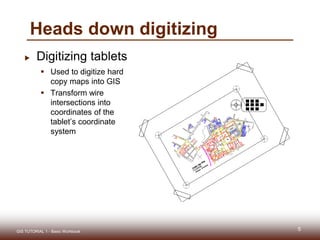
 Digitizing tablets
 Used to digitize hard
copy maps into GIS
 Transform wire
intersections into
coordinates of the
tablet’s coordinate
system
Heads down digitizing
5GIS TUTORIAL 1 - Basic Workbook
Steps for heads down digitizing
 Tape map to the
digitizer
 Register control points
on the map
 Estimate two
conversion equations
(one for vertical and
one for horizontal
coordinates)
 Digitize vectors (points,
lines, or polygons)
6GIS TUTORIAL 1 - Basic Workbook 6
Control
points
Map
Puck
Tape
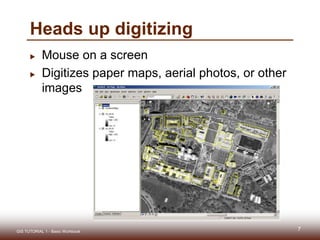
Heads up digitizing
 Mouse on a screen
 Digitizes paper maps, aerial photos, or other
images
GIS TUTORIAL 1 - Basic Workbook 77
GIS FEATURES
8GIS TUTORIAL 1 - Basic Workbook
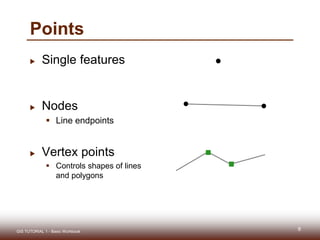
Points
 Single features
 Nodes
 Line endpoints
 Vertex points
 Controls shapes of lines
and polygons
9GIS TUTORIAL 1 - Basic Workbook
Creating points
 Heads up digitizing
 Single point features
 Sketch tool and snapping features
 Points added as XY event files
 Points geocoded using addresses
10GIS TUTORIAL 1 - Basic Workbook
Lines
 Starting and ending points with shape
vertices as needed
Vertex points
11
GIS TUTORIAL 1 - Basic Workbook
Lines
 Physical attributes of TIGER streets
 Shape
 From and To attributes
 Node
 Address
 Lat/long
 Length
GIS TUTORIAL 1 - Basic Workbook 12
Polygons
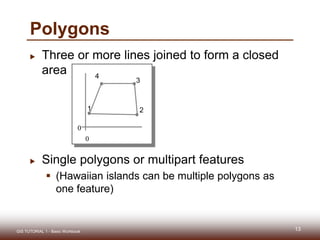
 Three or more lines joined to form a closed
area
 Single polygons or multipart features
 (Hawaiian islands can be multiple polygons as
one feature)
13GIS TUTORIAL 1 - Basic Workbook
0
0
1 2
4
3
Polygons
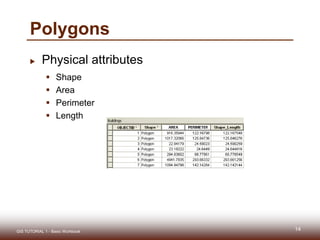
 Physical attributes
 Shape
 Area
 Perimeter
 Length
14GIS TUTORIAL 1 - Basic Workbook
15GIS TUTORIAL 1 - Basic Workbook

Digitization in ArcGIS

  • 1.
  • 2.
    Outline  Digitizing overview GIS features  Digitizing features  Advanced digitizing tools 2GIS TUTORIAL 1 - Basic Workbook
  • 3.
  • 4.
    Why digitize?  Newmaps  Map features are wrong  Missing features  Other? 4GIS TUTORIAL 1 - Basic Workbook
  • 5.
     Digitizing tablets Used to digitize hard copy maps into GIS  Transform wire intersections into coordinates of the tablet’s coordinate system Heads down digitizing 5GIS TUTORIAL 1 - Basic Workbook
  • 6.
    Steps for headsdown digitizing  Tape map to the digitizer  Register control points on the map  Estimate two conversion equations (one for vertical and one for horizontal coordinates)  Digitize vectors (points, lines, or polygons) 6GIS TUTORIAL 1 - Basic Workbook 6 Control points Map Puck Tape
  • 7.
    Heads up digitizing Mouse on a screen  Digitizes paper maps, aerial photos, or other images GIS TUTORIAL 1 - Basic Workbook 77
  • 8.
    GIS FEATURES 8GIS TUTORIAL1 - Basic Workbook
  • 9.
    Points  Single features Nodes  Line endpoints  Vertex points  Controls shapes of lines and polygons 9GIS TUTORIAL 1 - Basic Workbook
  • 10.
    Creating points  Headsup digitizing  Single point features  Sketch tool and snapping features  Points added as XY event files  Points geocoded using addresses 10GIS TUTORIAL 1 - Basic Workbook
  • 11.
    Lines  Starting andending points with shape vertices as needed Vertex points 11 GIS TUTORIAL 1 - Basic Workbook
  • 12.
    Lines  Physical attributesof TIGER streets  Shape  From and To attributes  Node  Address  Lat/long  Length GIS TUTORIAL 1 - Basic Workbook 12
  • 13.
    Polygons  Three ormore lines joined to form a closed area  Single polygons or multipart features  (Hawaiian islands can be multiple polygons as one feature) 13GIS TUTORIAL 1 - Basic Workbook 0 0 1 2 4 3
  • 14.
    Polygons  Physical attributes Shape  Area  Perimeter  Length 14GIS TUTORIAL 1 - Basic Workbook
  • 15.
    15GIS TUTORIAL 1- Basic Workbook