Introduction to ArcGIS
• How data are stored in ArcGIS
• Components of ArcGIS – ArcMap,
  ArcCatalog and ArcToolbox
• Extensions of ArcGIS – spatial analyst,
  geostatistical analyst and 3D analyst
ESRI GIS Development
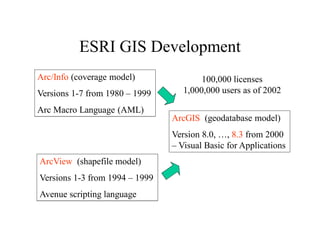
Arc/Info (coverage model)               100,000 licenses
Versions 1-7 from 1980 – 1999      1,000,000 users as of 2002

Arc Macro Language (AML)
                                ArcGIS (geodatabase model)
                                Version 8.0, …, 8.3 from 2000
                                – Visual Basic for Applications
ArcView (shapefile model)
Versions 1-3 from 1994 – 1999
Avenue scripting language
Geographic Data Models

All geographic information systems are built using formal
models that describe how things are located in space. A
formal model is an abstract and well-defined system of
concepts. A geographic data model defines the vocabulary
for describing and reasoning about the things that are
located on the earth. Geographic data models serve as the
foundation on which all geographic information systems
are built.

Scott Morehouse, Preface to “Modeling our World”
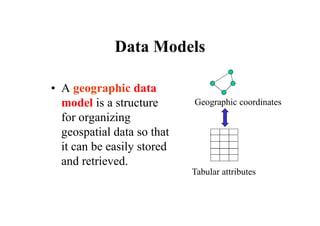
Data Models

• A geographic data
  model is a structure      Geographic coordinates
  for organizing
  geospatial data so that
  it can be easily stored
  and retrieved.
                            Tabular attributes
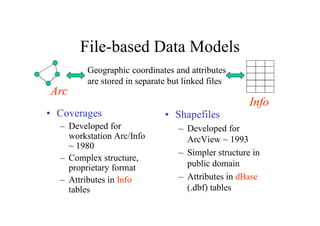
File-based Data Models
         Geographic coordinates and attributes
         are stored in separate but linked files
Arc
                                                     Info
• Coverages                   • Shapefiles
  – Developed for                 – Developed for
    workstation Arc/Info            ArcView ~ 1993
    ~ 1980
                                  – Simpler structure in
  – Complex structure,
    proprietary format              public domain
  – Attributes in Info            – Attributes in dBase
    tables                          (.dbf) tables
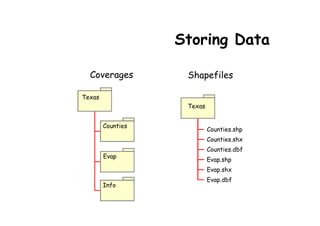
Storing Data

  Coverages         Shapefiles

Texas
                    Texas


        Counties
                            Counties.shp
                            Counties.shx
                            Counties.dbf
        Evap
                            Evap.shp
                            Evap.shx
                            Evap.dbf
        Info
Storing Data
• Coverages and Shapefiles
   – Coverages are stored partially in their own
     folder and partially in the common INFO
     folder. Shapefiles are stored in three to five
     files (with extensions .shp, .shx, .dbf, .sbx and
     .sbn).
   – Coverages store common boundaries between
     polygons only once, to avoid redundancy.
     Shapefiles store all the geometry of each
     polygon regardless of redundancy.
   – Coverage features are single lines or single
     polygons. Shapefiles allow features to have
     multiple, disconnected, intersecting and
     overlapping components.
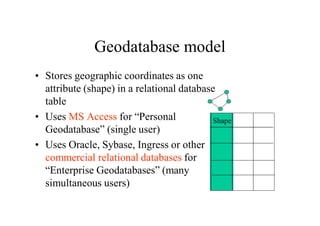
Geodatabase model
• Stores geographic coordinates as one
  attribute (shape) in a relational database
  table
• Uses MS Access for “Personal              Shape
  Geodatabase” (single user)
• Uses Oracle, Sybase, Ingress or other
  commercial relational databases for
  “Enterprise Geodatabases” (many
  simultaneous users)
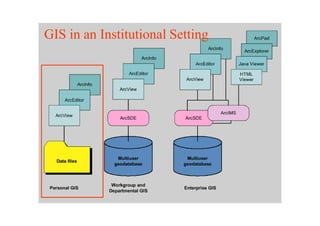
GIS in an Institutional Setting
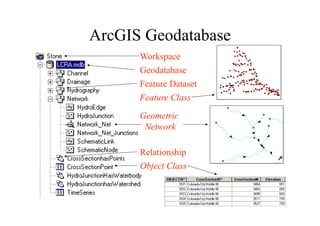
ArcGIS Geodatabase
      Workspace
      Geodatabase
      Feature Dataset
      Feature Class

      Geometric
       Network

      Relationship
      Object Class
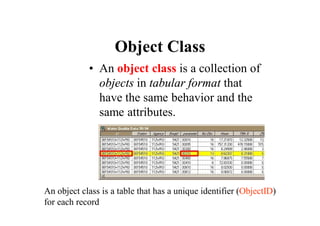
Object Class
            • An object class is a collection of
              objects in tabular format that
              have the same behavior and the
              same attributes.


An object class is a table that has a unique identifier (ObjectID)
for each record
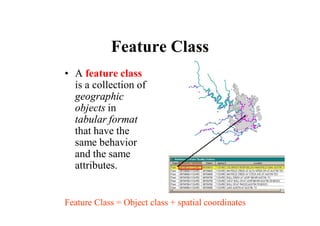
Feature Class
• A feature class
  is a collection of
  geographic
  objects in
  tabular format
  that have the
  same behavior
  and the same
  attributes.


Feature Class = Object class + spatial coordinates
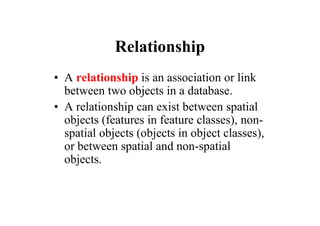
Relationship
• A relationship is an association or link
  between two objects in a database.
• A relationship can exist between spatial
  objects (features in feature classes), non-
  spatial objects (objects in object classes),
  or between spatial and non-spatial
  objects.
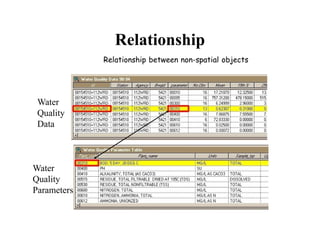
Relationship
             Relationship between non-spatial objects


 Water
 Quality
 Data


Water
Quality
Parameters
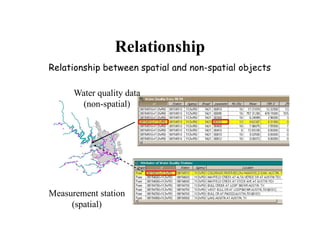
Relationship
Relationship between spatial and non-spatial objects

      Water quality data
       (non-spatial)


Measurement station
     (spatial)
Relationship
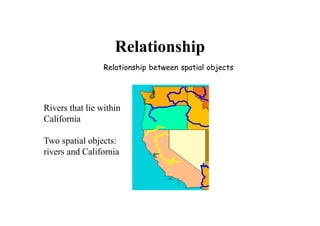
                 Relationship between spatial objects


Rivers that lie within
California

Two spatial objects:
rivers and California
Geodatabase and Feature
        Dataset
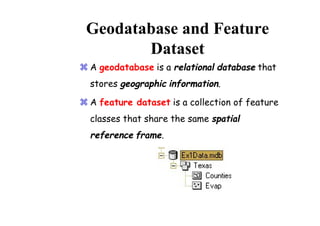
 A geodatabase is a relational database that
  stores geographic information.

 A feature dataset is a collection of feature
  classes that share the same spatial
  reference frame.
Geodatabase and Feature
       Dataset
• Why geodatabases?
  To establish and store relationships based on
  tabular information.

• Why feature datasets?
  To establish and store relationships based on
  geographic information.
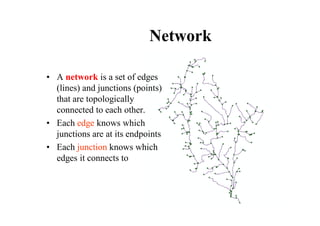
Network

• A network is a set of edges
  (lines) and junctions (points)
  that are topologically
  connected to each other.
• Each edge knows which
  junctions are at its endpoints
• Each junction knows which
  edges it connects to
Introduction to ArcGIS
• How data are stored in ArcGIS
• Components of ArcGIS – ArcMap,
  ArcCatalog and ArcToolbox
• Extensions of ArcGIS – spatial analyst,
  geostatistical analyst and 3D analyst
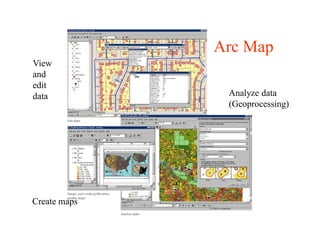
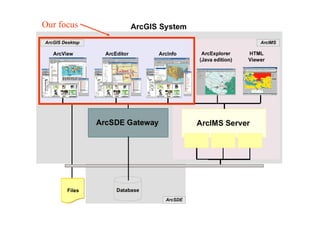
Arc Map
View
and
edit
data           Analyze data
               (Geoprocessing)


Create maps
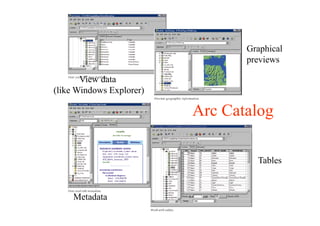
Graphical
                                 previews

       View data
(like Windows Explorer)

                          Arc Catalog

                                   Tables


     Metadata
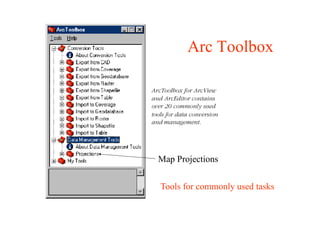
Arc Toolbox


Map Projections


Tools for commonly used tasks
Our focus
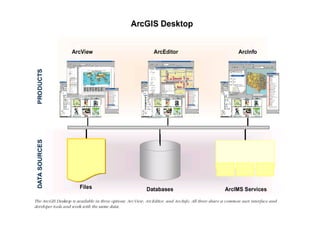
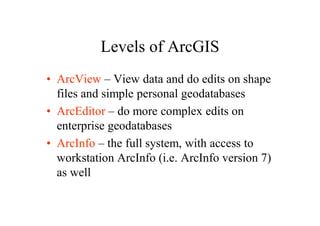
Levels of ArcGIS
• ArcView – View data and do edits on shape
  files and simple personal geodatabases
• ArcEditor – do more complex edits on
  enterprise geodatabases
• ArcInfo – the full system, with access to
  workstation ArcInfo (i.e. ArcInfo version 7)
  as well
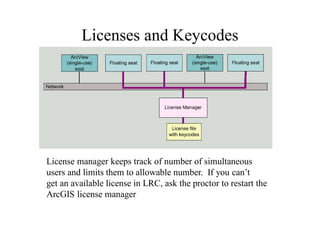
Licenses and Keycodes


License manager keeps track of number of simultaneous
users and limits them to allowable number. If you can’t
get an available license in LRC, ask the proctor to restart the
ArcGIS license manager
Introduction to ArcGIS
• How data are stored in ArcGIS
• Components of ArcGIS – ArcMap,
  ArcCatalog and ArcToolbox
• Extensions of ArcGIS – spatial analyst,
  geostatistical analyst and 3D analyst
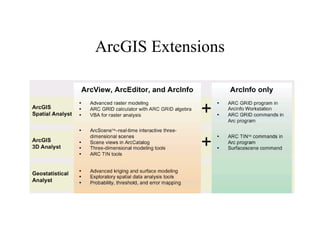
ArcGIS Extensions
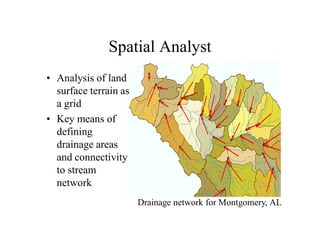
Spatial Analyst
• Analysis of land
  surface terrain as
  a grid
• Key means of
  defining
  drainage areas
  and connectivity
  to stream
  network
                       Drainage network for Montgomery, AL
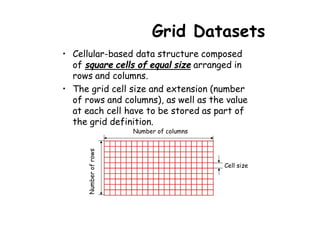
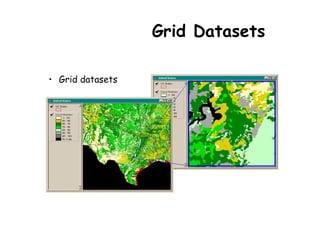
Grid Datasets
• Cellular-based data structure composed
  of square cells of equal size arranged in
  rows and columns.
• The grid cell size and extension (number
  of rows and columns), as well as the value
  at each cell have to be stored as part of
  the grid definition.
                       Number of columns
      Number of rows


                                           Cell size
Grid Datasets

• Grid datasets
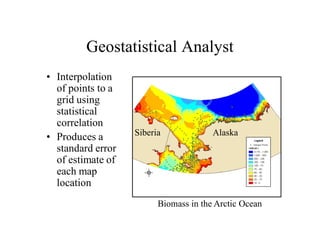
Geostatistical Analyst
• Interpolation
  of points to a
  grid using
  statistical
  correlation
                   Siberia             Alaska
• Produces a
  standard error
  of estimate of
  each map
  location
                         Biomass in the Arctic Ocean
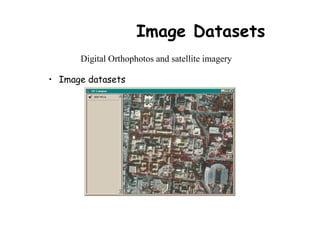
Image Datasets
      Digital Orthophotos and satellite imagery

• Image datasets
Image Datasets
• Supported image formats:
   – ARC Digitized Raster Graphics (ADRG)
   – Windows bitmap images (BMP) [.bmp]
   – Multiband (BSQ, BIL and BIP) and single band images
     [.bsq, .bil and .bip]
   – ERDAS [.lan and .gis]
   – ESRI Grid datasets
   – IMAGINE [.img]
   – IMPELL Bitmaps [.rlc]
   – Image catalogs
   – JPEG [.jpg]
   – MrSID [.sid]
   – National Image Transfer Format (NITF)
   – Sun rasterfiles [.rs, .ras and .sun]
   – Tag Image File Format (TIFF) [.tiff, .tif and .tff]
   – TIFF/LZW
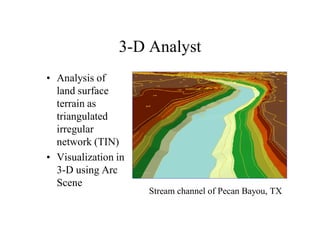
3-D Analyst
• Analysis of
  land surface
  terrain as
  triangulated
  irregular
  network (TIN)
• Visualization in
  3-D using Arc
  Scene
                     Stream channel of Pecan Bayou, TX
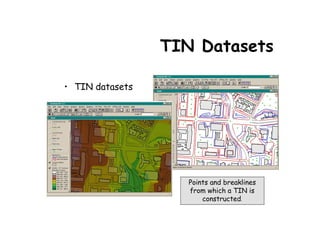
TIN Datasets

• TIN datasets


                    Points and breaklines
                    from which a TIN is
                        constructed.
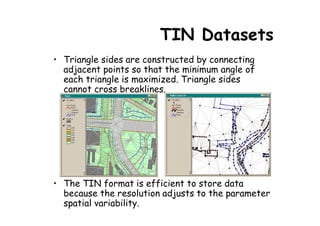
TIN Datasets
• Triangle sides are constructed by connecting
  adjacent points so that the minimum angle of
  each triangle is maximized. Triangle sides
  cannot cross breaklines.


• The TIN format is efficient to store data
  because the resolution adjusts to the parameter
  spatial variability.

Arc gis introduction-ppt

  • 1.
  • 2.
    Introduction to ArcGIS •How data are stored in ArcGIS • Components of ArcGIS – ArcMap, ArcCatalog and ArcToolbox • Extensions of ArcGIS – spatial analyst, geostatistical analyst and 3D analyst
  • 3.
    ESRI GIS Development Arc/Info(coverage model) 100,000 licenses Versions 1-7 from 1980 – 1999 1,000,000 users as of 2002 Arc Macro Language (AML) ArcGIS (geodatabase model) Version 8.0, …, 8.3 from 2000 – Visual Basic for Applications ArcView (shapefile model) Versions 1-3 from 1994 – 1999 Avenue scripting language
  • 4.
    Geographic Data Models Allgeographic information systems are built using formal models that describe how things are located in space. A formal model is an abstract and well-defined system of concepts. A geographic data model defines the vocabulary for describing and reasoning about the things that are located on the earth. Geographic data models serve as the foundation on which all geographic information systems are built. Scott Morehouse, Preface to “Modeling our World”
  • 5.
    Data Models • Ageographic data model is a structure Geographic coordinates for organizing geospatial data so that it can be easily stored and retrieved. Tabular attributes
  • 6.
    File-based Data Models Geographic coordinates and attributes are stored in separate but linked files Arc Info • Coverages • Shapefiles – Developed for – Developed for workstation Arc/Info ArcView ~ 1993 ~ 1980 – Simpler structure in – Complex structure, proprietary format public domain – Attributes in Info – Attributes in dBase tables (.dbf) tables
  • 7.
    Storing Data Coverages Shapefiles Texas Texas Counties Counties.shp Counties.shx Counties.dbf Evap Evap.shp Evap.shx Evap.dbf Info
  • 8.
    Storing Data • Coveragesand Shapefiles – Coverages are stored partially in their own folder and partially in the common INFO folder. Shapefiles are stored in three to five files (with extensions .shp, .shx, .dbf, .sbx and .sbn). – Coverages store common boundaries between polygons only once, to avoid redundancy. Shapefiles store all the geometry of each polygon regardless of redundancy. – Coverage features are single lines or single polygons. Shapefiles allow features to have multiple, disconnected, intersecting and overlapping components.
  • 9.
    Geodatabase model • Storesgeographic coordinates as one attribute (shape) in a relational database table • Uses MS Access for “Personal Shape Geodatabase” (single user) • Uses Oracle, Sybase, Ingress or other commercial relational databases for “Enterprise Geodatabases” (many simultaneous users)
  • 10.
    GIS in anInstitutional Setting
  • 11.
    ArcGIS Geodatabase Workspace Geodatabase Feature Dataset Feature Class Geometric Network Relationship Object Class
  • 12.
    Object Class • An object class is a collection of objects in tabular format that have the same behavior and the same attributes. An object class is a table that has a unique identifier (ObjectID) for each record
  • 13.
    Feature Class • Afeature class is a collection of geographic objects in tabular format that have the same behavior and the same attributes. Feature Class = Object class + spatial coordinates
  • 14.
    Relationship • A relationshipis an association or link between two objects in a database. • A relationship can exist between spatial objects (features in feature classes), non- spatial objects (objects in object classes), or between spatial and non-spatial objects.
  • 15.
    Relationship Relationship between non-spatial objects Water Quality Data Water Quality Parameters
  • 16.
    Relationship Relationship between spatialand non-spatial objects Water quality data (non-spatial) Measurement station (spatial)
  • 17.
    Relationship Relationship between spatial objects Rivers that lie within California Two spatial objects: rivers and California
  • 18.
    Geodatabase and Feature Dataset  A geodatabase is a relational database that stores geographic information.  A feature dataset is a collection of feature classes that share the same spatial reference frame.
  • 19.
    Geodatabase and Feature Dataset • Why geodatabases? To establish and store relationships based on tabular information. • Why feature datasets? To establish and store relationships based on geographic information.
  • 20.
    Network • A networkis a set of edges (lines) and junctions (points) that are topologically connected to each other. • Each edge knows which junctions are at its endpoints • Each junction knows which edges it connects to
  • 21.
    Introduction to ArcGIS •How data are stored in ArcGIS • Components of ArcGIS – ArcMap, ArcCatalog and ArcToolbox • Extensions of ArcGIS – spatial analyst, geostatistical analyst and 3D analyst
  • 22.
    Arc Map View and edit data Analyze data (Geoprocessing) Create maps
  • 23.
    Graphical previews View data (like Windows Explorer) Arc Catalog Tables Metadata
  • 24.
    Arc Toolbox Map Projections Toolsfor commonly used tasks
  • 25.
  • 27.
    Levels of ArcGIS •ArcView – View data and do edits on shape files and simple personal geodatabases • ArcEditor – do more complex edits on enterprise geodatabases • ArcInfo – the full system, with access to workstation ArcInfo (i.e. ArcInfo version 7) as well
  • 28.
    Licenses and Keycodes Licensemanager keeps track of number of simultaneous users and limits them to allowable number. If you can’t get an available license in LRC, ask the proctor to restart the ArcGIS license manager
  • 29.
    Introduction to ArcGIS •How data are stored in ArcGIS • Components of ArcGIS – ArcMap, ArcCatalog and ArcToolbox • Extensions of ArcGIS – spatial analyst, geostatistical analyst and 3D analyst
  • 30.
  • 31.
    Spatial Analyst • Analysisof land surface terrain as a grid • Key means of defining drainage areas and connectivity to stream network Drainage network for Montgomery, AL
  • 32.
    Grid Datasets • Cellular-baseddata structure composed of square cells of equal size arranged in rows and columns. • The grid cell size and extension (number of rows and columns), as well as the value at each cell have to be stored as part of the grid definition. Number of columns Number of rows Cell size
  • 33.
  • 34.
    Geostatistical Analyst • Interpolation of points to a grid using statistical correlation Siberia Alaska • Produces a standard error of estimate of each map location Biomass in the Arctic Ocean
  • 35.
    Image Datasets Digital Orthophotos and satellite imagery • Image datasets
  • 36.
    Image Datasets • Supportedimage formats: – ARC Digitized Raster Graphics (ADRG) – Windows bitmap images (BMP) [.bmp] – Multiband (BSQ, BIL and BIP) and single band images [.bsq, .bil and .bip] – ERDAS [.lan and .gis] – ESRI Grid datasets – IMAGINE [.img] – IMPELL Bitmaps [.rlc] – Image catalogs – JPEG [.jpg] – MrSID [.sid] – National Image Transfer Format (NITF) – Sun rasterfiles [.rs, .ras and .sun] – Tag Image File Format (TIFF) [.tiff, .tif and .tff] – TIFF/LZW
  • 37.
    3-D Analyst • Analysisof land surface terrain as triangulated irregular network (TIN) • Visualization in 3-D using Arc Scene Stream channel of Pecan Bayou, TX
  • 38.
    TIN Datasets • TINdatasets Points and breaklines from which a TIN is constructed.
  • 39.
    TIN Datasets • Trianglesides are constructed by connecting adjacent points so that the minimum angle of each triangle is maximized. Triangle sides cannot cross breaklines. • The TIN format is efficient to store data because the resolution adjusts to the parameter spatial variability.