Design
for Startups
Introduce
Hello 
Who I am ?
System Analyst and Usability Engineer
Since 2010 Till Now
Skills and Quality Construction Company
Web and Mobile Design Lecturer
Since 2012 till now
University College of Applied Sciences
UX Designer and Information Architect

Freelancer
And because of the Siege
I am not a UX Designer at booking.com 
What is UX ?
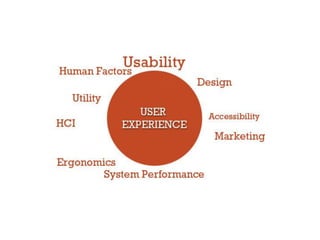
User experience (abbreviated as UX) is how a person
feels when interfacing with a system. The system could
be a website, a web application or desktop software
and, in modern contexts, is generally denoted by
some form of human-computer interaction (HCI).
How UX designers work
• A good UX designer is not just a person who handles
the button shapes and placement.
• Their job is to identify problems that could arise in
the user experience and find solutions for them, so
that when you launch your product everything is
seamless.
• They will ask a lot of questions, and that’s important
because they will focus not only on color scheme
and functional performance, but also on speed,
functional performance and pretty much everything
else that your end user will be paying attention to
When to bring UX to the table
• You should make sure that the UX designer is one of
the first people you hire.
• Collaborate with UX designers rather than hiring
them on a full-time position.
How much is just enough?
The more engineers you have on your team, the more
UX designers you need to find. Think of a ratio of
about 1 UX designer to every 3-5 engineers, which
may sound high but in reality is the only solution that
will give you the competitive advantage of a well-
though-of functional design.
User Research
• Find out the needs of your user
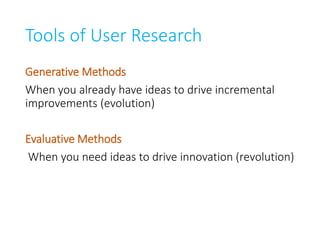
Tools of User Research
Generative Methods
When you already have ideas to drive incremental
improvements (evolution)
Evaluative Methods
When you need ideas to drive innovation (revolution)
Some of Generative methods
• Focus Group
• Interview
• Immersion
• Participatory Research
• Contextual Inquiry
Some of Evaluative methods
• Usability Testing
• Eye Tracking
• Mouse Tracking
• A/B Testing
• Closed Card Sorting
The Result of User Research
• Understanding the users
• Getting a full screen about the context
• Understanding the user behavior
Later it will be converted into:
• Functions List
• Personas
• Wireframes
• User task flows and scenarios
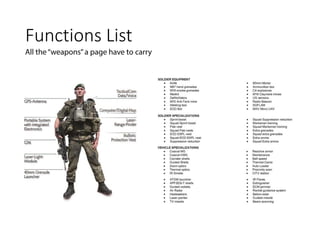
Functions List
Prioritize List
What is most important, what is nice to have, what is
in the middle
Personas
Personas are fact-based (derived from user research)
fictional representations of your users. They
represent the goals, motivations, characteristics
and behaviors of the most important groups of your
users.
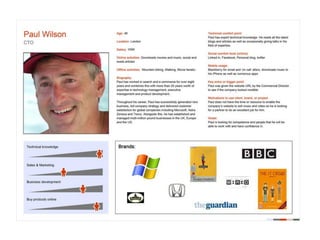
Here’s a sample persona (attaching a photo to a
persona helps us imagine a real person we’re building
the site for):
Effective Personas
• Represent a major user group for your website
• Express and focus on the major needs and
expectations of the most important user groups
• Give a clear picture of the user's expectations and
how they're likely to use the site
• Aid in uncovering universal features and
functionality
• Describe real people with backgrounds, goals, and
values
Questions to Ask During Persona
Development
Define the Purpose/ Vision for the Site
• What is the purpose of the site?
• What are the goals of the site?
Describe the User
• Personal
• What is the age of your person?
• What is the gender of your person?
• What is the highest level of education this person has received?
• Professional
• How much work experience does your person have?
• What is your person’s professional background?
• Why will they come to the site? (User needs, interests, and goals)
• Where (or from whom) else is this person getting information about your issue
or similar programs or services?
• When and where will users access the site? (User environment and context)
• Technical
• What technological devices does your person use on a regular basis?
• What software and/or applications does your person use on a regular basis?
• Through what technological device does your user primarily access the web for
information?
• How much time does your person spend browsing the web every day?
User Motivation
• What is your person motivated by?
• What are they looking for?
• What is your person looking to do?
• What are his needs?
Elements of a Persona
• Persona Group (i.e. web manager)
• Fictional name
• Job titles and major responsibilities
• Demographics such as age, education, ethnicity, and
family status
• The goals and tasks they are trying to complete using
the site
• Their physical, social, and technological environment
• A quote that sums up what matters most to the persona
as it relates to your site
• Casual pictures representing that user group
Create the IA
What is the IA ?
”The art and science of organizing and
labelling websites, intranets, online
communities and software to support usability and
findability”
Wikipedia
In Simple Terms
Easy to find, Easy to understand content
Figure out the metadata
• Metadata is information about information. It’s
what helps users find the content they’re looking
for.
Let’s say you want to buy a coffee grinder, and go to a
website that you know that sells those. If you browse
around and can’t find it, it’s a sign of bad metadata. If
you get your metadata right, you’ve already cleared
the first hurdle of effective site design.
• You have to determine what kind of information to
store about stuff that people care about – life coffee
grinders. Maybe they’d like to search by blade size?
Color? Brand?
• Knowing what are all the different parameters and
variables you need to store in your system is crucial
for excellent search results.
Create User Scenarios
A scenario is a story about someone (your user
persona) using your website to carry out a specific
task or goal:
like booking a flight, buying yoga pants or applying to speak at
an event.
Scenarios work together with personas by serving as
the stories behind why the particular persona would
come to your website.
Create User Scenarios
• What does the persona hope to accomplish on your
website?
• What can help him complete the task at hand?
• What might cause friction?
• You should focus on users and their tasks rather
than on your site’s organization and internal
structure.
• As a result, you will get insights to what content the
site must have and how it should be organized.
Map user tasks to individual web
pages
• Before you even start thinking about actual design,
you need to have the content in place.
• Next step is to decide what happens on your web
pages and how many pages exist on your site
• Each page must do two things:
• help the user accomplish one specific task,
• make the next step easy to access.
There are three types of pages on
your site:
• Navigation pages. These help users determine
where to find what they want, and give them access
to it. Their goal is to send users somewhere else.
Typically that’s a home page or search results page.
• Consumption pages. These are the “somewhere
else” you usually go to: articles, videos, pricing
information and so on.
• Interaction pages. These pages let users enter and
manipulate data. Think search page or a sign-up
form.
• Each type of page is optimized for a different kind of
user task.
• Understanding the type of page you need helps you
tailor the interface design.
• When you draw a site map or map out your user
flows, it’s important to note there whether a page is
a navigation page, consumption page or interaction
page – and design accordingly.
Techniques for figuring out the
optimal menu structure
Card sorting
You have a bunch of pages on your website that need
to be categorized. What should go where? Card
sorting lets you figure out where people would want
to find something.
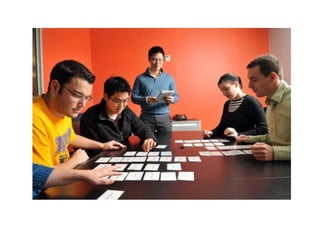
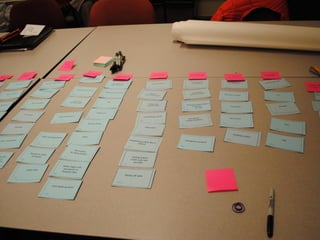
How the basic method works:
• You take a set of index cards (e.g. those yellow post it notes)
and write a term (e.g. name of the page, content) on each
one of them. Each card represents a (category) page on your
website. If you’re an audio-video ecommerce site, you might
write down things like ‘digital SLRs’, ‘Canon lenses’, ‘DVD
players’ etc.
• Test subjects (people that you’ve recruited for this purpose,
representatives of your ideal customer) are given a set of
index cards with terms already written on them.
• You ask people to put the terms into logical groupings, and
find a category name for each grouping.
• This process is repeated with each test subject.
• After going through the exercise with all the test participants,
you analyze their output and start seeing patterns.
3 main types of card sorting:
• Open card sorting. This is where the test participants create their
own names for the categories. It gives you insight to how your
customers think and mentally classify items.
• Closed card sorting. Here participants are provided with a
predetermined set of category names. Their goal is to assign the
index cards to these fixed categories.
• Modified Delphi method. This is different from the rest. Here
participants work one after another, refining a single model. The
first test subject does a traditional open card sort. The following
testers start with whatever the previous tester created. A
participant can choose either to modify that organization (rename
or restructure stuff), or even scrap the whole thing and start over
(create a new, different organization). You repeat the process until
participants are no longer making any significant changes (the
structure stabilizes).
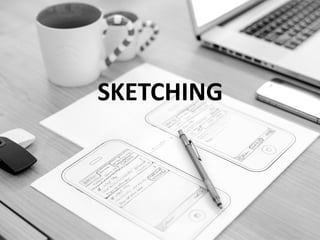
SKETCHING
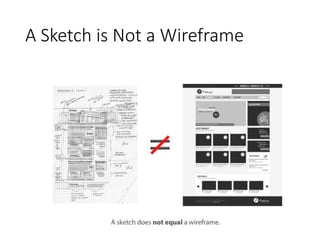
A Sketch is Not a Wireframe
• When you sketch, you are trying to get a basic
concept of how the app will work in user interface
form.
• The specifics of the user interface aren’t important
here. What matters most is understanding what the
user will basically see on each screen that will lead
them to the desired result.
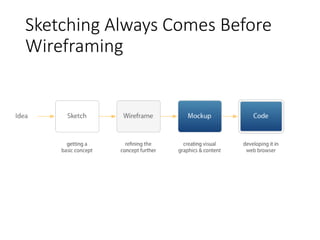
Sketching Always Comes Before
Wireframing
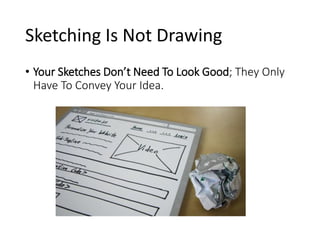
Sketching Is Not Drawing
• Your Sketches Don’t Need To Look Good; They Only
Have To Convey Your Idea.
How To Sketch
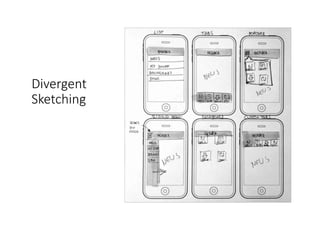
• DIVERGENT SKETCHING
In the beginning, you will want to capture different
ideas for your mobile app or website. Start
sketching different versions of a single key screen or
parts of it. Your goal is twofold: to generate a lot of
different ideas, and to explore and evaluate them —
at the same time. The more ideas you come up
with, the more options you will have to choose from
later on.
Divergent
Sketching
CONVERGENT SKETCHING
• Once you have sketched multiple versions of a
screen, pick the one that best solves the problem.
• Unfortunately, a single sketch will rarely check all of
the boxes. In most cases, you will have to combine
ideas or parts of ideas into a single winning concept.
To do this, you will need to explore in more depth
by making a more detailed sketch on a single page.
Use the white space to annotate. Jot down all
questions, new ideas, important or unclear areas,
and things to discuss. This will help others to
understand your thought process.
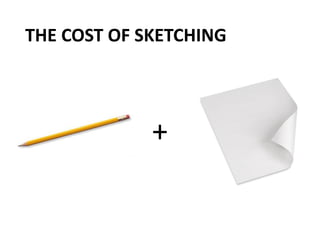
THE COST OF SKETCHING
+
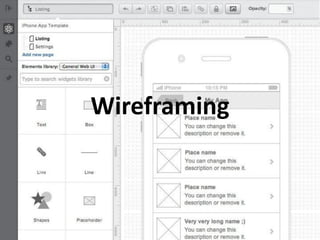
Wireframing
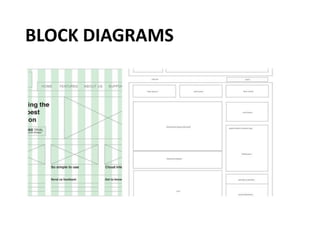
WHAT IS WIREFRAME ?
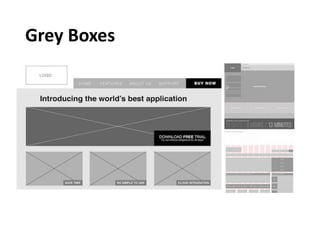
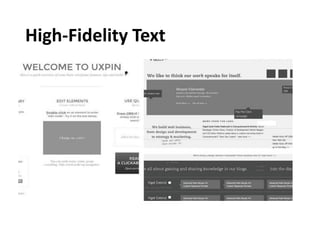
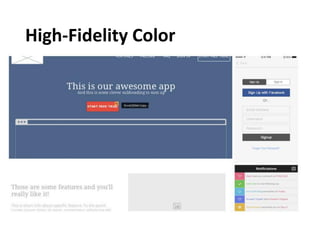
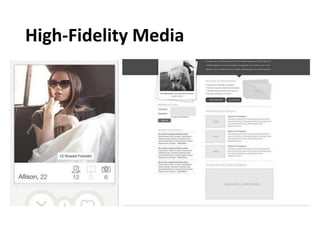
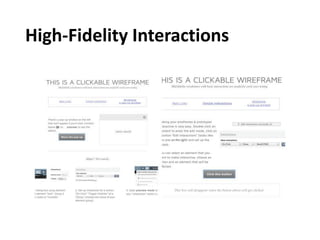
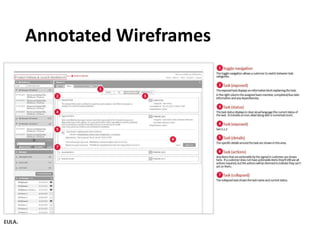
• A wireframe is a skeleton of a page. It shows the
priority and the organization of things on the screen
and how users will get to other parts of the site.
• Wireframes range in fidelity from quick sketches on
a whiteboard to detailed computer renderings.
• While wireframes will vary in their level of detail,
they generally reflect the designer's ideas about the
placement of elements on the page, the labeling of
elements, site navigation, and how the user will
interact with the site.??
Fidelity Levels
BLOCK DIAGRAMS
Grey Boxes
High-Fidelity Text
High-Fidelity Color
High-Fidelity Media
High-Fidelity Interactions
Annotated Wireframes
Tools
SOME OF A LOT
• Balsamiq Mockups
• Axure
• UXPin
• Invisionapp
• Justimind
I LOVE
uxpin.com
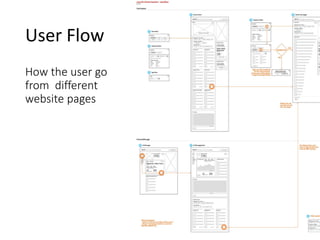
User Flow
How the user go
from different
website pages
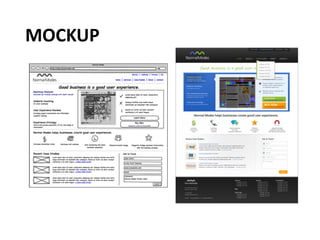
MOCKUP
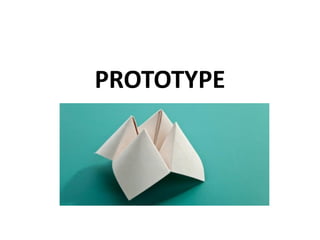
PROTOTYPE
WHAT IS A PROTOTYPE?
It’s a simulation of the final product. It’s like an
interactive mockup that can have any degree
of fidelity. The main purpose of building
prototypes is to test whether or not the flow of
the product is smooth and consistent.
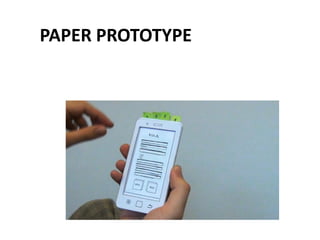
PAPER PROTOTYPE
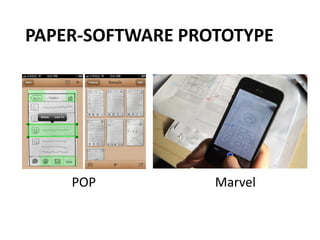
PAPER-SOFTWARE PROTOTYPE
POP Marvel
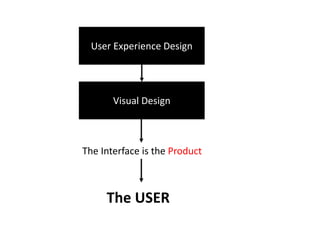
User Experience Design
Visual Design
The Interface is the Product
The USER
USABILITY
Looking Beyond ‘Ease of Use’
DEFINING EASE OF USE
The extent to which a product can be used by
specified users to achieve specified goals with
effectiveness, efficiency, and satisfaction in a specified
context of use
ISO 9241 standard
THIS DEFINITION CAN BE
EXPANDED TO :
• Effective
Effectiveness is the completeness and accuracy with which users achieve specified
goals
• Efficient
Efficiency can be described as the speed (with accuracy) in which users can
complete the tasks for which they use the product.
• Engaging
An interface is engaging if it is pleasant and satisfying to use
• Error Tolerant
Prevent errors caused by the user’s interaction, and to help the user in recovering
from any errors that do occur.
• Easy to Learn
allows users to build on their knowledge without deliberate effort.
Ux gsg
Ux gsg
Ux gsg
Ux gsg

Ux gsg

  • 1.
  • 2.
  • 3.
    Who I am? System Analyst and Usability Engineer Since 2010 Till Now Skills and Quality Construction Company Web and Mobile Design Lecturer Since 2012 till now University College of Applied Sciences UX Designer and Information Architect Freelancer And because of the Siege I am not a UX Designer at booking.com 
  • 42.
    What is UX? User experience (abbreviated as UX) is how a person feels when interfacing with a system. The system could be a website, a web application or desktop software and, in modern contexts, is generally denoted by some form of human-computer interaction (HCI).
  • 44.
    How UX designerswork • A good UX designer is not just a person who handles the button shapes and placement. • Their job is to identify problems that could arise in the user experience and find solutions for them, so that when you launch your product everything is seamless. • They will ask a lot of questions, and that’s important because they will focus not only on color scheme and functional performance, but also on speed, functional performance and pretty much everything else that your end user will be paying attention to
  • 45.
    When to bringUX to the table • You should make sure that the UX designer is one of the first people you hire. • Collaborate with UX designers rather than hiring them on a full-time position.
  • 46.
    How much isjust enough? The more engineers you have on your team, the more UX designers you need to find. Think of a ratio of about 1 UX designer to every 3-5 engineers, which may sound high but in reality is the only solution that will give you the competitive advantage of a well- though-of functional design.
  • 48.
    User Research • Findout the needs of your user
  • 49.
    Tools of UserResearch Generative Methods When you already have ideas to drive incremental improvements (evolution) Evaluative Methods When you need ideas to drive innovation (revolution)
  • 50.
    Some of Generativemethods • Focus Group • Interview • Immersion • Participatory Research • Contextual Inquiry
  • 51.
    Some of Evaluativemethods • Usability Testing • Eye Tracking • Mouse Tracking • A/B Testing • Closed Card Sorting
  • 52.
    The Result ofUser Research • Understanding the users • Getting a full screen about the context • Understanding the user behavior Later it will be converted into: • Functions List • Personas • Wireframes • User task flows and scenarios
  • 53.
  • 54.
    Prioritize List What ismost important, what is nice to have, what is in the middle
  • 55.
    Personas Personas are fact-based(derived from user research) fictional representations of your users. They represent the goals, motivations, characteristics and behaviors of the most important groups of your users. Here’s a sample persona (attaching a photo to a persona helps us imagine a real person we’re building the site for):
  • 57.
    Effective Personas • Representa major user group for your website • Express and focus on the major needs and expectations of the most important user groups • Give a clear picture of the user's expectations and how they're likely to use the site • Aid in uncovering universal features and functionality • Describe real people with backgrounds, goals, and values
  • 58.
    Questions to AskDuring Persona Development Define the Purpose/ Vision for the Site • What is the purpose of the site? • What are the goals of the site?
  • 59.
    Describe the User •Personal • What is the age of your person? • What is the gender of your person? • What is the highest level of education this person has received? • Professional • How much work experience does your person have? • What is your person’s professional background? • Why will they come to the site? (User needs, interests, and goals) • Where (or from whom) else is this person getting information about your issue or similar programs or services? • When and where will users access the site? (User environment and context) • Technical • What technological devices does your person use on a regular basis? • What software and/or applications does your person use on a regular basis? • Through what technological device does your user primarily access the web for information? • How much time does your person spend browsing the web every day?
  • 60.
    User Motivation • Whatis your person motivated by? • What are they looking for? • What is your person looking to do? • What are his needs?
  • 61.
    Elements of aPersona • Persona Group (i.e. web manager) • Fictional name • Job titles and major responsibilities • Demographics such as age, education, ethnicity, and family status • The goals and tasks they are trying to complete using the site • Their physical, social, and technological environment • A quote that sums up what matters most to the persona as it relates to your site • Casual pictures representing that user group
  • 62.
  • 64.
    What is theIA ? ”The art and science of organizing and labelling websites, intranets, online communities and software to support usability and findability” Wikipedia
  • 65.
    In Simple Terms Easyto find, Easy to understand content
  • 66.
    Figure out themetadata • Metadata is information about information. It’s what helps users find the content they’re looking for.
  • 67.
    Let’s say youwant to buy a coffee grinder, and go to a website that you know that sells those. If you browse around and can’t find it, it’s a sign of bad metadata. If you get your metadata right, you’ve already cleared the first hurdle of effective site design.
  • 68.
    • You haveto determine what kind of information to store about stuff that people care about – life coffee grinders. Maybe they’d like to search by blade size? Color? Brand? • Knowing what are all the different parameters and variables you need to store in your system is crucial for excellent search results.
  • 69.
    Create User Scenarios Ascenario is a story about someone (your user persona) using your website to carry out a specific task or goal: like booking a flight, buying yoga pants or applying to speak at an event. Scenarios work together with personas by serving as the stories behind why the particular persona would come to your website.
  • 70.
    Create User Scenarios •What does the persona hope to accomplish on your website? • What can help him complete the task at hand? • What might cause friction? • You should focus on users and their tasks rather than on your site’s organization and internal structure. • As a result, you will get insights to what content the site must have and how it should be organized.
  • 71.
    Map user tasksto individual web pages • Before you even start thinking about actual design, you need to have the content in place. • Next step is to decide what happens on your web pages and how many pages exist on your site
  • 72.
    • Each pagemust do two things: • help the user accomplish one specific task, • make the next step easy to access.
  • 73.
    There are threetypes of pages on your site: • Navigation pages. These help users determine where to find what they want, and give them access to it. Their goal is to send users somewhere else. Typically that’s a home page or search results page. • Consumption pages. These are the “somewhere else” you usually go to: articles, videos, pricing information and so on. • Interaction pages. These pages let users enter and manipulate data. Think search page or a sign-up form.
  • 74.
    • Each typeof page is optimized for a different kind of user task. • Understanding the type of page you need helps you tailor the interface design. • When you draw a site map or map out your user flows, it’s important to note there whether a page is a navigation page, consumption page or interaction page – and design accordingly.
  • 75.
    Techniques for figuringout the optimal menu structure Card sorting You have a bunch of pages on your website that need to be categorized. What should go where? Card sorting lets you figure out where people would want to find something.
  • 78.
    How the basicmethod works: • You take a set of index cards (e.g. those yellow post it notes) and write a term (e.g. name of the page, content) on each one of them. Each card represents a (category) page on your website. If you’re an audio-video ecommerce site, you might write down things like ‘digital SLRs’, ‘Canon lenses’, ‘DVD players’ etc. • Test subjects (people that you’ve recruited for this purpose, representatives of your ideal customer) are given a set of index cards with terms already written on them. • You ask people to put the terms into logical groupings, and find a category name for each grouping. • This process is repeated with each test subject. • After going through the exercise with all the test participants, you analyze their output and start seeing patterns.
  • 79.
    3 main typesof card sorting: • Open card sorting. This is where the test participants create their own names for the categories. It gives you insight to how your customers think and mentally classify items. • Closed card sorting. Here participants are provided with a predetermined set of category names. Their goal is to assign the index cards to these fixed categories. • Modified Delphi method. This is different from the rest. Here participants work one after another, refining a single model. The first test subject does a traditional open card sort. The following testers start with whatever the previous tester created. A participant can choose either to modify that organization (rename or restructure stuff), or even scrap the whole thing and start over (create a new, different organization). You repeat the process until participants are no longer making any significant changes (the structure stabilizes).
  • 80.
  • 81.
    A Sketch isNot a Wireframe
  • 82.
    • When yousketch, you are trying to get a basic concept of how the app will work in user interface form. • The specifics of the user interface aren’t important here. What matters most is understanding what the user will basically see on each screen that will lead them to the desired result.
  • 83.
    Sketching Always ComesBefore Wireframing
  • 84.
    Sketching Is NotDrawing • Your Sketches Don’t Need To Look Good; They Only Have To Convey Your Idea.
  • 85.
    How To Sketch •DIVERGENT SKETCHING In the beginning, you will want to capture different ideas for your mobile app or website. Start sketching different versions of a single key screen or parts of it. Your goal is twofold: to generate a lot of different ideas, and to explore and evaluate them — at the same time. The more ideas you come up with, the more options you will have to choose from later on.
  • 86.
  • 87.
    CONVERGENT SKETCHING • Onceyou have sketched multiple versions of a screen, pick the one that best solves the problem. • Unfortunately, a single sketch will rarely check all of the boxes. In most cases, you will have to combine ideas or parts of ideas into a single winning concept. To do this, you will need to explore in more depth by making a more detailed sketch on a single page. Use the white space to annotate. Jot down all questions, new ideas, important or unclear areas, and things to discuss. This will help others to understand your thought process.
  • 88.
    THE COST OFSKETCHING +
  • 89.
  • 90.
    WHAT IS WIREFRAME? • A wireframe is a skeleton of a page. It shows the priority and the organization of things on the screen and how users will get to other parts of the site. • Wireframes range in fidelity from quick sketches on a whiteboard to detailed computer renderings. • While wireframes will vary in their level of detail, they generally reflect the designer's ideas about the placement of elements on the page, the labeling of elements, site navigation, and how the user will interact with the site.??
  • 91.
  • 92.
  • 93.
  • 94.
  • 95.
  • 96.
  • 97.
  • 98.
  • 99.
  • 100.
    SOME OF ALOT • Balsamiq Mockups • Axure • UXPin • Invisionapp • Justimind
  • 101.
  • 102.
    User Flow How theuser go from different website pages
  • 103.
  • 104.
  • 105.
    WHAT IS APROTOTYPE? It’s a simulation of the final product. It’s like an interactive mockup that can have any degree of fidelity. The main purpose of building prototypes is to test whether or not the flow of the product is smooth and consistent.
  • 106.
  • 107.
  • 108.
    User Experience Design VisualDesign The Interface is the Product The USER
  • 152.
  • 153.
    DEFINING EASE OFUSE The extent to which a product can be used by specified users to achieve specified goals with effectiveness, efficiency, and satisfaction in a specified context of use ISO 9241 standard
  • 154.
    THIS DEFINITION CANBE EXPANDED TO : • Effective Effectiveness is the completeness and accuracy with which users achieve specified goals • Efficient Efficiency can be described as the speed (with accuracy) in which users can complete the tasks for which they use the product. • Engaging An interface is engaging if it is pleasant and satisfying to use • Error Tolerant Prevent errors caused by the user’s interaction, and to help the user in recovering from any errors that do occur. • Easy to Learn allows users to build on their knowledge without deliberate effort.