MIRUM AGENCY 2014
Session3:
USABILITY FIRSTby Joan Lumanauw | May, 2015
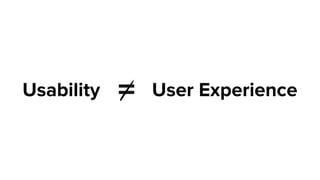
=Usability User Experience
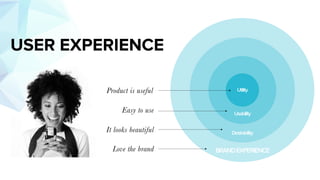
BRANDEXPERIENCE
Desirability
Utility
Usability
Love the brand
It looks beautiful
Easy to use
Product is useful
USER EXPERIENCE
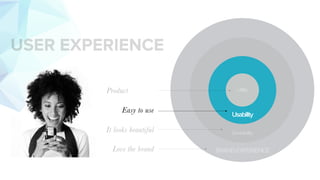
BRANDEXPERIENCE
Desirability
Utility
Usability
Love the brand
It looks beautiful
Easy to use
Product
USER EXPERIENCE
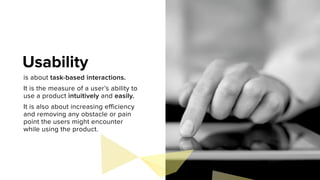
is about task-based interactions.
It is the measure of a user’s ability to
use a product intuitively and easily.
It is also about increasing efficiency
and removing any obstacle or pain
point the users might encounter
while using the product.
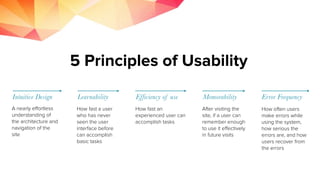
Usability
Intuitive Design Learnability Efficiency of use Memorability Error Frequency
A nearly effortless
understanding of
the architecture and
navigation of the
site
How fast a user
who has never
seen the user
interface before
can accomplish
basic tasks
How fast an
experienced user can
accomplish tasks
After visiting the
site, if a user can
remember enough
to use it effectively
in future visits
How often users
make errors while
using the system,
how serious the
errors are, and how
users recover from
the errors
How to Measure Usability
http://www.nngroup.com/articles/usability-101-introduction-to-usability/
Just how do we achieve those 5 things?
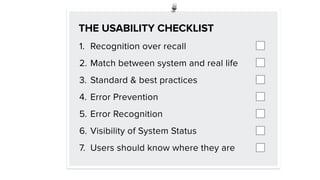
THE USABILITY CHECKLIST
Well, we can start by using
1. Recognition over recall
2. Match between system and real life
3. Standard & best practices
4. Error Prevention
5. Error Recognition
6. Visibility of System Status
7. Users should know where they are
THE USABILITY CHECKLIST
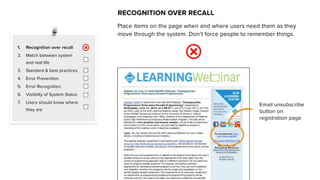
Place items on the page when and where users need them as they
move through the system. Don’t force people to remember things.
RECOGNITION OVER RECALL
1. Recognition over recall
2. Match between system
and real life
3. Standard & best practices
4. Error Prevention
5. Error Recognition
6. Visibility of System Status
7. Users should know where
they are
1. Recognition over recall
2. Match between system
and real life
3. Standard & best practices
4. Error Prevention
5. Error Recognition
6. Visibility of System Status
7. Users should know where
they are
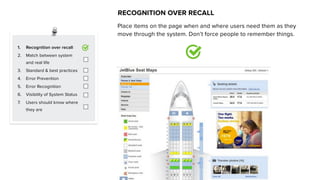
RECOGNITION OVER RECALL
Place items on the page when and where users need them as they
move through the system. Don’t force people to remember things.
Email unsubscribe
button on
registration page
1. Recognition over recall
2. Match between system
and real life
3. Standard & best practices
4. Error Prevention
5. Error Recognition
6. Visibility of System Status
7. Users should know where
they are
MATCH BETWEEN SYSTEM AND REAL LIFE
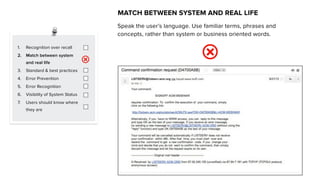
Speak the user’s language. Use familiar terms, phrases and
concepts, rather than system or business oriented words.
1. Recognition over recall
2. Match between system
and real life
3. Standard & best practices
4. Error Prevention
5. Error Recognition
6. Visibility of System Status
7. Users should know where
they are
MATCH BETWEEN SYSTEM AND REAL LIFE
Speak the user’s language. Use familiar terms, phrases and
concepts, rather than system or business oriented words.
1. Recognition over recall
2. Match between system
and real life
3. Standard & best practices
4. Error Prevention
5. Error Recognition
6. Visibility of System Status
7. Users should know where
they are
STANDARD & BEST PRACTICES
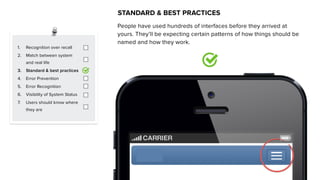
People have used hundreds of interfaces before they arrived at
yours. They’ll be expecting certain patterns of how things should be
named and how they work.
1. Recognition over recall
2. Match between system
and real life
3. Standard & best practices
4. Error Prevention
5. Error Recognition
6. Visibility of System Status
7. Users should know where
they are
STANDARD & BEST PRACTICES
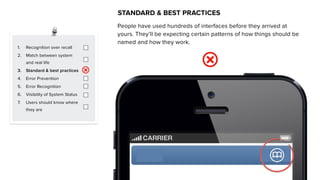
People have used hundreds of interfaces before they arrived at
yours. They’ll be expecting certain patterns of how things should be
named and how they work.
1. Recognition over recall
2. Match between system
and real life
3. Standard & best practices
4. Error Prevention
5. Error Recognition
6. Visibility of System Status
7. Users should know where
they are
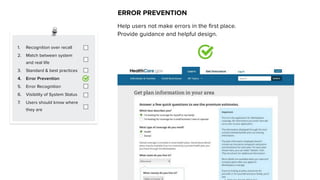
ERROR PREVENTION
Help users not make errors in the first place.
Provide guidance and helpful design.
1. Recognition over recall
2. Match between system
and real life
3. Standard & best practices
4. Error Prevention
5. Error Recognition
6. Visibility of System Status
7. Users should know where
they are
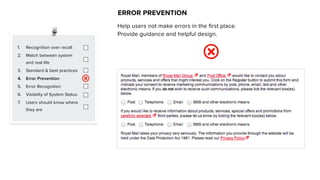
ERROR PREVENTION
Help users not make errors in the first place.
Provide guidance and helpful design.
1. Recognition over recall
2. Match between system
and real life
3. Standard & best practices
4. Error Prevention
5. Error Recognition
6. Visibility of System Status
7. Users should know where
they are
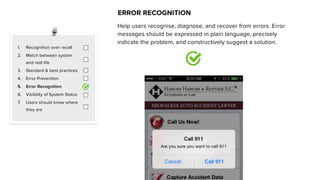
ERROR RECOGNITION
Help users recognise, diagnose, and recover from errors. Error
messages should be expressed in plain language, precisely
indicate the problem, and constructively suggest a solution.
1. Recognition over recall
2. Match between system
and real life
3. Standard & best practices
4. Error Prevention
5. Error Recognition
6. Visibility of System Status
7. Users should know where
they are
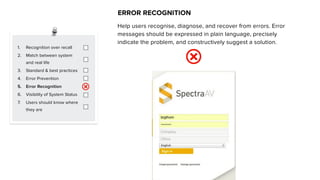
ERROR RECOGNITION
Help users recognise, diagnose, and recover from errors. Error
messages should be expressed in plain language, precisely
indicate the problem, and constructively suggest a solution.
1. Recognition over recall
2. Match between system
and real life
3. Standard & best practices
4. Error Prevention
5. Error Recognition
6. Visibility of System Status
7. Users should know where
they are
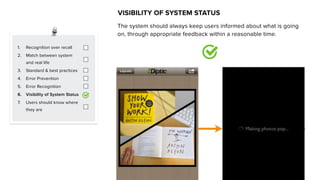
VISIBILITY OF SYSTEM STATUS
The system should always keep users informed about what is going
on, through appropriate feedback within a reasonable time.
1. Recognition over recall
2. Match between system
and real life
3. Standard & best practices
4. Error Prevention
5. Error Recognition
6. Visibility of System Status
7. Users should know where
they are
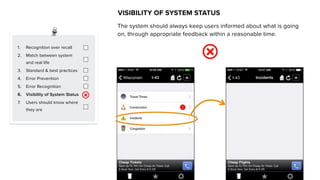
VISIBILITY OF SYSTEM STATUS
The system should always keep users informed about what is going
on, through appropriate feedback within a reasonable time.
1. Recognition over recall
2. Match between system
and real life
3. Standard & best practices
4. Error Prevention
5. Error Recognition
6. Visibility of System Status
7. Users should know where
they are
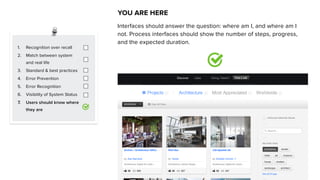
YOU ARE HERE
Interfaces should answer the question: where am I, and where am I
not. Process interfaces should show the number of steps, progress,
and the expected duration.
1. Recognition over recall
2. Match between system
and real life
3. Standard & best practices
4. Error Prevention
5. Error Recognition
6. Visibility of System Status
7. Users should know where
they are
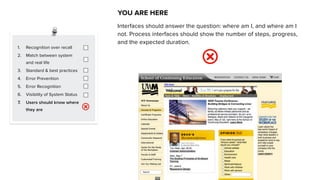
YOU ARE HERE
Interfaces should answer the question: where am I, and where am I
not. Process interfaces should show the number of steps, progress,
and the expected duration.
ANY QUESTIONS?

UX lesson 3: Usability First

  • 1.
    MIRUM AGENCY 2014 Session3: USABILITYFIRSTby Joan Lumanauw | May, 2015
  • 2.
  • 3.
    BRANDEXPERIENCE Desirability Utility Usability Love the brand Itlooks beautiful Easy to use Product is useful USER EXPERIENCE
  • 4.
    BRANDEXPERIENCE Desirability Utility Usability Love the brand Itlooks beautiful Easy to use Product USER EXPERIENCE
  • 5.
    is about task-basedinteractions. It is the measure of a user’s ability to use a product intuitively and easily. It is also about increasing efficiency and removing any obstacle or pain point the users might encounter while using the product. Usability
  • 6.
    Intuitive Design LearnabilityEfficiency of use Memorability Error Frequency A nearly effortless understanding of the architecture and navigation of the site How fast a user who has never seen the user interface before can accomplish basic tasks How fast an experienced user can accomplish tasks After visiting the site, if a user can remember enough to use it effectively in future visits How often users make errors while using the system, how serious the errors are, and how users recover from the errors How to Measure Usability http://www.nngroup.com/articles/usability-101-introduction-to-usability/
  • 7.
    Just how dowe achieve those 5 things?
  • 8.
    THE USABILITY CHECKLIST Well,we can start by using
  • 9.
    1. Recognition overrecall 2. Match between system and real life 3. Standard & best practices 4. Error Prevention 5. Error Recognition 6. Visibility of System Status 7. Users should know where they are THE USABILITY CHECKLIST
  • 10.
    Place items onthe page when and where users need them as they move through the system. Don’t force people to remember things. RECOGNITION OVER RECALL 1. Recognition over recall 2. Match between system and real life 3. Standard & best practices 4. Error Prevention 5. Error Recognition 6. Visibility of System Status 7. Users should know where they are
  • 11.
    1. Recognition overrecall 2. Match between system and real life 3. Standard & best practices 4. Error Prevention 5. Error Recognition 6. Visibility of System Status 7. Users should know where they are RECOGNITION OVER RECALL Place items on the page when and where users need them as they move through the system. Don’t force people to remember things. Email unsubscribe button on registration page
  • 12.
    1. Recognition overrecall 2. Match between system and real life 3. Standard & best practices 4. Error Prevention 5. Error Recognition 6. Visibility of System Status 7. Users should know where they are MATCH BETWEEN SYSTEM AND REAL LIFE Speak the user’s language. Use familiar terms, phrases and concepts, rather than system or business oriented words.
  • 13.
    1. Recognition overrecall 2. Match between system and real life 3. Standard & best practices 4. Error Prevention 5. Error Recognition 6. Visibility of System Status 7. Users should know where they are MATCH BETWEEN SYSTEM AND REAL LIFE Speak the user’s language. Use familiar terms, phrases and concepts, rather than system or business oriented words.
  • 14.
    1. Recognition overrecall 2. Match between system and real life 3. Standard & best practices 4. Error Prevention 5. Error Recognition 6. Visibility of System Status 7. Users should know where they are STANDARD & BEST PRACTICES People have used hundreds of interfaces before they arrived at yours. They’ll be expecting certain patterns of how things should be named and how they work.
  • 15.
    1. Recognition overrecall 2. Match between system and real life 3. Standard & best practices 4. Error Prevention 5. Error Recognition 6. Visibility of System Status 7. Users should know where they are STANDARD & BEST PRACTICES People have used hundreds of interfaces before they arrived at yours. They’ll be expecting certain patterns of how things should be named and how they work.
  • 16.
    1. Recognition overrecall 2. Match between system and real life 3. Standard & best practices 4. Error Prevention 5. Error Recognition 6. Visibility of System Status 7. Users should know where they are ERROR PREVENTION Help users not make errors in the first place. Provide guidance and helpful design.
  • 17.
    1. Recognition overrecall 2. Match between system and real life 3. Standard & best practices 4. Error Prevention 5. Error Recognition 6. Visibility of System Status 7. Users should know where they are ERROR PREVENTION Help users not make errors in the first place. Provide guidance and helpful design.
  • 18.
    1. Recognition overrecall 2. Match between system and real life 3. Standard & best practices 4. Error Prevention 5. Error Recognition 6. Visibility of System Status 7. Users should know where they are ERROR RECOGNITION Help users recognise, diagnose, and recover from errors. Error messages should be expressed in plain language, precisely indicate the problem, and constructively suggest a solution.
  • 19.
    1. Recognition overrecall 2. Match between system and real life 3. Standard & best practices 4. Error Prevention 5. Error Recognition 6. Visibility of System Status 7. Users should know where they are ERROR RECOGNITION Help users recognise, diagnose, and recover from errors. Error messages should be expressed in plain language, precisely indicate the problem, and constructively suggest a solution.
  • 20.
    1. Recognition overrecall 2. Match between system and real life 3. Standard & best practices 4. Error Prevention 5. Error Recognition 6. Visibility of System Status 7. Users should know where they are VISIBILITY OF SYSTEM STATUS The system should always keep users informed about what is going on, through appropriate feedback within a reasonable time.
  • 21.
    1. Recognition overrecall 2. Match between system and real life 3. Standard & best practices 4. Error Prevention 5. Error Recognition 6. Visibility of System Status 7. Users should know where they are VISIBILITY OF SYSTEM STATUS The system should always keep users informed about what is going on, through appropriate feedback within a reasonable time.
  • 22.
    1. Recognition overrecall 2. Match between system and real life 3. Standard & best practices 4. Error Prevention 5. Error Recognition 6. Visibility of System Status 7. Users should know where they are YOU ARE HERE Interfaces should answer the question: where am I, and where am I not. Process interfaces should show the number of steps, progress, and the expected duration.
  • 23.
    1. Recognition overrecall 2. Match between system and real life 3. Standard & best practices 4. Error Prevention 5. Error Recognition 6. Visibility of System Status 7. Users should know where they are YOU ARE HERE Interfaces should answer the question: where am I, and where am I not. Process interfaces should show the number of steps, progress, and the expected duration.
  • 24.