Free and Open Source GIS

  an introduction to open-source
        spatial software/GIS
What is Free &Open Source GIS?
Why use Free Open Source GIS?
Why teach Free open source GIS?
Different types of Free open Source GIS
Misconceptions about Free Open Source
GIS
What is Free &open source GIS?
  The freedom to use the software, for any
  purpose.
  The freedom to study how the software
  works and to change / adapt it to fit your
  needs.
 The freedom to redistribute copies.
  The freedom to distribute copies of your
  modified software to others, allowing the
  community to benefit from your changes
         http://en.wikipedia.org/wiki/Richard_Stallman
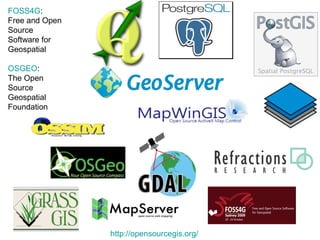
FOSS4G:
Free and Open
Source
Software for
Geospatial

OSGEO:
The Open
Source
Geospatial
Foundation


                http://opensourcegis.org/
Why Use Open Source GIS?
 Supported by huge development & support
   community
   Community is very passionate about helping each
   other and continually improving software
Low start-up costs
   It is now possible to install a complete GIS stack
   without paying a cent - LEGALLY
Security
   Arguably more secure than proprietary software
   Backed by large development community
   Complex Bugs are found and fixed quickly
Why Use Open Source GIS? (cont’d)
Works on all major platforms (Mac, Linux, Windows)
Nothing is missing,
 Desktop GIS, Spatial Database Storage, Server...
 Tons of analysis tools (No licensing worries)
 Community developed add-ons
Works with existing GIS data
 Import .shp files, most major formats
 Export to most major formats
 Support all Major file formats
  Vector formats and Raster Formats(Import and
 Export or directly works on the base format)
Why Teach Open Source GIS?
1. Basic exploration on GIS Software's and
   Projects
2. Becoming an increasingly necessary job skill,
   Companies with existing GIS(Packages) are
   interested in using open source GIS software's
3.Makes GIS marketable to smaller firms and
   non-profits
4. Drives innovation, through sharing of
   knowledge & source code
5. Code is open and human-readable for
   developers.
The Stack of Free GIS
               Free Alternatives For Your GIS Needs
Quantum GIS - Desktop GIS
   http://www.qgis.org/
GRASS - (Geographic Resources Analysis Support System)
   http://grass.osgeo.org/
PostgreSQL/ PostGIS - Spatial Database
   http://www.postgresql.org/
   http://postgis.refractions.net/
GeoServer - Server for Online Publishing/ Data Sharing
   http://geoserver.org/display/GEOS/Welcome
OpenLayers - Web Application Programming Interface (API)
   http://openlayers.org/
MapServer
   http://mapserver.org/
There are many more options, but these are good so far.
Open GIS Desktop Software's
Quantum GIS (QGIS)
  Desktop application – very user friendly
  Can work directly with .shp file, and too many to list
  Any Platform – Windows, Mac, Linux
  FREE
  Plugins available (Similar to Firefox add-ons)
  Allow spatial analysis, 3-D analysis, statistical analysis...
  User interface for GRASS tools. (Default)
  PostGIS interface. (Default)
  Map Server export(Default)
www.qgis.org
GRASS
Geographic Resources Analysis Support System
GRASS is developed by a worldwide network of
developers who continue to release new GRASS versions
regularly.
GRASS is used for used for geospatial data management
and analysis, image processing, graphics/map production,
spatial modelling, and visualization.

http://grass.osgeo.org/community/index.php
http://grass.osgeo.org/gdp/html_grass64/helptext.html
GRASS
Geographic Resources Analysis Support System

 Geospatial data management
 Analysis
 Image processing
 Graphics/maps production
 Spatial modeling
 Visualization
 Tons of tools + functions = Very complex analysis
 Now there's a simple user interface through QGIS
GRASS is an official project of the Open Source Geospatial Foundation.
http://grass.osgeo.org/
GDAL
GDAL is a translator
library for raster
geospatial data
formats...
It also comes with a
variety of useful
command line utilities
for data translation
and processing.
With GDAL tools you can:
Report information about a file.
Copy a raster file, with control of
output format.
Warp an image into a new
coordinate system.
Contours from DEM.
Tools to analyze and visualize DEMs.
Build a quick mosaic from a set of
images.
Rasterize vectors into raster file.
Transform coordinates.
Free Open GIS Databases
PostgreSQL + PostGIS

PostgreSQL is a powerful, open source object-relational
   database system
good spatial database
Conforms to Open Geospatial Consortium standards
(ArcSDE can connect to it)
Secure storage for both spatial and non spatial data
Column level permissions granularity
PostGIS "spatially enables" the PostgreSQL server, allowing it to
   be used as a backend spatial database for (GIS), much like
   ESRI's SDE
        http://www.opengeospatial.org/standards
Spatial Lite
• The SpatiaLite extension enables SQLite to
  support spatial data too [aka GEOMETRY], in a
  way conformant to Open GIS specifications.
• Supports all spatial data formats with open
  GIS specifications
• supports importing and exporting from /
  to shape files
Free open source Web GIS
The Procedure
   Web GIS(Open
   Source)


http://opengeo.org/publications/opengeo-architecture/
Map Server
MapServer is an Open Source geographic data rendering engine
written in C. Beyond browsing GIS data, MapServer allows you
create “geographic image maps”, that is, maps that can direct
users to content.
MapServer was originally developed by the University of
Minnesota (UMN) For Net project in cooperation with NASA,
A map file may have zero, one or more OUTPUTFORMAT object
declarations, defining available output formats supported
including formats like PNG, GIF, JPEG, GeoTIFF, SVG, PDF and
KML.

http://mapserver.org/#
OpenLayers
JavaScript Library, including API
Similar to Google Maps API
Makes building dynamic mapping webpages
VERY easy
Provides the tools needed to easily add a
map to a webpage
Allows overlaying your own data
Can display map tiles and markers loaded
from any source
  http://openlayers.org/
Common Misconceptions about Open
      Source GIS Software
• Not robust application.
• No Commercial Support.
• Opposite to proprietary
  Packages/ Software's.
• No regional/specific support.
• Incompatible.
• substandard compared to
  proprietary software
Now What?
Quantum GIS is a great place to start…
If you've ever used a GIS, you'll feel right at home!
http://qgis.org/

QGIS Tutorial
http://qgis.spatialthoughts.com/

Windows users start with OSGeo4W
 http://trac.osgeo.org/osgeo4w/
Tutorials / User Guides
QGIS: http://qgis.org/en/documentation/manuals.html

OpenLayers, and more:
 http://www.bostongis.com/
PostGIS:
  http://postgis.refractions.net/documentation/manual-1.3/
GeoServer: http://docs.geoserver.org/1.7.x/user/
GRASS: http://grass.osgeo.org/wiki/GRASS_Help
MapServer:http://mapserver.org/introduction.html#introduction

Free open source gis

  • 1.
    Free and OpenSource GIS an introduction to open-source spatial software/GIS
  • 2.
    What is Free&Open Source GIS? Why use Free Open Source GIS? Why teach Free open source GIS? Different types of Free open Source GIS Misconceptions about Free Open Source GIS
  • 3.
    What is Free&open source GIS?   The freedom to use the software, for any purpose.   The freedom to study how the software works and to change / adapt it to fit your needs.  The freedom to redistribute copies.   The freedom to distribute copies of your modified software to others, allowing the community to benefit from your changes http://en.wikipedia.org/wiki/Richard_Stallman
  • 4.
    FOSS4G: Free and Open Source Softwarefor Geospatial OSGEO: The Open Source Geospatial Foundation http://opensourcegis.org/
  • 5.
    Why Use OpenSource GIS? Supported by huge development & support community Community is very passionate about helping each other and continually improving software Low start-up costs It is now possible to install a complete GIS stack without paying a cent - LEGALLY Security Arguably more secure than proprietary software Backed by large development community Complex Bugs are found and fixed quickly
  • 6.
    Why Use OpenSource GIS? (cont’d) Works on all major platforms (Mac, Linux, Windows) Nothing is missing, Desktop GIS, Spatial Database Storage, Server... Tons of analysis tools (No licensing worries) Community developed add-ons Works with existing GIS data Import .shp files, most major formats Export to most major formats Support all Major file formats Vector formats and Raster Formats(Import and Export or directly works on the base format)
  • 7.
    Why Teach OpenSource GIS? 1. Basic exploration on GIS Software's and Projects 2. Becoming an increasingly necessary job skill, Companies with existing GIS(Packages) are interested in using open source GIS software's 3.Makes GIS marketable to smaller firms and non-profits 4. Drives innovation, through sharing of knowledge & source code 5. Code is open and human-readable for developers.
  • 8.
    The Stack ofFree GIS Free Alternatives For Your GIS Needs Quantum GIS - Desktop GIS http://www.qgis.org/ GRASS - (Geographic Resources Analysis Support System) http://grass.osgeo.org/ PostgreSQL/ PostGIS - Spatial Database http://www.postgresql.org/ http://postgis.refractions.net/ GeoServer - Server for Online Publishing/ Data Sharing http://geoserver.org/display/GEOS/Welcome OpenLayers - Web Application Programming Interface (API) http://openlayers.org/ MapServer http://mapserver.org/ There are many more options, but these are good so far.
  • 9.
    Open GIS DesktopSoftware's
  • 10.
    Quantum GIS (QGIS) Desktop application – very user friendly Can work directly with .shp file, and too many to list Any Platform – Windows, Mac, Linux FREE Plugins available (Similar to Firefox add-ons) Allow spatial analysis, 3-D analysis, statistical analysis... User interface for GRASS tools. (Default) PostGIS interface. (Default) Map Server export(Default) www.qgis.org
  • 11.
    GRASS Geographic Resources AnalysisSupport System GRASS is developed by a worldwide network of developers who continue to release new GRASS versions regularly. GRASS is used for used for geospatial data management and analysis, image processing, graphics/map production, spatial modelling, and visualization. http://grass.osgeo.org/community/index.php http://grass.osgeo.org/gdp/html_grass64/helptext.html
  • 12.
    GRASS Geographic Resources AnalysisSupport System Geospatial data management Analysis Image processing Graphics/maps production Spatial modeling Visualization Tons of tools + functions = Very complex analysis Now there's a simple user interface through QGIS GRASS is an official project of the Open Source Geospatial Foundation. http://grass.osgeo.org/
  • 13.
    GDAL GDAL is atranslator library for raster geospatial data formats... It also comes with a variety of useful command line utilities for data translation and processing.
  • 14.
    With GDAL tools you can: Report information abouta file. Copy a raster file, with control of output format. Warp an image into a new coordinate system. Contours from DEM. Tools to analyze and visualize DEMs. Build a quick mosaic from a set of images. Rasterize vectors into raster file. Transform coordinates.
  • 15.
    Free Open GISDatabases
  • 16.
    PostgreSQL + PostGIS PostgreSQLis a powerful, open source object-relational database system good spatial database Conforms to Open Geospatial Consortium standards (ArcSDE can connect to it) Secure storage for both spatial and non spatial data Column level permissions granularity PostGIS "spatially enables" the PostgreSQL server, allowing it to be used as a backend spatial database for (GIS), much like ESRI's SDE http://www.opengeospatial.org/standards
  • 17.
    Spatial Lite • TheSpatiaLite extension enables SQLite to support spatial data too [aka GEOMETRY], in a way conformant to Open GIS specifications. • Supports all spatial data formats with open GIS specifications • supports importing and exporting from / to shape files
  • 18.
  • 19.
    The Procedure Web GIS(Open Source) http://opengeo.org/publications/opengeo-architecture/
  • 20.
    Map Server MapServer isan Open Source geographic data rendering engine written in C. Beyond browsing GIS data, MapServer allows you create “geographic image maps”, that is, maps that can direct users to content. MapServer was originally developed by the University of Minnesota (UMN) For Net project in cooperation with NASA, A map file may have zero, one or more OUTPUTFORMAT object declarations, defining available output formats supported including formats like PNG, GIF, JPEG, GeoTIFF, SVG, PDF and KML. http://mapserver.org/#
  • 21.
    OpenLayers JavaScript Library, includingAPI Similar to Google Maps API Makes building dynamic mapping webpages VERY easy Provides the tools needed to easily add a map to a webpage Allows overlaying your own data Can display map tiles and markers loaded from any source http://openlayers.org/
  • 22.
    Common Misconceptions aboutOpen Source GIS Software • Not robust application. • No Commercial Support. • Opposite to proprietary Packages/ Software's. • No regional/specific support. • Incompatible. • substandard compared to proprietary software
  • 23.
    Now What? Quantum GISis a great place to start… If you've ever used a GIS, you'll feel right at home! http://qgis.org/ QGIS Tutorial http://qgis.spatialthoughts.com/ Windows users start with OSGeo4W http://trac.osgeo.org/osgeo4w/
  • 24.
    Tutorials / UserGuides QGIS: http://qgis.org/en/documentation/manuals.html OpenLayers, and more: http://www.bostongis.com/ PostGIS: http://postgis.refractions.net/documentation/manual-1.3/ GeoServer: http://docs.geoserver.org/1.7.x/user/ GRASS: http://grass.osgeo.org/wiki/GRASS_Help MapServer:http://mapserver.org/introduction.html#introduction

Editor's Notes

  • #5 http://www.refractions.net/products/ Open Source Software Image Map(OSSIM) Udig is from Refractions
  • #11 http://www.google-melange.com/gsoc/proposal/review/google/gsoc2011/mbernasocchi/1001 http://www.ftools.ca/ http://grass.osgeo.org/wiki/Extrude_2D_polygons_to_3D
  • #17 OGC(R) standards are technical documents that detail interfaces or encodings. Software developers use these documents to build open interfaces and encodings into their products and services. These standards are the main "products" of the Open Geospatial Consortium and have been developed by the membership to address specific interoperability challenges. Ideally, when OGC standards are implemented in products or online services by two different software engineers working independently, the resulting components plug and play, that is, they work together without further debugging
  • #22 http://www.openstreetmap.org/ is developed using openlayers
  • #23 http://www.interactivegis.com/opensource/misconceptions.html