GEOGRAPHICAL INFORMATION
SYSTEM(GIS)
INDIAN SPACE RESEARCH
ORGANISATION,JODHPUR
Presented by:
Karan Hotchandani
Roll No.13EJIEE026
(IV B.Tech., VII Sem.)
2/17/2017 17EETR: PT & IV
What this presentation covers?
What is geographic information?
Importance of GIS
What are the existing types of GIS software available
to you.
Advantages and disadvantages of GIS
Applications of GIS
Assets mapping
2/17/2017 7EETR: PT & IV 3
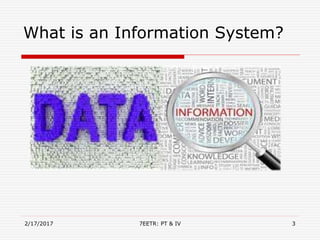
What is an Information System?
GIS history
 Roger Tomlinson drives the creation of the Canada
Geographic Information System (CGIS) in 1964
o First national GIS system
 Land Use and Natural resource Inventory System
o LUNR, New York 1967
 Minnesota Land Management System
o MLMIS, Minnesota 1969
 Arc Info introduced in 1981
o First major commercial GIS venture
2/17/2017 7EETR: PT & IV 4
What is GIS?
 GIS stands for Geographic Information System and it is a
computer-based mapping tool that allows users to
manipulate large sets of data as layers or themes.
 These themes appear as graphics on a base layer which may
be a map or orthographic aerial photo.
 Geographical Information Systems (GIS) are a special class
of information systems that keep track not only of events,
activities, and things, but also of where these events,
activities, and things happen or exist.
2/17/2017 7EETR: PT & IV 5
GIS Objectives
 Identify principles and functional issues pertaining to
physical geography applications of GIS.
 Examine and review specific application areas where GIS
is a useful tool.
 Investigate techniques provided by GIS which have
particular relevance to physical geography applications
and problem solving.
 Identify and address problem areas such as data sources,
modelling, error and uncertainty.
 The broad types of GIS software that are available.
2/17/2017 7EETR: PT & IV 6
Why it matters?
Almost everything happens somewhere and in most cases,
knowing where some things happen is critically important.
Examples:
• Position of country boundaries
• Location of hospitals
• Routing delivery vehicles
• Management of forest stands
• Disaster affected areas
2/17/2017 7EETR: PT & IV 7
Features of GIS
• Multidimensional – at least two coordinates must be
specified to define a location.
• Voluminous – a geographic database can easily reach a
terabyte in size.
• Different Representations - and how this is done can
strongly influence the ease of analysis and the end results.
• Requires unique analysis methods.
• Analyses require data integration.
• Map displays require fast data retrieval.
2/17/2017 7EETR: PT & IV 8
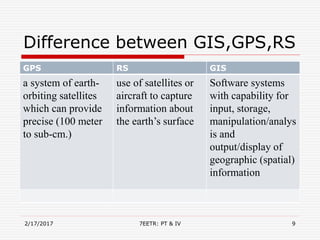
Difference between GIS,GPS,RS
2/17/2017 7EETR: PT & IV 9
GPS RS GIS
a system of earth-
orbiting satellites
which can provide
precise (100 meter
to sub-cm.)
use of satellites or
aircraft to capture
information about
the earth’s surface
Software systems
with capability for
input, storage,
manipulation/analys
is and
output/display of
geographic (spatial)
information
Types of GIS
There are a number of Geographical Information Systems (GIS)
(or GIS software) available today. They range from high-
powered analytical software to visual web applications, and
each of those are used for a different purpose.
Although they share the common characteristics yet there
functions are different.GIS are broadly classified into 3 types:-
• Web-based GIS: ONS
• Geobrowser: Google Earth
• Desktop GIS: QGIS
2/17/2017 7EETR: PT & IV 10
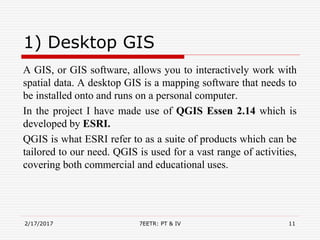
1) Desktop GIS
A GIS, or GIS software, allows you to interactively work with
spatial data. A desktop GIS is a mapping software that needs to
be installed onto and runs on a personal computer.
In the project I have made use of QGIS Essen 2.14 which is
developed by ESRI.
QGIS is what ESRI refer to as a suite of products which can be
tailored to our need. QGIS is used for a vast range of activities,
covering both commercial and educational uses.
2/17/2017 7EETR: PT & IV 11
2) Geobrowser
A Geobrowser is better explained with reference to an internet
browser, i.e. Internet Explorer. In short, a geobrowser can be
understood as an Internet Explorer for geographic information.
Like the internet it allows the combination of many types of
geographic data from many different sources. The biggest
difference between the World Wide Web and the geographic
web however is that everything within the latter is spatially
referenced.
Google Earth is the most popular geobrowser available and
will be the one used for this course.
2/17/2017 7EETR: PT & IV 12
3) Web-based GIS
Web-based GIS, or WebGIS, are online GIS applications which
in most cases are excellent data visualisation tools. Their
functionality is limited compared to software stored on your
computer, but they are user-friendly and particularly useful as
they not required data download.
There are many WebGIS available, but commonly used are: the
Office of National Statistics (ONS) and the London Profiler.
2/17/2017 7EETR: PT & IV 13
GIS Softwares
2/17/2017 7EETR: PT & IV 14
There are a number of softwares available for GIS purpose.
Few of them are:-
• Grass Gis
• Gvsig
• Ilwis
• Jump Gis
• Map window Gis
• Qgis
• Saga Gis
• ARCGIS
QUANTUM GIS(QGIS)
 QGIS is a cross-platform free and open-
source desktop geographic information system (GIS)
application that provides data viewing, editing, and
analysis.
 QGIS allows users to create maps with many layers using
different map projections. Maps can be assembled in
different formats and for different uses. QGIS allows maps
to be composed of Raster or Vector layers.
2/17/2017 7EETR: PT & IV 15
QGIS(cont.)
2/17/2017 7EETR: PT & IV 16
Types of Data
1) Raster Data:-
 Raster data is made up of pixels (also referred to as grid
cells). They are usually regularly-spaced and square but
they don’t have to be. Raster often look pixilated because
each pixel is associated with a value or class.
 Raster models are useful for storing data that varies
continuously, as in an aerial photograph, an elevation
surface or a satellite image. But it depends on the cell size
for spatial accuracy.
2/17/2017 7EETR: PT & IV 17
(cont.)
2) Vector Data:-
 Vector graphics are comprised of vertices and paths.
 The three basic symbol types for vector data are points,
lines and polygons (areas).In GIS terminology, real-world
features are called spatial entities.
 The decision to choose vector points, lines or polygons is
governed by the cartographer and scale of the map.
 Vector points are simply XY coordinates. When features
are too small to be represented as polygons, points are used
2/17/2017 7EETR: PT & IV 18
QGIS Plugins
 QGIS has been designed with a plugin architecture. This
allows many new features/functions to be easily added to
the application. Many of the features in QGIS are actually
implemented as either core or external plugins.
• Core Plugins are maintained by the QGIS Development
Team and are automatically part of every QGIS
distribution. They are written in one of two languages: C++
or Python.
• External Plugins are currently all written in Python. They
are stored in external repositories and maintained by the
individual authors.
2/17/2017 7EETR: PT & IV
19
QGIS Shapefiles
 The standard vector file format used in QGIS is the ESRI
Shapefile.
 A shape file actually consists of several files. The following
three are required:
• .shp file containing the feature geometries.
• .dbf file containing the attributes in dBase format.
• .shx index file.
 Shapefiles also can include a file with a .prj suffix, which
contains the projection information. While it is very useful
to have a projection file, it is not mandatory. A shapefile
dataset can contain additional files.
2/17/2017 7EETR: PT & IV 20
Google Earth
 Google Earth displays satellite images of varying resolution
of the Earth's surface, allowing users to see things like cities
and houses looking perpendicularly down or at an oblique
angle .The degree of resolution available is based somewhat
on the points of interest and popularity, but most land is
covered in at least 15 meters of resolution.
 Google Earth supports managing three-
dimensional Geospatial data.
 It stores the data in .KML or .KMZ extension.
2/17/2017 7EETR: PT & IV 21
Difference between KML and
KMZ file
 KML stands for “Keyhole Markup Language” while KMZ
stands for “Keyhole Markup Language Zipped.”
 KML is used to save and store map locations in
general while KMZ is used in the same capacity
for more specific locations like placemarks.
 KML can be read and recognized by many geobrowsers or
programs that run maps and images like Google Earth and
Google Maps. This sometimes does not hold true for KMZ.
2/17/2017 7EETR: PT & IV 22
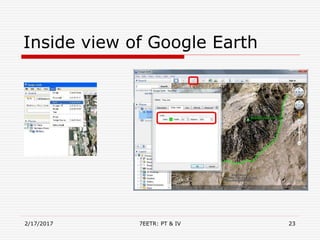
Inside view of Google Earth
2/17/2017 7EETR: PT & IV 23
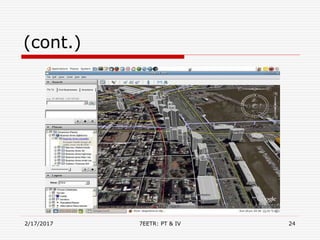
(cont.)
2/17/2017 7EETR: PT & IV 24
2/17/2017 7EETR: PT & IV 25
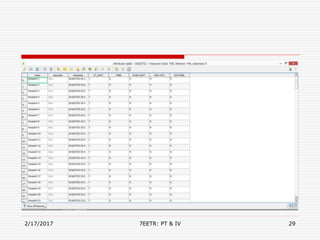
Adding Electrical Assets
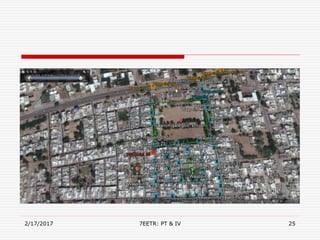
 With the help of google earth we have marked the area or
the boundary in which we have to do asset mapping. Assets
can also be marked with the help of google earth but for
more accuracy the points and coordinates have been
marked with the help of an app named as MAPinr.
 It is available for free on google play store for android(OS).
 Its easy access to the data and user friendly interface makes
it popular among the other similar apps which I have used
so far.
2/17/2017 7EETR: PT & IV 26
MAPinr
 The maps in MAPinr is available offline. It
provides facilities, such as you can mark your
waypoints of different types not only with
different symbols but also with different colors.
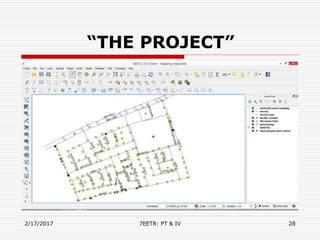
 The kml file of your saved map can be easily
transferred to QGIS just by opening the
corresponding kml file in QGIS, the points
marked on the map with there coordinates and
descriptions can now be seen and now you can
mark your waypoints in QGIS.
2/17/2017 7EETR: PT & IV 27
“THE PROJECT”
2/17/2017 7EETR: PT & IV 28
2/17/2017 7EETR: PT & IV 29
Advantages of GIS
 Exploring both geographical and thematic components
of data in a holistic way
 Stresses geographical aspects of a research question
 Allows handling and exploration of large volumes of
data
 Allows integration of data from widely disparate
sources
 Allows analysis of data to explicitly incorporate location
 Allows a wide variety of forms of visualisation
2/17/2017 7EETR: PT & IV 30
Conclusion
 On the conclusion note all we can say that the use of GIS
makes the way for the future mapping of our valuable assets
in an efficient way.
 Users, vendors and most importantly, researchers, have
symbiotic roles to play in the advancement of geographic
information science.
2/17/2017 7EETR: PT & IV 31
References
 http://www.qgis.org
 http://www.esri.org
 www.google.com
 http://www.supergeotek.com/Library_GISApplication_Geo
spatialIntelligence.aspx
 https://www.wikiwand.com/en/Geographic_information_sy
stem
2/17/2017 7EETR: PT & IV 32
2/17/2017 33
Thank You……
7EETR: PT & IV

GIS PPT

  • 1.
    GEOGRAPHICAL INFORMATION SYSTEM(GIS) INDIAN SPACERESEARCH ORGANISATION,JODHPUR Presented by: Karan Hotchandani Roll No.13EJIEE026 (IV B.Tech., VII Sem.) 2/17/2017 17EETR: PT & IV
  • 2.
    What this presentationcovers? What is geographic information? Importance of GIS What are the existing types of GIS software available to you. Advantages and disadvantages of GIS Applications of GIS Assets mapping
  • 3.
    2/17/2017 7EETR: PT& IV 3 What is an Information System?
  • 4.
    GIS history  RogerTomlinson drives the creation of the Canada Geographic Information System (CGIS) in 1964 o First national GIS system  Land Use and Natural resource Inventory System o LUNR, New York 1967  Minnesota Land Management System o MLMIS, Minnesota 1969  Arc Info introduced in 1981 o First major commercial GIS venture 2/17/2017 7EETR: PT & IV 4
  • 5.
    What is GIS? GIS stands for Geographic Information System and it is a computer-based mapping tool that allows users to manipulate large sets of data as layers or themes.  These themes appear as graphics on a base layer which may be a map or orthographic aerial photo.  Geographical Information Systems (GIS) are a special class of information systems that keep track not only of events, activities, and things, but also of where these events, activities, and things happen or exist. 2/17/2017 7EETR: PT & IV 5
  • 6.
    GIS Objectives  Identifyprinciples and functional issues pertaining to physical geography applications of GIS.  Examine and review specific application areas where GIS is a useful tool.  Investigate techniques provided by GIS which have particular relevance to physical geography applications and problem solving.  Identify and address problem areas such as data sources, modelling, error and uncertainty.  The broad types of GIS software that are available. 2/17/2017 7EETR: PT & IV 6
  • 7.
    Why it matters? Almosteverything happens somewhere and in most cases, knowing where some things happen is critically important. Examples: • Position of country boundaries • Location of hospitals • Routing delivery vehicles • Management of forest stands • Disaster affected areas 2/17/2017 7EETR: PT & IV 7
  • 8.
    Features of GIS •Multidimensional – at least two coordinates must be specified to define a location. • Voluminous – a geographic database can easily reach a terabyte in size. • Different Representations - and how this is done can strongly influence the ease of analysis and the end results. • Requires unique analysis methods. • Analyses require data integration. • Map displays require fast data retrieval. 2/17/2017 7EETR: PT & IV 8
  • 9.
    Difference between GIS,GPS,RS 2/17/20177EETR: PT & IV 9 GPS RS GIS a system of earth- orbiting satellites which can provide precise (100 meter to sub-cm.) use of satellites or aircraft to capture information about the earth’s surface Software systems with capability for input, storage, manipulation/analys is and output/display of geographic (spatial) information
  • 10.
    Types of GIS Thereare a number of Geographical Information Systems (GIS) (or GIS software) available today. They range from high- powered analytical software to visual web applications, and each of those are used for a different purpose. Although they share the common characteristics yet there functions are different.GIS are broadly classified into 3 types:- • Web-based GIS: ONS • Geobrowser: Google Earth • Desktop GIS: QGIS 2/17/2017 7EETR: PT & IV 10
  • 11.
    1) Desktop GIS AGIS, or GIS software, allows you to interactively work with spatial data. A desktop GIS is a mapping software that needs to be installed onto and runs on a personal computer. In the project I have made use of QGIS Essen 2.14 which is developed by ESRI. QGIS is what ESRI refer to as a suite of products which can be tailored to our need. QGIS is used for a vast range of activities, covering both commercial and educational uses. 2/17/2017 7EETR: PT & IV 11
  • 12.
    2) Geobrowser A Geobrowseris better explained with reference to an internet browser, i.e. Internet Explorer. In short, a geobrowser can be understood as an Internet Explorer for geographic information. Like the internet it allows the combination of many types of geographic data from many different sources. The biggest difference between the World Wide Web and the geographic web however is that everything within the latter is spatially referenced. Google Earth is the most popular geobrowser available and will be the one used for this course. 2/17/2017 7EETR: PT & IV 12
  • 13.
    3) Web-based GIS Web-basedGIS, or WebGIS, are online GIS applications which in most cases are excellent data visualisation tools. Their functionality is limited compared to software stored on your computer, but they are user-friendly and particularly useful as they not required data download. There are many WebGIS available, but commonly used are: the Office of National Statistics (ONS) and the London Profiler. 2/17/2017 7EETR: PT & IV 13
  • 14.
    GIS Softwares 2/17/2017 7EETR:PT & IV 14 There are a number of softwares available for GIS purpose. Few of them are:- • Grass Gis • Gvsig • Ilwis • Jump Gis • Map window Gis • Qgis • Saga Gis • ARCGIS
  • 15.
    QUANTUM GIS(QGIS)  QGISis a cross-platform free and open- source desktop geographic information system (GIS) application that provides data viewing, editing, and analysis.  QGIS allows users to create maps with many layers using different map projections. Maps can be assembled in different formats and for different uses. QGIS allows maps to be composed of Raster or Vector layers. 2/17/2017 7EETR: PT & IV 15
  • 16.
  • 17.
    Types of Data 1)Raster Data:-  Raster data is made up of pixels (also referred to as grid cells). They are usually regularly-spaced and square but they don’t have to be. Raster often look pixilated because each pixel is associated with a value or class.  Raster models are useful for storing data that varies continuously, as in an aerial photograph, an elevation surface or a satellite image. But it depends on the cell size for spatial accuracy. 2/17/2017 7EETR: PT & IV 17
  • 18.
    (cont.) 2) Vector Data:- Vector graphics are comprised of vertices and paths.  The three basic symbol types for vector data are points, lines and polygons (areas).In GIS terminology, real-world features are called spatial entities.  The decision to choose vector points, lines or polygons is governed by the cartographer and scale of the map.  Vector points are simply XY coordinates. When features are too small to be represented as polygons, points are used 2/17/2017 7EETR: PT & IV 18
  • 19.
    QGIS Plugins  QGIShas been designed with a plugin architecture. This allows many new features/functions to be easily added to the application. Many of the features in QGIS are actually implemented as either core or external plugins. • Core Plugins are maintained by the QGIS Development Team and are automatically part of every QGIS distribution. They are written in one of two languages: C++ or Python. • External Plugins are currently all written in Python. They are stored in external repositories and maintained by the individual authors. 2/17/2017 7EETR: PT & IV 19
  • 20.
    QGIS Shapefiles  Thestandard vector file format used in QGIS is the ESRI Shapefile.  A shape file actually consists of several files. The following three are required: • .shp file containing the feature geometries. • .dbf file containing the attributes in dBase format. • .shx index file.  Shapefiles also can include a file with a .prj suffix, which contains the projection information. While it is very useful to have a projection file, it is not mandatory. A shapefile dataset can contain additional files. 2/17/2017 7EETR: PT & IV 20
  • 21.
    Google Earth  GoogleEarth displays satellite images of varying resolution of the Earth's surface, allowing users to see things like cities and houses looking perpendicularly down or at an oblique angle .The degree of resolution available is based somewhat on the points of interest and popularity, but most land is covered in at least 15 meters of resolution.  Google Earth supports managing three- dimensional Geospatial data.  It stores the data in .KML or .KMZ extension. 2/17/2017 7EETR: PT & IV 21
  • 22.
    Difference between KMLand KMZ file  KML stands for “Keyhole Markup Language” while KMZ stands for “Keyhole Markup Language Zipped.”  KML is used to save and store map locations in general while KMZ is used in the same capacity for more specific locations like placemarks.  KML can be read and recognized by many geobrowsers or programs that run maps and images like Google Earth and Google Maps. This sometimes does not hold true for KMZ. 2/17/2017 7EETR: PT & IV 22
  • 23.
    Inside view ofGoogle Earth 2/17/2017 7EETR: PT & IV 23
  • 24.
  • 25.
  • 26.
    Adding Electrical Assets With the help of google earth we have marked the area or the boundary in which we have to do asset mapping. Assets can also be marked with the help of google earth but for more accuracy the points and coordinates have been marked with the help of an app named as MAPinr.  It is available for free on google play store for android(OS).  Its easy access to the data and user friendly interface makes it popular among the other similar apps which I have used so far. 2/17/2017 7EETR: PT & IV 26
  • 27.
    MAPinr  The mapsin MAPinr is available offline. It provides facilities, such as you can mark your waypoints of different types not only with different symbols but also with different colors.  The kml file of your saved map can be easily transferred to QGIS just by opening the corresponding kml file in QGIS, the points marked on the map with there coordinates and descriptions can now be seen and now you can mark your waypoints in QGIS. 2/17/2017 7EETR: PT & IV 27
  • 28.
  • 29.
  • 30.
    Advantages of GIS Exploring both geographical and thematic components of data in a holistic way  Stresses geographical aspects of a research question  Allows handling and exploration of large volumes of data  Allows integration of data from widely disparate sources  Allows analysis of data to explicitly incorporate location  Allows a wide variety of forms of visualisation 2/17/2017 7EETR: PT & IV 30
  • 31.
    Conclusion  On theconclusion note all we can say that the use of GIS makes the way for the future mapping of our valuable assets in an efficient way.  Users, vendors and most importantly, researchers, have symbiotic roles to play in the advancement of geographic information science. 2/17/2017 7EETR: PT & IV 31
  • 32.
    References  http://www.qgis.org  http://www.esri.org www.google.com  http://www.supergeotek.com/Library_GISApplication_Geo spatialIntelligence.aspx  https://www.wikiwand.com/en/Geographic_information_sy stem 2/17/2017 7EETR: PT & IV 32
  • 33.