Image Classification in ArcGIS10


               By
           Ashok Peddi
Introduction to image classification
• Image classification tool bar has been introduced in
  ArcGIS 10 with different classification techniques .
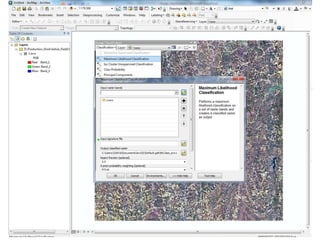
• Image classification is the process of converting
  multiband satellite image into single band image
  with different classes, defined or undefined.
• You can develop training sample and you can use the
  samples/ trained pixels which you have developed
  using other remote sensing software's as well.
• To use this tool bar you need spatial Analyst
  extension.
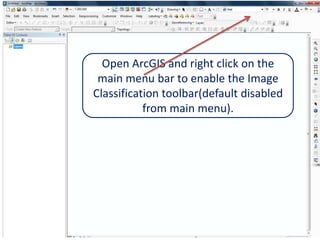
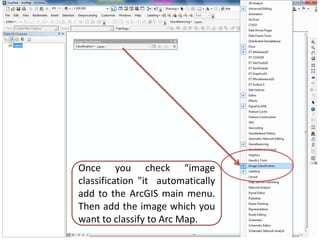
Open ArcGIS and right click on the
 main menu bar to enable the Image
Classification toolbar(default disabled
           from main menu).
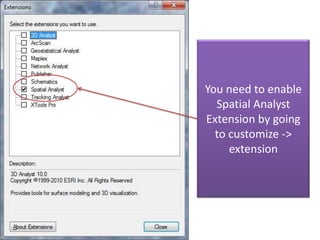
You need to enable
  Spatial Analyst
Extension by going
  to customize ->
     extension
Once you check “image
classification "it automatically
add to the ArcGIS main menu.
Then add the image which you
want to classify to Arc Map.
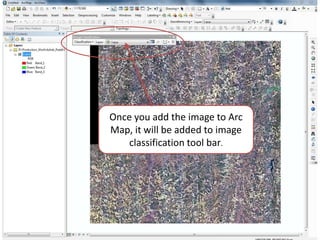
Once you add the image to Arc
Map, it will be added to image
    classification tool bar.
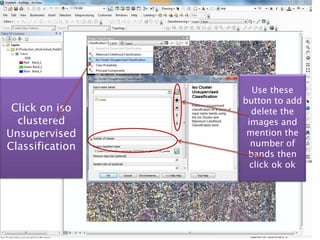
Use these
                 button to add
 Click on iso      delete the
  clustered       images and
Unsupervised      mention the
Classification     number of
                  bands then
                   click ok ok
1

2       If you have training
          sample(Signature
            file/shape file)
         which you want to
            apply the same
             rules with this
           image, You can.
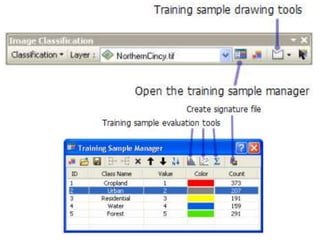
           Click on sample
           manager(1) and
         then click on open
            file(2). You can
               even create
                 training
            pixels/samples
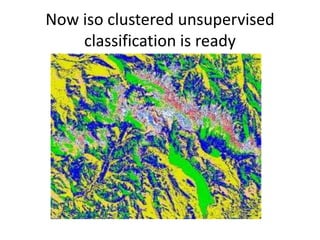
Now iso clustered unsupervised
    classification is ready
Observations
• Wide variety of algorithms available including
  supervised, unsupervised and hybrid as well.
• Processing may take longer time than remote
  sensing software's.
• Not robust algorithams
• Interesting thing is class probability

Image classification arc gis10

  • 1.
    Image Classification inArcGIS10 By Ashok Peddi
  • 2.
    Introduction to imageclassification • Image classification tool bar has been introduced in ArcGIS 10 with different classification techniques . • Image classification is the process of converting multiband satellite image into single band image with different classes, defined or undefined. • You can develop training sample and you can use the samples/ trained pixels which you have developed using other remote sensing software's as well. • To use this tool bar you need spatial Analyst extension.
  • 3.
    Open ArcGIS andright click on the main menu bar to enable the Image Classification toolbar(default disabled from main menu).
  • 4.
    You need toenable Spatial Analyst Extension by going to customize -> extension
  • 5.
    Once you check“image classification "it automatically add to the ArcGIS main menu. Then add the image which you want to classify to Arc Map.
  • 6.
    Once you addthe image to Arc Map, it will be added to image classification tool bar.
  • 9.
    Use these button to add Click on iso delete the clustered images and Unsupervised mention the Classification number of bands then click ok ok
  • 10.
    1 2 If you have training sample(Signature file/shape file) which you want to apply the same rules with this image, You can. Click on sample manager(1) and then click on open file(2). You can even create training pixels/samples
  • 11.
    Now iso clusteredunsupervised classification is ready
  • 12.
    Observations • Wide varietyof algorithms available including supervised, unsupervised and hybrid as well. • Processing may take longer time than remote sensing software's. • Not robust algorithams • Interesting thing is class probability