CONTENTS
Introduction
Data Base Management Systems (DBMS)
Functions of DBMS
Components of DBMS
GIS data file Management
Conclusion
References
Introduction
Management of GIS data consist of storing a
variety of data categorized under two types, entity
(Spatial data) and attribute (Aspatial) data in a way that
gives to retrieve or display any combination of these
data after manipulation.
GIS database comprises spatial or entity or
graphical database, nonspatial or attribute database and
a linkage mechanism for their topology to show the
relationship between the spatial data attribute data for
further analysis.
EXAMPLE
:
 Entity type is the point
 Spatial data are longitude and latitude
 Attribute data is the monument
Nonspatial (attribute) data can be stored in any
conventional data bases, whereas spatial data ,
which is the dominant data in GIS, should have the
data base which is capable for handling spatial
data.
DATA BASED MANAGEMENT
SYSTEM:
 Dale and McLaughlin (1988) define a DBMS as a
computer program to control the storage, retrieval
and modification of data (in a database)
 Stern and Stern (1993), a DBMS will allow users to
joint, manipulate or otherwise access the data in
any number of database files.
FUNCTIONS OF DBMS:
 File handling and file management (for creating,
modifying and deleting the data base structure)
 Adding, updating and deleting records
 Extraction of information from data
 Maintenance of data security and integrity and
 Application building
It includes Security, Integrity, Synchronization,
Physical data independence, Minimization of
redundancy and efficiency.
• In GIS data management field, two types of
distinct data are important, one is logical data and
another is physical data.
• The functions of GIS should be able to perform
include data input, data storage, management,
transformation analysis and output. DBMS is
helpful in payrolls, bibliographies, travel agency
booking system, and students enrolment.
• DBMS can also be used in handling both
geographical and non-geographical elements of GIS
data
• Two approaches to used DBMS in GIS (first
approach and second approach)
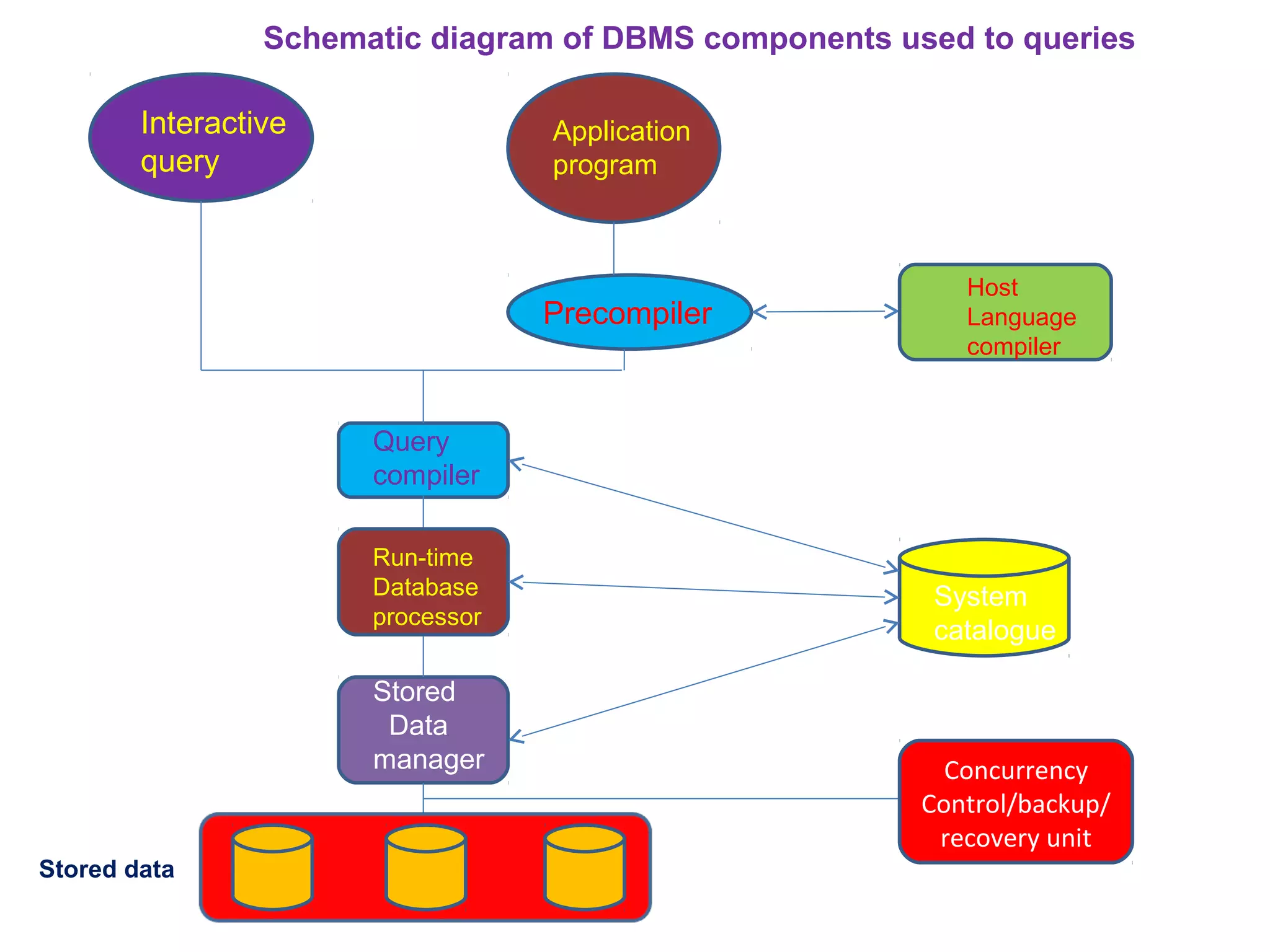
COMPONENTS OF DBMS:
• Data definition
• Storage definition
• Database administration, and
• Data manipulation
Interactive
query
Application
program
Precompiler
Query
compiler
System
catalogue
Run-time
Database
processor
Host
Language
compiler
Stored
Data
manager Concurrency
Control/backup/
recovery unit
Schematic diagram of DBMS components used to queries
Stored data
GIS DATA FILE MANAGEMENT:
• Database structure, composed of combination of
various file structures and other graphic structures,
allow complex method of managing data and analyzing
multiple thematic layers to be used for a particular GIS
• GIS consist of storing entity and attribute data
• It requires the computer using a representational file
structure, to be able to store, locate, retrieve, and
cross-reference records
• Three basic computer file structures: simple lists,
ordered sequential files and index files.
 Simple list
 Indexed files
 Building GIS worlds
CONCLUSION
 A database management system (DBMS) is a
software package that allows the user to set up,
use and maintain a database.
 A DBMS includes data backup and recovery
function to ensure data availability at all times.
 A DBMS allows the control of redundancy.
REFERENCES:
M. Anji Reddy, Textbook of Remote sensing and Geographical
Information Systems, BS Publications.
Rolf A. de By, Principle of Geographic Information System, Wim
Feringa.
Data base management system

Data base management system

  • 2.
    CONTENTS Introduction Data Base ManagementSystems (DBMS) Functions of DBMS Components of DBMS GIS data file Management Conclusion References
  • 3.
    Introduction Management of GISdata consist of storing a variety of data categorized under two types, entity (Spatial data) and attribute (Aspatial) data in a way that gives to retrieve or display any combination of these data after manipulation. GIS database comprises spatial or entity or graphical database, nonspatial or attribute database and a linkage mechanism for their topology to show the relationship between the spatial data attribute data for further analysis.
  • 4.
    EXAMPLE :  Entity typeis the point  Spatial data are longitude and latitude  Attribute data is the monument Nonspatial (attribute) data can be stored in any conventional data bases, whereas spatial data , which is the dominant data in GIS, should have the data base which is capable for handling spatial data.
  • 5.
    DATA BASED MANAGEMENT SYSTEM: Dale and McLaughlin (1988) define a DBMS as a computer program to control the storage, retrieval and modification of data (in a database)  Stern and Stern (1993), a DBMS will allow users to joint, manipulate or otherwise access the data in any number of database files.
  • 6.
    FUNCTIONS OF DBMS: File handling and file management (for creating, modifying and deleting the data base structure)  Adding, updating and deleting records  Extraction of information from data  Maintenance of data security and integrity and  Application building It includes Security, Integrity, Synchronization, Physical data independence, Minimization of redundancy and efficiency.
  • 7.
    • In GISdata management field, two types of distinct data are important, one is logical data and another is physical data. • The functions of GIS should be able to perform include data input, data storage, management, transformation analysis and output. DBMS is helpful in payrolls, bibliographies, travel agency booking system, and students enrolment. • DBMS can also be used in handling both geographical and non-geographical elements of GIS data • Two approaches to used DBMS in GIS (first approach and second approach)
  • 8.
    COMPONENTS OF DBMS: •Data definition • Storage definition • Database administration, and • Data manipulation
  • 9.
  • 10.
    GIS DATA FILEMANAGEMENT: • Database structure, composed of combination of various file structures and other graphic structures, allow complex method of managing data and analyzing multiple thematic layers to be used for a particular GIS • GIS consist of storing entity and attribute data • It requires the computer using a representational file structure, to be able to store, locate, retrieve, and cross-reference records
  • 11.
    • Three basiccomputer file structures: simple lists, ordered sequential files and index files.  Simple list  Indexed files  Building GIS worlds
  • 12.
    CONCLUSION  A databasemanagement system (DBMS) is a software package that allows the user to set up, use and maintain a database.  A DBMS includes data backup and recovery function to ensure data availability at all times.  A DBMS allows the control of redundancy.
  • 13.
    REFERENCES: M. Anji Reddy,Textbook of Remote sensing and Geographical Information Systems, BS Publications. Rolf A. de By, Principle of Geographic Information System, Wim Feringa.