Prepared By: Er. Nawaraj
Bhandari
Office Solution And Development
Topic 2 –
An Introduction to End-User
Software Development
The Need for Application Software to Meet
User and Business Requirements - 1
Application software should be:
 Efficient in its functionality, for example,
helping to solve problems, making decisions and
improving system functions, such as automating
regular processes, e.g. data entry
 User-friendly, e.g. easy to operate
The Need for Application Software to Meet
User and Business Requirements - 2
Application software should be (cont.):
 Reliable, e.g. producing the correct results of
database query
 Secure, e.g. locking spreadsheet cells
 Maintainable, e.g. modification of a
spreadsheet
End-User Application Software - 1
 In Topic 1, we discussed the two main types of
software - commercial and bespoke.
 Application software can also be created and/or
modified by an organisation’s own non-
programming/technical staff. This development
method is described as: end-user development
(EUD).
End-User Application Software - 2
 End-user application software is developed by end-
users (EUs) of computer systems to be used by
them in their day-to-day work and is often also
used by their colleagues in the same department
and/or in other departments.
 Applications developed by end-users are also
described as User Developed Applications
(UDAs).
Benefits of EUD
 Greater user involvement
 User has knowledge of the functionality of
the system
 Good use of resources
 Less costly method
 Improved decision making
 More user satisfaction
EUD Disadvantages
 Inaccurate (EU lacks training)
 Lack of planning
 Can be slow
 Use of incorrect formulae
 Not secure
 Not tested
 Not documented
Software Tools Available for Developing
Application Software Solutions
 Standard application software advanced functions
in databases, spreadsheet and word processing
 Macros
 Visual Basic for Applications (VBA)
 Macros and VBA refer to application software
programming methods.
Which Organisations Use EUD?
 Mainly, but not exclusively, small to medium
enterprises (SMEs) for small scale development,
e.g.
 Automating processes such as data entry and
data output
 Information management and retrieval
 Facilitating data transfer between software applications,
such as databases and spreadsheets
 Development can result from internal business
processes, information systems and external
business needs.
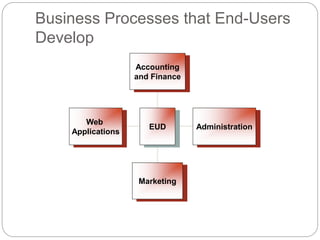
Business Processes that End-Users
Develop
Web
Applications
Marketing
Administration
Accounting
and Finance
EUD
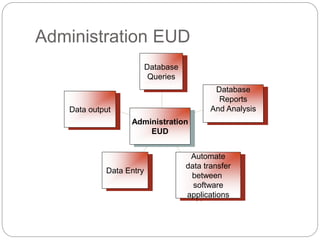
Administration EUD
Data output
Data Entry
Automate
data transfer
between
software
applications
Database
Reports
And Analysis
Database
Queries
Administration
EUD
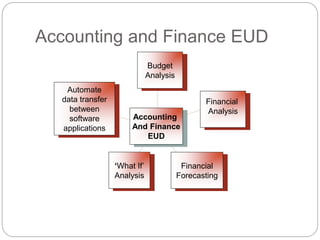
Accounting and Finance EUD
Automate
data transfer
between
software
applications
‘What If’
Analysis
Financial
Forecasting
Financial
Analysis
Budget
Analysis
Accounting
And Finance
EUD
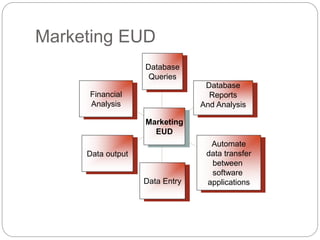
Marketing EUD
Financial
Analysis
Data output
Data Entry
Automate
data transfer
between
software
applications
Database
Reports
And Analysis
Database
Queries
Marketing
EUD
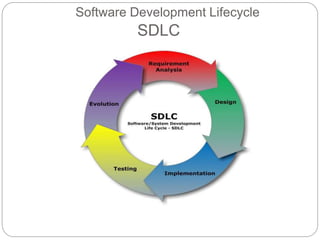
Software Development Lifecycle
SDLC
SDLC
Requirements - 1
 The user should concentrate on what needs to be
done as well as how it should be done and plan
carefully their software development:
 The task/problem should be analysed in detail
and the user should understand clearly what
needs to be done.
 The user and business requirements must be
identified clearly.
SDLC - 2
 A solution must be designed and development
that meets all requirements.
 The solution and results should be tested
thoroughly.
 The solution should be documented.
Human Computer Interface Design
 Human Computer Interaction (HCI) refers to the
interaction between users and the computer
system that is enabled by using the hardware and
software.
 Efficient HCI is necessary for usability of the
system, e.g. the user should be able to interact with
the system as simply and efficiently as possible.
 There are many aspects of HCI design, but we will
concentrate on software interface design when
developing our office solutions.
Human Computer Interface
Design
 The text, phrases and concepts used to develop
software is user friendly and user attractive.
 The software is consistent in terms of color layout,
font used, etc.
 Flexible and more efficient to use and navigate.
 Site structure with various buttons and links are in
hierarchal.
 Images used in software are in user prospective.
 Users’ attention is created using suitable sound
effects.
 Menus, Icons, Buttons used work properly
Software Interface Design
 Text (font type, font size,
letter and line spacing,
line length, justification,
line endings, paragraph
spacing)
 Colour (how it is used to
draw attention, show
meaning, etc.)
 Images (still and
moving, how it is used
to communicate,
persuade, etc.)
 Sound (sound effects,
music speech, how it is
used to attract attention)
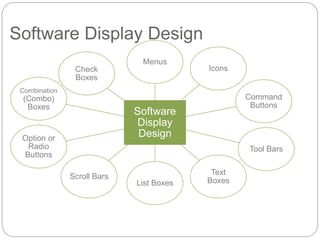
Software Display Design
Software
Display
Design
Menus
Icons
Command
Buttons
Tool Bars
Text
BoxesList Boxes
Scroll Bars
Option or
Radio
Buttons
Combination
(Combo)
Boxes
Check
Boxes
EUD Guidelines
 EUs should be aware of and refer to the following
guidelines when developing application software:
 ISO 9126 Software Quality Characteristics
[Available Online]
http://www.sqa.net/iso9126.html
Microsoft Office Suite Interface
Development
 We will look at the development of the
Microsoft Office Suite Interface (2003 –
2010) and discuss:
- changes in the interface layout
- new features
- updated features
- what impact these changes have on EUD
References
 ISO 9126 Software Quality Characteristics
[Available Online]
http://www.sqa.net/iso9126.html
 Office2010SuiteandVersionComparisonGuide.pdf
(2010) [Available Online]
 Trulock, V. (2008), Understanding HCI, [Available
Online]
http://ilikecake.ie/hci/index.htm
 Usernomics, (2011), [Available Online]
http://www.usernomics.com/
Topic 2 – An Introduction to End-User
Software Development
Any Questions?

An introduction to end user software development

  • 1.
    Prepared By: Er.Nawaraj Bhandari Office Solution And Development Topic 2 – An Introduction to End-User Software Development
  • 2.
    The Need forApplication Software to Meet User and Business Requirements - 1 Application software should be:  Efficient in its functionality, for example, helping to solve problems, making decisions and improving system functions, such as automating regular processes, e.g. data entry  User-friendly, e.g. easy to operate
  • 3.
    The Need forApplication Software to Meet User and Business Requirements - 2 Application software should be (cont.):  Reliable, e.g. producing the correct results of database query  Secure, e.g. locking spreadsheet cells  Maintainable, e.g. modification of a spreadsheet
  • 4.
    End-User Application Software- 1  In Topic 1, we discussed the two main types of software - commercial and bespoke.  Application software can also be created and/or modified by an organisation’s own non- programming/technical staff. This development method is described as: end-user development (EUD).
  • 5.
    End-User Application Software- 2  End-user application software is developed by end- users (EUs) of computer systems to be used by them in their day-to-day work and is often also used by their colleagues in the same department and/or in other departments.  Applications developed by end-users are also described as User Developed Applications (UDAs).
  • 6.
    Benefits of EUD Greater user involvement  User has knowledge of the functionality of the system  Good use of resources  Less costly method  Improved decision making  More user satisfaction
  • 7.
    EUD Disadvantages  Inaccurate(EU lacks training)  Lack of planning  Can be slow  Use of incorrect formulae  Not secure  Not tested  Not documented
  • 8.
    Software Tools Availablefor Developing Application Software Solutions  Standard application software advanced functions in databases, spreadsheet and word processing  Macros  Visual Basic for Applications (VBA)  Macros and VBA refer to application software programming methods.
  • 9.
    Which Organisations UseEUD?  Mainly, but not exclusively, small to medium enterprises (SMEs) for small scale development, e.g.  Automating processes such as data entry and data output  Information management and retrieval  Facilitating data transfer between software applications, such as databases and spreadsheets  Development can result from internal business processes, information systems and external business needs.
  • 10.
    Business Processes thatEnd-Users Develop Web Applications Marketing Administration Accounting and Finance EUD
  • 11.
    Administration EUD Data output DataEntry Automate data transfer between software applications Database Reports And Analysis Database Queries Administration EUD
  • 12.
    Accounting and FinanceEUD Automate data transfer between software applications ‘What If’ Analysis Financial Forecasting Financial Analysis Budget Analysis Accounting And Finance EUD
  • 13.
    Marketing EUD Financial Analysis Data output DataEntry Automate data transfer between software applications Database Reports And Analysis Database Queries Marketing EUD
  • 14.
  • 15.
    SDLC Requirements - 1 The user should concentrate on what needs to be done as well as how it should be done and plan carefully their software development:  The task/problem should be analysed in detail and the user should understand clearly what needs to be done.  The user and business requirements must be identified clearly.
  • 16.
    SDLC - 2 A solution must be designed and development that meets all requirements.  The solution and results should be tested thoroughly.  The solution should be documented.
  • 17.
    Human Computer InterfaceDesign  Human Computer Interaction (HCI) refers to the interaction between users and the computer system that is enabled by using the hardware and software.  Efficient HCI is necessary for usability of the system, e.g. the user should be able to interact with the system as simply and efficiently as possible.  There are many aspects of HCI design, but we will concentrate on software interface design when developing our office solutions.
  • 18.
    Human Computer Interface Design The text, phrases and concepts used to develop software is user friendly and user attractive.  The software is consistent in terms of color layout, font used, etc.  Flexible and more efficient to use and navigate.  Site structure with various buttons and links are in hierarchal.  Images used in software are in user prospective.  Users’ attention is created using suitable sound effects.  Menus, Icons, Buttons used work properly
  • 19.
    Software Interface Design Text (font type, font size, letter and line spacing, line length, justification, line endings, paragraph spacing)  Colour (how it is used to draw attention, show meaning, etc.)  Images (still and moving, how it is used to communicate, persuade, etc.)  Sound (sound effects, music speech, how it is used to attract attention)
  • 20.
    Software Display Design Software Display Design Menus Icons Command Buttons ToolBars Text BoxesList Boxes Scroll Bars Option or Radio Buttons Combination (Combo) Boxes Check Boxes
  • 21.
    EUD Guidelines  EUsshould be aware of and refer to the following guidelines when developing application software:  ISO 9126 Software Quality Characteristics [Available Online] http://www.sqa.net/iso9126.html
  • 22.
    Microsoft Office SuiteInterface Development  We will look at the development of the Microsoft Office Suite Interface (2003 – 2010) and discuss: - changes in the interface layout - new features - updated features - what impact these changes have on EUD
  • 23.
    References  ISO 9126Software Quality Characteristics [Available Online] http://www.sqa.net/iso9126.html  Office2010SuiteandVersionComparisonGuide.pdf (2010) [Available Online]  Trulock, V. (2008), Understanding HCI, [Available Online] http://ilikecake.ie/hci/index.htm  Usernomics, (2011), [Available Online] http://www.usernomics.com/
  • 24.
    Topic 2 –An Introduction to End-User Software Development Any Questions?