Lecture 9:
Data and Database Administration
ISOM3260, Spring 2014
2
Where we are now
• Database environment
– Introduction to database
• Database development process
– steps to develop a database
• Conceptual data modeling
– entity-relationship (ER) diagram; enhanced ER
• Logical database design
– transforming ER diagram into relations; normalization
• Physical database design
– technical specifications of the database
• Database implementation
– Structured Query Language (SQL), Advanced SQL
• Advanced topics
– data and database administration
3
Importance of Data/Database
Administration
• Data are a corporate asset
– similar to personnel, equipment, and financial assets
• Important assets of the organization need to be
managed properly
• Data are stored in databases
• Hence, effective data and database administration
provide support for managerial decision-making
4
Data/Database Administration
• Data and database administration functions
• Managing data security
• Backing up databases
5
Data/Database Administration
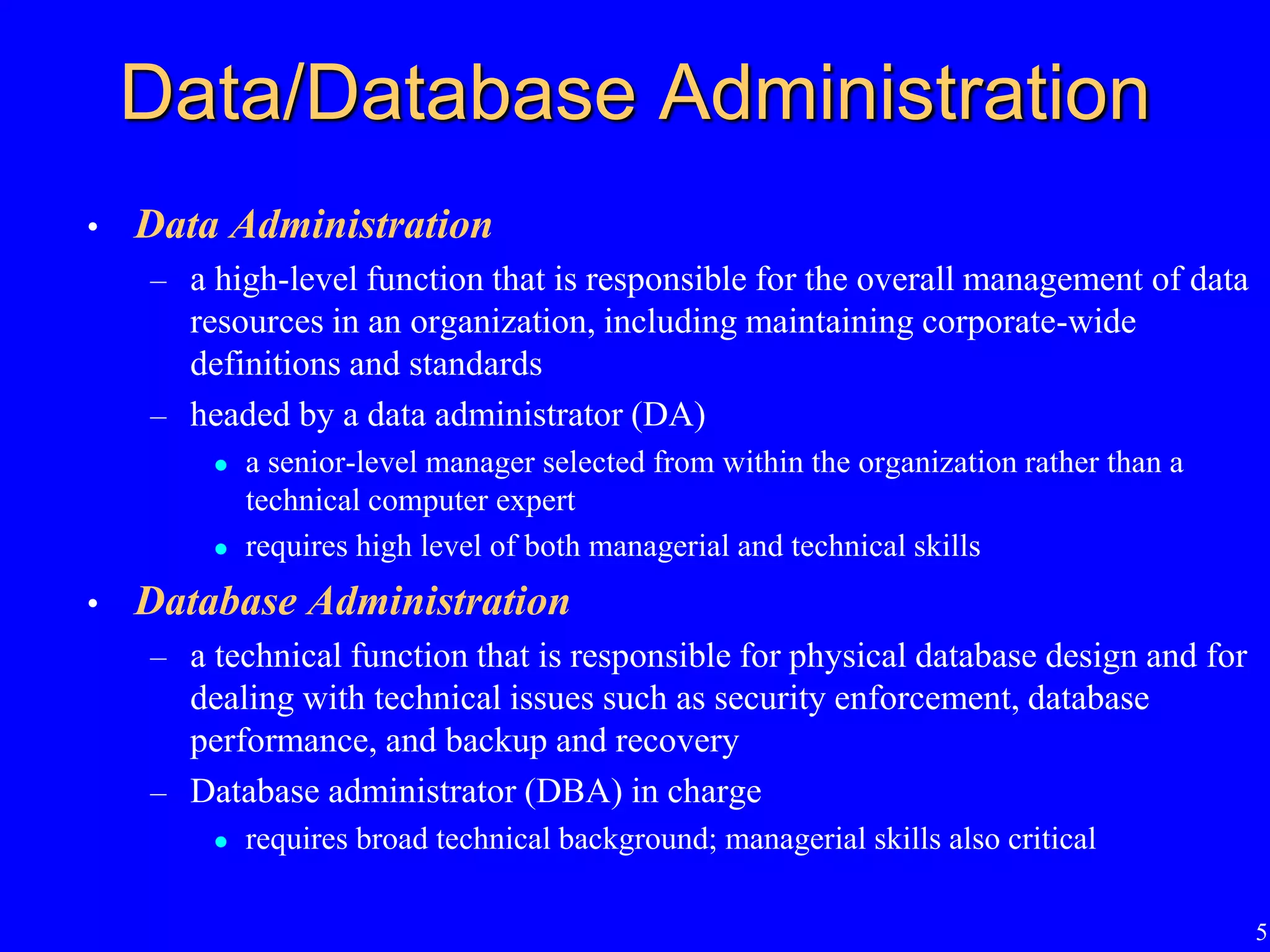
• Data Administration
– a high-level function that is responsible for the overall management of data
resources in an organization, including maintaining corporate-wide
definitions and standards
– headed by a data administrator (DA)
 a senior-level manager selected from within the organization rather than a
technical computer expert
 requires high level of both managerial and technical skills
• Database Administration
– a technical function that is responsible for physical database design and for
dealing with technical issues such as security enforcement, database
performance, and backup and recovery
– Database administrator (DBA) in charge
 requires broad technical background; managerial skills also critical
6
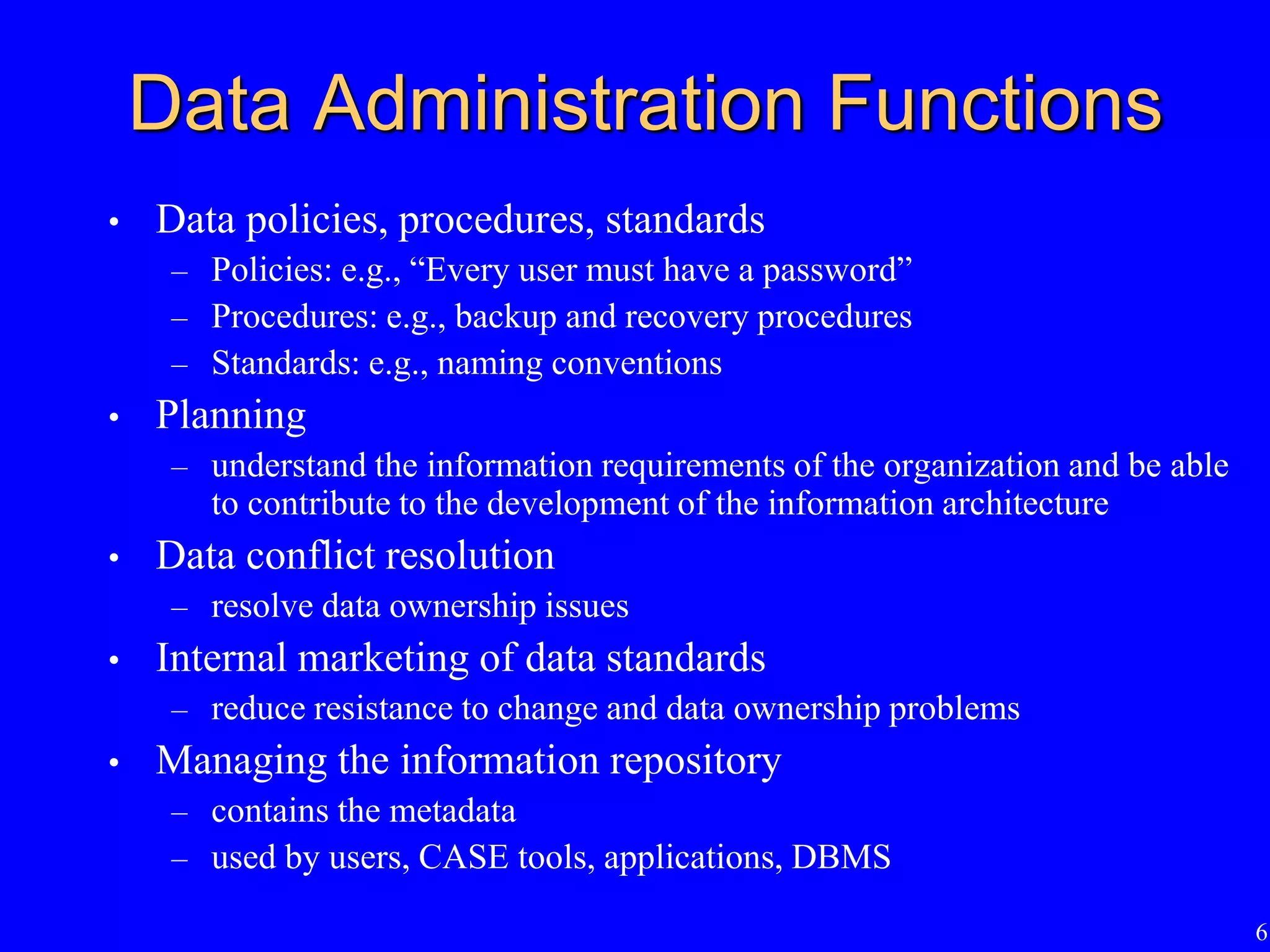
Data Administration Functions
• Data policies, procedures, standards
– Policies: e.g., “Every user must have a password”
– Procedures: e.g., backup and recovery procedures
– Standards: e.g., naming conventions
• Planning
– understand the information requirements of the organization and be able
to contribute to the development of the information architecture
• Data conflict resolution
– resolve data ownership issues
• Internal marketing of data standards
– reduce resistance to change and data ownership problems
• Managing the information repository
– contains the metadata
– used by users, CASE tools, applications, DBMS
7
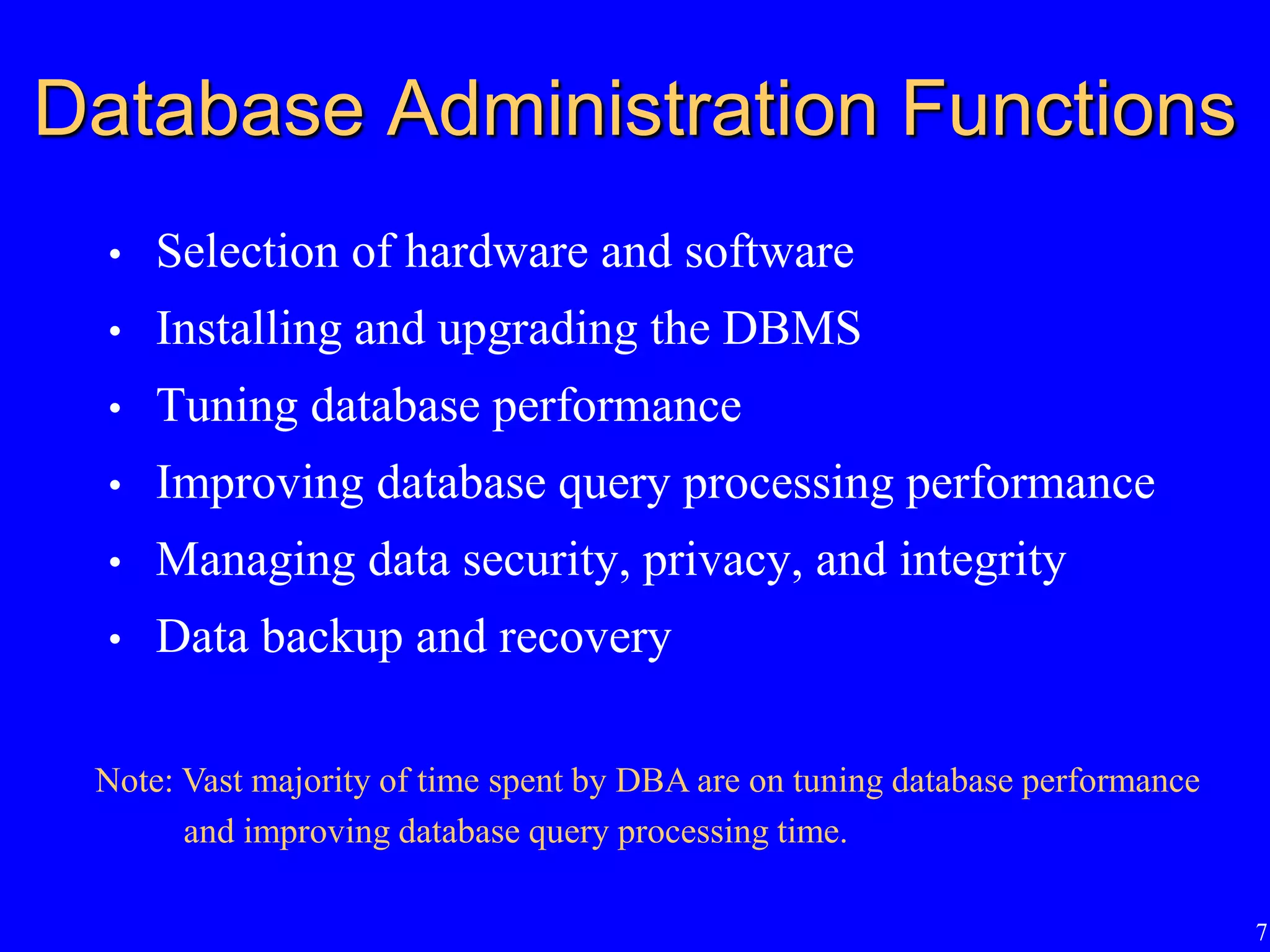
Database Administration Functions
• Selection of hardware and software
• Installing and upgrading the DBMS
• Tuning database performance
• Improving database query processing performance
• Managing data security, privacy, and integrity
• Data backup and recovery
Note: Vast majority of time spent by DBA are on tuning database performance
and improving database query processing time.
8
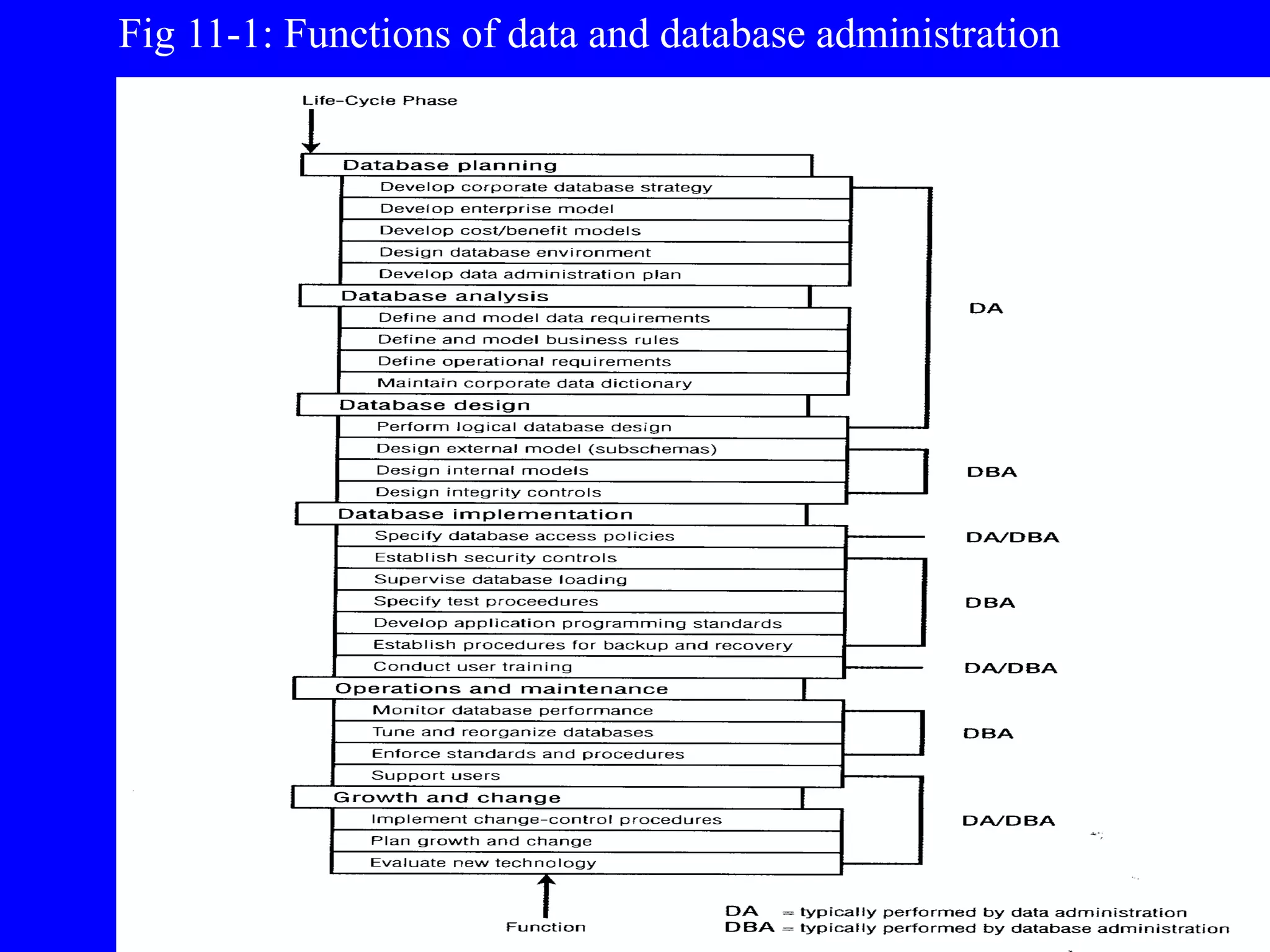
Fig 11-1: Functions of data and database administration
9
Evolving Approach
• Many organizations are combining the data and database
administration functions
– emphasize the capability to build a database quickly, tuning
for maximum performance, and restore to production
quickly when problems develop
– using prototyping approach
• DBA expected to maintain required quality levels while
decreasing time required to build a reliable system
10
Managing Data Security
• Database Security
– protection of the data against accidental or
intentional loss, destruction, or misuse
• Increasingly difficult to manage
– access to data become more open through the
Internet and corporate intranets
– distributed databases located on client/server
architectures rather than mainframes
11
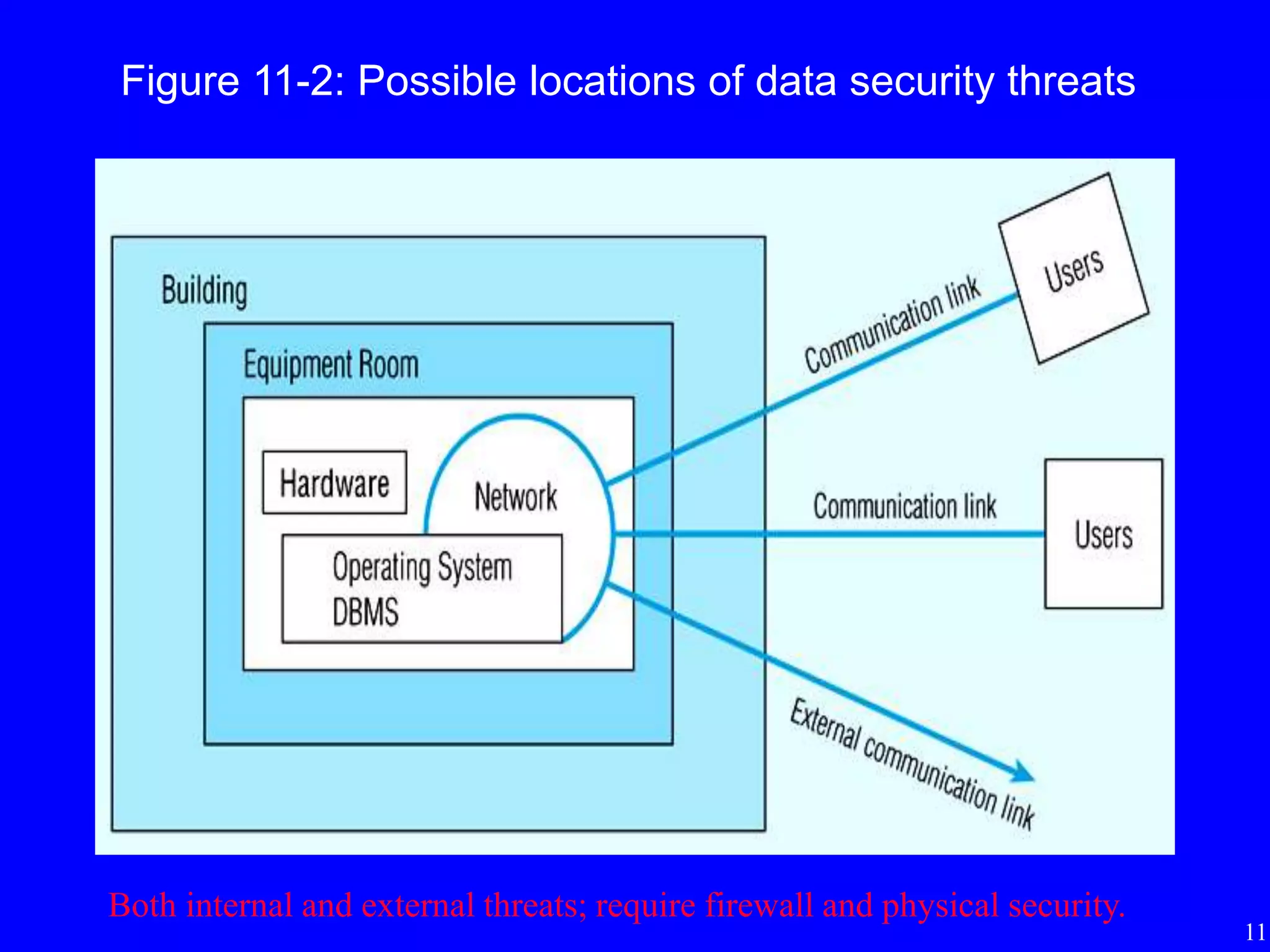
Figure 11-2: Possible locations of data security threats
Both internal and external threats; require firewall and physical security.
12
Threats to Data Security
• Accidental losses
– human error, software failure, hardware failure
• Theft and fraud
• Improper data access
– loss of privacy (personal data)
– loss of confidentiality (corporate data)
• Loss of data integrity
– data becomes invalid or corrupted
• Loss of availability
– sabotage of hardware, networks or applications
– virus attack
13
Data Management Software
Security Features
• Views
- restrict user views of the database; CREATE VIEW
• Integrity controls
- enforced by the DBMS during querying and updating
• Authorization rules
- identify users and restrict the actions they may take against a database
- e.g., GRANT SELECT, UPDATE(price) ON PRODUCT_T TO Smith
• User-defined procedures
- define additional constraints or limitations in using a database
• Encryption procedures
- encode data in an unrecognizable form
• Authentication schemes
- positively identify a person attempting to gain access to a database
• Backup databases
- facilitate recovery procedures
14
Views and Integrity Controls
• Views
– subset of the database that is presented to one or more users
– user can be given access privilege to view without allowing
access privilege to underlying tables
• Integrity Controls
– protect data from unauthorized use and update
– Domains: set allowable values
– Assertions: enforce database conditions or business rules
(CHECK)
– Triggers: more complex than assertions
 e.g. recording an entry in a log which users have done what with
which data
15
Authorization Rules
• Controls incorporated in the DBMS
– restrict access to data
– restrict actions that people may take when they access data
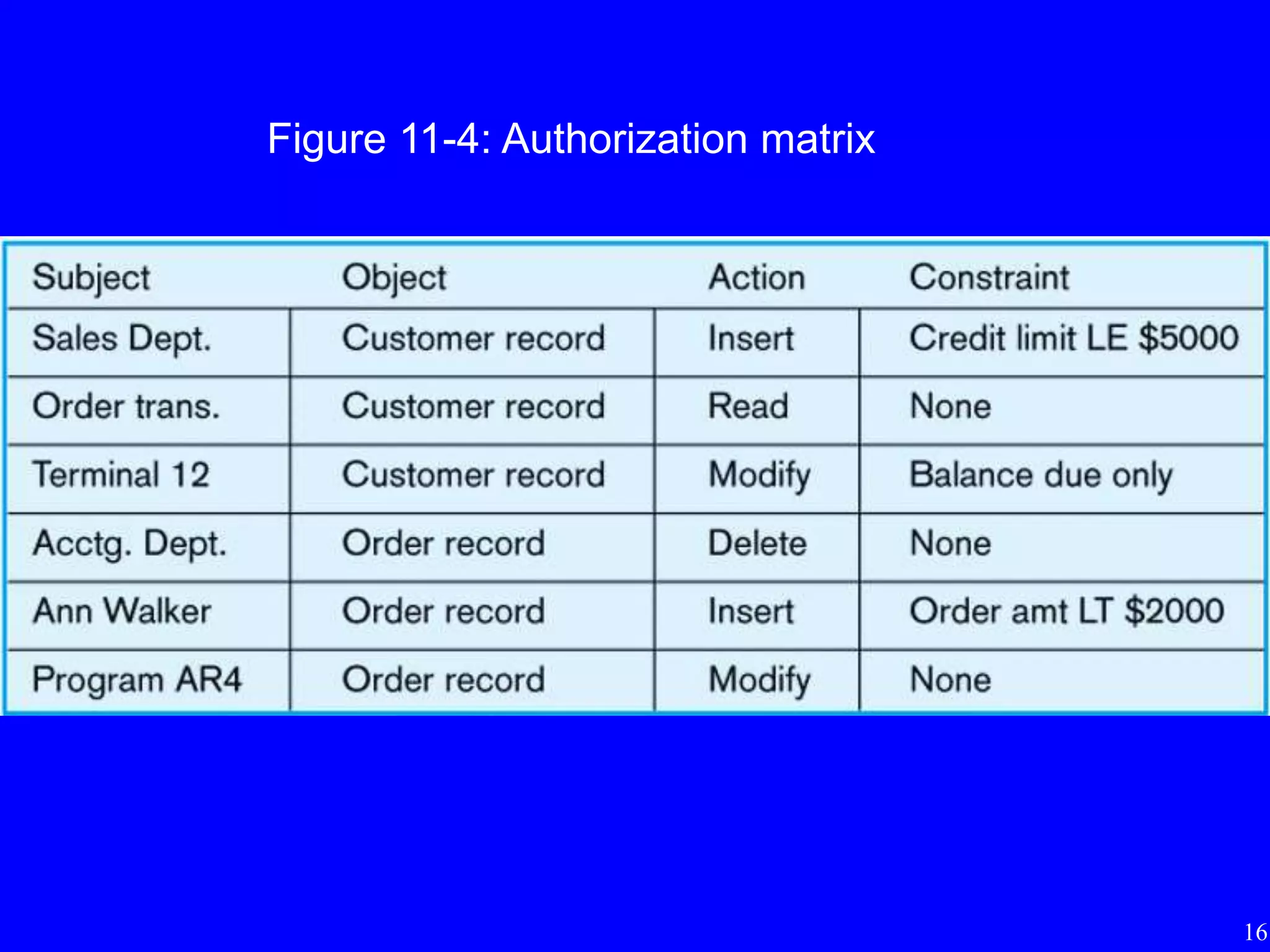
• Authorization matrix include
– subjects, objects, actions, constraints
– can be viewed as metadata and stored in the repository
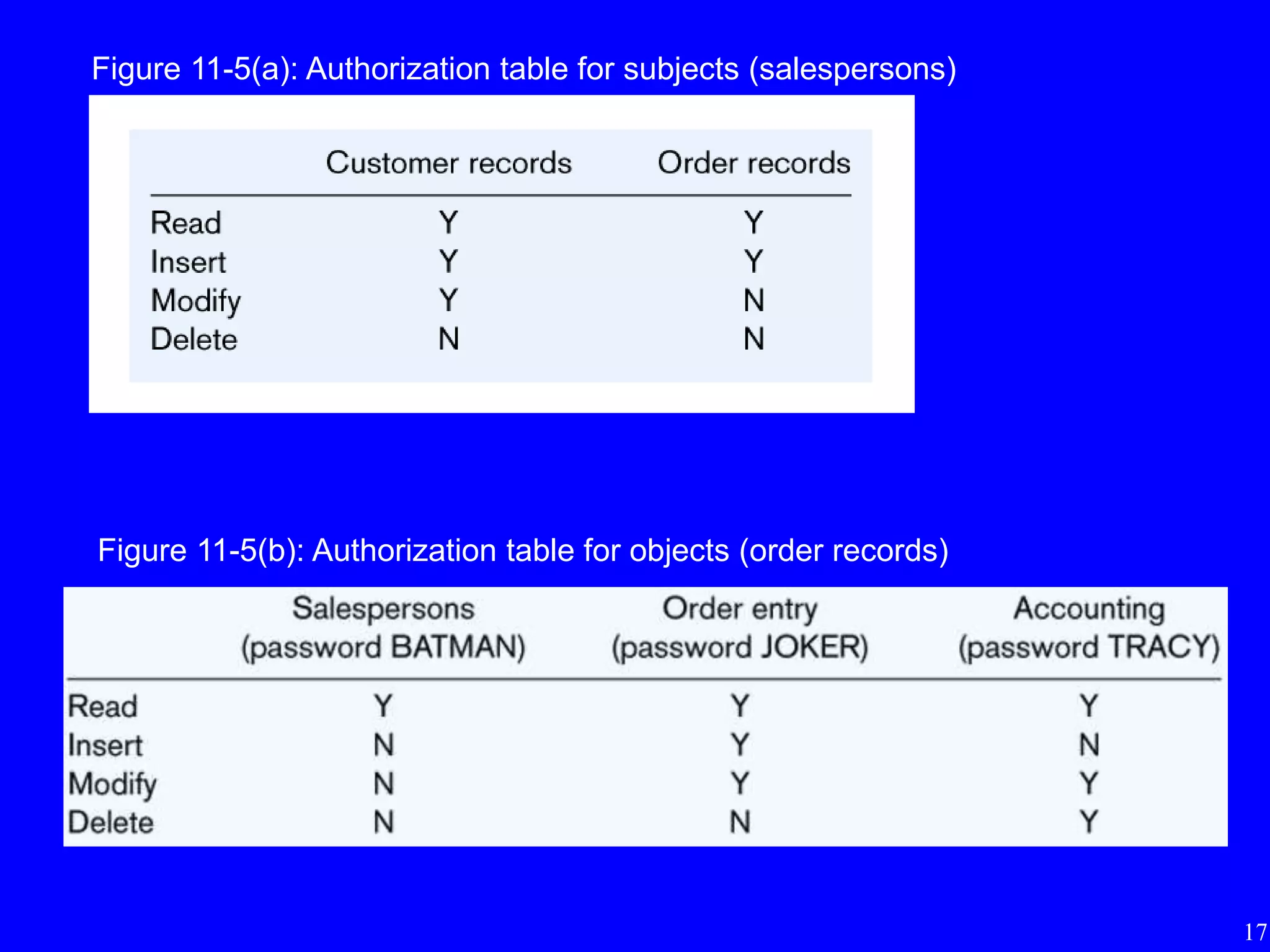
• Authorization tables for subjects
• Authorization tables for objects
16
Figure 11-4: Authorization matrix
17
Figure 11-5(a): Authorization table for subjects (salespersons)
Figure 11-5(b): Authorization table for objects (order records)
18
Authentication Schemes
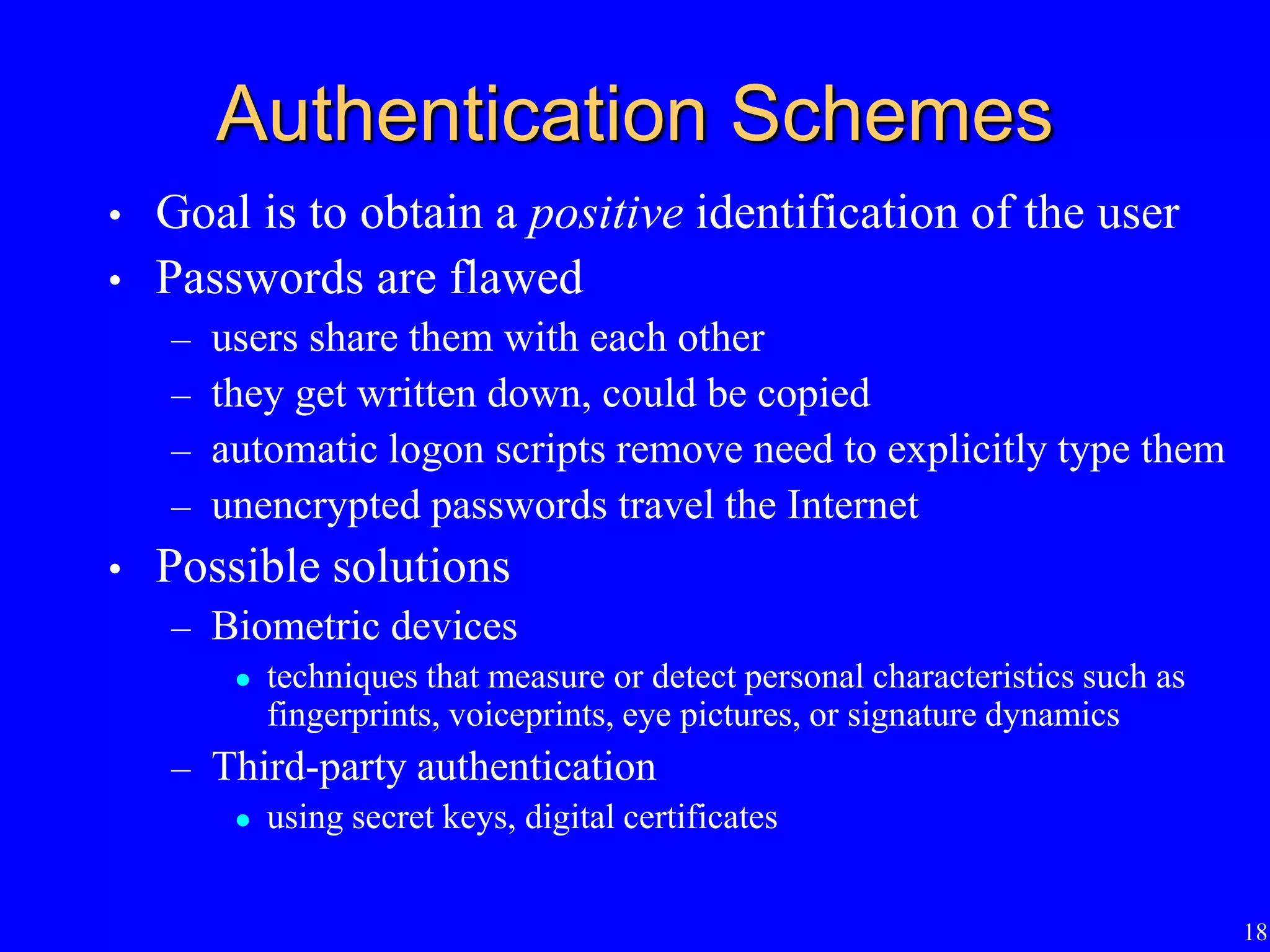
• Goal is to obtain a positive identification of the user
• Passwords are flawed
– users share them with each other
– they get written down, could be copied
– automatic logon scripts remove need to explicitly type them
– unencrypted passwords travel the Internet
• Possible solutions
– Biometric devices
 techniques that measure or detect personal characteristics such as
fingerprints, voiceprints, eye pictures, or signature dynamics
– Third-party authentication
 using secret keys, digital certificates
19
Backing Up Databases
• Database recovery is the mechanism for restoring a
database quickly and accurately after loss or
damage
• Recovery manager
– a module of the DBMS which restores the database to a
correct condition when a failure occurs and which
resumes processing user requests
20
Backup Facilities
• An automatic dump facility that produces backup
copy of the entire database
• Periodic backup
– e.g. nightly, weekly
• Cold backup
– database is shut down during backup
• Hot backup
– selected portion of the database is shut down and backed up
at a given time
– useful when it is a critical system that must always remain
available
• Backups stored in secure, off-site location
21
Journalizing Facilities
• An audit trail of transactions and database changes
• Transaction
– a discrete unit of work that must be completely processed or
not processed at all
– e.g. entering a customer order
• Transaction log
– record of essential data for each transaction processed against
the database
• Database change log
– before- and after-images of records that have been modified
by transactions
 before-image is a copy of record before modification
 after-image is a copy of record after modification
22
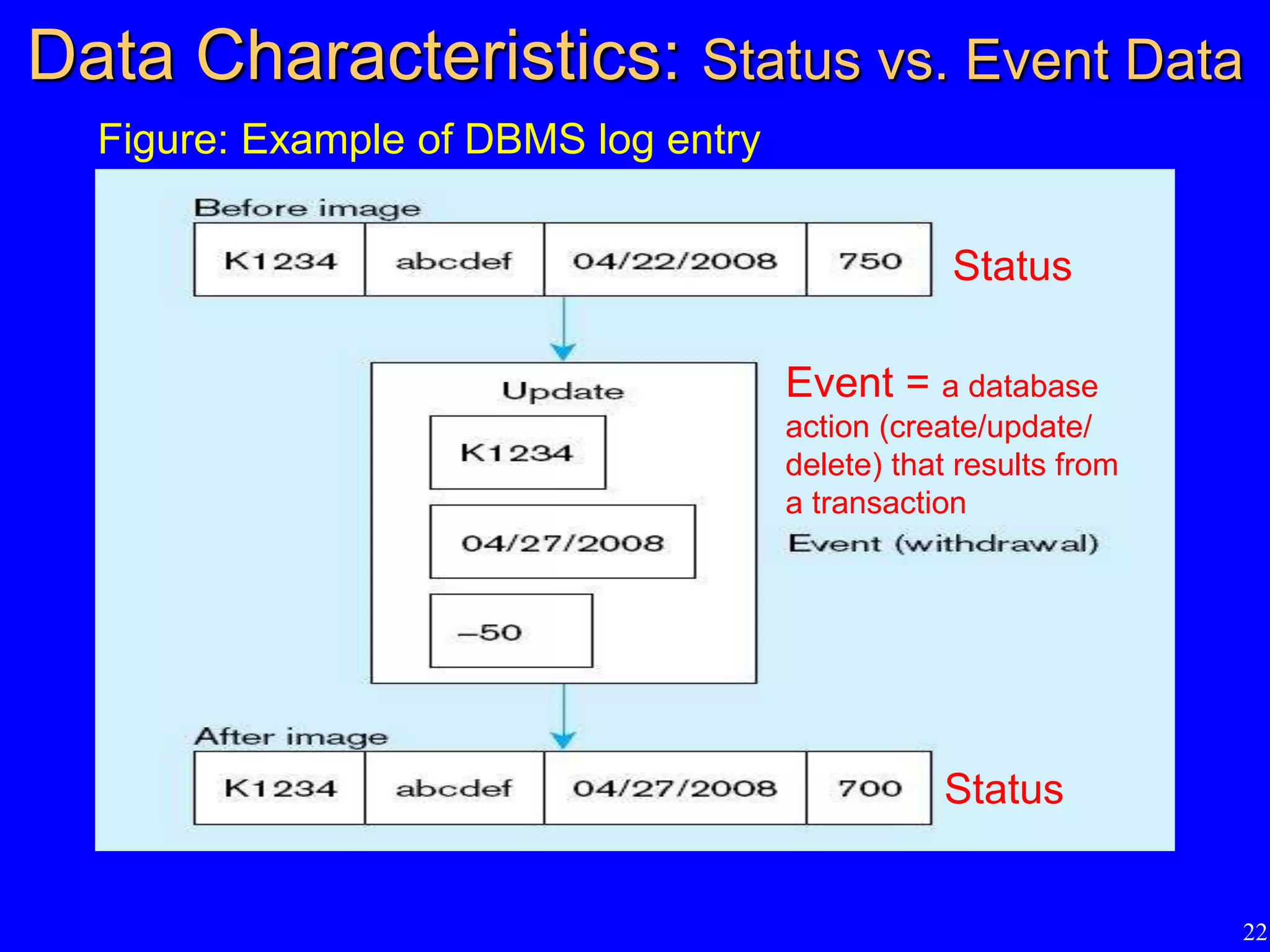
Data Characteristics: Status vs. Event Data
Figure: Example of DBMS log entry
Status
Status
Event = a database
action (create/update/
delete) that results from
a transaction
23
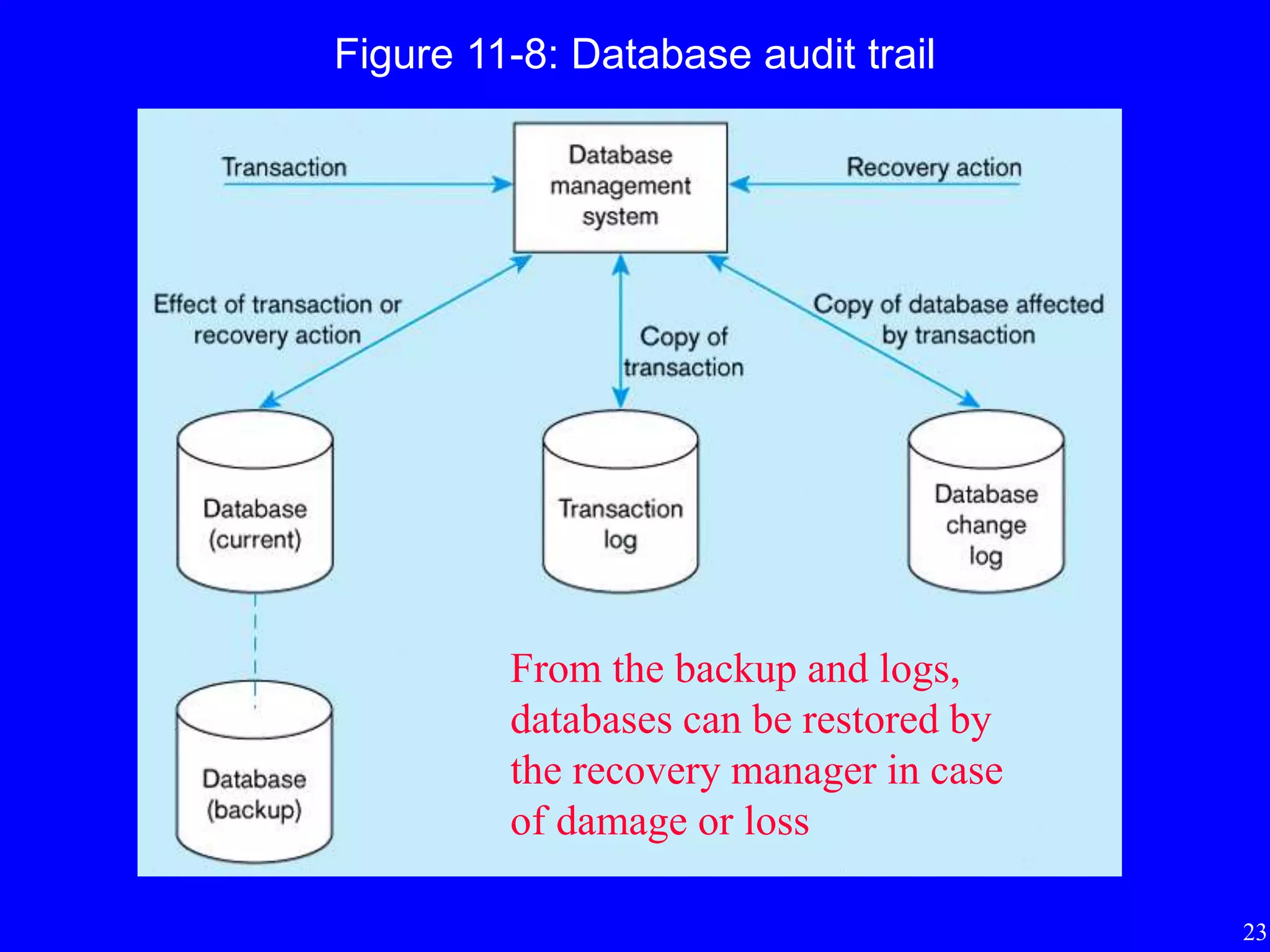
Figure 11-8: Database audit trail
From the backup and logs,
databases can be restored by
the recovery manager in case
of damage or loss
24
Recovery and Restart Procedures
• Switch
• Restore/Rerun
• Backward Recovery (rollback)
• Forward Recovery (rollforward)
25
Recovery and Restart Procedures
• Switch
– Mirrored databases
 at least two copies of the database must be kept and updated
simultaneously
 implemented in RAID 1 systems
– Procedure
 when a disk failure occurs, system switches to mirrored disk
 defective disk can be removed and replaced with a new disk
– Advantages
 no disruption in service; fastest recovery
 popular as cost of secondary storage has dropped
– Disadvantages
 does not protect against lost of power or damage to both databases
26
Recovery and Restart Procedures
• Restore/Rerun
– reprocessing the day’s transactions (up to the point of
failure) against the backup copy of the database
– Advantages
 does not need to create a database change journal
 no special restart procedures required
– Disadvantages
 time to reprocess transactions may be long
– Used only as a last resort
27
Recovery and Restart Procedures
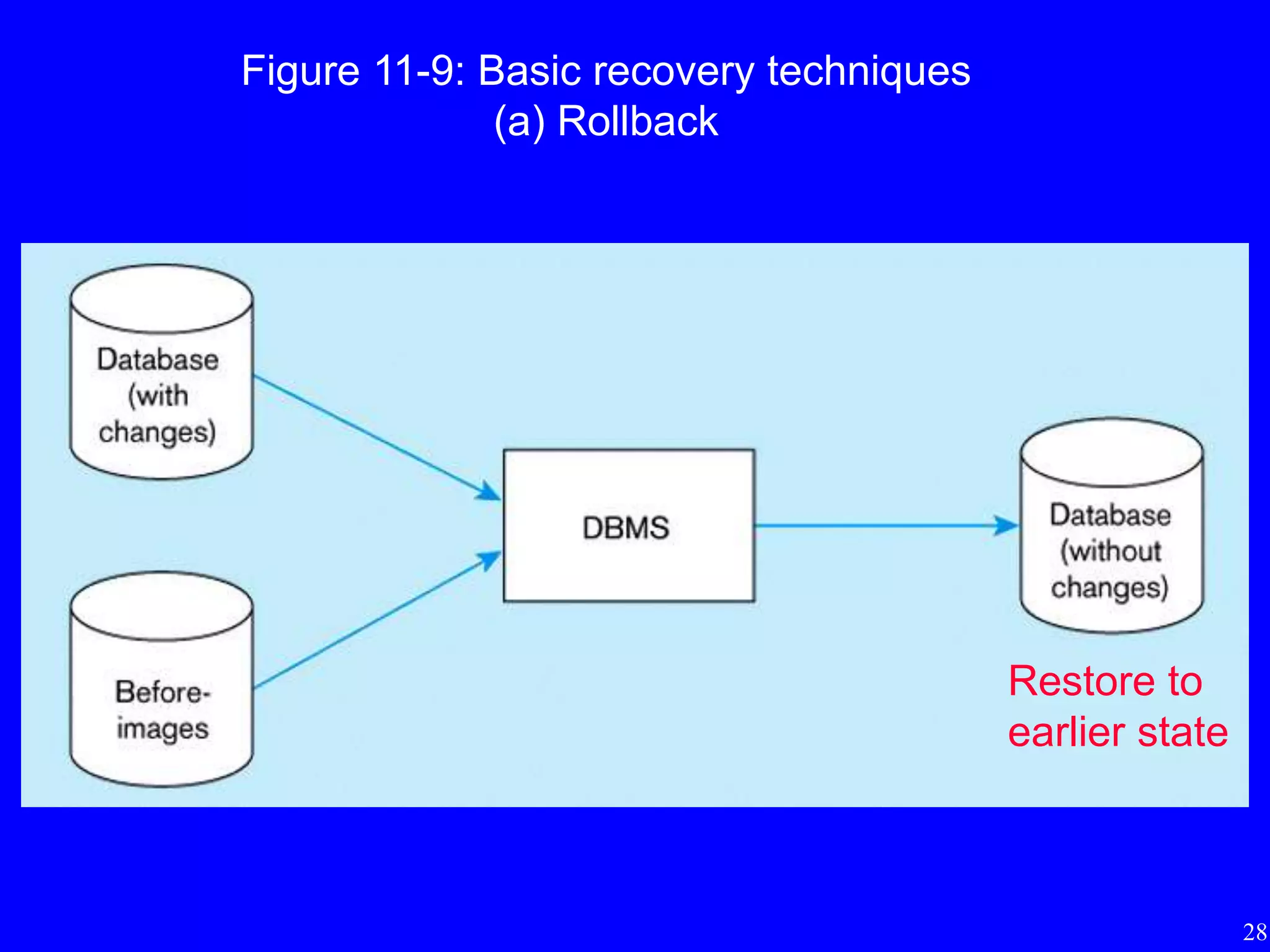
• Backward Recovery (rollback)
– apply before-images of records that have been changed to the database
– restore the database to an earlier state
– used to reverse the changes made by transactions that have been aborted
or terminated abnormally
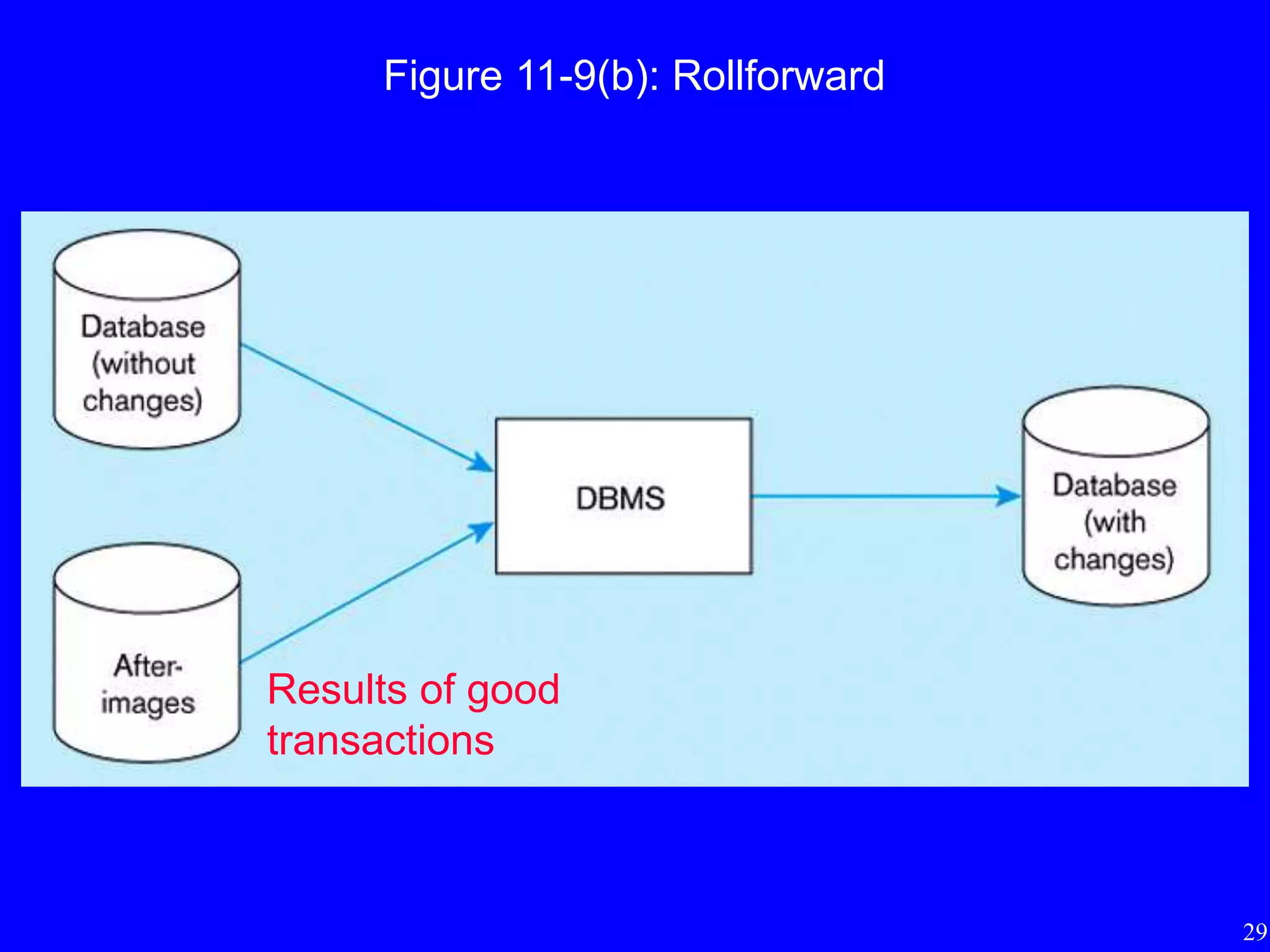
• Forward Recovery (rollforward)
– starts with an earlier copy of the database
– apply after-images (the results of good transactions) to the database
– preferable to restore/rerun
 do not need to reprocess each transaction
 only the most recent after-image of a record need to be applied
28
Figure 11-9: Basic recovery techniques
(a) Rollback
Restore to
earlier state
29
Figure 11-9(b): Rollforward
Results of good
transactions
30
Review Questions
• What are the functions of data administration?
• What are the functions of database administration?
• What are 5 threats to data security?
• How 7 DBMS features can help manage data
security?
• How to backup databases?
• What are 4 recovery and restart procedures?

Data and database administration(database)

  • 1.
    Lecture 9: Data andDatabase Administration ISOM3260, Spring 2014
  • 2.
    2 Where we arenow • Database environment – Introduction to database • Database development process – steps to develop a database • Conceptual data modeling – entity-relationship (ER) diagram; enhanced ER • Logical database design – transforming ER diagram into relations; normalization • Physical database design – technical specifications of the database • Database implementation – Structured Query Language (SQL), Advanced SQL • Advanced topics – data and database administration
  • 3.
    3 Importance of Data/Database Administration •Data are a corporate asset – similar to personnel, equipment, and financial assets • Important assets of the organization need to be managed properly • Data are stored in databases • Hence, effective data and database administration provide support for managerial decision-making
  • 4.
    4 Data/Database Administration • Dataand database administration functions • Managing data security • Backing up databases
  • 5.
    5 Data/Database Administration • DataAdministration – a high-level function that is responsible for the overall management of data resources in an organization, including maintaining corporate-wide definitions and standards – headed by a data administrator (DA)  a senior-level manager selected from within the organization rather than a technical computer expert  requires high level of both managerial and technical skills • Database Administration – a technical function that is responsible for physical database design and for dealing with technical issues such as security enforcement, database performance, and backup and recovery – Database administrator (DBA) in charge  requires broad technical background; managerial skills also critical
  • 6.
    6 Data Administration Functions •Data policies, procedures, standards – Policies: e.g., “Every user must have a password” – Procedures: e.g., backup and recovery procedures – Standards: e.g., naming conventions • Planning – understand the information requirements of the organization and be able to contribute to the development of the information architecture • Data conflict resolution – resolve data ownership issues • Internal marketing of data standards – reduce resistance to change and data ownership problems • Managing the information repository – contains the metadata – used by users, CASE tools, applications, DBMS
  • 7.
    7 Database Administration Functions •Selection of hardware and software • Installing and upgrading the DBMS • Tuning database performance • Improving database query processing performance • Managing data security, privacy, and integrity • Data backup and recovery Note: Vast majority of time spent by DBA are on tuning database performance and improving database query processing time.
  • 8.
    8 Fig 11-1: Functionsof data and database administration
  • 9.
    9 Evolving Approach • Manyorganizations are combining the data and database administration functions – emphasize the capability to build a database quickly, tuning for maximum performance, and restore to production quickly when problems develop – using prototyping approach • DBA expected to maintain required quality levels while decreasing time required to build a reliable system
  • 10.
    10 Managing Data Security •Database Security – protection of the data against accidental or intentional loss, destruction, or misuse • Increasingly difficult to manage – access to data become more open through the Internet and corporate intranets – distributed databases located on client/server architectures rather than mainframes
  • 11.
    11 Figure 11-2: Possiblelocations of data security threats Both internal and external threats; require firewall and physical security.
  • 12.
    12 Threats to DataSecurity • Accidental losses – human error, software failure, hardware failure • Theft and fraud • Improper data access – loss of privacy (personal data) – loss of confidentiality (corporate data) • Loss of data integrity – data becomes invalid or corrupted • Loss of availability – sabotage of hardware, networks or applications – virus attack
  • 13.
    13 Data Management Software SecurityFeatures • Views - restrict user views of the database; CREATE VIEW • Integrity controls - enforced by the DBMS during querying and updating • Authorization rules - identify users and restrict the actions they may take against a database - e.g., GRANT SELECT, UPDATE(price) ON PRODUCT_T TO Smith • User-defined procedures - define additional constraints or limitations in using a database • Encryption procedures - encode data in an unrecognizable form • Authentication schemes - positively identify a person attempting to gain access to a database • Backup databases - facilitate recovery procedures
  • 14.
    14 Views and IntegrityControls • Views – subset of the database that is presented to one or more users – user can be given access privilege to view without allowing access privilege to underlying tables • Integrity Controls – protect data from unauthorized use and update – Domains: set allowable values – Assertions: enforce database conditions or business rules (CHECK) – Triggers: more complex than assertions  e.g. recording an entry in a log which users have done what with which data
  • 15.
    15 Authorization Rules • Controlsincorporated in the DBMS – restrict access to data – restrict actions that people may take when they access data • Authorization matrix include – subjects, objects, actions, constraints – can be viewed as metadata and stored in the repository • Authorization tables for subjects • Authorization tables for objects
  • 16.
  • 17.
    17 Figure 11-5(a): Authorizationtable for subjects (salespersons) Figure 11-5(b): Authorization table for objects (order records)
  • 18.
    18 Authentication Schemes • Goalis to obtain a positive identification of the user • Passwords are flawed – users share them with each other – they get written down, could be copied – automatic logon scripts remove need to explicitly type them – unencrypted passwords travel the Internet • Possible solutions – Biometric devices  techniques that measure or detect personal characteristics such as fingerprints, voiceprints, eye pictures, or signature dynamics – Third-party authentication  using secret keys, digital certificates
  • 19.
    19 Backing Up Databases •Database recovery is the mechanism for restoring a database quickly and accurately after loss or damage • Recovery manager – a module of the DBMS which restores the database to a correct condition when a failure occurs and which resumes processing user requests
  • 20.
    20 Backup Facilities • Anautomatic dump facility that produces backup copy of the entire database • Periodic backup – e.g. nightly, weekly • Cold backup – database is shut down during backup • Hot backup – selected portion of the database is shut down and backed up at a given time – useful when it is a critical system that must always remain available • Backups stored in secure, off-site location
  • 21.
    21 Journalizing Facilities • Anaudit trail of transactions and database changes • Transaction – a discrete unit of work that must be completely processed or not processed at all – e.g. entering a customer order • Transaction log – record of essential data for each transaction processed against the database • Database change log – before- and after-images of records that have been modified by transactions  before-image is a copy of record before modification  after-image is a copy of record after modification
  • 22.
    22 Data Characteristics: Statusvs. Event Data Figure: Example of DBMS log entry Status Status Event = a database action (create/update/ delete) that results from a transaction
  • 23.
    23 Figure 11-8: Databaseaudit trail From the backup and logs, databases can be restored by the recovery manager in case of damage or loss
  • 24.
    24 Recovery and RestartProcedures • Switch • Restore/Rerun • Backward Recovery (rollback) • Forward Recovery (rollforward)
  • 25.
    25 Recovery and RestartProcedures • Switch – Mirrored databases  at least two copies of the database must be kept and updated simultaneously  implemented in RAID 1 systems – Procedure  when a disk failure occurs, system switches to mirrored disk  defective disk can be removed and replaced with a new disk – Advantages  no disruption in service; fastest recovery  popular as cost of secondary storage has dropped – Disadvantages  does not protect against lost of power or damage to both databases
  • 26.
    26 Recovery and RestartProcedures • Restore/Rerun – reprocessing the day’s transactions (up to the point of failure) against the backup copy of the database – Advantages  does not need to create a database change journal  no special restart procedures required – Disadvantages  time to reprocess transactions may be long – Used only as a last resort
  • 27.
    27 Recovery and RestartProcedures • Backward Recovery (rollback) – apply before-images of records that have been changed to the database – restore the database to an earlier state – used to reverse the changes made by transactions that have been aborted or terminated abnormally • Forward Recovery (rollforward) – starts with an earlier copy of the database – apply after-images (the results of good transactions) to the database – preferable to restore/rerun  do not need to reprocess each transaction  only the most recent after-image of a record need to be applied
  • 28.
    28 Figure 11-9: Basicrecovery techniques (a) Rollback Restore to earlier state
  • 29.
  • 30.
    30 Review Questions • Whatare the functions of data administration? • What are the functions of database administration? • What are 5 threats to data security? • How 7 DBMS features can help manage data security? • How to backup databases? • What are 4 recovery and restart procedures?