Chapter 11 : Windows Vista
This chapter is based on
 Tanenbaum OS/3E book slides
 And also from Chapter 21 slides of the
book:
“Operating Systems (Third Edition)”, Deitel,
Deitel and Choffnes Prentice Hall, 2004
1
Chapter 11 : Windows Vista
 History
 Programming Windows Vista
 Operating System Structure
 Process and Thread Management
 Thread Scheduling
 Memory Management
 Input/Output in Vista
 NTFS
 Security
 Intercrosses Communication
2
Figure 11-1. Major releases in the history of Microsoft operating systems for
desktop PCs.
History (1)
3
History (2)
 1976 Bill Gates and Paul Allen founded Microsoft
 1981 MS-DOS 1.0 (Known as CP/M)
 16-bit addressing
 8 KB memory resident code
 1985 Windows 1.0
 First Microsoft GUI operating system
 1990 Windows 3.1 and Windows for Workgroups 3.1
 Added network support (LANs)
 1992 Windows NT 3.1
 NTFS
 32-bit addressing
 1995 Windows 95
 32-bit addressing
 DirectX
 Simulates direct access to hardware through API
4
History (3)
 1996 Windows NT 4.0
 Moved graphics driver into kernel
 1998 Windows 98
 Bundled Internet Explorer into operating system
 2000 Windows ME
 Does not boot in DOS mode
 2000 Windows 2000
 Active Directory
 Database of users, computers and services
 2001 Windows XP
 64-bit support
 2006 Windows Vista
5
2000s: NT-based Windows (1)
Figure 11-2. DEC Operating Systems developed by Dave Cutler
 NT was inspired from VMS operating system
 DEC (Digital Equipment Company), a minicomputer maker
was sold in 1998 to Compaq which was bought by HP
 NT was also jointly developed as OS/2 for IBM
6
•
2000s: NT-based Windows (2)
Figure 11-3. The Win32 API allows programs to run on almost all versions of
Windows.
7
Figure 11-4. Split client and server releases of
Windows.
2000s: NT-based Windows (3)
8
Figure 11-5. Comparison of lines of code for selected
kernel-mode modules in Linux and Windows (from Mark
Russinovich, co-author of Microsoft Windows Internals).
Windows Vista
9
Programming Windows Vista
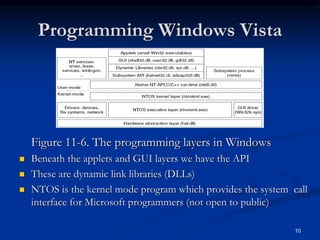
Figure 11-6. The programming layers in Windows
 Beneath the applets and GUI layers we have the API
 These are dynamic link libraries (DLLs)
 NTOS is the kernel mode program which provides the system call
interface for Microsoft programmers (not open to public)
10
Figure 11-8. Common categories of kernel-mode object types.
The Native NT Application
Programming Interface (1)
11
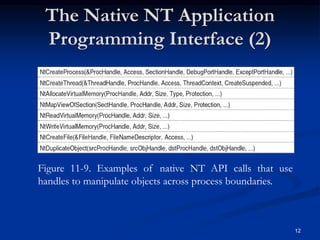
Figure 11-9. Examples of native NT API calls that use
handles to manipulate objects across process boundaries.
The Native NT Application
Programming Interface (2)
12
The Win32 Application
Programming Interface
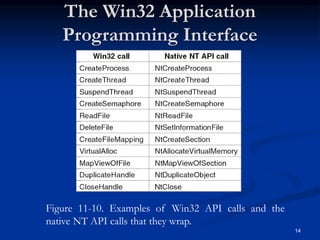
 Win32 API – interface for developing applications
 Fully documented and publicly disclosed
 The API is a library of procedures that either wrap (use and call
somehow) the native NT system calls or do the work themselves
 Two special execution environments are also provided
 WOW32 (Windows-on-Windows) which is used on 32-bit x86 systems to
run 16-bit Windows 3.x applications by mapping system calls and
parameters between the 16-bit and 32-bit worlds
 WOW64 does the same thing for 32-bit applications to work on x64
systems
 Previously there were OS2 and POSIX environments but not anymore
13
Figure 11-10. Examples of Win32 API calls and the
native NT API calls that they wrap.
The Win32 Application
Programming Interface
14
The Windows Registry (1)
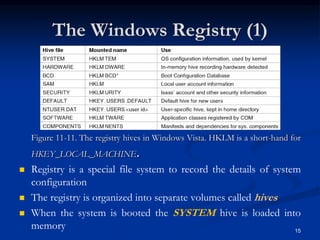
Figure 11-11. The registry hives in Windows Vista. HKLM is a short-hand for
HKEY_LOCAL_MACHINE.
 Registry is a special file system to record the details of system
configuration
 The registry is organized into separate volumes called hives
 When the system is booted the SYSTEM hive is loaded into
memory 15
The Windows Registry (2)
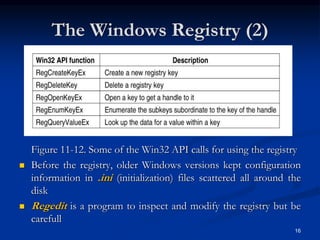
Figure 11-12. Some of the Win32 API calls for using the registry
 Before the registry, older Windows versions kept configuration
information in .ini (initialization) files scattered all around the
disk
 Regedit is a program to inspect and modify the registry but be
carefull
16
Figure 11-13. Windows kernel-mode organization.
Operating System Structure
17
Operating System Kernel
 The system library (ntdll.dll) executing at user-mode contains
compiler run-time and low-level libraries
 NTOS kernel layer: thread scheduling, synchronization
abstractions, trap handlers, interrupts etc.
 NTOS executive layer contains the services such as management
services for virtual memory, cache, I/O etc.
 HAL (Hardware Abstraction Layer)
 Interacts with hardware, drives device components on main
board
 Abstracts hardware specifics that differ between systems of
the same architecture (such as different CPUs)
 Device drivers are used for any kernel-mode activities which are
not a part of NTOS or HAL (such as file system, network
protocols and antivirus software)
18
Booting Windows Vista
 On power on, BIOS loads a small bootstrap loader found at the
beginning of the disk drive partitions
 Bootstrap loader loads BootMgr program from the root
directory
 If hibernated or in stand-by mode WinResume.exe is loaded
 If not Winload.exe is loaded for a fresh boot. This program
loads:
 Ntoskrnl.exe
 Hal.dll
 SYSTEM hive
 Win32k.sys (kernel-mode parts of Win32 subsystem
 Other boot drivers
19
20
Process and Thread Management
 Processes (containers for threads. PEB- Process
Environment Block)
 Threads (Basic scheduling unit. Normally executes in
user-mode. TEB – Thread Environment Block)
 Jobs
 Group processes together as a unit
 Manage resources consumed by these processes (e.g., CPU
time, memory consumption, etc.)
 Terminate all processes at once
21
Process and Thread Organization
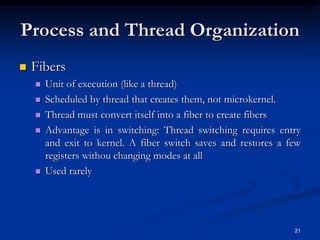
 Fibers
 Unit of execution (like a thread)
 Scheduled by thread that creates them, not microkernel.
 Thread must convert itself into a fiber to create fibers
 Advantage is in switching: Thread switching requires entry
and exit to kernel. A fiber switch saves and restores a few
registers withou changing modes at all
 Used rarely
22
Process and Thread Organization
 Thread pools
 Worker threads that sleep waiting for work items
 Each process gets a thread pool
 Useful in certain situations
 Fulfilling client requests
 Asynchronous I/O
 Combining several threads that sleep most of the time
 Memory overhead and less control for the
programmer
Figure 11-24. The relationship between jobs, processes, threads and
fibers. Jobs and fibers are optional; not all processes are in jobs or contain
fibers.
Processes and Threads
23
Figure 11-25. Basic concepts used for CPU and resource management.
24
Thread Synchronization
 Dispatcher objects
 Event object
 Signaled when event occurs;
 unsignaled either when one thread awakens or all threads
awaken (choice determined by event’s creator)
 Mutex object
 One owner
 Acquire – unsignaled; release – signaled
 Semaphore object
 Counting semaphore
 Signaled while count > 0; unsignaled when count 0
 Can be acquired multiple times by same thread
25
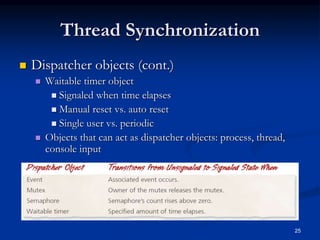
Thread Synchronization
 Dispatcher objects (cont.)
 Waitable timer object
 Signaled when time elapses
 Manual reset vs. auto reset
 Single user vs. periodic
 Objects that can act as dispatcher objects: process, thread,
console input
26
Thread Synchronization
 Kernel mode locks
 Spin lock
 Queued spin lock
 More efficient than spin lock
 Guarantees FIFO ordering of requests
 Fast mutex
 Like a mutex, but more efficient
 Cannot specify maximum wait time
 Reacquisition by owning thread causes deadlock
 Kernel mode locks (cont.)
 Executive resource lock
 One lock holder in exclusive mode
 Many lock holders in shared mode
 Good for readers and writers
27
Thread Synchronization
 Other synchronization tools
 Critical section object
 Like a mutex, but only for threads of the same process
 Faster than a mutex
 No maximum wait time
 Timer-queue timer
 Waitable timer objects combined with a thread pool
 Interlocked variable access
 Atomic operations on variables
 Interlocked singly-linked lists
 Atomic insertion and deletion
Figure 11-26. Some of the Win32 calls for
managing processes, threads, and fibers.
Synchronization
28
29
Thread Scheduling (1)
 Thread States
 Initialized
 Ready
 Standby
 Running
 Waiting
 Transition
 Terminated
 Unknown
Thread Scheduling (2)
 Windows kernel does not have a central
scheduling thread. Instead, when a thread can
not run any more, the thread enters kernel-mode
and calls into the scheduler itself to see which
thread to switch to
30
Thread Scheduling (3)
 The following conditions cause the currently running thread to
execute the scheduler code:
 The currently running thread blocks on a semaphore,
mutex, event, I/O, etc.
 The thread signals an object (e.g., does an up on a
semaphore or causes an event to be signaled).
 The quantum expires.
 The scheduler is also called under two other conditions:
 An I/O operation completes.
 A timed wait expires.
31
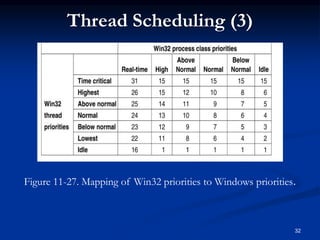
Figure 11-27. Mapping of Win32 priorities to Windows priorities.
Thread Scheduling (3)
32
Thread Scheduling (4)
Figure 11-28. Windows Vista supports 32 priorities for
threads.
 Round-robin for highest-priority non-empty ready queue
33
Memory Management (1)
Figure 11-30. Virtual address space layout for three
user processes on the x86. The white areas are private
per process. The shaded areas are shared among all
processes. 34
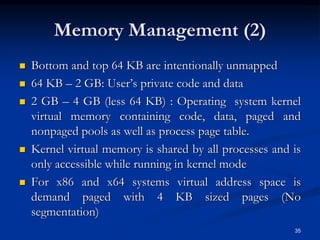
Memory Management (2)
 Bottom and top 64 KB are intentionally unmapped
 64 KB – 2 GB: User’s private code and data
 2 GB – 4 GB (less 64 KB) : Operating system kernel
virtual memory containing code, data, paged and
nonpaged pools as well as process page table.
 Kernel virtual memory is shared by all processes and is
only accessible while running in kernel mode
 For x86 and x64 systems virtual address space is
demand paged with 4 KB sized pages (No
segmentation)
35
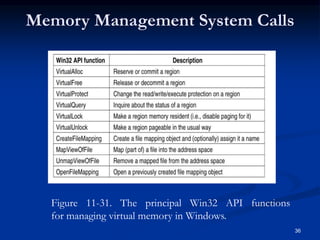
Figure 11-31. The principal Win32 API functions
for managing virtual memory in Windows.
Memory Management System Calls
36
Figure 11-32. Mapped regions with their shadow pages on
disk. The lib.dll file mapped into two address spaces at same
time.
Implementation of Memory Management
37
Page Fault Handling (1)
Figure 11-33. A page table entry (PTE) for a mapped page on the (a) Intel x86
and (b) AMD x64 architectures.
 D and A bits are used to implement a LRU (Least
Recently Used) style page replacement algorithm
38
Page Fault Handling (2)
 Each page fault can be considered as being in
one of five categories:
 The page referenced is not committed (program error –
page has not been assigned to a process or in memory).
 Attempted access to a page in violation of the permissions
(program error).
 A shared copy-on-write page was about to be modified.
 The stack needs to grow.
 The page referenced is committed but not currently
mapped in (normal page fault in a paged system).
39
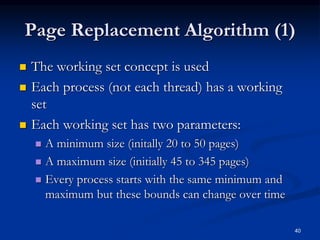
Page Replacement Algorithm (1)
 The working set concept is used
 Each process (not each thread) has a working
set
 Each working set has two parameters:
 A minimum size (initally 20 to 50 pages)
 A maximum size (initially 45 to 345 pages)
 Every process starts with the same minimum and
maximum but these bounds can change over time
40
Page Replacement Algorithm (2)
 Working sets only come into play when physical
memory gets low
 Otherwise, processes can exceed the maximum of their
working set
 The working set manager runs periodically based on a
timer and does the following:
 When lots of memory is available, it uses the access bits to
compute an age for each page
 When memory gets tight, the working set is fixed and oldest
pages are replaced when a new page is needed
 When memory is tight, the working sets are trimmed below their
maximum by removing the oldest pages
41
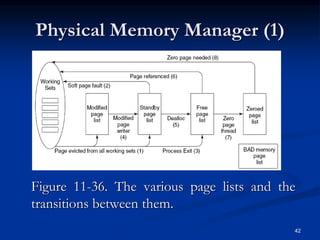
Physical Memory Manager (1)
Figure 11-36. The various page lists and the
transitions between them.
42
Physical Memory Manager (2)
1. Pages removed from a working set are put on
either modified page list or standby page list
(pages which are not modified)
2. The pages on these two lists are in memory so
if a page fault occurs and one of these pages is
needed, they are put back to the working set
with no disk I/O (A soft page fault)
3. When a process exits all nonshared pages of
the working set, modified pages and standby
pages are returned to the free page list
43
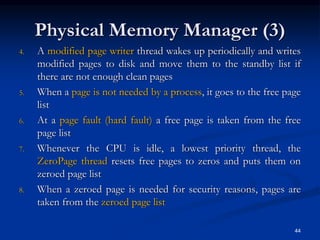
Physical Memory Manager (3)
4. A modified page writer thread wakes up periodically and writes
modified pages to disk and move them to the standby list if
there are not enough clean pages
5. When a page is not needed by a process, it goes to the free page
list
6. At a page fault (hard fault) a free page is taken from the free
page list
7. Whenever the CPU is idle, a lowest priority thread, the
ZeroPage thread resets free pages to zeros and puts them on
zeroed page list
8. When a zeroed page is needed for security reasons, pages are
taken from the zeroed page list
44
Input/Output in Vista
 The I/O system consists of
 Plug-and-play services
 The power manager
 The Input/Output manager
 Device drivers
45
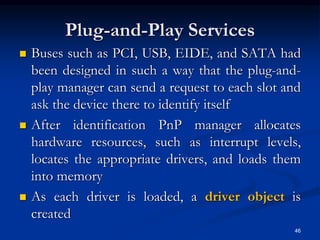
Plug-and-Play Services
 Buses such as PCI, USB, EIDE, and SATA had
been designed in such a way that the plug-and-
play manager can send a request to each slot and
ask the device there to identify itself
 After identification PnP manager allocates
hardware resources, such as interrupt levels,
locates the appropriate drivers, and loads them
into memory
 As each driver is loaded, a driver object is
created
46
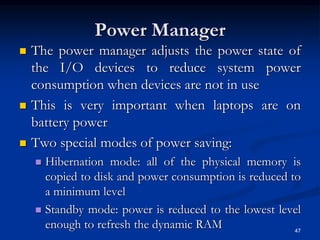
Power Manager
 The power manager adjusts the power state of
the I/O devices to reduce system power
consumption when devices are not in use
 This is very important when laptops are on
battery power
 Two special modes of power saving:
 Hibernation mode: all of the physical memory is
copied to disk and power consumption is reduced to
a minimum level
 Standby mode: power is reduced to the lowest level
enough to refresh the dynamic RAM 47
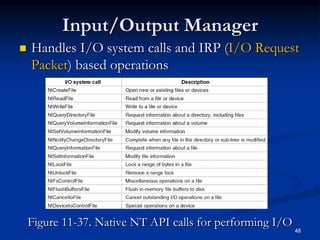
Input/Output Manager
 Handles I/O system calls and IRP (I/O Request
Packet) based operations
Figure 11-37. Native NT API calls for performing I/O
48
Device Drivers
 All drivers must conform to the WDM
(Windows Driver Model) standarts for
compatibility reasons with the older windows
versions
 Devices in Windows are represented by device
objects which are used to represent
 Hardware, such as buses
 Software abstractions like file systems, network
protocol engines and kernel extensions, like antivirus
filter drivers
49
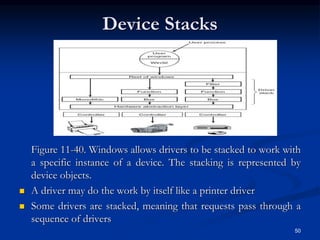
Device Stacks
Figure 11-40. Windows allows drivers to be stacked to work with
a specific instance of a device. The stacking is represented by
device objects.
 A driver may do the work by itself like a printer driver
 Some drivers are stacked, meaning that requests pass through a
sequence of drivers
50
51
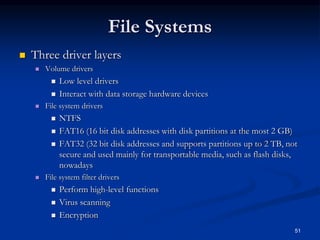
File Systems
 Three driver layers
 Volume drivers
 Low level drivers
 Interact with data storage hardware devices
 File system drivers
 NTFS
 FAT16 (16 bit disk addresses with disk partitions at the most 2 GB)
 FAT32 (32 bit disk addresses and supports partitions up to 2 TB, not
secure and used mainly for transportable media, such as flash disks,
nowadays
 File system filter drivers
 Perform high-level functions
 Virus scanning
 Encryption
52
File System Drivers
 Typical Disk I/O
 User-mode thread passes file handle to object
manager
 Object manager passes file pointer to file system
driver
 File system driver passes request to device driver
stack
 Eventually request reaches disk
 Disk performs requested I/O
53
NTFS
 NTFS overview
 Windows NT file system
 More secure than FAT
 Scales well to large disks
 Cluster size depends on disk size
 64-bit file pointers
 Can address up to 16 exabytes of disk
 Multiple data streams
 Compression and encryption
Powers of 10 & 2 - Side Remark
Prefix Symbol Power of 10 Power of 2
Kilo K 103 210
Mega M 106 220
Giga G 109 230
Tera T 1012 240
Peta P 1015 250
Exa E 1018 260
Zetta Z 1021 270
Yotta Y 1024 280
54
64 bits for addressing = 16 Exa bytes
File System Structure
 Each NTFS volume (e.g., disk partition)
contains files, directories, bitmaps, and other
data structures
 Each volume is organized as a linear sequence of
blocks (called as clusters) usually 4 KB in size
(can be 512 bytes to 64 KB) and pointed by 64
bit pointers
 The main data structure in each volume is the
MFT (Master File Table) which is a linear
sequence of 1 KB records
55
NTFS Master File Table (1)
 Each MFT record describes one file or directory and
contains file attributes (file name, block addresses,
timestamps etc.)
 The MFT is a file itself and can be placed anywhere
within the volume thus eliminating the problem of
defective sectors in the first track
 MFT can grow dynamically up to a maximum size of
248 records
 The first 16 MFT records are reserved for NTFS
metadata files which contain volume related system
data to describe the volume
56
NTFS Master File Table (2)
57
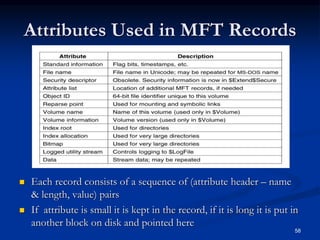
Attributes Used in MFT Records
 Each record consists of a sequence of (attribute header – name
& length, value) pairs
 If attribute is small it is kept in the record, if it is long it is put in
another block on disk and pointed here
58
MFT Record for A File
Figure 11-43. An MFT record for a three-run, nine-block stream.
 File fits one MFT record
 Header (0,9): Offset of the first block of the stream (0) and offset
of the first block not covered by the record (9)
59
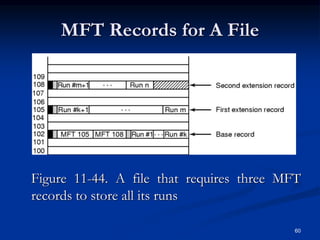
MFT Records for A File
Figure 11-44. A file that requires three MFT
records to store all its runs
60
An MFT Record for A Small
Directory
61
An MFT Record for A Large
Directory
 Large directories are arranged as B trees
 Multiple directory entries can point to the same file
 File deleted only when an attribute (hard_link) drops to
zero
62
63
File Compression
 Transforms file to take less space on disk
 Lempel-Ziv Compression Algorithm
 Transparent
 Applications access files using standard API calls
 System compresses and decompresses files
 Applications unaware if file compressed
 The compression algorithm considers 16
consecutive blocks
 If the compressed form takes less than 16 blocks
then the compression is applied else not
64
File Encryption
 Protects files from illicit access
 Encryption performed in compression units
 Keys
 Public key / private key encryption
 Recovery key given to system administrator
 In case user forgets password
 Encrypted versions of keys stored on disk
 Decrypted keys stored in non-paged pool
Security
 Security properties inherited from the original
security design of NT:
 Secure login with anti-spoofing measures (prevents
login screen to be imitated)
 Discretionary access controls (owner has the rights)
 Privileged access controls (superuser can override)
 Address space protection per process
 New pages must be zeroed before being mapped in
 Security auditing (log of several security related
events)
65
66
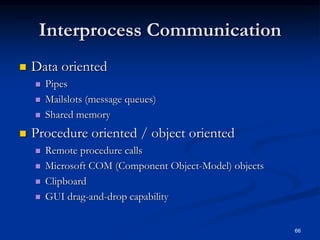
Interprocess Communication
 Data oriented
 Pipes
 Mailslots (message queues)
 Shared memory
 Procedure oriented / object oriented
 Remote procedure calls
 Microsoft COM (Component Object-Model) objects
 Clipboard
 GUI drag-and-drop capability
67
Pipes
 Manipulated with file system calls
 Read
 Write
 Open
 Pipe server
 Process that creates pipe
 Pipe clients
 Processes that connect to pipe
 Modes
 Read: pipe server receives data from pipe clients
 Write: pipe server sends data to pipe clients
 Duplex: pipe server sends and receives data
68
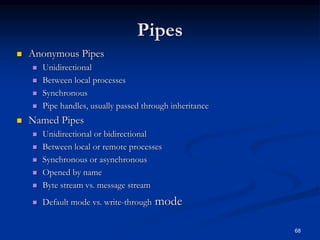
Pipes
 Anonymous Pipes
 Unidirectional
 Between local processes
 Synchronous
 Pipe handles, usually passed through inheritance
 Named Pipes
 Unidirectional or bidirectional
 Between local or remote processes
 Synchronous or asynchronous
 Opened by name
 Byte stream vs. message stream
 Default mode vs. write-through mode
69
Mailslots
 Mailslot server: creates mailslot
 Mailslot clients: send messages to mailslot
 Communication
 Unidirectional
 No acknowledgement of receipt
 Local or remote communication
 Implemented as files
 Two modes
 Datagram: for small messages
 Server Message Block (SMB): for large messages
70
Other Features
 Cookie management
 Certificates
 Trusted Internet Zones
 Automatic Update
 Notifies users of security patches
 Can download and install patches automatically

Case Study 2: WINDOWS VISTA

  • 1.
    Chapter 11 :Windows Vista This chapter is based on  Tanenbaum OS/3E book slides  And also from Chapter 21 slides of the book: “Operating Systems (Third Edition)”, Deitel, Deitel and Choffnes Prentice Hall, 2004 1
  • 2.
    Chapter 11 :Windows Vista  History  Programming Windows Vista  Operating System Structure  Process and Thread Management  Thread Scheduling  Memory Management  Input/Output in Vista  NTFS  Security  Intercrosses Communication 2
  • 3.
    Figure 11-1. Majorreleases in the history of Microsoft operating systems for desktop PCs. History (1) 3
  • 4.
    History (2)  1976Bill Gates and Paul Allen founded Microsoft  1981 MS-DOS 1.0 (Known as CP/M)  16-bit addressing  8 KB memory resident code  1985 Windows 1.0  First Microsoft GUI operating system  1990 Windows 3.1 and Windows for Workgroups 3.1  Added network support (LANs)  1992 Windows NT 3.1  NTFS  32-bit addressing  1995 Windows 95  32-bit addressing  DirectX  Simulates direct access to hardware through API 4
  • 5.
    History (3)  1996Windows NT 4.0  Moved graphics driver into kernel  1998 Windows 98  Bundled Internet Explorer into operating system  2000 Windows ME  Does not boot in DOS mode  2000 Windows 2000  Active Directory  Database of users, computers and services  2001 Windows XP  64-bit support  2006 Windows Vista 5
  • 6.
    2000s: NT-based Windows(1) Figure 11-2. DEC Operating Systems developed by Dave Cutler  NT was inspired from VMS operating system  DEC (Digital Equipment Company), a minicomputer maker was sold in 1998 to Compaq which was bought by HP  NT was also jointly developed as OS/2 for IBM 6
  • 7.
    • 2000s: NT-based Windows(2) Figure 11-3. The Win32 API allows programs to run on almost all versions of Windows. 7
  • 8.
    Figure 11-4. Splitclient and server releases of Windows. 2000s: NT-based Windows (3) 8
  • 9.
    Figure 11-5. Comparisonof lines of code for selected kernel-mode modules in Linux and Windows (from Mark Russinovich, co-author of Microsoft Windows Internals). Windows Vista 9
  • 10.
    Programming Windows Vista Figure11-6. The programming layers in Windows  Beneath the applets and GUI layers we have the API  These are dynamic link libraries (DLLs)  NTOS is the kernel mode program which provides the system call interface for Microsoft programmers (not open to public) 10
  • 11.
    Figure 11-8. Commoncategories of kernel-mode object types. The Native NT Application Programming Interface (1) 11
  • 12.
    Figure 11-9. Examplesof native NT API calls that use handles to manipulate objects across process boundaries. The Native NT Application Programming Interface (2) 12
  • 13.
    The Win32 Application ProgrammingInterface  Win32 API – interface for developing applications  Fully documented and publicly disclosed  The API is a library of procedures that either wrap (use and call somehow) the native NT system calls or do the work themselves  Two special execution environments are also provided  WOW32 (Windows-on-Windows) which is used on 32-bit x86 systems to run 16-bit Windows 3.x applications by mapping system calls and parameters between the 16-bit and 32-bit worlds  WOW64 does the same thing for 32-bit applications to work on x64 systems  Previously there were OS2 and POSIX environments but not anymore 13
  • 14.
    Figure 11-10. Examplesof Win32 API calls and the native NT API calls that they wrap. The Win32 Application Programming Interface 14
  • 15.
    The Windows Registry(1) Figure 11-11. The registry hives in Windows Vista. HKLM is a short-hand for HKEY_LOCAL_MACHINE.  Registry is a special file system to record the details of system configuration  The registry is organized into separate volumes called hives  When the system is booted the SYSTEM hive is loaded into memory 15
  • 16.
    The Windows Registry(2) Figure 11-12. Some of the Win32 API calls for using the registry  Before the registry, older Windows versions kept configuration information in .ini (initialization) files scattered all around the disk  Regedit is a program to inspect and modify the registry but be carefull 16
  • 17.
    Figure 11-13. Windowskernel-mode organization. Operating System Structure 17
  • 18.
    Operating System Kernel The system library (ntdll.dll) executing at user-mode contains compiler run-time and low-level libraries  NTOS kernel layer: thread scheduling, synchronization abstractions, trap handlers, interrupts etc.  NTOS executive layer contains the services such as management services for virtual memory, cache, I/O etc.  HAL (Hardware Abstraction Layer)  Interacts with hardware, drives device components on main board  Abstracts hardware specifics that differ between systems of the same architecture (such as different CPUs)  Device drivers are used for any kernel-mode activities which are not a part of NTOS or HAL (such as file system, network protocols and antivirus software) 18
  • 19.
    Booting Windows Vista On power on, BIOS loads a small bootstrap loader found at the beginning of the disk drive partitions  Bootstrap loader loads BootMgr program from the root directory  If hibernated or in stand-by mode WinResume.exe is loaded  If not Winload.exe is loaded for a fresh boot. This program loads:  Ntoskrnl.exe  Hal.dll  SYSTEM hive  Win32k.sys (kernel-mode parts of Win32 subsystem  Other boot drivers 19
  • 20.
    20 Process and ThreadManagement  Processes (containers for threads. PEB- Process Environment Block)  Threads (Basic scheduling unit. Normally executes in user-mode. TEB – Thread Environment Block)  Jobs  Group processes together as a unit  Manage resources consumed by these processes (e.g., CPU time, memory consumption, etc.)  Terminate all processes at once
  • 21.
    21 Process and ThreadOrganization  Fibers  Unit of execution (like a thread)  Scheduled by thread that creates them, not microkernel.  Thread must convert itself into a fiber to create fibers  Advantage is in switching: Thread switching requires entry and exit to kernel. A fiber switch saves and restores a few registers withou changing modes at all  Used rarely
  • 22.
    22 Process and ThreadOrganization  Thread pools  Worker threads that sleep waiting for work items  Each process gets a thread pool  Useful in certain situations  Fulfilling client requests  Asynchronous I/O  Combining several threads that sleep most of the time  Memory overhead and less control for the programmer
  • 23.
    Figure 11-24. Therelationship between jobs, processes, threads and fibers. Jobs and fibers are optional; not all processes are in jobs or contain fibers. Processes and Threads 23 Figure 11-25. Basic concepts used for CPU and resource management.
  • 24.
    24 Thread Synchronization  Dispatcherobjects  Event object  Signaled when event occurs;  unsignaled either when one thread awakens or all threads awaken (choice determined by event’s creator)  Mutex object  One owner  Acquire – unsignaled; release – signaled  Semaphore object  Counting semaphore  Signaled while count > 0; unsignaled when count 0  Can be acquired multiple times by same thread
  • 25.
    25 Thread Synchronization  Dispatcherobjects (cont.)  Waitable timer object  Signaled when time elapses  Manual reset vs. auto reset  Single user vs. periodic  Objects that can act as dispatcher objects: process, thread, console input
  • 26.
    26 Thread Synchronization  Kernelmode locks  Spin lock  Queued spin lock  More efficient than spin lock  Guarantees FIFO ordering of requests  Fast mutex  Like a mutex, but more efficient  Cannot specify maximum wait time  Reacquisition by owning thread causes deadlock  Kernel mode locks (cont.)  Executive resource lock  One lock holder in exclusive mode  Many lock holders in shared mode  Good for readers and writers
  • 27.
    27 Thread Synchronization  Othersynchronization tools  Critical section object  Like a mutex, but only for threads of the same process  Faster than a mutex  No maximum wait time  Timer-queue timer  Waitable timer objects combined with a thread pool  Interlocked variable access  Atomic operations on variables  Interlocked singly-linked lists  Atomic insertion and deletion
  • 28.
    Figure 11-26. Someof the Win32 calls for managing processes, threads, and fibers. Synchronization 28
  • 29.
    29 Thread Scheduling (1) Thread States  Initialized  Ready  Standby  Running  Waiting  Transition  Terminated  Unknown
  • 30.
    Thread Scheduling (2) Windows kernel does not have a central scheduling thread. Instead, when a thread can not run any more, the thread enters kernel-mode and calls into the scheduler itself to see which thread to switch to 30
  • 31.
    Thread Scheduling (3) The following conditions cause the currently running thread to execute the scheduler code:  The currently running thread blocks on a semaphore, mutex, event, I/O, etc.  The thread signals an object (e.g., does an up on a semaphore or causes an event to be signaled).  The quantum expires.  The scheduler is also called under two other conditions:  An I/O operation completes.  A timed wait expires. 31
  • 32.
    Figure 11-27. Mappingof Win32 priorities to Windows priorities. Thread Scheduling (3) 32
  • 33.
    Thread Scheduling (4) Figure11-28. Windows Vista supports 32 priorities for threads.  Round-robin for highest-priority non-empty ready queue 33
  • 34.
    Memory Management (1) Figure11-30. Virtual address space layout for three user processes on the x86. The white areas are private per process. The shaded areas are shared among all processes. 34
  • 35.
    Memory Management (2) Bottom and top 64 KB are intentionally unmapped  64 KB – 2 GB: User’s private code and data  2 GB – 4 GB (less 64 KB) : Operating system kernel virtual memory containing code, data, paged and nonpaged pools as well as process page table.  Kernel virtual memory is shared by all processes and is only accessible while running in kernel mode  For x86 and x64 systems virtual address space is demand paged with 4 KB sized pages (No segmentation) 35
  • 36.
    Figure 11-31. Theprincipal Win32 API functions for managing virtual memory in Windows. Memory Management System Calls 36
  • 37.
    Figure 11-32. Mappedregions with their shadow pages on disk. The lib.dll file mapped into two address spaces at same time. Implementation of Memory Management 37
  • 38.
    Page Fault Handling(1) Figure 11-33. A page table entry (PTE) for a mapped page on the (a) Intel x86 and (b) AMD x64 architectures.  D and A bits are used to implement a LRU (Least Recently Used) style page replacement algorithm 38
  • 39.
    Page Fault Handling(2)  Each page fault can be considered as being in one of five categories:  The page referenced is not committed (program error – page has not been assigned to a process or in memory).  Attempted access to a page in violation of the permissions (program error).  A shared copy-on-write page was about to be modified.  The stack needs to grow.  The page referenced is committed but not currently mapped in (normal page fault in a paged system). 39
  • 40.
    Page Replacement Algorithm(1)  The working set concept is used  Each process (not each thread) has a working set  Each working set has two parameters:  A minimum size (initally 20 to 50 pages)  A maximum size (initially 45 to 345 pages)  Every process starts with the same minimum and maximum but these bounds can change over time 40
  • 41.
    Page Replacement Algorithm(2)  Working sets only come into play when physical memory gets low  Otherwise, processes can exceed the maximum of their working set  The working set manager runs periodically based on a timer and does the following:  When lots of memory is available, it uses the access bits to compute an age for each page  When memory gets tight, the working set is fixed and oldest pages are replaced when a new page is needed  When memory is tight, the working sets are trimmed below their maximum by removing the oldest pages 41
  • 42.
    Physical Memory Manager(1) Figure 11-36. The various page lists and the transitions between them. 42
  • 43.
    Physical Memory Manager(2) 1. Pages removed from a working set are put on either modified page list or standby page list (pages which are not modified) 2. The pages on these two lists are in memory so if a page fault occurs and one of these pages is needed, they are put back to the working set with no disk I/O (A soft page fault) 3. When a process exits all nonshared pages of the working set, modified pages and standby pages are returned to the free page list 43
  • 44.
    Physical Memory Manager(3) 4. A modified page writer thread wakes up periodically and writes modified pages to disk and move them to the standby list if there are not enough clean pages 5. When a page is not needed by a process, it goes to the free page list 6. At a page fault (hard fault) a free page is taken from the free page list 7. Whenever the CPU is idle, a lowest priority thread, the ZeroPage thread resets free pages to zeros and puts them on zeroed page list 8. When a zeroed page is needed for security reasons, pages are taken from the zeroed page list 44
  • 45.
    Input/Output in Vista The I/O system consists of  Plug-and-play services  The power manager  The Input/Output manager  Device drivers 45
  • 46.
    Plug-and-Play Services  Busessuch as PCI, USB, EIDE, and SATA had been designed in such a way that the plug-and- play manager can send a request to each slot and ask the device there to identify itself  After identification PnP manager allocates hardware resources, such as interrupt levels, locates the appropriate drivers, and loads them into memory  As each driver is loaded, a driver object is created 46
  • 47.
    Power Manager  Thepower manager adjusts the power state of the I/O devices to reduce system power consumption when devices are not in use  This is very important when laptops are on battery power  Two special modes of power saving:  Hibernation mode: all of the physical memory is copied to disk and power consumption is reduced to a minimum level  Standby mode: power is reduced to the lowest level enough to refresh the dynamic RAM 47
  • 48.
    Input/Output Manager  HandlesI/O system calls and IRP (I/O Request Packet) based operations Figure 11-37. Native NT API calls for performing I/O 48
  • 49.
    Device Drivers  Alldrivers must conform to the WDM (Windows Driver Model) standarts for compatibility reasons with the older windows versions  Devices in Windows are represented by device objects which are used to represent  Hardware, such as buses  Software abstractions like file systems, network protocol engines and kernel extensions, like antivirus filter drivers 49
  • 50.
    Device Stacks Figure 11-40.Windows allows drivers to be stacked to work with a specific instance of a device. The stacking is represented by device objects.  A driver may do the work by itself like a printer driver  Some drivers are stacked, meaning that requests pass through a sequence of drivers 50
  • 51.
    51 File Systems  Threedriver layers  Volume drivers  Low level drivers  Interact with data storage hardware devices  File system drivers  NTFS  FAT16 (16 bit disk addresses with disk partitions at the most 2 GB)  FAT32 (32 bit disk addresses and supports partitions up to 2 TB, not secure and used mainly for transportable media, such as flash disks, nowadays  File system filter drivers  Perform high-level functions  Virus scanning  Encryption
  • 52.
    52 File System Drivers Typical Disk I/O  User-mode thread passes file handle to object manager  Object manager passes file pointer to file system driver  File system driver passes request to device driver stack  Eventually request reaches disk  Disk performs requested I/O
  • 53.
    53 NTFS  NTFS overview Windows NT file system  More secure than FAT  Scales well to large disks  Cluster size depends on disk size  64-bit file pointers  Can address up to 16 exabytes of disk  Multiple data streams  Compression and encryption
  • 54.
    Powers of 10& 2 - Side Remark Prefix Symbol Power of 10 Power of 2 Kilo K 103 210 Mega M 106 220 Giga G 109 230 Tera T 1012 240 Peta P 1015 250 Exa E 1018 260 Zetta Z 1021 270 Yotta Y 1024 280 54 64 bits for addressing = 16 Exa bytes
  • 55.
    File System Structure Each NTFS volume (e.g., disk partition) contains files, directories, bitmaps, and other data structures  Each volume is organized as a linear sequence of blocks (called as clusters) usually 4 KB in size (can be 512 bytes to 64 KB) and pointed by 64 bit pointers  The main data structure in each volume is the MFT (Master File Table) which is a linear sequence of 1 KB records 55
  • 56.
    NTFS Master FileTable (1)  Each MFT record describes one file or directory and contains file attributes (file name, block addresses, timestamps etc.)  The MFT is a file itself and can be placed anywhere within the volume thus eliminating the problem of defective sectors in the first track  MFT can grow dynamically up to a maximum size of 248 records  The first 16 MFT records are reserved for NTFS metadata files which contain volume related system data to describe the volume 56
  • 57.
    NTFS Master FileTable (2) 57
  • 58.
    Attributes Used inMFT Records  Each record consists of a sequence of (attribute header – name & length, value) pairs  If attribute is small it is kept in the record, if it is long it is put in another block on disk and pointed here 58
  • 59.
    MFT Record forA File Figure 11-43. An MFT record for a three-run, nine-block stream.  File fits one MFT record  Header (0,9): Offset of the first block of the stream (0) and offset of the first block not covered by the record (9) 59
  • 60.
    MFT Records forA File Figure 11-44. A file that requires three MFT records to store all its runs 60
  • 61.
    An MFT Recordfor A Small Directory 61
  • 62.
    An MFT Recordfor A Large Directory  Large directories are arranged as B trees  Multiple directory entries can point to the same file  File deleted only when an attribute (hard_link) drops to zero 62
  • 63.
    63 File Compression  Transformsfile to take less space on disk  Lempel-Ziv Compression Algorithm  Transparent  Applications access files using standard API calls  System compresses and decompresses files  Applications unaware if file compressed  The compression algorithm considers 16 consecutive blocks  If the compressed form takes less than 16 blocks then the compression is applied else not
  • 64.
    64 File Encryption  Protectsfiles from illicit access  Encryption performed in compression units  Keys  Public key / private key encryption  Recovery key given to system administrator  In case user forgets password  Encrypted versions of keys stored on disk  Decrypted keys stored in non-paged pool
  • 65.
    Security  Security propertiesinherited from the original security design of NT:  Secure login with anti-spoofing measures (prevents login screen to be imitated)  Discretionary access controls (owner has the rights)  Privileged access controls (superuser can override)  Address space protection per process  New pages must be zeroed before being mapped in  Security auditing (log of several security related events) 65
  • 66.
    66 Interprocess Communication  Dataoriented  Pipes  Mailslots (message queues)  Shared memory  Procedure oriented / object oriented  Remote procedure calls  Microsoft COM (Component Object-Model) objects  Clipboard  GUI drag-and-drop capability
  • 67.
    67 Pipes  Manipulated withfile system calls  Read  Write  Open  Pipe server  Process that creates pipe  Pipe clients  Processes that connect to pipe  Modes  Read: pipe server receives data from pipe clients  Write: pipe server sends data to pipe clients  Duplex: pipe server sends and receives data
  • 68.
    68 Pipes  Anonymous Pipes Unidirectional  Between local processes  Synchronous  Pipe handles, usually passed through inheritance  Named Pipes  Unidirectional or bidirectional  Between local or remote processes  Synchronous or asynchronous  Opened by name  Byte stream vs. message stream  Default mode vs. write-through mode
  • 69.
    69 Mailslots  Mailslot server:creates mailslot  Mailslot clients: send messages to mailslot  Communication  Unidirectional  No acknowledgement of receipt  Local or remote communication  Implemented as files  Two modes  Datagram: for small messages  Server Message Block (SMB): for large messages
  • 70.
    70 Other Features  Cookiemanagement  Certificates  Trusted Internet Zones  Automatic Update  Notifies users of security patches  Can download and install patches automatically