Interface Design Serial Communications Omid Fatemi
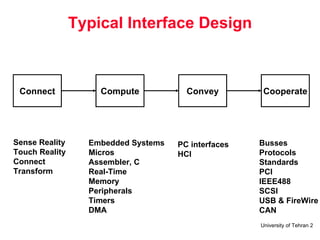
Typical Interface Design Connect Sense Reality Touch Reality Connect Transform Embedded Systems Micros Assembler, C Real-Time Memory Peripherals Timers DMA PC interfaces HCI Busses Protocols Standards PCI IEEE488 SCSI USB & FireWire CAN Compute Convey Cooperate
Outline Concept of serial communications Synchronous, Asynchronous RS-232 standard Hand shaking UART and USART chips 8250 and 8251 chips
What is Serial Communications
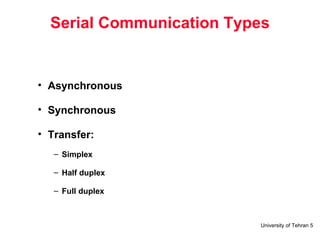
Serial Communication Types Asynchronous Synchronous Transfer: Simplex Half duplex Full duplex
Transfer Types
Asynchronous Data Framing Idle (high):  Mark Low: Space Overhead? (parity, start, stop)
Data Transfer Rate Baud rate bps
RS-232 Standard  EIA 232 = ITU-T V.24/V.28 Specifies the interface between DTE and DCE: V.28 : mechanical and electrical characteristics V.24 : functional and procedural characteristics Even used in applications where there is no DCE e.g. connecting computer to printer, magnetic card reader, robot, … etc. Introduced in 1962 but is still widely used Stand for  R ecommended  S tandard
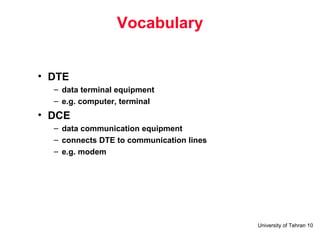
Vocabulary DTE data terminal equipment e.g. computer, terminal DCE data communication equipment connects DTE to communication lines e.g. modem
DTE Connections
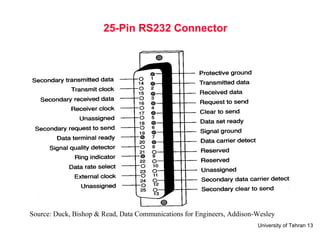
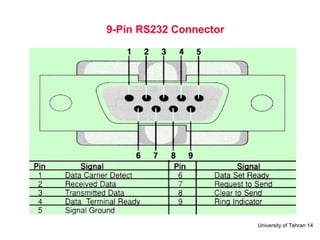
Mechanical Characteristics 25-pin connector 9-pin connector is more commonly found in IBM-PC but it covers signals for asynchronous serial communication only Use male connector on DTE and female connector on DCE Note:  all signal names are viewed from DTE
25-Pin RS232 Connector Source: Duck, Bishop & Read, Data Communications for Engineers, Addison-Wesley
9-Pin RS232 Connector
Electrical Characteristics Single-ended one wire per signal, voltage levels are with respect to system common (i.e. signal ground) Mark: –3V to –15V represent Logic 1, Idle State (OFF) Space: +3 to +15V represent Logic 0, Active State (ON) Usually swing between –12V to +12V Recommended maximum cable length is 15m, at 20kbps
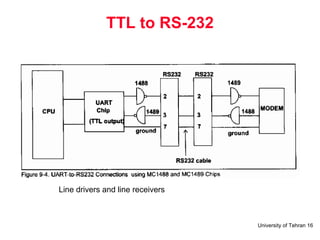
TTL to RS-232 Line drivers and line receivers
RS-232  Frame Format Start bit ASCII Parity Stop bit 111101000001111 Idle A … Example
RS232 Logic Waveform
Function of Signals TD: transmitted data RD: received data DSR: data set ready indicate whether DCE is powered on DTR: data terminal ready indicate whether DTR is powered on turning off DTR causes modem to hang up the line RI: ring indicator ON when modem detects phone call
Function of Signals DCD: data carrier detect ON when two modems have negotiated successfully and the carrier signal is established on the phone line RTS: request to send ON when DTE wants to send data Used to turn on and off modem’s carrier signal in multi-point (i.e. multi-drop) lines Normally constantly ON in point-to-point lines CTS: clear to send ON when DCE is ready to receive data SG: signal ground
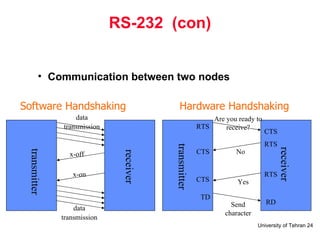
Flow Control Means to ask the transmitter to stop/resume sending in data Required when: DTE to DCE speed > DCE to DCE speed (e.g. terminal speed = 115.2kbps and  line speed = 33.6kbps, in order to benefit from modem’s data compression protocol) without flow control, the buffer within modem will overflow  – sooner or later the receiving end takes time to process the data and thus cannot be always ready to receive
Hardware Flow Control RTS/CTS the transmitting end activates RTS to inform the receiving end that it has data to send if the receiving end is ready to receive, it activates CTS normally used between computer and modem computer is always ready to receive data but modem is not, because terminal speed > link speed
Software Flow Control Xon/Xoff when the buffer within the receiving end is nearly full, Xoff is sent to the transmitting end to ask it to stop when data have been processed by the receiving end and the buffer has space again, Xon is sent to the transmitting end to notify it to resume advantage: only three wires are required (TD, RD and GND) disadvantage: confusion arises when the transmitted data (e.g. a graphics file) contains a byte equal to 13H (Xoff)
RS-232  (con) Communication between two nodes x-off x-on data   transmission transmitter receiver receiver RTS RTS RTS CTS CTS TD CTS RD transmitter data   transmission Are you ready to receive? No Yes Send character Software Handshaking Hardware Handshaking
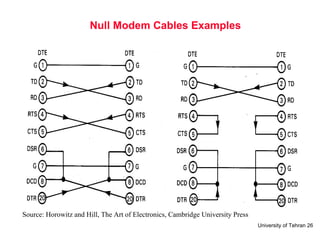
Null Modem Cables Used to directly connect two DTEs together Many possibilities  –  depending on whether and how the two DTEs handshake (i.e. doing flow control)
Null Modem Cables Examples Source: Horowitz and Hill, The Art of Electronics, Cambridge University Press
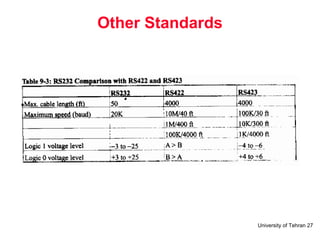
Other Standards
8250/16450/16550 UART
UART in PC
Registers Transmitter holding register Receiver buffer register Interrupt enable register
Registers Interrupt identification register
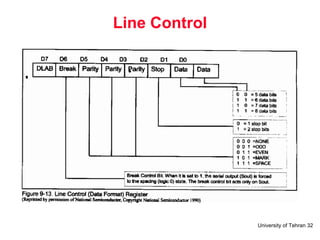
Line Control
Modem Registers
Line Status
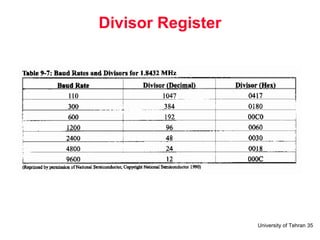
Divisor Register
Example
Example 2
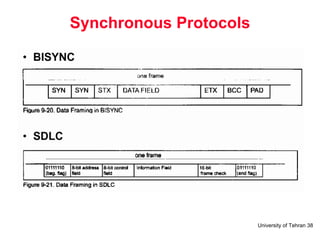
Synchronous Protocols
CRC In SDLC: G(X) = x**16 + x**12 + x**5 + 1
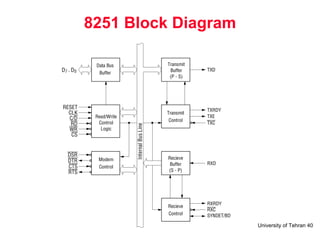
8251 Block Diagram
8251 Registers
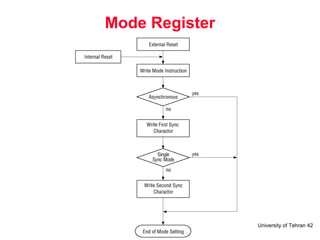
Mode Register
Mode Instruction (Asynchronous)
Mode Instruction (Synchronous)
Command Register
Status Register
8251 Timing
Summary

8251 08 Serial

  • 1.
    Interface Design SerialCommunications Omid Fatemi
  • 2.
    Typical Interface DesignConnect Sense Reality Touch Reality Connect Transform Embedded Systems Micros Assembler, C Real-Time Memory Peripherals Timers DMA PC interfaces HCI Busses Protocols Standards PCI IEEE488 SCSI USB & FireWire CAN Compute Convey Cooperate
  • 3.
    Outline Concept ofserial communications Synchronous, Asynchronous RS-232 standard Hand shaking UART and USART chips 8250 and 8251 chips
  • 4.
    What is SerialCommunications
  • 5.
    Serial Communication TypesAsynchronous Synchronous Transfer: Simplex Half duplex Full duplex
  • 6.
  • 7.
    Asynchronous Data FramingIdle (high): Mark Low: Space Overhead? (parity, start, stop)
  • 8.
    Data Transfer RateBaud rate bps
  • 9.
    RS-232 Standard EIA 232 = ITU-T V.24/V.28 Specifies the interface between DTE and DCE: V.28 : mechanical and electrical characteristics V.24 : functional and procedural characteristics Even used in applications where there is no DCE e.g. connecting computer to printer, magnetic card reader, robot, … etc. Introduced in 1962 but is still widely used Stand for R ecommended S tandard
  • 10.
    Vocabulary DTE dataterminal equipment e.g. computer, terminal DCE data communication equipment connects DTE to communication lines e.g. modem
  • 11.
  • 12.
    Mechanical Characteristics 25-pinconnector 9-pin connector is more commonly found in IBM-PC but it covers signals for asynchronous serial communication only Use male connector on DTE and female connector on DCE Note: all signal names are viewed from DTE
  • 13.
    25-Pin RS232 ConnectorSource: Duck, Bishop & Read, Data Communications for Engineers, Addison-Wesley
  • 14.
  • 15.
    Electrical Characteristics Single-endedone wire per signal, voltage levels are with respect to system common (i.e. signal ground) Mark: –3V to –15V represent Logic 1, Idle State (OFF) Space: +3 to +15V represent Logic 0, Active State (ON) Usually swing between –12V to +12V Recommended maximum cable length is 15m, at 20kbps
  • 16.
    TTL to RS-232Line drivers and line receivers
  • 17.
    RS-232 FrameFormat Start bit ASCII Parity Stop bit 111101000001111 Idle A … Example
  • 18.
  • 19.
    Function of SignalsTD: transmitted data RD: received data DSR: data set ready indicate whether DCE is powered on DTR: data terminal ready indicate whether DTR is powered on turning off DTR causes modem to hang up the line RI: ring indicator ON when modem detects phone call
  • 20.
    Function of SignalsDCD: data carrier detect ON when two modems have negotiated successfully and the carrier signal is established on the phone line RTS: request to send ON when DTE wants to send data Used to turn on and off modem’s carrier signal in multi-point (i.e. multi-drop) lines Normally constantly ON in point-to-point lines CTS: clear to send ON when DCE is ready to receive data SG: signal ground
  • 21.
    Flow Control Meansto ask the transmitter to stop/resume sending in data Required when: DTE to DCE speed > DCE to DCE speed (e.g. terminal speed = 115.2kbps and line speed = 33.6kbps, in order to benefit from modem’s data compression protocol) without flow control, the buffer within modem will overflow – sooner or later the receiving end takes time to process the data and thus cannot be always ready to receive
  • 22.
    Hardware Flow ControlRTS/CTS the transmitting end activates RTS to inform the receiving end that it has data to send if the receiving end is ready to receive, it activates CTS normally used between computer and modem computer is always ready to receive data but modem is not, because terminal speed > link speed
  • 23.
    Software Flow ControlXon/Xoff when the buffer within the receiving end is nearly full, Xoff is sent to the transmitting end to ask it to stop when data have been processed by the receiving end and the buffer has space again, Xon is sent to the transmitting end to notify it to resume advantage: only three wires are required (TD, RD and GND) disadvantage: confusion arises when the transmitted data (e.g. a graphics file) contains a byte equal to 13H (Xoff)
  • 24.
    RS-232 (con)Communication between two nodes x-off x-on data transmission transmitter receiver receiver RTS RTS RTS CTS CTS TD CTS RD transmitter data transmission Are you ready to receive? No Yes Send character Software Handshaking Hardware Handshaking
  • 25.
    Null Modem CablesUsed to directly connect two DTEs together Many possibilities – depending on whether and how the two DTEs handshake (i.e. doing flow control)
  • 26.
    Null Modem CablesExamples Source: Horowitz and Hill, The Art of Electronics, Cambridge University Press
  • 27.
  • 28.
  • 29.
  • 30.
    Registers Transmitter holdingregister Receiver buffer register Interrupt enable register
  • 31.
  • 32.
  • 33.
  • 34.
  • 35.
  • 36.
  • 37.
  • 38.
  • 39.
    CRC In SDLC:G(X) = x**16 + x**12 + x**5 + 1
  • 40.
  • 41.
  • 42.
  • 43.
  • 44.
  • 45.
  • 46.
  • 47.
  • 48.

Editor's Notes

  • #25 Software flow control uses special characters to control the flow of data when a device wishes to halt the flow it sends the XOFF character, when flow can resume it sends the XON character. The XOFF character is called DC3 or Device Code 3. It is decimal 19 or control S. The XON character is called DC1 or Device Code 1. It is decimal 17 or control Q. XOn / XOff is a software flow control mechanism. It can only be used in character oriented data transmissions (not binary transfer) as it relies on the use of a pre-determined XOn character and a pre-determined XOff character. The basic idea is simple, when the receiver buffer fills to the point it cannot receive anymore data it issues an XOff (Transmit Off) to the transmitter. When the transmitter sees the XOff character is stops transmitting. It will only resume once it sees a corresponding XOn. The disadvantage of such a system is that should an issued character become damaged in transit no action will be taken by the transmitter.
  • #39 BCC block check character STX start of text Control field contains info like the sequence of data