BASICS OF SERIAL COMMUNICATION
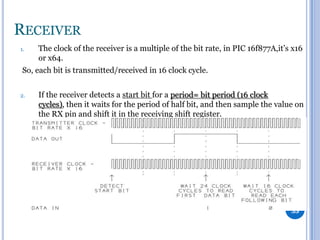
& USART
Prepared by:

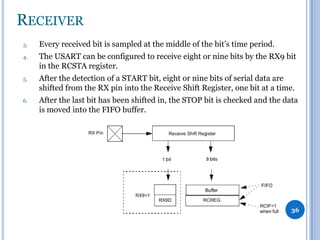
Islam Samir
AGENDA





Data Transmission Types
Parallel VS Serial
Synchronous VS Asynchronous
USART

2
WHY DO WE NEED FAST INTERFACES?
-

Microcontrollers need fast ways of communication to the outside
world for:

1- Communicating with other microcontrollers, DSPs or even FPGAs.
(ex. SRIO, PCIe, I2C)
2- Capturing input from user and displaying outputs.
3- Communicating with other microcontrollers on different boards for
applications with network of microcontrollers. (ex. CAN and LIN)

3


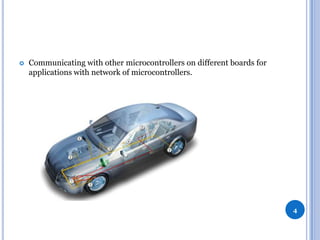
Communicating with other microcontrollers on different boards for
applications with network of microcontrollers.

4


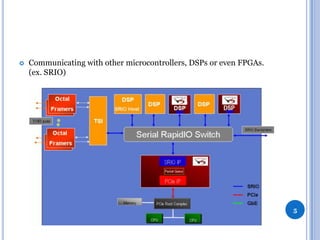
Communicating with other microcontrollers, DSPs or even FPGAs.
(ex. SRIO)

5
DATA TRANSMISSION TYPES
1.
-

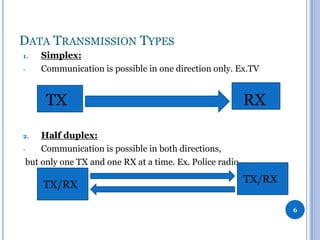
Simplex:
Communication is possible in one direction only. Ex.TV

TX

RX

Half duplex:
Communication is possible in both directions,
but only one TX and one RX at a time. Ex. Police radio.
2.

TX/RX

TX/RX
6
DATA TRANSMISSION TYPES
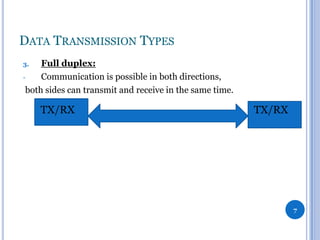
Full duplex:
Communication is possible in both directions,
both sides can transmit and receive in the same time.
3.

TX/RX

TX/RX

7
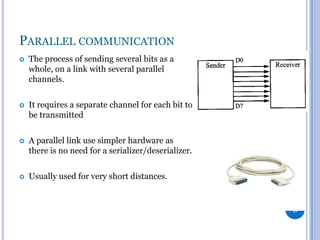
PARALLEL COMMUNICATION


The process of sending several bits as a
whole, on a link with several parallel
channels.



It requires a separate channel for each bit to
be transmitted



A parallel link use simpler hardware as
there is no need for a serializer/deserializer.



Usually used for very short distances.

8
PARALLEL COMMUNICATION


1.

Problems of parallel communication:
Clock skew:

-The

clock signal (sent from the clock circuit) arrives at different components
(at different times).
-This

happens because of wire-interconnect length, capacitive
coupling, material imperfections …etc. It reduces the speed of every link to the
slowest of all of the links.

9
PARALLEL COMMUNICATION
2.

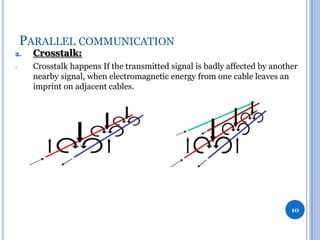
Crosstalk:

-

Crosstalk happens If the transmitted signal is badly affected by another
nearby signal, when electromagnetic energy from one cable leaves an
imprint on adjacent cables.

10
PARALLEL COMMUNICATION
-

In parallel communication,
it can refer to electromagnetic interference from one unshielded
pair to another pair, normally running in parallel.

-

This issue places an upper limit on the length of a parallel data
connection that is usually shorter than a serial connection.

11
PARALLEL COMMUNICATION


Features of parallel communication:

1.

Very simple.

2.

Crosstalk places an upper limit on the length of a parallel data
connection (usually shorter than a serial connection).

3.

Clock skew between different channels.

4.

Low data rate compared to a serial connection for long
distances. (Due to the last two reasons).

5.

Has a cable cost higher than a serial connection.
12
SERIAL COMMUNICATION


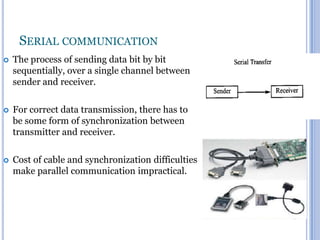
The process of sending data bit by bit
sequentially, over a single channel between
sender and receiver.



For correct data transmission, there has to
be some form of synchronization between
transmitter and receiver.



Cost of cable and synchronization difficulties
make parallel communication impractical.

13
SERIAL COMMUNICATION


Features of serial communication:

1.

To reduce the cost of an IC package by reducing the number of pins used
for communication between different IC’s, instead of using parallel
communication.

2.

Clock skew between different channels is not an issue (for unclocked
asynchronous serial communication links).

3.

A serial connection requires fewer interconnecting cables and hence
occupies less space.

14
SERIAL COMMUNICATION
4.

Serial links can be clocked considerably faster than parallel
links, and achieve a higher data rate.

5.

Used for all long-haul communication and most computer
networks

15
COMPARISON

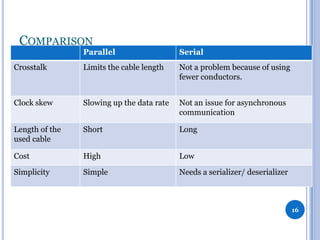
Parallel

Serial

Crosstalk

Limits the cable length

Not a problem because of using
fewer conductors.

Clock skew

Slowing up the data rate

Not an issue for asynchronous
communication

Length of the
used cable

Short

Long

Cost

High

Low

Simplicity

Simple

Needs a serializer/ deserializer

16
BASICS OF SERIAL COMMUNICATION


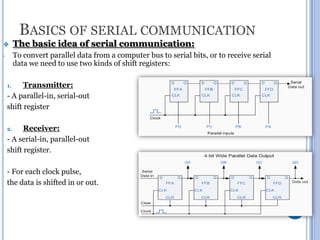
The basic idea of serial communication:

-

To convert parallel data from a computer bus to serial bits, or to receive serial
data we need to use two kinds of shift registers:

Transmitter:
- A parallel-in, serial-out
shift register
1.

Receiver:
- A serial-in, parallel-out
shift register.
2.

- For each clock pulse,
the data is shifted in or out.

17
BASICS OF SERIAL COMMUNICATION
Bit rate:
- Number of bits sent every second (BPS)
Baud rate:
- Number of symbols sent every second, where every symbol
can represent more than one bit.

Ex. high-speed modems which use phase shifts to make every
data transition period represent more than one bit.
-

-

For the PIC 16f877A’s USART, with every clock tick one bit is
sent, each symbol represents one bit.
So, we can consider bit rate and baud rate the same thing.

18
BASICS OF SERIAL COMMUNICATION
-

The sender and receiver must agree on a set of rules
(Protocol) on :
1.
When data transmission begins and ends.
2.
The used bit rate and data packaging format.
-

If there is no reference for the receiver to know when
transmission begins or the used bit rate,
 it’ll sample the wrong values and data will be lost.

19
SYNCHRONOUS VS ASYNCHRONOUS
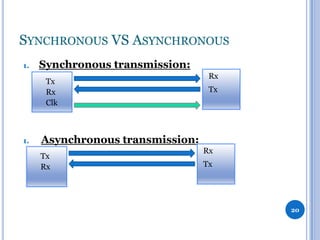
1.

Synchronous transmission:
Tx
Rx
Clk

1.

Rx
Tx

Asynchronous transmission:
Tx
Rx

Rx
Tx

20
SYNCHRONOUS VS ASYNCHRONOUS
-

In synchronous transmission, a separate link is dedicated for the
clock from one terminal (Master) to another (Slave).

-

In asynchronous transmission, no link for the clock.
Synchronization is done  using a fixed baud rate and using start
and stop bits.

21
HOW SYNCHRONIZATION IS DONE?


For asynchronous transmission:

-

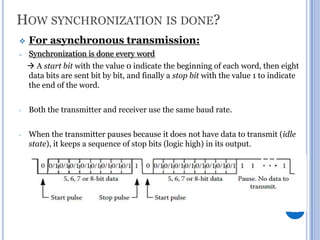
Synchronization is done every word
 A start bit with the value 0 indicate the beginning of each word, then eight
data bits are sent bit by bit, and finally a stop bit with the value 1 to indicate
the end of the word.

-

Both the transmitter and receiver use the same baud rate.

-

When the transmitter pauses because it does not have data to transmit (idle
state), it keeps a sequence of stop bits (logic high) in its output.

22


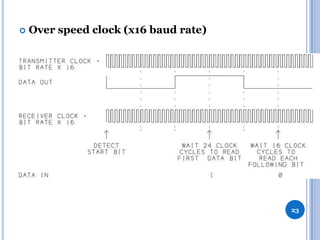
Over speed clock (x16 baud rate)

23
HOW SYNCHRONIZATION IS DONE?

-

For synchronous transmission:
Synchronization is done using a clock line

-

A clock line from one terminal (master) to the other terminal (slave)
makes the synchronization.

-

Another line is used for data transmission between master and
slave(s).

-

If the master communicates with many peripheral ICs using the
same data and clock lines, a (slave select) line is used to determine
which slave to communicate with.
24
HOW SYNCHRONIZATION IS DONE?


Notes about Synchronous transmission:

-

Preferred for short-distance transmission.

-

Uses its communication time more efficiently because, after the
transmitter and receiver are synchronized, they only
transmit/receive data.

-

Not used For long-distance transmission as sending the clock signal
with the data signal is not an appropriate solution for the additional
costs and clock skew.



In some cases, it’s impossible to use synchronous transmission and
we have to use asynchronous communication Ex. remote control.
25
Universal Synchronous
Asynchronous Receiver
Transmitter
(USART)

26
USART
-

The USART module is a full duplex, serial I/O communication peripheral.

-

It contains all shift registers, clock generators and data buffers needed for
serial communication.

-

It can work in synchronous mode, or in asynchronous mode.

-

The USART uses two I/O pins to transmit and receive serial data. Both
transmission and reception can occur at the same time i.e. ‘full duplex’
operation.

27
USART
-

-

To send a byte, the application writes the byte to the transmit buffer.
The UART then sends the data, bit by bit in the requested
format, adding Stop, Start, and parity bits as needed.
In a similar way, the UART stores received bytes in a buffer.
Then the UART can generate an interrupt to notify the application or
software can poll the port to find out if data has arrived.

28
USART


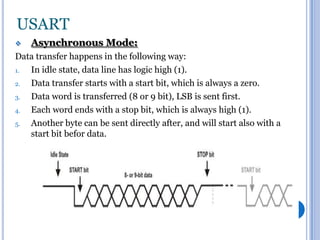
Asynchronous Mode:

Data transfer happens in the following way:
1.
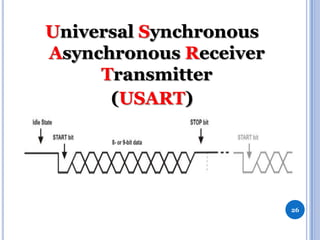
In idle state, data line has logic high (1).
2.
Data transfer starts with a start bit, which is always a zero.
3.
Data word is transferred (8 or 9 bit), LSB is sent first.
4.
Each word ends with a stop bit, which is always high (1).
5.
Another byte can be sent directly after, and will start also with a
start bit befor data.

29
USART
-

The Nine-bit mode is useful when parity or an extra STOP bit is
needed.

-

Even if Parity is not supported by the hardware, but can be
implemented in software.

-

The ninth bit can also be used for the Addressable mode.

-

The TXSTA and RCSTA registers are used to control transmission
and reception but there are some overlapping functions and both
registers are always used.

30
USART


The USART peripheral consists of three main parts:

-

Transmitter.

-

Receiver.

-

Baud generator.

31
TRANSMITTER
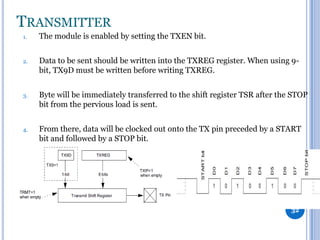
1.

The module is enabled by setting the TXEN bit.

2.

Data to be sent should be written into the TXREG register. When using 9bit, TX9D must be written before writing TXREG.

3.

Byte will be immediately transferred to the shift register TSR after the STOP
bit from the pervious load is sent.

4.

From there, data will be clocked out onto the TX pin preceded by a START
bit and followed by a STOP bit.

32
TRANSMITTER
4.

5.

6.

Every bit is sent in the same amount of time, beginning
with the LSB.
After data has been shifted (on the start of the STOP bit ),
the TRMT bit in the TXSTA register will be set.
A new byte can be sent in the same way beginning with a
new start bit.

33
TRANSMITTER
TXIF bit : in the PIR1 register
indicates when data can be written to TXREG (when data is moved
from TXREG into the Transmit Shift Register,
- It cannot be cleared in software. It will reset only when new data is
loaded into the TXREG register.
it doesn’t indicate that the transmission has completed.


TRMT bit:
- Once the data in the TSR register has been clocked out on the TX pin
(at the beginning of the STOP bit), the TRMT bit in the TXSTA
register will be set,
indicating that the transmission has been completed.


34
RECEIVER
1.

The clock of the receiver is a multiple of the bit rate, in PIC 16f877A,it’s x16
or x64.

So, each bit is transmitted/received in 16 clock cycle.
2.

If the receiver detects a start bit for a period= bit period (16 clock
cycles), then it waits for the period of half bit, and then sample the value on
the RX pin and shift it in the receiving shift register.

35
RECEIVER
3.

Every received bit is sampled at the middle of the bit’s time period.

4.

The USART can be configured to receive eight or nine bits by the RX9 bit
in the RCSTA register.

5.

After the detection of a START bit, eight or nine bits of serial data are
shifted from the RX pin into the Receive Shift Register, one bit at a time.

6.

After the last bit has been shifted in, the STOP bit is checked and the data
is moved into the FIFO buffer.

36
RECEIVER
-

Two bytes can be held in the FIFO buffer while a third is being
received.
6.
RCREG is the output of the two element FIFO buffer. A next start
bit can be sent immediately after the stop bit


RCIF: indicates when data is available in the RCREG.

-

It is read only bit, cleared by hardware when the RCREG register has
been read and is empty.

-

If two bytes have been received, the RCIF bit will remain set until all
the data has been read from RCREG.
37
RECEIVER
Errors happen during reception:
1.
Overrun error:
When the buffer is full, and a third byte is received in the RSR
register.
When sampling the STOP bit of this third byte, OERR
(RCSTA<1>) will be set and this word will be lost and transfer
from the RSR register to the RCREG register is inhibited.
This bit is cleared in software.



38
RECEIVER
2.

-

Framing error:
occurs when the receiver does not detect the STOP bit at the expected
time. This happens because the receiver and the transmitter operates on
different baud rates.

-

When this happens, the FERR bit [RCSTA<2>] will be set, indicating
that the last received data has an error.

-

A framing error (bit set) does not prevent reception of new data.

-

The FERR bit is cleared by reading received data, so check must be done
before reading the received byte.

-

The FERR bit cannot be cleared by software. If needed, it can be cleared
by clearing the SPEN bit of the RCSTA register. It will simultaneously
cause reset of the whole USART system.
39
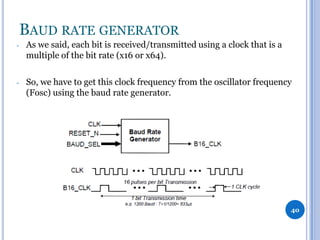
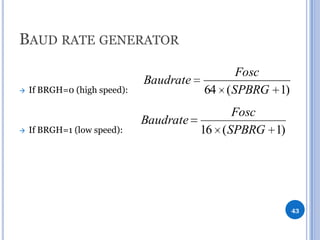
BAUD RATE GENERATOR
-

As we said, each bit is received/transmitted using a clock that is a
multiple of the bit rate (x16 or x64).

-

So, we have to get this clock frequency from the oscillator frequency
(Fosc) using the baud rate generator.

40
BAUD RATE GENERATOR


This is done by dividing Fosc by a programmable timing
device to synchronize the bit duration for both the transmitter
and the receiver.

41
BAUD RATE GENERATOR
-

The BRG supports both the Asynchronous and Synchronous
modes.

-

It is a dedicated 8-bit baud rate generator.

-

The SPBRG register, and the BRGH-bit (TXSTA<2>) controls
the operation of the baud generator.

42
BAUD RATE GENERATOR




If BRGH=0 (high speed):

If BRGH=1 (low speed):

Baudrate

Fosc
64 ( SPBRG 1)

Fosc
Baudrate
16 ( SPBRG 1)

43
BAUD RATE GENERATOR
-

-

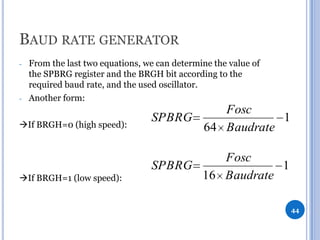
From the last two equations, we can determine the value of
the SPBRG register and the BRGH bit according to the
required baud rate, and the used oscillator.
Another form:

If BRGH=0 (high speed):

Fosc
SPBRG
1
64 Baudrate

If BRGH=1 (low speed):

Fosc
SPBRG
1
16 Baudrate
44
SUMMARY
To make asynchronous connection using the PIC’s USART:
 At the Transmitter end:
1.
Determine the value of the SPBRG register and the BRGH-bit
according to the required baud rate.
2.
The SYNC-bit [TXSTA<4>] is cleared, SPEN-bit [RCSTA<7>] is
set to enable the serial port.
3.
On 9-bit data transmission, the TX9-bit [TXSTA<6>] is set.
4.
TXEN-bit [TXSTA<5>] is set to enable data transmission.
5.
On 9-bit data transmission, value of the ninth bit should be
written to the TX9D-bit [TXSTA<0>].
6.
Transmission can be started again by writing 8-bit data to the
TXREG register, usually wait for at least (1ms) between every two
writes.


45
SUMMARY
At the Receiver end:
1.
Determine the value of the SPBRG register and the BRGH-bit
according to the required baud rate.
2.
The SYNC-bit [TXSTA<4>] is cleared, SPEN-bit [RCSTA<7>] is
set to enable the serial port.
3.
On 9-bit data receive, the RX9-bit [RCSTA<6>] is set.
4.
Data receive should be enabled by setting the CREN-bit
[RCSTA<4>].
5.
The RCSTA register should be read to get information on possible
errors which have occurred during transmission.
6.
On 9-bit data receive, the ninth bit will be stored in RX9D-bit
[RCSTA<0>].
7.
Received 8-bit data stored in the RCREG register should be read.



46

USART

  • 1.
    BASICS OF SERIALCOMMUNICATION & USART Prepared by: Islam Samir
  • 2.
    AGENDA     Data Transmission Types ParallelVS Serial Synchronous VS Asynchronous USART 2
  • 3.
    WHY DO WENEED FAST INTERFACES? - Microcontrollers need fast ways of communication to the outside world for: 1- Communicating with other microcontrollers, DSPs or even FPGAs. (ex. SRIO, PCIe, I2C) 2- Capturing input from user and displaying outputs. 3- Communicating with other microcontrollers on different boards for applications with network of microcontrollers. (ex. CAN and LIN) 3
  • 4.
     Communicating with othermicrocontrollers on different boards for applications with network of microcontrollers. 4
  • 5.
     Communicating with othermicrocontrollers, DSPs or even FPGAs. (ex. SRIO) 5
  • 6.
    DATA TRANSMISSION TYPES 1. - Simplex: Communicationis possible in one direction only. Ex.TV TX RX Half duplex: Communication is possible in both directions, but only one TX and one RX at a time. Ex. Police radio. 2. TX/RX TX/RX 6
  • 7.
    DATA TRANSMISSION TYPES Fullduplex: Communication is possible in both directions, both sides can transmit and receive in the same time. 3. TX/RX TX/RX 7
  • 8.
    PARALLEL COMMUNICATION  The processof sending several bits as a whole, on a link with several parallel channels.  It requires a separate channel for each bit to be transmitted  A parallel link use simpler hardware as there is no need for a serializer/deserializer.  Usually used for very short distances. 8
  • 9.
    PARALLEL COMMUNICATION  1. Problems ofparallel communication: Clock skew: -The clock signal (sent from the clock circuit) arrives at different components (at different times). -This happens because of wire-interconnect length, capacitive coupling, material imperfections …etc. It reduces the speed of every link to the slowest of all of the links. 9
  • 10.
    PARALLEL COMMUNICATION 2. Crosstalk: - Crosstalk happensIf the transmitted signal is badly affected by another nearby signal, when electromagnetic energy from one cable leaves an imprint on adjacent cables. 10
  • 11.
    PARALLEL COMMUNICATION - In parallelcommunication, it can refer to electromagnetic interference from one unshielded pair to another pair, normally running in parallel. - This issue places an upper limit on the length of a parallel data connection that is usually shorter than a serial connection. 11
  • 12.
    PARALLEL COMMUNICATION  Features ofparallel communication: 1. Very simple. 2. Crosstalk places an upper limit on the length of a parallel data connection (usually shorter than a serial connection). 3. Clock skew between different channels. 4. Low data rate compared to a serial connection for long distances. (Due to the last two reasons). 5. Has a cable cost higher than a serial connection. 12
  • 13.
    SERIAL COMMUNICATION  The processof sending data bit by bit sequentially, over a single channel between sender and receiver.  For correct data transmission, there has to be some form of synchronization between transmitter and receiver.  Cost of cable and synchronization difficulties make parallel communication impractical. 13
  • 14.
    SERIAL COMMUNICATION  Features ofserial communication: 1. To reduce the cost of an IC package by reducing the number of pins used for communication between different IC’s, instead of using parallel communication. 2. Clock skew between different channels is not an issue (for unclocked asynchronous serial communication links). 3. A serial connection requires fewer interconnecting cables and hence occupies less space. 14
  • 15.
    SERIAL COMMUNICATION 4. Serial linkscan be clocked considerably faster than parallel links, and achieve a higher data rate. 5. Used for all long-haul communication and most computer networks 15
  • 16.
    COMPARISON Parallel Serial Crosstalk Limits the cablelength Not a problem because of using fewer conductors. Clock skew Slowing up the data rate Not an issue for asynchronous communication Length of the used cable Short Long Cost High Low Simplicity Simple Needs a serializer/ deserializer 16
  • 17.
    BASICS OF SERIALCOMMUNICATION  The basic idea of serial communication: - To convert parallel data from a computer bus to serial bits, or to receive serial data we need to use two kinds of shift registers: Transmitter: - A parallel-in, serial-out shift register 1. Receiver: - A serial-in, parallel-out shift register. 2. - For each clock pulse, the data is shifted in or out. 17
  • 18.
    BASICS OF SERIALCOMMUNICATION Bit rate: - Number of bits sent every second (BPS) Baud rate: - Number of symbols sent every second, where every symbol can represent more than one bit. Ex. high-speed modems which use phase shifts to make every data transition period represent more than one bit. - - For the PIC 16f877A’s USART, with every clock tick one bit is sent, each symbol represents one bit. So, we can consider bit rate and baud rate the same thing. 18
  • 19.
    BASICS OF SERIALCOMMUNICATION - The sender and receiver must agree on a set of rules (Protocol) on : 1. When data transmission begins and ends. 2. The used bit rate and data packaging format. - If there is no reference for the receiver to know when transmission begins or the used bit rate,  it’ll sample the wrong values and data will be lost. 19
  • 20.
    SYNCHRONOUS VS ASYNCHRONOUS 1. Synchronoustransmission: Tx Rx Clk 1. Rx Tx Asynchronous transmission: Tx Rx Rx Tx 20
  • 21.
    SYNCHRONOUS VS ASYNCHRONOUS - Insynchronous transmission, a separate link is dedicated for the clock from one terminal (Master) to another (Slave). - In asynchronous transmission, no link for the clock. Synchronization is done  using a fixed baud rate and using start and stop bits. 21
  • 22.
    HOW SYNCHRONIZATION ISDONE?  For asynchronous transmission: - Synchronization is done every word  A start bit with the value 0 indicate the beginning of each word, then eight data bits are sent bit by bit, and finally a stop bit with the value 1 to indicate the end of the word. - Both the transmitter and receiver use the same baud rate. - When the transmitter pauses because it does not have data to transmit (idle state), it keeps a sequence of stop bits (logic high) in its output. 22
  • 23.
     Over speed clock(x16 baud rate) 23
  • 24.
    HOW SYNCHRONIZATION ISDONE?  - For synchronous transmission: Synchronization is done using a clock line - A clock line from one terminal (master) to the other terminal (slave) makes the synchronization. - Another line is used for data transmission between master and slave(s). - If the master communicates with many peripheral ICs using the same data and clock lines, a (slave select) line is used to determine which slave to communicate with. 24
  • 25.
    HOW SYNCHRONIZATION ISDONE?  Notes about Synchronous transmission: - Preferred for short-distance transmission. - Uses its communication time more efficiently because, after the transmitter and receiver are synchronized, they only transmit/receive data. - Not used For long-distance transmission as sending the clock signal with the data signal is not an appropriate solution for the additional costs and clock skew.  In some cases, it’s impossible to use synchronous transmission and we have to use asynchronous communication Ex. remote control. 25
  • 26.
  • 27.
    USART - The USART moduleis a full duplex, serial I/O communication peripheral. - It contains all shift registers, clock generators and data buffers needed for serial communication. - It can work in synchronous mode, or in asynchronous mode. - The USART uses two I/O pins to transmit and receive serial data. Both transmission and reception can occur at the same time i.e. ‘full duplex’ operation. 27
  • 28.
    USART - - To send abyte, the application writes the byte to the transmit buffer. The UART then sends the data, bit by bit in the requested format, adding Stop, Start, and parity bits as needed. In a similar way, the UART stores received bytes in a buffer. Then the UART can generate an interrupt to notify the application or software can poll the port to find out if data has arrived. 28
  • 29.
    USART  Asynchronous Mode: Data transferhappens in the following way: 1. In idle state, data line has logic high (1). 2. Data transfer starts with a start bit, which is always a zero. 3. Data word is transferred (8 or 9 bit), LSB is sent first. 4. Each word ends with a stop bit, which is always high (1). 5. Another byte can be sent directly after, and will start also with a start bit befor data. 29
  • 30.
    USART - The Nine-bit modeis useful when parity or an extra STOP bit is needed. - Even if Parity is not supported by the hardware, but can be implemented in software. - The ninth bit can also be used for the Addressable mode. - The TXSTA and RCSTA registers are used to control transmission and reception but there are some overlapping functions and both registers are always used. 30
  • 31.
    USART  The USART peripheralconsists of three main parts: - Transmitter. - Receiver. - Baud generator. 31
  • 32.
    TRANSMITTER 1. The module isenabled by setting the TXEN bit. 2. Data to be sent should be written into the TXREG register. When using 9bit, TX9D must be written before writing TXREG. 3. Byte will be immediately transferred to the shift register TSR after the STOP bit from the pervious load is sent. 4. From there, data will be clocked out onto the TX pin preceded by a START bit and followed by a STOP bit. 32
  • 33.
    TRANSMITTER 4. 5. 6. Every bit issent in the same amount of time, beginning with the LSB. After data has been shifted (on the start of the STOP bit ), the TRMT bit in the TXSTA register will be set. A new byte can be sent in the same way beginning with a new start bit. 33
  • 34.
    TRANSMITTER TXIF bit :in the PIR1 register indicates when data can be written to TXREG (when data is moved from TXREG into the Transmit Shift Register, - It cannot be cleared in software. It will reset only when new data is loaded into the TXREG register. it doesn’t indicate that the transmission has completed.  TRMT bit: - Once the data in the TSR register has been clocked out on the TX pin (at the beginning of the STOP bit), the TRMT bit in the TXSTA register will be set, indicating that the transmission has been completed.  34
  • 35.
    RECEIVER 1. The clock ofthe receiver is a multiple of the bit rate, in PIC 16f877A,it’s x16 or x64. So, each bit is transmitted/received in 16 clock cycle. 2. If the receiver detects a start bit for a period= bit period (16 clock cycles), then it waits for the period of half bit, and then sample the value on the RX pin and shift it in the receiving shift register. 35
  • 36.
    RECEIVER 3. Every received bitis sampled at the middle of the bit’s time period. 4. The USART can be configured to receive eight or nine bits by the RX9 bit in the RCSTA register. 5. After the detection of a START bit, eight or nine bits of serial data are shifted from the RX pin into the Receive Shift Register, one bit at a time. 6. After the last bit has been shifted in, the STOP bit is checked and the data is moved into the FIFO buffer. 36
  • 37.
    RECEIVER - Two bytes canbe held in the FIFO buffer while a third is being received. 6. RCREG is the output of the two element FIFO buffer. A next start bit can be sent immediately after the stop bit  RCIF: indicates when data is available in the RCREG. - It is read only bit, cleared by hardware when the RCREG register has been read and is empty. - If two bytes have been received, the RCIF bit will remain set until all the data has been read from RCREG. 37
  • 38.
    RECEIVER Errors happen duringreception: 1. Overrun error: When the buffer is full, and a third byte is received in the RSR register. When sampling the STOP bit of this third byte, OERR (RCSTA<1>) will be set and this word will be lost and transfer from the RSR register to the RCREG register is inhibited. This bit is cleared in software.  38
  • 39.
    RECEIVER 2. - Framing error: occurs whenthe receiver does not detect the STOP bit at the expected time. This happens because the receiver and the transmitter operates on different baud rates. - When this happens, the FERR bit [RCSTA<2>] will be set, indicating that the last received data has an error. - A framing error (bit set) does not prevent reception of new data. - The FERR bit is cleared by reading received data, so check must be done before reading the received byte. - The FERR bit cannot be cleared by software. If needed, it can be cleared by clearing the SPEN bit of the RCSTA register. It will simultaneously cause reset of the whole USART system. 39
  • 40.
    BAUD RATE GENERATOR - Aswe said, each bit is received/transmitted using a clock that is a multiple of the bit rate (x16 or x64). - So, we have to get this clock frequency from the oscillator frequency (Fosc) using the baud rate generator. 40
  • 41.
    BAUD RATE GENERATOR  Thisis done by dividing Fosc by a programmable timing device to synchronize the bit duration for both the transmitter and the receiver. 41
  • 42.
    BAUD RATE GENERATOR - TheBRG supports both the Asynchronous and Synchronous modes. - It is a dedicated 8-bit baud rate generator. - The SPBRG register, and the BRGH-bit (TXSTA<2>) controls the operation of the baud generator. 42
  • 43.
    BAUD RATE GENERATOR   IfBRGH=0 (high speed): If BRGH=1 (low speed): Baudrate Fosc 64 ( SPBRG 1) Fosc Baudrate 16 ( SPBRG 1) 43
  • 44.
    BAUD RATE GENERATOR - - Fromthe last two equations, we can determine the value of the SPBRG register and the BRGH bit according to the required baud rate, and the used oscillator. Another form: If BRGH=0 (high speed): Fosc SPBRG 1 64 Baudrate If BRGH=1 (low speed): Fosc SPBRG 1 16 Baudrate 44
  • 45.
    SUMMARY To make asynchronousconnection using the PIC’s USART:  At the Transmitter end: 1. Determine the value of the SPBRG register and the BRGH-bit according to the required baud rate. 2. The SYNC-bit [TXSTA<4>] is cleared, SPEN-bit [RCSTA<7>] is set to enable the serial port. 3. On 9-bit data transmission, the TX9-bit [TXSTA<6>] is set. 4. TXEN-bit [TXSTA<5>] is set to enable data transmission. 5. On 9-bit data transmission, value of the ninth bit should be written to the TX9D-bit [TXSTA<0>]. 6. Transmission can be started again by writing 8-bit data to the TXREG register, usually wait for at least (1ms) between every two writes.  45
  • 46.
    SUMMARY At the Receiverend: 1. Determine the value of the SPBRG register and the BRGH-bit according to the required baud rate. 2. The SYNC-bit [TXSTA<4>] is cleared, SPEN-bit [RCSTA<7>] is set to enable the serial port. 3. On 9-bit data receive, the RX9-bit [RCSTA<6>] is set. 4. Data receive should be enabled by setting the CREN-bit [RCSTA<4>]. 5. The RCSTA register should be read to get information on possible errors which have occurred during transmission. 6. On 9-bit data receive, the ninth bit will be stored in RX9D-bit [RCSTA<0>]. 7. Received 8-bit data stored in the RCREG register should be read.  46