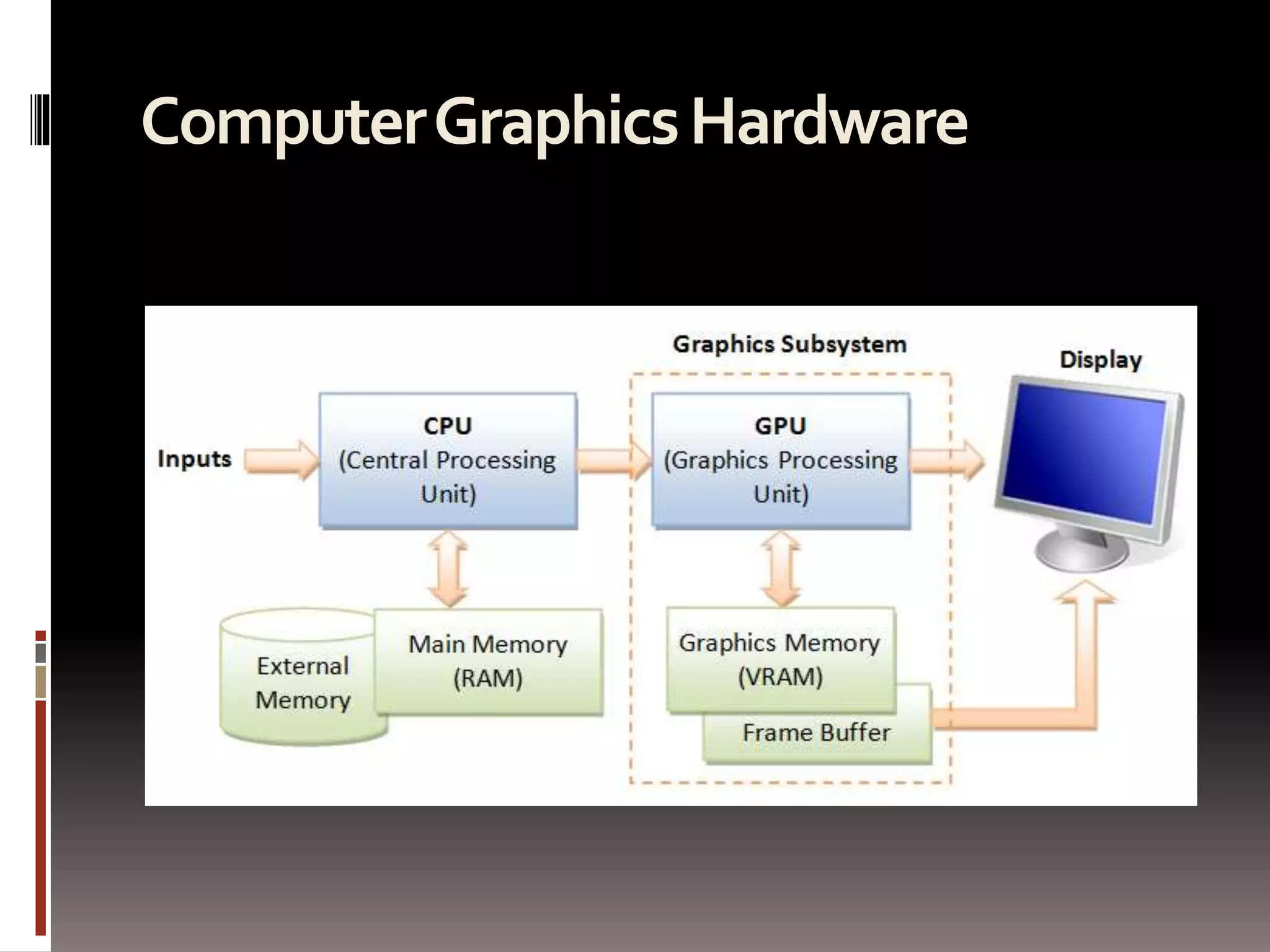
Computer Graphics Hardware
 The 3D graphics rendering pipeline consists 
of the following main stages
1. Arrange the objects (or models, or avatar) in the 
world (Model Transformation orWorld 
transformation). 
2. Position and orientate the camera (View 
transformation). 
3. Select a camera lens (wide angle, normal or 
telescopic), adjust the focus length and zoom 
factor to set the camera's field of view 
(Projection transformation). 
4. Print the photo on a selected area of the paper 
(Viewport transformation) - in rasterization 
stage 
A transform converts a vertex V from one space (or coordinate system) to another 
space V'. In computer graphics, transform is carried by multiplying the vector with 
a transformation matrix, i.e., V' = M V.
Projection Transform -Perspective 
Projection 
 Once the camera is positioned and oriented, we 
need to decide what it can see (analogous to 
choosing the camera's field of view by adjusting 
the focus length and zoom factor), and how the 
objects are projected onto the screen. 
 This is done by selecting a projection mode 
(perspective or orthographic) and specifying a 
viewing volume or clipping volume. 
 Objects outside the clipping volume are clipped 
out of the scene and cannot be seen.
View Frustum in Perspective View 
 The camera has a limited field of view, which 
exhibits a view frustum (truncated pyramid), and is 
specified by four parameters: 
 fovy, aspect, zNear and zFar. 
 Fovy: specify the total vertical angle of view in degrees. 
 Aspect: the ratio of width vs. height. For a particular z, 
we can get the height from the fovy, and then get the 
width from the aspect. 
 zNear; the near plane. 
 zFar: the far plane. 
 The camera space (xc, yc, zc) is renamed to the 
familiar (x, y, z) for convenience.
 The projection with view frustum is known as 
perspective projection, where objects nearer 
to the COP (Center of Projection) appear 
larger than objects further to the COP of the 
same size. 
 An object outside the view frustum is not 
visible to the camera. It does not contribute 
to the final image and shall be discarded to 
improve the performance. This is known as 
view-frustum culling.
In OpenGL 
 In OpenGL, there are two functions for 
choosing the perspective projection and 
setting its clipping volume: 
 More commonly-used GLU function 
gluPerspective(): 
 Core GL function glFrustum():
Clipping-Volume Cuboid 
 Next, we shall apply a so-called projection matrix to 
transform the view-frustum into a axis-aligned cuboid 
clipping-volume of 2x2x1 centered on the near plane. 
 The near plane has z=0, whereas the far plane has z=-1. 
The planes have dimension of 2x2, with range from -1 to 
+1.
 The final step is to flip the z-axis, so that the near plane 
is still located at z=0, but the far plane is flipped and 
located at z=1 (instead of z=-1). 
 In other words, the larger the z, the further is the object. 
To perform flipping, we can simply negate the third row 
of the projection matrix. 
 After the flip, the coordinate system is no longer a 
Right-Hand System (RHS), but becomes a Left-hand 
System (LHS).
OpenGL's Model-View Matrix and 
Projection Matrix 
 OpenGL manages the transforms via two matrices: a 
model-view matrix (GL_MODELVIEW for handling 
model and view transforms) and a projection matrix 
(GL_PROJECTION for handling projection 
transform). 
 These two matrices can be manipulated 
independently. 
 We need to first select the matrix for manipulation via: 
 We can reset the currently selected matrix via: 
 We can save the value of the currently selected matrix onto 
the stack and restore it back via: 
Push and pop use a stack and operate in a last-in-first-out 
manner, and can be nested.
Projection Transform -Orthographic 
Projection 
 Besides the commonly-used perspective projection, there is 
another so-called orthographic projection (or parallel 
projection), which is a special case where the camera is 
placed very far away from the world (analogous to using 
telescopic lens). 
 The view volume for orthographic projection is a parallel 
(instead of a frustum in perspective projection).
In OpenGL 
 In OpenGL, we can use glOrtho() function to choose the 
orthographic projection mode and specify its clipping 
volume: 
 void glOrtho(GLdouble xLeft, GLdouble xRight, GLdouble 
 For 2D graphics, we can use gluOrtho2D() (GLU function 
instead of GL) to choose 2D orthographic projection and set 
its clipping area: 
 void gluOrtho2D(GLdouble xLeft, GLdouble xRight, 
 The default 3D projection in OpenGL is the orthographic 
(instead of perspective) with parameters (-1.0, 1.0, -1.0, 1.0, 
-1.0, 1.0), i.e., a cube with sides of 2.0, centered at origin.
Outputs of the Vertex Processing 
Stage 
 Each vertex is transformed and positioned in the 
clipping-volume cuboid space, together with 
their vertex-normal. 
 The x and y coordinates (in the range of -1 to +1) 
represent its position on the screen, and the z 
value (in the range of 0 to 1) represents its depth, 
i.e., how far away from the near plane. 
 The vertex processing stage transform individual 
vertices. 
 The relationships between vertices (i.e., 
primitives) are not considered in this stage.
Stage 2 Rasterization 
 In the previous vertex processing stage, the 
vertices, which is usually represented in a float 
value, are not necessarily aligned with the pixel-grid 
of the display. 
 The relationship of vertices, in term of primitives, 
are also not considered.
 In this rasterization stage, each primitive (such 
as triangle, quad, point and line), which is 
defined by one or more vertices, are raster-scan 
to obtain a set of fragments enclosed within the 
primitive. 
 Fragments can be treated as 3D pixels, which are 
aligned with the pixel-grid. The 2D pixels have a 
position and a RGB color value. 
 The 3D fragments, which are interpolated from 
the vertices, have the same set of attributes as 
the vertices, such as position, color, normal, 
texture.
 The substages of rasterization include 
viewport transform, clipping, perspective 
division, back-face culling, and scan 
conversion. 
 The rasterizer is not programmable, but 
configurable via the directives.
Viewport Transform 
 Viewport is a rectangular display area on the 
application window, which is measured in 
screen's coordinates (in pixels, with origin at the 
top-left corner). 
 A viewport defines the size and shape of the 
display area to map the projected scene 
captured by the camera onto the application 
window. It may or may not occupy the entire 
screen. 
 In 3D graphics, a viewport is 3-dimensional to 
support z-ordering
In OpenGL 
 In OpenGL, by default, the viewport is set to 
cover the entire application window. 
 We can use the glViewport() function to 
choose a smaller area (e.g., for split-screen or 
multi-screen application). 
 void glViewport(GLint xTopLeft, GLint yTopLeft, 
GLsizei width, GLsizei height) 
 We can also set the z-range of viewport via 
glDepthRange(): 
 glDepthRange(GLint minZ, GLint maxZ)
Aspect Ratios of Viewport and 
Projection Plane 
 if the aspect ratio of the viewport (set via 
glViewport()) and the projection plane (set via 
gluPerspective(), glOrtho()) are not the same, 
the shapes will be distorted. 
 Hence, it is important to use the same aspect 
ratio for the viewport and the projection 
plane.
Back-Face Culling 
 While view frustum culling discard objects 
outside the view frustum, back-face culling 
discard primitives which is not facing the 
camera. 
 Back face can be declared based on the 
normal vector and the vector connecting the 
surface and the camera. 
 Back-face culling shall not be enabled if the 
object is transparent and alpha blending is 
enabled.
In OpenGL 
 In OpenGL, face culling is disabled by default, 
and both front-face and back-faces are 
rendered. 
 We can use function glCullFace() to specify 
whether the back-face (GL_BACK) or front-face 
(GL_FRONT) or both 
(GL_FRONT_AND_BACK) shall be culled.
Stage 3 Fragment Processing 
 After rasterization, we have a set of fragments for 
each primitive. 
 A fragment has a position, which is aligned to the 
pixel-grid. It has a depth, color, normal and 
texture coordinates, which are interpolated from 
the vertices. 
 Fragment Processing: Process individual 
fragments.
 The fragment processing focuses on the texture 
and lighting, which has the greatest impact on 
the quality of the final image. 
We shall discussed texture and lighting in details in later 
sections. 
 The operations involved in the fragment 
processor are: 
 The first operation in fragment processing is texturing. 
 Next, primary and secondary colors are combined, and 
fog calculation may be applied. 
 The optional scissor test, alpha test, stencil test, and 
depth-buffer test are carried out, if enabled. 
 Then, the optional blending, dithering, logical 
operation, and bitmasking may be performed.
Pixel vs. Fragment 
 Pixels refers to the dots on the display, which are 
aligned in a 2-dimensional grid of a certain rows 
and columns corresponding to the display's 
resolution. 
 A pixel is 2-dimensional, with a (x, y) position and 
a RGB color value (there is no alpha value for 
pixels). 
 The purpose of the Graphics Rendering Pipeline 
is to produce the color-value for all the pixels for 
displaying on the screen, given the input 
primitives.
Pixel vs. Fragment cont… 
 In order to produce the grid-aligned pixels for the 
display, the rasterizer of the graphics rendering 
pipeline, as its name implied, takes each input 
primitive and perform raster-scan to produce a set of 
grid-aligned fragments enclosed within the 
primitive. 
 A fragment is 3-dimensional, with a (x, y, z) position. 
The (x, y) are aligned with the 2D pixel-grid. 
 The z-value (not grid-aligned) denotes its depth. 
 The z-values are needed to capture the relative 
depth of various primitives, so that the occluded 
objects can be discarded (or the alpha channel of 
transparent objects processed) in the output-merging 
stage.
Pixel vs. Fragment cont… 
 Fragments are produced via interpolation of 
the vertices. 
 Hence, a fragment has all the vertex's 
attributes such as color, fragment-normal and 
texture coordinates.
Stage 4 Output Merging 
 Output Merging: Combine the fragments of all 
primitives (in 3D space) into 2D color-pixel for the 
display.
Z-Buffer and Hidden-Surface 
Removal 
 z-buffer (or depth-buffer) can be used to remove 
hidden surfaces (surfaces blocked by other surfaces 
and cannot be seen from the camera). 
 The z-buffer of the screen is initialized to 1 and color-buffer 
initialized to the background color. 
 For each fragment (of each primitive) processed, its 
z-value is checked against the buffer value. 
 If its z-value is smaller than the z-buffer, its color and z-value 
are copied into the buffer. 
 Otherwise, this fragment is occluded by another object and 
discarded. 
 The fragments can be processed in any order, in this algorithm.
In OpenGL 
 In OpenGL, to use z-buffer for hidden-surface 
removal via depth testing, we need to: 
 Request for z-buffer via 
glutInitDisplayMode(): 
 glutInitDisplayMode(GLUT_RGBA | GLUT_DOUBLE | 
 Enable depth testing on z-buffer: 
 glEnable(GL_DEPTH_TEST); 
 Clear the z-buffer (to 1 denoting the furthest) 
and the color buffer (to the background 
color):
Depth Buffer 
 The depth buffer stores a depth value for each 
pixel. 
 Depth is usually measured in terms of distance to 
the eye, so pixels with larger depth-buffer values 
are overwritten by pixels with smaller values. 
This is just a useful convention, 
 The depth buffer is sometimes called the z 
buffer (the z comes from the fact 
that x and y values measure horizontal and 
vertical displacement on the screen, and 
the z value measures distance perpendicular to 
the screen).
Depth Test 
 For each pixel on the screen, the depth buffer keeps track of the 
distance between the viewpoint and the object occupying that pixel. 
Then if the specified depth test passes, the incoming depth value 
replaces the one already in the depth buffer. 
 The depth buffer is generally used for hidden-surface elimination. 
 If a new candidate color for that pixel appears, it's drawn only if the 
corresponding object is closer than the previous object. In this way, after 
the entire scene has been rendered, only objects that aren't obscured by 
other items remain. Initially, the clearing value for the depth buffer is a 
value that's as far from the viewpoint as possible, so the depth of any 
object is nearer than that value. If this is how you want to use the depth 
buffer, you simply have to enable it by passing GL_DEPTH_TEST 
to glEnable() and remember to clear the depth buffer before you redraw 
each frame. 
 You can also choose a different comparison function for the depth test 
with glDepthFunc().

3 d graphics with opengl part 2

  • 2.
  • 3.
     The 3Dgraphics rendering pipeline consists of the following main stages
  • 4.
    1. Arrange theobjects (or models, or avatar) in the world (Model Transformation orWorld transformation). 2. Position and orientate the camera (View transformation). 3. Select a camera lens (wide angle, normal or telescopic), adjust the focus length and zoom factor to set the camera's field of view (Projection transformation). 4. Print the photo on a selected area of the paper (Viewport transformation) - in rasterization stage A transform converts a vertex V from one space (or coordinate system) to another space V'. In computer graphics, transform is carried by multiplying the vector with a transformation matrix, i.e., V' = M V.
  • 5.
    Projection Transform -Perspective Projection  Once the camera is positioned and oriented, we need to decide what it can see (analogous to choosing the camera's field of view by adjusting the focus length and zoom factor), and how the objects are projected onto the screen.  This is done by selecting a projection mode (perspective or orthographic) and specifying a viewing volume or clipping volume.  Objects outside the clipping volume are clipped out of the scene and cannot be seen.
  • 6.
    View Frustum inPerspective View  The camera has a limited field of view, which exhibits a view frustum (truncated pyramid), and is specified by four parameters:  fovy, aspect, zNear and zFar.  Fovy: specify the total vertical angle of view in degrees.  Aspect: the ratio of width vs. height. For a particular z, we can get the height from the fovy, and then get the width from the aspect.  zNear; the near plane.  zFar: the far plane.  The camera space (xc, yc, zc) is renamed to the familiar (x, y, z) for convenience.
  • 7.
     The projectionwith view frustum is known as perspective projection, where objects nearer to the COP (Center of Projection) appear larger than objects further to the COP of the same size.  An object outside the view frustum is not visible to the camera. It does not contribute to the final image and shall be discarded to improve the performance. This is known as view-frustum culling.
  • 8.
    In OpenGL In OpenGL, there are two functions for choosing the perspective projection and setting its clipping volume:  More commonly-used GLU function gluPerspective():  Core GL function glFrustum():
  • 9.
    Clipping-Volume Cuboid Next, we shall apply a so-called projection matrix to transform the view-frustum into a axis-aligned cuboid clipping-volume of 2x2x1 centered on the near plane.  The near plane has z=0, whereas the far plane has z=-1. The planes have dimension of 2x2, with range from -1 to +1.
  • 10.
     The finalstep is to flip the z-axis, so that the near plane is still located at z=0, but the far plane is flipped and located at z=1 (instead of z=-1).  In other words, the larger the z, the further is the object. To perform flipping, we can simply negate the third row of the projection matrix.  After the flip, the coordinate system is no longer a Right-Hand System (RHS), but becomes a Left-hand System (LHS).
  • 11.
    OpenGL's Model-View Matrixand Projection Matrix  OpenGL manages the transforms via two matrices: a model-view matrix (GL_MODELVIEW for handling model and view transforms) and a projection matrix (GL_PROJECTION for handling projection transform).  These two matrices can be manipulated independently.  We need to first select the matrix for manipulation via:  We can reset the currently selected matrix via:  We can save the value of the currently selected matrix onto the stack and restore it back via: Push and pop use a stack and operate in a last-in-first-out manner, and can be nested.
  • 12.
    Projection Transform -Orthographic Projection  Besides the commonly-used perspective projection, there is another so-called orthographic projection (or parallel projection), which is a special case where the camera is placed very far away from the world (analogous to using telescopic lens).  The view volume for orthographic projection is a parallel (instead of a frustum in perspective projection).
  • 13.
    In OpenGL In OpenGL, we can use glOrtho() function to choose the orthographic projection mode and specify its clipping volume:  void glOrtho(GLdouble xLeft, GLdouble xRight, GLdouble  For 2D graphics, we can use gluOrtho2D() (GLU function instead of GL) to choose 2D orthographic projection and set its clipping area:  void gluOrtho2D(GLdouble xLeft, GLdouble xRight,  The default 3D projection in OpenGL is the orthographic (instead of perspective) with parameters (-1.0, 1.0, -1.0, 1.0, -1.0, 1.0), i.e., a cube with sides of 2.0, centered at origin.
  • 14.
    Outputs of theVertex Processing Stage  Each vertex is transformed and positioned in the clipping-volume cuboid space, together with their vertex-normal.  The x and y coordinates (in the range of -1 to +1) represent its position on the screen, and the z value (in the range of 0 to 1) represents its depth, i.e., how far away from the near plane.  The vertex processing stage transform individual vertices.  The relationships between vertices (i.e., primitives) are not considered in this stage.
  • 16.
    Stage 2 Rasterization  In the previous vertex processing stage, the vertices, which is usually represented in a float value, are not necessarily aligned with the pixel-grid of the display.  The relationship of vertices, in term of primitives, are also not considered.
  • 17.
     In thisrasterization stage, each primitive (such as triangle, quad, point and line), which is defined by one or more vertices, are raster-scan to obtain a set of fragments enclosed within the primitive.  Fragments can be treated as 3D pixels, which are aligned with the pixel-grid. The 2D pixels have a position and a RGB color value.  The 3D fragments, which are interpolated from the vertices, have the same set of attributes as the vertices, such as position, color, normal, texture.
  • 18.
     The substagesof rasterization include viewport transform, clipping, perspective division, back-face culling, and scan conversion.  The rasterizer is not programmable, but configurable via the directives.
  • 19.
    Viewport Transform Viewport is a rectangular display area on the application window, which is measured in screen's coordinates (in pixels, with origin at the top-left corner).  A viewport defines the size and shape of the display area to map the projected scene captured by the camera onto the application window. It may or may not occupy the entire screen.  In 3D graphics, a viewport is 3-dimensional to support z-ordering
  • 20.
    In OpenGL In OpenGL, by default, the viewport is set to cover the entire application window.  We can use the glViewport() function to choose a smaller area (e.g., for split-screen or multi-screen application).  void glViewport(GLint xTopLeft, GLint yTopLeft, GLsizei width, GLsizei height)  We can also set the z-range of viewport via glDepthRange():  glDepthRange(GLint minZ, GLint maxZ)
  • 21.
    Aspect Ratios ofViewport and Projection Plane  if the aspect ratio of the viewport (set via glViewport()) and the projection plane (set via gluPerspective(), glOrtho()) are not the same, the shapes will be distorted.  Hence, it is important to use the same aspect ratio for the viewport and the projection plane.
  • 23.
    Back-Face Culling While view frustum culling discard objects outside the view frustum, back-face culling discard primitives which is not facing the camera.  Back face can be declared based on the normal vector and the vector connecting the surface and the camera.  Back-face culling shall not be enabled if the object is transparent and alpha blending is enabled.
  • 24.
    In OpenGL In OpenGL, face culling is disabled by default, and both front-face and back-faces are rendered.  We can use function glCullFace() to specify whether the back-face (GL_BACK) or front-face (GL_FRONT) or both (GL_FRONT_AND_BACK) shall be culled.
  • 25.
    Stage 3 FragmentProcessing  After rasterization, we have a set of fragments for each primitive.  A fragment has a position, which is aligned to the pixel-grid. It has a depth, color, normal and texture coordinates, which are interpolated from the vertices.  Fragment Processing: Process individual fragments.
  • 26.
     The fragmentprocessing focuses on the texture and lighting, which has the greatest impact on the quality of the final image. We shall discussed texture and lighting in details in later sections.  The operations involved in the fragment processor are:  The first operation in fragment processing is texturing.  Next, primary and secondary colors are combined, and fog calculation may be applied.  The optional scissor test, alpha test, stencil test, and depth-buffer test are carried out, if enabled.  Then, the optional blending, dithering, logical operation, and bitmasking may be performed.
  • 27.
    Pixel vs. Fragment  Pixels refers to the dots on the display, which are aligned in a 2-dimensional grid of a certain rows and columns corresponding to the display's resolution.  A pixel is 2-dimensional, with a (x, y) position and a RGB color value (there is no alpha value for pixels).  The purpose of the Graphics Rendering Pipeline is to produce the color-value for all the pixels for displaying on the screen, given the input primitives.
  • 28.
    Pixel vs. Fragmentcont…  In order to produce the grid-aligned pixels for the display, the rasterizer of the graphics rendering pipeline, as its name implied, takes each input primitive and perform raster-scan to produce a set of grid-aligned fragments enclosed within the primitive.  A fragment is 3-dimensional, with a (x, y, z) position. The (x, y) are aligned with the 2D pixel-grid.  The z-value (not grid-aligned) denotes its depth.  The z-values are needed to capture the relative depth of various primitives, so that the occluded objects can be discarded (or the alpha channel of transparent objects processed) in the output-merging stage.
  • 29.
    Pixel vs. Fragmentcont…  Fragments are produced via interpolation of the vertices.  Hence, a fragment has all the vertex's attributes such as color, fragment-normal and texture coordinates.
  • 30.
    Stage 4 OutputMerging  Output Merging: Combine the fragments of all primitives (in 3D space) into 2D color-pixel for the display.
  • 31.
    Z-Buffer and Hidden-Surface Removal  z-buffer (or depth-buffer) can be used to remove hidden surfaces (surfaces blocked by other surfaces and cannot be seen from the camera).  The z-buffer of the screen is initialized to 1 and color-buffer initialized to the background color.  For each fragment (of each primitive) processed, its z-value is checked against the buffer value.  If its z-value is smaller than the z-buffer, its color and z-value are copied into the buffer.  Otherwise, this fragment is occluded by another object and discarded.  The fragments can be processed in any order, in this algorithm.
  • 32.
    In OpenGL In OpenGL, to use z-buffer for hidden-surface removal via depth testing, we need to:  Request for z-buffer via glutInitDisplayMode():  glutInitDisplayMode(GLUT_RGBA | GLUT_DOUBLE |  Enable depth testing on z-buffer:  glEnable(GL_DEPTH_TEST);  Clear the z-buffer (to 1 denoting the furthest) and the color buffer (to the background color):
  • 33.
    Depth Buffer The depth buffer stores a depth value for each pixel.  Depth is usually measured in terms of distance to the eye, so pixels with larger depth-buffer values are overwritten by pixels with smaller values. This is just a useful convention,  The depth buffer is sometimes called the z buffer (the z comes from the fact that x and y values measure horizontal and vertical displacement on the screen, and the z value measures distance perpendicular to the screen).
  • 34.
    Depth Test For each pixel on the screen, the depth buffer keeps track of the distance between the viewpoint and the object occupying that pixel. Then if the specified depth test passes, the incoming depth value replaces the one already in the depth buffer.  The depth buffer is generally used for hidden-surface elimination.  If a new candidate color for that pixel appears, it's drawn only if the corresponding object is closer than the previous object. In this way, after the entire scene has been rendered, only objects that aren't obscured by other items remain. Initially, the clearing value for the depth buffer is a value that's as far from the viewpoint as possible, so the depth of any object is nearer than that value. If this is how you want to use the depth buffer, you simply have to enable it by passing GL_DEPTH_TEST to glEnable() and remember to clear the depth buffer before you redraw each frame.  You can also choose a different comparison function for the depth test with glDepthFunc().