COMPUTER GRAPHICS & IMAGE PROCESSING
COM2304
Morphological Image Processing
K.A.S.H.Kulathilake
B.Sc. (Hons) IT (SLIIT), MCS (UCSC), M.Phil (UOM), SEDA(UK)
Rajarata University of Sri Lanka
Faculty of Applied Sciences
Department of Physical Sciences
Learning Outcomes
COM2304 - Computer Graphics & Image
Processing
• At the end of this lecture, you should be
able to;
– describe the importance of morphological
features in an image.
– describe the operation of erosion, dilation,
open and close operations.
– identify the practical advantage of the
morphological operations.
– apply morphological operations for problem
solving.
2
Introduction
• Mathematical morphology is a tool for
extracting image components that are useful
in the representation and description of the
region shape, such as boundaries and
skeletons.
• Morphological operations are typically applied
to remove imperfections introduced during
segmentation, and so typically operate on bi-
level images.
COM2304 - Computer Graphics & Image
Processing
3
Introduction (Cont…)
• The language of mathematical morphology is set
theory.
• Sets in mathematical morphology represent objects
in an image.
– Ex: binary image – set represents 2D integer space
denoted as Z2 and consists of x,y coordinates.
– Gray scale image – set represents components in
Z3 which means x,y coordinates and discrete
intensity value.
COM2304 - Computer Graphics & Image
Processing
4
Introduction (Cont…)
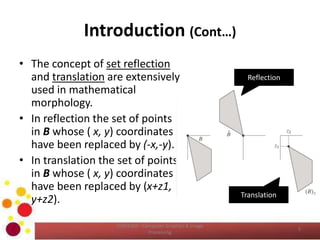
• The concept of set reflection
and translation are extensively
used in mathematical
morphology.
• In reflection the set of points
in B whose ( x, y) coordinates
have been replaced by (-x,-y).
• In translation the set of points
in B whose ( x, y) coordinates
have been replaced by (x+z1,
y+z2).
COM2304 - Computer Graphics & Image
Processing
5
Reflection
Translation
Introduction (Cont…)
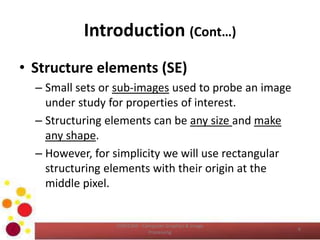
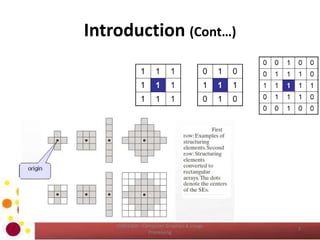
• Structure elements (SE)
– Small sets or sub-images used to probe an image
under study for properties of interest.
– Structuring elements can be any size and make
any shape.
– However, for simplicity we will use rectangular
structuring elements with their origin at the
middle pixel.
COM2304 - Computer Graphics & Image
Processing
6
Introduction (Cont…)
COM2304 - Computer Graphics & Image
Processing
7
Introduction (Cont…)
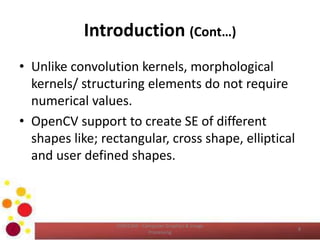
• Unlike convolution kernels, morphological
kernels/ structuring elements do not require
numerical values.
• OpenCV support to create SE of different
shapes like; rectangular, cross shape, elliptical
and user defined shapes.
COM2304 - Computer Graphics & Image
Processing
8
Introduction (Cont…)
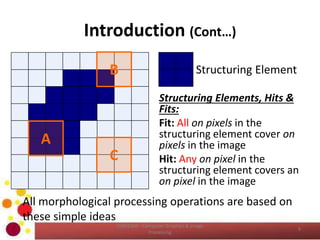
B
A
C
Structuring Element
Structuring Elements, Hits &
Fits:
Fit: All on pixels in the
structuring element cover on
pixels in the image
Hit: Any on pixel in the
structuring element covers an
on pixel in the image
All morphological processing operations are based on
these simple ideas
9
COM2304 - Computer Graphics & Image
Processing
Introduction (Cont…)
10
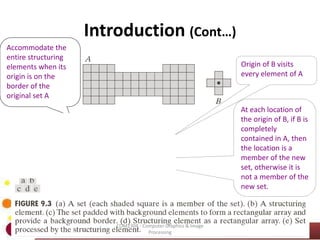
Accommodate the
entire structuring
elements when its
origin is on the
border of the
original set A
Origin of B visits
every element of A
At each location of
the origin of B, if B is
completely
contained in A, then
the location is a
member of the new
set, otherwise it is
not a member of the
new set.
COM2304 - Computer Graphics & Image
Processing
Introduction (Cont…)
• Fundamentally morphological image
processing is very like spatial filtering.
• The structuring element is moved across every
pixel in the original image to give a pixel in a
new processed image.
• The value of this new pixel depends on the
operation performed.
• There are two basic morphological operations:
erosion and dilation
COM2304 - Computer Graphics & Image
Processing
11
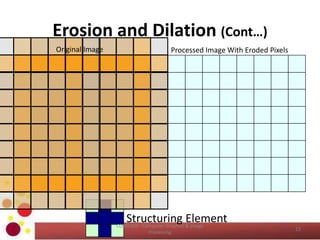
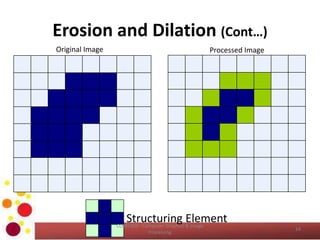
Erosion and Dilation
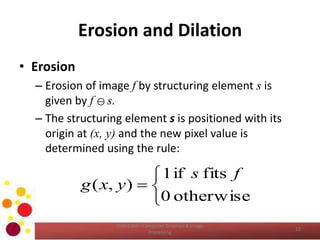
• Erosion
– Erosion of image f by structuring element s is
given by f  s.
– The structuring element s is positioned with its
origin at (x, y) and the new pixel value is
determined using the rule:
COM2304 - Computer Graphics & Image
Processing
12




otherwise0
fitsif1
),(
fs
yxg
Erosion and Dilation (Cont…)
Structuring Element
Original Image Processed Image With Eroded Pixels
13
COM2304 - Computer Graphics & Image
Processing
Erosion and Dilation (Cont…)
Structuring Element
Original Image Processed Image
14
COM2304 - Computer Graphics & Image
Processing
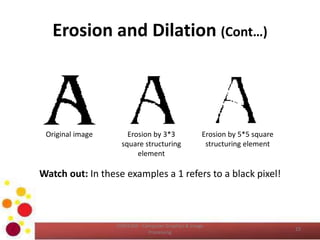
Erosion and Dilation (Cont…)
Watch out: In these examples a 1 refers to a black pixel!
Original image Erosion by 3*3
square structuring
element
Erosion by 5*5 square
structuring element
15
COM2304 - Computer Graphics & Image
Processing
Erosion and Dilation (Cont…)
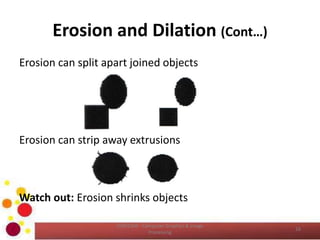
Erosion can split apart joined objects
Erosion can strip away extrusions
Watch out: Erosion shrinks objects
16
COM2304 - Computer Graphics & Image
Processing
Erosion and Dilation (Cont…)
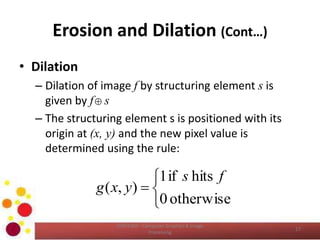
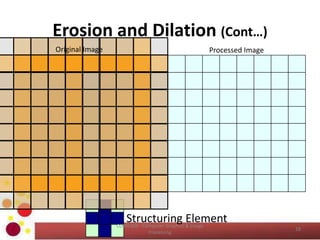
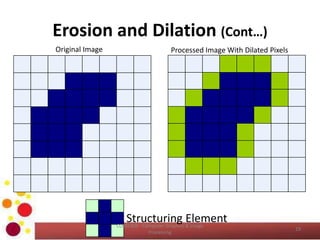
• Dilation
– Dilation of image f by structuring element s is
given by f s
– The structuring element s is positioned with its
origin at (x, y) and the new pixel value is
determined using the rule:
COM2304 - Computer Graphics & Image
Processing
17





otherwise0
hitsif1
),(
fs
yxg
Erosion and Dilation (Cont…)
Structuring Element
Original Image Processed Image
18
COM2304 - Computer Graphics & Image
Processing
Erosion and Dilation (Cont…)
Structuring Element
Original Image Processed Image With Dilated Pixels
19
COM2304 - Computer Graphics & Image
Processing
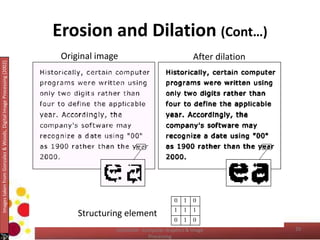
Erosion and Dilation (Cont…)
Structuring element
Original image After dilation
ImagestakenfromGonzalez&Woods,DigitalImageProcessing(2002)
20COM2304 - Computer Graphics & Image
Processing
Erosion and Dilation (Cont…)
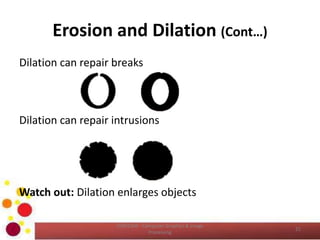
Dilation can repair breaks
Dilation can repair intrusions
Watch out: Dilation enlarges objects
21
COM2304 - Computer Graphics & Image
Processing
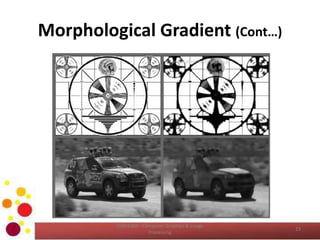
Morphological Gradient
Gradient(src) = dilate(src) – erode(src)
• The effect of this operation on a Boolean image
would be simply to isolate perimeters of existing
blobs.
• With a grayscale image we see that the value of
operator is telling us something about how fast
the image brightness is changing.
• Morphological gradient is often used when we
want to isolate the perimeters of bright regions
so we can treat them as whole objects.
COM2304 - Computer Graphics & Image
Processing
22
Morphological Gradient (Cont…)
COM2304 - Computer Graphics & Image
Processing
23
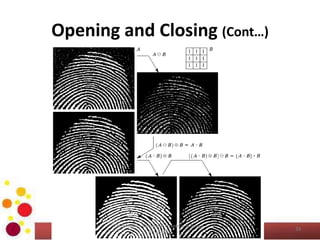
Opening and Closing
• More interesting morphological operations
can be performed by performing
combinations of erosions and dilations.
• The most widely used of these compound
operations are:
– Opening
– Closing
COM2304 - Computer Graphics & Image
Processing
24
Opening and Closing (Cont…)
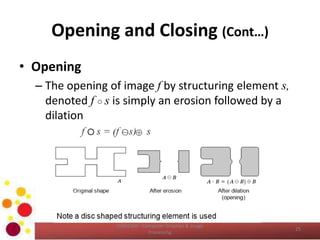
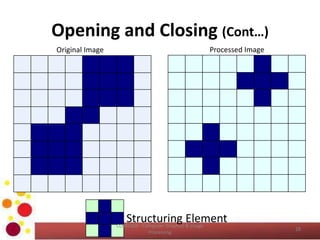
• Opening
– The opening of image f by structuring element s,
denoted f ○ s is simply an erosion followed by a
dilation
COM2304 - Computer Graphics & Image
Processing
25
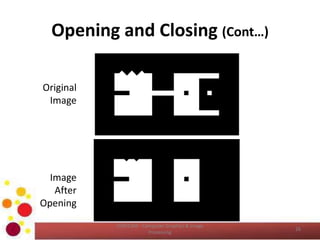
Opening and Closing (Cont…)
Original
Image
Image
After
Opening
26
COM2304 - Computer Graphics & Image
Processing
Opening and Closing (Cont…)
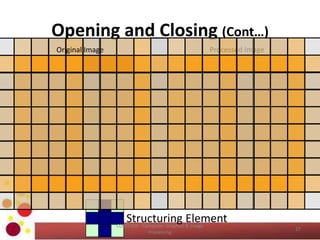
Structuring Element
Original Image Processed Image
27
COM2304 - Computer Graphics & Image
Processing
Opening and Closing (Cont…)
Structuring Element
Original Image Processed Image
28
COM2304 - Computer Graphics & Image
Processing
Opening and Closing (Cont…)
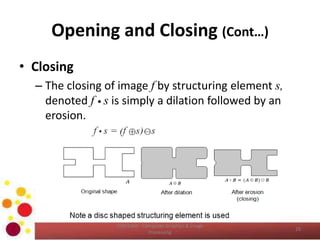
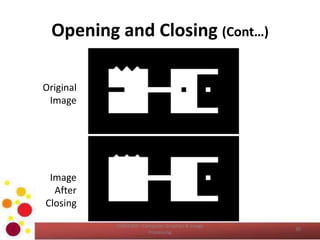
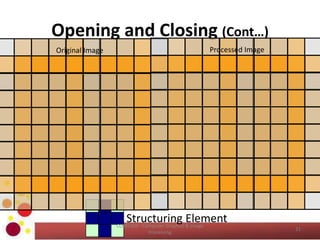
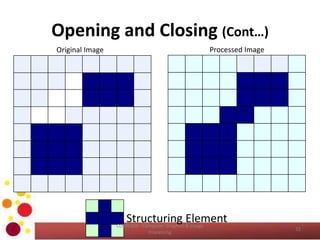
• Closing
– The closing of image f by structuring element s,
denoted f • s is simply a dilation followed by an
erosion.
COM2304 - Computer Graphics & Image
Processing
29
Opening and Closing (Cont…)
Original
Image
Image
After
Closing
30
COM2304 - Computer Graphics & Image
Processing
Opening and Closing (Cont…)
Structuring Element
Original Image Processed Image
31
COM2304 - Computer Graphics & Image
Processing
Opening and Closing (Cont…)
Structuring Element
Original Image Processed Image
32
COM2304 - Computer Graphics & Image
Processing
Opening and Closing (Cont…)
33
COM2304 - Computer Graphics & Image
Processing
Opening and Closing (Cont…)
• Opening generally smoothes the contour of an
object, breaks narrow isthmuses, and
eliminates thin protrusions.
• Closing smoothes sections of contours, but
opposed to opening.
• It generally fuses narrow breaks and long thin
gulfs, eliminates small holes, and fills gaps in
the contour.
COM2304 - Computer Graphics & Image
Processing
34
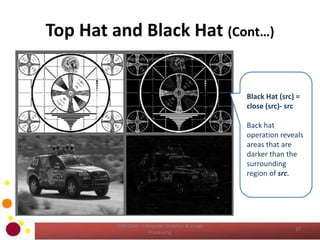
Top Hat and Black Hat
• These operators are used to isolate patches
that are, respectively brighter or dimmer than
their immediate neighbors.
• You would use these when trying to isolate
parts of an object that exhibits brightness
changes relative only to the object to which
they have attached.
• This often occurs with microscope images of
organisms or cells.
COM2304 - Computer Graphics & Image
Processing
35
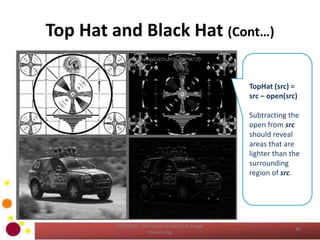
Top Hat and Black Hat (Cont…)
COM2304 - Computer Graphics & Image
Processing
36
TopHat (src) =
src – open(src)
Subtracting the
open from src
should reveal
areas that are
lighter than the
surrounding
region of src.
Top Hat and Black Hat (Cont…)
COM2304 - Computer Graphics & Image
Processing
37
Black Hat (src) =
close (src)- src
Back hat
operation reveals
areas that are
darker than the
surrounding
region of src.
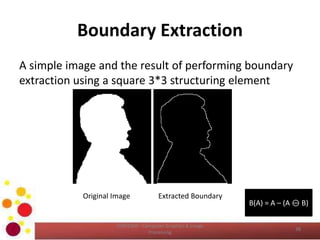
Boundary Extraction
A simple image and the result of performing boundary
extraction using a square 3*3 structuring element
Original Image Extracted Boundary
B(A) = A – (A  B)
38
COM2304 - Computer Graphics & Image
Processing
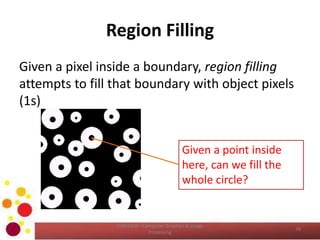
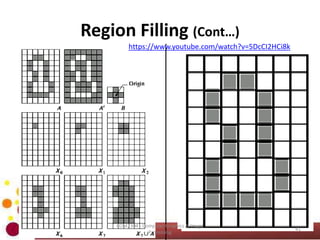
Region Filling
Given a pixel inside a boundary, region filling
attempts to fill that boundary with object pixels
(1s)
Given a point inside
here, can we fill the
whole circle?
39
COM2304 - Computer Graphics & Image
Processing
Region Filling (Cont…)
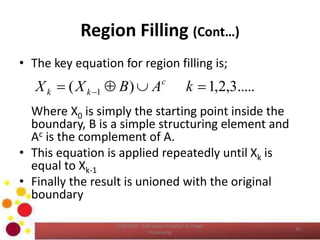
• The key equation for region filling is;
Where X0 is simply the starting point inside the
boundary, B is a simple structuring element and
Ac is the complement of A.
• This equation is applied repeatedly until Xk is
equal to Xk-1
• Finally the result is unioned with the original
boundary
COM2304 - Computer Graphics & Image
Processing
40
.....3,2,1)( 1   kABXX c
kk
Region Filling (Cont…)
41
COM2304 - Computer Graphics & Image
Processing
https://www.youtube.com/watch?v=5DcCI2HCi8k
Reference
• Chapter 09 of Gonzalez, R.C., Woods, R.E.,
Digital Image Processing, 3rd ed. Addison-
Wesley Pub.
COM2304 - Computer Graphics & Image
Processing
42
Learning Outcomes Revisit
• Now, you should be able to;
– describe the importance of morphological
features in an image.
– describe the operation of erosion, dilation,
open and close operations.
– identify the practical advantage of the
morphological operations.
– apply morphological operations for problem
solving.
COM2304 - Computer Graphics & Image
Processing
43
QUESTIONS ?
Next Lecture – Segmentation Techniques
COM2304 - Computer Graphics & Image
Processing
44

COM2304: Morphological Image Processing

  • 1.
    COMPUTER GRAPHICS &IMAGE PROCESSING COM2304 Morphological Image Processing K.A.S.H.Kulathilake B.Sc. (Hons) IT (SLIIT), MCS (UCSC), M.Phil (UOM), SEDA(UK) Rajarata University of Sri Lanka Faculty of Applied Sciences Department of Physical Sciences
  • 2.
    Learning Outcomes COM2304 -Computer Graphics & Image Processing • At the end of this lecture, you should be able to; – describe the importance of morphological features in an image. – describe the operation of erosion, dilation, open and close operations. – identify the practical advantage of the morphological operations. – apply morphological operations for problem solving. 2
  • 3.
    Introduction • Mathematical morphologyis a tool for extracting image components that are useful in the representation and description of the region shape, such as boundaries and skeletons. • Morphological operations are typically applied to remove imperfections introduced during segmentation, and so typically operate on bi- level images. COM2304 - Computer Graphics & Image Processing 3
  • 4.
    Introduction (Cont…) • Thelanguage of mathematical morphology is set theory. • Sets in mathematical morphology represent objects in an image. – Ex: binary image – set represents 2D integer space denoted as Z2 and consists of x,y coordinates. – Gray scale image – set represents components in Z3 which means x,y coordinates and discrete intensity value. COM2304 - Computer Graphics & Image Processing 4
  • 5.
    Introduction (Cont…) • Theconcept of set reflection and translation are extensively used in mathematical morphology. • In reflection the set of points in B whose ( x, y) coordinates have been replaced by (-x,-y). • In translation the set of points in B whose ( x, y) coordinates have been replaced by (x+z1, y+z2). COM2304 - Computer Graphics & Image Processing 5 Reflection Translation
  • 6.
    Introduction (Cont…) • Structureelements (SE) – Small sets or sub-images used to probe an image under study for properties of interest. – Structuring elements can be any size and make any shape. – However, for simplicity we will use rectangular structuring elements with their origin at the middle pixel. COM2304 - Computer Graphics & Image Processing 6
  • 7.
    Introduction (Cont…) COM2304 -Computer Graphics & Image Processing 7
  • 8.
    Introduction (Cont…) • Unlikeconvolution kernels, morphological kernels/ structuring elements do not require numerical values. • OpenCV support to create SE of different shapes like; rectangular, cross shape, elliptical and user defined shapes. COM2304 - Computer Graphics & Image Processing 8
  • 9.
    Introduction (Cont…) B A C Structuring Element StructuringElements, Hits & Fits: Fit: All on pixels in the structuring element cover on pixels in the image Hit: Any on pixel in the structuring element covers an on pixel in the image All morphological processing operations are based on these simple ideas 9 COM2304 - Computer Graphics & Image Processing
  • 10.
    Introduction (Cont…) 10 Accommodate the entirestructuring elements when its origin is on the border of the original set A Origin of B visits every element of A At each location of the origin of B, if B is completely contained in A, then the location is a member of the new set, otherwise it is not a member of the new set. COM2304 - Computer Graphics & Image Processing
  • 11.
    Introduction (Cont…) • Fundamentallymorphological image processing is very like spatial filtering. • The structuring element is moved across every pixel in the original image to give a pixel in a new processed image. • The value of this new pixel depends on the operation performed. • There are two basic morphological operations: erosion and dilation COM2304 - Computer Graphics & Image Processing 11
  • 12.
    Erosion and Dilation •Erosion – Erosion of image f by structuring element s is given by f  s. – The structuring element s is positioned with its origin at (x, y) and the new pixel value is determined using the rule: COM2304 - Computer Graphics & Image Processing 12     otherwise0 fitsif1 ),( fs yxg
  • 13.
    Erosion and Dilation(Cont…) Structuring Element Original Image Processed Image With Eroded Pixels 13 COM2304 - Computer Graphics & Image Processing
  • 14.
    Erosion and Dilation(Cont…) Structuring Element Original Image Processed Image 14 COM2304 - Computer Graphics & Image Processing
  • 15.
    Erosion and Dilation(Cont…) Watch out: In these examples a 1 refers to a black pixel! Original image Erosion by 3*3 square structuring element Erosion by 5*5 square structuring element 15 COM2304 - Computer Graphics & Image Processing
  • 16.
    Erosion and Dilation(Cont…) Erosion can split apart joined objects Erosion can strip away extrusions Watch out: Erosion shrinks objects 16 COM2304 - Computer Graphics & Image Processing
  • 17.
    Erosion and Dilation(Cont…) • Dilation – Dilation of image f by structuring element s is given by f s – The structuring element s is positioned with its origin at (x, y) and the new pixel value is determined using the rule: COM2304 - Computer Graphics & Image Processing 17      otherwise0 hitsif1 ),( fs yxg
  • 18.
    Erosion and Dilation(Cont…) Structuring Element Original Image Processed Image 18 COM2304 - Computer Graphics & Image Processing
  • 19.
    Erosion and Dilation(Cont…) Structuring Element Original Image Processed Image With Dilated Pixels 19 COM2304 - Computer Graphics & Image Processing
  • 20.
    Erosion and Dilation(Cont…) Structuring element Original image After dilation ImagestakenfromGonzalez&Woods,DigitalImageProcessing(2002) 20COM2304 - Computer Graphics & Image Processing
  • 21.
    Erosion and Dilation(Cont…) Dilation can repair breaks Dilation can repair intrusions Watch out: Dilation enlarges objects 21 COM2304 - Computer Graphics & Image Processing
  • 22.
    Morphological Gradient Gradient(src) =dilate(src) – erode(src) • The effect of this operation on a Boolean image would be simply to isolate perimeters of existing blobs. • With a grayscale image we see that the value of operator is telling us something about how fast the image brightness is changing. • Morphological gradient is often used when we want to isolate the perimeters of bright regions so we can treat them as whole objects. COM2304 - Computer Graphics & Image Processing 22
  • 23.
    Morphological Gradient (Cont…) COM2304- Computer Graphics & Image Processing 23
  • 24.
    Opening and Closing •More interesting morphological operations can be performed by performing combinations of erosions and dilations. • The most widely used of these compound operations are: – Opening – Closing COM2304 - Computer Graphics & Image Processing 24
  • 25.
    Opening and Closing(Cont…) • Opening – The opening of image f by structuring element s, denoted f ○ s is simply an erosion followed by a dilation COM2304 - Computer Graphics & Image Processing 25
  • 26.
    Opening and Closing(Cont…) Original Image Image After Opening 26 COM2304 - Computer Graphics & Image Processing
  • 27.
    Opening and Closing(Cont…) Structuring Element Original Image Processed Image 27 COM2304 - Computer Graphics & Image Processing
  • 28.
    Opening and Closing(Cont…) Structuring Element Original Image Processed Image 28 COM2304 - Computer Graphics & Image Processing
  • 29.
    Opening and Closing(Cont…) • Closing – The closing of image f by structuring element s, denoted f • s is simply a dilation followed by an erosion. COM2304 - Computer Graphics & Image Processing 29
  • 30.
    Opening and Closing(Cont…) Original Image Image After Closing 30 COM2304 - Computer Graphics & Image Processing
  • 31.
    Opening and Closing(Cont…) Structuring Element Original Image Processed Image 31 COM2304 - Computer Graphics & Image Processing
  • 32.
    Opening and Closing(Cont…) Structuring Element Original Image Processed Image 32 COM2304 - Computer Graphics & Image Processing
  • 33.
    Opening and Closing(Cont…) 33 COM2304 - Computer Graphics & Image Processing
  • 34.
    Opening and Closing(Cont…) • Opening generally smoothes the contour of an object, breaks narrow isthmuses, and eliminates thin protrusions. • Closing smoothes sections of contours, but opposed to opening. • It generally fuses narrow breaks and long thin gulfs, eliminates small holes, and fills gaps in the contour. COM2304 - Computer Graphics & Image Processing 34
  • 35.
    Top Hat andBlack Hat • These operators are used to isolate patches that are, respectively brighter or dimmer than their immediate neighbors. • You would use these when trying to isolate parts of an object that exhibits brightness changes relative only to the object to which they have attached. • This often occurs with microscope images of organisms or cells. COM2304 - Computer Graphics & Image Processing 35
  • 36.
    Top Hat andBlack Hat (Cont…) COM2304 - Computer Graphics & Image Processing 36 TopHat (src) = src – open(src) Subtracting the open from src should reveal areas that are lighter than the surrounding region of src.
  • 37.
    Top Hat andBlack Hat (Cont…) COM2304 - Computer Graphics & Image Processing 37 Black Hat (src) = close (src)- src Back hat operation reveals areas that are darker than the surrounding region of src.
  • 38.
    Boundary Extraction A simpleimage and the result of performing boundary extraction using a square 3*3 structuring element Original Image Extracted Boundary B(A) = A – (A  B) 38 COM2304 - Computer Graphics & Image Processing
  • 39.
    Region Filling Given apixel inside a boundary, region filling attempts to fill that boundary with object pixels (1s) Given a point inside here, can we fill the whole circle? 39 COM2304 - Computer Graphics & Image Processing
  • 40.
    Region Filling (Cont…) •The key equation for region filling is; Where X0 is simply the starting point inside the boundary, B is a simple structuring element and Ac is the complement of A. • This equation is applied repeatedly until Xk is equal to Xk-1 • Finally the result is unioned with the original boundary COM2304 - Computer Graphics & Image Processing 40 .....3,2,1)( 1   kABXX c kk
  • 41.
    Region Filling (Cont…) 41 COM2304- Computer Graphics & Image Processing https://www.youtube.com/watch?v=5DcCI2HCi8k
  • 42.
    Reference • Chapter 09of Gonzalez, R.C., Woods, R.E., Digital Image Processing, 3rd ed. Addison- Wesley Pub. COM2304 - Computer Graphics & Image Processing 42
  • 43.
    Learning Outcomes Revisit •Now, you should be able to; – describe the importance of morphological features in an image. – describe the operation of erosion, dilation, open and close operations. – identify the practical advantage of the morphological operations. – apply morphological operations for problem solving. COM2304 - Computer Graphics & Image Processing 43
  • 44.
    QUESTIONS ? Next Lecture– Segmentation Techniques COM2304 - Computer Graphics & Image Processing 44