CSC462: Introduction to Artificial
Intelligence (Lab)
Department of Computer Sciences
COMSATS Institute of Information Technology
Abbottabad
Dr. Zia ur Rehman CSC462: Introduction to Artificial Intelligence (Lab)1 / 19
Introduction Python
Dr. Zia ur Rehman
COMSATS Institute of Information Technology
Abbottabad, Pakistan
Fall 2016
Dr. Zia ur Rehman CSC462: Introduction to Artificial Intelligence (Lab)2 / 19
What is Python?
Python was created by a Dutchman named Guido van Rossum
in the early 90s.
It is now one of the most popular languages in existence.
There are two versions of Python:
Python 2.7
Python 3.5
Dr. Zia ur Rehman CSC462: Introduction to Artificial Intelligence (Lab)3 / 19
Installing Python
There are several ways for installing Python and its associated
tools.
The easiest is to donwload and install the anaconda
distribution from:
https://www.continuum.io/downloads
Dr. Zia ur Rehman CSC462: Introduction to Artificial Intelligence (Lab)4 / 19
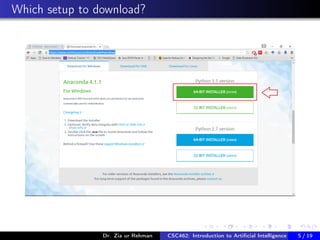
Which setup to download?
Dr. Zia ur Rehman CSC462: Introduction to Artificial Intelligence (Lab)5 / 19
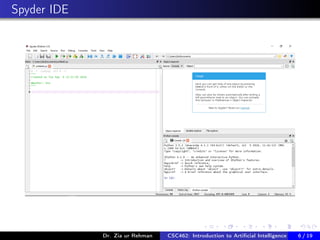
Spyder IDE
Dr. Zia ur Rehman CSC462: Introduction to Artificial Intelligence (Lab)6 / 19
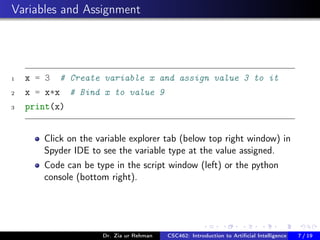
Variables and Assignment
1 x = 3 # Create variable x and assign value 3 to it
2 x = x*x # Bind x to value 9
3 print(x)
Click on the variable explorer tab (below top right window) in
Spyder IDE to see the variable type at the value assigned.
Code can be type in the script window (left) or the python
console (bottom right).
Dr. Zia ur Rehman CSC462: Introduction to Artificial Intelligence (Lab)7 / 19
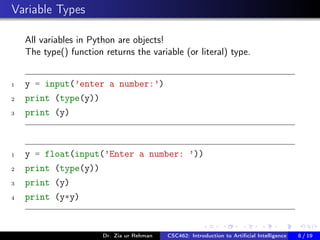
Variable Types
All variables in Python are objects!
The type() function returns the variable (or literal) type.
1 y = input(’enter a number:’)
2 print (type(y))
3 print (y)
1 y = float(input(’Enter a number: ’))
2 print (type(y))
3 print (y)
4 print (y*y)
Dr. Zia ur Rehman CSC462: Introduction to Artificial Intelligence (Lab)8 / 19
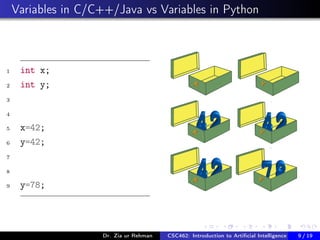
Variables in C/C++/Java vs Variables in Python
1 int x;
2 int y;
3
4
5 x=42;
6 y=42;
7
8
9 y=78;
Dr. Zia ur Rehman CSC462: Introduction to Artificial Intelligence (Lab)9 / 19
Variables in Python
There is no declaration of variables required in Python. It’s not
even possible. If there is need of a variable, you think of a
name and start using it as a variable.
Not only the value of a variable may change during program
execution but the type as well. You can assign an integer value
to a variable, use it as an integer for a while and then assign a
string to the same variable.
Dr. Zia ur Rehman CSC462: Introduction to Artificial Intelligence (Lab)10 / 19
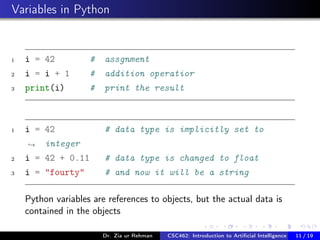
Variables in Python
1 i = 42 # assgnment
2 i = i + 1 # addition operatior
3 print(i) # print the result
1 i = 42 # data type is implicitly set to
integer→
2 i = 42 + 0.11 # data type is changed to float
3 i = "fourty" # and now it will be a string
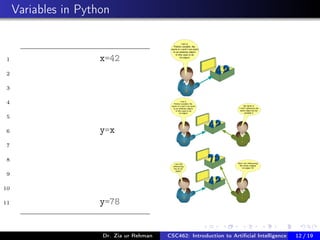
Python variables are references to objects, but the actual data is
contained in the objects
Dr. Zia ur Rehman CSC462: Introduction to Artificial Intelligence (Lab)11 / 19
Variables in Python
1 x=42
2
3
4
5
6 y=x
7
8
9
10
11 y=78
Dr. Zia ur Rehman CSC462: Introduction to Artificial Intelligence (Lab)12 / 19
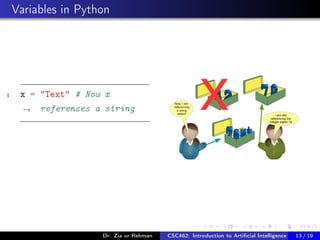
Variables in Python
1 x = "Text" # Now x
references a string→
Dr. Zia ur Rehman CSC462: Introduction to Artificial Intelligence (Lab)13 / 19
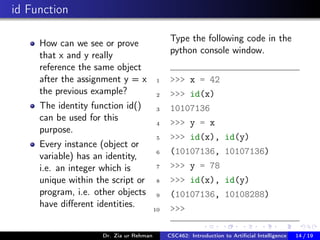
id Function
How can we see or prove
that x and y really
reference the same object
after the assignment y = x
the previous example?
The identity function id()
can be used for this
purpose.
Every instance (object or
variable) has an identity,
i.e. an integer which is
unique within the script or
program, i.e. other objects
have different identities.
Type the following code in the
python console window.
1 >>> x = 42
2 >>> id(x)
3 10107136
4 >>> y = x
5 >>> id(x), id(y)
6 (10107136, 10107136)
7 >>> y = 78
8 >>> id(x), id(y)
9 (10107136, 10108288)
10 >>>
Dr. Zia ur Rehman CSC462: Introduction to Artificial Intelligence (Lab)14 / 19
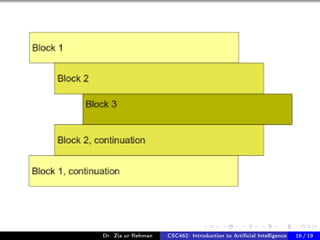
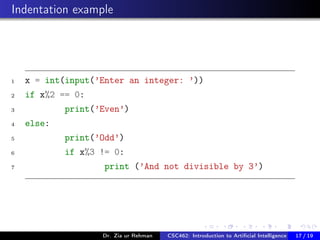
Blocks and Indentation
Other languages use { } or Begin: End: kewords to mark
code blocks. Python uses a different principle.
Python programs get structured through indentation, i.e. code
blocks are defined by their indentation.
Code indentation is used in other languages as well but in case
of Python it’s a language requirement not a matter of style.
Loops and Conditional statements end with a colon ":" - the
same is true for functions and other structures introducing
blocks.
Dr. Zia ur Rehman CSC462: Introduction to Artificial Intelligence (Lab)15 / 19
Dr. Zia ur Rehman CSC462: Introduction to Artificial Intelligence (Lab)16 / 19
Indentation example
1 x = int(input(’Enter an integer: ’))
2 if x%2 == 0:
3 print(’Even’)
4 else:
5 print(’Odd’)
6 if x%3 != 0:
7 print (’And not divisible by 3’)
Dr. Zia ur Rehman CSC462: Introduction to Artificial Intelligence (Lab)17 / 19
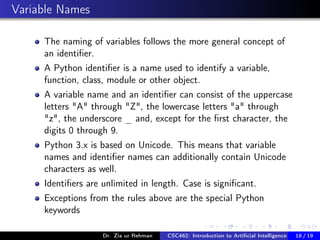
Variable Names
The naming of variables follows the more general concept of
an identifier.
A Python identifier is a name used to identify a variable,
function, class, module or other object.
A variable name and an identifier can consist of the uppercase
letters "A" through "Z", the lowercase letters "a" through
"z", the underscore _ and, except for the first character, the
digits 0 through 9.
Python 3.x is based on Unicode. This means that variable
names and identifier names can additionally contain Unicode
characters as well.
Identifiers are unlimited in length. Case is significant.
Exceptions from the rules above are the special Python
keywords
Dr. Zia ur Rehman CSC462: Introduction to Artificial Intelligence (Lab)18 / 19
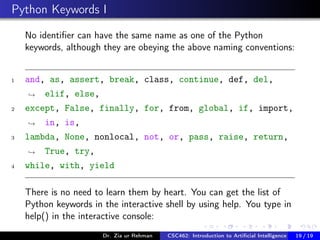
Python Keywords I
No identifier can have the same name as one of the Python
keywords, although they are obeying the above naming conventions:
1 and, as, assert, break, class, continue, def, del,
elif, else,→
2 except, False, finally, for, from, global, if, import,
in, is,→
3 lambda, None, nonlocal, not, or, pass, raise, return,
True, try,→
4 while, with, yield
There is no need to learn them by heart. You can get the list of
Python keywords in the interactive shell by using help. You type in
help() in the interactive console:
Dr. Zia ur Rehman CSC462: Introduction to Artificial Intelligence (Lab)19 / 19
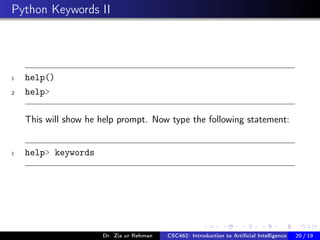
Python Keywords II
1 help()
2 help>
This will show he help prompt. Now type the following statement:
1 help> keywords
Dr. Zia ur Rehman CSC462: Introduction to Artificial Intelligence (Lab)20 / 19

introduction to python

  • 1.
    CSC462: Introduction toArtificial Intelligence (Lab) Department of Computer Sciences COMSATS Institute of Information Technology Abbottabad Dr. Zia ur Rehman CSC462: Introduction to Artificial Intelligence (Lab)1 / 19
  • 2.
    Introduction Python Dr. Ziaur Rehman COMSATS Institute of Information Technology Abbottabad, Pakistan Fall 2016 Dr. Zia ur Rehman CSC462: Introduction to Artificial Intelligence (Lab)2 / 19
  • 3.
    What is Python? Pythonwas created by a Dutchman named Guido van Rossum in the early 90s. It is now one of the most popular languages in existence. There are two versions of Python: Python 2.7 Python 3.5 Dr. Zia ur Rehman CSC462: Introduction to Artificial Intelligence (Lab)3 / 19
  • 4.
    Installing Python There areseveral ways for installing Python and its associated tools. The easiest is to donwload and install the anaconda distribution from: https://www.continuum.io/downloads Dr. Zia ur Rehman CSC462: Introduction to Artificial Intelligence (Lab)4 / 19
  • 5.
    Which setup todownload? Dr. Zia ur Rehman CSC462: Introduction to Artificial Intelligence (Lab)5 / 19
  • 6.
    Spyder IDE Dr. Ziaur Rehman CSC462: Introduction to Artificial Intelligence (Lab)6 / 19
  • 7.
    Variables and Assignment 1x = 3 # Create variable x and assign value 3 to it 2 x = x*x # Bind x to value 9 3 print(x) Click on the variable explorer tab (below top right window) in Spyder IDE to see the variable type at the value assigned. Code can be type in the script window (left) or the python console (bottom right). Dr. Zia ur Rehman CSC462: Introduction to Artificial Intelligence (Lab)7 / 19
  • 8.
    Variable Types All variablesin Python are objects! The type() function returns the variable (or literal) type. 1 y = input(’enter a number:’) 2 print (type(y)) 3 print (y) 1 y = float(input(’Enter a number: ’)) 2 print (type(y)) 3 print (y) 4 print (y*y) Dr. Zia ur Rehman CSC462: Introduction to Artificial Intelligence (Lab)8 / 19
  • 9.
    Variables in C/C++/Javavs Variables in Python 1 int x; 2 int y; 3 4 5 x=42; 6 y=42; 7 8 9 y=78; Dr. Zia ur Rehman CSC462: Introduction to Artificial Intelligence (Lab)9 / 19
  • 10.
    Variables in Python Thereis no declaration of variables required in Python. It’s not even possible. If there is need of a variable, you think of a name and start using it as a variable. Not only the value of a variable may change during program execution but the type as well. You can assign an integer value to a variable, use it as an integer for a while and then assign a string to the same variable. Dr. Zia ur Rehman CSC462: Introduction to Artificial Intelligence (Lab)10 / 19
  • 11.
    Variables in Python 1i = 42 # assgnment 2 i = i + 1 # addition operatior 3 print(i) # print the result 1 i = 42 # data type is implicitly set to integer→ 2 i = 42 + 0.11 # data type is changed to float 3 i = "fourty" # and now it will be a string Python variables are references to objects, but the actual data is contained in the objects Dr. Zia ur Rehman CSC462: Introduction to Artificial Intelligence (Lab)11 / 19
  • 12.
    Variables in Python 1x=42 2 3 4 5 6 y=x 7 8 9 10 11 y=78 Dr. Zia ur Rehman CSC462: Introduction to Artificial Intelligence (Lab)12 / 19
  • 13.
    Variables in Python 1x = "Text" # Now x references a string→ Dr. Zia ur Rehman CSC462: Introduction to Artificial Intelligence (Lab)13 / 19
  • 14.
    id Function How canwe see or prove that x and y really reference the same object after the assignment y = x the previous example? The identity function id() can be used for this purpose. Every instance (object or variable) has an identity, i.e. an integer which is unique within the script or program, i.e. other objects have different identities. Type the following code in the python console window. 1 >>> x = 42 2 >>> id(x) 3 10107136 4 >>> y = x 5 >>> id(x), id(y) 6 (10107136, 10107136) 7 >>> y = 78 8 >>> id(x), id(y) 9 (10107136, 10108288) 10 >>> Dr. Zia ur Rehman CSC462: Introduction to Artificial Intelligence (Lab)14 / 19
  • 15.
    Blocks and Indentation Otherlanguages use { } or Begin: End: kewords to mark code blocks. Python uses a different principle. Python programs get structured through indentation, i.e. code blocks are defined by their indentation. Code indentation is used in other languages as well but in case of Python it’s a language requirement not a matter of style. Loops and Conditional statements end with a colon ":" - the same is true for functions and other structures introducing blocks. Dr. Zia ur Rehman CSC462: Introduction to Artificial Intelligence (Lab)15 / 19
  • 16.
    Dr. Zia urRehman CSC462: Introduction to Artificial Intelligence (Lab)16 / 19
  • 17.
    Indentation example 1 x= int(input(’Enter an integer: ’)) 2 if x%2 == 0: 3 print(’Even’) 4 else: 5 print(’Odd’) 6 if x%3 != 0: 7 print (’And not divisible by 3’) Dr. Zia ur Rehman CSC462: Introduction to Artificial Intelligence (Lab)17 / 19
  • 18.
    Variable Names The namingof variables follows the more general concept of an identifier. A Python identifier is a name used to identify a variable, function, class, module or other object. A variable name and an identifier can consist of the uppercase letters "A" through "Z", the lowercase letters "a" through "z", the underscore _ and, except for the first character, the digits 0 through 9. Python 3.x is based on Unicode. This means that variable names and identifier names can additionally contain Unicode characters as well. Identifiers are unlimited in length. Case is significant. Exceptions from the rules above are the special Python keywords Dr. Zia ur Rehman CSC462: Introduction to Artificial Intelligence (Lab)18 / 19
  • 19.
    Python Keywords I Noidentifier can have the same name as one of the Python keywords, although they are obeying the above naming conventions: 1 and, as, assert, break, class, continue, def, del, elif, else,→ 2 except, False, finally, for, from, global, if, import, in, is,→ 3 lambda, None, nonlocal, not, or, pass, raise, return, True, try,→ 4 while, with, yield There is no need to learn them by heart. You can get the list of Python keywords in the interactive shell by using help. You type in help() in the interactive console: Dr. Zia ur Rehman CSC462: Introduction to Artificial Intelligence (Lab)19 / 19
  • 20.
    Python Keywords II 1help() 2 help> This will show he help prompt. Now type the following statement: 1 help> keywords Dr. Zia ur Rehman CSC462: Introduction to Artificial Intelligence (Lab)20 / 19