CS 354 Object Viewing and Representation Mark Kilgard University of Texas February 9, 2012
Today’s material In-class quiz Lecture topic: viewing + object representation Looking at an object Representing an object Assignment Reading Chapter 4, page 238-241; Chapter 6, 331-341 (Tuesday) Chapter 4, pages 241-249 You should be working on Project #1
Administrative I was sick Tuesday Thanks to Dr. Fussell for lecturing in my absence Final exam is during the exam period (Instead of last day of class) Making last day of class a review session instead Date & time:   Thursday, May 10, 2:00-5:00 pm Location:   TBD Quiz feedback started Look on piazza
My Office Hours Tuesday, before class Painter (PAI) 5.35 8:45 a.m. to 9:15 Not last Tuesday   Thursday, after class ACE 6.302 11:00 a.m. to 12:00
Last time, this time Last two lectures, we discussed Consequences of homogeneous coordinates Thursday: Projection transforms:  ortho and frustum Tuesday: Dr. Fussell discussed rotations with you This lecture How do we look at objects How do we represent objects for interactive rendering
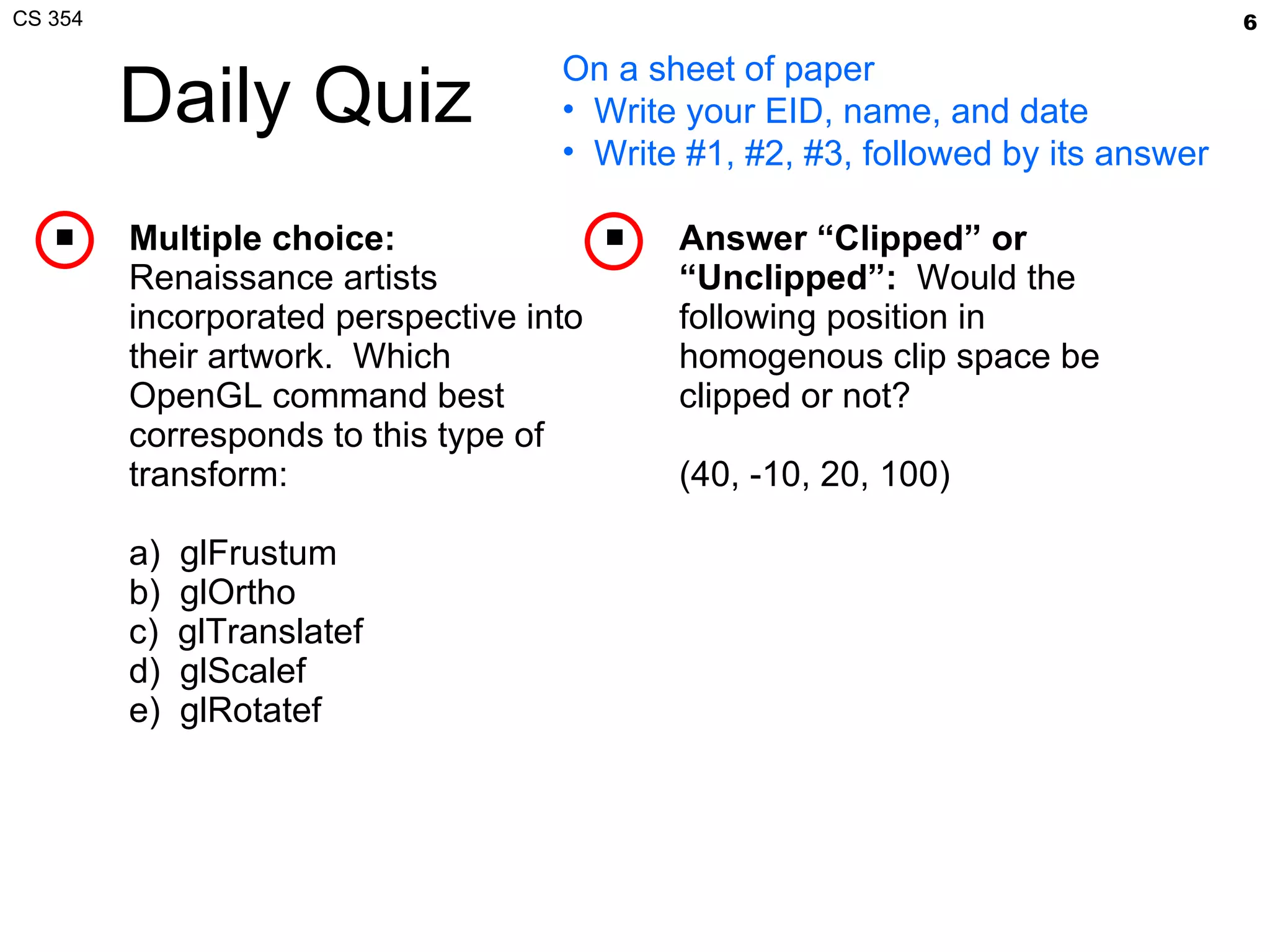
Daily Quiz Multiple choice:   Renaissance artists incorporated perspective into their artwork.  Which OpenGL command best corresponds to this type of transform: a)  glFrustum b)  glOrtho c)  glTranslatef d)  glScalef e)  glRotatef Answer “Clipped” or “Unclipped”:   Would the following position in homogenous clip space be clipped or not? (40, -10, 20, 100)  On a sheet of paper Write your EID, name, and date Write #1, #2, #3, followed by its answer
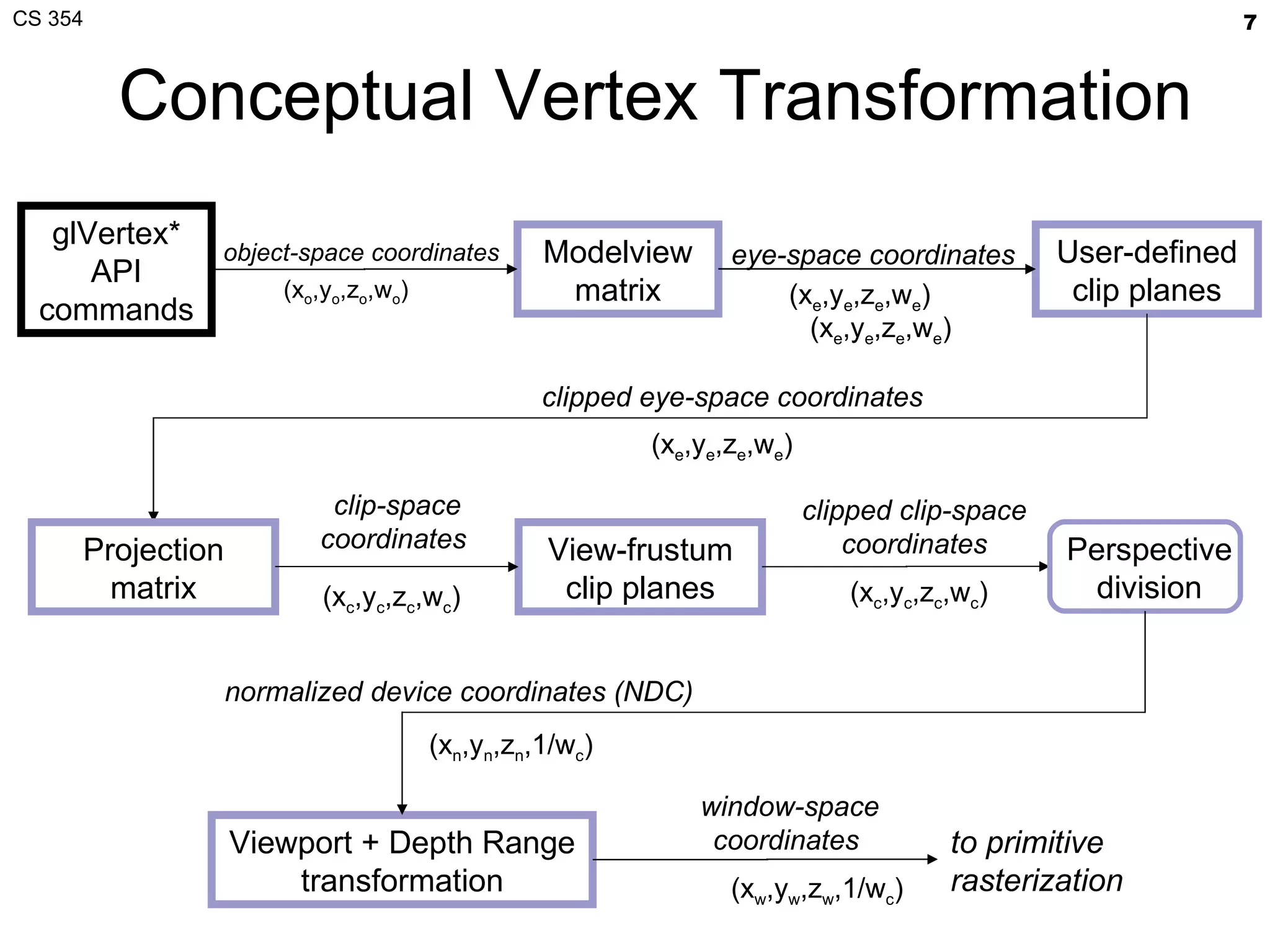
Conceptual Vertex Transformation glVertex* API commands Modelview matrix User-defined clip planes View-frustum clip planes to primitive rasterization object-space coordinates  (x o ,y o ,z o ,w o )  eye-space coordinates  (x e ,y e ,z e ,w e ) clipped eye-space coordinates  clipped clip-space  coordinates  Perspective division Projection matrix Viewport + Depth Range transformation (x c ,y c ,z c ,w c ) window-space coordinates  (x w ,y w ,z w ,1/w c ) normalized device coordinates (NDC) (x n ,y n ,z n ,1/w c ) clip-space coordinates  (x c ,y c ,z c ,w c ) (x e ,y e ,z e ,w e ) (x e ,y e ,z e ,w e )
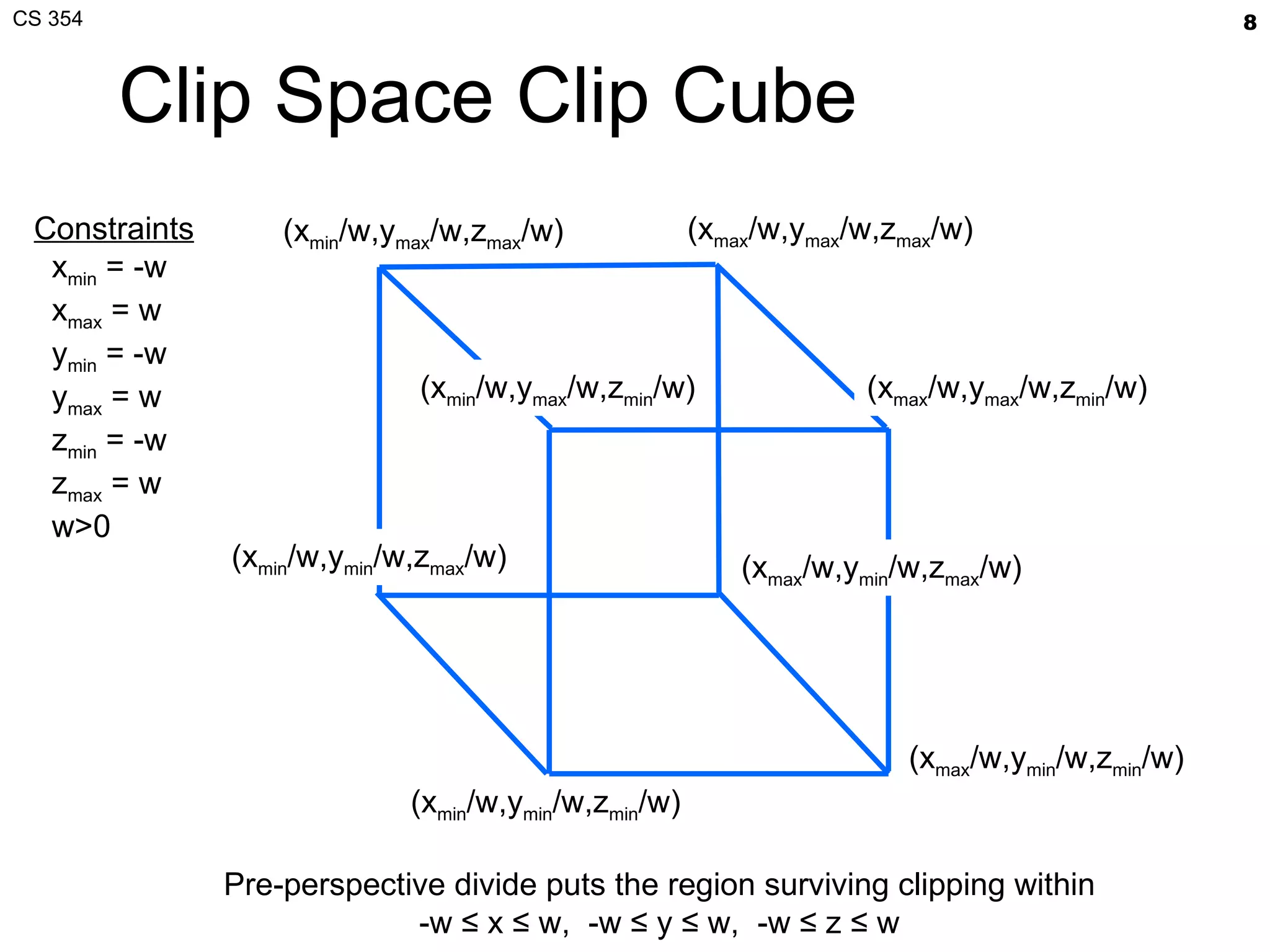
Clip Space Clip Cube (x min /w,y min /w,z min /w)  Pre-perspective divide puts the region surviving clipping within -w ≤ x ≤ w,  -w ≤ y ≤ w,  -w ≤ z ≤ w (x max /w,y min /w,z min /w)  (x max /w,y min /w,z max /w)  (x min /w,y min /w,z max /w)  (x max /w,y max /w,z max /w)  (x max /w,y max /w,z min /w)  (x min /w,y max /w,z min /w) (x min /w,y max /w,z max /w)  Constraints x min  = -w   x max  = w   y min  = -w y max  = w z min  = -w z max  = w w>0
Vertex Transformation Object-space vertex position transformed by a general linear projective transformation Expressed as a 4x4 matrix
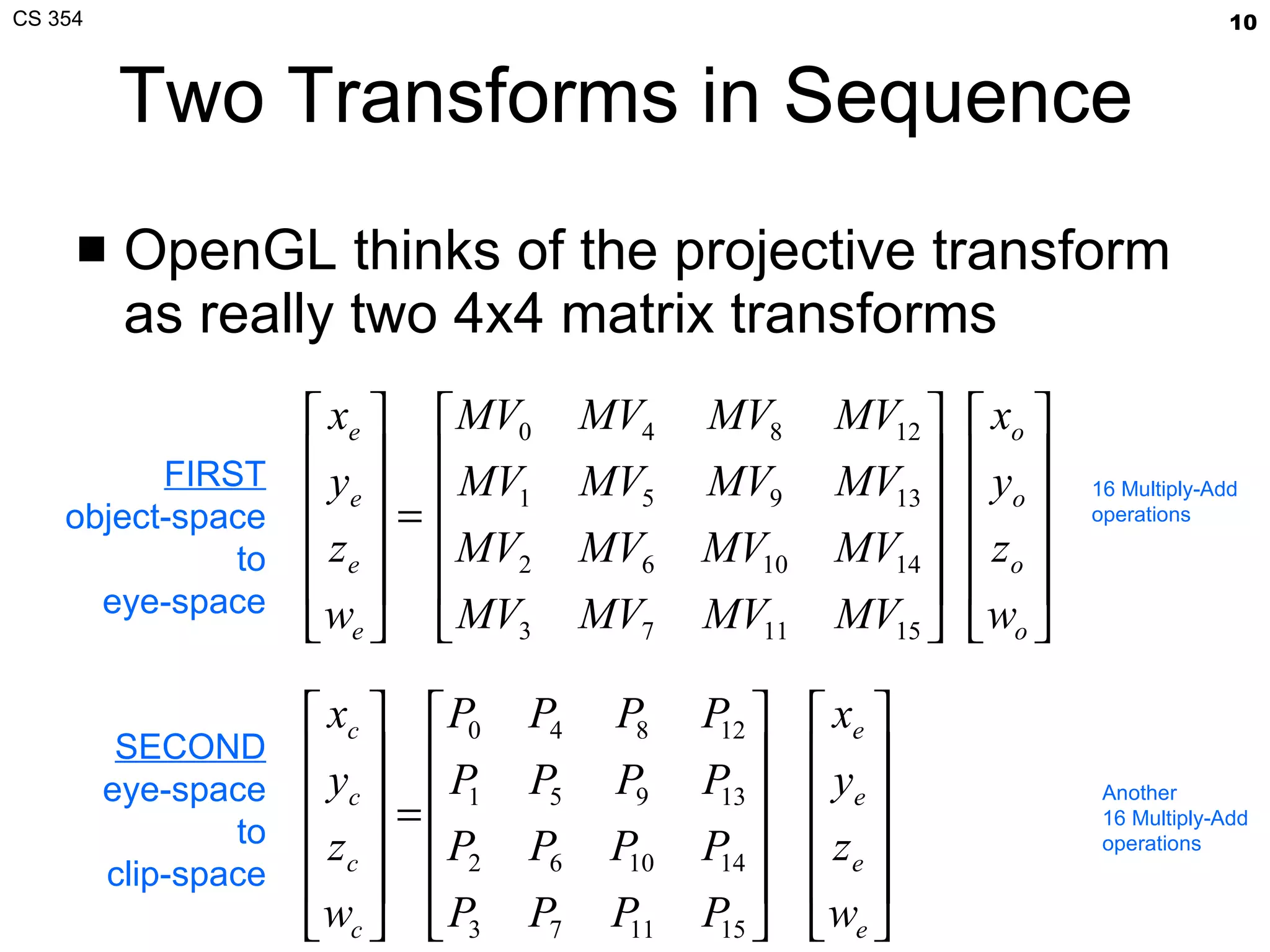
Two Transforms in Sequence OpenGL thinks of the projective transform as really two 4x4 matrix transforms FIRST object-space to eye-space SECOND eye-space to clip-space 16 Multiply-Add operations Another 16 Multiply-Add operations
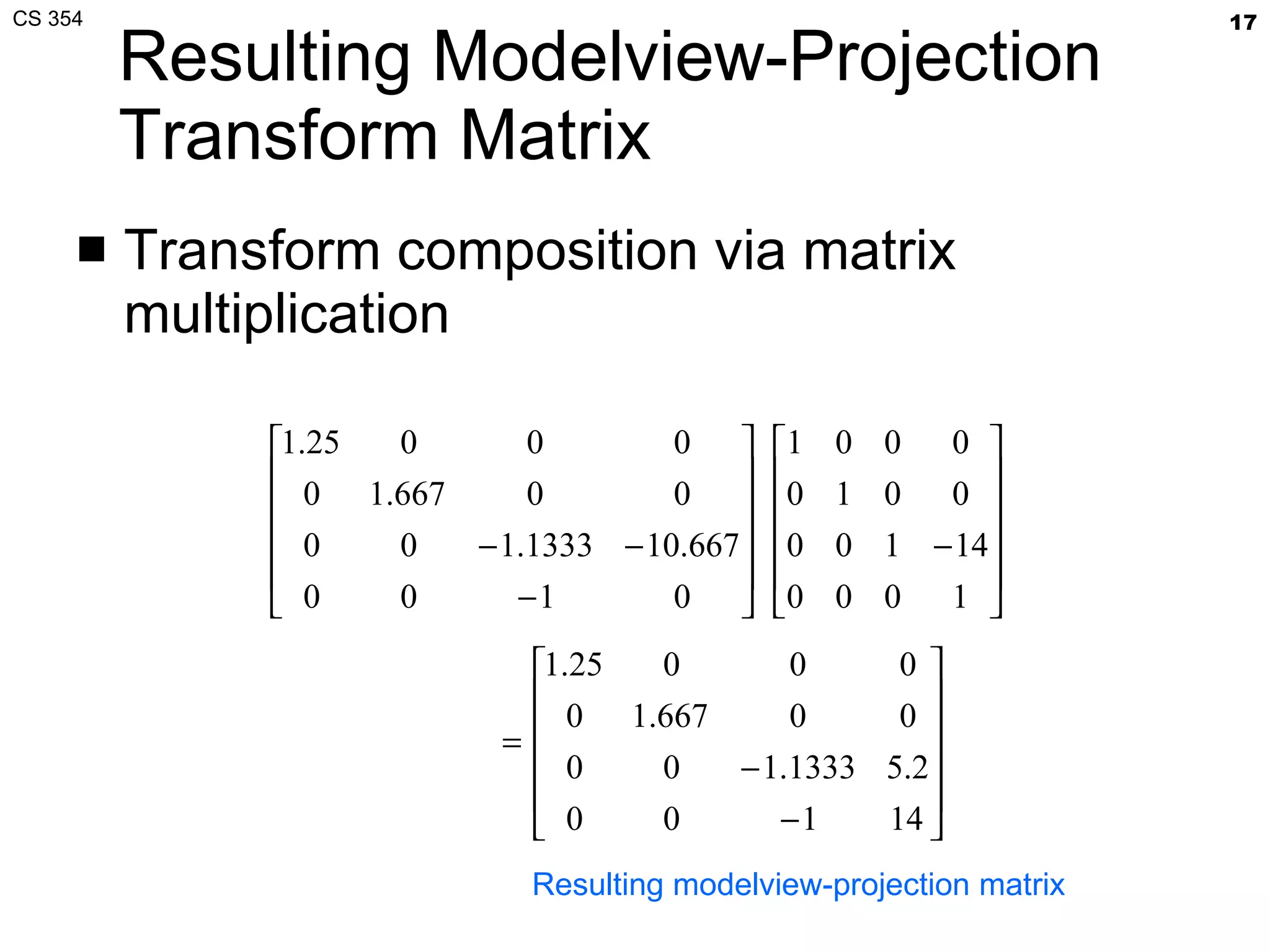
Modelview-Projection Transform Matrixes can associate (combine) Combination of the modelview and projection matrix = modelview-projection matrix or often simply the “MVP” matrix concatenation is 64 Multiply-Add operations, done by OpenGL driver Matrix multiplication is  associative  (but not commutative) A(BC) = (AB)C, but ABC≠CBA
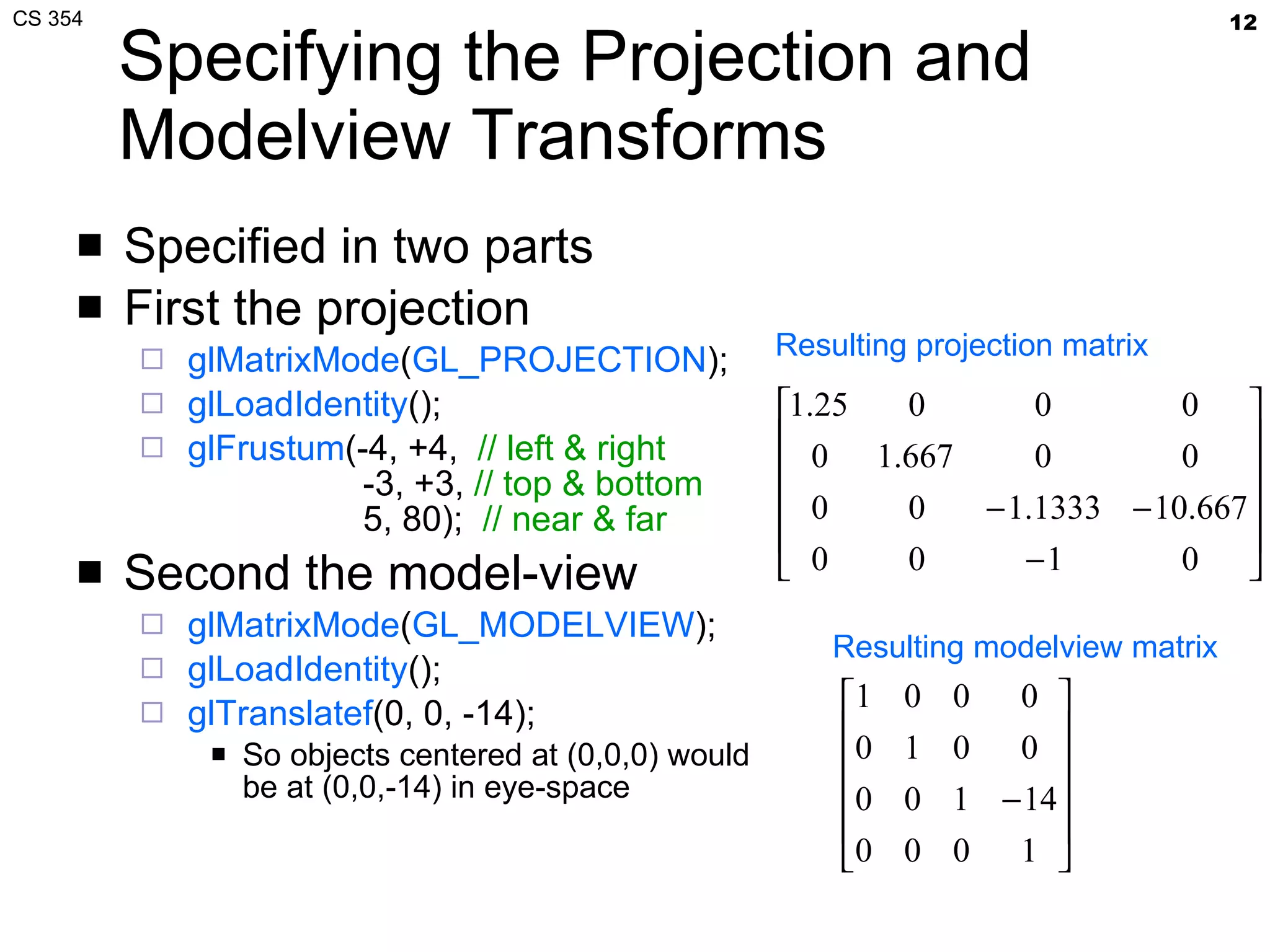
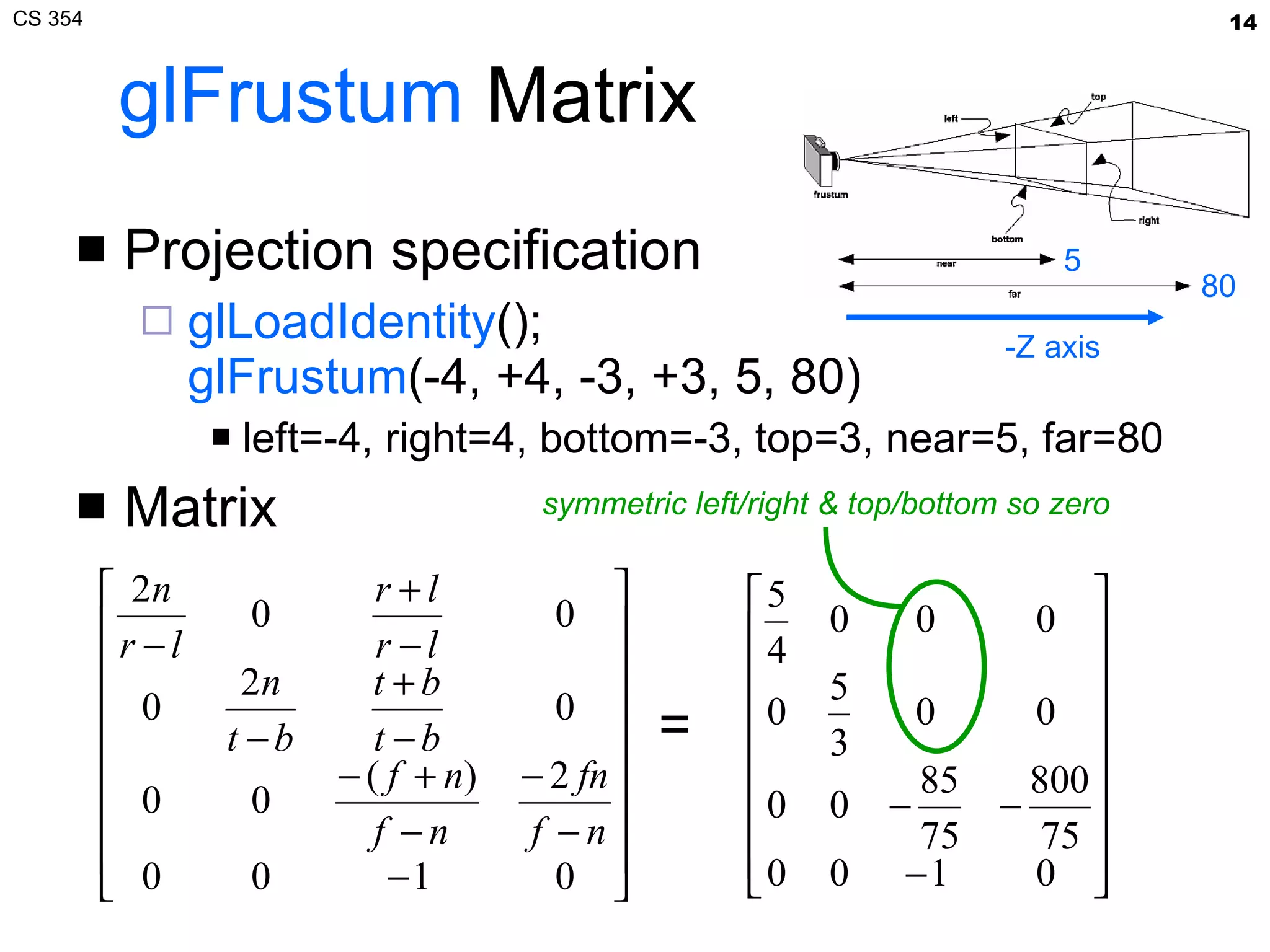
Specifying the Projection and Modelview Transforms Specified in two parts First the projection glMatrixMode ( GL_PROJECTION ); glLoadIdentity (); glFrustum (-4, +4,  // left & right   -3, +3,  // top & bottom   5, 80);  // near & far Second the model-view glMatrixMode ( GL_MODELVIEW ); glLoadIdentity (); glTranslatef (0, 0, -14); So objects centered at (0,0,0) would be at (0,0,-14) in eye-space Resulting projection matrix Resulting modelview matrix
Frustum Transform Prototype glFrustum ( GLdouble  left,  GLdouble  right,   GLdouble  bottom,  GLdouble  top,   GLdouble  near,  GLdouble  far) Post-concatenates a frustum matrix
glFrustum  Matrix Projection specification glLoadIdentity (); glFrustum (-4, +4, -3, +3, 5, 80) left=-4, right=4, bottom=-3, top=3, near=5, far=80 Matrix = -Z axis symmetric left/right & top/bottom so zero 80 5
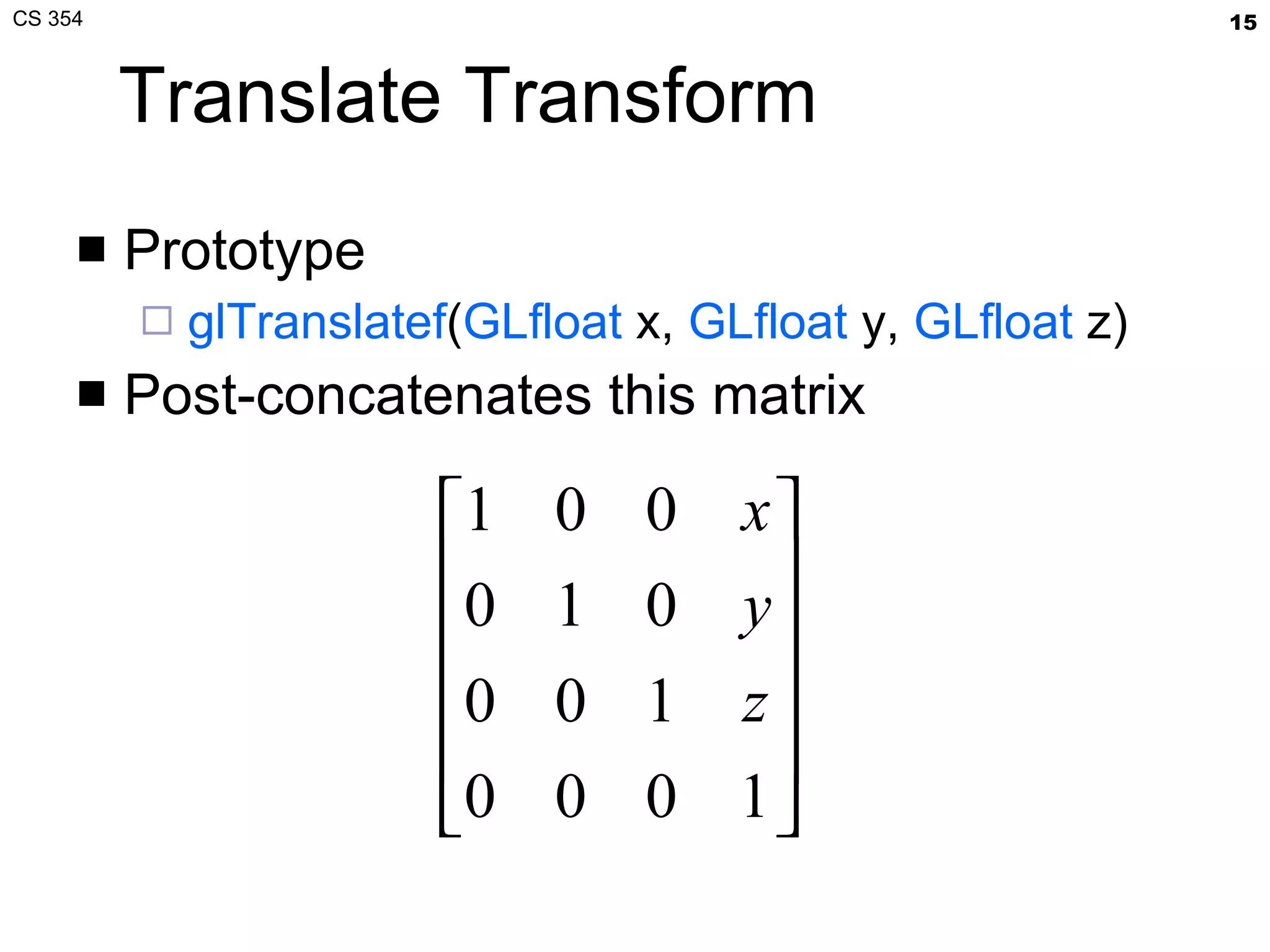
Translate Transform Prototype glTranslatef ( GLfloat  x,  GLfloat  y,  GLfloat  z) Post-concatenates this matrix
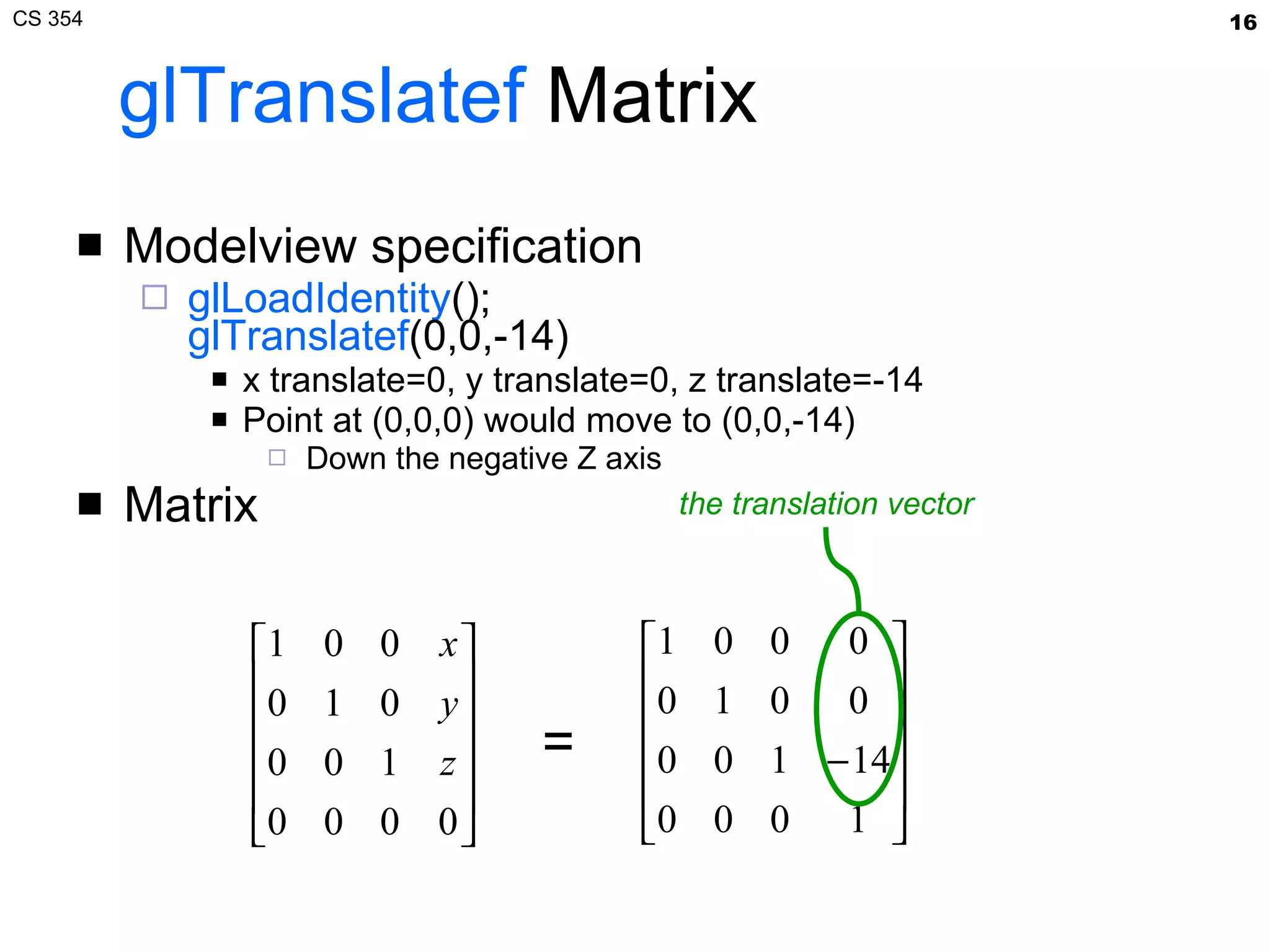
glTranslatef  Matrix Modelview specification glLoadIdentity (); glTranslatef (0,0,-14) x translate=0, y translate=0, z translate=-14 Point at (0,0,0) would move to (0,0,-14) Down the negative Z axis Matrix = the translation vector
Resulting Modelview-Projection Transform Matrix Transform composition via matrix multiplication Resulting modelview-projection matrix
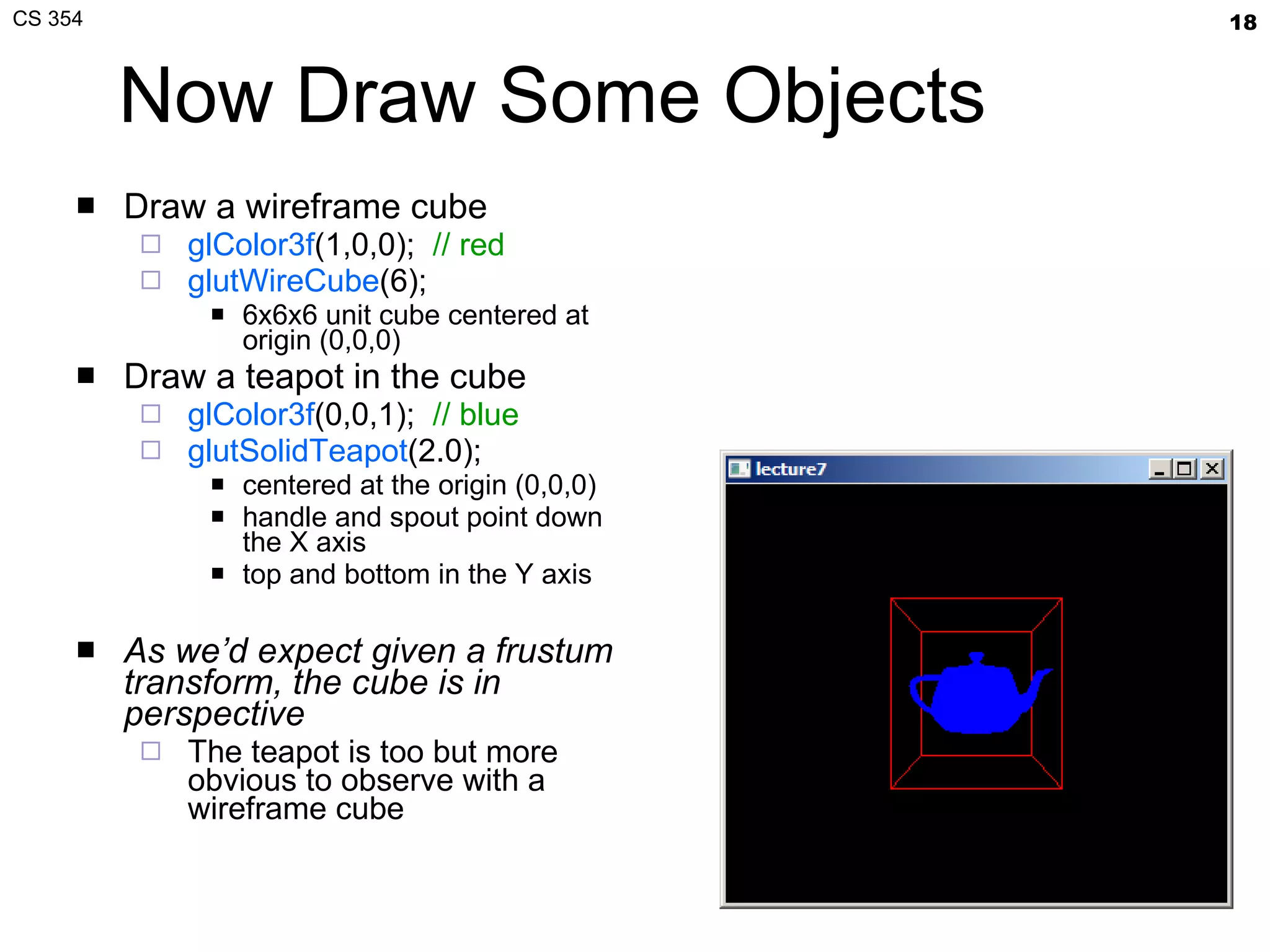
Now Draw Some Objects Draw a wireframe cube glColor3f (1,0,0);  // red glutWireCube (6); 6x6x6 unit cube centered at origin (0,0,0) Draw a teapot in the cube glColor3f (0,0,1);   // blue glutSolidTeapot (2.0);  centered at the origin (0,0,0) handle and spout point down the X axis top and bottom in the Y axis  As we’d expect given a frustum transform, the cube is in perspective   The teapot is too but more obvious to observe with a wireframe cube
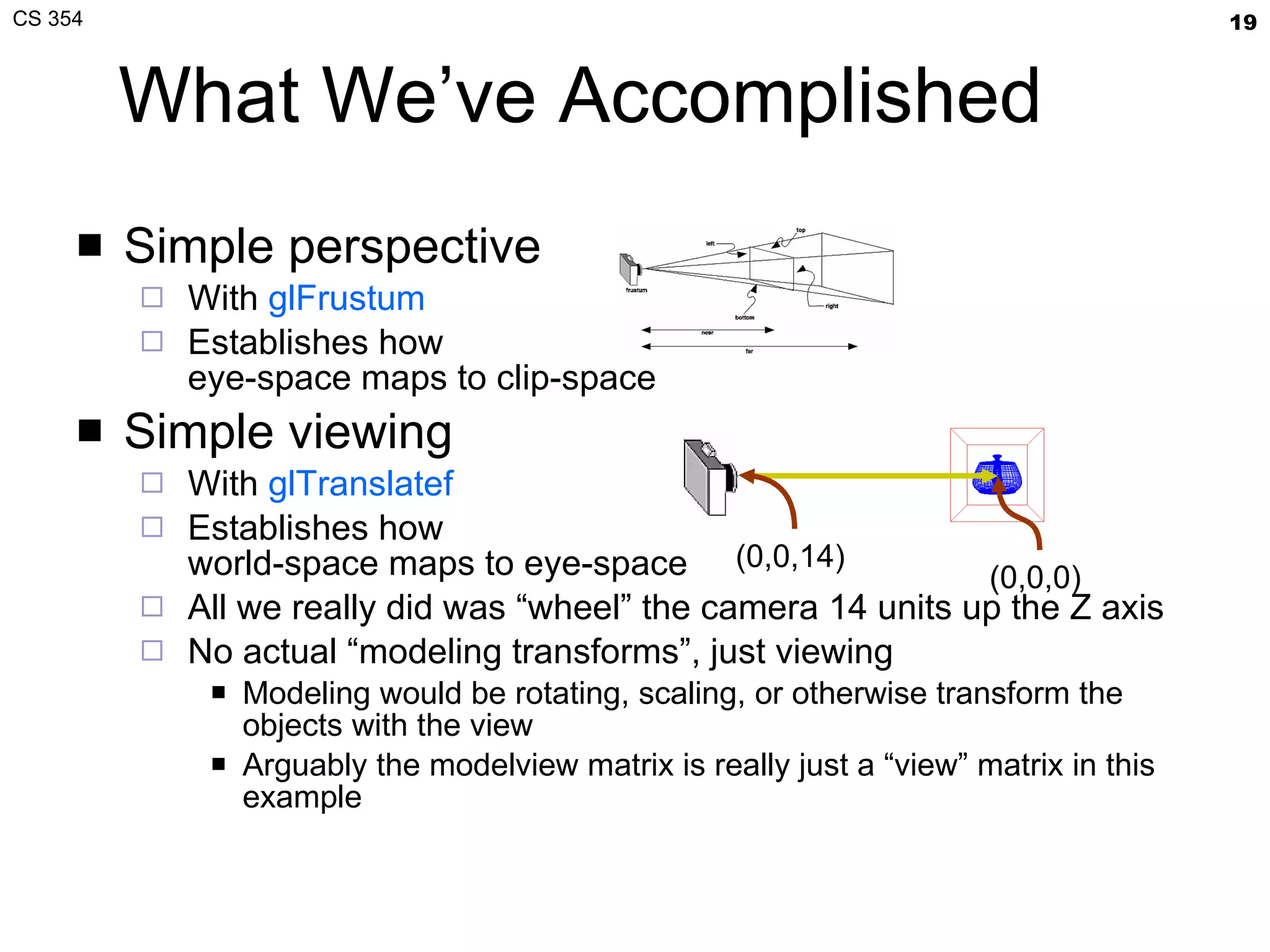
What We’ve Accomplished Simple perspective With  glFrustum Establishes how eye-space maps to clip-space Simple viewing With  glTranslatef Establishes how world-space maps to eye-space All we really did was “wheel” the camera 14 units up the Z axis No actual “modeling transforms”, just viewing Modeling would be rotating, scaling, or otherwise transform the objects with the view Arguably the modelview matrix is really just a “view” matrix in this example (0,0,14)  (0,0,0)
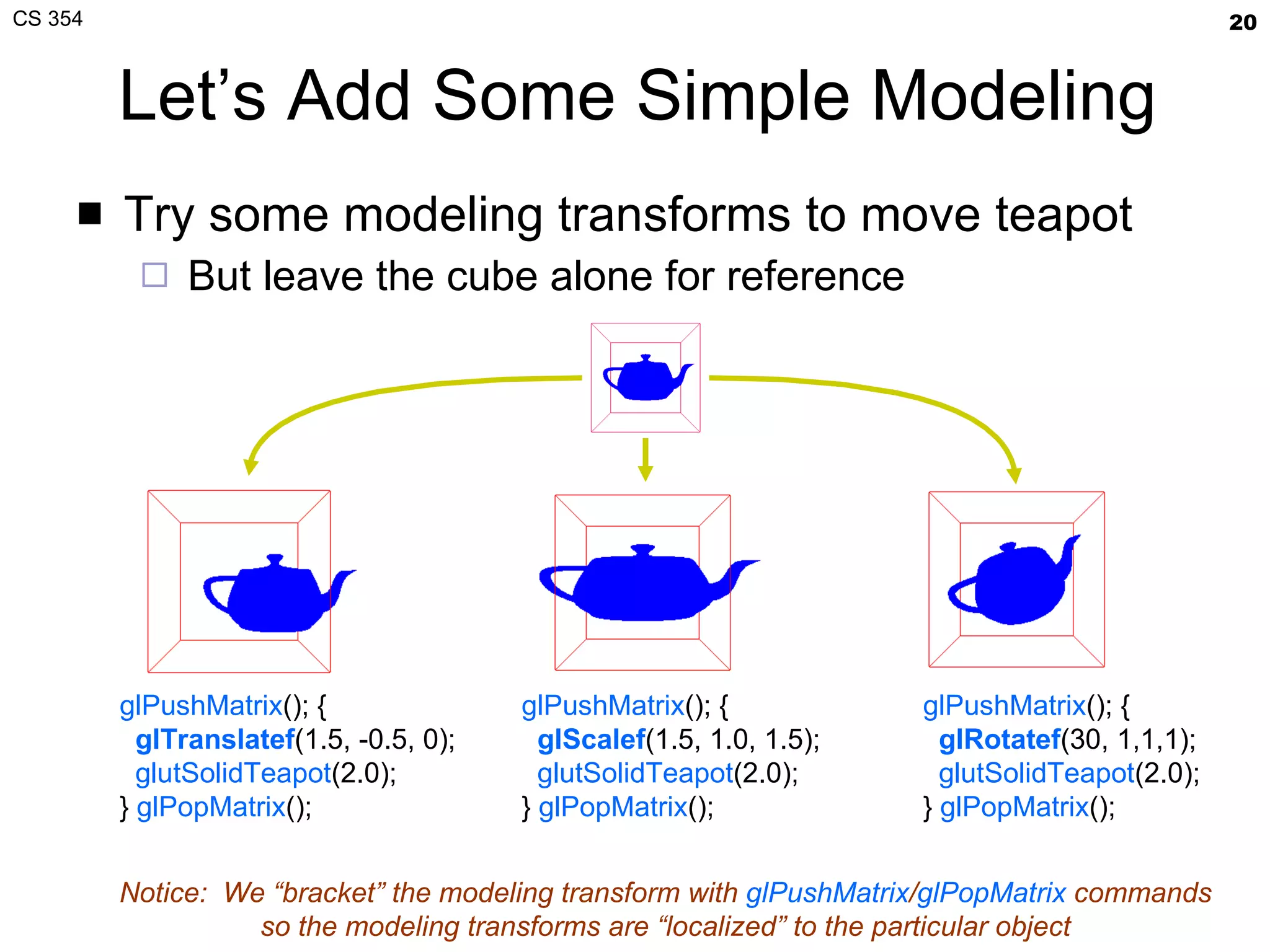
Let’s Add Some Simple Modeling Try some modeling transforms to move teapot But leave the cube alone for reference glPushMatrix (); { glTranslatef (1.5, -0.5, 0); glutSolidTeapot (2.0); }  glPopMatrix (); glPushMatrix (); { gl Scalef (1.5, 1.0, 1.5); glutSolidTeapot (2.0); }  glPopMatrix (); glPushMatrix (); { gl Rotatef ( 30, 1,1,1 ); glutSolidTeapot (2.0); }  glPopMatrix (); Notice:  We “bracket” the modeling transform with  glPushMatrix / glPopMatrix  commands so the modeling transforms are “localized” to the particular object
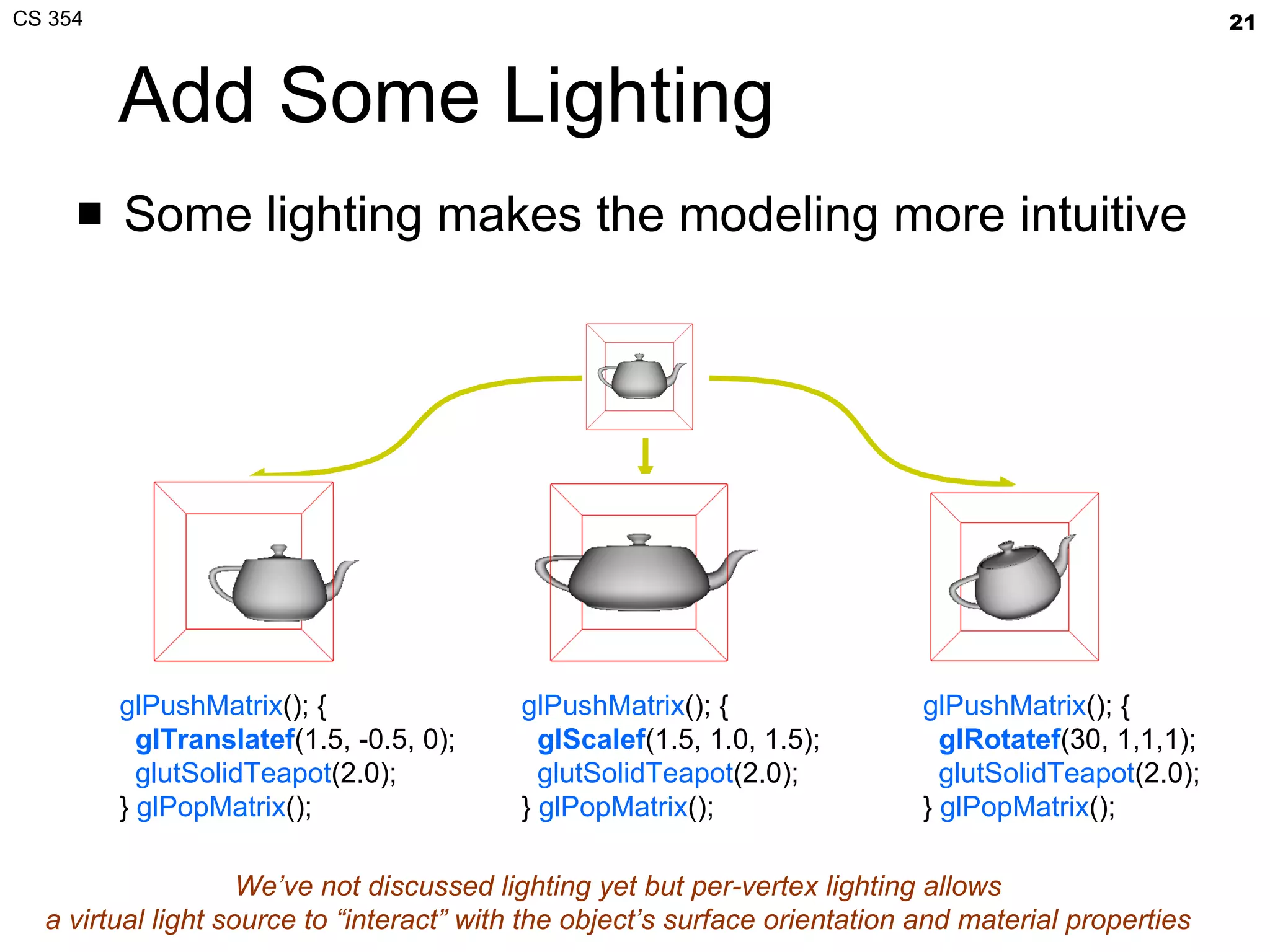
Add Some Lighting Some lighting makes the modeling more intuitive glPushMatrix (); { glTranslatef (1.5, -0.5, 0); glutSolidTeapot (2.0); }  glPopMatrix (); glPushMatrix (); { gl Scalef (1.5, 1.0, 1.5); glutSolidTeapot (2.0); }  glPopMatrix (); glPushMatrix (); { gl Rotatef ( 30, 1,1,1 ); glutSolidTeapot (2.0); }  glPopMatrix (); We’ve not discussed lighting yet but per-vertex lighting allows a virtual light source to “interact” with the object’s surface orientation and material properties
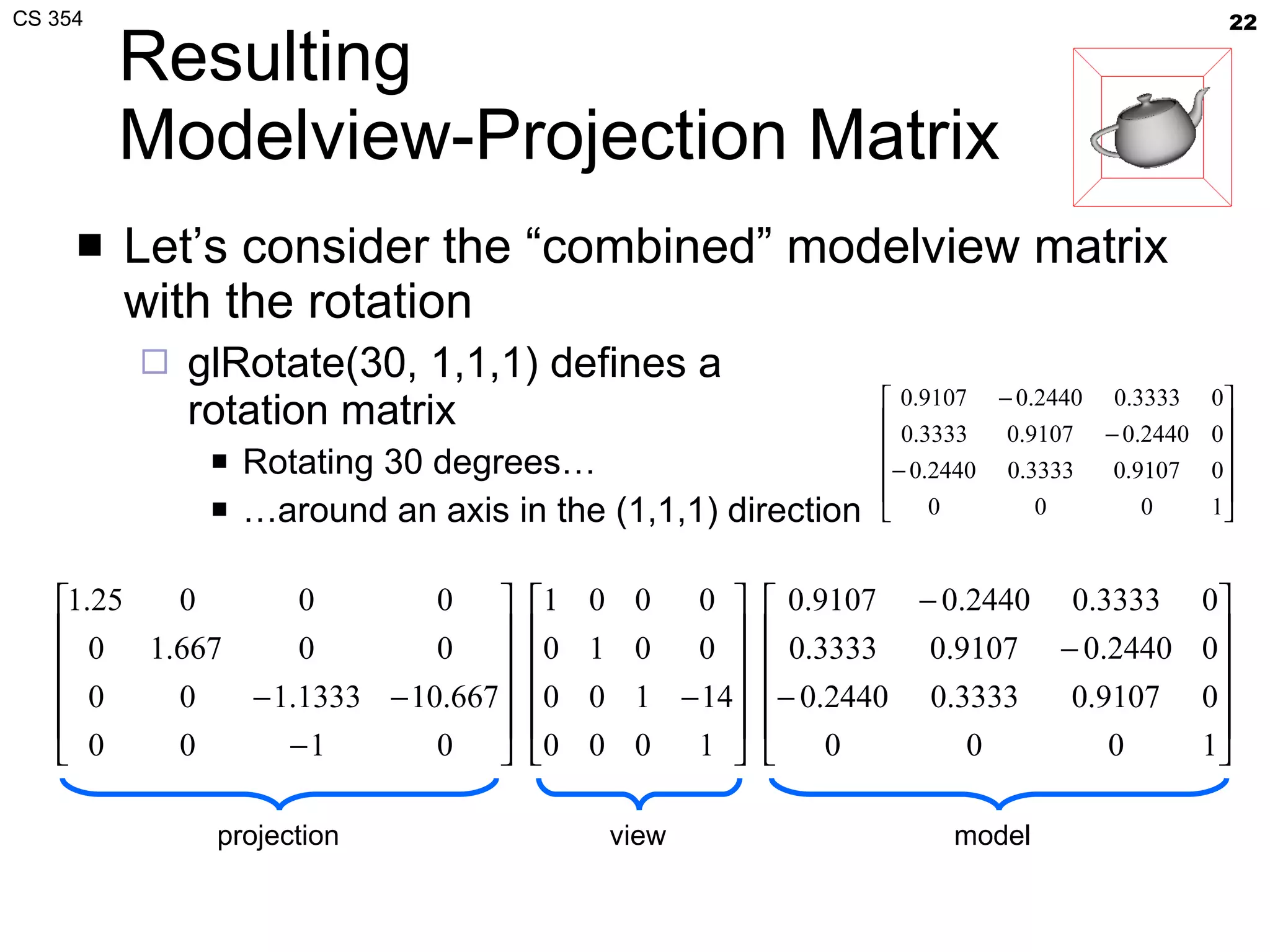
Resulting Modelview-Projection Matrix Let’s consider the “combined” modelview matrix with the rotation glRotate(30, 1,1,1) defines a rotation matrix Rotating 30 degrees… … around an axis in the (1,1,1) direction projection  view  model
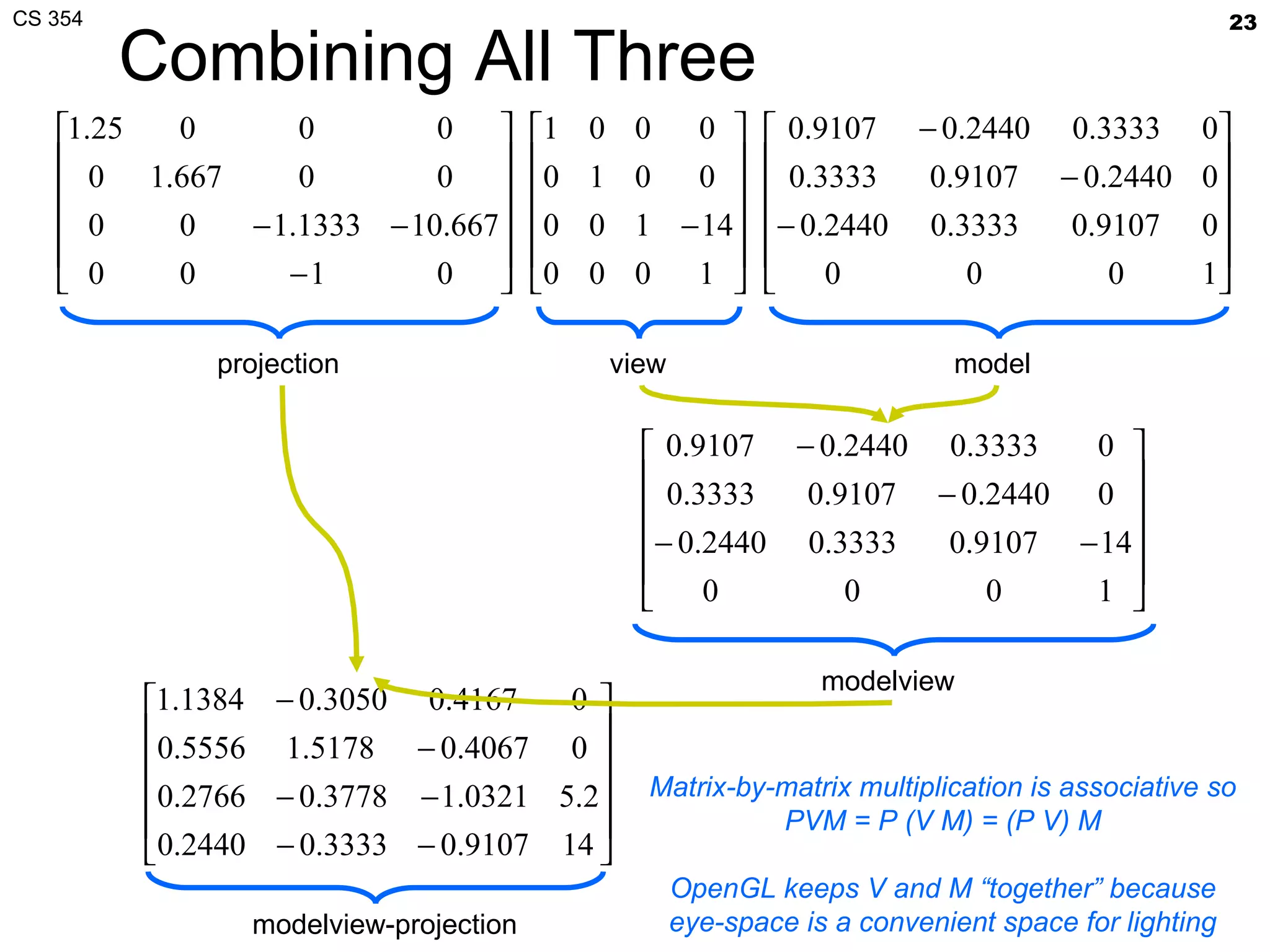
Combining All Three projection  view  model  modelview  modelview-projection Matrix-by-matrix multiplication is associative so PVM = P (V M) = (P V) M OpenGL keeps V and M “together” because eye-space is a convenient space for lighting
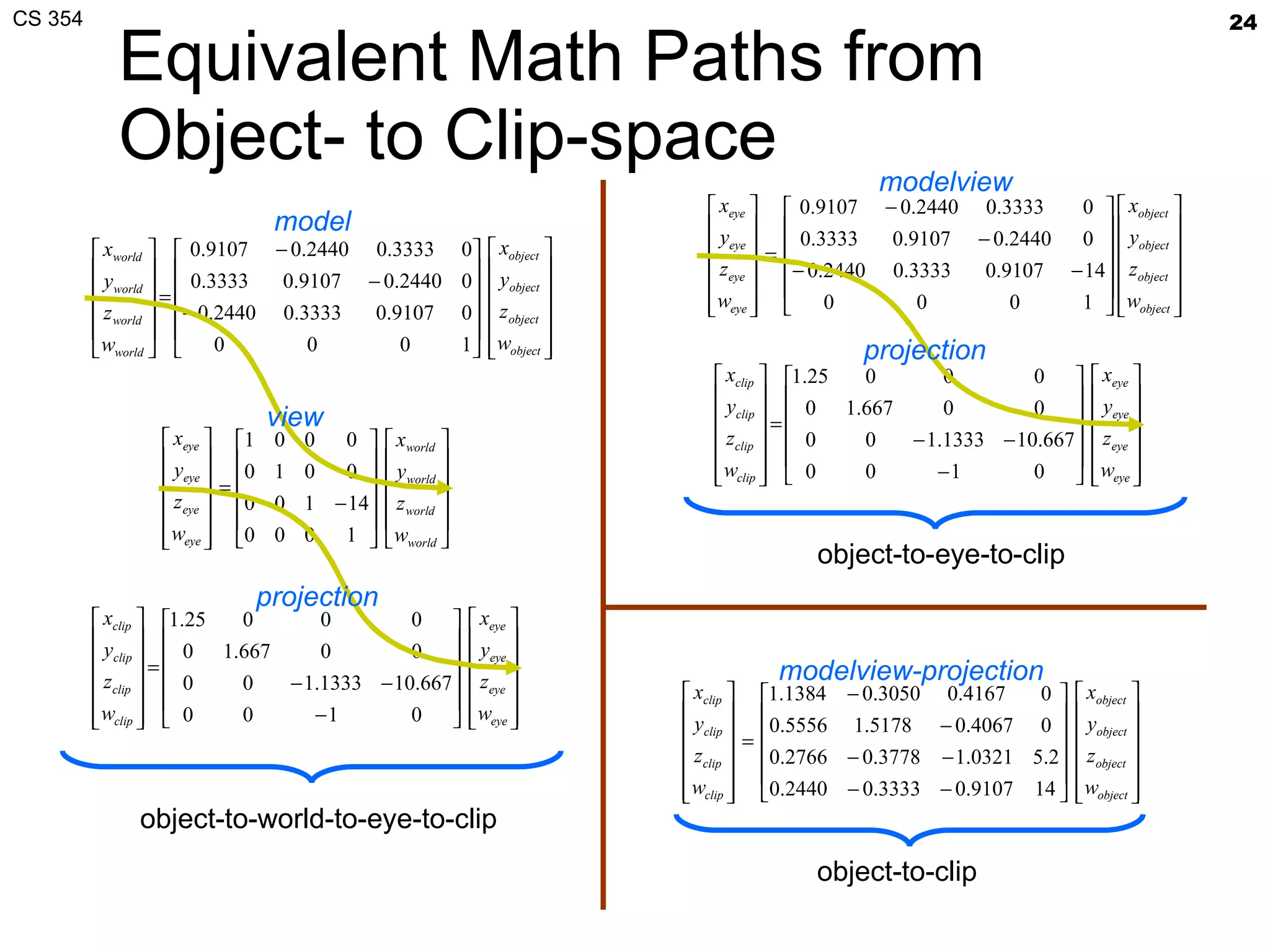
Equivalent Math Paths from Object- to Clip-space object-to-world-to-eye-to-clip  object-to-eye-to-clip  object-to-clip  modelview projection projection modelview-projection model view
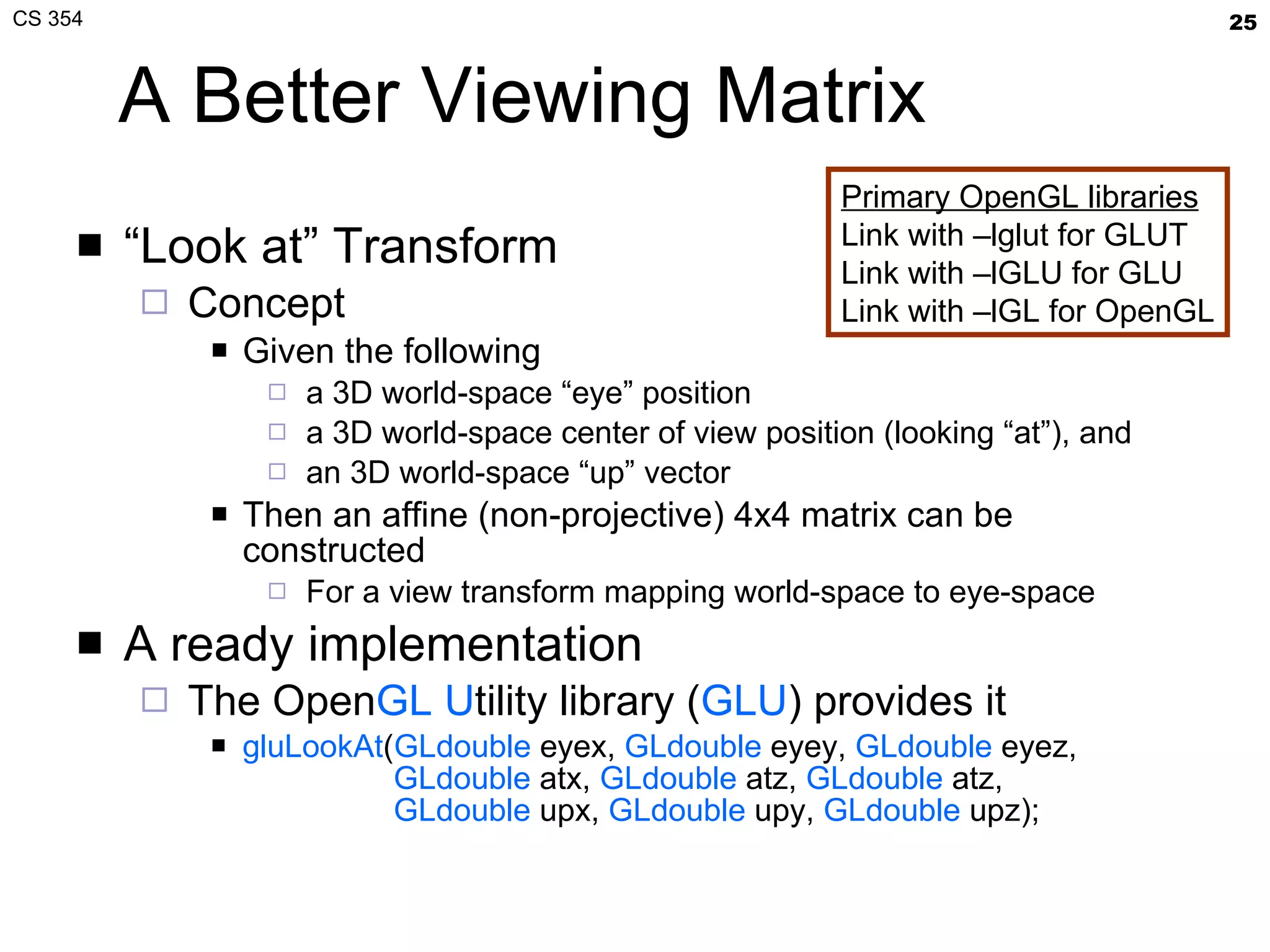
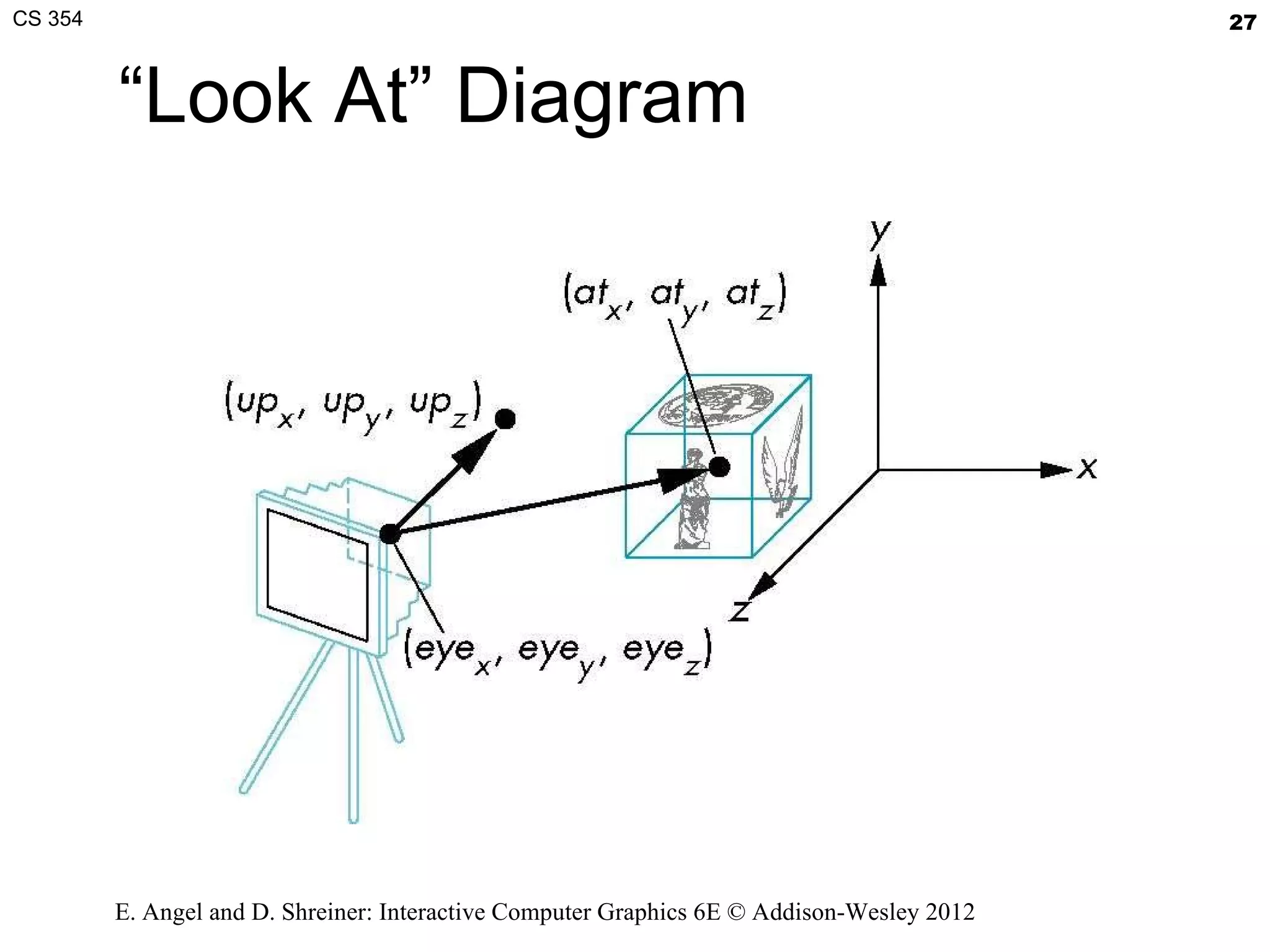
A Better Viewing Matrix “ Look at” Transform Concept Given the following a 3D world-space “eye” position a 3D world-space center of view position (looking “at”), and an 3D world-space “up” vector Then an affine (non-projective) 4x4 matrix can be constructed For a view transform mapping world-space to eye-space A ready implementation The Open GL   U tility library ( GLU ) provides it gluLookAt ( GLdouble  eyex,  GLdouble  eyey,  GLdouble  eyez,   GLdouble  atx,  GLdouble  atz,  GLdouble  atz,   GLdouble  upx,  GLdouble  upy,  GLdouble  upz); Primary OpenGL libraries Link with –lglut for GLUT Link with –lGLU for GLU Link with –lGL for OpenGL
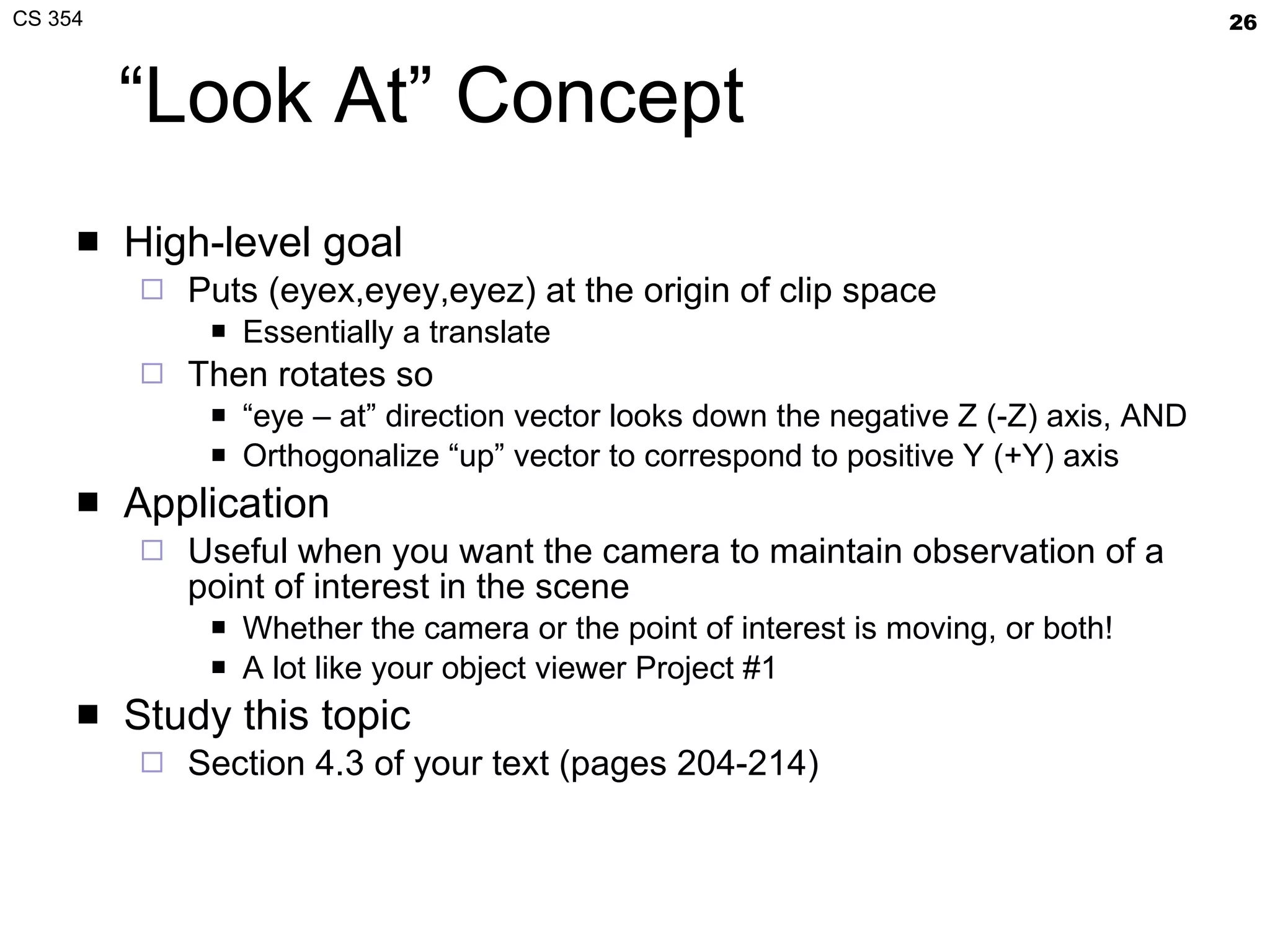
“Look At” Concept High-level goal Puts (eyex,eyey,eyez) at the origin of clip space Essentially a translate Then rotates so “ eye – at” direction vector looks down the negative Z (-Z) axis, AND Orthogonalize “up” vector to correspond to positive Y (+Y) axis Application Useful when you want the camera to maintain observation of a point of interest in the scene Whether the camera or the point of interest is moving, or both! A lot like your object viewer Project #1 Study this topic Section 4.3 of your text (pages 204-214)
“Look At” Diagram E. Angel and D. Shreiner: Interactive Computer Graphics 6E © Addison-Wesley 2012
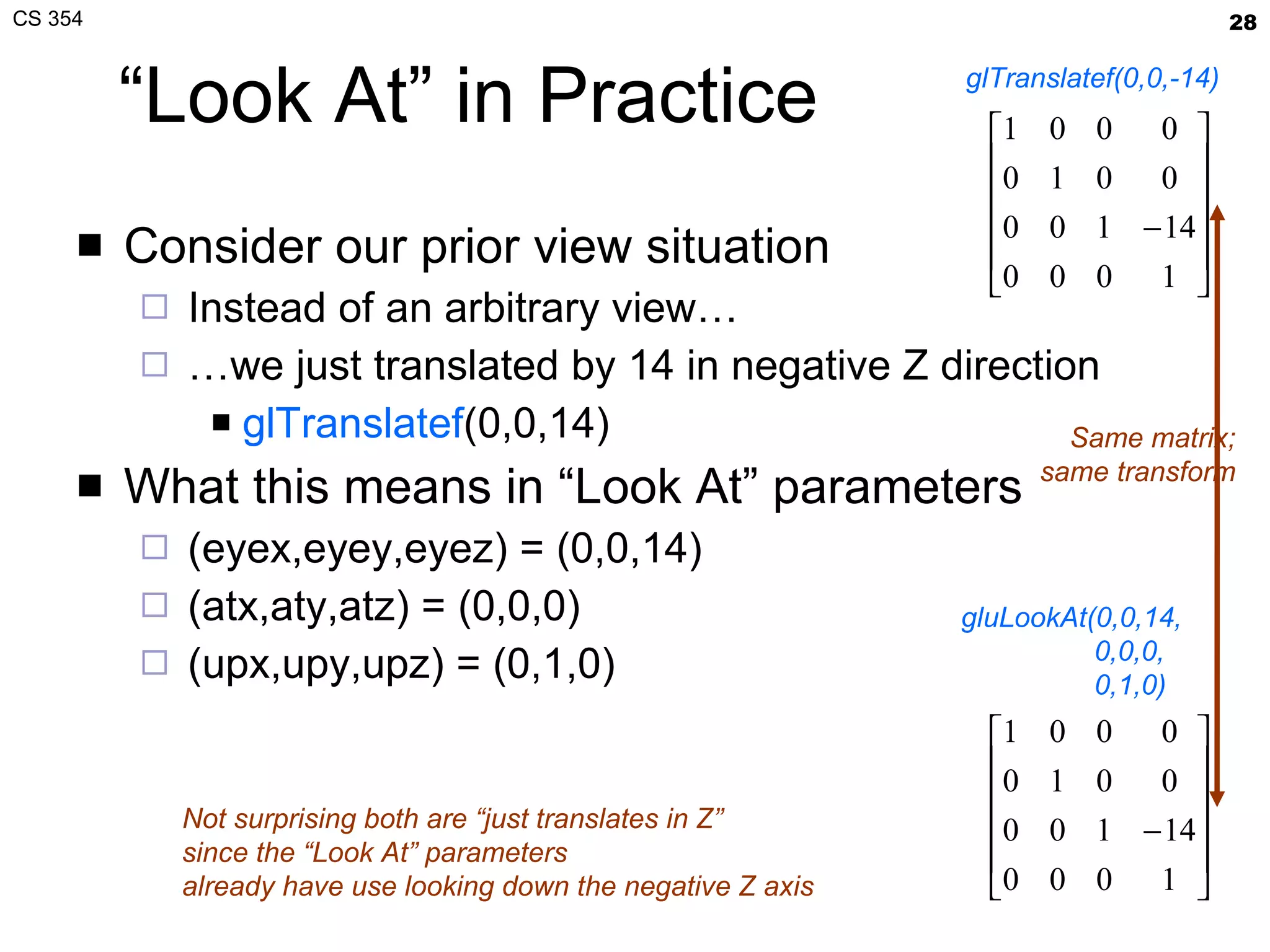
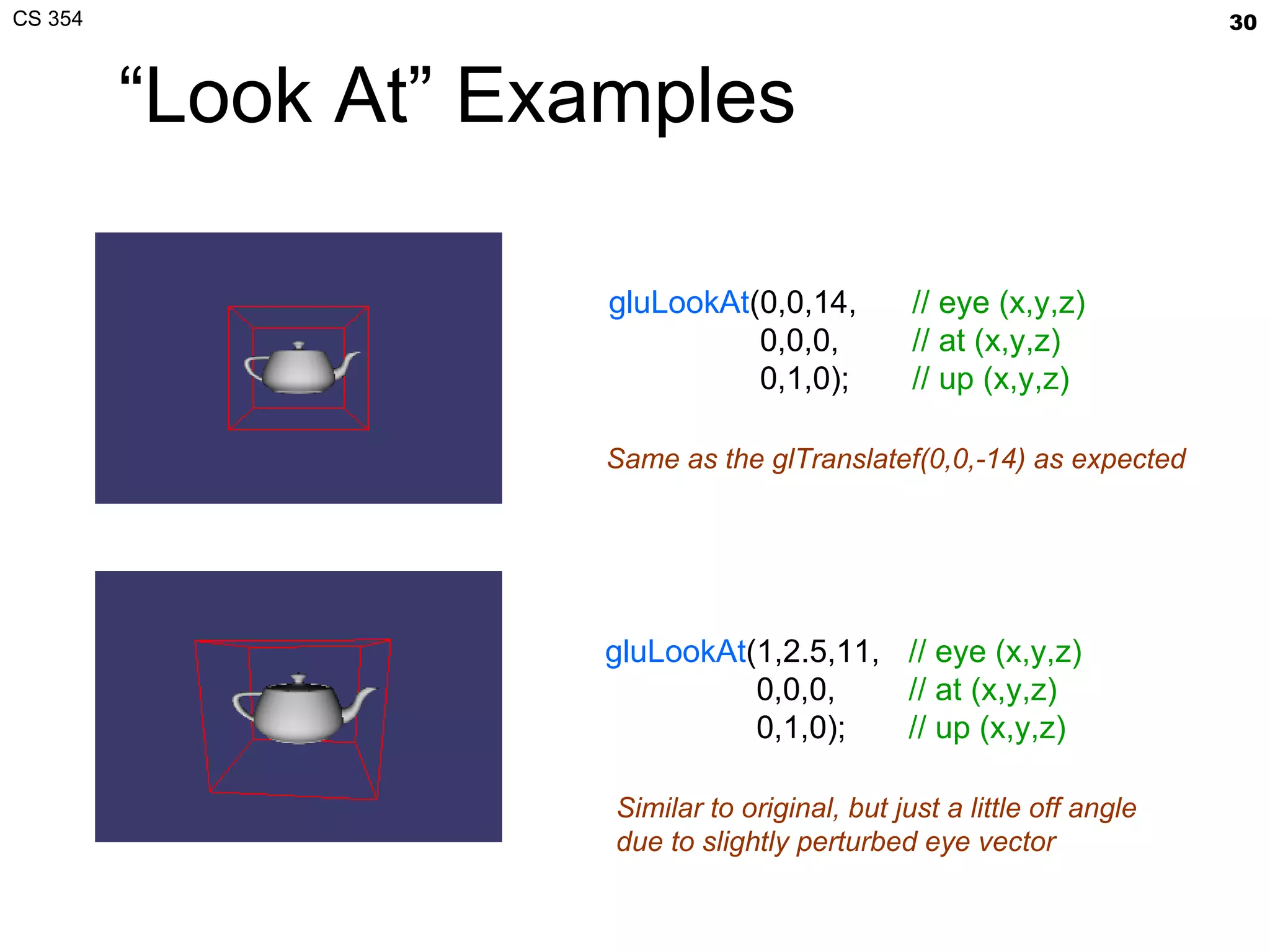
“Look At” in Practice Consider our prior view situation Instead of an arbitrary view… … we just translated by 14 in negative Z direction glTranslatef (0,0,14) What this means in “Look At” parameters (eyex,eyey,eyez) = (0,0,14) (atx,aty,atz) = (0,0,0) (upx,upy,upz) = (0,1,0) glTranslatef(0,0,-14) gluLookAt(0,0,14,   0,0,0,   0,1,0) Same matrix; same transform Not surprising both are “just translates in Z” since the “Look At” parameters already have use looking down the negative Z axis
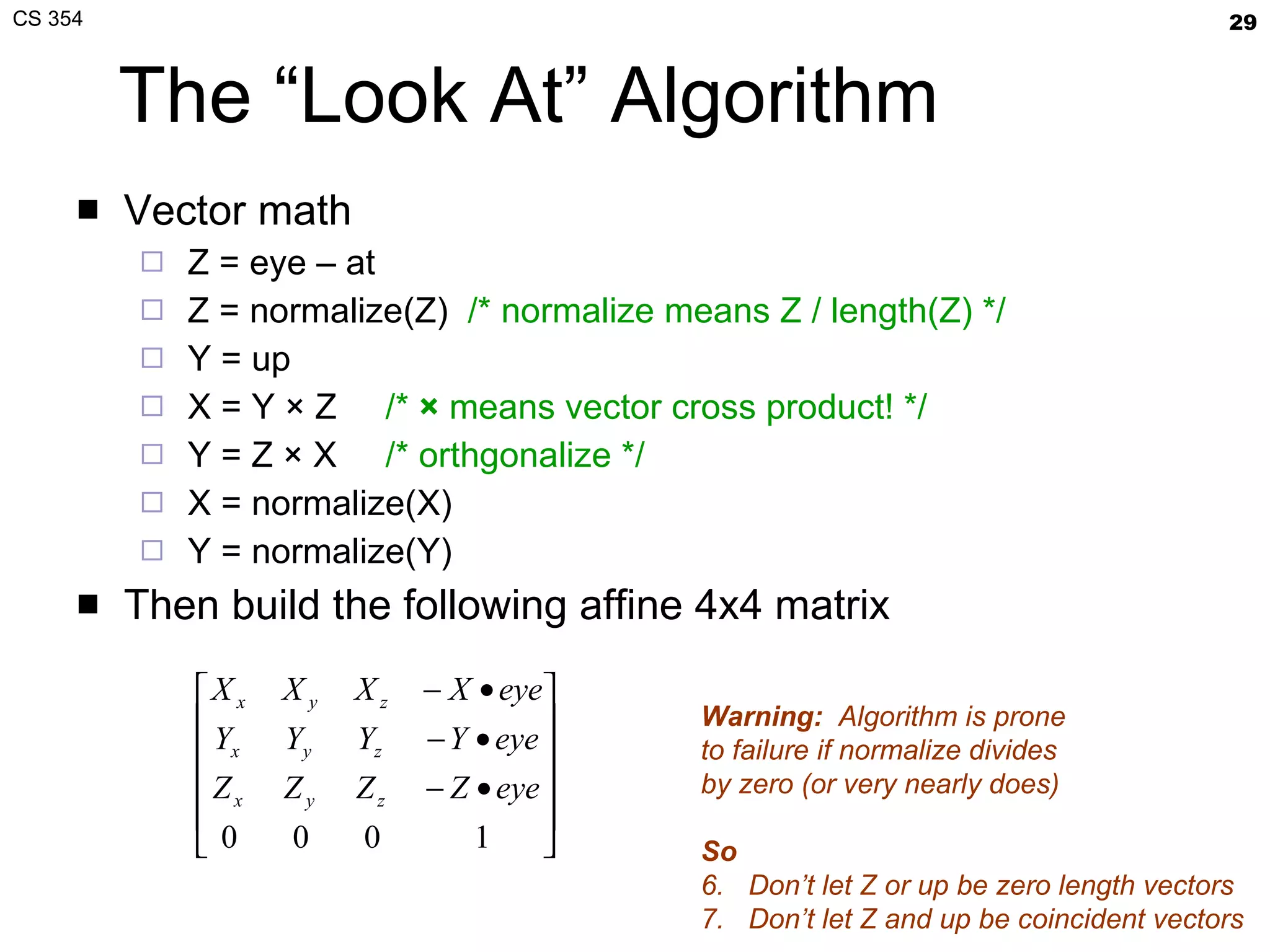
The “Look At” Algorithm Vector math Z = eye – at Z = normalize(Z)  /* normalize means Z / length(Z) */ Y = up X = Y × Z  /*  ×  means vector cross product! */ Y = Z × X  /* orthgonalize */ X = normalize(X) Y = normalize(Y) Then build the following affine 4x4 matrix Warning:   Algorithm is prone to failure if normalize divides by zero (or very nearly does) So Don’t let Z or up be zero length vectors Don’t let Z and up be coincident vectors
“Look At” Examples gluLookAt (0,0,14,   0,0,0,   0,1,0); // eye (x,y,z) // at (x,y,z) // up (x,y,z) gluLookAt (1,2.5,11,   0,0,0,   0,1,0); // eye (x,y,z) // at (x,y,z) // up (x,y,z) Same as the glTranslatef(0,0,-14) as expected Similar to original, but just a little off angle due to slightly perturbed eye vector
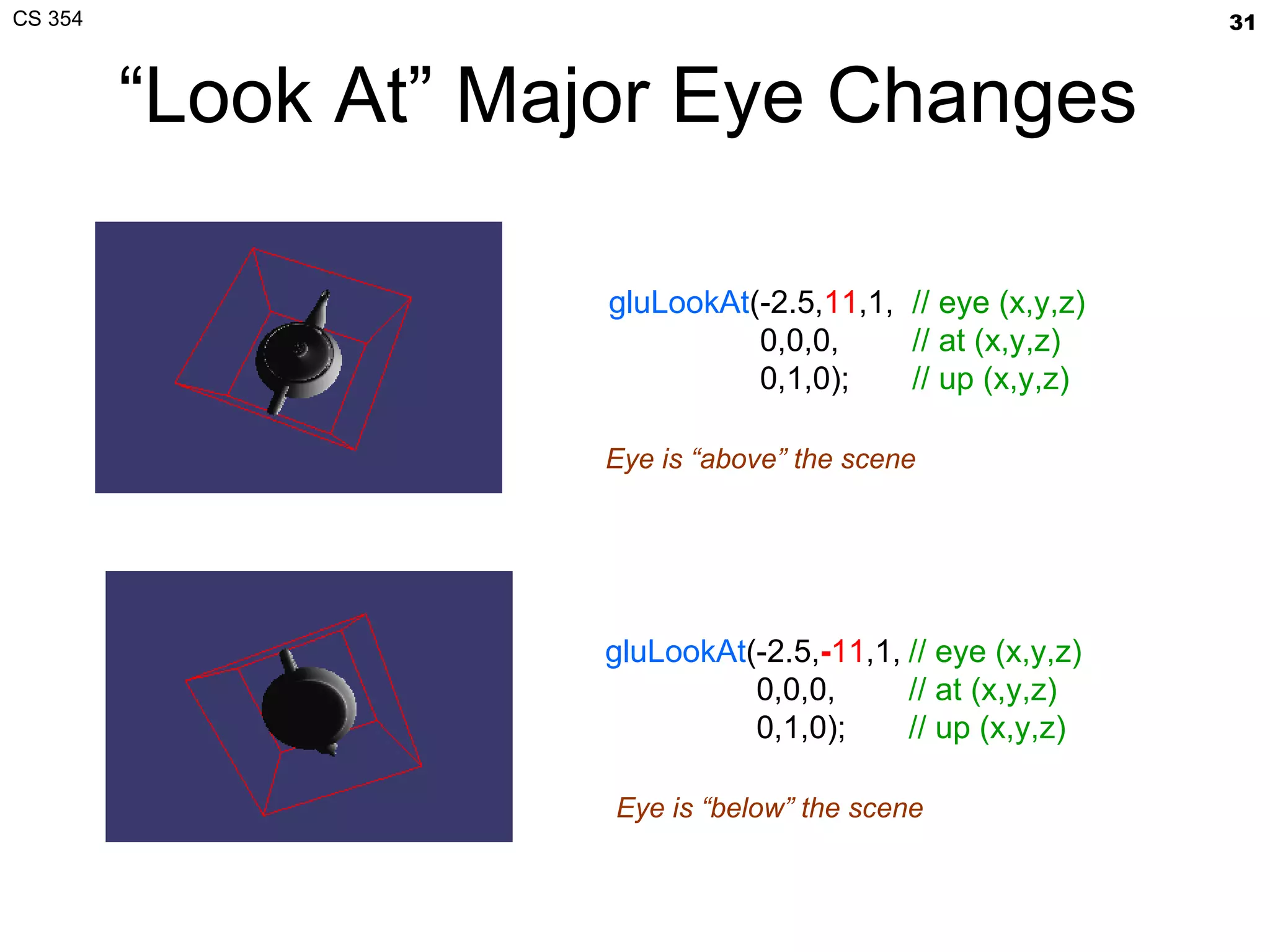
“Look At” Major Eye Changes gluLookAt (-2.5, 11 ,1,   0,0,0,   0,1,0); // eye (x,y,z) // at (x,y,z) // up (x,y,z) gluLookAt (-2.5, - 11 ,1,   0,0,0,   0,1,0); // eye (x,y,z) // at (x,y,z) // up (x,y,z) Eye is “above” the scene Eye is “below” the scene
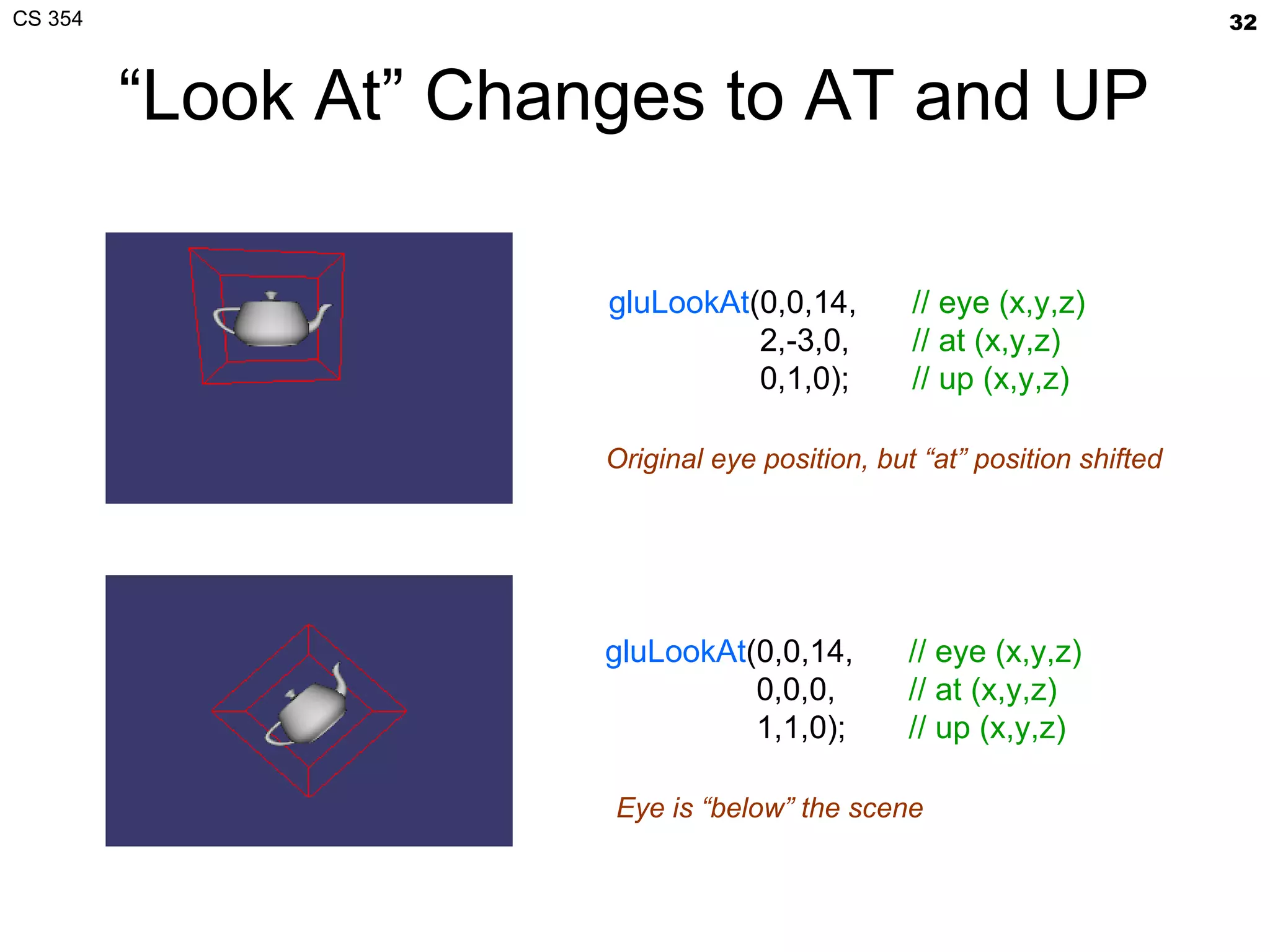
“ Look At” Changes to AT and UP gluLookAt (0,0,14,   2,-3,0,   0,1,0); // eye (x,y,z) // at (x,y,z) // up (x,y,z) gluLookAt (0,0,14,   0,0,0,   1,1,0); // eye (x,y,z) // at (x,y,z) // up (x,y,z) Original eye position, but “at” position shifted Eye is “below” the scene
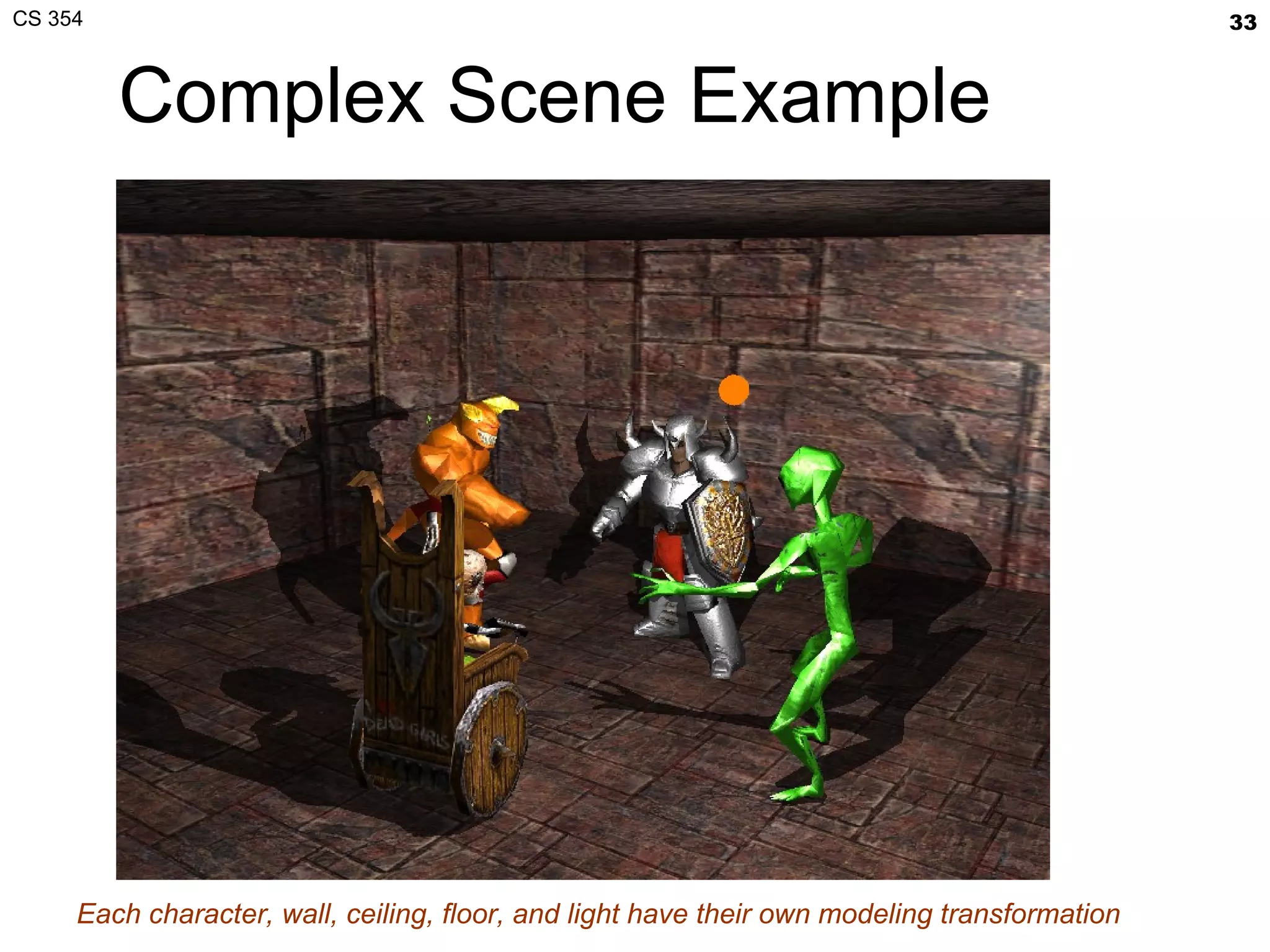
Complex Scene Example Each character, wall, ceiling, floor, and light have their own modeling transformation
Representing Objects Interested in object’s boundary (or manifold) Various approaches Procedural representations Often fractal Explicit polygon (triangle) meshes By far, the most popular method Curved surface patches Often displacement mapped Implicit representation Blobby, volumetric Sierpinski gasket Utah Teapot Blobby modeling in RenderMan Quake 2 key frame triangle meshes Fractal tree [Philip Winston]
Focus on Triangle Meshes Easiest approach to representing object boundaries So what is a mesh and how should it be stored? Simplest view A set of triangles, each with its “own” 3 vertices Essentially “triangle soup” Yet triangles in meshes share edges by design Sharing edges implies sharing vertices More sophisticated view Store single set of unique vertexes in array Then each primitive (triangle) specifies 3 indices into array of vertexes More compact Vertex data size >> index size Avoids redundant vertex data Separates “topology” (how the mesh is connected) from its “geometry” (vertex positions and attributes) Connectivity can be deduced more easily Makes mesh processing algorithms easier Geometry data can change without altering the topology
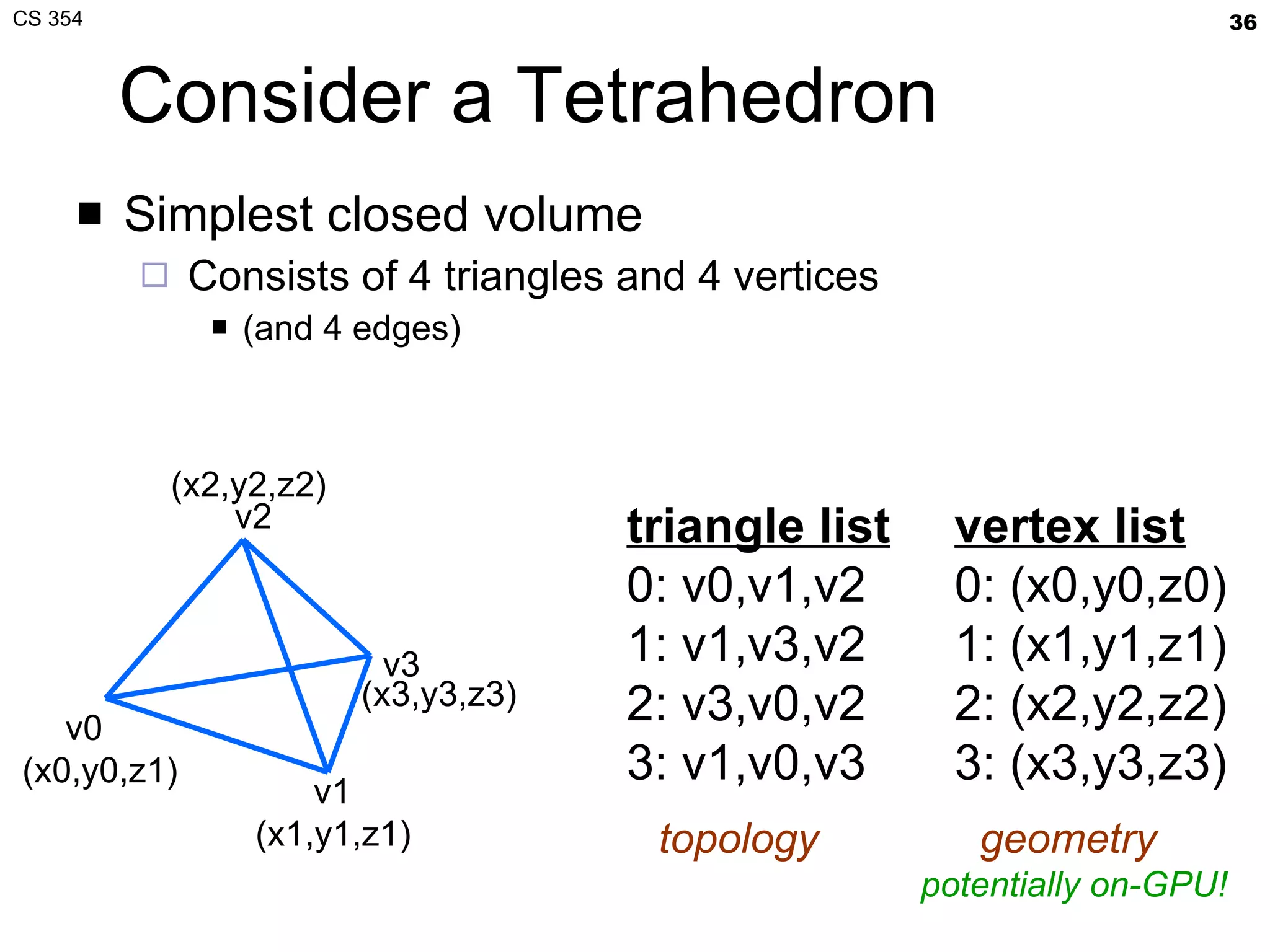
Consider a Tetrahedron Simplest closed volume Consists of 4 triangles and 4 vertices (and 4 edges) v0  v1 v3 v2 triangle list 0: v0,v1,v2 1: v1,v3,v2  2: v3,v0,v2 3: v1,v0,v3 (x0,y0,z1) (x1,y1,z1) (x2,y2,z2) (x3,y3,z3) vertex list 0: (x0,y0,z0) 1: (x1,y1,z1) 2: (x2,y2,z2) 3: (x3,y3,z3) topology  geometry  potentially on-GPU!
Benefits of Vertex Array Approach Unique vertices are stored once Saves memory On CPU, on disk, and on GPU Matches OpenGL vertex array model of operation And this matches the efficient GPU mode of operation The GPU can “cache” post-transformed vertex results by vertex index Saves retransformation and redundant vertex fetching Direct3D has the same model Allows vertex data to be stored on-GPU for even faster vertex processing OpenGL supported vertex buffer objects for this
More Information See “Modern OpenGL Usage:  Using Vertex Buffer Objects Well” http://www.slideshare.net/Mark_Kilgard/using-vertex-bufferobjectswell
Next Lecture More about triangle mesh representation Blending, Compositing, Anti-aliasing More than simply writing pixels into the framebuffer Also information on GLUT input callbacks As usual, expect a short quiz on today’s lecture Assignments Reading Chapter 4, page 238-241; Chapter 6, 331-341 (Tuesday) Chapter 4, pages 241-249 Work on Project #1 Building a 3D object model loader Due Tuesday, February 21

CS 354 Object Viewing and Representation

  • 1.
    CS 354 ObjectViewing and Representation Mark Kilgard University of Texas February 9, 2012
  • 2.
    Today’s material In-classquiz Lecture topic: viewing + object representation Looking at an object Representing an object Assignment Reading Chapter 4, page 238-241; Chapter 6, 331-341 (Tuesday) Chapter 4, pages 241-249 You should be working on Project #1
  • 3.
    Administrative I wassick Tuesday Thanks to Dr. Fussell for lecturing in my absence Final exam is during the exam period (Instead of last day of class) Making last day of class a review session instead Date & time: Thursday, May 10, 2:00-5:00 pm Location: TBD Quiz feedback started Look on piazza
  • 4.
    My Office HoursTuesday, before class Painter (PAI) 5.35 8:45 a.m. to 9:15 Not last Tuesday  Thursday, after class ACE 6.302 11:00 a.m. to 12:00
  • 5.
    Last time, thistime Last two lectures, we discussed Consequences of homogeneous coordinates Thursday: Projection transforms: ortho and frustum Tuesday: Dr. Fussell discussed rotations with you This lecture How do we look at objects How do we represent objects for interactive rendering
  • 6.
    Daily Quiz Multiplechoice: Renaissance artists incorporated perspective into their artwork. Which OpenGL command best corresponds to this type of transform: a) glFrustum b) glOrtho c) glTranslatef d) glScalef e) glRotatef Answer “Clipped” or “Unclipped”: Would the following position in homogenous clip space be clipped or not? (40, -10, 20, 100) On a sheet of paper Write your EID, name, and date Write #1, #2, #3, followed by its answer
  • 7.
    Conceptual Vertex TransformationglVertex* API commands Modelview matrix User-defined clip planes View-frustum clip planes to primitive rasterization object-space coordinates (x o ,y o ,z o ,w o ) eye-space coordinates (x e ,y e ,z e ,w e ) clipped eye-space coordinates clipped clip-space coordinates Perspective division Projection matrix Viewport + Depth Range transformation (x c ,y c ,z c ,w c ) window-space coordinates (x w ,y w ,z w ,1/w c ) normalized device coordinates (NDC) (x n ,y n ,z n ,1/w c ) clip-space coordinates (x c ,y c ,z c ,w c ) (x e ,y e ,z e ,w e ) (x e ,y e ,z e ,w e )
  • 8.
    Clip Space ClipCube (x min /w,y min /w,z min /w) Pre-perspective divide puts the region surviving clipping within -w ≤ x ≤ w, -w ≤ y ≤ w, -w ≤ z ≤ w (x max /w,y min /w,z min /w) (x max /w,y min /w,z max /w) (x min /w,y min /w,z max /w) (x max /w,y max /w,z max /w) (x max /w,y max /w,z min /w) (x min /w,y max /w,z min /w) (x min /w,y max /w,z max /w) Constraints x min = -w x max = w y min = -w y max = w z min = -w z max = w w>0
  • 9.
    Vertex Transformation Object-spacevertex position transformed by a general linear projective transformation Expressed as a 4x4 matrix
  • 10.
    Two Transforms inSequence OpenGL thinks of the projective transform as really two 4x4 matrix transforms FIRST object-space to eye-space SECOND eye-space to clip-space 16 Multiply-Add operations Another 16 Multiply-Add operations
  • 11.
    Modelview-Projection Transform Matrixescan associate (combine) Combination of the modelview and projection matrix = modelview-projection matrix or often simply the “MVP” matrix concatenation is 64 Multiply-Add operations, done by OpenGL driver Matrix multiplication is associative (but not commutative) A(BC) = (AB)C, but ABC≠CBA
  • 12.
    Specifying the Projectionand Modelview Transforms Specified in two parts First the projection glMatrixMode ( GL_PROJECTION ); glLoadIdentity (); glFrustum (-4, +4, // left & right -3, +3, // top & bottom 5, 80); // near & far Second the model-view glMatrixMode ( GL_MODELVIEW ); glLoadIdentity (); glTranslatef (0, 0, -14); So objects centered at (0,0,0) would be at (0,0,-14) in eye-space Resulting projection matrix Resulting modelview matrix
  • 13.
    Frustum Transform PrototypeglFrustum ( GLdouble left, GLdouble right, GLdouble bottom, GLdouble top, GLdouble near, GLdouble far) Post-concatenates a frustum matrix
  • 14.
    glFrustum MatrixProjection specification glLoadIdentity (); glFrustum (-4, +4, -3, +3, 5, 80) left=-4, right=4, bottom=-3, top=3, near=5, far=80 Matrix = -Z axis symmetric left/right & top/bottom so zero 80 5
  • 15.
    Translate Transform PrototypeglTranslatef ( GLfloat x, GLfloat y, GLfloat z) Post-concatenates this matrix
  • 16.
    glTranslatef MatrixModelview specification glLoadIdentity (); glTranslatef (0,0,-14) x translate=0, y translate=0, z translate=-14 Point at (0,0,0) would move to (0,0,-14) Down the negative Z axis Matrix = the translation vector
  • 17.
    Resulting Modelview-Projection TransformMatrix Transform composition via matrix multiplication Resulting modelview-projection matrix
  • 18.
    Now Draw SomeObjects Draw a wireframe cube glColor3f (1,0,0); // red glutWireCube (6); 6x6x6 unit cube centered at origin (0,0,0) Draw a teapot in the cube glColor3f (0,0,1); // blue glutSolidTeapot (2.0); centered at the origin (0,0,0) handle and spout point down the X axis top and bottom in the Y axis As we’d expect given a frustum transform, the cube is in perspective The teapot is too but more obvious to observe with a wireframe cube
  • 19.
    What We’ve AccomplishedSimple perspective With glFrustum Establishes how eye-space maps to clip-space Simple viewing With glTranslatef Establishes how world-space maps to eye-space All we really did was “wheel” the camera 14 units up the Z axis No actual “modeling transforms”, just viewing Modeling would be rotating, scaling, or otherwise transform the objects with the view Arguably the modelview matrix is really just a “view” matrix in this example (0,0,14) (0,0,0)
  • 20.
    Let’s Add SomeSimple Modeling Try some modeling transforms to move teapot But leave the cube alone for reference glPushMatrix (); { glTranslatef (1.5, -0.5, 0); glutSolidTeapot (2.0); } glPopMatrix (); glPushMatrix (); { gl Scalef (1.5, 1.0, 1.5); glutSolidTeapot (2.0); } glPopMatrix (); glPushMatrix (); { gl Rotatef ( 30, 1,1,1 ); glutSolidTeapot (2.0); } glPopMatrix (); Notice: We “bracket” the modeling transform with glPushMatrix / glPopMatrix commands so the modeling transforms are “localized” to the particular object
  • 21.
    Add Some LightingSome lighting makes the modeling more intuitive glPushMatrix (); { glTranslatef (1.5, -0.5, 0); glutSolidTeapot (2.0); } glPopMatrix (); glPushMatrix (); { gl Scalef (1.5, 1.0, 1.5); glutSolidTeapot (2.0); } glPopMatrix (); glPushMatrix (); { gl Rotatef ( 30, 1,1,1 ); glutSolidTeapot (2.0); } glPopMatrix (); We’ve not discussed lighting yet but per-vertex lighting allows a virtual light source to “interact” with the object’s surface orientation and material properties
  • 22.
    Resulting Modelview-Projection MatrixLet’s consider the “combined” modelview matrix with the rotation glRotate(30, 1,1,1) defines a rotation matrix Rotating 30 degrees… … around an axis in the (1,1,1) direction projection view model
  • 23.
    Combining All Threeprojection view model modelview modelview-projection Matrix-by-matrix multiplication is associative so PVM = P (V M) = (P V) M OpenGL keeps V and M “together” because eye-space is a convenient space for lighting
  • 24.
    Equivalent Math Pathsfrom Object- to Clip-space object-to-world-to-eye-to-clip object-to-eye-to-clip object-to-clip modelview projection projection modelview-projection model view
  • 25.
    A Better ViewingMatrix “ Look at” Transform Concept Given the following a 3D world-space “eye” position a 3D world-space center of view position (looking “at”), and an 3D world-space “up” vector Then an affine (non-projective) 4x4 matrix can be constructed For a view transform mapping world-space to eye-space A ready implementation The Open GL U tility library ( GLU ) provides it gluLookAt ( GLdouble eyex, GLdouble eyey, GLdouble eyez, GLdouble atx, GLdouble atz, GLdouble atz, GLdouble upx, GLdouble upy, GLdouble upz); Primary OpenGL libraries Link with –lglut for GLUT Link with –lGLU for GLU Link with –lGL for OpenGL
  • 26.
    “Look At” ConceptHigh-level goal Puts (eyex,eyey,eyez) at the origin of clip space Essentially a translate Then rotates so “ eye – at” direction vector looks down the negative Z (-Z) axis, AND Orthogonalize “up” vector to correspond to positive Y (+Y) axis Application Useful when you want the camera to maintain observation of a point of interest in the scene Whether the camera or the point of interest is moving, or both! A lot like your object viewer Project #1 Study this topic Section 4.3 of your text (pages 204-214)
  • 27.
    “Look At” DiagramE. Angel and D. Shreiner: Interactive Computer Graphics 6E © Addison-Wesley 2012
  • 28.
    “Look At” inPractice Consider our prior view situation Instead of an arbitrary view… … we just translated by 14 in negative Z direction glTranslatef (0,0,14) What this means in “Look At” parameters (eyex,eyey,eyez) = (0,0,14) (atx,aty,atz) = (0,0,0) (upx,upy,upz) = (0,1,0) glTranslatef(0,0,-14) gluLookAt(0,0,14, 0,0,0, 0,1,0) Same matrix; same transform Not surprising both are “just translates in Z” since the “Look At” parameters already have use looking down the negative Z axis
  • 29.
    The “Look At”Algorithm Vector math Z = eye – at Z = normalize(Z) /* normalize means Z / length(Z) */ Y = up X = Y × Z /* × means vector cross product! */ Y = Z × X /* orthgonalize */ X = normalize(X) Y = normalize(Y) Then build the following affine 4x4 matrix Warning: Algorithm is prone to failure if normalize divides by zero (or very nearly does) So Don’t let Z or up be zero length vectors Don’t let Z and up be coincident vectors
  • 30.
    “Look At” ExamplesgluLookAt (0,0,14, 0,0,0, 0,1,0); // eye (x,y,z) // at (x,y,z) // up (x,y,z) gluLookAt (1,2.5,11, 0,0,0, 0,1,0); // eye (x,y,z) // at (x,y,z) // up (x,y,z) Same as the glTranslatef(0,0,-14) as expected Similar to original, but just a little off angle due to slightly perturbed eye vector
  • 31.
    “Look At” MajorEye Changes gluLookAt (-2.5, 11 ,1, 0,0,0, 0,1,0); // eye (x,y,z) // at (x,y,z) // up (x,y,z) gluLookAt (-2.5, - 11 ,1, 0,0,0, 0,1,0); // eye (x,y,z) // at (x,y,z) // up (x,y,z) Eye is “above” the scene Eye is “below” the scene
  • 32.
    “ Look At”Changes to AT and UP gluLookAt (0,0,14, 2,-3,0, 0,1,0); // eye (x,y,z) // at (x,y,z) // up (x,y,z) gluLookAt (0,0,14, 0,0,0, 1,1,0); // eye (x,y,z) // at (x,y,z) // up (x,y,z) Original eye position, but “at” position shifted Eye is “below” the scene
  • 33.
    Complex Scene ExampleEach character, wall, ceiling, floor, and light have their own modeling transformation
  • 34.
    Representing Objects Interestedin object’s boundary (or manifold) Various approaches Procedural representations Often fractal Explicit polygon (triangle) meshes By far, the most popular method Curved surface patches Often displacement mapped Implicit representation Blobby, volumetric Sierpinski gasket Utah Teapot Blobby modeling in RenderMan Quake 2 key frame triangle meshes Fractal tree [Philip Winston]
  • 35.
    Focus on TriangleMeshes Easiest approach to representing object boundaries So what is a mesh and how should it be stored? Simplest view A set of triangles, each with its “own” 3 vertices Essentially “triangle soup” Yet triangles in meshes share edges by design Sharing edges implies sharing vertices More sophisticated view Store single set of unique vertexes in array Then each primitive (triangle) specifies 3 indices into array of vertexes More compact Vertex data size >> index size Avoids redundant vertex data Separates “topology” (how the mesh is connected) from its “geometry” (vertex positions and attributes) Connectivity can be deduced more easily Makes mesh processing algorithms easier Geometry data can change without altering the topology
  • 36.
    Consider a TetrahedronSimplest closed volume Consists of 4 triangles and 4 vertices (and 4 edges) v0 v1 v3 v2 triangle list 0: v0,v1,v2 1: v1,v3,v2 2: v3,v0,v2 3: v1,v0,v3 (x0,y0,z1) (x1,y1,z1) (x2,y2,z2) (x3,y3,z3) vertex list 0: (x0,y0,z0) 1: (x1,y1,z1) 2: (x2,y2,z2) 3: (x3,y3,z3) topology geometry potentially on-GPU!
  • 37.
    Benefits of VertexArray Approach Unique vertices are stored once Saves memory On CPU, on disk, and on GPU Matches OpenGL vertex array model of operation And this matches the efficient GPU mode of operation The GPU can “cache” post-transformed vertex results by vertex index Saves retransformation and redundant vertex fetching Direct3D has the same model Allows vertex data to be stored on-GPU for even faster vertex processing OpenGL supported vertex buffer objects for this
  • 38.
    More Information See“Modern OpenGL Usage: Using Vertex Buffer Objects Well” http://www.slideshare.net/Mark_Kilgard/using-vertex-bufferobjectswell
  • 39.
    Next Lecture Moreabout triangle mesh representation Blending, Compositing, Anti-aliasing More than simply writing pixels into the framebuffer Also information on GLUT input callbacks As usual, expect a short quiz on today’s lecture Assignments Reading Chapter 4, page 238-241; Chapter 6, 331-341 (Tuesday) Chapter 4, pages 241-249 Work on Project #1 Building a 3D object model loader Due Tuesday, February 21