Boundary Extraction By Dilation
 and Erosion (With MatLab)


For Details: http://happystudybymaria.blogspot.com/2012/04/project-
boundary-extraction-by-dilation.html
Presented By:
Maria Akther
ID: 083-20-119
Dept.: Computer Science
Daffodil International University
   Mathematical morphology is one of the data processing
    methods that is extremely useful for image processing and
    has many applications, such as, boundary extraction ,noise
    elimination, shape description, texture analysis, and so on.
    The mathematical base of morphological processing is
    dilation and erosion which are described by set analysis and
    can be expressed in logical AND, OR notation .
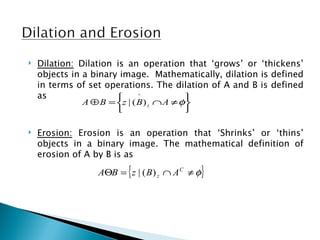
   Dilation: Dilation is an operation that ‘grows’ or ‘thickens’
    objects in a binary image. Mathematically, dilation is defined
    in terms of set operations. The dilation of A and B is defined
    as                       ^
                                           
               A ⊕ B = z | ( B ) z ∩ A ≠ φ
                                          

   Erosion: Erosion is an operation that ‘Shrinks’ or ‘thins’
    objects in a binary image. The mathematical definition of
    erosion of A by B is as

                         {
                  AΘB = z | ( B ) z ∩ A C ≠ φ   }
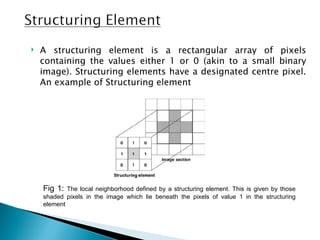
   A structuring element is a rectangular array of pixels
    containing the values either 1 or 0 (akin to a small binary
    image). Structuring elements have a designated centre pixel.
    An example of Structuring element


    Fig 1:  The local neighborhood defined by a structuring element. This is given by those
    shaded pixels in the image which lie beneath the pixels of value 1 in the structuring
    element
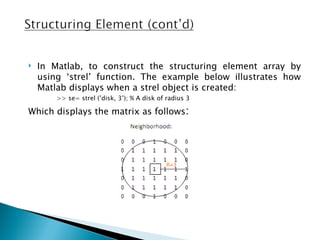
   In Matlab, to construct the structuring element array by
    using ‘strel’ function. The example below illustrates how
    Matlab displays when a strel object is created:
        >> se= strel (’disk, 3’); % A disk of radius 3

Which displays the matrix as follows:
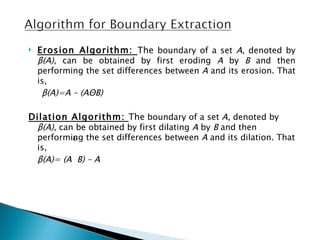
   Erosion Algorithm: The boundary of a set A, denoted by
    β(A), can be obtained by first eroding A by B and then
    performing the set differences between A and its erosion. That
    is,
     β(A)=A – (AΘB)

Dilation Algorithm: The boundary of a set A, denoted by
 β(A), can be obtained by first dilating A by B and then
 performing the set differences between A and its dilation. That
          ⊕
 is,
 β(A)= (A B) – A
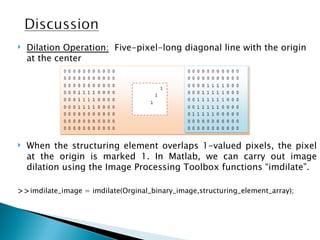
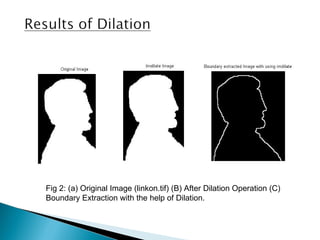
   Dilation Operation: Five-pixel-long diagonal line with the origin
    at the center


   When the structuring element overlaps 1-valued pixels, the pixel
    at the origin is marked 1. In Matlab, we can carry out image
    dilation using the Image Processing Toolbox functions “imdilate”.

>>imdilate_image = imdilate(Orginal_binary_image,structuring_element_array);
Fig 2: (a) Original Image (linkon.tif) (B) After Dilation Operation (C)
Boundary Extraction with the help of Dilation.
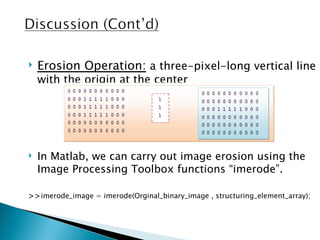
   Erosion Operation: a three-pixel-long vertical line
    with the origin at the center


   In Matlab, we can carry out image erosion using the
    Image Processing Toolbox functions “imerode”.

>>imerode_image = imerode(Orginal_binary_image , structuring_element_array);
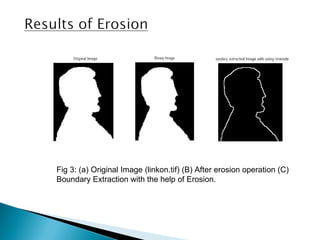
Fig 3: (a) Original Image (linkon.tif) (B) After erosion operation (C)
Boundary Extraction with the help of Erosion.
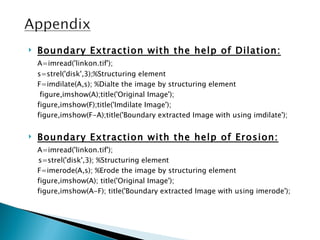
   Boundary Extraction with the help of Dilation:
    A=imread('linkon.tif');
    s=strel('disk',3);%Structuring element
    F=imdilate(A,s); %Dialte the image by structuring element
     figure,imshow(A);title('Original Image');
    figure,imshow(F);title('Imdilate Image');
    figure,imshow(F-A);title('Boundary extracted Image with using imdilate');


   Boundary Extraction with the help of Erosion:
    A=imread('linkon.tif');
    s=strel('disk',3); %Structuring element
    F=imerode(A,s); %Erode the image by structuring element
    figure,imshow(A); title('Original Image');
    figure,imshow(A-F); title('Boundary extracted Image with using imerode');
1. "Fundamentals of Digital Image Processing", Chris Solomon and
   Toby Breckon, Wiley Publications. 1st edition.
2. “Digital Image Processing Using Matlab”, Rafael C. Gonzalez,
   Richard E. Woods and Steven L. Eddins, 2nd edition.
3. “Discrete Mathematics”, Seymour Lipschutz and Marc Lars Lipson,
   2nd edition, Mcgraw-hill publication.
4. Images can be downloaded from:
   http://www.imageprocessingplace.com/DIP-3E/dip2e_book_images_dow
Thanks To All

Boundary Extraction

  • 1.
     Boundary Extraction ByDilation and Erosion (With MatLab) For Details: http://happystudybymaria.blogspot.com/2012/04/project- boundary-extraction-by-dilation.html
  • 2.
    Presented By: Maria Akther ID:083-20-119 Dept.: Computer Science Daffodil International University
  • 3.
    Mathematical morphology is one of the data processing methods that is extremely useful for image processing and has many applications, such as, boundary extraction ,noise elimination, shape description, texture analysis, and so on. The mathematical base of morphological processing is dilation and erosion which are described by set analysis and can be expressed in logical AND, OR notation .
  • 4.
    Dilation: Dilation is an operation that ‘grows’ or ‘thickens’ objects in a binary image. Mathematically, dilation is defined in terms of set operations. The dilation of A and B is defined as  ^  A ⊕ B = z | ( B ) z ∩ A ≠ φ    Erosion: Erosion is an operation that ‘Shrinks’ or ‘thins’ objects in a binary image. The mathematical definition of erosion of A by B is as { AΘB = z | ( B ) z ∩ A C ≠ φ }
  • 5.
    A structuring element is a rectangular array of pixels containing the values either 1 or 0 (akin to a small binary image). Structuring elements have a designated centre pixel. An example of Structuring element Fig 1: The local neighborhood defined by a structuring element. This is given by those shaded pixels in the image which lie beneath the pixels of value 1 in the structuring element
  • 6.
    In Matlab, to construct the structuring element array by using ‘strel’ function. The example below illustrates how Matlab displays when a strel object is created: >> se= strel (’disk, 3’); % A disk of radius 3 Which displays the matrix as follows:
  • 7.
    Erosion Algorithm: The boundary of a set A, denoted by β(A), can be obtained by first eroding A by B and then performing the set differences between A and its erosion. That is, β(A)=A – (AΘB) Dilation Algorithm: The boundary of a set A, denoted by β(A), can be obtained by first dilating A by B and then performing the set differences between A and its dilation. That ⊕ is, β(A)= (A B) – A
  • 8.
    Dilation Operation: Five-pixel-long diagonal line with the origin at the center  When the structuring element overlaps 1-valued pixels, the pixel at the origin is marked 1. In Matlab, we can carry out image dilation using the Image Processing Toolbox functions “imdilate”. >>imdilate_image = imdilate(Orginal_binary_image,structuring_element_array);
  • 9.
    Fig 2: (a)Original Image (linkon.tif) (B) After Dilation Operation (C) Boundary Extraction with the help of Dilation.
  • 10.
    Erosion Operation: a three-pixel-long vertical line with the origin at the center  In Matlab, we can carry out image erosion using the Image Processing Toolbox functions “imerode”. >>imerode_image = imerode(Orginal_binary_image , structuring_element_array);
  • 11.
    Fig 3: (a)Original Image (linkon.tif) (B) After erosion operation (C) Boundary Extraction with the help of Erosion.
  • 12.
    Boundary Extraction with the help of Dilation: A=imread('linkon.tif'); s=strel('disk',3);%Structuring element F=imdilate(A,s); %Dialte the image by structuring element figure,imshow(A);title('Original Image'); figure,imshow(F);title('Imdilate Image'); figure,imshow(F-A);title('Boundary extracted Image with using imdilate');  Boundary Extraction with the help of Erosion: A=imread('linkon.tif'); s=strel('disk',3); %Structuring element F=imerode(A,s); %Erode the image by structuring element figure,imshow(A); title('Original Image'); figure,imshow(A-F); title('Boundary extracted Image with using imerode');
  • 13.
    1. "Fundamentals ofDigital Image Processing", Chris Solomon and Toby Breckon, Wiley Publications. 1st edition. 2. “Digital Image Processing Using Matlab”, Rafael C. Gonzalez, Richard E. Woods and Steven L. Eddins, 2nd edition. 3. “Discrete Mathematics”, Seymour Lipschutz and Marc Lars Lipson, 2nd edition, Mcgraw-hill publication. 4. Images can be downloaded from: http://www.imageprocessingplace.com/DIP-3E/dip2e_book_images_dow
  • 14.