A. K. Biswas, Dept. Of Computer Apllication, B.I.T., Durg 1
COMPUTER GRAPHICSCOMPUTER GRAPHICS
Visible SurfaceVisible Surface
DetectionDetection
A. K. Biswas, Dept. Of Computer Apllication, B.I.T., Durg 2
CONTENTCONTENT
Surface Detection Methods
 Back face detection
 Depth-buffer method
 A-buffer method
 Scan-line method
 Depth Sorting
 Area Sub-Division
A. K. Biswas, Dept. Of Computer Apllication, B.I.T., Durg 3
Why Surface Detection?Why Surface Detection?
Given a set of 3D objects and a viewing specification, we
wish to determine which lines or surfaces are visible, so
that we do not needlessly calculate and draw surfaces,
which will not ultimately be seen by the viewer, or which
might confuse the viewer.
For 3D worlds this is known as Visible Surface Detection
or Hidden Surface Elimination
Visible Surface Detection or Hidden Surface
Elimination, refer to the methods and algorithms to
determine which parts of which surfaces of a scene are
visible from a chosen viewing position.
A. K. Biswas, Dept. Of Computer Apllication, B.I.T., Durg 4
Simple Example…….Simple Example…….
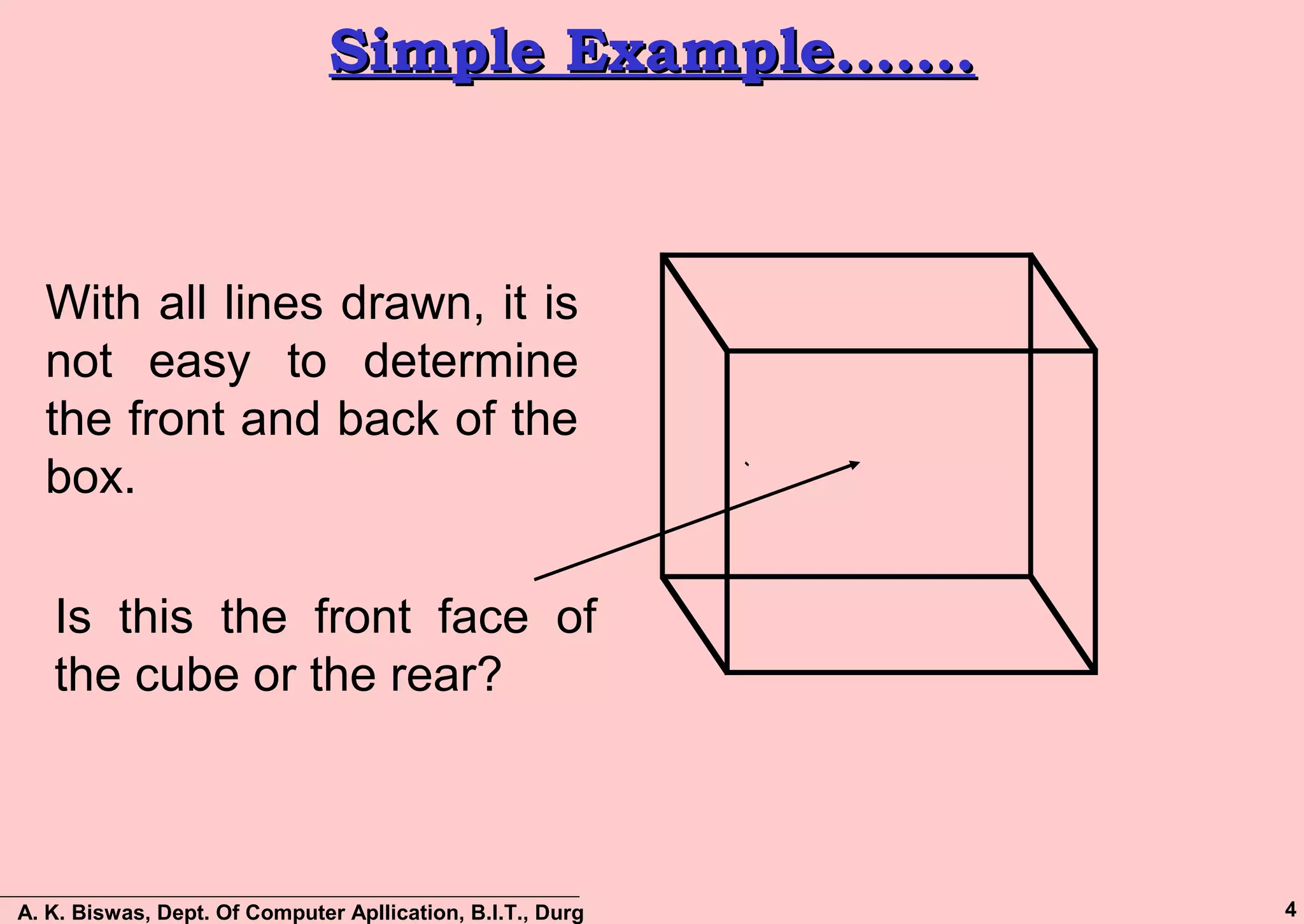
With all lines drawn, it is
not easy to determine
the front and back of the
box.
Is this the front face of
the cube or the rear?
A. K. Biswas, Dept. Of Computer Apllication, B.I.T., Durg 5
DEFINITIONSDEFINITIONS
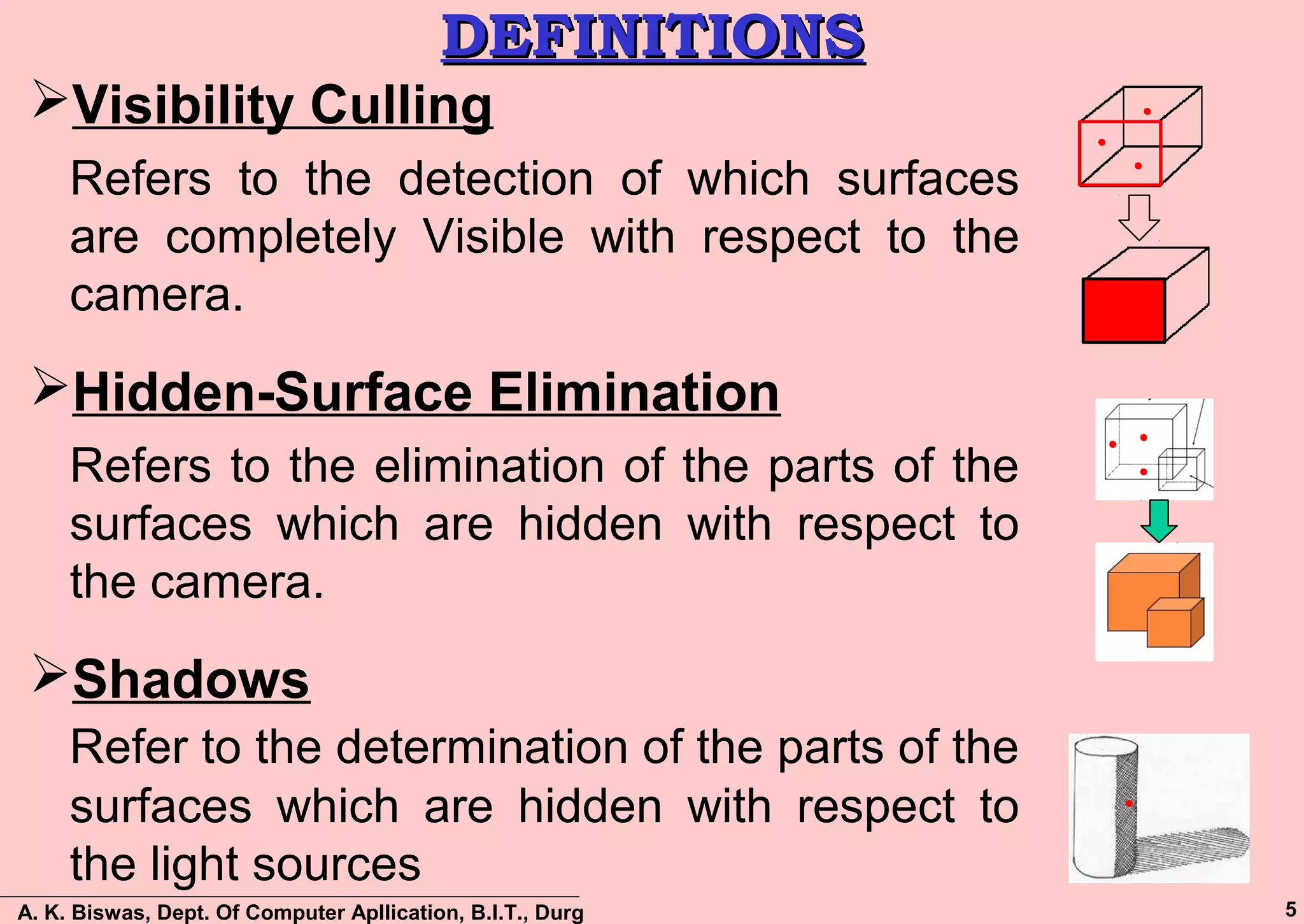
Visibility Culling
Refers to the detection of which surfaces
are completely Visible with respect to the
camera.
Hidden-Surface Elimination
Refers to the elimination of the parts of the
surfaces which are hidden with respect to
the camera.
Shadows
Refer to the determination of the parts of the
surfaces which are hidden with respect to
the light sources
A. K. Biswas, Dept. Of Computer Apllication, B.I.T., Durg 6
DIFFERENT APPROACHESDIFFERENT APPROACHES
Visible Surface Detection or Hidden Surface
Elimination algorithms are broadly classified as:
 Object Space Methods:
Compares objects and parts of objects to each other
within the scene definition to determine which surfaces
are visible
 Image Space Methods:
Visibility is decided point-by-point at each pixel position
on the projection plane
Image space methods are more common
Pixel Space
A. K. Biswas, Dept. Of Computer Apllication, B.I.T., Durg 7
OBJECT SPACEOBJECT SPACE
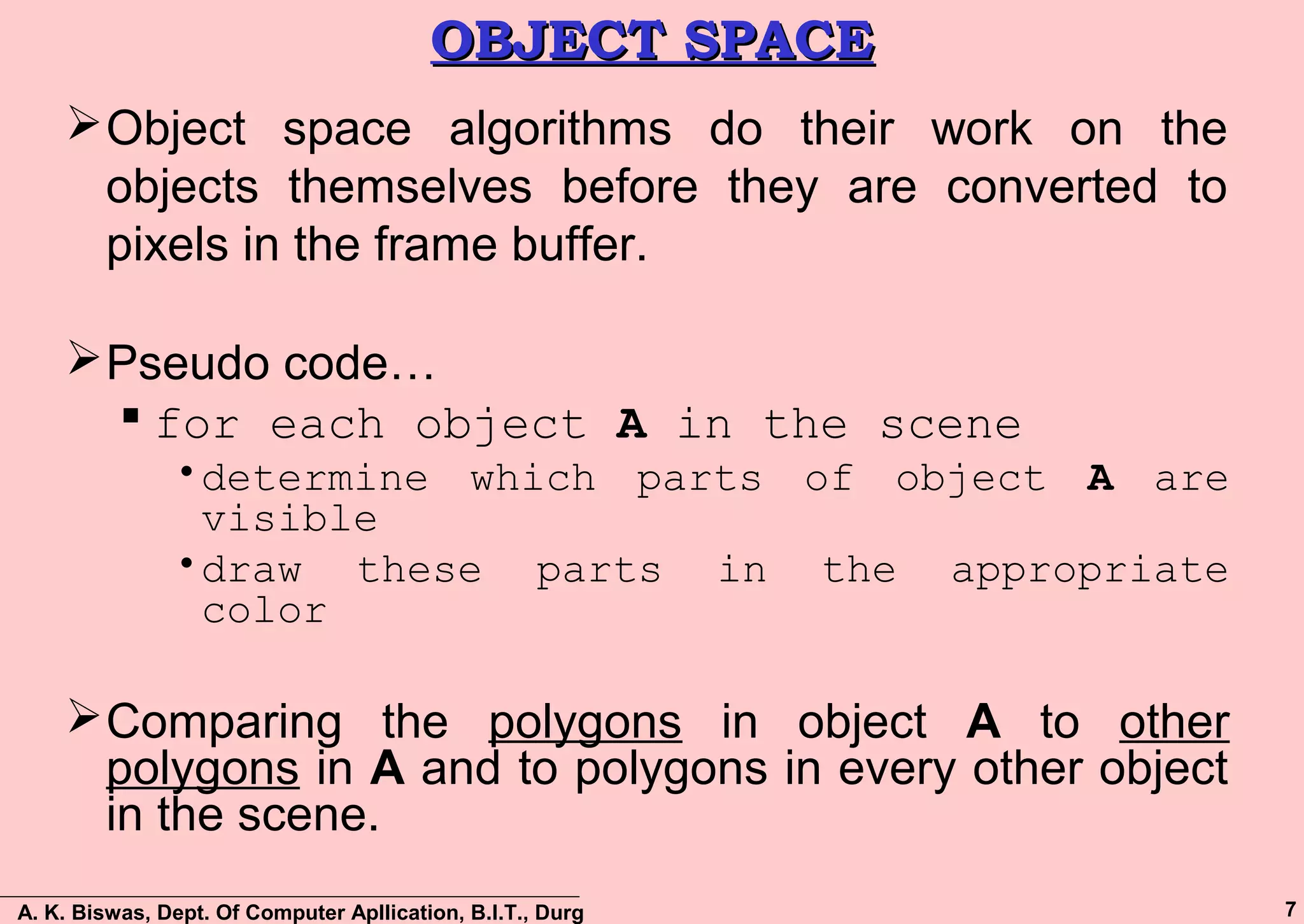
Object space algorithms do their work on the
objects themselves before they are converted to
pixels in the frame buffer.
Pseudo code…
 for each object A in the scene
•determine which parts of object A are
visible
•draw these parts in the appropriate
color
Comparing the polygons in object A to other
polygons in A and to polygons in every other object
in the scene.
A. K. Biswas, Dept. Of Computer Apllication, B.I.T., Durg 8
IMAGE SPACEIMAGE SPACE
Image space algorithms, the objects are being
converted to pixels in the frame buffer.
Pseudo code…
 for each pixel in the frame buffer
•Determine which polygon is closest to
the viewer at that pixel location
•Color the pixel with the color of that
polygon at that location
A. K. Biswas, Dept. Of Computer Apllication, B.I.T., Durg 9
OBJECT SPACE VS IMAGE SPACEOBJECT SPACE VS IMAGE SPACE
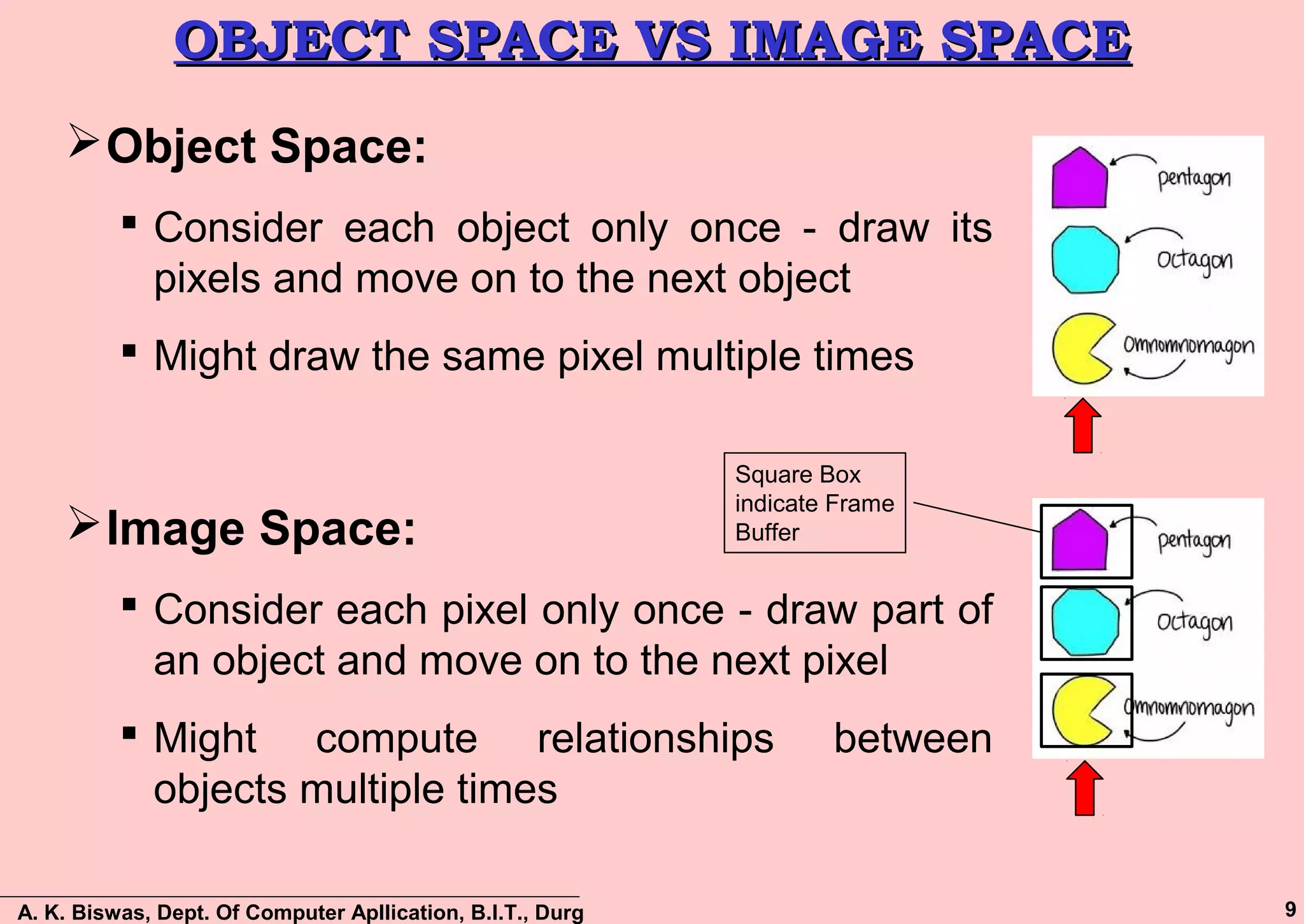
Object Space:
 Consider each object only once - draw its
pixels and move on to the next object
 Might draw the same pixel multiple times
Image Space:
 Consider each pixel only once - draw part of
an object and move on to the next pixel
 Might compute relationships between
objects multiple times
Square Box
indicate Frame
Buffer
A. K. Biswas, Dept. Of Computer Apllication, B.I.T., Durg 10
ALGORITHMSALGORITHMS
Object space
– Back-Face Detection / Culling
Image space
– z-Buffer / Depth Buffer Algorithm
– A-Buffer
– Scan Line
Hybrid
– Depth-Sort / Painter
– Area Sub-division
– Binary Space Partitioning (BSP)
A. K. Biswas, Dept. Of Computer Apllication, B.I.T., Durg 11
BACK-FACE DETECTION / CULLINGBACK-FACE DETECTION / CULLING
Back-face culling (an object space algorithm) works
on 'solid' objects which you are looking at from the
outside. That is, the polygons of the surface of the
object completely enclose the object.
The simplest thing we can do is find the faces on the
backs of polyhedra and discard them
A. K. Biswas, Dept. Of Computer Apllication, B.I.T., Durg 12
BACK-FACE DETECTION / CULLINGBACK-FACE DETECTION / CULLING
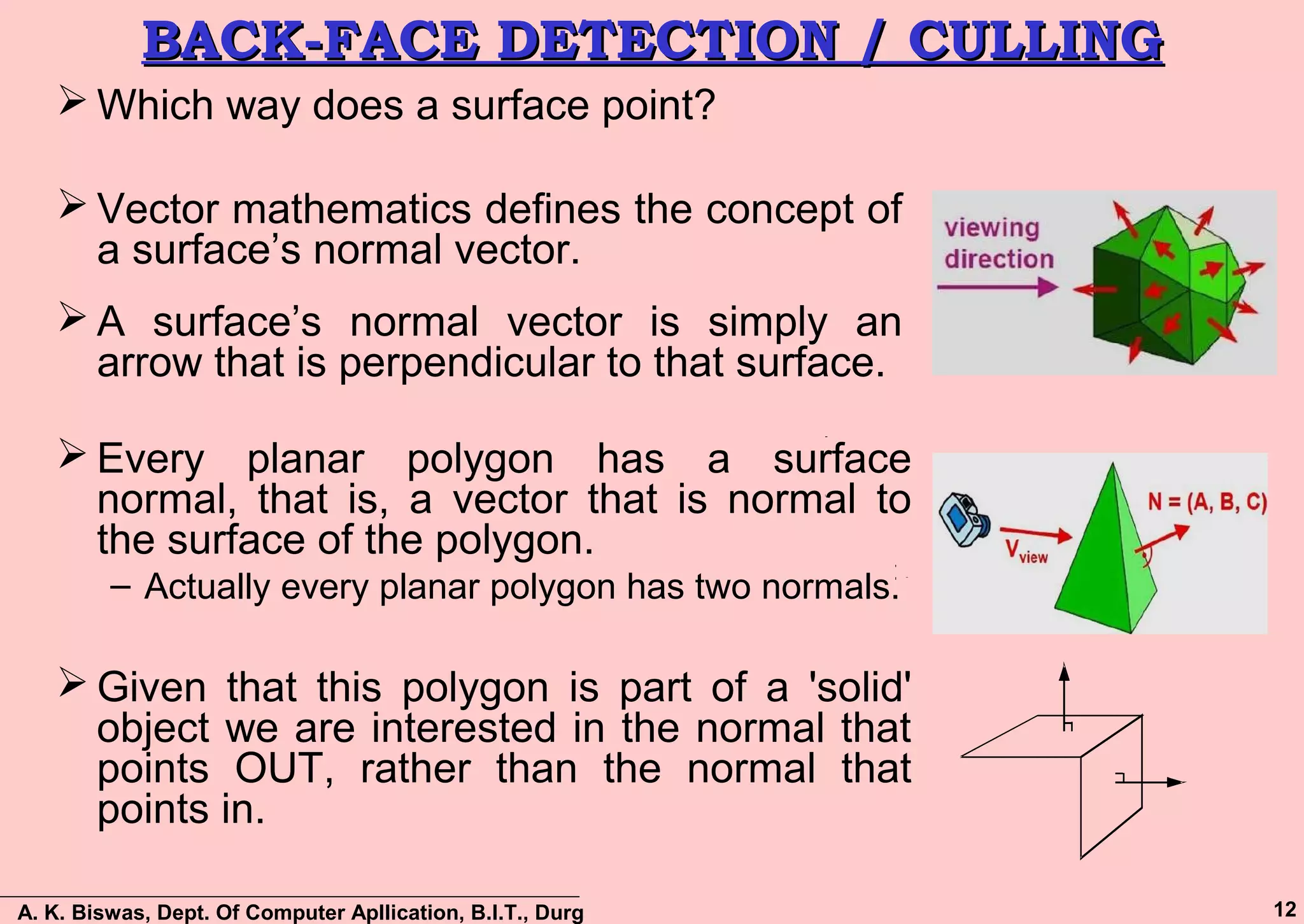
 Which way does a surface point?
 Vector mathematics defines the concept of
a surface’s normal vector.
 A surface’s normal vector is simply an
arrow that is perpendicular to that surface.
 Every planar polygon has a surface
normal, that is, a vector that is normal to
the surface of the polygon.
– Actually every planar polygon has two normals.
 Given that this polygon is part of a 'solid'
object we are interested in the normal that
points OUT, rather than the normal that
points in.
A. K. Biswas, Dept. Of Computer Apllication, B.I.T., Durg 13
BACK-FACE DETECTION / CULLINGBACK-FACE DETECTION / CULLING
 Consider the 2 faces (Surface) of a cube and their normal
vectors.
 Vectors N1 and N2 are the normal to surfaces 1 and 2
respectively.
 Vector L points from surface 1 to the viewpoint.
 Depending on the angle between L, and N1 & N2, they may or
may not be visible to the viewer.
N2
N1L
surface1
surface2
A. K. Biswas, Dept. Of Computer Apllication, B.I.T., Durg 14
BACK-FACE DETECTION / CULLINGBACK-FACE DETECTION / CULLING
•If we define θ to be the angle between L and N.
•Then a surface is visible from the position given by L if:
•Can calculate Cos θ using the formula:
°≤≤ 900 θ 1cos0 ≤≤ θor
θcos... NLNL =
A. K. Biswas, Dept. Of Computer Apllication, B.I.T., Durg 15
BACK-FACE DETECTION / CULLINGBACK-FACE DETECTION / CULLING
Determining N:
• Use cross product to calculate N
• N = A × B
–Vertices are given a counter clockwise order when
looking at visible side.
A
B
E
D
N
N
A. K. Biswas, Dept. Of Computer Apllication, B.I.T., Durg 16
BACK-FACE DETECTION / CULLINGBACK-FACE DETECTION / CULLING
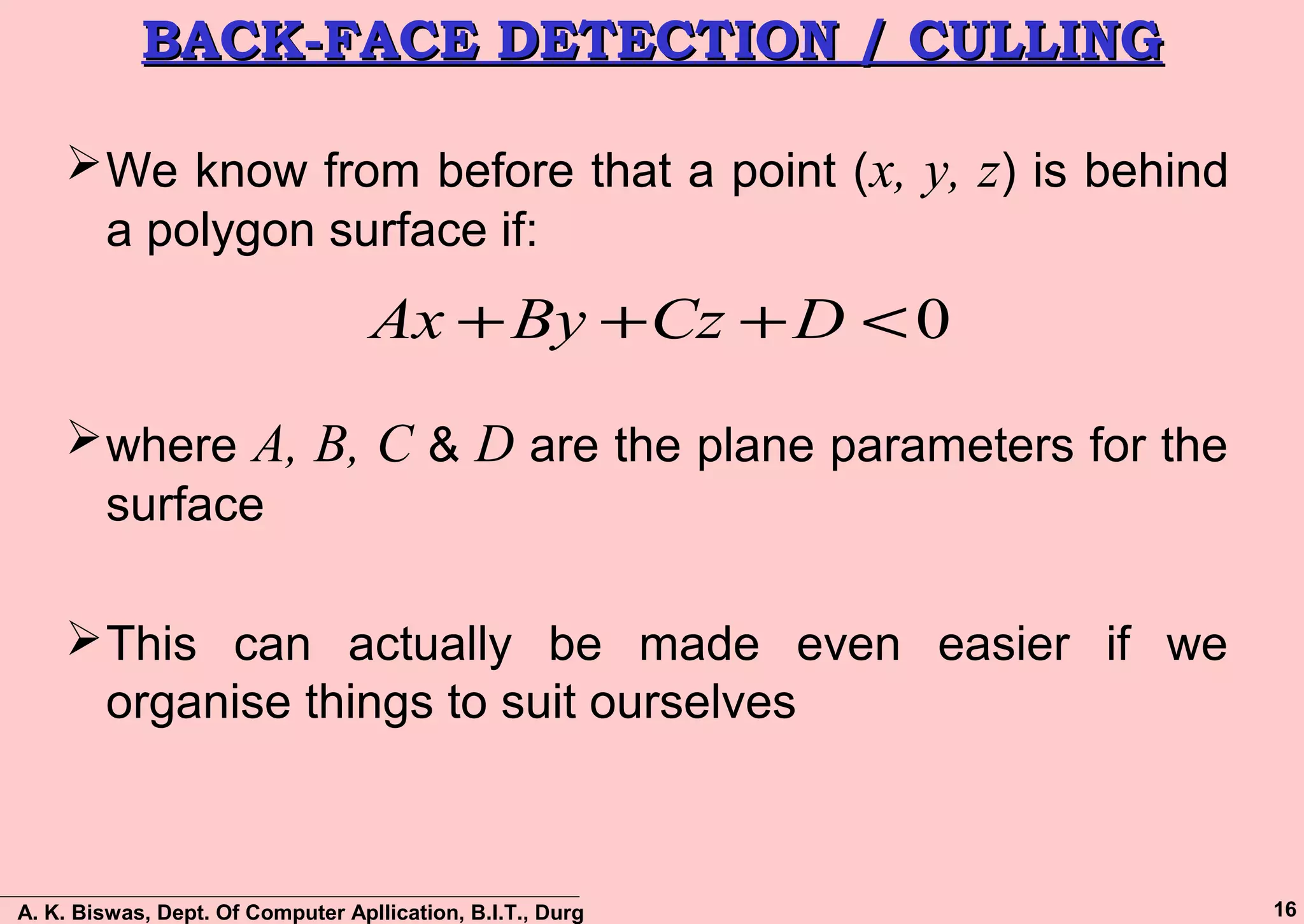
We know from before that a point (x, y, z) is behind
a polygon surface if:
where A, B, C & D are the plane parameters for the
surface
This can actually be made even easier if we
organise things to suit ourselves
0<+++ DCzByAx
A. K. Biswas, Dept. Of Computer Apllication, B.I.T., Durg 17
BACK-FACE DETECTION / CULLINGBACK-FACE DETECTION / CULLING
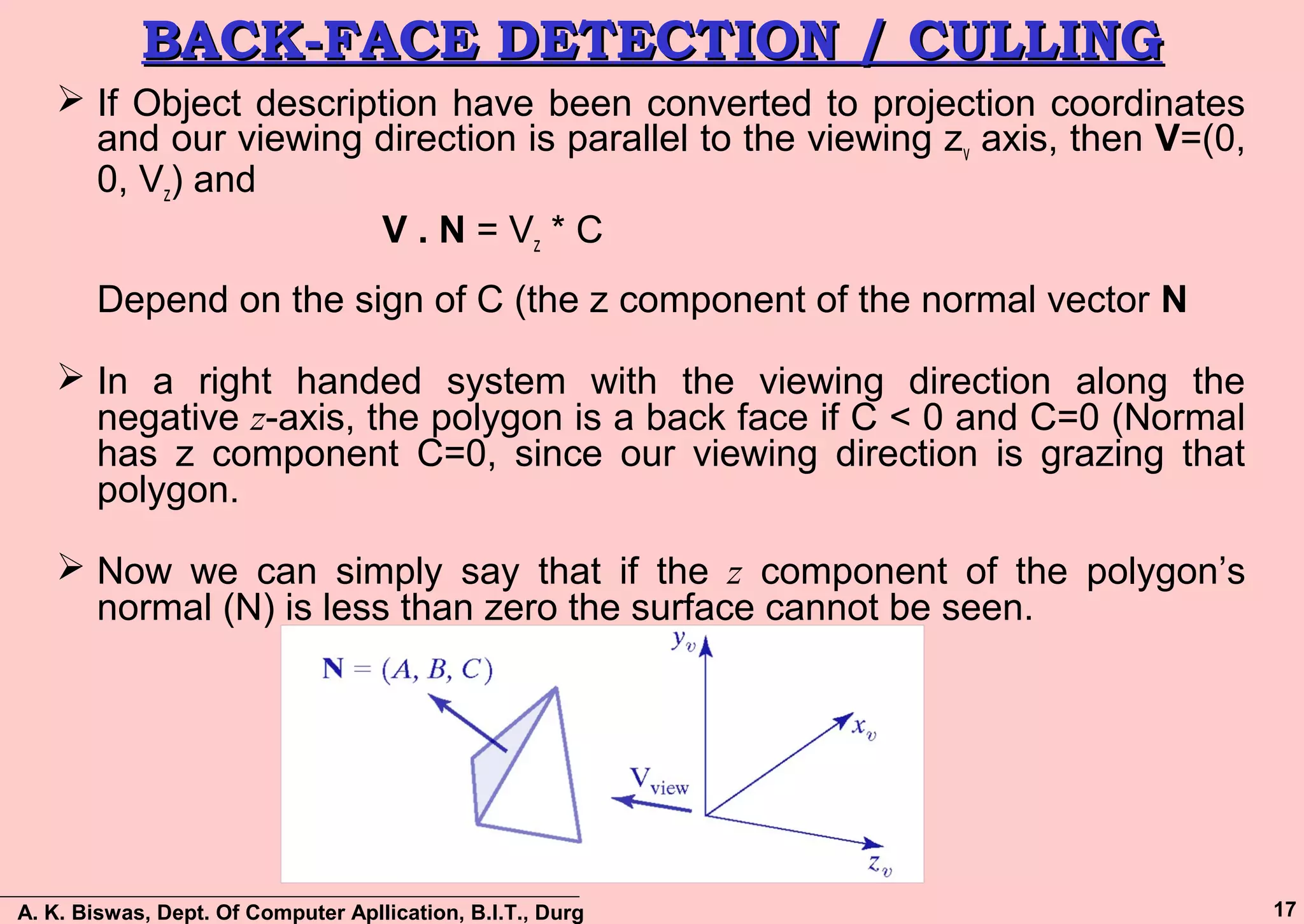
 If Object description have been converted to projection coordinates
and our viewing direction is parallel to the viewing zv axis, then V=(0,
0, Vz) and
V . N = Vz * C
Depend on the sign of C (the z component of the normal vector N
 In a right handed system with the viewing direction along the
negative z-axis, the polygon is a back face if C < 0 and C=0 (Normal
has z component C=0, since our viewing direction is grazing that
polygon.
 Now we can simply say that if the z component of the polygon’s
normal (N) is less than zero the surface cannot be seen.
A. K. Biswas, Dept. Of Computer Apllication, B.I.T., Durg 18
BACK-FACE DETECTION / CULLINGBACK-FACE DETECTION / CULLING
Limitations:
 Requires a lot of memory
 It can only be used on solid objects…
• Remove the top or front face of the cube, and
suddenly we can see inside, and our algorithm falls
over.
 It works fine for convex polyhedra but not
necessarily for concave polyhedra.
• example of a partially hidden face, that will not be
eliminated by Back-face removal.
A. K. Biswas, Dept. Of Computer Apllication, B.I.T., Durg 19
DEPTH-BUFFER METHODDEPTH-BUFFER METHOD
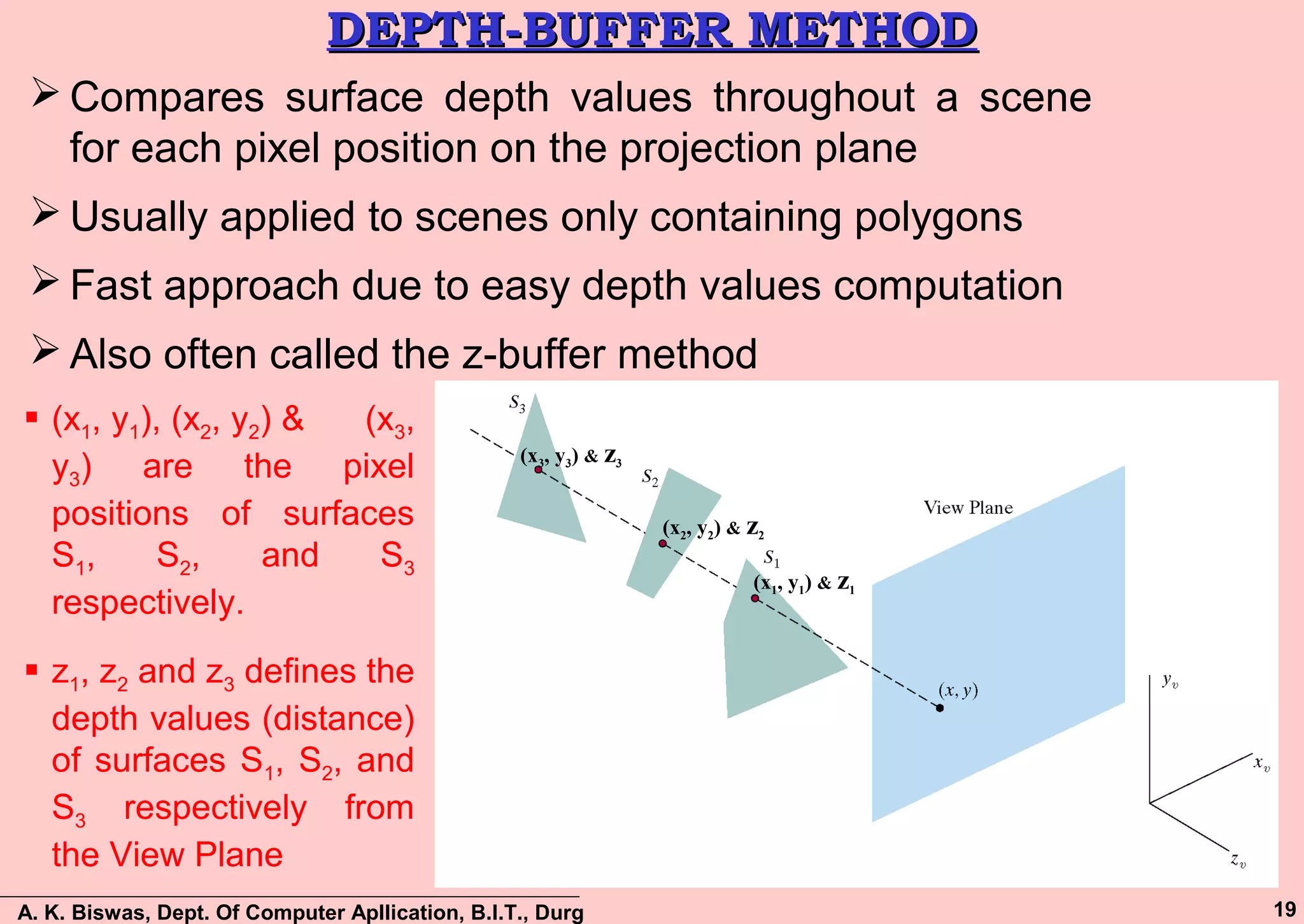
 Compares surface depth values throughout a scene
for each pixel position on the projection plane
 Usually applied to scenes only containing polygons
 Fast approach due to easy depth values computation
 Also often called the z-buffer method
(x2, y2) & z2
(x3, y3) & z3
(x1, y1) & z1
 (x1, y1), (x2, y2) & (x3,
y3) are the pixel
positions of surfaces
S1, S2, and S3
respectively.
 z1, z2 and z3 defines the
depth values (distance)
of surfaces S1, S2, and
S3 respectively from
the View Plane
A. K. Biswas, Dept. Of Computer Apllication, B.I.T., Durg 20
DEPTH-BUFFER METHOD (Cont…)DEPTH-BUFFER METHOD (Cont…)
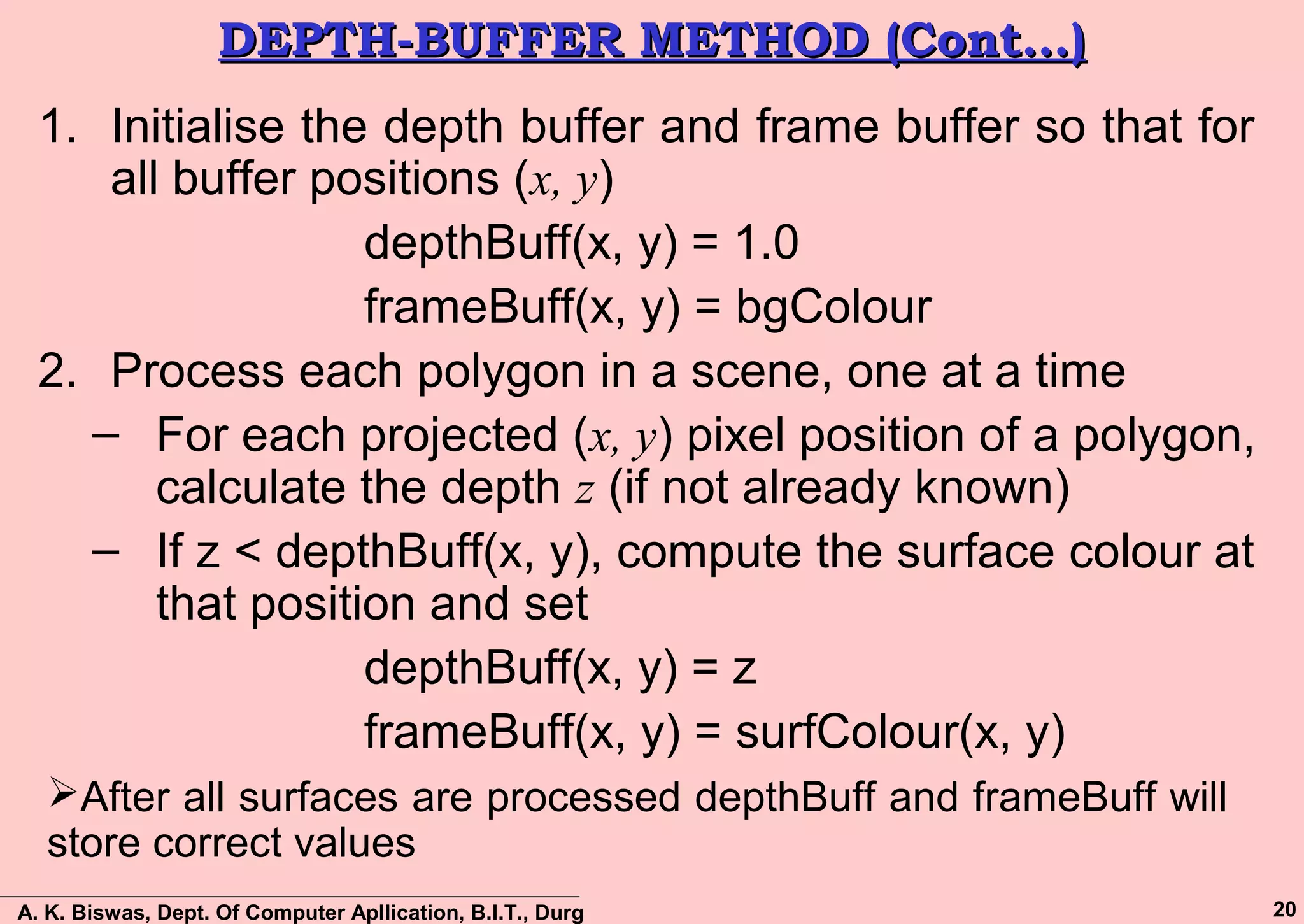
1. Initialise the depth buffer and frame buffer so that for
all buffer positions (x, y)
depthBuff(x, y) = 1.0
frameBuff(x, y) = bgColour
2. Process each polygon in a scene, one at a time
– For each projected (x, y) pixel position of a polygon,
calculate the depth z (if not already known)
– If z < depthBuff(x, y), compute the surface colour at
that position and set
depthBuff(x, y) = z
frameBuff(x, y) = surfColour(x, y)
After all surfaces are processed depthBuff and frameBuff will
store correct values
A. K. Biswas, Dept. Of Computer Apllication, B.I.T., Durg 21
DEPTH CALCULATIONDEPTH CALCULATION
A. K. Biswas, Dept. Of Computer Apllication, B.I.T., Durg 22
Iterative Calculations (cont…)Iterative Calculations (cont…)
top scan line
bottom scan line
y scan line
y - 1 scan line
x x’
A. K. Biswas, Dept. Of Computer Apllication, B.I.T., Durg 23
DISADVANTAGES: DEPTH BUFFERDISADVANTAGES: DEPTH BUFFER
This method only find out one visible surface
at each pixel position that means it deals
with only Opaque surface.
1
2
3
4
5
6
1 Red
2 Red
3 Green
4 Blue
5 Green
6 Red
A. K. Biswas, Dept. Of Computer Apllication, B.I.T., Durg 24
A-BUFFER METHODA-BUFFER METHOD
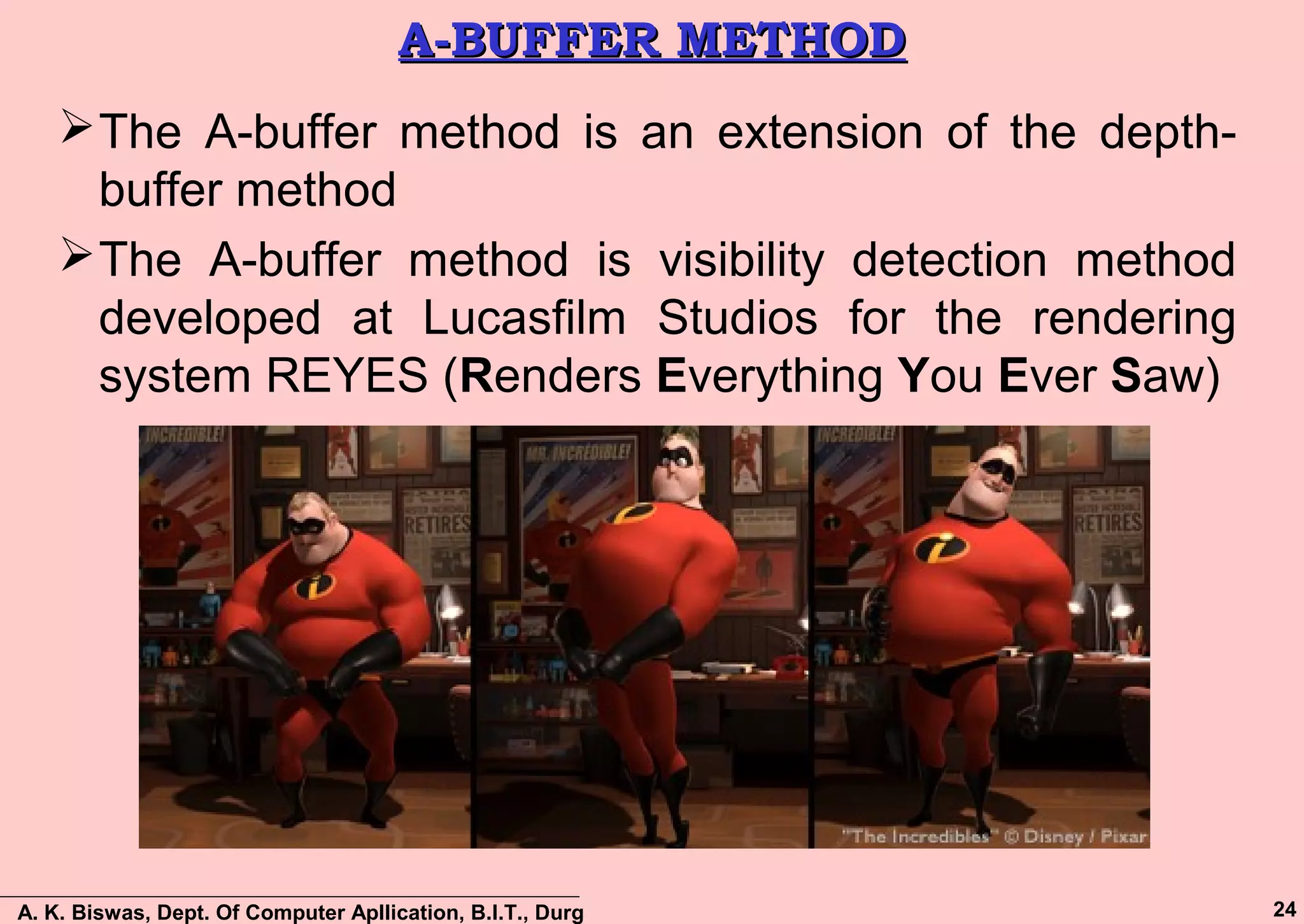
The A-buffer method is an extension of the depth-
buffer method
The A-buffer method is visibility detection method
developed at Lucasfilm Studios for the rendering
system REYES (Renders Everything You Ever Saw)
A. K. Biswas, Dept. Of Computer Apllication, B.I.T., Durg 25
A-BUFFER METHOD (Cont…)A-BUFFER METHOD (Cont…)
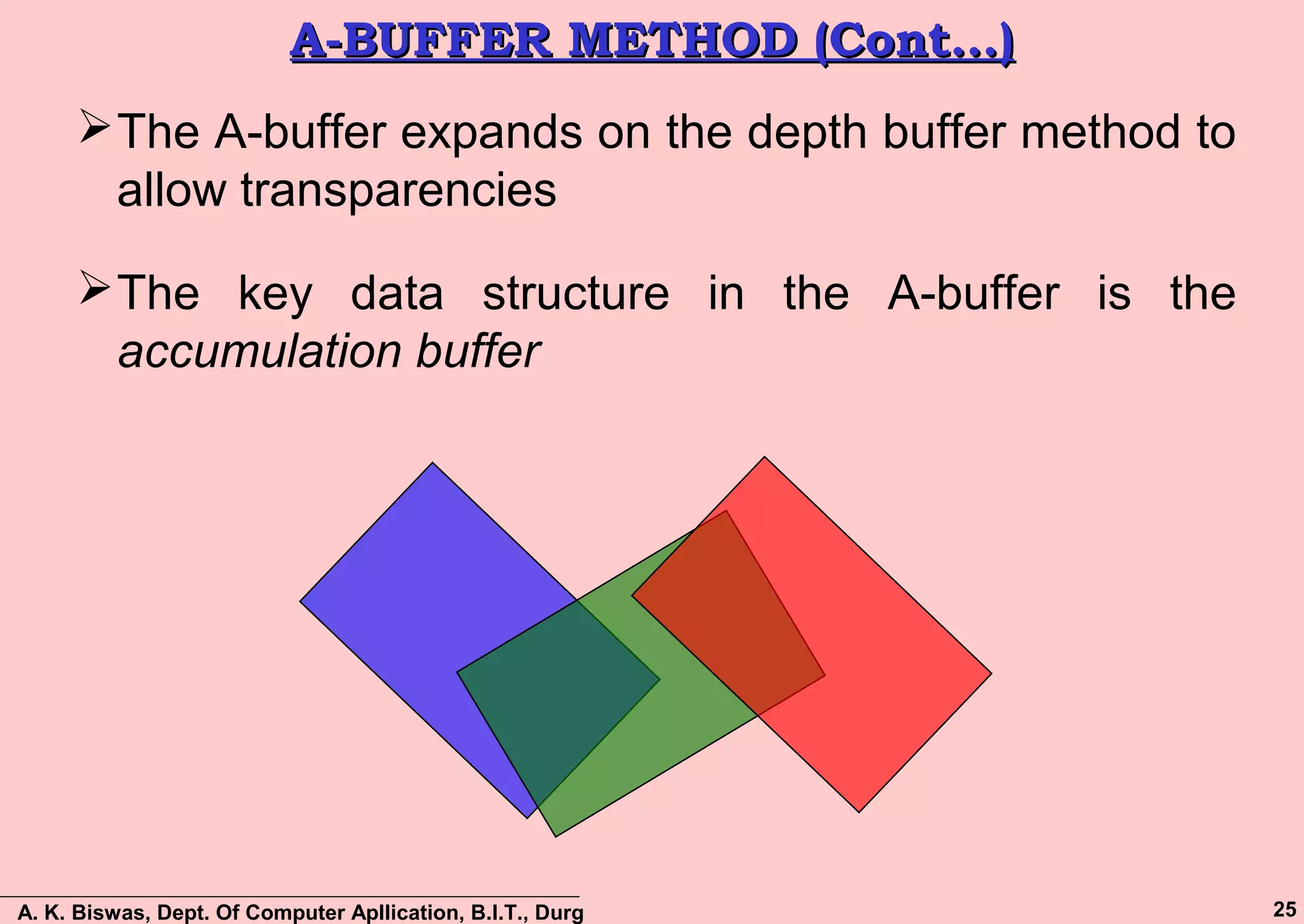
The A-buffer expands on the depth buffer method to
allow transparencies
The key data structure in the A-buffer is the
accumulation buffer
A. K. Biswas, Dept. Of Computer Apllication, B.I.T., Durg 26
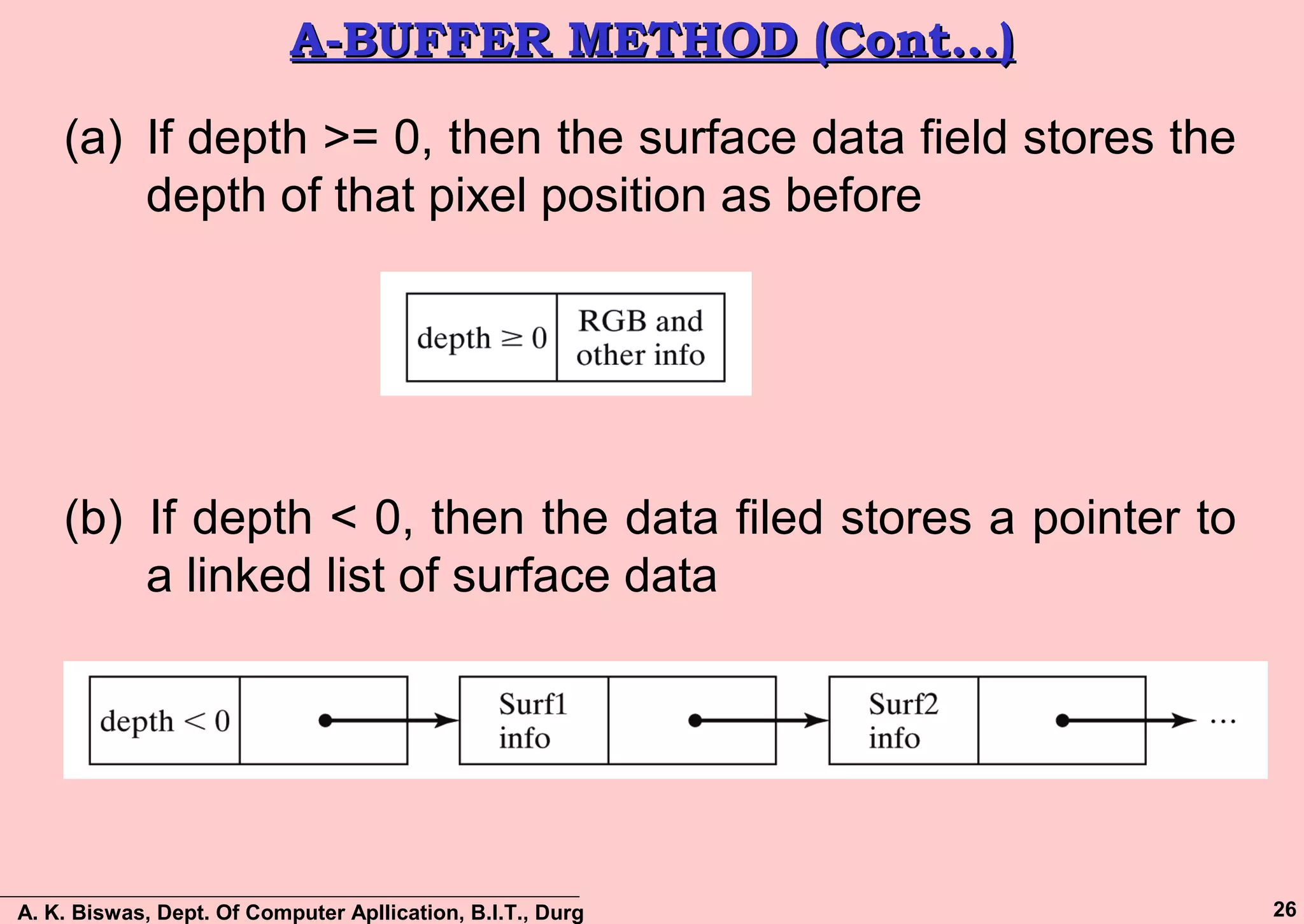
A-BUFFER METHOD (Cont…)A-BUFFER METHOD (Cont…)
(a) If depth >= 0, then the surface data field stores the
depth of that pixel position as before
(b) If depth < 0, then the data filed stores a pointer to
a linked list of surface data
A. K. Biswas, Dept. Of Computer Apllication, B.I.T., Durg 27
A-BUFFER METHOD (Cont…)A-BUFFER METHOD (Cont…)
Surface information in the A-buffer includes:
 RGB intensity components
 Opacity parameter
 Depth
 Percent of area coverage
 Surface identifier
 Other surface rendering parameters
The algorithm proceeds just like the depth buffer
algorithm
The depth and opacity values are used to determine
the final colour of a pixel
A. K. Biswas, Dept. Of Computer Apllication, B.I.T., Durg 28
SCAN-LINE METHODSCAN-LINE METHOD
An image space method for identifying visible surfaces
Computes and compares depth values to create an
image one scan line at a time.
This algorithm is similar to polygon scan conversion
algorithm, but deal with a set of polygons.
Two important tables are maintained:
 The Edge Table (ET)
 The Polygon Table (PT)
A. K. Biswas, Dept. Of Computer Apllication, B.I.T., Durg 29
Edge TableEdge Table
 Create an Edge Table (ET) for all non-horizontal edges of all
polygons projected on the view plane.
 Edge Table Process:
– Entries in the ET are sorted into bucket based on each edge’s smaller
y coordinates and within bucket are ordered by increasing x
coordinate.
 Edge Table fields:
– The x-coordinate of the end with the smaller y coordinate.
– The y-coordinate of the edge’s other end.
– The x Increment, ∆x used in stepping from one scan line to the
next.
– Polygon Identification no., indicating the polygon to shich the
edge belongs.
– Pointers into the surface facet table to connect edges to
surfaces.
x ymax ∆x ID
A. K. Biswas, Dept. Of Computer Apllication, B.I.T., Durg 30
Polygon TablePolygon Table
Polygon Table fields:
– Polygon ID
– The coefficients of the plane equation
– Shading or Color information for the Polygon
– An ‘in-out’ Boolean flag, initiated to false and used
during Scan-line processing.
ID Plane Equation Shading Information In-out
A. K. Biswas, Dept. Of Computer Apllication, B.I.T., Durg 31
Scan-Line MethodScan-Line Method
 To facilitate the search for surfaces crossing a given scan-line
an active list of edges is formed for each scan-line as it is
processed
 The active list stores only those edges that cross the scan-line
in order of increasing x
 Also a flag is set for each surface to indicate whether a position
along a scan-line is either inside or outside the surface
 To facilitate the search for surfaces crossing a given scan-line
an active list of edges is formed for each scan-line as it is
processed
 The active list stores only those edges that cross the scan-line
in order of increasing x
 Also a flag is set for each surface to indicate whether a position
along a scan-line is either inside or outside the surface
A. K. Biswas, Dept. Of Computer Apllication, B.I.T., Durg 32
Scan-Line Method: ExampleScan-Line Method: Example
Sorted Edges Are: AD, CD, GH, FG, HE, BC, AB and EF
Polygon Table has entries for ABCD and EFGH
Prepare a Active Edge Table (AET):
Active Edge Table (AET)
Scan Line Entries
1 AB, BC, HE, FG
2 AD, HE, BC, FG
3 AD, HE, BC, FG
4 AD, DC, GH, FG Scan Line 4
A. K. Biswas, Dept. Of Computer Apllication, B.I.T., Durg 33
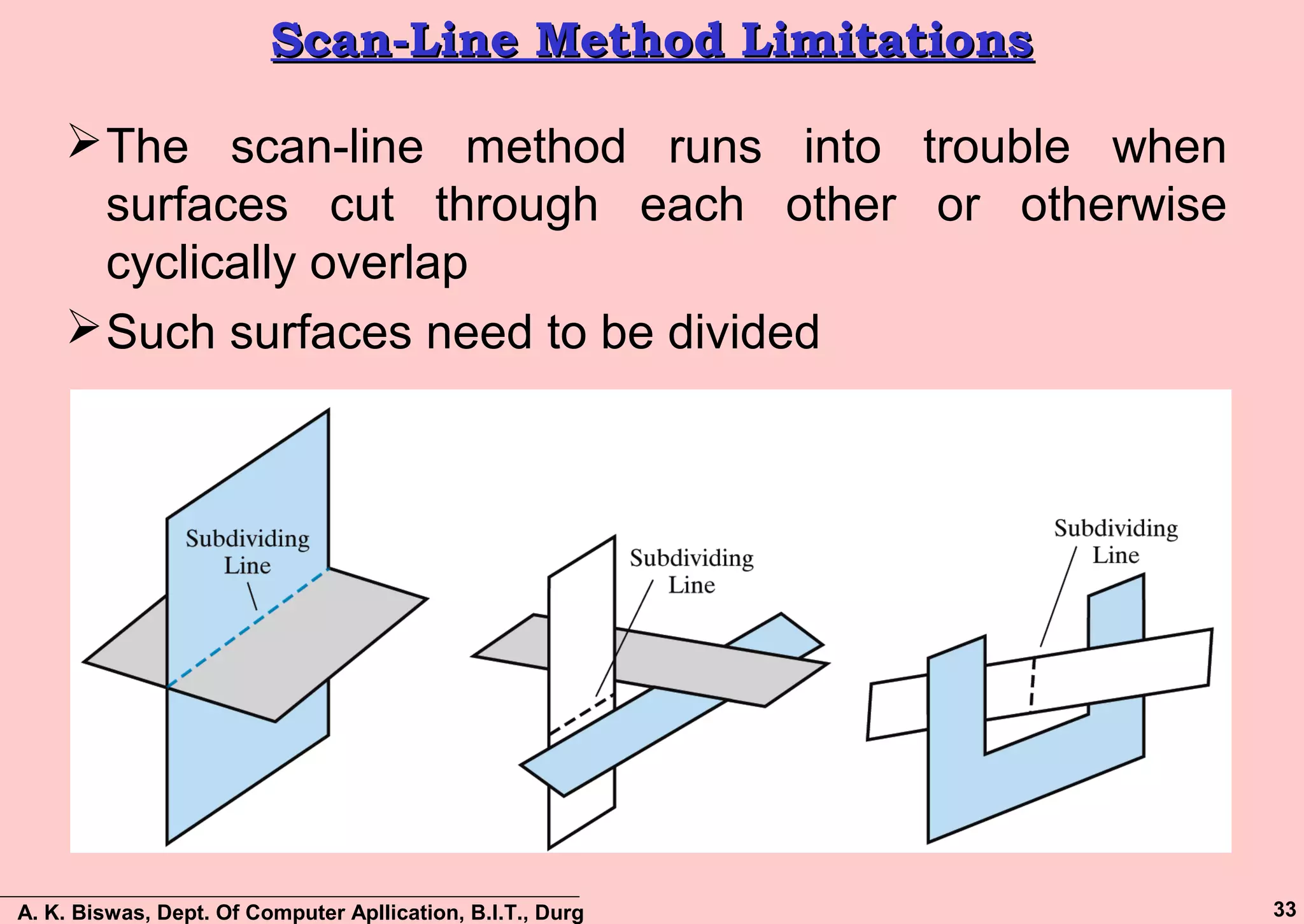
Scan-Line Method LimitationsScan-Line Method Limitations
The scan-line method runs into trouble when
surfaces cut through each other or otherwise
cyclically overlap
Such surfaces need to be divided
A. K. Biswas, Dept. Of Computer Apllication, B.I.T., Durg 34
Depth-Sorting MethodDepth-Sorting Method
A visible surface detection method that uses
both image-space and object-space operations
Basically, the following two operations are
performed
–Surfaces are sorted in order of decreasing depth
–Surfaces are scan converted in order, starting with
the surface of greatest depth.
The depth-sorting method is often also known as
the Painter’s method
A. K. Biswas, Dept. Of Computer Apllication, B.I.T., Durg 35
Depth-Sorting Method: ProblemDepth-Sorting Method: Problem
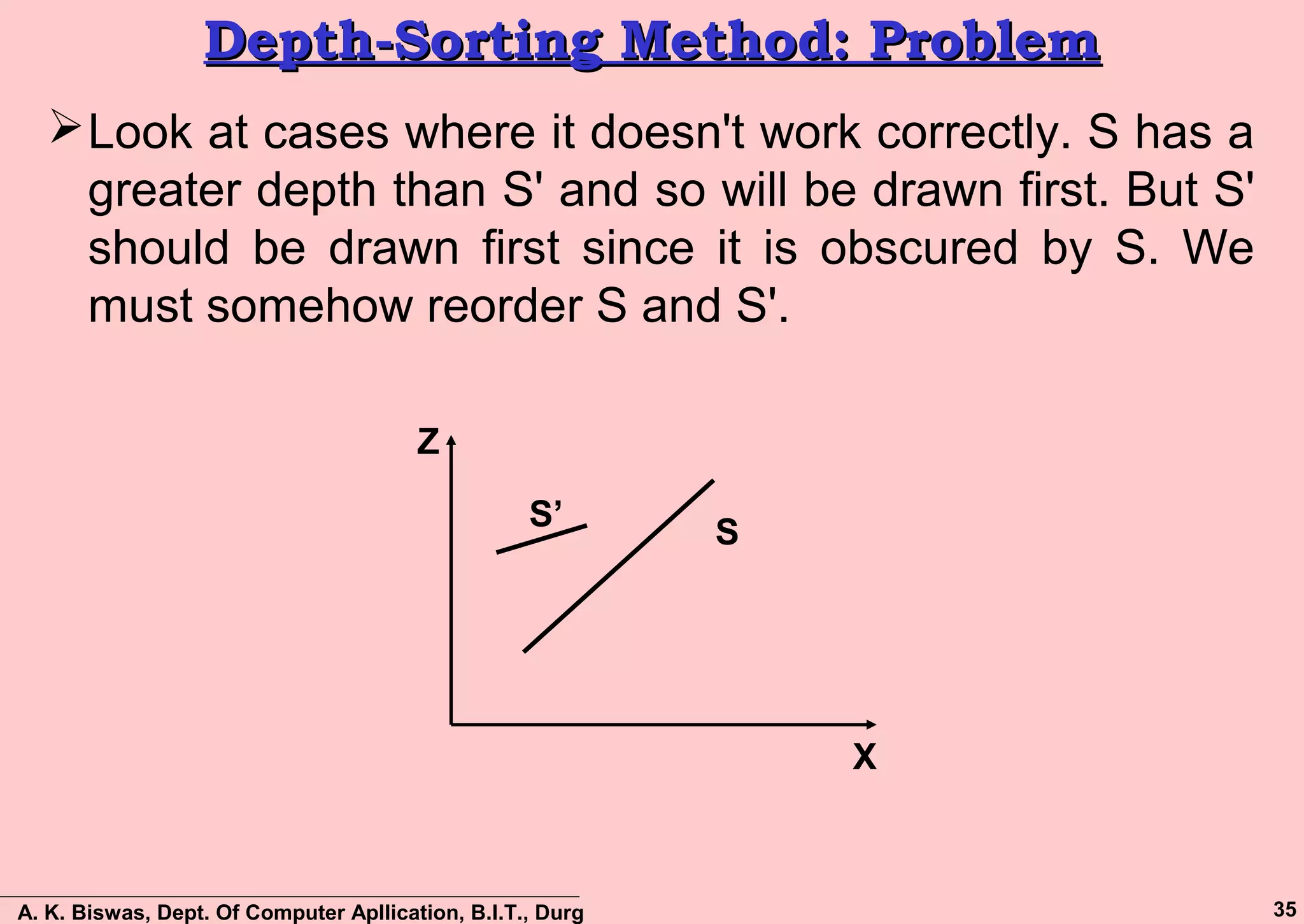
Look at cases where it doesn't work correctly. S has a
greater depth than S' and so will be drawn first. But S'
should be drawn first since it is obscured by S. We
must somehow reorder S and S'.
S
S’
X
Z
A. K. Biswas, Dept. Of Computer Apllication, B.I.T., Durg 36
Depth-Sorting MethodDepth-Sorting Method
First, assume that we are viewing along the z
direction
All surfaces in the scene are ordered according to the
smallest z value on each surface
The surface S at the end of the list is then compared
against all other surfaces to see if there are any
depth overlaps
If no overlaps occur then the surface is scan
converted and the process is then repeated for the
next surface in the list.
If depth overlap is detected at any point in the list,
then need some additional comparisons to determine
whether any of the surface should be reordered.
A. K. Biswas, Dept. Of Computer Apllication, B.I.T., Durg 37
Depth-Sorting Method (cont…)Depth-Sorting Method (cont…)
Test for depth overlap:
– The bounding rectangles for the two surfaces do not
overlap.
– Surface S is completely behind the overlapping surface
relative to the viewing position.
– The overlapping surface is completely in front of S relative
to the viewing position.
– The boundary edge projections of the two surfaces onto
the view plane do not overlap
The tests are performed in the order listed and as
soon as one is true we move on to the next surface
If all tests fail then we swap the orders of the surfaces
A. K. Biswas, Dept. Of Computer Apllication, B.I.T., Durg 38
Depth OverlappingDepth Overlapping
S
Pz’max
z’min
zmax
zmin
x
z
No Depth Overlap
S
P
z’max
z’min
zmax
zmin
x
z
Depth Overlap
A. K. Biswas, Dept. Of Computer Apllication, B.I.T., Durg 39
Polygon Reordering TestPolygon Reordering Test
Perform a series of test for reordering the polygons.
If the polygons fails all the test one after another, then
the polygons are reorder.
The initial tests are computationally cheap, but the
later tests are more expensive.
 Test Requirements:
– Store Zmax, Zmin for each Polygon
– Sort on Zmax
– Start with polygon with greatest depth (S)
A. K. Biswas, Dept. Of Computer Apllication, B.I.T., Durg 40
Depth-OverlappingDepth-Overlapping
Compare S with all other polygons (P) to see if there
is any depth overlap.
If S.Zmin <= P.Zmax then have depth overlap (as in
below figures), Test-2 will perform
S.Zmax
S.Zmin
P.Zmax
P.Zmin
S
P
S.Zmax
S.Zmin
P.Zmax
P.Zmin
S
P
Depth
Overlap
No Depth
Overlap
Z
X
Z
X
A. K. Biswas, Dept. Of Computer Apllication, B.I.T., Durg 41
Depth-Overlapping: Test – 1Depth-Overlapping: Test – 1
 Check to see if polygons overlap in xy plane (use bounding
rectangles)
S.XrS.Xl P.Xl P.Xr
S
P
Depth Overlap, check for
xy overlap
Case-1
S.XrS.Xl P.Xl P.Xr
S P
Bounding rectangle of P is
Completely inside of S i. e. overlap
Case-2
S P
Partially obscured
Problem
Case-3
 For Case-1 and Case-2, Test-2
is Passed
 For Case-3, Test-2 is Failed
Z Z
Z
X X
X
A. K. Biswas, Dept. Of Computer Apllication, B.I.T., Durg 42
Depth-Overlapping: Test – 2 (1/2)Depth-Overlapping: Test – 2 (1/2)
Test if surface S is “inside" of polygon P (relative to
view plane)
Remember: a point (x, y, z) is "outside" of a plane if
we put that point into the plane equation and get:
Ax + By + Cz + D > 0
Suppose plane equation for P is
Ax + By + Cz + D
So to test for S outside of P, put all vertices of S into
the plane equation for P and check that all vertices
give a result that is > 0.
i.e. Ax' + By' + Cz' + D > 0 x', y', z' are S vertices
A. K. Biswas, Dept. Of Computer Apllication, B.I.T., Durg 43
Depth-Overlapping: Test – 2 (2/2)Depth-Overlapping: Test – 2 (2/2)
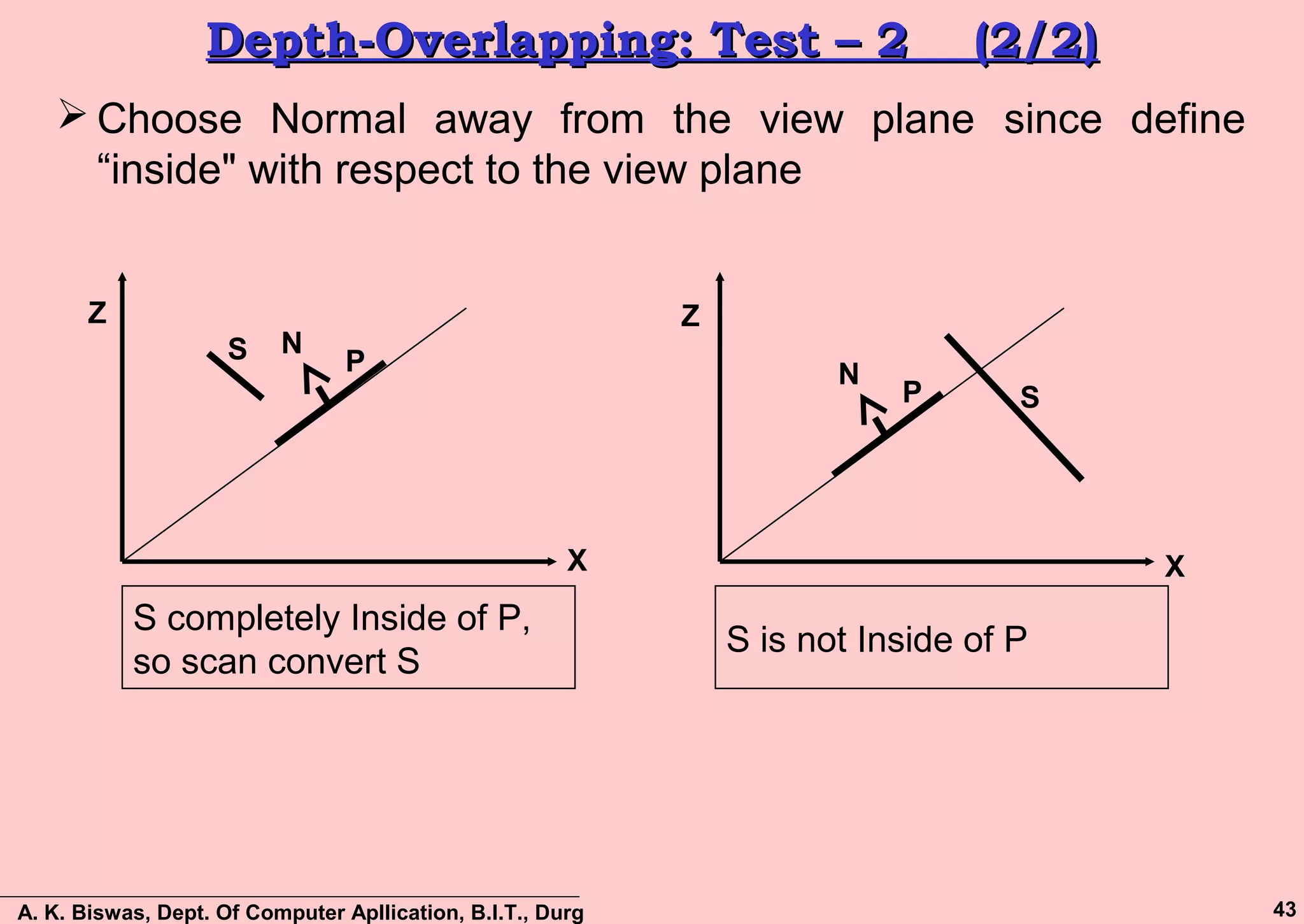
 Choose Normal away from the view plane since define
“inside" with respect to the view plane
S P
N
S completely Inside of P,
so scan convert S
SP
N
S is not Inside of P
XX
ZZ
A. K. Biswas, Dept. Of Computer Apllication, B.I.T., Durg 44
Depth-Overlapping: Test – 3Depth-Overlapping: Test – 3
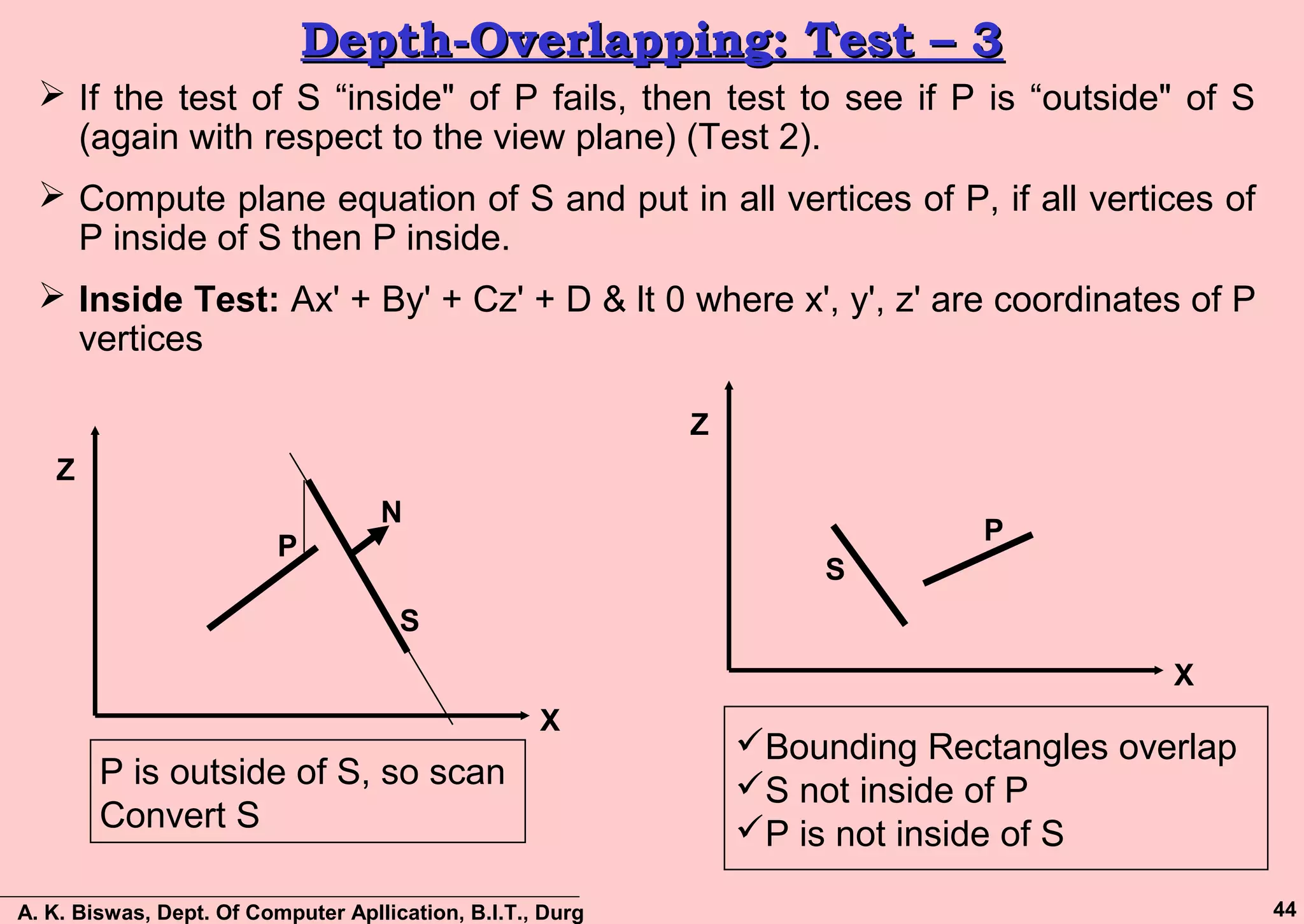
 If the test of S “inside" of P fails, then test to see if P is “outside" of S
(again with respect to the view plane) (Test 2).
 Compute plane equation of S and put in all vertices of P, if all vertices of
P inside of S then P inside.
 Inside Test: Ax' + By' + Cz' + D & lt 0 where x', y', z' are coordinates of P
vertices
S
P
N
P is outside of S, so scan
Convert S
X
Z
S
P
Bounding Rectangles overlap
S not inside of P
P is not inside of S
X
Z
A. K. Biswas, Dept. Of Computer Apllication, B.I.T., Durg 45
Depth-Overlapping: Test – 4Depth-Overlapping: Test – 4
 Check for overlap for actual projections in xy plane since may have
bounding rectangles overlap but not actual overlap
 For example: Look at projection of two polygons in the xy plane
X
Z
• Bounding Rectangle Overlap, But Projection Don’t
• Use Line eq. and test for Intersection
• No intersection, scan convert S
X
Z
A. K. Biswas, Dept. Of Computer Apllication, B.I.T., Durg 46
Ordering S and S’Ordering S and S’
 If all previous tests fail, interchange S and S’ in the list
x
z
S
S’
A. K. Biswas, Dept. Of Computer Apllication, B.I.T., Durg 47
DrawbacksDrawbacks
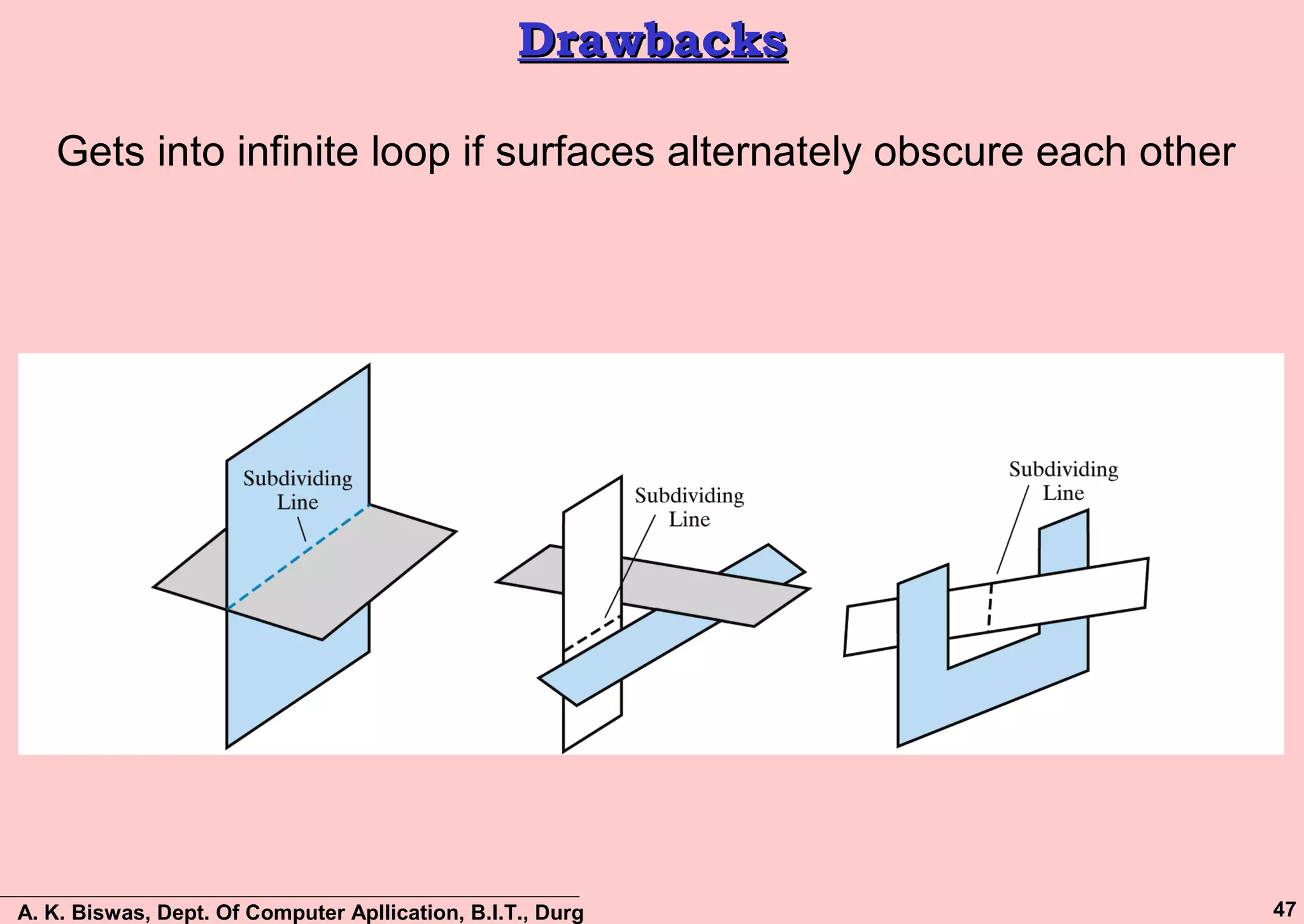
Gets into infinite loop if surfaces alternately obscure each other
A. K. Biswas, Dept. Of Computer Apllication, B.I.T., Durg 48
Area Sub-Division methodArea Sub-Division method
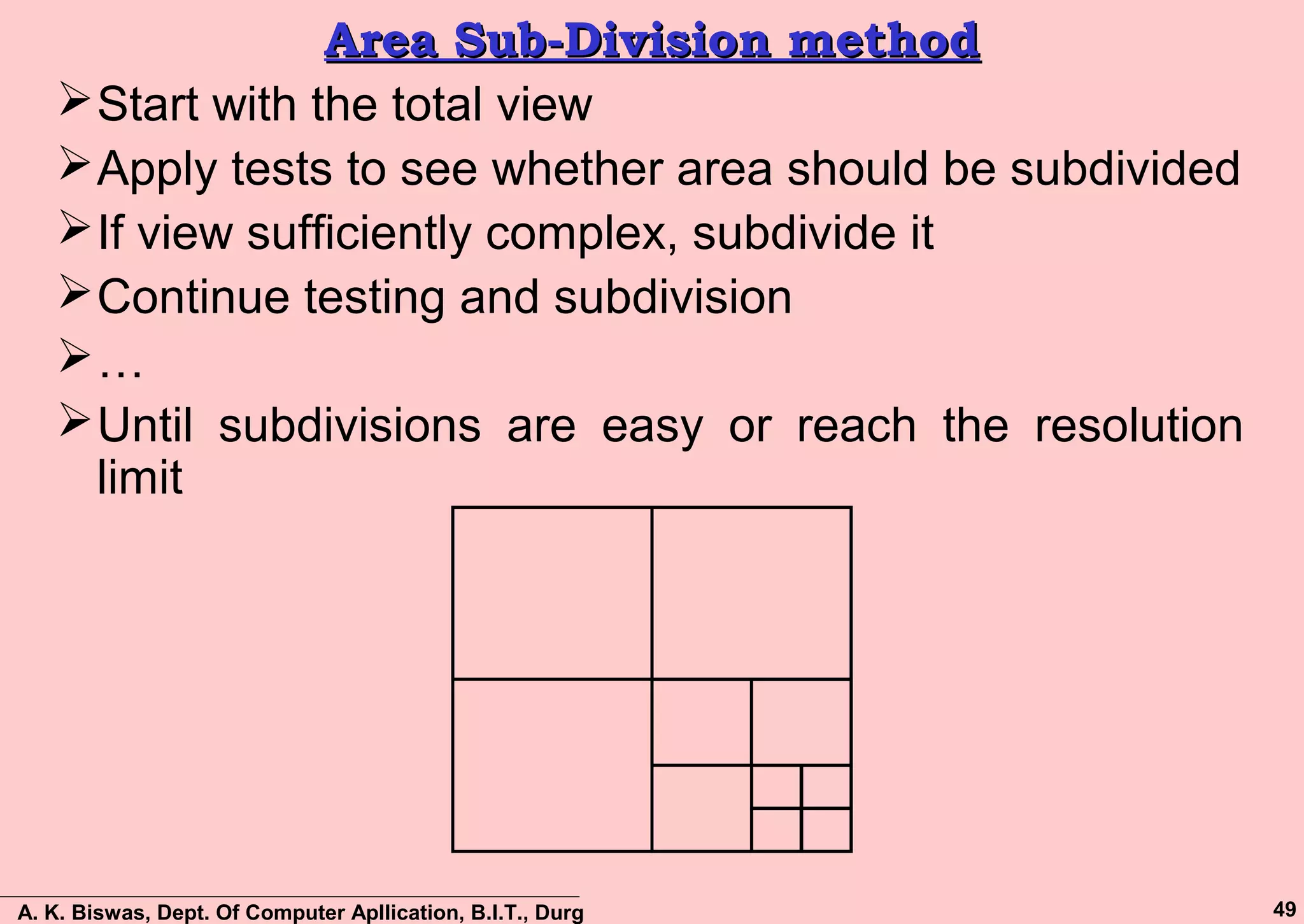
 This method is essentially an image space method but used
Object Space operations for reordering of surfaces according
to depth.
 The method makes use of area coherence in a scene by
collecting those areas that form part of a single surface.
 Successively subdivide the total viewing area into small
rectangles until each small is the projection of part of a single
visible surface or no surface at all.
 Identify whether the area is part of a single surface or a
complex surface by mean of visibility tests.
 The visibility of a single surface within a specified area is
determined by comparing it against the specified area
boundary.
A. K. Biswas, Dept. Of Computer Apllication, B.I.T., Durg 49
Area Sub-Division methodArea Sub-Division method
Start with the total view
Apply tests to see whether area should be subdivided
If view sufficiently complex, subdivide it
Continue testing and subdivision
…
Until subdivisions are easy or reach the resolution
limit
A. K. Biswas, Dept. Of Computer Apllication, B.I.T., Durg 50
Area – Surface RelationshipsArea – Surface Relationships
The relative surface characteristics of test surface and
the specified area are as follows:
– Surrounding Surface:
The test surface that completely enclose the area.
– Overlapping Surface:
The Test surface that is partially inside and partially
outside the area.
– Inside Surface:
The Test surface that is completely inside the area.
– Outside Surface:
The Test surface that is completely outside the area.
A. K. Biswas, Dept. Of Computer Apllication, B.I.T., Durg 51
Area – Surface RelationshipsArea – Surface Relationships
Surrounding
surface
Overlapping
surface
Inside
surface
Outside
surface
A. K. Biswas, Dept. Of Computer Apllication, B.I.T., Durg 52
Conditions for Stopping SubdivisionConditions for Stopping Subdivision
 All surfaces are outside the specified area.
 There is only one overlapping surface or only one inside surface. In this
case, the area is filled with the background color, and then the part of the
surface inside the area is scan converted .
 There is a single surrounding surface but no overlapping or inside
surface. In this case, the area is filled with the color of surrounding
surface.
 A surrounding surface obscures all other surfaces within the specified
area boundary. If there is more that one surface which is overlapping,
inside or surrounding the specified area, then there may be atleast one
surface which is front of all others. It is easy to determine such surface
by computing the z-coordinates of the planes of all surfaces al the four
corner of the specified area. The surface whose four whose four corner
z-coordinates are closer to the view point than those of the other surface
obscures all other surfaces. So the entire area is filled with the color of
this surrounding surface.
A. K. Biswas, Dept. Of Computer Apllication, B.I.T., Durg 53
Subdivision ConditionsSubdivision Conditions
Conditions for stopping subdivision:
– All surfaces are outside an area
– An area has only one inside, overlapping, or surrounding
surface
– An area has one surrounding surface that obscures all
other surfaces within the area boundaries:
A. K. Biswas, Dept. Of Computer Apllication, B.I.T., Durg 54
Area-Subdivision MethodArea-Subdivision Method
 Conditions for stopping subdivision:
1.All surfaces are outside an area
2.An area has only one inside, overlapping, or surrounding
surface
3.An area has one surrounding surface that obscures all
other surfaces within the area boundaries:
A. K. Biswas, Dept. Of Computer Apllication, B.I.T., Durg 55
Ray Tracing MethodRay Tracing Method
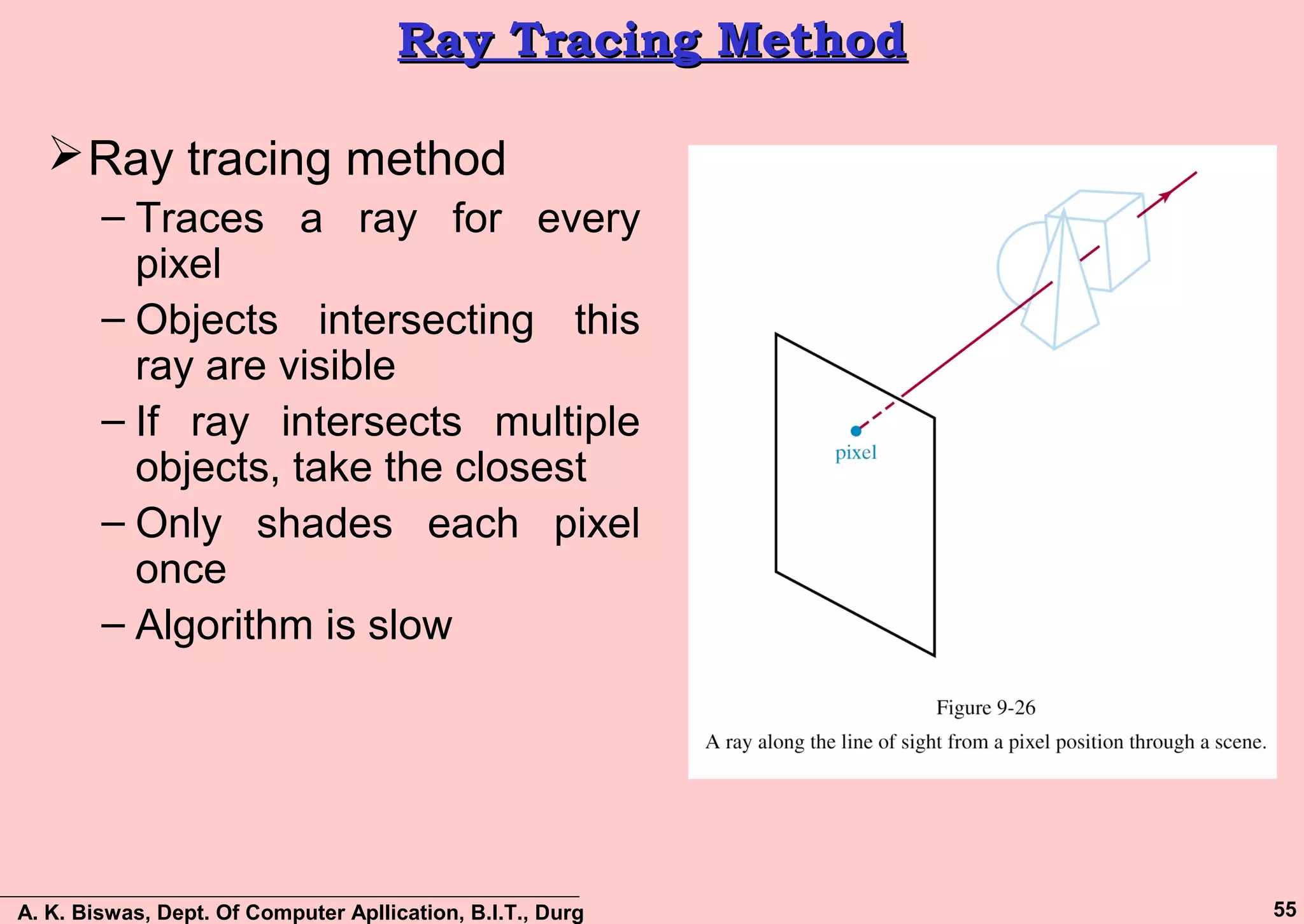
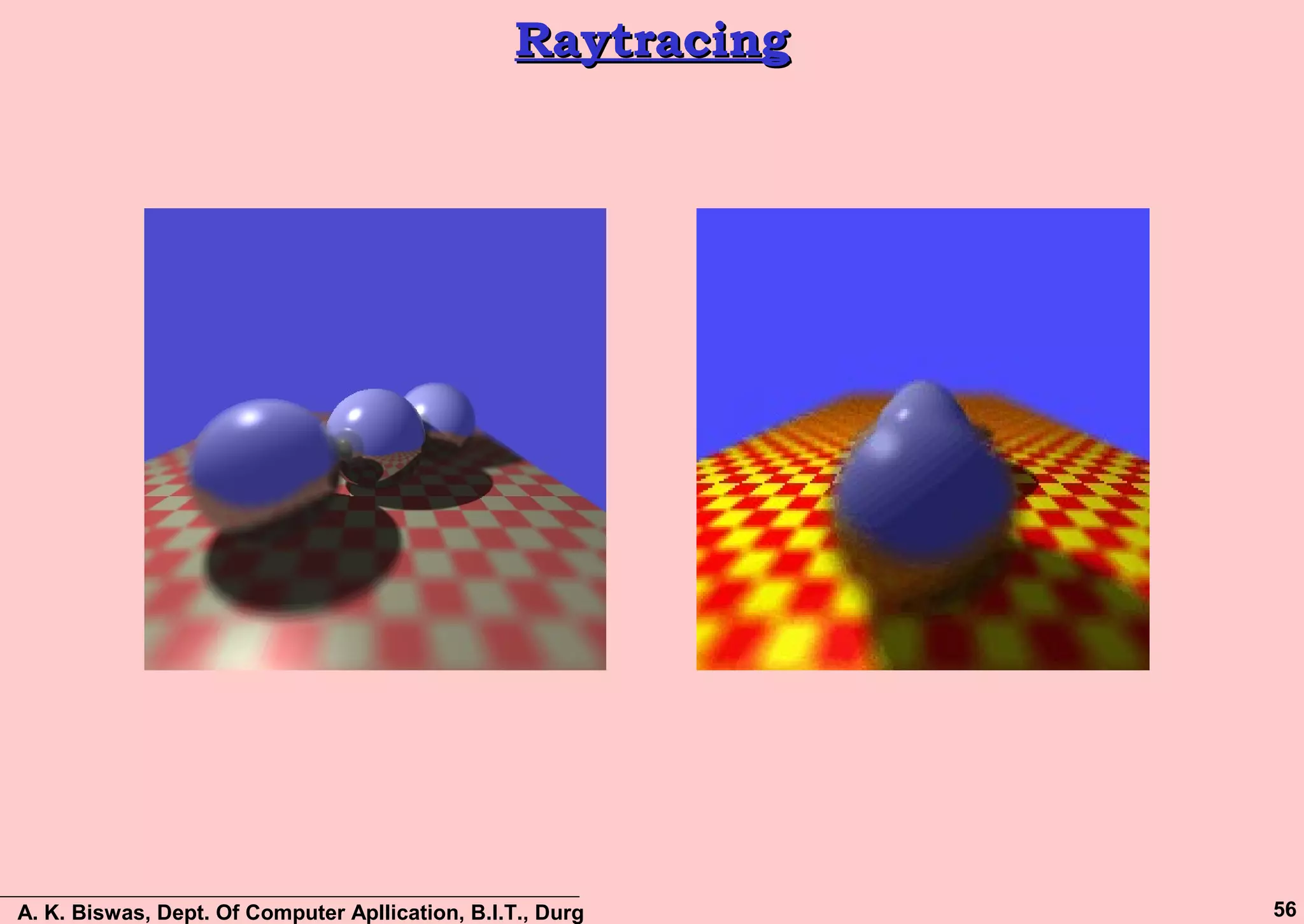
Ray tracing method
– Traces a ray for every
pixel
– Objects intersecting this
ray are visible
– If ray intersects multiple
objects, take the closest
– Only shades each pixel
once
– Algorithm is slow
A. K. Biswas, Dept. Of Computer Apllication, B.I.T., Durg 56
RaytracingRaytracing
A. K. Biswas, Dept. Of Computer Apllication, B.I.T., Durg 57
Binary Space PartitioningBinary Space Partitioning
Goal: build a structure that captures some relative
depth information between objects. Use it to draw
objects in the right order from any viewpoint.
Called the binary space partitioning tree, or BSP tree
Key observation: The polygons in the scene are
painted in the correct order if for each polygon P,
– Polygons on the far side of P are painted first
– P is painted next
– Polygons in front of P are painted last

Visible Surface Detection

  • 1.
    A. K. Biswas,Dept. Of Computer Apllication, B.I.T., Durg 1 COMPUTER GRAPHICSCOMPUTER GRAPHICS Visible SurfaceVisible Surface DetectionDetection
  • 2.
    A. K. Biswas,Dept. Of Computer Apllication, B.I.T., Durg 2 CONTENTCONTENT Surface Detection Methods  Back face detection  Depth-buffer method  A-buffer method  Scan-line method  Depth Sorting  Area Sub-Division
  • 3.
    A. K. Biswas,Dept. Of Computer Apllication, B.I.T., Durg 3 Why Surface Detection?Why Surface Detection? Given a set of 3D objects and a viewing specification, we wish to determine which lines or surfaces are visible, so that we do not needlessly calculate and draw surfaces, which will not ultimately be seen by the viewer, or which might confuse the viewer. For 3D worlds this is known as Visible Surface Detection or Hidden Surface Elimination Visible Surface Detection or Hidden Surface Elimination, refer to the methods and algorithms to determine which parts of which surfaces of a scene are visible from a chosen viewing position.
  • 4.
    A. K. Biswas,Dept. Of Computer Apllication, B.I.T., Durg 4 Simple Example…….Simple Example……. With all lines drawn, it is not easy to determine the front and back of the box. Is this the front face of the cube or the rear?
  • 5.
    A. K. Biswas,Dept. Of Computer Apllication, B.I.T., Durg 5 DEFINITIONSDEFINITIONS Visibility Culling Refers to the detection of which surfaces are completely Visible with respect to the camera. Hidden-Surface Elimination Refers to the elimination of the parts of the surfaces which are hidden with respect to the camera. Shadows Refer to the determination of the parts of the surfaces which are hidden with respect to the light sources
  • 6.
    A. K. Biswas,Dept. Of Computer Apllication, B.I.T., Durg 6 DIFFERENT APPROACHESDIFFERENT APPROACHES Visible Surface Detection or Hidden Surface Elimination algorithms are broadly classified as:  Object Space Methods: Compares objects and parts of objects to each other within the scene definition to determine which surfaces are visible  Image Space Methods: Visibility is decided point-by-point at each pixel position on the projection plane Image space methods are more common Pixel Space
  • 7.
    A. K. Biswas,Dept. Of Computer Apllication, B.I.T., Durg 7 OBJECT SPACEOBJECT SPACE Object space algorithms do their work on the objects themselves before they are converted to pixels in the frame buffer. Pseudo code…  for each object A in the scene •determine which parts of object A are visible •draw these parts in the appropriate color Comparing the polygons in object A to other polygons in A and to polygons in every other object in the scene.
  • 8.
    A. K. Biswas,Dept. Of Computer Apllication, B.I.T., Durg 8 IMAGE SPACEIMAGE SPACE Image space algorithms, the objects are being converted to pixels in the frame buffer. Pseudo code…  for each pixel in the frame buffer •Determine which polygon is closest to the viewer at that pixel location •Color the pixel with the color of that polygon at that location
  • 9.
    A. K. Biswas,Dept. Of Computer Apllication, B.I.T., Durg 9 OBJECT SPACE VS IMAGE SPACEOBJECT SPACE VS IMAGE SPACE Object Space:  Consider each object only once - draw its pixels and move on to the next object  Might draw the same pixel multiple times Image Space:  Consider each pixel only once - draw part of an object and move on to the next pixel  Might compute relationships between objects multiple times Square Box indicate Frame Buffer
  • 10.
    A. K. Biswas,Dept. Of Computer Apllication, B.I.T., Durg 10 ALGORITHMSALGORITHMS Object space – Back-Face Detection / Culling Image space – z-Buffer / Depth Buffer Algorithm – A-Buffer – Scan Line Hybrid – Depth-Sort / Painter – Area Sub-division – Binary Space Partitioning (BSP)
  • 11.
    A. K. Biswas,Dept. Of Computer Apllication, B.I.T., Durg 11 BACK-FACE DETECTION / CULLINGBACK-FACE DETECTION / CULLING Back-face culling (an object space algorithm) works on 'solid' objects which you are looking at from the outside. That is, the polygons of the surface of the object completely enclose the object. The simplest thing we can do is find the faces on the backs of polyhedra and discard them
  • 12.
    A. K. Biswas,Dept. Of Computer Apllication, B.I.T., Durg 12 BACK-FACE DETECTION / CULLINGBACK-FACE DETECTION / CULLING  Which way does a surface point?  Vector mathematics defines the concept of a surface’s normal vector.  A surface’s normal vector is simply an arrow that is perpendicular to that surface.  Every planar polygon has a surface normal, that is, a vector that is normal to the surface of the polygon. – Actually every planar polygon has two normals.  Given that this polygon is part of a 'solid' object we are interested in the normal that points OUT, rather than the normal that points in.
  • 13.
    A. K. Biswas,Dept. Of Computer Apllication, B.I.T., Durg 13 BACK-FACE DETECTION / CULLINGBACK-FACE DETECTION / CULLING  Consider the 2 faces (Surface) of a cube and their normal vectors.  Vectors N1 and N2 are the normal to surfaces 1 and 2 respectively.  Vector L points from surface 1 to the viewpoint.  Depending on the angle between L, and N1 & N2, they may or may not be visible to the viewer. N2 N1L surface1 surface2
  • 14.
    A. K. Biswas,Dept. Of Computer Apllication, B.I.T., Durg 14 BACK-FACE DETECTION / CULLINGBACK-FACE DETECTION / CULLING •If we define θ to be the angle between L and N. •Then a surface is visible from the position given by L if: •Can calculate Cos θ using the formula: °≤≤ 900 θ 1cos0 ≤≤ θor θcos... NLNL =
  • 15.
    A. K. Biswas,Dept. Of Computer Apllication, B.I.T., Durg 15 BACK-FACE DETECTION / CULLINGBACK-FACE DETECTION / CULLING Determining N: • Use cross product to calculate N • N = A × B –Vertices are given a counter clockwise order when looking at visible side. A B E D N N
  • 16.
    A. K. Biswas,Dept. Of Computer Apllication, B.I.T., Durg 16 BACK-FACE DETECTION / CULLINGBACK-FACE DETECTION / CULLING We know from before that a point (x, y, z) is behind a polygon surface if: where A, B, C & D are the plane parameters for the surface This can actually be made even easier if we organise things to suit ourselves 0<+++ DCzByAx
  • 17.
    A. K. Biswas,Dept. Of Computer Apllication, B.I.T., Durg 17 BACK-FACE DETECTION / CULLINGBACK-FACE DETECTION / CULLING  If Object description have been converted to projection coordinates and our viewing direction is parallel to the viewing zv axis, then V=(0, 0, Vz) and V . N = Vz * C Depend on the sign of C (the z component of the normal vector N  In a right handed system with the viewing direction along the negative z-axis, the polygon is a back face if C < 0 and C=0 (Normal has z component C=0, since our viewing direction is grazing that polygon.  Now we can simply say that if the z component of the polygon’s normal (N) is less than zero the surface cannot be seen.
  • 18.
    A. K. Biswas,Dept. Of Computer Apllication, B.I.T., Durg 18 BACK-FACE DETECTION / CULLINGBACK-FACE DETECTION / CULLING Limitations:  Requires a lot of memory  It can only be used on solid objects… • Remove the top or front face of the cube, and suddenly we can see inside, and our algorithm falls over.  It works fine for convex polyhedra but not necessarily for concave polyhedra. • example of a partially hidden face, that will not be eliminated by Back-face removal.
  • 19.
    A. K. Biswas,Dept. Of Computer Apllication, B.I.T., Durg 19 DEPTH-BUFFER METHODDEPTH-BUFFER METHOD  Compares surface depth values throughout a scene for each pixel position on the projection plane  Usually applied to scenes only containing polygons  Fast approach due to easy depth values computation  Also often called the z-buffer method (x2, y2) & z2 (x3, y3) & z3 (x1, y1) & z1  (x1, y1), (x2, y2) & (x3, y3) are the pixel positions of surfaces S1, S2, and S3 respectively.  z1, z2 and z3 defines the depth values (distance) of surfaces S1, S2, and S3 respectively from the View Plane
  • 20.
    A. K. Biswas,Dept. Of Computer Apllication, B.I.T., Durg 20 DEPTH-BUFFER METHOD (Cont…)DEPTH-BUFFER METHOD (Cont…) 1. Initialise the depth buffer and frame buffer so that for all buffer positions (x, y) depthBuff(x, y) = 1.0 frameBuff(x, y) = bgColour 2. Process each polygon in a scene, one at a time – For each projected (x, y) pixel position of a polygon, calculate the depth z (if not already known) – If z < depthBuff(x, y), compute the surface colour at that position and set depthBuff(x, y) = z frameBuff(x, y) = surfColour(x, y) After all surfaces are processed depthBuff and frameBuff will store correct values
  • 21.
    A. K. Biswas,Dept. Of Computer Apllication, B.I.T., Durg 21 DEPTH CALCULATIONDEPTH CALCULATION
  • 22.
    A. K. Biswas,Dept. Of Computer Apllication, B.I.T., Durg 22 Iterative Calculations (cont…)Iterative Calculations (cont…) top scan line bottom scan line y scan line y - 1 scan line x x’
  • 23.
    A. K. Biswas,Dept. Of Computer Apllication, B.I.T., Durg 23 DISADVANTAGES: DEPTH BUFFERDISADVANTAGES: DEPTH BUFFER This method only find out one visible surface at each pixel position that means it deals with only Opaque surface. 1 2 3 4 5 6 1 Red 2 Red 3 Green 4 Blue 5 Green 6 Red
  • 24.
    A. K. Biswas,Dept. Of Computer Apllication, B.I.T., Durg 24 A-BUFFER METHODA-BUFFER METHOD The A-buffer method is an extension of the depth- buffer method The A-buffer method is visibility detection method developed at Lucasfilm Studios for the rendering system REYES (Renders Everything You Ever Saw)
  • 25.
    A. K. Biswas,Dept. Of Computer Apllication, B.I.T., Durg 25 A-BUFFER METHOD (Cont…)A-BUFFER METHOD (Cont…) The A-buffer expands on the depth buffer method to allow transparencies The key data structure in the A-buffer is the accumulation buffer
  • 26.
    A. K. Biswas,Dept. Of Computer Apllication, B.I.T., Durg 26 A-BUFFER METHOD (Cont…)A-BUFFER METHOD (Cont…) (a) If depth >= 0, then the surface data field stores the depth of that pixel position as before (b) If depth < 0, then the data filed stores a pointer to a linked list of surface data
  • 27.
    A. K. Biswas,Dept. Of Computer Apllication, B.I.T., Durg 27 A-BUFFER METHOD (Cont…)A-BUFFER METHOD (Cont…) Surface information in the A-buffer includes:  RGB intensity components  Opacity parameter  Depth  Percent of area coverage  Surface identifier  Other surface rendering parameters The algorithm proceeds just like the depth buffer algorithm The depth and opacity values are used to determine the final colour of a pixel
  • 28.
    A. K. Biswas,Dept. Of Computer Apllication, B.I.T., Durg 28 SCAN-LINE METHODSCAN-LINE METHOD An image space method for identifying visible surfaces Computes and compares depth values to create an image one scan line at a time. This algorithm is similar to polygon scan conversion algorithm, but deal with a set of polygons. Two important tables are maintained:  The Edge Table (ET)  The Polygon Table (PT)
  • 29.
    A. K. Biswas,Dept. Of Computer Apllication, B.I.T., Durg 29 Edge TableEdge Table  Create an Edge Table (ET) for all non-horizontal edges of all polygons projected on the view plane.  Edge Table Process: – Entries in the ET are sorted into bucket based on each edge’s smaller y coordinates and within bucket are ordered by increasing x coordinate.  Edge Table fields: – The x-coordinate of the end with the smaller y coordinate. – The y-coordinate of the edge’s other end. – The x Increment, ∆x used in stepping from one scan line to the next. – Polygon Identification no., indicating the polygon to shich the edge belongs. – Pointers into the surface facet table to connect edges to surfaces. x ymax ∆x ID
  • 30.
    A. K. Biswas,Dept. Of Computer Apllication, B.I.T., Durg 30 Polygon TablePolygon Table Polygon Table fields: – Polygon ID – The coefficients of the plane equation – Shading or Color information for the Polygon – An ‘in-out’ Boolean flag, initiated to false and used during Scan-line processing. ID Plane Equation Shading Information In-out
  • 31.
    A. K. Biswas,Dept. Of Computer Apllication, B.I.T., Durg 31 Scan-Line MethodScan-Line Method  To facilitate the search for surfaces crossing a given scan-line an active list of edges is formed for each scan-line as it is processed  The active list stores only those edges that cross the scan-line in order of increasing x  Also a flag is set for each surface to indicate whether a position along a scan-line is either inside or outside the surface  To facilitate the search for surfaces crossing a given scan-line an active list of edges is formed for each scan-line as it is processed  The active list stores only those edges that cross the scan-line in order of increasing x  Also a flag is set for each surface to indicate whether a position along a scan-line is either inside or outside the surface
  • 32.
    A. K. Biswas,Dept. Of Computer Apllication, B.I.T., Durg 32 Scan-Line Method: ExampleScan-Line Method: Example Sorted Edges Are: AD, CD, GH, FG, HE, BC, AB and EF Polygon Table has entries for ABCD and EFGH Prepare a Active Edge Table (AET): Active Edge Table (AET) Scan Line Entries 1 AB, BC, HE, FG 2 AD, HE, BC, FG 3 AD, HE, BC, FG 4 AD, DC, GH, FG Scan Line 4
  • 33.
    A. K. Biswas,Dept. Of Computer Apllication, B.I.T., Durg 33 Scan-Line Method LimitationsScan-Line Method Limitations The scan-line method runs into trouble when surfaces cut through each other or otherwise cyclically overlap Such surfaces need to be divided
  • 34.
    A. K. Biswas,Dept. Of Computer Apllication, B.I.T., Durg 34 Depth-Sorting MethodDepth-Sorting Method A visible surface detection method that uses both image-space and object-space operations Basically, the following two operations are performed –Surfaces are sorted in order of decreasing depth –Surfaces are scan converted in order, starting with the surface of greatest depth. The depth-sorting method is often also known as the Painter’s method
  • 35.
    A. K. Biswas,Dept. Of Computer Apllication, B.I.T., Durg 35 Depth-Sorting Method: ProblemDepth-Sorting Method: Problem Look at cases where it doesn't work correctly. S has a greater depth than S' and so will be drawn first. But S' should be drawn first since it is obscured by S. We must somehow reorder S and S'. S S’ X Z
  • 36.
    A. K. Biswas,Dept. Of Computer Apllication, B.I.T., Durg 36 Depth-Sorting MethodDepth-Sorting Method First, assume that we are viewing along the z direction All surfaces in the scene are ordered according to the smallest z value on each surface The surface S at the end of the list is then compared against all other surfaces to see if there are any depth overlaps If no overlaps occur then the surface is scan converted and the process is then repeated for the next surface in the list. If depth overlap is detected at any point in the list, then need some additional comparisons to determine whether any of the surface should be reordered.
  • 37.
    A. K. Biswas,Dept. Of Computer Apllication, B.I.T., Durg 37 Depth-Sorting Method (cont…)Depth-Sorting Method (cont…) Test for depth overlap: – The bounding rectangles for the two surfaces do not overlap. – Surface S is completely behind the overlapping surface relative to the viewing position. – The overlapping surface is completely in front of S relative to the viewing position. – The boundary edge projections of the two surfaces onto the view plane do not overlap The tests are performed in the order listed and as soon as one is true we move on to the next surface If all tests fail then we swap the orders of the surfaces
  • 38.
    A. K. Biswas,Dept. Of Computer Apllication, B.I.T., Durg 38 Depth OverlappingDepth Overlapping S Pz’max z’min zmax zmin x z No Depth Overlap S P z’max z’min zmax zmin x z Depth Overlap
  • 39.
    A. K. Biswas,Dept. Of Computer Apllication, B.I.T., Durg 39 Polygon Reordering TestPolygon Reordering Test Perform a series of test for reordering the polygons. If the polygons fails all the test one after another, then the polygons are reorder. The initial tests are computationally cheap, but the later tests are more expensive.  Test Requirements: – Store Zmax, Zmin for each Polygon – Sort on Zmax – Start with polygon with greatest depth (S)
  • 40.
    A. K. Biswas,Dept. Of Computer Apllication, B.I.T., Durg 40 Depth-OverlappingDepth-Overlapping Compare S with all other polygons (P) to see if there is any depth overlap. If S.Zmin <= P.Zmax then have depth overlap (as in below figures), Test-2 will perform S.Zmax S.Zmin P.Zmax P.Zmin S P S.Zmax S.Zmin P.Zmax P.Zmin S P Depth Overlap No Depth Overlap Z X Z X
  • 41.
    A. K. Biswas,Dept. Of Computer Apllication, B.I.T., Durg 41 Depth-Overlapping: Test – 1Depth-Overlapping: Test – 1  Check to see if polygons overlap in xy plane (use bounding rectangles) S.XrS.Xl P.Xl P.Xr S P Depth Overlap, check for xy overlap Case-1 S.XrS.Xl P.Xl P.Xr S P Bounding rectangle of P is Completely inside of S i. e. overlap Case-2 S P Partially obscured Problem Case-3  For Case-1 and Case-2, Test-2 is Passed  For Case-3, Test-2 is Failed Z Z Z X X X
  • 42.
    A. K. Biswas,Dept. Of Computer Apllication, B.I.T., Durg 42 Depth-Overlapping: Test – 2 (1/2)Depth-Overlapping: Test – 2 (1/2) Test if surface S is “inside" of polygon P (relative to view plane) Remember: a point (x, y, z) is "outside" of a plane if we put that point into the plane equation and get: Ax + By + Cz + D > 0 Suppose plane equation for P is Ax + By + Cz + D So to test for S outside of P, put all vertices of S into the plane equation for P and check that all vertices give a result that is > 0. i.e. Ax' + By' + Cz' + D > 0 x', y', z' are S vertices
  • 43.
    A. K. Biswas,Dept. Of Computer Apllication, B.I.T., Durg 43 Depth-Overlapping: Test – 2 (2/2)Depth-Overlapping: Test – 2 (2/2)  Choose Normal away from the view plane since define “inside" with respect to the view plane S P N S completely Inside of P, so scan convert S SP N S is not Inside of P XX ZZ
  • 44.
    A. K. Biswas,Dept. Of Computer Apllication, B.I.T., Durg 44 Depth-Overlapping: Test – 3Depth-Overlapping: Test – 3  If the test of S “inside" of P fails, then test to see if P is “outside" of S (again with respect to the view plane) (Test 2).  Compute plane equation of S and put in all vertices of P, if all vertices of P inside of S then P inside.  Inside Test: Ax' + By' + Cz' + D & lt 0 where x', y', z' are coordinates of P vertices S P N P is outside of S, so scan Convert S X Z S P Bounding Rectangles overlap S not inside of P P is not inside of S X Z
  • 45.
    A. K. Biswas,Dept. Of Computer Apllication, B.I.T., Durg 45 Depth-Overlapping: Test – 4Depth-Overlapping: Test – 4  Check for overlap for actual projections in xy plane since may have bounding rectangles overlap but not actual overlap  For example: Look at projection of two polygons in the xy plane X Z • Bounding Rectangle Overlap, But Projection Don’t • Use Line eq. and test for Intersection • No intersection, scan convert S X Z
  • 46.
    A. K. Biswas,Dept. Of Computer Apllication, B.I.T., Durg 46 Ordering S and S’Ordering S and S’  If all previous tests fail, interchange S and S’ in the list x z S S’
  • 47.
    A. K. Biswas,Dept. Of Computer Apllication, B.I.T., Durg 47 DrawbacksDrawbacks Gets into infinite loop if surfaces alternately obscure each other
  • 48.
    A. K. Biswas,Dept. Of Computer Apllication, B.I.T., Durg 48 Area Sub-Division methodArea Sub-Division method  This method is essentially an image space method but used Object Space operations for reordering of surfaces according to depth.  The method makes use of area coherence in a scene by collecting those areas that form part of a single surface.  Successively subdivide the total viewing area into small rectangles until each small is the projection of part of a single visible surface or no surface at all.  Identify whether the area is part of a single surface or a complex surface by mean of visibility tests.  The visibility of a single surface within a specified area is determined by comparing it against the specified area boundary.
  • 49.
    A. K. Biswas,Dept. Of Computer Apllication, B.I.T., Durg 49 Area Sub-Division methodArea Sub-Division method Start with the total view Apply tests to see whether area should be subdivided If view sufficiently complex, subdivide it Continue testing and subdivision … Until subdivisions are easy or reach the resolution limit
  • 50.
    A. K. Biswas,Dept. Of Computer Apllication, B.I.T., Durg 50 Area – Surface RelationshipsArea – Surface Relationships The relative surface characteristics of test surface and the specified area are as follows: – Surrounding Surface: The test surface that completely enclose the area. – Overlapping Surface: The Test surface that is partially inside and partially outside the area. – Inside Surface: The Test surface that is completely inside the area. – Outside Surface: The Test surface that is completely outside the area.
  • 51.
    A. K. Biswas,Dept. Of Computer Apllication, B.I.T., Durg 51 Area – Surface RelationshipsArea – Surface Relationships Surrounding surface Overlapping surface Inside surface Outside surface
  • 52.
    A. K. Biswas,Dept. Of Computer Apllication, B.I.T., Durg 52 Conditions for Stopping SubdivisionConditions for Stopping Subdivision  All surfaces are outside the specified area.  There is only one overlapping surface or only one inside surface. In this case, the area is filled with the background color, and then the part of the surface inside the area is scan converted .  There is a single surrounding surface but no overlapping or inside surface. In this case, the area is filled with the color of surrounding surface.  A surrounding surface obscures all other surfaces within the specified area boundary. If there is more that one surface which is overlapping, inside or surrounding the specified area, then there may be atleast one surface which is front of all others. It is easy to determine such surface by computing the z-coordinates of the planes of all surfaces al the four corner of the specified area. The surface whose four whose four corner z-coordinates are closer to the view point than those of the other surface obscures all other surfaces. So the entire area is filled with the color of this surrounding surface.
  • 53.
    A. K. Biswas,Dept. Of Computer Apllication, B.I.T., Durg 53 Subdivision ConditionsSubdivision Conditions Conditions for stopping subdivision: – All surfaces are outside an area – An area has only one inside, overlapping, or surrounding surface – An area has one surrounding surface that obscures all other surfaces within the area boundaries:
  • 54.
    A. K. Biswas,Dept. Of Computer Apllication, B.I.T., Durg 54 Area-Subdivision MethodArea-Subdivision Method  Conditions for stopping subdivision: 1.All surfaces are outside an area 2.An area has only one inside, overlapping, or surrounding surface 3.An area has one surrounding surface that obscures all other surfaces within the area boundaries:
  • 55.
    A. K. Biswas,Dept. Of Computer Apllication, B.I.T., Durg 55 Ray Tracing MethodRay Tracing Method Ray tracing method – Traces a ray for every pixel – Objects intersecting this ray are visible – If ray intersects multiple objects, take the closest – Only shades each pixel once – Algorithm is slow
  • 56.
    A. K. Biswas,Dept. Of Computer Apllication, B.I.T., Durg 56 RaytracingRaytracing
  • 57.
    A. K. Biswas,Dept. Of Computer Apllication, B.I.T., Durg 57 Binary Space PartitioningBinary Space Partitioning Goal: build a structure that captures some relative depth information between objects. Use it to draw objects in the right order from any viewpoint. Called the binary space partitioning tree, or BSP tree Key observation: The polygons in the scene are painted in the correct order if for each polygon P, – Polygons on the far side of P are painted first – P is painted next – Polygons in front of P are painted last