Chapter 3

Examining Relationships
3.1 SCATTERPLOTS AND
CORRELATION
Basics
• Up until now, we have been concerned with
  “one-variable data”
• We are about to view the relationship
  between two-variables.
• Do two variables have to be related?
Variables
• Response Variable
  – This is the variable that is measured in a study
  – The “outcome” of studies
  – We can think of it as our “dependant variable”
  –(y)
Variables
• Explanatory variable
  – May (or may not) influence or change the
    response variable
  – We often would like to show that different values
    of explanatory will affect the response
  – “independent variable”
  –(x)
Variables
• More often than not, explanatory v. response
  is just a vocabulary choice.
• Just because we are calling a variable the
  “response variable” does not mean that the
  corresponding “explanatory variable” causes
  change!
• We are content right now to just examine if a
  relationship exists between the two variables
Scatterplots
• Shows the relationship between two quantitative
  variables
• Each data pair is represented by a point
• x- coordinate is the value of the explanatory
  variable
• y-coordinate is the value of the response variable
• Be sure to label and scale both axes!!
• Quickly automated using the TI!
Scatterplots on the TI-84
• [stat], [1] (Edit)
• Enter the explanatory variables in “L1”
• Enter the response variables in “L2”
     – Make sure your L1 and L2 correspond
• [2nd], [Y=] (STATPLOT), [1]
     – You can define a number of plots from here
•   Turn “ON” the plot
•   Choose the scatterplot (first icon)
•   Xlist: “L1”
•   Ylist: “L2”
•   [zoom], [9] (zoomstat)
     – I recommend starting with this zoom. Examine and take note of the
       window!
Scatterplots on the TI89
•   From the “apps” choose the “stat/list”
•   Enter the explanatory variables in “list1”
•   Enter the response variables in “list2”
•   [F2] (plots),[F1] (define)
•   Plot Type: “scatter”
•   x: “list1”
•   y: “list2”
•   [ENTER]
•   (Zoomdata)
Interpreting a Scatterplot
  Use the following list when asked to comment on a
  scatterplot/relationship between 2 variables.
1. Direction/Association: is the slope positive or
   negative?
2. Form:
   1. Linear or nonlinear? If nonlinear, what is the relationship
      (more on this later)
   2. Are there any clusters? How many?
3. Strength of relationship: strong, moderate, weak?
4. Outliers? Outliers are either outliers in the x-direction,
   y-direction, or both
Categorical data
• We can add categorical information to a
  scatterplot by using multiple marker types
• Example: all marks that represent dogs are a
  box, all marks that represent cats are circles
• Sometimes differing patterns will appear
  when categorical information is added!
3.1 A
• P173 #1, 4, 5, 7, 9
Correlation
• One way to measure the strength of a linear
  relationship is to calculate it with variable “r”
• The variable r measures both the strength and
  the direction of the relationship
• r is known as the “correlation coefficient” and
  measures the quantity “correlation”
• You should not use the word “correlation”
  unless you mean r.
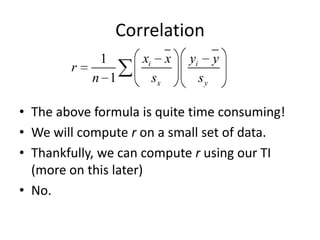
Correlation
             1      xi        x   yi        y
        r
            n 1          sx            sy

• The above formula is quite time consuming!
• We will compute r on a small set of data.
• Thankfully, we can compute r using our TI
  (more on this later)
• No.
Correlation
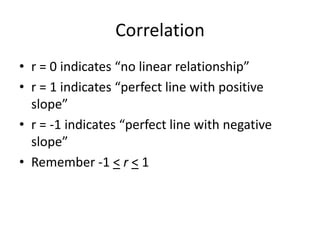
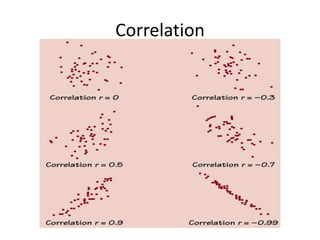
• r = 0 indicates “no linear relationship”
• r = 1 indicates “perfect line with positive
  slope”
• r = -1 indicates “perfect line with negative
  slope”
• Remember -1 < r < 1
Correlation
Cautions
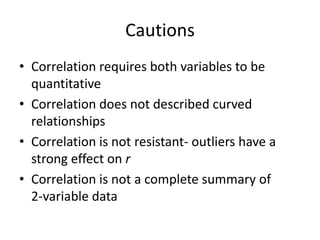
• Correlation requires both variables to be
  quantitative
• Correlation does not described curved
  relationships
• Correlation is not resistant- outliers have a
  strong effect on r
• Correlation is not a complete summary of
  2-variable data
Assignment 3.1B
• P188 #13, 16, 19, 20, 23, 24
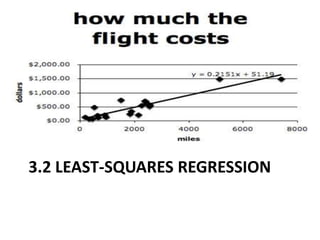
3.2 LEAST-SQUARES REGRESSION
Regression Line
Regression Line
• A line (linear equation) that describes the
  relationship between two variables
• Naturally, just calling a line a “regression line”
  does not mean that it does an accurate job
  describing a relationship!
• If you had done this in an algebra class, you
  probably just “eyeballed” a relationship or found
  the equation of a line that connected two points
  in the scatter.
Regression Line
• Regression lines in statistics are a bit “backwards”
  from what you learned in algebra!
• a = y-intercept
   – This is the predicted value of the response variable
     when the exp. var. is zero.
• b = slope
   – This is the average amount the resp. var. changes for
     every change of one unit in the expl. var.
• You will be asked to interpret both the values of
  ‘a’ and ‘b’
Extrapolation and Interpolation
Interpolation
- Use the regression line to predict values of the
  resp var for a expl var within the data range.
Extrapolation
- Use the regression line to predict values of the
  resp var for a expl var outside the data range.
- As you might suspect, interpolation good,
  extrapolation bad
   - OK, not really. You need to use results obtained from
     extrapolation with great caution.
Least-Squares Regression Line
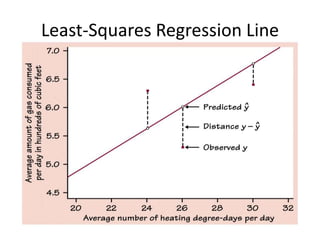
Least-Square Regression Line (LSRL)
• A good regression line should minimize the
  vertical distance between an actual y value of
  a point in the scatter and the corresponding y-
  value on the regression line.
• This distance (yactual – ypredicted) is known as a
  residual.
Least-Squares Regression Line
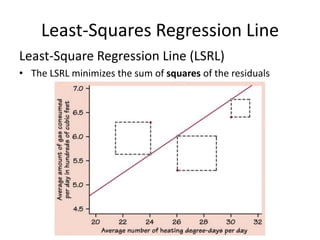
Least-Square Regression Line (LSRL)
• The LSRL minimizes the sum of squares of the residuals
Least-Squares Regression Line
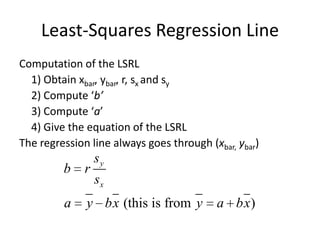
Computation of the LSRL
  1) Obtain xbar, ybar, r, sx and sy
  2) Compute ‘b’
  3) Compute ‘a’
  4) Give the equation of the LSRL
The regression line always goes through (xbar, ybar)
                  sy
         b    r
                  sx
         a    y bx (this is from y        a bx )
Least-Squares Regression Line
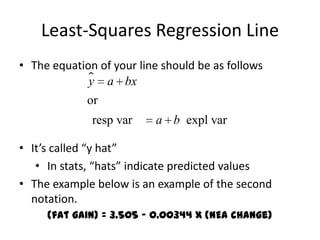
• The equation of your line should be as follows
              a bx
             y
             or
              resp var    a b expl var

• It’s called “y hat”
   • In stats, “hats” indicate predicted values
• The example below is an example of the second
  notation.
     (fat gain) = 3.505 – 0.00344 x (NEA change)
Reading a printout
Reading a printout


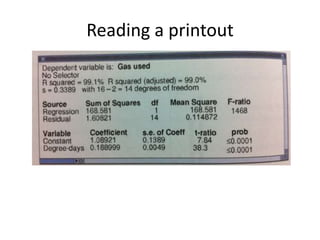
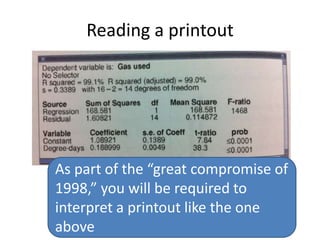
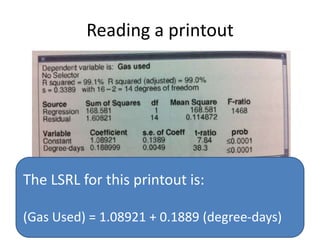
As part of the “great compromise of
1998,” you will be required to
interpret a printout like the one
above
Reading a printout


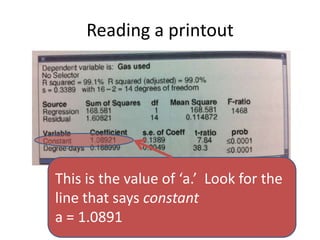
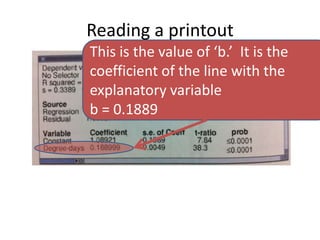
This is the value of ‘a.’ Look for the
line that says constant
a = 1.0891
Reading a printout
This is the value of ‘b.’ It is the
coefficient of the line with the
explanatory variable
b = 0.1889
Reading a printout


The LSRL for this printout is:

(Gas Used) = 1.08921 + 0.1889 (degree-days)
Assignment 3.2A
• P204 #29, 32, 33, 36, 38
LSRL on the TI83/84
1. Input data in L1 and L2
2. From home, *stat+, “CALC,” *8+ (LinReg a+bx)
3. On the home screen enter the variable list:
   “LinReg L1, L2, Y1”
   (this will copy and paste the LSRL into Y1)
   AMAZING! It computes “r” for you, too!
4. [zoom], [9] (zoomstat)
  Take a good look at your LSRL!
LSRL on the TI89
1. On the “stat list” app, input data in “list1” and
   “list2”
2. [F4] (calc)
3. Choose LinReg a+bx
4. Select “list1” and for the expl var and list2 resp
   var
5. Select “y1” for “store list”
6. [ENTER] and behold the magic!
7. *F2+, “zoom data”
Residuals
• (This is where the analysis begins)
• Recall that the residual of a point is y – yhat
  (yactual - ypredicted).
• Luckily when you compute an LSRL, your
  calculator will automatically compute the
  residuals and place them in a list called
  “RESID”
   – Keep scrolling to the right
Residual Plots
• A residual plot is a type of scatter plot where
  the x-coordinate is the expl var of an
  observation and the y-coordinate is the
  residual of the observation.
• Scatter plot of “expl var” vs. “resid”
Residual Plots
  To create a residual plot on your TI,
1. Create a LSRL for your data
2. Choose a scatterplot from the [stat plot]
   menu,
3. Set “Xlist: L1”
4. Set “Ylist: RESID” (*2nd+ ,*stat+,”NAMES”)
5. Turn off all other plots and graphs
6. [ZOOM], [9]
Residual Plots
• Residual plots tell us whether a linear model
  was a good choice for our data.
• We want the residual plot to look like an
  unstructured scatter of points
• The presence of a curve or any other pattern
  indicate that the linear model might not be
  the best choice.
Residual Plots
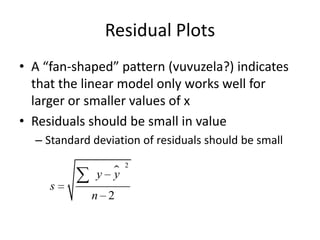
• A “fan-shaped” pattern (vuvuzela?) indicates
  that the linear model only works well for
  larger or smaller values of x
• Residuals should be small in value
  – Standard deviation of residuals should be small
                    2
              y 
                y
     s
             n 2
Assn 3.2B
• P 212 #34, 35, 37, 39, 41
Coefficient of determination
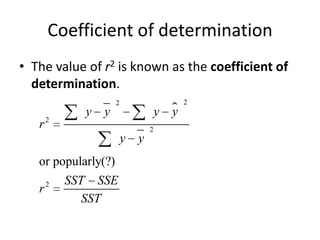
• The value of r2 is known as the coefficient of
  determination.
                     2                     2
             y   y                   y 
                                       y
   r2                            2
                         y   y
   or popularly(?)
       2   SST SSE
   r
              SST
Coefficient of determination
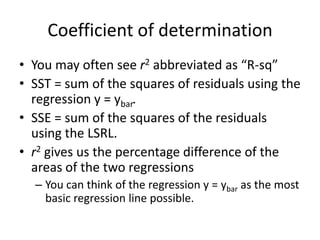
• You may often see r2 abbreviated as “R-sq”
• SST = sum of the squares of residuals using the
  regression y = ybar.
• SSE = sum of the squares of the residuals
  using the LSRL.
• r2 gives us the percentage difference of the
  areas of the two regressions
  – You can think of the regression y = ybar as the most
    basic regression line possible.
Coefficient of determination
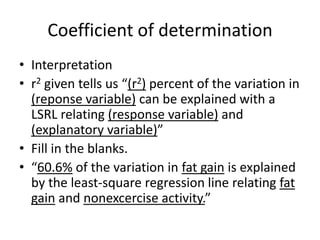
• Interpretation
• r2 given tells us “(r2) percent of the variation in
  (reponse variable) can be explained with a
  LSRL relating (response variable) and
  (explanatory variable)”
• Fill in the blanks.
• “60.6% of the variation in fat gain is explained
  by the least-square regression line relating fat
  gain and nonexcercise activity.”
Facts about LSRL
• The distinction between expl var and resp var
  is essential.
  – You will get a different LSRL if you switch variables
• Correlation is closely related to the slope
• The LSRL always passes through (xbar, ybar)
• r2 is the fraction of variation in y that is
  explained with a LSRL regression of y on x.
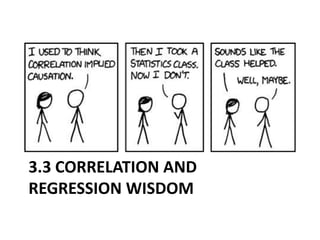
3.3 CORRELATION AND
REGRESSION WISDOM
Cautions!
• Correlation and Regression are only useful if
  the data shows a linear pattern
• Extrapolation often produces unreliable
  predictions
• Correlation is not resistant
  – Outliers will affect your regressions!
Outliers and Influential Points
• Regression outliers fall outside the overall
  pattern of the other observations
  – These can be outliers in the x and/or y direction
• Influential points greatly affect the regression
  with their inclusion/exclusion
  – These are often outliers in the x direction.
Lurkers
• Often an unaccounted variable will affect both
  the “explanatory” and “response”
  – In this scenario, both the “explanatory” and
    “response” are actually responding to a third variable!
• EX. When the #of Methodist ministers in New
  England increased from 1860-1915, the #of
  barrels of imported Cuban rum also increased
  with a r = 0.999! Would we say that the #of
  Methodist ministers causes an increase in import
  of Cuban rum?
Remember
• Association does not imply causation!
Chapter 3 REV
• P 228 #46, 55, 62, 70, 77, 80, 83, 84

Stats chapter 3

  • 1.
  • 2.
  • 3.
    Basics • Up untilnow, we have been concerned with “one-variable data” • We are about to view the relationship between two-variables. • Do two variables have to be related?
  • 4.
    Variables • Response Variable – This is the variable that is measured in a study – The “outcome” of studies – We can think of it as our “dependant variable” –(y)
  • 5.
    Variables • Explanatory variable – May (or may not) influence or change the response variable – We often would like to show that different values of explanatory will affect the response – “independent variable” –(x)
  • 6.
    Variables • More oftenthan not, explanatory v. response is just a vocabulary choice. • Just because we are calling a variable the “response variable” does not mean that the corresponding “explanatory variable” causes change! • We are content right now to just examine if a relationship exists between the two variables
  • 7.
    Scatterplots • Shows therelationship between two quantitative variables • Each data pair is represented by a point • x- coordinate is the value of the explanatory variable • y-coordinate is the value of the response variable • Be sure to label and scale both axes!! • Quickly automated using the TI!
  • 8.
    Scatterplots on theTI-84 • [stat], [1] (Edit) • Enter the explanatory variables in “L1” • Enter the response variables in “L2” – Make sure your L1 and L2 correspond • [2nd], [Y=] (STATPLOT), [1] – You can define a number of plots from here • Turn “ON” the plot • Choose the scatterplot (first icon) • Xlist: “L1” • Ylist: “L2” • [zoom], [9] (zoomstat) – I recommend starting with this zoom. Examine and take note of the window!
  • 9.
    Scatterplots on theTI89 • From the “apps” choose the “stat/list” • Enter the explanatory variables in “list1” • Enter the response variables in “list2” • [F2] (plots),[F1] (define) • Plot Type: “scatter” • x: “list1” • y: “list2” • [ENTER] • (Zoomdata)
  • 10.
    Interpreting a Scatterplot Use the following list when asked to comment on a scatterplot/relationship between 2 variables. 1. Direction/Association: is the slope positive or negative? 2. Form: 1. Linear or nonlinear? If nonlinear, what is the relationship (more on this later) 2. Are there any clusters? How many? 3. Strength of relationship: strong, moderate, weak? 4. Outliers? Outliers are either outliers in the x-direction, y-direction, or both
  • 11.
    Categorical data • Wecan add categorical information to a scatterplot by using multiple marker types • Example: all marks that represent dogs are a box, all marks that represent cats are circles • Sometimes differing patterns will appear when categorical information is added!
  • 12.
    3.1 A • P173#1, 4, 5, 7, 9
  • 13.
    Correlation • One wayto measure the strength of a linear relationship is to calculate it with variable “r” • The variable r measures both the strength and the direction of the relationship • r is known as the “correlation coefficient” and measures the quantity “correlation” • You should not use the word “correlation” unless you mean r.
  • 14.
    Correlation 1 xi x yi y r n 1 sx sy • The above formula is quite time consuming! • We will compute r on a small set of data. • Thankfully, we can compute r using our TI (more on this later) • No.
  • 15.
    Correlation • r =0 indicates “no linear relationship” • r = 1 indicates “perfect line with positive slope” • r = -1 indicates “perfect line with negative slope” • Remember -1 < r < 1
  • 16.
  • 17.
    Cautions • Correlation requiresboth variables to be quantitative • Correlation does not described curved relationships • Correlation is not resistant- outliers have a strong effect on r • Correlation is not a complete summary of 2-variable data
  • 18.
    Assignment 3.1B • P188#13, 16, 19, 20, 23, 24
  • 19.
  • 20.
    Regression Line Regression Line •A line (linear equation) that describes the relationship between two variables • Naturally, just calling a line a “regression line” does not mean that it does an accurate job describing a relationship! • If you had done this in an algebra class, you probably just “eyeballed” a relationship or found the equation of a line that connected two points in the scatter.
  • 21.
    Regression Line • Regressionlines in statistics are a bit “backwards” from what you learned in algebra! • a = y-intercept – This is the predicted value of the response variable when the exp. var. is zero. • b = slope – This is the average amount the resp. var. changes for every change of one unit in the expl. var. • You will be asked to interpret both the values of ‘a’ and ‘b’
  • 22.
    Extrapolation and Interpolation Interpolation -Use the regression line to predict values of the resp var for a expl var within the data range. Extrapolation - Use the regression line to predict values of the resp var for a expl var outside the data range. - As you might suspect, interpolation good, extrapolation bad - OK, not really. You need to use results obtained from extrapolation with great caution.
  • 23.
    Least-Squares Regression Line Least-SquareRegression Line (LSRL) • A good regression line should minimize the vertical distance between an actual y value of a point in the scatter and the corresponding y- value on the regression line. • This distance (yactual – ypredicted) is known as a residual.
  • 24.
  • 25.
    Least-Squares Regression Line Least-SquareRegression Line (LSRL) • The LSRL minimizes the sum of squares of the residuals
  • 26.
    Least-Squares Regression Line Computationof the LSRL 1) Obtain xbar, ybar, r, sx and sy 2) Compute ‘b’ 3) Compute ‘a’ 4) Give the equation of the LSRL The regression line always goes through (xbar, ybar) sy b r sx a y bx (this is from y a bx )
  • 27.
    Least-Squares Regression Line •The equation of your line should be as follows  a bx y or resp var a b expl var • It’s called “y hat” • In stats, “hats” indicate predicted values • The example below is an example of the second notation. (fat gain) = 3.505 – 0.00344 x (NEA change)
  • 28.
  • 29.
    Reading a printout Aspart of the “great compromise of 1998,” you will be required to interpret a printout like the one above
  • 30.
    Reading a printout Thisis the value of ‘a.’ Look for the line that says constant a = 1.0891
  • 31.
    Reading a printout Thisis the value of ‘b.’ It is the coefficient of the line with the explanatory variable b = 0.1889
  • 32.
    Reading a printout TheLSRL for this printout is: (Gas Used) = 1.08921 + 0.1889 (degree-days)
  • 33.
    Assignment 3.2A • P204#29, 32, 33, 36, 38
  • 34.
    LSRL on theTI83/84 1. Input data in L1 and L2 2. From home, *stat+, “CALC,” *8+ (LinReg a+bx) 3. On the home screen enter the variable list: “LinReg L1, L2, Y1” (this will copy and paste the LSRL into Y1) AMAZING! It computes “r” for you, too! 4. [zoom], [9] (zoomstat) Take a good look at your LSRL!
  • 35.
    LSRL on theTI89 1. On the “stat list” app, input data in “list1” and “list2” 2. [F4] (calc) 3. Choose LinReg a+bx 4. Select “list1” and for the expl var and list2 resp var 5. Select “y1” for “store list” 6. [ENTER] and behold the magic! 7. *F2+, “zoom data”
  • 36.
    Residuals • (This iswhere the analysis begins) • Recall that the residual of a point is y – yhat (yactual - ypredicted). • Luckily when you compute an LSRL, your calculator will automatically compute the residuals and place them in a list called “RESID” – Keep scrolling to the right
  • 37.
    Residual Plots • Aresidual plot is a type of scatter plot where the x-coordinate is the expl var of an observation and the y-coordinate is the residual of the observation. • Scatter plot of “expl var” vs. “resid”
  • 38.
    Residual Plots To create a residual plot on your TI, 1. Create a LSRL for your data 2. Choose a scatterplot from the [stat plot] menu, 3. Set “Xlist: L1” 4. Set “Ylist: RESID” (*2nd+ ,*stat+,”NAMES”) 5. Turn off all other plots and graphs 6. [ZOOM], [9]
  • 39.
    Residual Plots • Residualplots tell us whether a linear model was a good choice for our data. • We want the residual plot to look like an unstructured scatter of points • The presence of a curve or any other pattern indicate that the linear model might not be the best choice.
  • 40.
    Residual Plots • A“fan-shaped” pattern (vuvuzela?) indicates that the linear model only works well for larger or smaller values of x • Residuals should be small in value – Standard deviation of residuals should be small 2 y  y s n 2
  • 41.
    Assn 3.2B • P212 #34, 35, 37, 39, 41
  • 42.
    Coefficient of determination •The value of r2 is known as the coefficient of determination. 2 2 y y y  y r2 2 y y or popularly(?) 2 SST SSE r SST
  • 43.
    Coefficient of determination •You may often see r2 abbreviated as “R-sq” • SST = sum of the squares of residuals using the regression y = ybar. • SSE = sum of the squares of the residuals using the LSRL. • r2 gives us the percentage difference of the areas of the two regressions – You can think of the regression y = ybar as the most basic regression line possible.
  • 44.
    Coefficient of determination •Interpretation • r2 given tells us “(r2) percent of the variation in (reponse variable) can be explained with a LSRL relating (response variable) and (explanatory variable)” • Fill in the blanks. • “60.6% of the variation in fat gain is explained by the least-square regression line relating fat gain and nonexcercise activity.”
  • 45.
    Facts about LSRL •The distinction between expl var and resp var is essential. – You will get a different LSRL if you switch variables • Correlation is closely related to the slope • The LSRL always passes through (xbar, ybar) • r2 is the fraction of variation in y that is explained with a LSRL regression of y on x.
  • 46.
  • 47.
    Cautions! • Correlation andRegression are only useful if the data shows a linear pattern • Extrapolation often produces unreliable predictions • Correlation is not resistant – Outliers will affect your regressions!
  • 48.
    Outliers and InfluentialPoints • Regression outliers fall outside the overall pattern of the other observations – These can be outliers in the x and/or y direction • Influential points greatly affect the regression with their inclusion/exclusion – These are often outliers in the x direction.
  • 49.
    Lurkers • Often anunaccounted variable will affect both the “explanatory” and “response” – In this scenario, both the “explanatory” and “response” are actually responding to a third variable! • EX. When the #of Methodist ministers in New England increased from 1860-1915, the #of barrels of imported Cuban rum also increased with a r = 0.999! Would we say that the #of Methodist ministers causes an increase in import of Cuban rum?
  • 50.
    Remember • Association doesnot imply causation!
  • 51.
    Chapter 3 REV •P 228 #46, 55, 62, 70, 77, 80, 83, 84