SPM-UNIT II
ACTIVITY PLANNING
Prof. Kanchana Devi
Network Planning Models
Prof. Kanchana Devi
2
 Scheduling techniques model the project’s activ ities and
their relationships as a “Network”.
 In network time flows from left to right
 These techniques were developed in 1950’s
 There are two best techniques:
 CPM (Critical Path Method)
 PERT (Program Evaluation Review Technique)
 Both uses an “activity-on-arrow” approach
 Activities are drawn as arrows joining circles, or nodes
 Which show the start and completion time of the activities
Precedence Network
Prof. Kanchana Devi
3
 Recently used , Popular one
 It uses “activity-on-node” networks
 Where activities are represented as nodes
 Links between the nodes are represented as
sequencing requirements.
Formulating a Network Model
Prof. Kanchana Devi
4
 First stage:
 Representing the activities and their
relationships as graph.
 In “Activity-on-node”
 Representing the activities as nodes(boxes) and
the lines between nodes represent the
dependencies.
Rules:Constructing Precedence
Network
Prof. Kanchana Devi
5
 A project network should have only one start
node
 A project network should have only one end
node
 A node has a duration
 Links normally have no duration
 Precedents are the immediate preceding
activities
 Time moves from left to right
 A network may not contain loops
 A network should not contain dangles
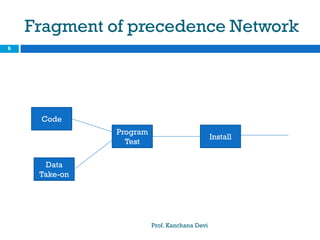
Fragment of precedence Network
Prof. Kanchana Devi
6
Install
Program
Test
Data
Take-on
Code
A loop represents an impossible
sequence
Prof. Kanchana Devi
7
Code
Program
Release
Program
Test
Program
Diagnose
Errors
Correct
Errors
A Dangle
Prof. Kanchana Devi
8
Design
Program
Install
Program
Test Program
Code
Program
Write User
Manual
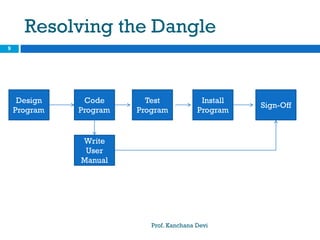
Resolving the Dangle
Prof. Kanchana Devi
9
Design
Program
Install
Program
Test
Program
Code
Program
Write
User
Manual
Sign-Off
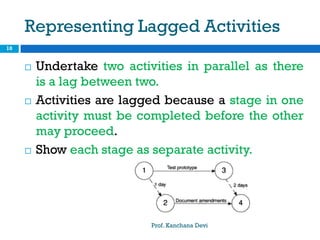
Representing Lagged Activities
Prof. Kanchana Devi
10
 Undertake two activities in parallel as there
is a lag between two.
 Activities are lagged because a stage in one
activity must be completed before the other
may proceed.
 Show each stage as separate activity.
Adding Time Dimension
Prof. Kanchana Devi
11
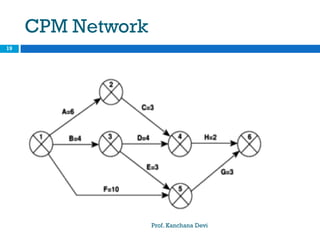
 Each activity have an estimate of its duration.
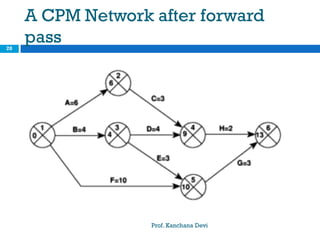
 Forward pass – Earliest dates at which
activities may commence and project be
completed.
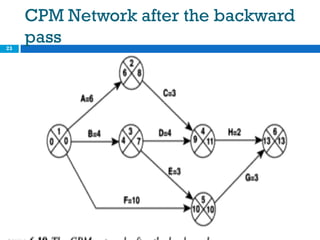
 Backward pass – Latest start dates for
activities and critical path.
Project Specification
Prof. Kanchana Devi
12
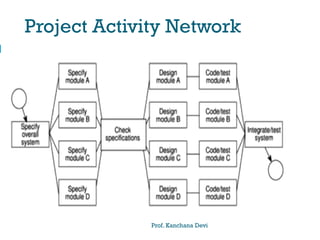
Project Activity Network
Prof. Kanchana Devi
13
Project Activity Network
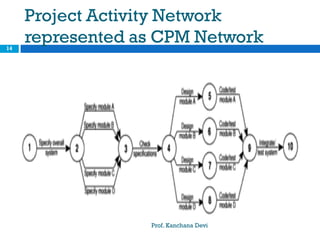
represented as CPM Network
Prof. Kanchana Devi
14
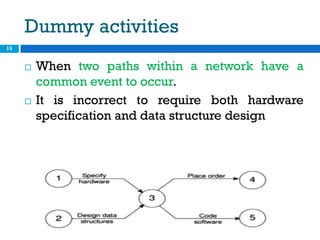
Dummy activities
15
 When two paths within a network have a
common event to occur.
 It is incorrect to require both hardware
specification and data structure design
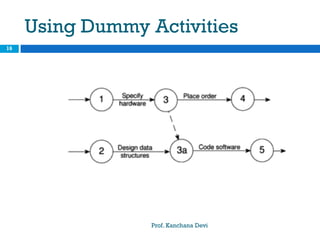
Using Dummy Activities
Prof. Kanchana Devi
16
…….
Prof. Kanchana Devi
17
 Dummy activities shown as dotted lines have
a zero duration and use no resources.
 Use of dummy activity where two activities
share the same start and end nodes makes it
easier to distinguish activity end points.
Forward Pass
Prof. Kanchana Devi
18
Activity Duration
(Weeks)
Earliest Start
Date (Weeks)
Earliest Finish
Date(Weeks)
A 6 0 6
B 4 0 4
C 3 6 9
D 4 4 8
E 3 4 7
F 10 0 10
G 3 10 13
H 2 9 11
CPM Network
Prof. Kanchana Devi
19
A CPM Network after forward
pass
Prof. Kanchana Devi
20
Activity table for forward pass
Prof. Kanchana Devi
21
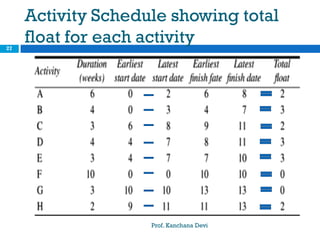
Activity Duration
(weeks)
Earliest
Start
Date
Latest
Start
Date
Earliest
Finish
Date
Latest
Finish
Date
Total
Float
A 6 0 6
B 4 0 4
C 3 6 9
D 4 4 8
E 3 4 7
F 10 0 10
G 3 10 13
H 2 9 11
Backward Pass
Prof. Kanchana Devi
22
CPM Network after the backward
pass
Prof. Kanchana Devi
23
Identifying the Critical Path
Prof. Kanchana Devi
24
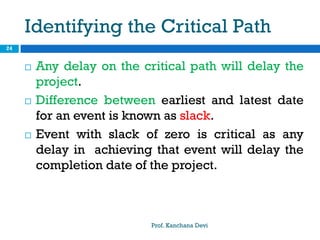
 Any delay on the critical path will delay the
project.
 Difference between earliest and latest date
for an event is known as slack.
 Event with slack of zero is critical as any
delay in achieving that event will delay the
completion date of the project.
Critical Path
Prof. Kanchana Devi
25
Event
Number
Latest
Date
Earliest
Date
Slack
Activity Float
Prof. Kanchana Devi
26
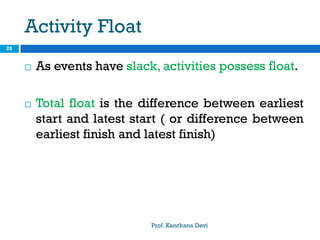
 As events have slack, activities possess float.
 Total float is the difference between earliest
start and latest start ( or difference between
earliest finish and latest finish)
Activity Schedule showing total
float for each activity
Prof. Kanchana Devi
27
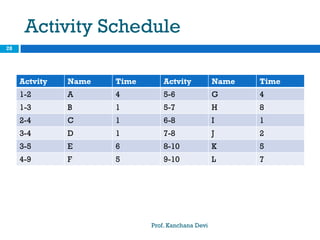
Activity Schedule
Prof. Kanchana Devi
28
Actvity Name Time Actvity Name Time
1-2 A 4 5-6 G 4
1-3 B 1 5-7 H 8
2-4 C 1 6-8 I 1
3-4 D 1 7-8 J 2
3-5 E 6 8-10 K 5
4-9 F 5 9-10 L 7
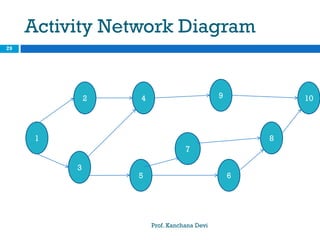
Activity Network Diagram
Prof. Kanchana Devi
29
1
2
3
5
4
7
6
8
109
Solution
Prof. Kanchana Devi
30
Activity Activity
Name
Normal
Time
E.S E.F L.S L.F Total
Float
1-2 A 4 0 4 5 9 5
1-3 B 1 0 1 0 1 0
2-4 C 1 4 5 9 10 5
3-4 D 1 1 2 9 10 8
3-5 E 6 1 7 1 7 0
4-9 F 5 5 10 10 15 5
5-6 G 4 7 11 12 16 5
5-7 H 8 7 15 7 15 0
6-8 I 1 11 12 16 17 5
7-8 J 2 15 17 15 17 0
8-10 K 5 17 22 17 22 0
9-10 L 7 10 17 15 22 5
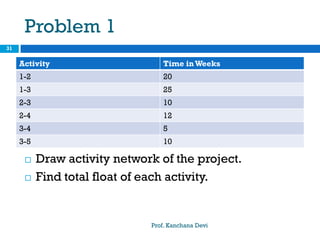
Problem 1
Prof. Kanchana Devi
31
 Draw activity network of the project.
 Find total float of each activity.
Activity Time inWeeks
1-2 20
1-3 25
2-3 10
2-4 12
3-4 5
3-5 10
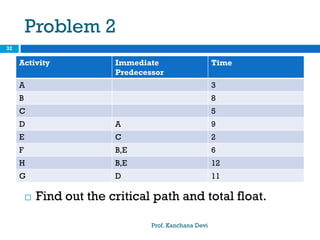
Problem 2
Prof. Kanchana Devi
32
 Find out the critical path and total float.
Activity Immediate
Predecessor
Time
A 3
B 8
C 5
D A 9
E C 2
F B,E 6
H B,E 12
G D 11

Spm ap-network model-

  • 1.
  • 2.
    Network Planning Models Prof.Kanchana Devi 2  Scheduling techniques model the project’s activ ities and their relationships as a “Network”.  In network time flows from left to right  These techniques were developed in 1950’s  There are two best techniques:  CPM (Critical Path Method)  PERT (Program Evaluation Review Technique)  Both uses an “activity-on-arrow” approach  Activities are drawn as arrows joining circles, or nodes  Which show the start and completion time of the activities
  • 3.
    Precedence Network Prof. KanchanaDevi 3  Recently used , Popular one  It uses “activity-on-node” networks  Where activities are represented as nodes  Links between the nodes are represented as sequencing requirements.
  • 4.
    Formulating a NetworkModel Prof. Kanchana Devi 4  First stage:  Representing the activities and their relationships as graph.  In “Activity-on-node”  Representing the activities as nodes(boxes) and the lines between nodes represent the dependencies.
  • 5.
    Rules:Constructing Precedence Network Prof. KanchanaDevi 5  A project network should have only one start node  A project network should have only one end node  A node has a duration  Links normally have no duration  Precedents are the immediate preceding activities  Time moves from left to right  A network may not contain loops  A network should not contain dangles
  • 6.
    Fragment of precedenceNetwork Prof. Kanchana Devi 6 Install Program Test Data Take-on Code
  • 7.
    A loop representsan impossible sequence Prof. Kanchana Devi 7 Code Program Release Program Test Program Diagnose Errors Correct Errors
  • 8.
    A Dangle Prof. KanchanaDevi 8 Design Program Install Program Test Program Code Program Write User Manual
  • 9.
    Resolving the Dangle Prof.Kanchana Devi 9 Design Program Install Program Test Program Code Program Write User Manual Sign-Off
  • 10.
    Representing Lagged Activities Prof.Kanchana Devi 10  Undertake two activities in parallel as there is a lag between two.  Activities are lagged because a stage in one activity must be completed before the other may proceed.  Show each stage as separate activity.
  • 11.
    Adding Time Dimension Prof.Kanchana Devi 11  Each activity have an estimate of its duration.  Forward pass – Earliest dates at which activities may commence and project be completed.  Backward pass – Latest start dates for activities and critical path.
  • 12.
  • 13.
  • 14.
    Project Activity Network representedas CPM Network Prof. Kanchana Devi 14
  • 15.
    Dummy activities 15  Whentwo paths within a network have a common event to occur.  It is incorrect to require both hardware specification and data structure design
  • 16.
  • 17.
    ……. Prof. Kanchana Devi 17 Dummy activities shown as dotted lines have a zero duration and use no resources.  Use of dummy activity where two activities share the same start and end nodes makes it easier to distinguish activity end points.
  • 18.
    Forward Pass Prof. KanchanaDevi 18 Activity Duration (Weeks) Earliest Start Date (Weeks) Earliest Finish Date(Weeks) A 6 0 6 B 4 0 4 C 3 6 9 D 4 4 8 E 3 4 7 F 10 0 10 G 3 10 13 H 2 9 11
  • 19.
  • 20.
    A CPM Networkafter forward pass Prof. Kanchana Devi 20
  • 21.
    Activity table forforward pass Prof. Kanchana Devi 21 Activity Duration (weeks) Earliest Start Date Latest Start Date Earliest Finish Date Latest Finish Date Total Float A 6 0 6 B 4 0 4 C 3 6 9 D 4 4 8 E 3 4 7 F 10 0 10 G 3 10 13 H 2 9 11
  • 22.
  • 23.
    CPM Network afterthe backward pass Prof. Kanchana Devi 23
  • 24.
    Identifying the CriticalPath Prof. Kanchana Devi 24  Any delay on the critical path will delay the project.  Difference between earliest and latest date for an event is known as slack.  Event with slack of zero is critical as any delay in achieving that event will delay the completion date of the project.
  • 25.
    Critical Path Prof. KanchanaDevi 25 Event Number Latest Date Earliest Date Slack
  • 26.
    Activity Float Prof. KanchanaDevi 26  As events have slack, activities possess float.  Total float is the difference between earliest start and latest start ( or difference between earliest finish and latest finish)
  • 27.
    Activity Schedule showingtotal float for each activity Prof. Kanchana Devi 27
  • 28.
    Activity Schedule Prof. KanchanaDevi 28 Actvity Name Time Actvity Name Time 1-2 A 4 5-6 G 4 1-3 B 1 5-7 H 8 2-4 C 1 6-8 I 1 3-4 D 1 7-8 J 2 3-5 E 6 8-10 K 5 4-9 F 5 9-10 L 7
  • 29.
    Activity Network Diagram Prof.Kanchana Devi 29 1 2 3 5 4 7 6 8 109
  • 30.
    Solution Prof. Kanchana Devi 30 ActivityActivity Name Normal Time E.S E.F L.S L.F Total Float 1-2 A 4 0 4 5 9 5 1-3 B 1 0 1 0 1 0 2-4 C 1 4 5 9 10 5 3-4 D 1 1 2 9 10 8 3-5 E 6 1 7 1 7 0 4-9 F 5 5 10 10 15 5 5-6 G 4 7 11 12 16 5 5-7 H 8 7 15 7 15 0 6-8 I 1 11 12 16 17 5 7-8 J 2 15 17 15 17 0 8-10 K 5 17 22 17 22 0 9-10 L 7 10 17 15 22 5
  • 31.
    Problem 1 Prof. KanchanaDevi 31  Draw activity network of the project.  Find total float of each activity. Activity Time inWeeks 1-2 20 1-3 25 2-3 10 2-4 12 3-4 5 3-5 10
  • 32.
    Problem 2 Prof. KanchanaDevi 32  Find out the critical path and total float. Activity Immediate Predecessor Time A 3 B 8 C 5 D A 9 E C 2 F B,E 6 H B,E 12 G D 11