MG6088 SOFTWARE PROJECT MANAGEMENT
UNIT – I
Dr.A.Kathirvel, Professor and Head, Dept of CSE
M.N.M Jain Engineering College, Chennai
UNIT I
PROJECT EVALUATION AND PROJECT PLANNING
Importance of Software Project Management – Activities
Methodologies – Categorization of Software Projects –
Setting objectives – Management Principles –
Management Control – Project portfolio Management –
Cost-benefit evaluation technology – Risk evaluation –
Strategic program Management – Stepwise Project
Planning.
TEXT BOOK
Bob Hughes, Mike Cotterell and Rajib Mall: Software Project
Management – Fifth Edition, Tata McGraw Hill, New Delhi, 2012.
3
What is a project?
Some dictionary definitions:
 “A specific plan or design”
 “A planned undertaking”
 “A large undertaking e.g. a public works scheme”
Key points above are planning and size of task
An Introduction
4
Jobs versus projects
 ‘Jobs’ – repetition of very well-defined and well understood
tasks with very little uncertainty
 ‘Exploration’ – e.g. finding a cure for cancer: the outcome is
very uncertain
 ‘Projects’ – in the middle!
4
Characteristics of projects
 Non-routine
 Planned
 Aiming at a specific target
 Work carried out for a customer
 Involving several specialisms
 Made up of several different phases
 Constrained by time and resources
 Large and/or complex
5
Are software projects really different from other
projects?
Not really! …but…
 Invisibility
 Complexity
 Conformity
 Flexibility
make software more problematic to build
than other engineered products.
6
7
Activities covered by project management
Feasibility study
Is project technically feasible and worthwhile from a business point of view?
Planning
Only done if project is feasible
Execution
Implement plan, but plan may be changed as we go along
7
ISO 12207 life-cycle
Requirements analysis
 Requirements elicitation: what does the client need?
 Analysis: converting ‘customer-facing’ requirements into
equivalents that developers can understand
 Requirements will cover
◼ Functions, Quality, Resource constraints i.e. costs
 Architecture design
 Based on system requirements
 Defines components of system: hardware, software, organizational
 Software requirements will come out of this
 Code and test
 Of individual components
 Integration
 Putting the components together
8
9
Activities covered by project management
9
ISO12207 …
 Qualification testing
 Testing the system (not just the software)
 Installation
 The process of making the system operational
 Includes setting up standing data, setting system parameters,
installing on operational hardware platforms, user training etc
 Acceptance support
 Including maintenance and enhancement
10
Categorization of software projects
Distinguishing different types of project is important as different
types of task need different project approaches e.g.
 Information systems versus embedded systems
 Objective-based versus product-based
Stakeholders
These are people who have a stake or interest in the project.
In general, they could be users/clients or evelopers/implementers
They could be:
 Within the project team
 Outside the project team, but within the same organization
 Outside both the project team and the organization
11
Setting objectives
 Answering the question ‘What do we have to do to have a project success?’
 Need for a project authority
 Sets the project scope, Allocates/approves costs
 Could be one person - or a group
 Project Board, Project Management Board, Steering committee
Objectives should be SMART
S – specific, that is, concrete and well-defined
M – measurable, that is, satisfaction of the objective can be objectively judged
A – achievable, that is, it is within the power of the individual or group concerned to
meet the target
R – relevant, the objective must relevant to the true purpose of the project
T – time constrained: there is defined point in time by which the objective should be
achieved
12
Goals/sub-objectives
These are steps along the way to achieving the objective. Informally, these
can be defined by completing the sentence…
Objective X will be achieved
IF the following goals are all achieved
A……………
B……………
C…………… etc
Often a goal can be allocated to an individual.
Individual may have the capability of achieving goal, but not the
objective on their own e.g.
Objective – user satisfaction with software product
Analyst goal – accurate requirements
Developer goal – software that is reliable
13
Measures of effectiveness
How do we know that the goal or objective has been achieved?
By a practical test, that can be objectively assessed.
e.g. for user satisfaction with software product:
 Repeat business – they buy further products from us
 Number of complaints – if low etc etc
14
What is management?
This involves the following activities:
 Planning – deciding what is to be done
 Organizing – making arrangements
 Staffing – selecting the right people for the job
 Directing – giving instructions
 Monitoring – checking on progress
 Controlling – taking action to remedy hold-ups
 Innovating – coming up with solutions when problems
emerge
 Representing – liaising with clients, users, developers and
other stakeholders
15
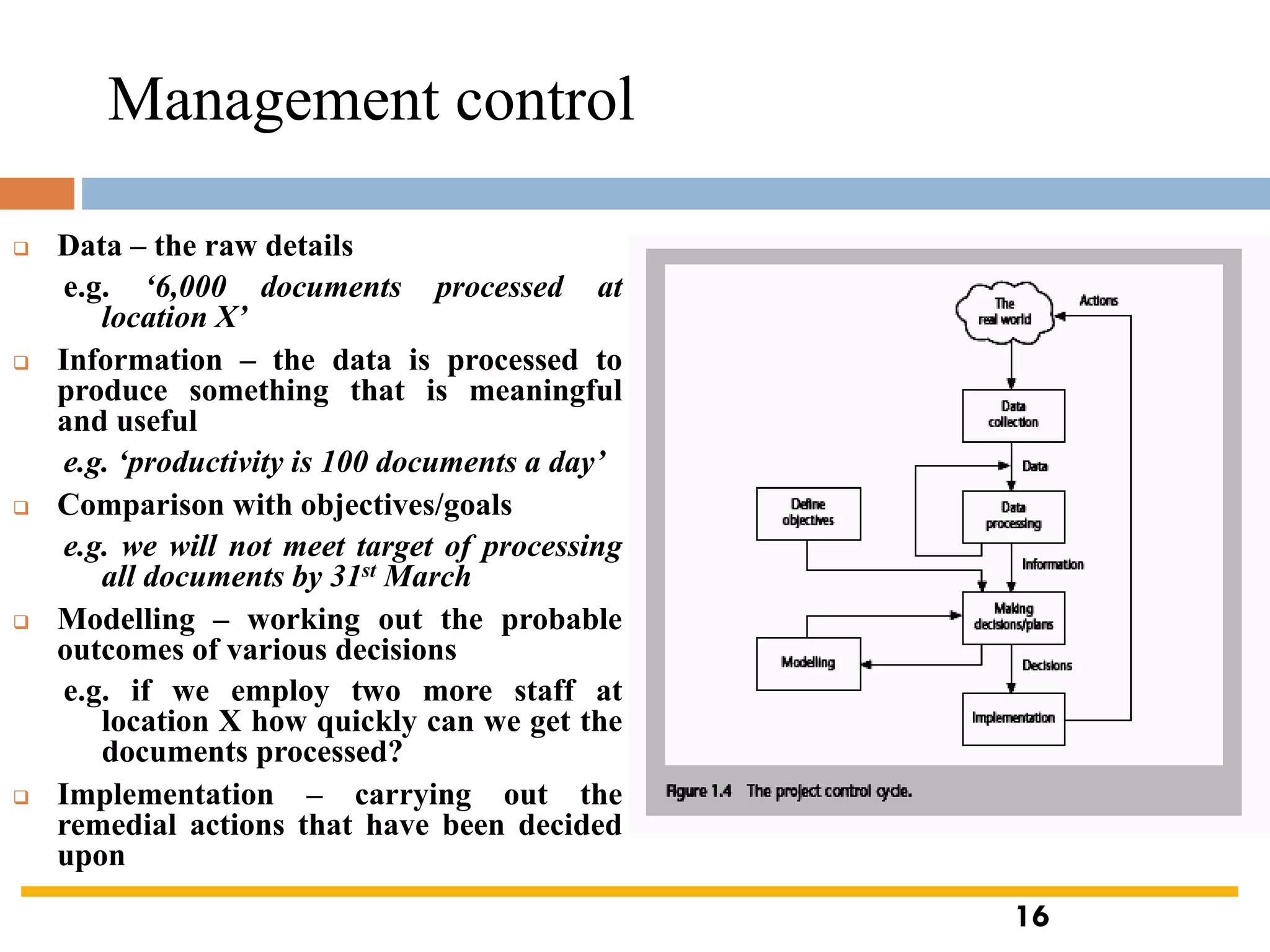
Management control
❑ Data – the raw details
e.g. ‘6,000 documents processed at
location X’
❑ Information – the data is processed to
produce something that is meaningful
and useful
e.g. ‘productivity is 100 documents a day’
❑ Comparison with objectives/goals
e.g. we will not meet target of processing
all documents by 31st March
❑ Modelling – working out the probable
outcomes of various decisions
e.g. if we employ two more staff at
location X how quickly can we get the
documents processed?
❑ Implementation – carrying out the
remedial actions that have been decided
upon
16
Benefits management
the
application
developers users
benefits
build
use
to deliver
organization
for
•Providing an organization with a capability does not guarantee that
this will provide benefits envisaged – need for benefits management
•This has to be outside the project – project will have been
completed
•Therefore done at programme level
17
Benefits management
To carry this out, you must:
 Define expected benefits
 Analyse balance between costs and benefits
 Plan how benefits will be achieved
 Allocate responsibilities for their achievement
 Monitor achievement of benefits
Cost benefit analysis (CBA)
You need to:
 Identify all the costs which could be:
 Development costs, Set-up, Operational costs
 Identify the value of benefits
 Check benefits are greater than costs
18
19
Cost benefit analysis (CBA)/ Cost benefit
evaluation techniques(CBET)
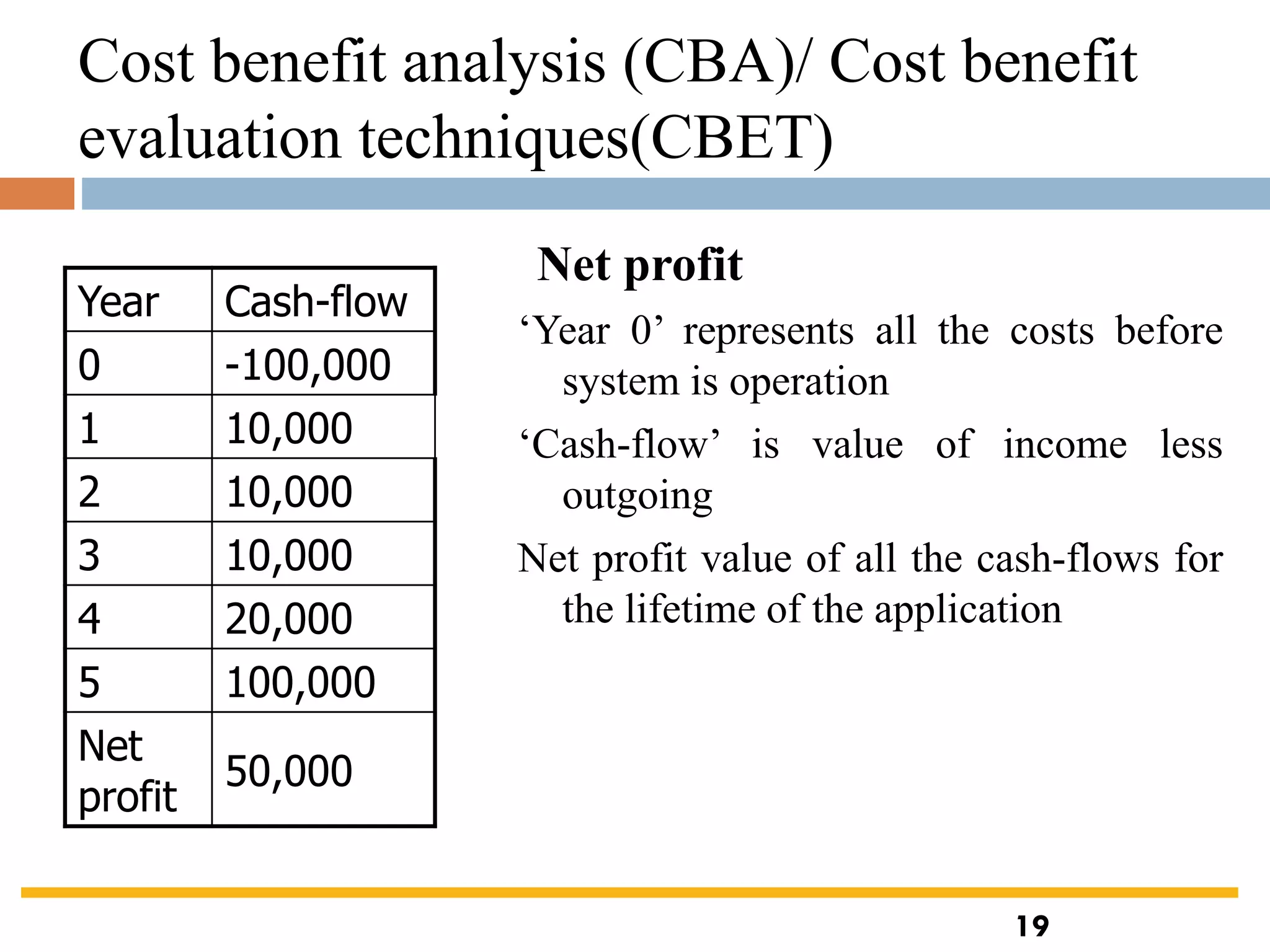
‘Year 0’ represents all the costs before
system is operation
‘Cash-flow’ is value of income less
outgoing
Net profit value of all the cash-flows for
the lifetime of the application
Year Cash-flow
0 -100,000
1 10,000
2 10,000
3 10,000
4 20,000
5 100,000
Net
profit
50,000
Net profit
19
Pay back period
This is the time it takes to start generating a surplus of income over
outgoings. What would it be below?
Year Cash-flow Accumulated
0 -100,000 -100,000
1 10,000 -90,000
2 10,000 -80,000
3 10,000 -70,000
4 20,000 -50,000
5 100,000 50,000
Cost benefit analysis (CBA)/ Cost benefit
evaluation techniques(CBET)
20
Return on investment (ROI)
ROI = Average annual profit
Total investment
X 100
In the previous example
• average annual profit
= 50,000/5
= 10,000
• ROI = 10,000/100,000 X 100
= 10%
Cost benefit analysis (CBA)/ Cost benefit
evaluation techniques(CBET)
21
Net present value
❑ Would you rather I gave you £100 today or in 12 months time?
❑ If I gave you £100 now you could put it in savings account and get
interest on it.
❑ If the interest rate was 10% how much would I have to invest now
to get £100 in a year’s time?
❑ This figure is the net present value of £100 in one year’s time
Cost benefit analysis (CBA)/ Cost benefit
evaluation techniques(CBET)
22
Discount factor
Discount factor = 1/(1+r)t
r is the interest rate
(e.g. 10% is 0.10)
t is the number of years
In the case of 10% rate and one year
Discount factor = 1/(1+0.10)
= 0.9091
In the case of 10% rate and two years
Discount factor = 1/(1.10 x 1.10)
=0.8294
Year Cash-
flow
Discount
factor
Discount
ed cash
flow
0 -100,000 1.0000 -100,000
1 10,000 0.9091 9,091
2 10,000 0.8264 8,264
3 10,000 0.7513 7,513
4 20,000 0.6830 13,660
5 100,000 0.6209 62,090
NPV 618
Applying discount factors
Cost benefit analysis (CBA)/ Cost benefit
evaluation techniques(CBET)
23
Internal rate of return
 Internal rate of return (IRR) is the discount rate that
would produce an NPV of 0 for the project
 Can be used to compare different investment
opportunities
 There is a Microsoft Excel function which can be
used to calculate
Cost benefit analysis (CBA)/ Cost benefit
evaluation techniques(CBET)
24
Risk evaluation
Dealing with uncertainty:
 project A might appear to give a better return than B but could be riskier
 Could draw up draw a project risk matrix for each project to assess risks
– see next overhead
 For riskier projects could use higher discount rates
Example of a project risk matrix
25
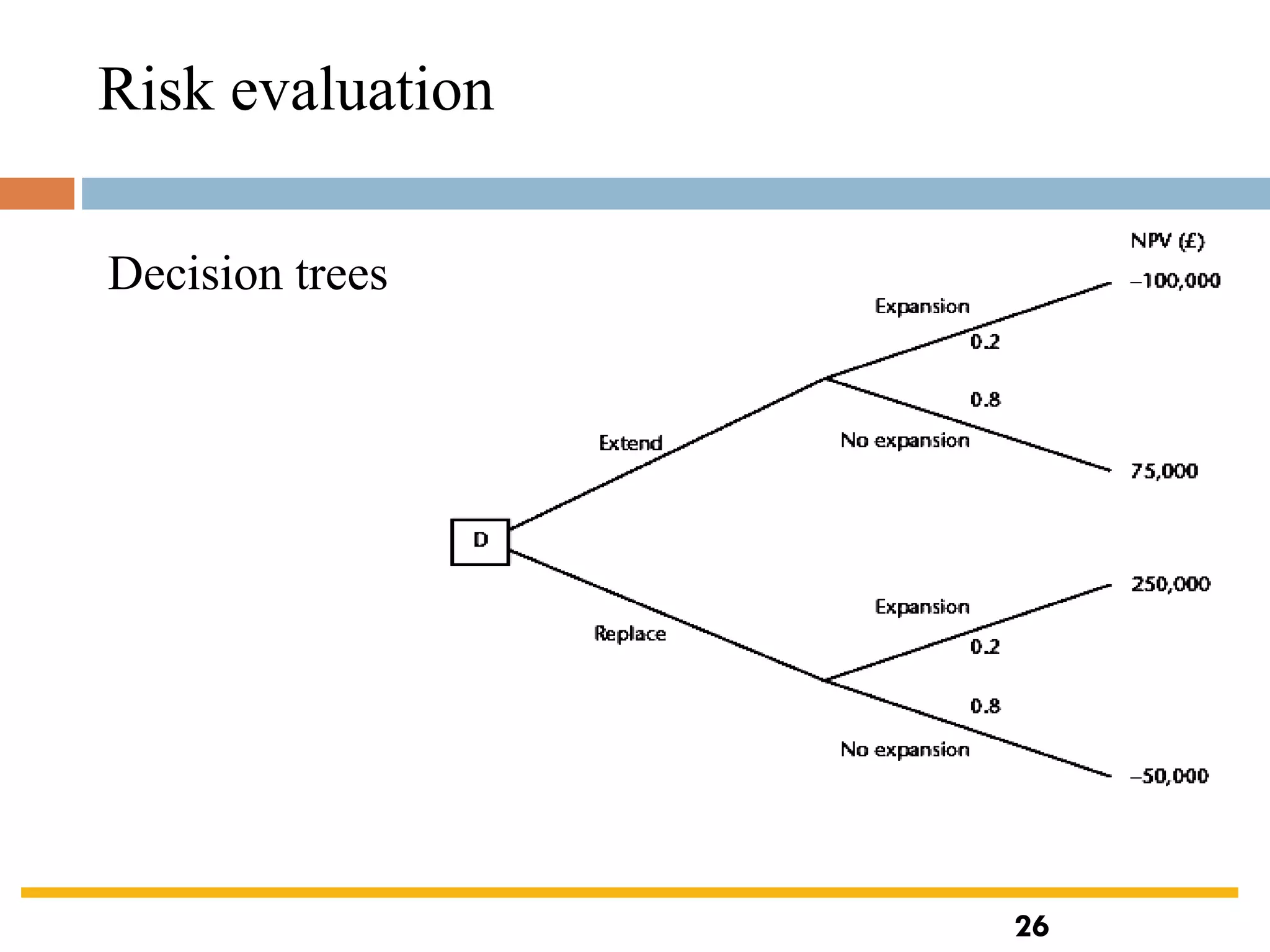
Decision trees
Risk evaluation
26
Programme management
 Definition:
‘a group of projects that are managed in a co-ordinated way to gain
benefits that would not be possible were the projects to be managed
independently’ Ferns
❑Programmes may be Strategic
 Business cycle programmes
 Infrastructure programmes
 Research and development programmes
 Innovative partnerships
27
28
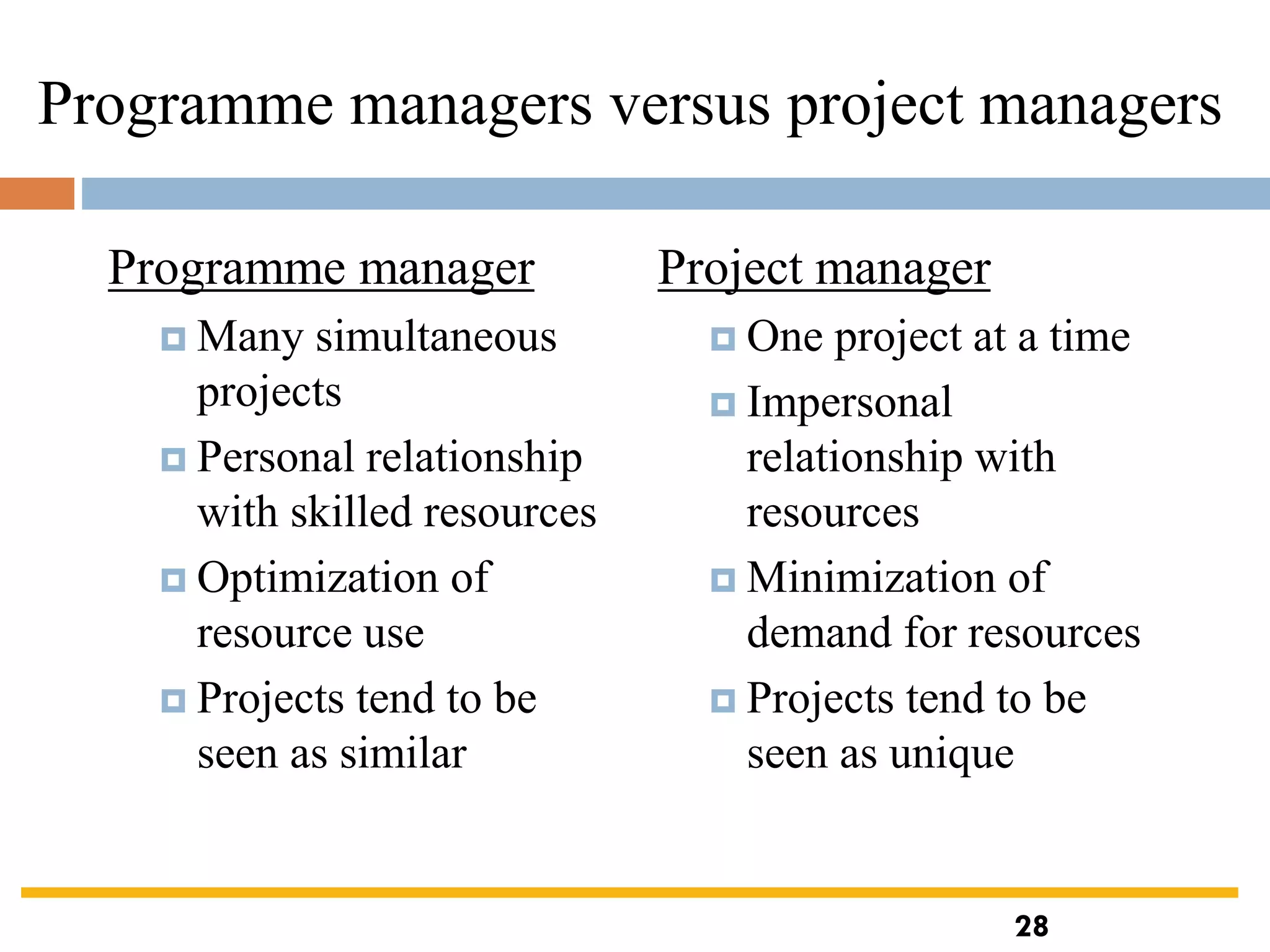
Programme managers versus project managers
Programme manager
 Many simultaneous
projects
 Personal relationship
with skilled resources
 Optimization of
resource use
 Projects tend to be
seen as similar
Project manager
 One project at a time
 Impersonal
relationship with
resources
 Minimization of
demand for resources
 Projects tend to be
seen as unique
28
Strategic programmes
 Based on OGC approach
 Initial planning document is the Programme Mandate describing
 The new services/capabilities that the programme should deliver
 How an organization will be improved
 Fit with existing organizational goals
 A programme director appointed a champion for the scheme
Next stages/documents
 The programme brief – equivalent of a feasibility study: emphasis on costs
and benefits
 The vision statement – explains the new capability that the organization
will have
 The blueprint – explains the changes to be made to obtain the new
capability
29
Step Wise Project Planning
 Practicality
tries to answer the question ‘what do I do now?’
 Scalability
useful for small project as well as large
 Range of application
 Accepted techniques
e.g. borrowed from PRINCE etc
30
‘Step Wise’ - an overview
0.Select
project1. Identify
project objectives
2. Identify project
infrastructure
3. Analyse
project
characteristics
4. Identify products
and activities
5. Estimate effort
for activity
8. Review/ publicize
plan
6. Identify activity
risks
7. Allocate
resources
9. Execute plan
10. Lower level
planning
Review
Lower
level
detail
5. Estimate effort
for activity
6. Identify activity
risks
10. Lower level
planning
For each
activity
31
A project scenario
 Hardware/software engineering company (C++ language
of choice)
 teams are selected for individual projects - some friction
has been found between team members
 HR manager suggests psychometric testing to select team
 Software package to be used to test staff
 Visual basic suggested as a vehicle for implementation
 usability is important - decision to carry out usability tests
32
Step 1 establish project scope and objectives
 1.1 Identify objectives and measures of effectiveness
 ‘how do we know if we have succeeded?’
 1.2 Establish a project authority
 ‘who is the boss?’
 1.3 Identify all stakeholders in the project and their
interests
 ‘who will be affected/involved in the project?’
 1.4 Modify objectives in the light of stakeholder analysis
 ‘do we need to do things to win over stakeholders?’
 1.5 Establish methods of communication with all parties
 ‘how do we keep in contact?’
33
Back to the scenario
 Project authority
 should be a project manager rather than HR manager?
 Stakeholders
 project team members to complete on-line questionnaires:
concern about results?
 Revision to objectives
 provide feedback to team members on results
Step 2 Establish project infrastructure
 2.1 Establish link between project and any strategic plan
 ‘why did they want the project?’
 2.2 Identify installation standards and procedures
 ‘what standards do we have to follow?’
 2.3. Identify project team organization
 ‘where do I fit in?’
34
Step 3 Analysis of project characteristics
 3.1 Distinguish the project as either objective or product-based.
 Is there more than one way of achieving success?
 3.2 Analyse other project characteristics (including quality based ones)
 what is different about this project?
 Identify high level project risks
 ‘what could go wrong?’
 ‘what can we do to stop it?’
 Take into account user requirements concerning implementation
 Select general life cycle approach
 waterfall? Increments? Prototypes?
 Review overall resource estimates
 ‘does all this increase the cost?’
35
Back to the scenario
 Objectives vs. products
 use paper questionnaire then input results of the analysis?
 Some risks
 team members worried about implications and do no co-
operate
 project managers unwilling to try out application
 Developer not familiar with features of VB
 Answer? - evolutionary prototype?
36
Step 4 Identify project products and activities
4.1 Identify and describe project products - ‘what do we
have to produce?’
Usability
testing
Change
requests
Test results
Testing
arrangements
Selected
subjects
Completed
questionnaire
Questionnaire
design
Booked
PC
Analysis
report
A product breakdown structure
(PBS)
37
Products
 The result of an activity
 Could be (among other things)
 physical thing (‘installed pc’),
 a document (‘logical data structure’)
 a person (‘trained user’)
 a new version of an old product (‘updated software’)
 The following are NOT normally products:
 activities (e.g. ‘training’)
 events (e.g. ‘interviews completed’)
 resources and actors (e.g. ‘software developer’) - may be
exceptions to this
 Products CAN BE deliverable or intermediate
38
39
Product description (PD)
 Product identity
 Description - what is it?
 Derivation - what is it based on?
 Composition - what does it contain?
 Format
 Relevant standards
 Quality criteria
Create a PD for ‘test data’
39
40
Step 4 continued
4.2 document Generic Product flows
Selected
subjects
Testing plan
Questionnaire
design
Booked
machine
Completed
questionnaire
Analysis report
Test results
Change
requests
Step 4.3 Recognize product
instances
 The PBS and PFD will probably
have identified generic products
e.g. ‘software modules’
 It might be possible to identify
specific instances e.g. ‘module A’,
‘module B’ …
 But in many cases this will have to
be left to later, more detailed,
planning
40
41
4.4. Produce ideal activity network
 Identify the activities needed to create each product in the PFD
 More than one activity might be needed to create a single product
 Hint: Identify activities by verb + noun but avoid ‘produce…’
(too vague)
 Draw up activity network
Plan
testing
Design
questionnaire
Select
subjects
Book
machine
Conduct
tests
Analyse
results
Draft change
requests
42
Step 4.5 Add check-points if needed
Test
system
Design
module A
Design
module B
Design
system
Design
module C
Code
module A
Code
module B
Code
module C
Test
system
Design
module A
Design
module B
Design
system
Design
module C
Code
module A
Code
module B
Code
module C
Check-point
put in a
check point
Step 5:Estimate effort for each activity
 5.1 Carry out bottom-up estimates
 distinguish carefully between effort and elapsed time
 5.2. Revise plan to create controllable activities
 break up very long activities into a series of smaller ones
 bundle up very short activities (create check lists?)
Step 6: Identify activity risks
 6.1.Identify and quantify risks for activities
 damage if risk occurs (measure in time lost or money)
 likelihood if risk occurring
 6.2. Plan risk reduction and contingency measures
 risk reduction: activity to stop risk occurring
 contingency: action if risk does occur
43
 6.3 Adjust overall plans and estimates to take account of risks
 e.g. add new activities which reduce risks associated with
other activities e.g. training, pilot trials, information gathering
Step 7: Allocate resources
 7.1 Identify and allocate resources to activities
 7.2 Revise plans and estimates to take into account resource
constraints
 e.g. staff not being available until a later date
 non-project activities
44
Gantt charts
Select subjects
Design
questionnaire
Book machine
Conduct tests
Analyse results
Week
commencing
5 12 19 26
MARCH APRIL
9 16
Plan testing
2
Draft changes
LT
TA
LT
TA
LT
LT
TA
LT = lead tester
TA = testing assistant
45
Step 8: Review/publicise plan
 8.1 Review quality aspects of project plan
 8.2 Document plan and obtain agreement
Step 9 and 10: Execute plan and create
lower level plans
46
MG6088 SOFTWARE PROJECT MANAGEMENT

MG6088 SOFTWARE PROJECT MANAGEMENT

  • 1.
    MG6088 SOFTWARE PROJECTMANAGEMENT UNIT – I Dr.A.Kathirvel, Professor and Head, Dept of CSE M.N.M Jain Engineering College, Chennai
  • 2.
    UNIT I PROJECT EVALUATIONAND PROJECT PLANNING Importance of Software Project Management – Activities Methodologies – Categorization of Software Projects – Setting objectives – Management Principles – Management Control – Project portfolio Management – Cost-benefit evaluation technology – Risk evaluation – Strategic program Management – Stepwise Project Planning. TEXT BOOK Bob Hughes, Mike Cotterell and Rajib Mall: Software Project Management – Fifth Edition, Tata McGraw Hill, New Delhi, 2012.
  • 3.
    3 What is aproject? Some dictionary definitions:  “A specific plan or design”  “A planned undertaking”  “A large undertaking e.g. a public works scheme” Key points above are planning and size of task An Introduction
  • 4.
    4 Jobs versus projects ‘Jobs’ – repetition of very well-defined and well understood tasks with very little uncertainty  ‘Exploration’ – e.g. finding a cure for cancer: the outcome is very uncertain  ‘Projects’ – in the middle! 4
  • 5.
    Characteristics of projects Non-routine  Planned  Aiming at a specific target  Work carried out for a customer  Involving several specialisms  Made up of several different phases  Constrained by time and resources  Large and/or complex 5
  • 6.
    Are software projectsreally different from other projects? Not really! …but…  Invisibility  Complexity  Conformity  Flexibility make software more problematic to build than other engineered products. 6
  • 7.
    7 Activities covered byproject management Feasibility study Is project technically feasible and worthwhile from a business point of view? Planning Only done if project is feasible Execution Implement plan, but plan may be changed as we go along 7
  • 8.
    ISO 12207 life-cycle Requirementsanalysis  Requirements elicitation: what does the client need?  Analysis: converting ‘customer-facing’ requirements into equivalents that developers can understand  Requirements will cover ◼ Functions, Quality, Resource constraints i.e. costs  Architecture design  Based on system requirements  Defines components of system: hardware, software, organizational  Software requirements will come out of this  Code and test  Of individual components  Integration  Putting the components together 8
  • 9.
    9 Activities covered byproject management 9
  • 10.
    ISO12207 …  Qualificationtesting  Testing the system (not just the software)  Installation  The process of making the system operational  Includes setting up standing data, setting system parameters, installing on operational hardware platforms, user training etc  Acceptance support  Including maintenance and enhancement 10
  • 11.
    Categorization of softwareprojects Distinguishing different types of project is important as different types of task need different project approaches e.g.  Information systems versus embedded systems  Objective-based versus product-based Stakeholders These are people who have a stake or interest in the project. In general, they could be users/clients or evelopers/implementers They could be:  Within the project team  Outside the project team, but within the same organization  Outside both the project team and the organization 11
  • 12.
    Setting objectives  Answeringthe question ‘What do we have to do to have a project success?’  Need for a project authority  Sets the project scope, Allocates/approves costs  Could be one person - or a group  Project Board, Project Management Board, Steering committee Objectives should be SMART S – specific, that is, concrete and well-defined M – measurable, that is, satisfaction of the objective can be objectively judged A – achievable, that is, it is within the power of the individual or group concerned to meet the target R – relevant, the objective must relevant to the true purpose of the project T – time constrained: there is defined point in time by which the objective should be achieved 12
  • 13.
    Goals/sub-objectives These are stepsalong the way to achieving the objective. Informally, these can be defined by completing the sentence… Objective X will be achieved IF the following goals are all achieved A…………… B…………… C…………… etc Often a goal can be allocated to an individual. Individual may have the capability of achieving goal, but not the objective on their own e.g. Objective – user satisfaction with software product Analyst goal – accurate requirements Developer goal – software that is reliable 13
  • 14.
    Measures of effectiveness Howdo we know that the goal or objective has been achieved? By a practical test, that can be objectively assessed. e.g. for user satisfaction with software product:  Repeat business – they buy further products from us  Number of complaints – if low etc etc 14
  • 15.
    What is management? Thisinvolves the following activities:  Planning – deciding what is to be done  Organizing – making arrangements  Staffing – selecting the right people for the job  Directing – giving instructions  Monitoring – checking on progress  Controlling – taking action to remedy hold-ups  Innovating – coming up with solutions when problems emerge  Representing – liaising with clients, users, developers and other stakeholders 15
  • 16.
    Management control ❑ Data– the raw details e.g. ‘6,000 documents processed at location X’ ❑ Information – the data is processed to produce something that is meaningful and useful e.g. ‘productivity is 100 documents a day’ ❑ Comparison with objectives/goals e.g. we will not meet target of processing all documents by 31st March ❑ Modelling – working out the probable outcomes of various decisions e.g. if we employ two more staff at location X how quickly can we get the documents processed? ❑ Implementation – carrying out the remedial actions that have been decided upon 16
  • 17.
    Benefits management the application developers users benefits build use todeliver organization for •Providing an organization with a capability does not guarantee that this will provide benefits envisaged – need for benefits management •This has to be outside the project – project will have been completed •Therefore done at programme level 17
  • 18.
    Benefits management To carrythis out, you must:  Define expected benefits  Analyse balance between costs and benefits  Plan how benefits will be achieved  Allocate responsibilities for their achievement  Monitor achievement of benefits Cost benefit analysis (CBA) You need to:  Identify all the costs which could be:  Development costs, Set-up, Operational costs  Identify the value of benefits  Check benefits are greater than costs 18
  • 19.
    19 Cost benefit analysis(CBA)/ Cost benefit evaluation techniques(CBET) ‘Year 0’ represents all the costs before system is operation ‘Cash-flow’ is value of income less outgoing Net profit value of all the cash-flows for the lifetime of the application Year Cash-flow 0 -100,000 1 10,000 2 10,000 3 10,000 4 20,000 5 100,000 Net profit 50,000 Net profit 19
  • 20.
    Pay back period Thisis the time it takes to start generating a surplus of income over outgoings. What would it be below? Year Cash-flow Accumulated 0 -100,000 -100,000 1 10,000 -90,000 2 10,000 -80,000 3 10,000 -70,000 4 20,000 -50,000 5 100,000 50,000 Cost benefit analysis (CBA)/ Cost benefit evaluation techniques(CBET) 20
  • 21.
    Return on investment(ROI) ROI = Average annual profit Total investment X 100 In the previous example • average annual profit = 50,000/5 = 10,000 • ROI = 10,000/100,000 X 100 = 10% Cost benefit analysis (CBA)/ Cost benefit evaluation techniques(CBET) 21
  • 22.
    Net present value ❑Would you rather I gave you £100 today or in 12 months time? ❑ If I gave you £100 now you could put it in savings account and get interest on it. ❑ If the interest rate was 10% how much would I have to invest now to get £100 in a year’s time? ❑ This figure is the net present value of £100 in one year’s time Cost benefit analysis (CBA)/ Cost benefit evaluation techniques(CBET) 22
  • 23.
    Discount factor Discount factor= 1/(1+r)t r is the interest rate (e.g. 10% is 0.10) t is the number of years In the case of 10% rate and one year Discount factor = 1/(1+0.10) = 0.9091 In the case of 10% rate and two years Discount factor = 1/(1.10 x 1.10) =0.8294 Year Cash- flow Discount factor Discount ed cash flow 0 -100,000 1.0000 -100,000 1 10,000 0.9091 9,091 2 10,000 0.8264 8,264 3 10,000 0.7513 7,513 4 20,000 0.6830 13,660 5 100,000 0.6209 62,090 NPV 618 Applying discount factors Cost benefit analysis (CBA)/ Cost benefit evaluation techniques(CBET) 23
  • 24.
    Internal rate ofreturn  Internal rate of return (IRR) is the discount rate that would produce an NPV of 0 for the project  Can be used to compare different investment opportunities  There is a Microsoft Excel function which can be used to calculate Cost benefit analysis (CBA)/ Cost benefit evaluation techniques(CBET) 24
  • 25.
    Risk evaluation Dealing withuncertainty:  project A might appear to give a better return than B but could be riskier  Could draw up draw a project risk matrix for each project to assess risks – see next overhead  For riskier projects could use higher discount rates Example of a project risk matrix 25
  • 26.
  • 27.
    Programme management  Definition: ‘agroup of projects that are managed in a co-ordinated way to gain benefits that would not be possible were the projects to be managed independently’ Ferns ❑Programmes may be Strategic  Business cycle programmes  Infrastructure programmes  Research and development programmes  Innovative partnerships 27
  • 28.
    28 Programme managers versusproject managers Programme manager  Many simultaneous projects  Personal relationship with skilled resources  Optimization of resource use  Projects tend to be seen as similar Project manager  One project at a time  Impersonal relationship with resources  Minimization of demand for resources  Projects tend to be seen as unique 28
  • 29.
    Strategic programmes  Basedon OGC approach  Initial planning document is the Programme Mandate describing  The new services/capabilities that the programme should deliver  How an organization will be improved  Fit with existing organizational goals  A programme director appointed a champion for the scheme Next stages/documents  The programme brief – equivalent of a feasibility study: emphasis on costs and benefits  The vision statement – explains the new capability that the organization will have  The blueprint – explains the changes to be made to obtain the new capability 29
  • 30.
    Step Wise ProjectPlanning  Practicality tries to answer the question ‘what do I do now?’  Scalability useful for small project as well as large  Range of application  Accepted techniques e.g. borrowed from PRINCE etc 30
  • 31.
    ‘Step Wise’ -an overview 0.Select project1. Identify project objectives 2. Identify project infrastructure 3. Analyse project characteristics 4. Identify products and activities 5. Estimate effort for activity 8. Review/ publicize plan 6. Identify activity risks 7. Allocate resources 9. Execute plan 10. Lower level planning Review Lower level detail 5. Estimate effort for activity 6. Identify activity risks 10. Lower level planning For each activity 31
  • 32.
    A project scenario Hardware/software engineering company (C++ language of choice)  teams are selected for individual projects - some friction has been found between team members  HR manager suggests psychometric testing to select team  Software package to be used to test staff  Visual basic suggested as a vehicle for implementation  usability is important - decision to carry out usability tests 32
  • 33.
    Step 1 establishproject scope and objectives  1.1 Identify objectives and measures of effectiveness  ‘how do we know if we have succeeded?’  1.2 Establish a project authority  ‘who is the boss?’  1.3 Identify all stakeholders in the project and their interests  ‘who will be affected/involved in the project?’  1.4 Modify objectives in the light of stakeholder analysis  ‘do we need to do things to win over stakeholders?’  1.5 Establish methods of communication with all parties  ‘how do we keep in contact?’ 33
  • 34.
    Back to thescenario  Project authority  should be a project manager rather than HR manager?  Stakeholders  project team members to complete on-line questionnaires: concern about results?  Revision to objectives  provide feedback to team members on results Step 2 Establish project infrastructure  2.1 Establish link between project and any strategic plan  ‘why did they want the project?’  2.2 Identify installation standards and procedures  ‘what standards do we have to follow?’  2.3. Identify project team organization  ‘where do I fit in?’ 34
  • 35.
    Step 3 Analysisof project characteristics  3.1 Distinguish the project as either objective or product-based.  Is there more than one way of achieving success?  3.2 Analyse other project characteristics (including quality based ones)  what is different about this project?  Identify high level project risks  ‘what could go wrong?’  ‘what can we do to stop it?’  Take into account user requirements concerning implementation  Select general life cycle approach  waterfall? Increments? Prototypes?  Review overall resource estimates  ‘does all this increase the cost?’ 35
  • 36.
    Back to thescenario  Objectives vs. products  use paper questionnaire then input results of the analysis?  Some risks  team members worried about implications and do no co- operate  project managers unwilling to try out application  Developer not familiar with features of VB  Answer? - evolutionary prototype? 36
  • 37.
    Step 4 Identifyproject products and activities 4.1 Identify and describe project products - ‘what do we have to produce?’ Usability testing Change requests Test results Testing arrangements Selected subjects Completed questionnaire Questionnaire design Booked PC Analysis report A product breakdown structure (PBS) 37
  • 38.
    Products  The resultof an activity  Could be (among other things)  physical thing (‘installed pc’),  a document (‘logical data structure’)  a person (‘trained user’)  a new version of an old product (‘updated software’)  The following are NOT normally products:  activities (e.g. ‘training’)  events (e.g. ‘interviews completed’)  resources and actors (e.g. ‘software developer’) - may be exceptions to this  Products CAN BE deliverable or intermediate 38
  • 39.
    39 Product description (PD) Product identity  Description - what is it?  Derivation - what is it based on?  Composition - what does it contain?  Format  Relevant standards  Quality criteria Create a PD for ‘test data’ 39
  • 40.
    40 Step 4 continued 4.2document Generic Product flows Selected subjects Testing plan Questionnaire design Booked machine Completed questionnaire Analysis report Test results Change requests Step 4.3 Recognize product instances  The PBS and PFD will probably have identified generic products e.g. ‘software modules’  It might be possible to identify specific instances e.g. ‘module A’, ‘module B’ …  But in many cases this will have to be left to later, more detailed, planning 40
  • 41.
    41 4.4. Produce idealactivity network  Identify the activities needed to create each product in the PFD  More than one activity might be needed to create a single product  Hint: Identify activities by verb + noun but avoid ‘produce…’ (too vague)  Draw up activity network Plan testing Design questionnaire Select subjects Book machine Conduct tests Analyse results Draft change requests
  • 42.
    42 Step 4.5 Addcheck-points if needed Test system Design module A Design module B Design system Design module C Code module A Code module B Code module C Test system Design module A Design module B Design system Design module C Code module A Code module B Code module C Check-point put in a check point
  • 43.
    Step 5:Estimate effortfor each activity  5.1 Carry out bottom-up estimates  distinguish carefully between effort and elapsed time  5.2. Revise plan to create controllable activities  break up very long activities into a series of smaller ones  bundle up very short activities (create check lists?) Step 6: Identify activity risks  6.1.Identify and quantify risks for activities  damage if risk occurs (measure in time lost or money)  likelihood if risk occurring  6.2. Plan risk reduction and contingency measures  risk reduction: activity to stop risk occurring  contingency: action if risk does occur 43
  • 44.
     6.3 Adjustoverall plans and estimates to take account of risks  e.g. add new activities which reduce risks associated with other activities e.g. training, pilot trials, information gathering Step 7: Allocate resources  7.1 Identify and allocate resources to activities  7.2 Revise plans and estimates to take into account resource constraints  e.g. staff not being available until a later date  non-project activities 44
  • 45.
    Gantt charts Select subjects Design questionnaire Bookmachine Conduct tests Analyse results Week commencing 5 12 19 26 MARCH APRIL 9 16 Plan testing 2 Draft changes LT TA LT TA LT LT TA LT = lead tester TA = testing assistant 45
  • 46.
    Step 8: Review/publiciseplan  8.1 Review quality aspects of project plan  8.2 Document plan and obtain agreement Step 9 and 10: Execute plan and create lower level plans 46