IT8075 SOFTWARE PROJECT MANAGEMENT
UNIT – I
UNIT I
PROJECT EVALUATION AND PROJECT
PLANNING
• Importance of Software Project Management –
Activities Methodologies – Categorization of
Software Projects – Setting objectives – Management
Principles – Management Control – Project portfolio
Management – Cost-benefit evaluation technology –
Risk evaluation – Strategic program Management –
Stepwise Project Planning.
TEXT BOOK
Bob Hughes, Mike Cotterell and Rajib Mall: Software
Project Management – Fifth Edition, Tata McGraw Hill, New Delhi,
2012. 2
An Introduction
What is a project?
Some dictionary definitions:
 “A specific plan or design”
 “A planned undertaking”
 “A large undertaking e.g. a public works scheme”
Key points above are planning and size of
task
3
Jobs versus projects
 ‘Jobs’ – repetition of very well-defined and well understood
tasks with very little uncertainty
 ‘Exploration’ – e.g. finding a cure for cancer: the outcomeis
very uncertain
 ‘Projects’ – in themiddle!
4
Characteristics of projects
 Non-routine
 Planned
 Aiming at a specific target
 Work carried out for a customer
 Involving several specialisms
 Made up of several different phases
 Constrained by time and resources
 Large and/or complex
5
Are software projects really different from other
projects?
Not really! …but…
 Invisibility
 Complexity
 Conformity
 Flexibility
make software more problematic to build
than other engineered products.
6
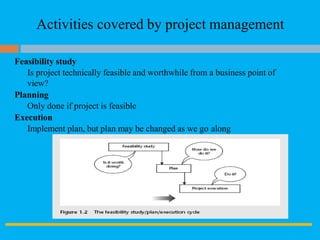
Activities covered by project management
Feasibility study
Is project technically feasible and worthwhile from a business point of
view?
Planning
Only done if project is feasible
Execution
Implement plan, but plan may be changed as we go along
7
ISO 12207 life-cycle
Requirements analysis
 Requirements elicitation: what does the client need?
 Analysis: converting ‘customer-facing’ requirements
equivalents that developers can understand
 Requirements will cover
 Functions, Quality, Resource constraints i.e.costs
 Architecture design
 Based on system requirements
 Defines components of system: hardware, software, organizational
 Software requirements will come out of this
 Code and test
 Of individual components
 Integration
 Putting the components together
8
ISO12207 …
9
 Qualification testing
 Testing the system (not just the software)
 Installation
 The process of making the system operational
 Includes setting up standing data, setting system parameters,
installing on operational hardware platforms, user training etc
 Acceptance support
 Including maintenance and enhancement
Categorization of software projects
10
Distinguishing different types of project is important as
different types of task need different project approaches e.g.
 Information systems versus embedded systems
 Objective-based versus product-based
Stakeholders
These are people who have a stake or interest in the project.
In general, they could be users/clients or evelopers/implementers
They could be:
 Within the project team
 Outside the project team, but within the same organization
 Outside both the project team and the organization
Setting objectives
11
 Answering the question ‘What do we have to do to have a project success?’
 Need for a project authority
 Sets the project scope, Allocates/approves costs
 Could be one person - or a group
 Project Board, Project Management Board, Steering committee
Objectives should be SMART
S – specific, that is, concrete and well-defined
M – measurable, that is, satisfaction of the objective can be objectively judged
A – achievable, that is, it is within the power of the individual or group concerned to
meet the target
R – relevant, the objective must relevant to the true purpose of the project
T – time constrained: there is defined point in time by which the objective should be
achieved
Goals/sub-objectives
12
These are steps along the way to achieving the objective. Informally,
these can be defined by completing the sentence…
Objective X will be achieved
IF the following goals are all
achieved A……………
B……………
C ....................etc
Often a goal can be allocated to an individual.
Individual may have the capability of achieving goal, but not the
objective on their own e.g.
Objective – user satisfaction with software product
Analyst goal – accurate requirements
Developer goal – software that is reliable
Measures of effectiveness
13
How do we know that the goal or objective has been achieved?
By a practical test, that can be objectively assessed.
e.g. for user satisfaction with software product:
 Repeat business – they buy further products from us
 Number of complaints – if low etc etc
What is management?
14
This involves the following activities:
 Planning – deciding what is to be done
 Organizing – making arrangements
 Staffing – selecting the right people for the job
 Directing – giving instructions
 Monitoring – checking on progress
 Controlling – taking action to remedy hold-ups
 Innovating – coming up with solutions when
problems emerge
 Representing – liaising with clients, users, developers
and other stakeholders
Management control
15
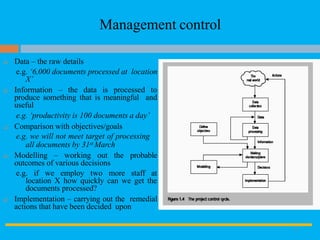
 Data – the raw details
e.g. ‘6,000 documents processed at location
X’
 Information – the data is processed to
produce something that is meaningful and
useful
e.g. ‘productivity is 100 documents a day’
 Comparison with objectives/goals
e.g. we will not meet target of processing
all documents by 31st March
 Modelling – working out the probable
outcomes of various decisions
e.g. if we employ two more staff at
location X how quickly can we get the
documents processed?
 Implementation – carrying out the remedial
actions that have been decided upon
Benefits management
16
developers
the
application
users
us
e
for
buil
d to
deliver
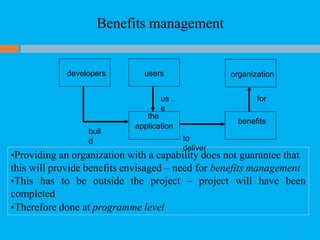
•Providing an organization with a capability does not guarantee that
this will provide benefits envisaged – need for benefits management
•This has to be outside the project – project will have been
completed
•Therefore done at programme level
organization
benefits
Benefits management
17
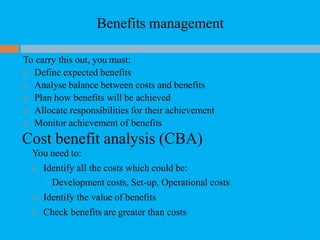
To carry this out, you must:
 Define expected benefits
 Analyse balance between costs and benefits
 Plan how benefits will be achieved
 Allocate responsibilities for their achievement
 Monitor achievement of benefits
Cost benefit analysis (CBA)
You need to:
 Identify all the costs which could be:
Development costs, Set-up, Operational costs
 Identify the value of benefits
 Check benefits are greater than costs
Cost benefit analysis (CBA)/ Cost benefit evaluation
techniques(CBET)
18
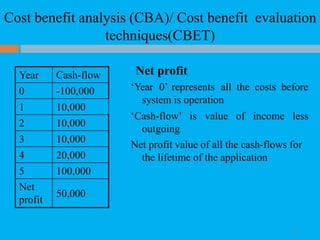
Net profit
‘Year 0’ represents all the costs before
system is operation
‘Cash-flow’ is value of income less
outgoing
Net profit value of all the cash-flows for
the lifetime of the application
Year Cash-flow
0 -100,000
1 10,000
2 10,000
3 10,000
4 20,000
5 100,000
Net
profit
50,000
Cost benefit analysis (CBA)/ Cost benefit evaluation
techniques(CBET)
19
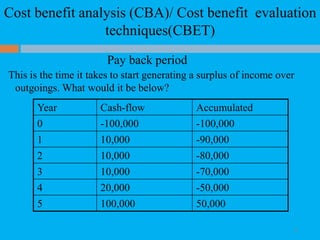
Pay back period
This is the time it takes to start generating a surplus of income over
outgoings. What would it be below?
Year Cash-flow Accumulated
0 -100,000 -100,000
1 10,000 -90,000
2 10,000 -80,000
3 10,000 -70,000
4 20,000 -50,000
5 100,000 50,000
Cost benefit analysis (CBA)/ Cost benefit evaluation
techniques(CBET)
20
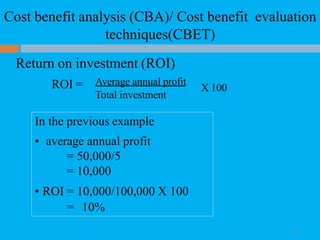
Return on investment (ROI)
ROI = Average annual profit
Total investment
X 100
In the previous example
• average annual profit
= 50,000/5
= 10,000
• ROI = 10,000/100,000 X 100
= 10%
Cost benefit analysis (CBA)/ Cost benefit evaluation
techniques(CBET)
21
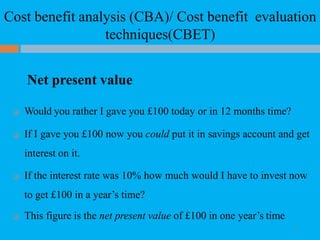
Net present value
 Would you rather I gave you £100 today or in 12 months time?
 If I gave you £100 now you could put it in savings account and get
interest on it.
 If the interest rate was 10% how much would I have to invest now
to get £100 in a year’s time?
 This figure is the net present value of £100 in one year’s time
Cost benefit analysis (CBA)/ Cost benefit evaluation
techniques(CBET)
22
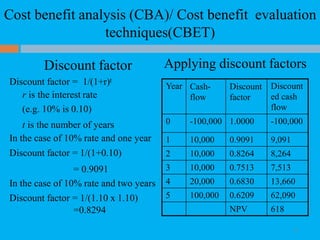
Discount factor
Discount factor = 1/(1+r)t
r is the interest rate
(e.g. 10% is 0.10)
t is the number of years
In the case of 10% rate and one year
Discount factor = 1/(1+0.10)
= 0.9091
In the case of 10% rate and two years
Discount factor = 1/(1.10 x 1.10)
=0.8294
Applying discount factors
Year Cash-
flow
Discount
factor
Discount
ed cash
flow
0 -100,000 1.0000 -100,000
1 10,000 0.9091 9,091
2 10,000 0.8264 8,264
3 10,000 0.7513 7,513
4 20,000 0.6830 13,660
5 100,000 0.6209 62,090
NPV 618
Cost benefit analysis (CBA)/ Cost benefit evaluation
techniques(CBET)
23
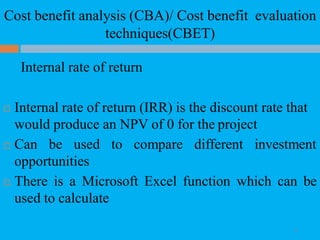
Internal rate of return
 Internal rate of return (IRR) is the discount rate that
would produce an NPV of 0 for the project
 Can be used to compare different investment
opportunities
 There is a Microsoft Excel function which can be
used to calculate
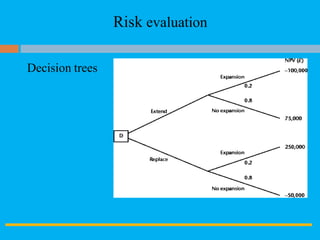
Risk evaluation
24
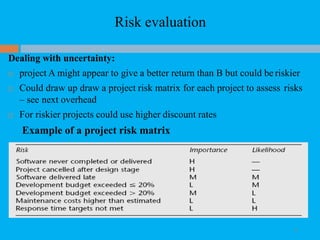
Dealing with uncertainty:
 project A might appear to give a better return than B but could be riskier
 Could draw up draw a project risk matrix for each project to assess risks
– see next overhead
 For riskier projects could use higher discount rates
Example of a project risk matrix
Risk evaluation
Decision trees
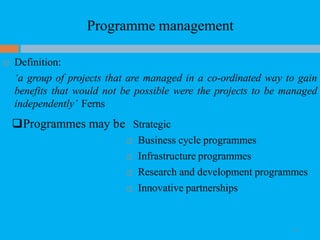
Programme management
26
 Definition:
‘a group of projects that are managed in a co-ordinated way to gain
benefits that would not be possible were the projects to be managed
independently’ Ferns
Programmes may be Strategic
 Business cycle programmes
 Infrastructure programmes
 Research and development programmes
 Innovative partnerships
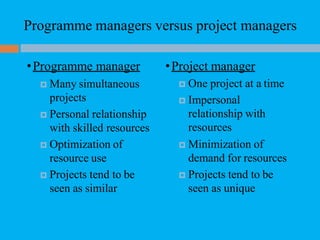
Programme managers versus project managers
•Programme manager
 Many simultaneous
projects
 Personal relationship
with skilled resources
 Optimization of
resource use
 Projects tend to be
seen as similar
•Project manager
 One project at a time
 Impersonal
relationship with
resources
 Minimization of
demand for resources
 Projects tend to be
seen as unique
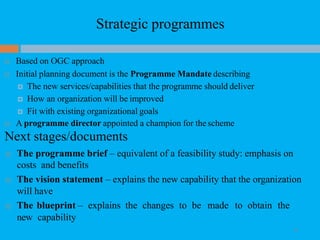
Strategic programmes
28
 Based on OGC approach
 Initial planning document is the Programme Mandate describing
 The new services/capabilities that the programme should deliver
 How an organization will be improved
 Fit with existing organizational goals
 A programme director appointed a champion for the scheme
Next stages/documents
 The programme brief – equivalent of a feasibility study: emphasis on
costs and benefits
 The vision statement – explains the new capability that the organization
will have
 The blueprint – explains the changes to be made to obtain the
new capability
Step Wise Project Planning
29
 Practicality
tries to answer the question ‘what do I do now?’
 Scalability
useful for small project as well as large
 Range of application
 Accepted techniques
e.g. borrowed from PRINCE etc
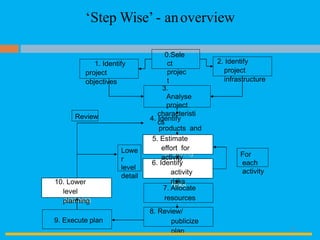
5. Estimate effort
for activity
6. Identify
activity
risks10. Lower
level
planning
0.Sele
ct
projec
t
3.
Analyse
project
characteristi
cs
4. Identify
products and
activities
1. Identify
project
objectives
2. Identify
project
infrastructure
10. Lower
level
planning
6. Identify
activity
risks
9. Execute plan
8. Review/
publicize
plan
7. Allocate
resources
Lowe
r
level
detail
5. Estimate
effort for
activity
‘Step Wise’ - anoverview
Review
For
each
activity
30
A project scenario
 Hardware/software engineering company (C++ language
of choice)
 teams are selected for individual projects - some friction
has been found between team members
 HR manager suggests psychometric testing to select team
 Software package to be used to test staff
 Visual basic suggested as a vehicle for implementation
 usability is important - decision to carry out usability tests
31
Step 1 establish project scope and objectives
 1.1 Identify objectives and measures of effectiveness
 ‘how do we know if we have succeeded?’
 1.2 Establish a project authority
 ‘who is the boss?’
 1.3 Identify all stakeholders in the project and their
interests
 ‘who will be affected/involved in the project?’
 1.4 Modify objectives in the light of stakeholder analysis
 ‘do we need to do things to win over stakeholders?’
 1.5 Establish methods of communication with all parties
 ‘how do we keep in contact?’
32
Back to the scenario
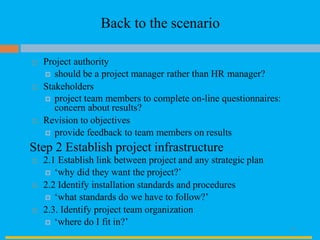
 Project authority
 should be a project manager rather than HR manager?
 Stakeholders
 project team members to complete on-line questionnaires:
concern about results?
 Revision to objectives
 provide feedback to team members on results
Step 2 Establish project infrastructure
 2.1 Establish link between project and any strategic plan
 ‘why did they want the project?’
 2.2 Identify installation standards and procedures
 ‘what standards do we have to follow?’
 2.3. Identify project team organization
 ‘where do I fit in?’
33
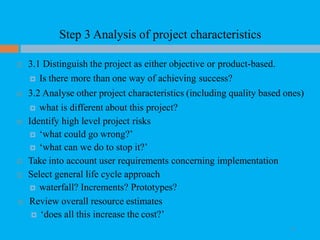
Step 3 Analysis of project characteristics
 3.1 Distinguish the project as either objective or product-based.
 Is there more than one way of achieving success?
 3.2 Analyse other project characteristics (including quality based ones)
 what is different about this project?
 Identify high level project risks
 ‘what could go wrong?’
 ‘what can we do to stop it?’
 Take into account user requirements concerning implementation
 Select general life cycle approach
 waterfall? Increments? Prototypes?
 Review overall resource estimates
 ‘does all this increase the cost?’
34
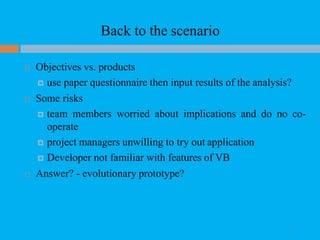
Back to the scenario
 Objectives vs. products
 use paper questionnaire then input results of the analysis?
 Some risks
 team members worried about implications and do no co-
operate
 project managers unwilling to try out application
 Developer not familiar with features of VB
 Answer? - evolutionary prototype?
35
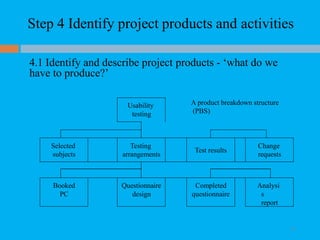
Step 4 Identify project products and activities
4.1 Identify and describe project products - ‘what do we
have to produce?’
Usability
testing
A product breakdown structure
(PBS)
Selected
subjects
Testing
arrangements
Test results
Change
requests
Booked
PC
Questionnaire
design
Completed
questionnaire
Analysi
s
report
36
Products
 The result of an activity
 Could be (among other things)
 physical thing (‘installed pc’),
 a document (‘logical data structure’)
 a person (‘trained user’)
 a new version of an old product (‘updated software’)
 The following are NOT normally products:
 activities (e.g. ‘training’)
 events (e.g. ‘interviews completed’)
 resources and actors (e.g. ‘software developer’) - may be
exceptions to this
 Products CAN BE deliverable or intermediate
37
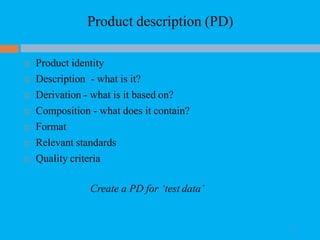
Product description (PD)
 Product identity
 Description - what is it?
 Derivation - what is it based on?
 Composition - what does it contain?
 Format
 Relevant standards
 Quality criteria
Create a PD for ‘test data’
38
Step 4 continued
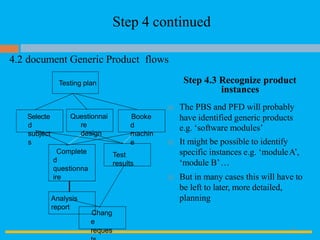
4.2 document Generic Product flows
Step 4.3 Recognize product
instances
Selecte
d
subject
s
Questionnai
re
design
Booke
d
machin
e
Test
results
 The PBS and PFD will probably
have identified generic products
e.g. ‘software modules’
 It might be possible to identify
specific instances e.g. ‘moduleA’,
‘module B’…
 But in many cases this will have to
be left to later, more detailed,
planning
Chang
e
reques
Testing plan
Complete
d
questionna
ire
Analysis
report
39
Book
machine
Plan
testing
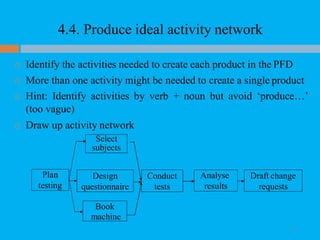
4.4. Produce ideal activity network
 Identify the activities needed to create each product in the PFD
 More than one activity might be needed to create a single product
 Hint: Identify activities by verb + noun but avoid ‘produce…’
(too vague)
 Draw up activity network
Conduct
tests
Design
questionnaire
Select
subjects
Analyse
results
Draft change
requests
40
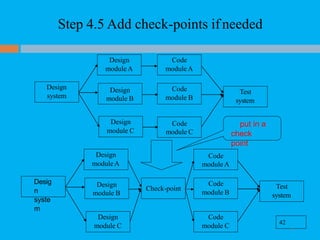
Step 4.5 Add check-points ifneeded
Design
module B
Code
module C
put in a
check
point
Code
module A
Design
module B
42
Code
module C
Design
module C
Test
system
Code
module B
Check-point
Desig
n
syste
m
Design
module A
Design
module C
Test
system
Code
module B
Design
system
Code
module A
Design
module A
41
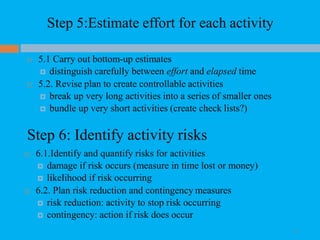
Step 5:Estimate effort for each activity
42
 5.1 Carry out bottom-up estimates
 distinguish carefully between effort and elapsed time
 5.2. Revise plan to create controllable activities
 break up very long activities into a series of smaller ones
 bundle up very short activities (create check lists?)
Step 6: Identify activity risks
 6.1.Identify and quantify risks for activities
 damage if risk occurs (measure in time lost or money)
 likelihood if risk occurring
 6.2. Plan risk reduction and contingency measures
 risk reduction: activity to stop risk occurring
 contingency: action if risk does occur
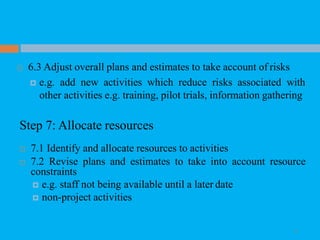
 6.3 Adjust overall plans and estimates to take account of risks
 e.g. add new activities which reduce risks associated with
other activities e.g. training, pilot trials, information gathering
Step 7: Allocate resources
 7.1 Identify and allocate resources to activities
 7.2 Revise plans and estimates to take into account resource
constraints
 e.g. staff not being available until a later date
 non-project activities
43
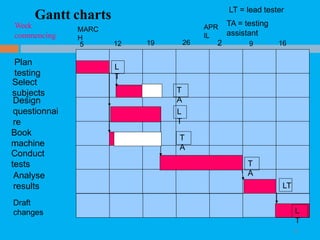
Week
Gantt charts
44
MARC
H
APR
IL
LT = lead tester
TA = testing
assistantcommencing
Plan
testing
Select
subjects
Design
questionnai
re
Book
machine
Conduct
tests
Analyse
results
5 12 19 26
L
T
T
A
L
T
T
A
2 9 16
T
A
Draft
changes L
T
LT
Step 8: Review/publicize plan
45
 8.1 Review quality aspects of project plan
 8.2 Document plan and obtain agreement
Step 9 and 10: Execute plan and create
lower level plans

Software Project Management

  • 1.
    IT8075 SOFTWARE PROJECTMANAGEMENT UNIT – I
  • 2.
    UNIT I PROJECT EVALUATIONAND PROJECT PLANNING • Importance of Software Project Management – Activities Methodologies – Categorization of Software Projects – Setting objectives – Management Principles – Management Control – Project portfolio Management – Cost-benefit evaluation technology – Risk evaluation – Strategic program Management – Stepwise Project Planning. TEXT BOOK Bob Hughes, Mike Cotterell and Rajib Mall: Software Project Management – Fifth Edition, Tata McGraw Hill, New Delhi, 2012. 2
  • 3.
    An Introduction What isa project? Some dictionary definitions:  “A specific plan or design”  “A planned undertaking”  “A large undertaking e.g. a public works scheme” Key points above are planning and size of task 3
  • 4.
    Jobs versus projects ‘Jobs’ – repetition of very well-defined and well understood tasks with very little uncertainty  ‘Exploration’ – e.g. finding a cure for cancer: the outcomeis very uncertain  ‘Projects’ – in themiddle! 4
  • 5.
    Characteristics of projects Non-routine  Planned  Aiming at a specific target  Work carried out for a customer  Involving several specialisms  Made up of several different phases  Constrained by time and resources  Large and/or complex 5
  • 6.
    Are software projectsreally different from other projects? Not really! …but…  Invisibility  Complexity  Conformity  Flexibility make software more problematic to build than other engineered products. 6
  • 7.
    Activities covered byproject management Feasibility study Is project technically feasible and worthwhile from a business point of view? Planning Only done if project is feasible Execution Implement plan, but plan may be changed as we go along 7
  • 8.
    ISO 12207 life-cycle Requirementsanalysis  Requirements elicitation: what does the client need?  Analysis: converting ‘customer-facing’ requirements equivalents that developers can understand  Requirements will cover  Functions, Quality, Resource constraints i.e.costs  Architecture design  Based on system requirements  Defines components of system: hardware, software, organizational  Software requirements will come out of this  Code and test  Of individual components  Integration  Putting the components together 8
  • 9.
    ISO12207 … 9  Qualificationtesting  Testing the system (not just the software)  Installation  The process of making the system operational  Includes setting up standing data, setting system parameters, installing on operational hardware platforms, user training etc  Acceptance support  Including maintenance and enhancement
  • 10.
    Categorization of softwareprojects 10 Distinguishing different types of project is important as different types of task need different project approaches e.g.  Information systems versus embedded systems  Objective-based versus product-based Stakeholders These are people who have a stake or interest in the project. In general, they could be users/clients or evelopers/implementers They could be:  Within the project team  Outside the project team, but within the same organization  Outside both the project team and the organization
  • 11.
    Setting objectives 11  Answeringthe question ‘What do we have to do to have a project success?’  Need for a project authority  Sets the project scope, Allocates/approves costs  Could be one person - or a group  Project Board, Project Management Board, Steering committee Objectives should be SMART S – specific, that is, concrete and well-defined M – measurable, that is, satisfaction of the objective can be objectively judged A – achievable, that is, it is within the power of the individual or group concerned to meet the target R – relevant, the objective must relevant to the true purpose of the project T – time constrained: there is defined point in time by which the objective should be achieved
  • 12.
    Goals/sub-objectives 12 These are stepsalong the way to achieving the objective. Informally, these can be defined by completing the sentence… Objective X will be achieved IF the following goals are all achieved A…………… B…………… C ....................etc Often a goal can be allocated to an individual. Individual may have the capability of achieving goal, but not the objective on their own e.g. Objective – user satisfaction with software product Analyst goal – accurate requirements Developer goal – software that is reliable
  • 13.
    Measures of effectiveness 13 Howdo we know that the goal or objective has been achieved? By a practical test, that can be objectively assessed. e.g. for user satisfaction with software product:  Repeat business – they buy further products from us  Number of complaints – if low etc etc
  • 14.
    What is management? 14 Thisinvolves the following activities:  Planning – deciding what is to be done  Organizing – making arrangements  Staffing – selecting the right people for the job  Directing – giving instructions  Monitoring – checking on progress  Controlling – taking action to remedy hold-ups  Innovating – coming up with solutions when problems emerge  Representing – liaising with clients, users, developers and other stakeholders
  • 15.
    Management control 15  Data– the raw details e.g. ‘6,000 documents processed at location X’  Information – the data is processed to produce something that is meaningful and useful e.g. ‘productivity is 100 documents a day’  Comparison with objectives/goals e.g. we will not meet target of processing all documents by 31st March  Modelling – working out the probable outcomes of various decisions e.g. if we employ two more staff at location X how quickly can we get the documents processed?  Implementation – carrying out the remedial actions that have been decided upon
  • 16.
    Benefits management 16 developers the application users us e for buil d to deliver •Providingan organization with a capability does not guarantee that this will provide benefits envisaged – need for benefits management •This has to be outside the project – project will have been completed •Therefore done at programme level organization benefits
  • 17.
    Benefits management 17 To carrythis out, you must:  Define expected benefits  Analyse balance between costs and benefits  Plan how benefits will be achieved  Allocate responsibilities for their achievement  Monitor achievement of benefits Cost benefit analysis (CBA) You need to:  Identify all the costs which could be: Development costs, Set-up, Operational costs  Identify the value of benefits  Check benefits are greater than costs
  • 18.
    Cost benefit analysis(CBA)/ Cost benefit evaluation techniques(CBET) 18 Net profit ‘Year 0’ represents all the costs before system is operation ‘Cash-flow’ is value of income less outgoing Net profit value of all the cash-flows for the lifetime of the application Year Cash-flow 0 -100,000 1 10,000 2 10,000 3 10,000 4 20,000 5 100,000 Net profit 50,000
  • 19.
    Cost benefit analysis(CBA)/ Cost benefit evaluation techniques(CBET) 19 Pay back period This is the time it takes to start generating a surplus of income over outgoings. What would it be below? Year Cash-flow Accumulated 0 -100,000 -100,000 1 10,000 -90,000 2 10,000 -80,000 3 10,000 -70,000 4 20,000 -50,000 5 100,000 50,000
  • 20.
    Cost benefit analysis(CBA)/ Cost benefit evaluation techniques(CBET) 20 Return on investment (ROI) ROI = Average annual profit Total investment X 100 In the previous example • average annual profit = 50,000/5 = 10,000 • ROI = 10,000/100,000 X 100 = 10%
  • 21.
    Cost benefit analysis(CBA)/ Cost benefit evaluation techniques(CBET) 21 Net present value  Would you rather I gave you £100 today or in 12 months time?  If I gave you £100 now you could put it in savings account and get interest on it.  If the interest rate was 10% how much would I have to invest now to get £100 in a year’s time?  This figure is the net present value of £100 in one year’s time
  • 22.
    Cost benefit analysis(CBA)/ Cost benefit evaluation techniques(CBET) 22 Discount factor Discount factor = 1/(1+r)t r is the interest rate (e.g. 10% is 0.10) t is the number of years In the case of 10% rate and one year Discount factor = 1/(1+0.10) = 0.9091 In the case of 10% rate and two years Discount factor = 1/(1.10 x 1.10) =0.8294 Applying discount factors Year Cash- flow Discount factor Discount ed cash flow 0 -100,000 1.0000 -100,000 1 10,000 0.9091 9,091 2 10,000 0.8264 8,264 3 10,000 0.7513 7,513 4 20,000 0.6830 13,660 5 100,000 0.6209 62,090 NPV 618
  • 23.
    Cost benefit analysis(CBA)/ Cost benefit evaluation techniques(CBET) 23 Internal rate of return  Internal rate of return (IRR) is the discount rate that would produce an NPV of 0 for the project  Can be used to compare different investment opportunities  There is a Microsoft Excel function which can be used to calculate
  • 24.
    Risk evaluation 24 Dealing withuncertainty:  project A might appear to give a better return than B but could be riskier  Could draw up draw a project risk matrix for each project to assess risks – see next overhead  For riskier projects could use higher discount rates Example of a project risk matrix
  • 25.
  • 26.
    Programme management 26  Definition: ‘agroup of projects that are managed in a co-ordinated way to gain benefits that would not be possible were the projects to be managed independently’ Ferns Programmes may be Strategic  Business cycle programmes  Infrastructure programmes  Research and development programmes  Innovative partnerships
  • 27.
    Programme managers versusproject managers •Programme manager  Many simultaneous projects  Personal relationship with skilled resources  Optimization of resource use  Projects tend to be seen as similar •Project manager  One project at a time  Impersonal relationship with resources  Minimization of demand for resources  Projects tend to be seen as unique
  • 28.
    Strategic programmes 28  Basedon OGC approach  Initial planning document is the Programme Mandate describing  The new services/capabilities that the programme should deliver  How an organization will be improved  Fit with existing organizational goals  A programme director appointed a champion for the scheme Next stages/documents  The programme brief – equivalent of a feasibility study: emphasis on costs and benefits  The vision statement – explains the new capability that the organization will have  The blueprint – explains the changes to be made to obtain the new capability
  • 29.
    Step Wise ProjectPlanning 29  Practicality tries to answer the question ‘what do I do now?’  Scalability useful for small project as well as large  Range of application  Accepted techniques e.g. borrowed from PRINCE etc
  • 30.
    5. Estimate effort foractivity 6. Identify activity risks10. Lower level planning 0.Sele ct projec t 3. Analyse project characteristi cs 4. Identify products and activities 1. Identify project objectives 2. Identify project infrastructure 10. Lower level planning 6. Identify activity risks 9. Execute plan 8. Review/ publicize plan 7. Allocate resources Lowe r level detail 5. Estimate effort for activity ‘Step Wise’ - anoverview Review For each activity 30
  • 31.
    A project scenario Hardware/software engineering company (C++ language of choice)  teams are selected for individual projects - some friction has been found between team members  HR manager suggests psychometric testing to select team  Software package to be used to test staff  Visual basic suggested as a vehicle for implementation  usability is important - decision to carry out usability tests 31
  • 32.
    Step 1 establishproject scope and objectives  1.1 Identify objectives and measures of effectiveness  ‘how do we know if we have succeeded?’  1.2 Establish a project authority  ‘who is the boss?’  1.3 Identify all stakeholders in the project and their interests  ‘who will be affected/involved in the project?’  1.4 Modify objectives in the light of stakeholder analysis  ‘do we need to do things to win over stakeholders?’  1.5 Establish methods of communication with all parties  ‘how do we keep in contact?’ 32
  • 33.
    Back to thescenario  Project authority  should be a project manager rather than HR manager?  Stakeholders  project team members to complete on-line questionnaires: concern about results?  Revision to objectives  provide feedback to team members on results Step 2 Establish project infrastructure  2.1 Establish link between project and any strategic plan  ‘why did they want the project?’  2.2 Identify installation standards and procedures  ‘what standards do we have to follow?’  2.3. Identify project team organization  ‘where do I fit in?’ 33
  • 34.
    Step 3 Analysisof project characteristics  3.1 Distinguish the project as either objective or product-based.  Is there more than one way of achieving success?  3.2 Analyse other project characteristics (including quality based ones)  what is different about this project?  Identify high level project risks  ‘what could go wrong?’  ‘what can we do to stop it?’  Take into account user requirements concerning implementation  Select general life cycle approach  waterfall? Increments? Prototypes?  Review overall resource estimates  ‘does all this increase the cost?’ 34
  • 35.
    Back to thescenario  Objectives vs. products  use paper questionnaire then input results of the analysis?  Some risks  team members worried about implications and do no co- operate  project managers unwilling to try out application  Developer not familiar with features of VB  Answer? - evolutionary prototype? 35
  • 36.
    Step 4 Identifyproject products and activities 4.1 Identify and describe project products - ‘what do we have to produce?’ Usability testing A product breakdown structure (PBS) Selected subjects Testing arrangements Test results Change requests Booked PC Questionnaire design Completed questionnaire Analysi s report 36
  • 37.
    Products  The resultof an activity  Could be (among other things)  physical thing (‘installed pc’),  a document (‘logical data structure’)  a person (‘trained user’)  a new version of an old product (‘updated software’)  The following are NOT normally products:  activities (e.g. ‘training’)  events (e.g. ‘interviews completed’)  resources and actors (e.g. ‘software developer’) - may be exceptions to this  Products CAN BE deliverable or intermediate 37
  • 38.
    Product description (PD) Product identity  Description - what is it?  Derivation - what is it based on?  Composition - what does it contain?  Format  Relevant standards  Quality criteria Create a PD for ‘test data’ 38
  • 39.
    Step 4 continued 4.2document Generic Product flows Step 4.3 Recognize product instances Selecte d subject s Questionnai re design Booke d machin e Test results  The PBS and PFD will probably have identified generic products e.g. ‘software modules’  It might be possible to identify specific instances e.g. ‘moduleA’, ‘module B’…  But in many cases this will have to be left to later, more detailed, planning Chang e reques Testing plan Complete d questionna ire Analysis report 39
  • 40.
    Book machine Plan testing 4.4. Produce idealactivity network  Identify the activities needed to create each product in the PFD  More than one activity might be needed to create a single product  Hint: Identify activities by verb + noun but avoid ‘produce…’ (too vague)  Draw up activity network Conduct tests Design questionnaire Select subjects Analyse results Draft change requests 40
  • 41.
    Step 4.5 Addcheck-points ifneeded Design module B Code module C put in a check point Code module A Design module B 42 Code module C Design module C Test system Code module B Check-point Desig n syste m Design module A Design module C Test system Code module B Design system Code module A Design module A 41
  • 42.
    Step 5:Estimate effortfor each activity 42  5.1 Carry out bottom-up estimates  distinguish carefully between effort and elapsed time  5.2. Revise plan to create controllable activities  break up very long activities into a series of smaller ones  bundle up very short activities (create check lists?) Step 6: Identify activity risks  6.1.Identify and quantify risks for activities  damage if risk occurs (measure in time lost or money)  likelihood if risk occurring  6.2. Plan risk reduction and contingency measures  risk reduction: activity to stop risk occurring  contingency: action if risk does occur
  • 43.
     6.3 Adjustoverall plans and estimates to take account of risks  e.g. add new activities which reduce risks associated with other activities e.g. training, pilot trials, information gathering Step 7: Allocate resources  7.1 Identify and allocate resources to activities  7.2 Revise plans and estimates to take into account resource constraints  e.g. staff not being available until a later date  non-project activities 43
  • 44.
    Week Gantt charts 44 MARC H APR IL LT =lead tester TA = testing assistantcommencing Plan testing Select subjects Design questionnai re Book machine Conduct tests Analyse results 5 12 19 26 L T T A L T T A 2 9 16 T A Draft changes L T LT
  • 45.
    Step 8: Review/publicizeplan 45  8.1 Review quality aspects of project plan  8.2 Document plan and obtain agreement Step 9 and 10: Execute plan and create lower level plans