Matlab:Image Restoration Techniques
Removing Noise By Linear FilteringLinear filters, such as averaging or Gaussian filters can be used to remove certain types of noise. An averaging filter is useful for removing grain noise from a photograph. Because each pixel gets set to the average of the pixels in its neighborhood, local variations caused by grain are reduced.
Removing Noise By Median FilteringWith median filtering, the value of an output pixel is determined by the median of the neighborhood pixels, rather than the mean. The median is much less sensitive than the mean to extreme values (called outliers). Median filtering is therefore better able to remove these outliers without reducing the sharpness of the image.
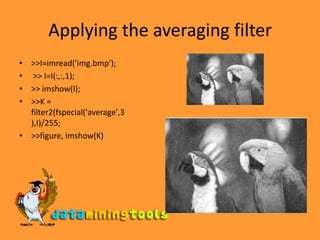
Applying the averaging filter>>I=imread('img.bmp'); >> I=I(:,:,1);>> imshow(I);>>K = filter2(fspecial('average',3),I)/255;>>figure, imshow(K)
Applying the median filter>>I=imread('img.bmp'); >> I=I(:,:,1);>> imshow(I);>> L = medfilt2(I,[3 3]);>>figure, imshow(L)
Rectifying background illuminationStep 1: Read ImageStep 2: Use Morphological Opening to Estimate the BackgroundStep 3: View the Background Approximation as a SurfaceStep 4: Subtract the Background Image from the Original Image
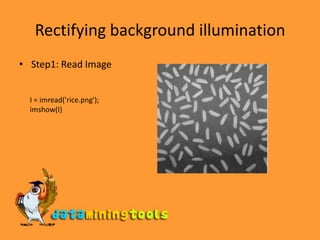
Rectifying background illuminationStep1: Read ImageI = imread('rice.png'); imshow(I)
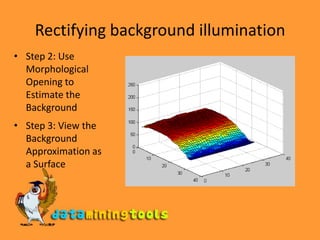
Rectifying background illuminationStep 2: Use Morphological Opening to Estimate the Background>>background = imopen(I,strel('disk',15));>>figure, surf(double(background(1:8:end,1:8:end))),zlim([0 255]); set(gca,'ydir','reverse');Step 3: View the Background Approximation as a SurfaceRectifying background illuminationStep 2: Use Morphological Opening to Estimate the BackgroundStep 3: View the Background Approximation as a SurfaceRectifying background illuminationStep 4: Subtract the Background Image from the Original ImageI2 = I - background; imshow(I2)
Matlab Image Restoration Techniques

Matlab Image Restoration Techniques

  • 1.
  • 2.
    Removing Noise ByLinear FilteringLinear filters, such as averaging or Gaussian filters can be used to remove certain types of noise. An averaging filter is useful for removing grain noise from a photograph. Because each pixel gets set to the average of the pixels in its neighborhood, local variations caused by grain are reduced.
  • 3.
    Removing Noise ByMedian FilteringWith median filtering, the value of an output pixel is determined by the median of the neighborhood pixels, rather than the mean. The median is much less sensitive than the mean to extreme values (called outliers). Median filtering is therefore better able to remove these outliers without reducing the sharpness of the image.
  • 4.
    Applying the averagingfilter>>I=imread('img.bmp'); >> I=I(:,:,1);>> imshow(I);>>K = filter2(fspecial('average',3),I)/255;>>figure, imshow(K)
  • 5.
    Applying the medianfilter>>I=imread('img.bmp'); >> I=I(:,:,1);>> imshow(I);>> L = medfilt2(I,[3 3]);>>figure, imshow(L)
  • 6.
    Rectifying background illuminationStep1: Read ImageStep 2: Use Morphological Opening to Estimate the BackgroundStep 3: View the Background Approximation as a SurfaceStep 4: Subtract the Background Image from the Original Image
  • 7.
    Rectifying background illuminationStep1:Read ImageI = imread('rice.png'); imshow(I)
  • 8.
    Rectifying background illuminationStep2: Use Morphological Opening to Estimate the Background>>background = imopen(I,strel('disk',15));>>figure, surf(double(background(1:8:end,1:8:end))),zlim([0 255]); set(gca,'ydir','reverse');Step 3: View the Background Approximation as a SurfaceRectifying background illuminationStep 2: Use Morphological Opening to Estimate the BackgroundStep 3: View the Background Approximation as a SurfaceRectifying background illuminationStep 4: Subtract the Background Image from the Original ImageI2 = I - background; imshow(I2)