
IS 139
Lecture 2
(Introduction – Part 2)
Introduction
The Computer Level Hierarchy
 Computers consist of many things besides
chips.
 Before a computer can do anything worthwhile,
it must also use software.
 Writing complex programs requires a “divide
and conquer” approach, where each program
module solves a smaller problem.
 Complex computer systems employ a similar
technique through a series of virtual machine
layers.
2
The Computer Level Hierarchy
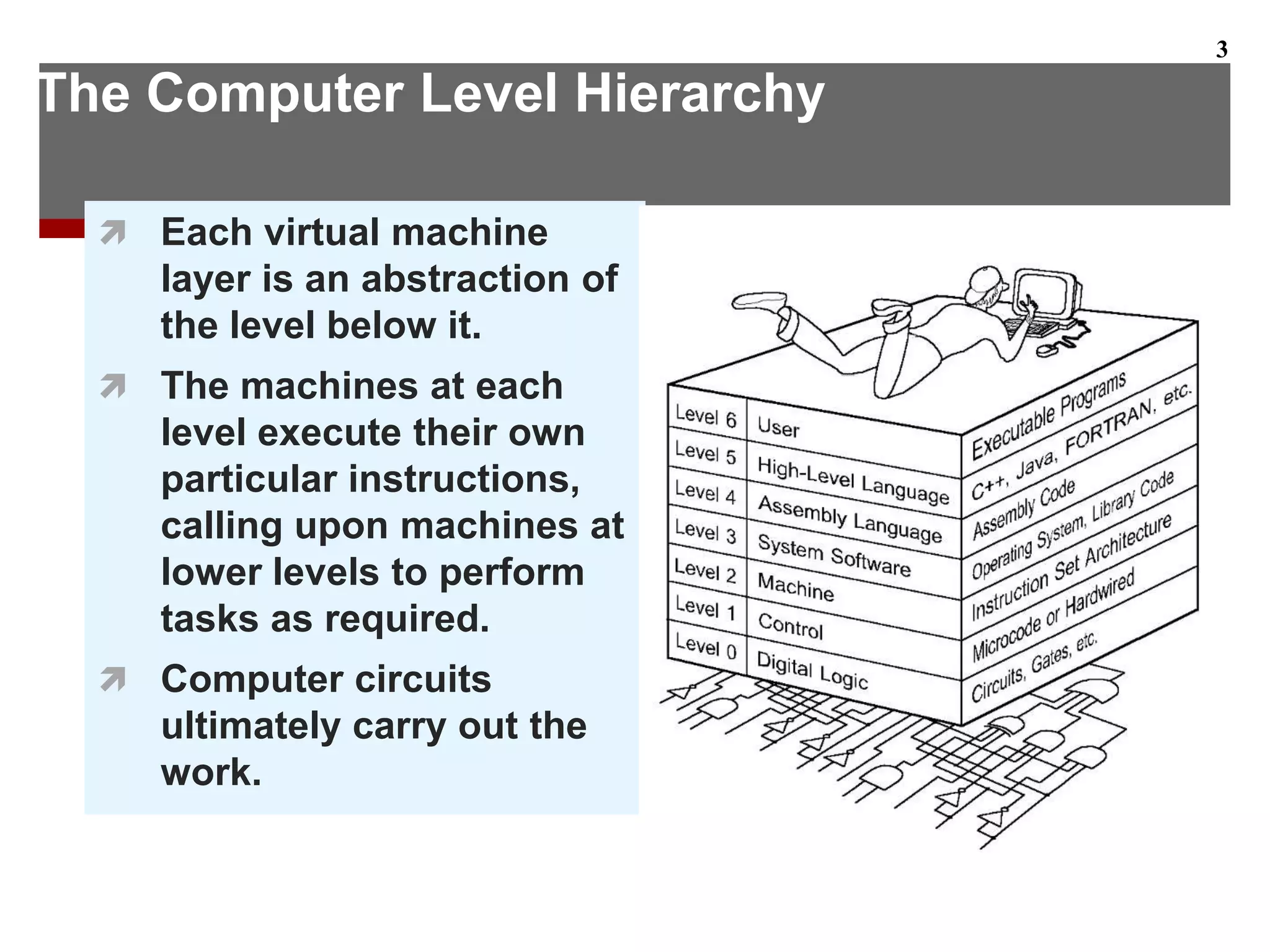
 Each virtual machine
layer is an abstraction of
the level below it.
 The machines at each
level execute their own
particular instructions,
calling upon machines at
lower levels to perform
tasks as required.
 Computer circuits
ultimately carry out the
work.
3
The Computer Level Hierarchy
 Level 6: The User Level
 Program execution and user interface level.
 The level with which we are most familiar.
 Level 5: High-Level Language Level
 The level with which we interact when we write
programs in languages such as C, Pascal, Lisp, and
Java.
4
The Computer Level Hierarchy
 Level 4: Assembly Language Level
 Acts upon assembly language produced from
Level 5, as well as instructions programmed
directly at this level.
 Level 3: System Software Level
 Controls executing processes on the system.
 Protects system resources.
 Assembly language instructions often pass
through Level 3 without modification.
5
The Computer Level Hierarchy
 Level 2: Machine Level
 Also known as the Instruction Set Architecture
(ISA) Level.
 Consists of instructions that are particular to the
architecture of the machine.
 Programs written in machine language need no
compilers, interpreters, or assemblers.
6
The Computer Level Hierarchy
 Level 1: Control Level
 A control unit decodes and executes instructions
and moves data through the system.
 Control units can be microprogrammed or
hardwired.
 A microprogram is a program written in a low-
level language that is implemented by the
hardware.
 Hardwired control units consist of hardware that
directly executes machine instructions.
7
The Computer Level Hierarchy
 Level 0: Digital Logic Level
 This level is where we find digital circuits (the
chips).
 Digital circuits consist of gates and wires.
 These components implement the mathematical
logic of all other levels.
8
The von Neumann Model
 On the ENIAC, all programming was done at
the digital logic level.
 Programming the computer involved moving
plugs and wires.
 A different hardware configuration was needed
to solve every unique problem type.
9
Configuring the ENIAC to solve a “simple” problem
required many days labor by skilled technicians.
The von Neumann Model
 Inventors of the ENIAC, John Mauchley and
J. Presper Eckert, conceived of a computer
that could store instructions in memory.
 The invention of this idea has since been
ascribed to a mathematician, John von
Neumann, who was a contemporary of
Mauchley and Eckert.
 Stored-program computers have become
known as von Neumann Architecture
systems.
10
The von Neumann Model
 Properties of a von Neumann architecture
 Data & Instructions are stored in the same
memory – are only distinguishable through
usage
 Only a single memory space – accessed
sequentially
 Memory is one dimensional
 Meaning of data is not stored with it
11
The von Neumann Model
 Today’s stored-program computers have the
following characteristics:
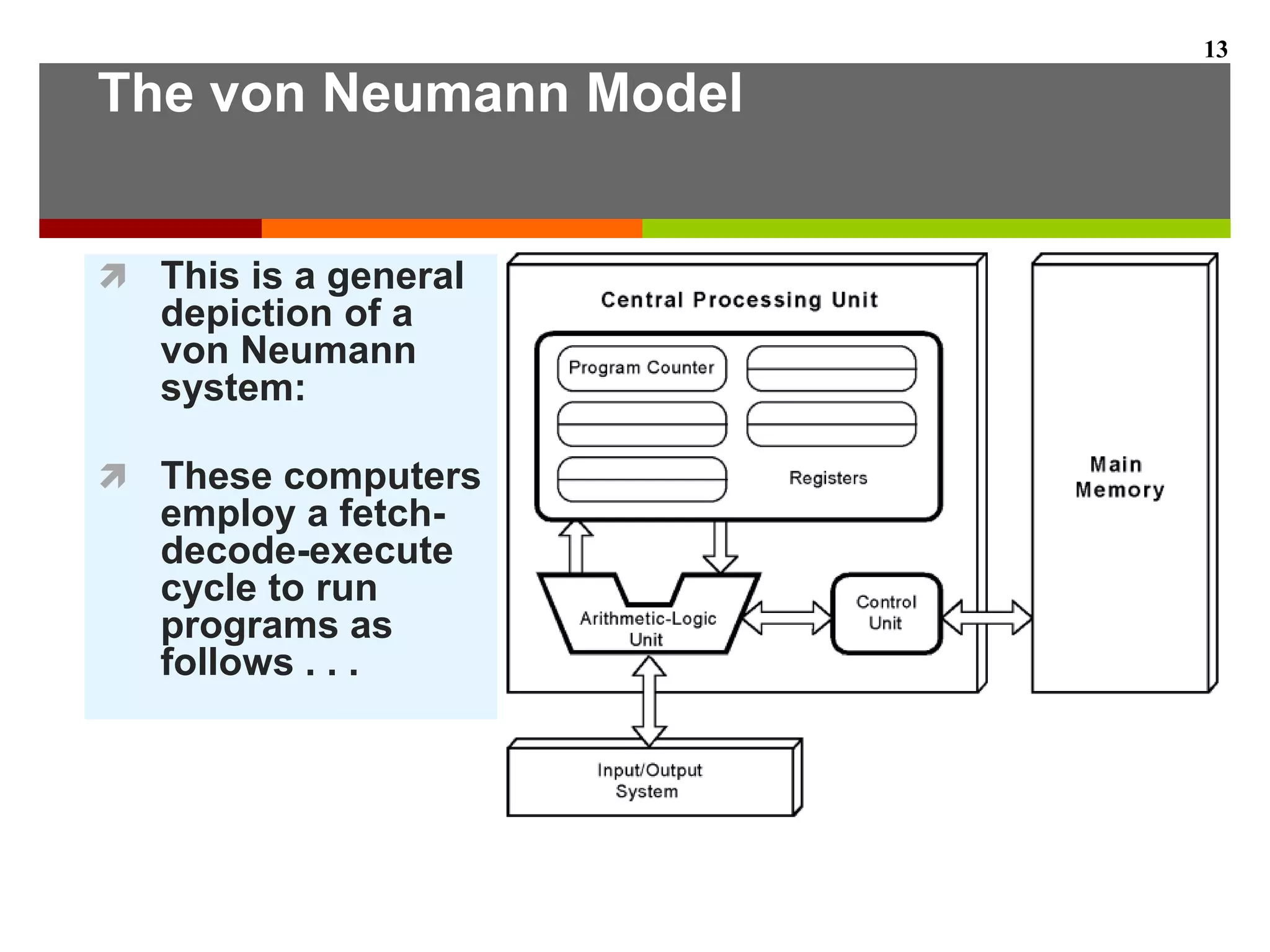
 Three hardware systems:
 A central processing unit (CPU)
 A main memory system
 An I/O system
 The capacity to carry out sequential instruction
processing.
 A single data path between the CPU and main
memory.
 This single path is known as the von Neumann
bottleneck.
12
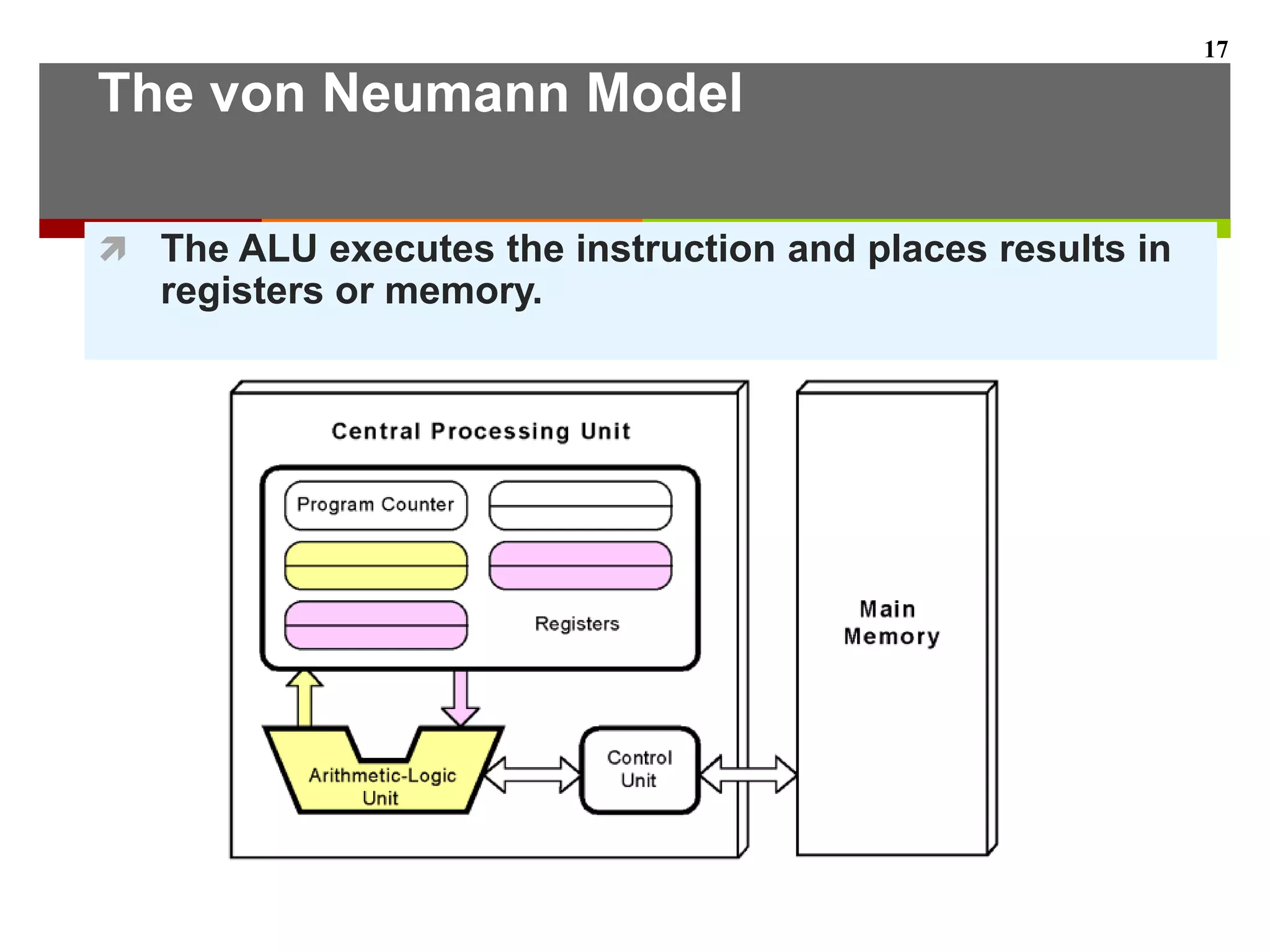
The von Neumann Model
 This is a general
depiction of a
von Neumann
system:
 These computers
employ a fetch-
decode-execute
cycle to run
programs as
follows . . .
13
The von Neumann Model
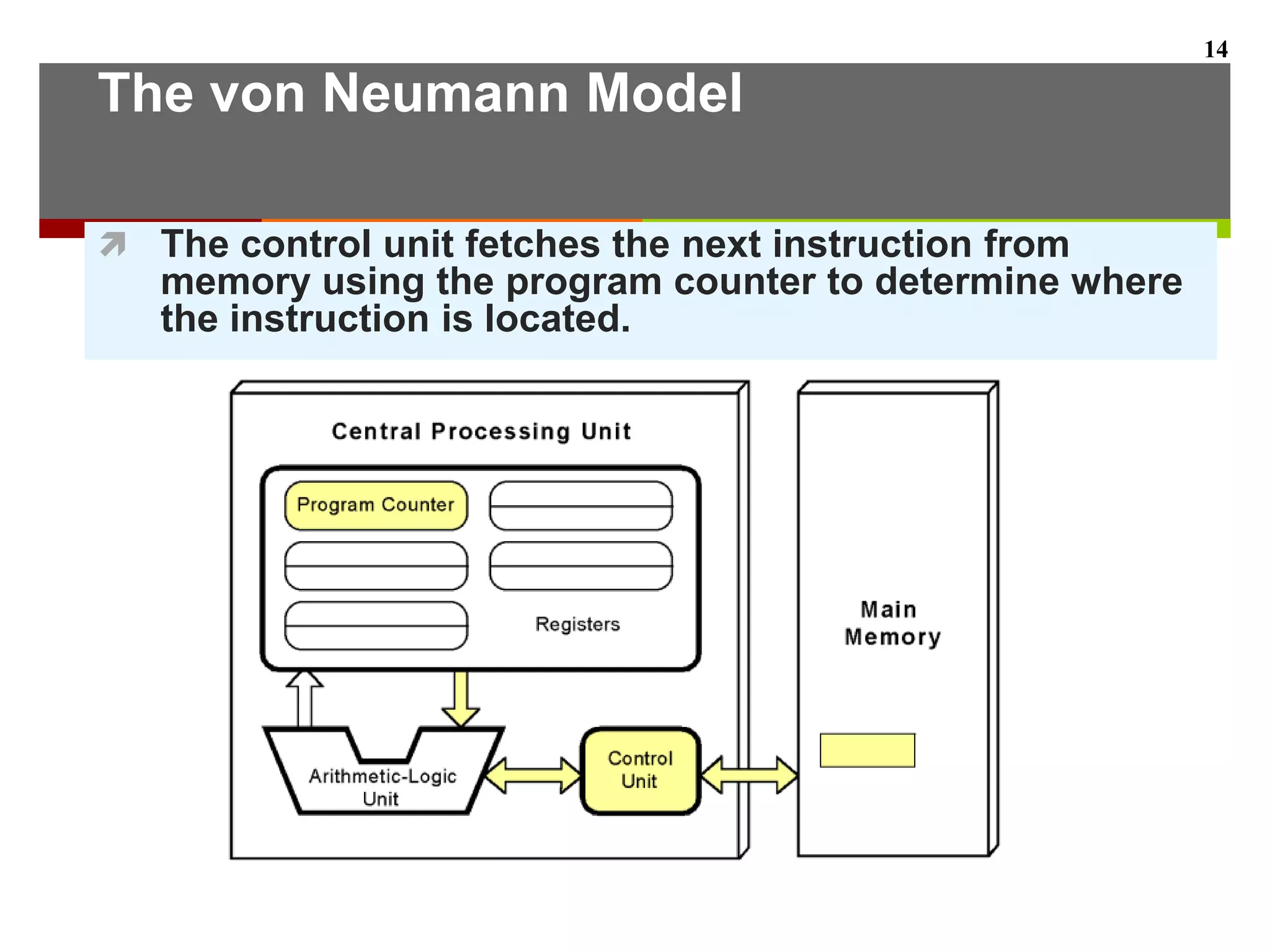
 The control unit fetches the next instruction from
memory using the program counter to determine where
the instruction is located.
14
The von Neumann Model
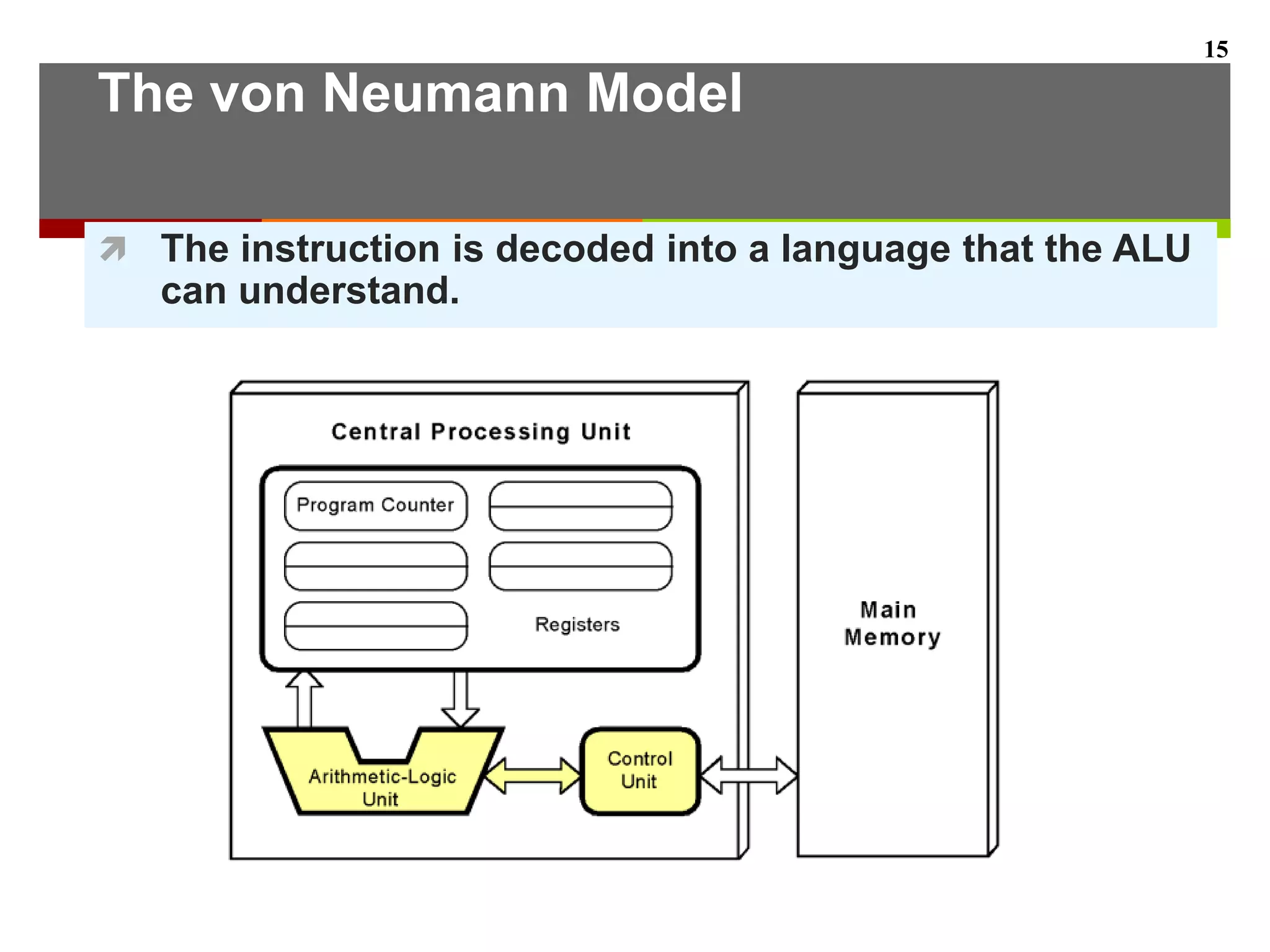
 The instruction is decoded into a language that the ALU
can understand.
15
The von Neumann Model
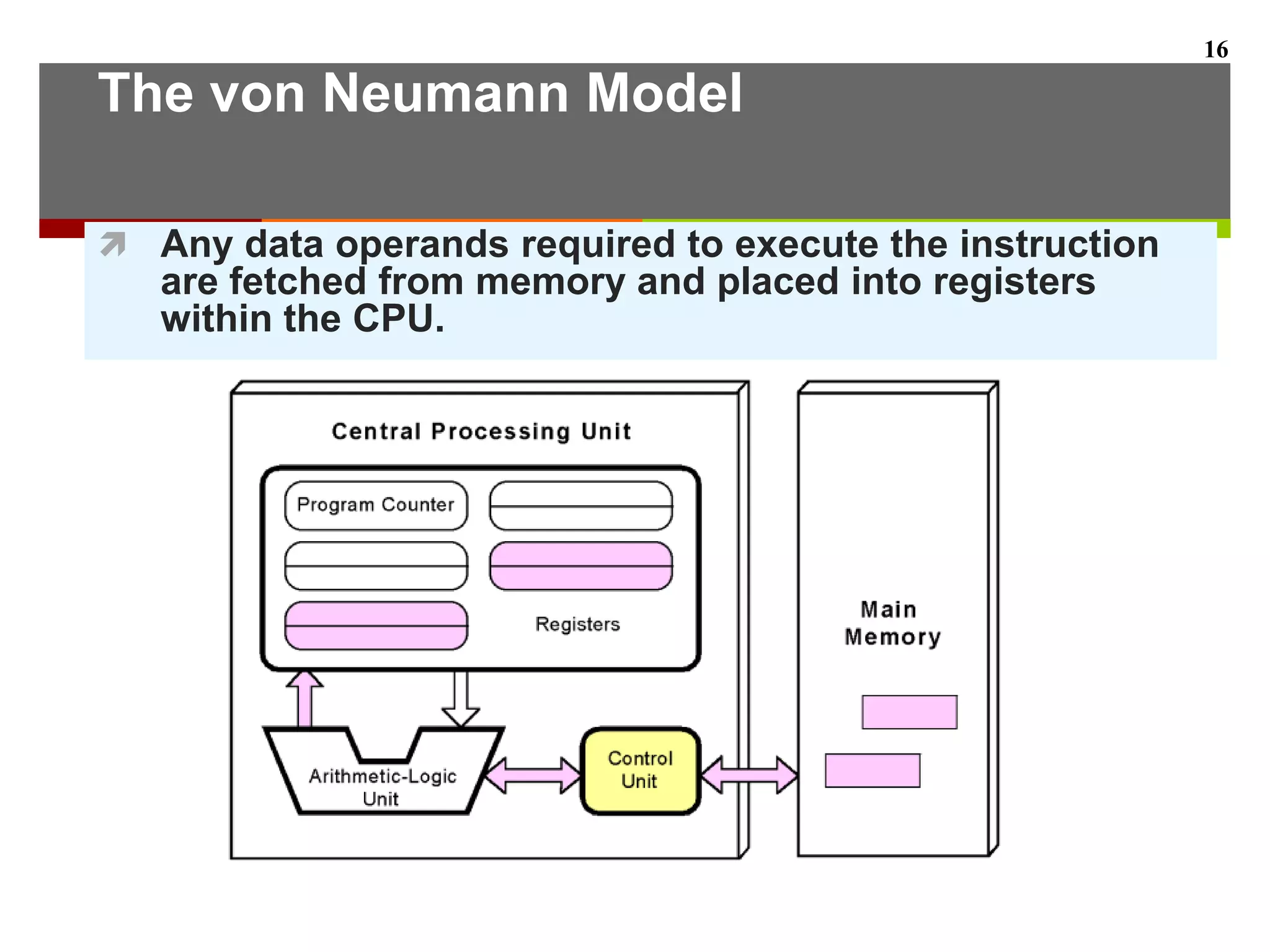
 Any data operands required to execute the instruction
are fetched from memory and placed into registers
within the CPU.
16
The von Neumann Model
 The ALU executes the instruction and places results in
registers or memory.
17
von Neumann Models -
Improvements
 Conventional stored-program computers
have undergone many incremental
improvements over the years.
 These improvements include adding
specialized buses, floating-point units, and
cache memories, to name only a few.
 But enormous improvements in
computational power require departure from
the classic von Neumann architecture.
 Adding processors is one approach.
18
von Neumann Models -
Improvements
 In the late 1960s, high-performance
computer systems were equipped with dual
processors to increase computational
throughput.
 In the 1970s supercomputer systems were
introduced with 32 processors.
 Supercomputers with 1,000 processors were
built in the 1980s.
 In 1999, IBM announced its Blue Gene
system containing over 1 million processors.
19
Non-von Neumann Models
 Typed storage (self-identifying data)
 Each operand (data item) carries bits to
identify its type
 Programs that operate on structures rather
than words
 Functional approach
 Replacing computation as a sequence of
discrete operations
 Data flow model – order of execution
depends on data interdependence
20
Conclusion & Further reading
You should now be sufficiently familiar with general
system structure to guide your studies throughout
the remainder of this course.
Subsequent lectures will explore many of these
topics in great detail.
Essentials of Computer Organization &
architecture – Linda Null => Chapter 1
21

IS 139 Lecture 2

  • 1.
     IS 139 Lecture 2 (Introduction– Part 2) Introduction
  • 2.
    The Computer LevelHierarchy  Computers consist of many things besides chips.  Before a computer can do anything worthwhile, it must also use software.  Writing complex programs requires a “divide and conquer” approach, where each program module solves a smaller problem.  Complex computer systems employ a similar technique through a series of virtual machine layers. 2
  • 3.
    The Computer LevelHierarchy  Each virtual machine layer is an abstraction of the level below it.  The machines at each level execute their own particular instructions, calling upon machines at lower levels to perform tasks as required.  Computer circuits ultimately carry out the work. 3
  • 4.
    The Computer LevelHierarchy  Level 6: The User Level  Program execution and user interface level.  The level with which we are most familiar.  Level 5: High-Level Language Level  The level with which we interact when we write programs in languages such as C, Pascal, Lisp, and Java. 4
  • 5.
    The Computer LevelHierarchy  Level 4: Assembly Language Level  Acts upon assembly language produced from Level 5, as well as instructions programmed directly at this level.  Level 3: System Software Level  Controls executing processes on the system.  Protects system resources.  Assembly language instructions often pass through Level 3 without modification. 5
  • 6.
    The Computer LevelHierarchy  Level 2: Machine Level  Also known as the Instruction Set Architecture (ISA) Level.  Consists of instructions that are particular to the architecture of the machine.  Programs written in machine language need no compilers, interpreters, or assemblers. 6
  • 7.
    The Computer LevelHierarchy  Level 1: Control Level  A control unit decodes and executes instructions and moves data through the system.  Control units can be microprogrammed or hardwired.  A microprogram is a program written in a low- level language that is implemented by the hardware.  Hardwired control units consist of hardware that directly executes machine instructions. 7
  • 8.
    The Computer LevelHierarchy  Level 0: Digital Logic Level  This level is where we find digital circuits (the chips).  Digital circuits consist of gates and wires.  These components implement the mathematical logic of all other levels. 8
  • 9.
    The von NeumannModel  On the ENIAC, all programming was done at the digital logic level.  Programming the computer involved moving plugs and wires.  A different hardware configuration was needed to solve every unique problem type. 9 Configuring the ENIAC to solve a “simple” problem required many days labor by skilled technicians.
  • 10.
    The von NeumannModel  Inventors of the ENIAC, John Mauchley and J. Presper Eckert, conceived of a computer that could store instructions in memory.  The invention of this idea has since been ascribed to a mathematician, John von Neumann, who was a contemporary of Mauchley and Eckert.  Stored-program computers have become known as von Neumann Architecture systems. 10
  • 11.
    The von NeumannModel  Properties of a von Neumann architecture  Data & Instructions are stored in the same memory – are only distinguishable through usage  Only a single memory space – accessed sequentially  Memory is one dimensional  Meaning of data is not stored with it 11
  • 12.
    The von NeumannModel  Today’s stored-program computers have the following characteristics:  Three hardware systems:  A central processing unit (CPU)  A main memory system  An I/O system  The capacity to carry out sequential instruction processing.  A single data path between the CPU and main memory.  This single path is known as the von Neumann bottleneck. 12
  • 13.
    The von NeumannModel  This is a general depiction of a von Neumann system:  These computers employ a fetch- decode-execute cycle to run programs as follows . . . 13
  • 14.
    The von NeumannModel  The control unit fetches the next instruction from memory using the program counter to determine where the instruction is located. 14
  • 15.
    The von NeumannModel  The instruction is decoded into a language that the ALU can understand. 15
  • 16.
    The von NeumannModel  Any data operands required to execute the instruction are fetched from memory and placed into registers within the CPU. 16
  • 17.
    The von NeumannModel  The ALU executes the instruction and places results in registers or memory. 17
  • 18.
    von Neumann Models- Improvements  Conventional stored-program computers have undergone many incremental improvements over the years.  These improvements include adding specialized buses, floating-point units, and cache memories, to name only a few.  But enormous improvements in computational power require departure from the classic von Neumann architecture.  Adding processors is one approach. 18
  • 19.
    von Neumann Models- Improvements  In the late 1960s, high-performance computer systems were equipped with dual processors to increase computational throughput.  In the 1970s supercomputer systems were introduced with 32 processors.  Supercomputers with 1,000 processors were built in the 1980s.  In 1999, IBM announced its Blue Gene system containing over 1 million processors. 19
  • 20.
    Non-von Neumann Models Typed storage (self-identifying data)  Each operand (data item) carries bits to identify its type  Programs that operate on structures rather than words  Functional approach  Replacing computation as a sequence of discrete operations  Data flow model – order of execution depends on data interdependence 20
  • 21.
    Conclusion & Furtherreading You should now be sufficiently familiar with general system structure to guide your studies throughout the remainder of this course. Subsequent lectures will explore many of these topics in great detail. Essentials of Computer Organization & architecture – Linda Null => Chapter 1 21