I. INTRODUCTION
Microcomputer Systems:
Basic Computer Organization
1. Basic Organization of a Microcomputer
2. Von-Neumann’s Simple Computer
3. The Fetch-Decode-Execute Cycle
Outline
At the end of the discussion, we should
be able to
ď‚§ describe the basic organization of
microprocessor-based systems and the Von
Neumann system,
ď‚§ discuss how a program instruction is
executed.
Objectives
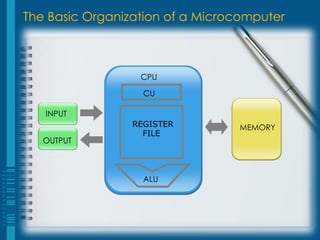
The Basic Organization of a Microcomputer
MEMORY
INPUT
OUTPUT
ALU
CPU
CU
REGISTER
FILE
The Basic Organization of a Microcomputer
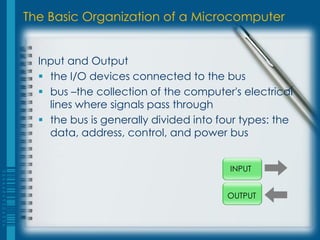
Input and Output
ď‚§ the I/O devices connected to the bus
 bus –the collection of the computer's electrical
lines where signals pass through
ď‚§ the bus is generally divided into four types: the
data, address, control, and power bus
INPUT
OUTPUT
The Basic Organization of a Microcomputer
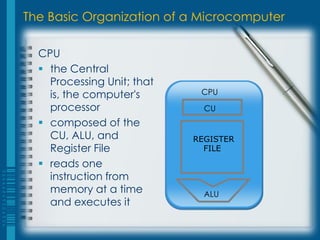
CPU
ď‚§ the Central
Processing Unit; that
is, the computer's
processor
ď‚§ composed of the
CU, ALU, and
Register File
ď‚§ reads one
instruction from
memory at a time
and executes it
ALU
CPU
CU
REGISTER
FILE
The Basic Organization of a Microcomputer
CU
ď‚§ the Control Unit
ď‚§ the part of the CPU that sends control signals
to the different parts of the system through
the control bus
The Basic Organization of a Microcomputer
ALU
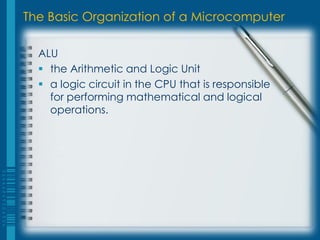
ď‚§ the Arithmetic and Logic Unit
ď‚§ a logic circuit in the CPU that is responsible
for performing mathematical and logical
operations.
The Basic Organization of a Microcomputer
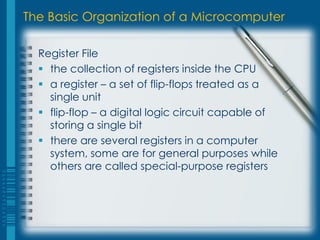
Register File
ď‚§ the collection of registers inside the CPU
 a register – a set of flip-flops treated as a
single unit
 flip-flop – a digital logic circuit capable of
storing a single bit
ď‚§ there are several registers in a computer
system, some are for general purposes while
others are called special-purpose registers
The Basic Organization of a Microcomputer
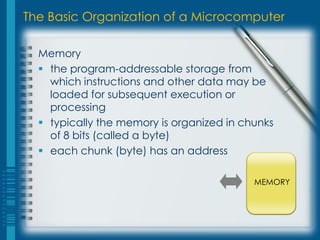
Memory
ď‚§ the program-addressable storage from
which instructions and other data may be
loaded for subsequent execution or
processing
ď‚§ typically the memory is organized in chunks
of 8 bits (called a byte)
ď‚§ each chunk (byte) has an address
MEMORY
Von Neumann’s Simple Computer
MEMORY
INPUT
OUTPUT
ALU
CPU
CU
PC
IR
MAR
MBR
A
Von Neumann’s Simple Computer
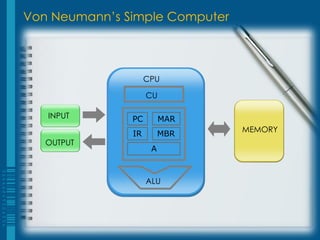
PC
 Program Counter – contains the address
of the next instruction to be executed.
IR
 Instruction Register – contains the current
instruction word.
Von Neumann’s Simple Computer
MAR
 Memory Address Register –contains the
memory address of data needed for an
instruction's execution.
MBR
 Memory Buffer Register –contains data
needed for an instruction's execution.
Von Neumann’s Simple Computer
A
 Accumulator –the register used as
temporary storage for data or for the
result of arithmetic or logical operations.
The Fetch-Decode-Execute Cycle
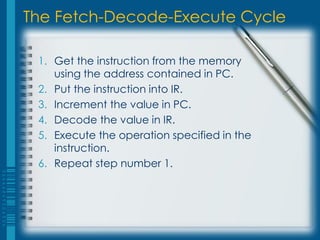
1. Get the instruction from the memory
using the address contained in PC.
2. Put the instruction into IR.
3. Increment the value in PC.
4. Decode the value in IR.
5. Execute the operation specified in the
instruction.
6. Repeat step number 1.
Instructions
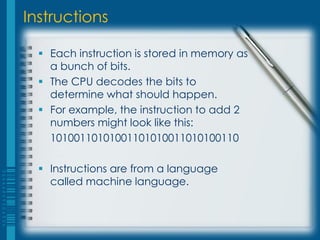
ď‚§ Each instruction is stored in memory as
a bunch of bits.
ď‚§ The CPU decodes the bits to
determine what should happen.
ď‚§ For example, the instruction to add 2
numbers might look like this:
10100110101001101010011010100110
ď‚§ Instructions are from a language
called machine language.
Machine Code
ď‚§ An executable program is a sequence of
these simple instructions.
ď‚§ The sequence is stored in memory.
ď‚§ The CPU processes the simple instructions
sequentially.
ď‚§ Some instructions can tell the CPU to jump
to a new place in memory to get the next
instruction.
Sample Program
# Instruction
1. set memory[801] to hold 00000001
2. set memory[802] to hold 00000000
3. if memory[802] = 10 jump to instruction #8
4. increment memory[802]
5. set memory[803] to 2 times memory[801]
6. put memory[803] in to memory[801]
7. jump to instruction #3
8. print memory[801]
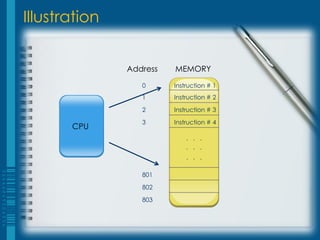
Illustration
CPU
Address MEMORY
0 Instruction # 1
1 Instruction # 2
2 Instruction # 3
3 Instruction # 4
. . .
. . .
. . .
801
802
803
Human vs. Machine Programs
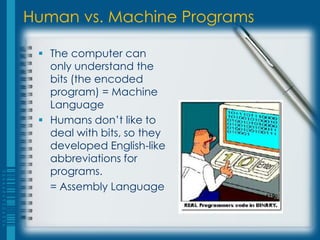
ď‚§ The computer can
only understand the
bits (the encoded
program) = Machine
Language
 Humans don’t like to
deal with bits, so they
developed English-like
abbreviations for
programs.
= Assembly Language
I. INTRODUCTION
The Rationale of Using Low-level Language
Objectives
At the end of this section, we should be
able to:
ď‚§ Identify different levels of programming
languages
ď‚§ Discuss the rationale of using low-level
languages
Hierarchy of Programming Languages
Machine Language
ď‚§ This is what the computer actually sees
and deals with. Every command the
computer sees is given as a number or
sequence of numbers.
Hierarchy of Programming Languages
Assembly Language
ď‚§ the same as machine language, except
the command numbers have been
replaced by letter sequences which are
easier to memorize.
ď‚§ middle-level language
ď‚§ maps human-readable mnemonics to
machine instructions
ď‚§ allows machine-level programming without
writing in machine language
Hierarchy of Programming Languages
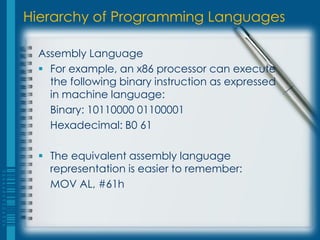
Assembly Language
ď‚§ For example, an x86 processor can execute
the following binary instruction as expressed
in machine language:
Binary: 10110000 01100001
Hexadecimal: B0 61
ď‚§ The equivalent assembly language
representation is easier to remember:
MOV AL, #61h
Hierarchy of Programming Languages
High-Level Language
ď‚§ High-level languages are there to make
programming easier.
ď‚§ Assembly language requires you to work with the
machine itself. High-level languages allow you to
describe the program in a more natural
language.
ď‚§ A single command in a high-level language
usually is equivalent to several commands in an
assembly language.
Reasons for not using Assembly
ď‚§ Development time: it takes much longer to
develop in assembly
ď‚§ Maintainability: unstructured
ď‚§ Portability: platform-dependent
Reasons for using Assembly
ď‚§ To understand how CPUs and compilers work
ď‚§ Developing compilers, debuggers and other
development tools
ď‚§ Hardware drivers, system code and low-level
tasks such as bootloaders
ď‚§ Embedded systems
ď‚§ Reverse Engineering
ď‚§ Address critical performance issues (Optimizing
for speed or space)
The Rationale of Using Low-level Language
ď‚§ By gaining a deeper understanding of how
computers work at a lower level, one can
often be more productive developing
software in higher level language such as C.
ď‚§ Learning to program in assembly language is
an excellent way to achieve this goal.
(Ref: Paul A. Carter, PC Assembly Language, July 23 2006)
An Application
ď‚§ NBA Jam

Chapter1a

  • 1.
  • 2.
    1. Basic Organizationof a Microcomputer 2. Von-Neumann’s Simple Computer 3. The Fetch-Decode-Execute Cycle Outline
  • 3.
    At the endof the discussion, we should be able to ď‚§ describe the basic organization of microprocessor-based systems and the Von Neumann system, ď‚§ discuss how a program instruction is executed. Objectives
  • 4.
    The Basic Organizationof a Microcomputer MEMORY INPUT OUTPUT ALU CPU CU REGISTER FILE
  • 5.
    The Basic Organizationof a Microcomputer Input and Output  the I/O devices connected to the bus  bus –the collection of the computer's electrical lines where signals pass through  the bus is generally divided into four types: the data, address, control, and power bus INPUT OUTPUT
  • 6.
    The Basic Organizationof a Microcomputer CPU ď‚§ the Central Processing Unit; that is, the computer's processor ď‚§ composed of the CU, ALU, and Register File ď‚§ reads one instruction from memory at a time and executes it ALU CPU CU REGISTER FILE
  • 7.
    The Basic Organizationof a Microcomputer CU ď‚§ the Control Unit ď‚§ the part of the CPU that sends control signals to the different parts of the system through the control bus
  • 8.
    The Basic Organizationof a Microcomputer ALU ď‚§ the Arithmetic and Logic Unit ď‚§ a logic circuit in the CPU that is responsible for performing mathematical and logical operations.
  • 9.
    The Basic Organizationof a Microcomputer Register File  the collection of registers inside the CPU  a register – a set of flip-flops treated as a single unit  flip-flop – a digital logic circuit capable of storing a single bit  there are several registers in a computer system, some are for general purposes while others are called special-purpose registers
  • 10.
    The Basic Organizationof a Microcomputer Memory ď‚§ the program-addressable storage from which instructions and other data may be loaded for subsequent execution or processing ď‚§ typically the memory is organized in chunks of 8 bits (called a byte) ď‚§ each chunk (byte) has an address MEMORY
  • 11.
    Von Neumann’s SimpleComputer MEMORY INPUT OUTPUT ALU CPU CU PC IR MAR MBR A
  • 12.
    Von Neumann’s SimpleComputer PC  Program Counter – contains the address of the next instruction to be executed. IR  Instruction Register – contains the current instruction word.
  • 13.
    Von Neumann’s SimpleComputer MAR  Memory Address Register –contains the memory address of data needed for an instruction's execution. MBR  Memory Buffer Register –contains data needed for an instruction's execution.
  • 14.
    Von Neumann’s SimpleComputer A  Accumulator –the register used as temporary storage for data or for the result of arithmetic or logical operations.
  • 15.
    The Fetch-Decode-Execute Cycle 1.Get the instruction from the memory using the address contained in PC. 2. Put the instruction into IR. 3. Increment the value in PC. 4. Decode the value in IR. 5. Execute the operation specified in the instruction. 6. Repeat step number 1.
  • 16.
    Instructions ď‚§ Each instructionis stored in memory as a bunch of bits. ď‚§ The CPU decodes the bits to determine what should happen. ď‚§ For example, the instruction to add 2 numbers might look like this: 10100110101001101010011010100110 ď‚§ Instructions are from a language called machine language.
  • 17.
    Machine Code ď‚§ Anexecutable program is a sequence of these simple instructions. ď‚§ The sequence is stored in memory. ď‚§ The CPU processes the simple instructions sequentially. ď‚§ Some instructions can tell the CPU to jump to a new place in memory to get the next instruction.
  • 18.
    Sample Program # Instruction 1.set memory[801] to hold 00000001 2. set memory[802] to hold 00000000 3. if memory[802] = 10 jump to instruction #8 4. increment memory[802] 5. set memory[803] to 2 times memory[801] 6. put memory[803] in to memory[801] 7. jump to instruction #3 8. print memory[801]
  • 19.
    Illustration CPU Address MEMORY 0 Instruction# 1 1 Instruction # 2 2 Instruction # 3 3 Instruction # 4 . . . . . . . . . 801 802 803
  • 20.
    Human vs. MachinePrograms  The computer can only understand the bits (the encoded program) = Machine Language  Humans don’t like to deal with bits, so they developed English-like abbreviations for programs. = Assembly Language
  • 21.
    I. INTRODUCTION The Rationaleof Using Low-level Language
  • 22.
    Objectives At the endof this section, we should be able to: ď‚§ Identify different levels of programming languages ď‚§ Discuss the rationale of using low-level languages
  • 23.
    Hierarchy of ProgrammingLanguages Machine Language ď‚§ This is what the computer actually sees and deals with. Every command the computer sees is given as a number or sequence of numbers.
  • 24.
    Hierarchy of ProgrammingLanguages Assembly Language ď‚§ the same as machine language, except the command numbers have been replaced by letter sequences which are easier to memorize. ď‚§ middle-level language ď‚§ maps human-readable mnemonics to machine instructions ď‚§ allows machine-level programming without writing in machine language
  • 25.
    Hierarchy of ProgrammingLanguages Assembly Language ď‚§ For example, an x86 processor can execute the following binary instruction as expressed in machine language: Binary: 10110000 01100001 Hexadecimal: B0 61 ď‚§ The equivalent assembly language representation is easier to remember: MOV AL, #61h
  • 26.
    Hierarchy of ProgrammingLanguages High-Level Language ď‚§ High-level languages are there to make programming easier. ď‚§ Assembly language requires you to work with the machine itself. High-level languages allow you to describe the program in a more natural language. ď‚§ A single command in a high-level language usually is equivalent to several commands in an assembly language.
  • 27.
    Reasons for notusing Assembly ď‚§ Development time: it takes much longer to develop in assembly ď‚§ Maintainability: unstructured ď‚§ Portability: platform-dependent
  • 28.
    Reasons for usingAssembly ď‚§ To understand how CPUs and compilers work ď‚§ Developing compilers, debuggers and other development tools ď‚§ Hardware drivers, system code and low-level tasks such as bootloaders ď‚§ Embedded systems ď‚§ Reverse Engineering ď‚§ Address critical performance issues (Optimizing for speed or space)
  • 29.
    The Rationale ofUsing Low-level Language ď‚§ By gaining a deeper understanding of how computers work at a lower level, one can often be more productive developing software in higher level language such as C. ď‚§ Learning to program in assembly language is an excellent way to achieve this goal. (Ref: Paul A. Carter, PC Assembly Language, July 23 2006)
  • 30.