Athar Hussain Mutahari 
BS(Hons) 
Bioinformatics and Biotechnology 
Govt.College University Faisalabad
Discovering 
Computers 2009 
Chapter 8 
Operating 
Systems and 
Utility 
Programs
System Software 
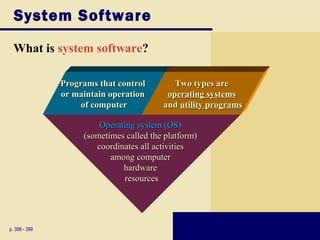
What is system software? 
p. 398 - 399 
PPrrooggrraammss tthhaatt ccoonnttrrooll 
oorr mmaaiinnttaaiinn ooppeerraattiioonn 
ooff ccoommppuutteerr 
OOppeerraattiinngg ssyysstteemm ((OOSS)) 
((ssoommeettiimmeess ccaalllleedd tthhee ppllaattffoorrmm)) 
ccoooorrddiinnaatteess aallll aaccttiivviittiieess 
aammoonngg ccoommppuutteerr 
hhaarrddwwaarree 
rreessoouurrcceess 
TTwwoo ttyyppeess aarree 
ooppeerraattiinngg ssyysstteemmss 
aanndd uuttiilliittyy pprrooggrraammss
Operating Systems 
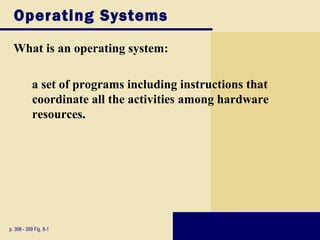
What is an operating system: 
a set of programs including instructions that 
coordinate all the activities among hardware 
resources. 
p. 398 - 399 Fig. 8-1
Operating System Functions 
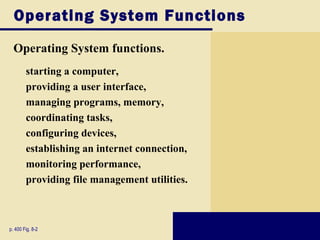
Operating System functions. 
 starting a computer, 
 providing a user interface, 
 managing programs, memory, 
 coordinating tasks, 
 configuring devices, 
 establishing an internet connection, 
 monitoring performance, 
 providing file management utilities. 
p. 400 Fig. 8-2
Operating System Functions 
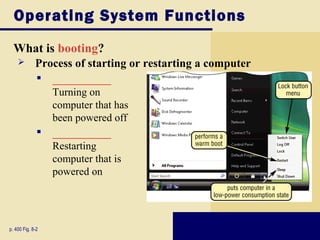
What is booting? 
 Process of starting or restarting a computer 
 ___________ 
p. 400 Fig. 8-2 
Turning on 
computer that has 
been powered off 
 ___________ 
Restarting 
computer that is 
powered on
Operating System Functions 
BOOT DISK: 
 Contains system files that will start computer when 
p. 402 
computer cannot boot 
 Also called recovery disk
Operating System Functions 
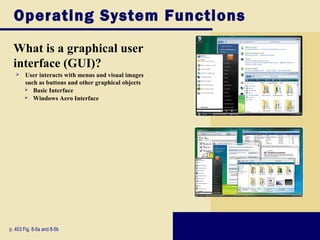
What is a graphical user 
interface (GUI)? 
 User interacts with menus and visual images 
such as buttons and other graphical objects 
 Basic Interface 
 Windows Aero Interface 
p. 403 Fig. 8-5a and 8-5b
Operating System Functions 
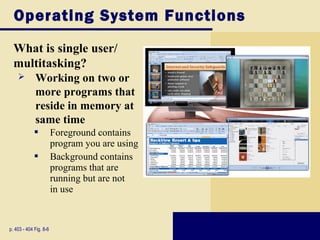
What is single user/ 
multitasking? 
 Working on two or 
more programs that 
reside in memory at 
same time 
 Foreground contains 
program you are using 
 Background contains 
programs that are 
running but are not 
in use 
p. 403 - 404 Fig. 8-6
Operating System Functions 
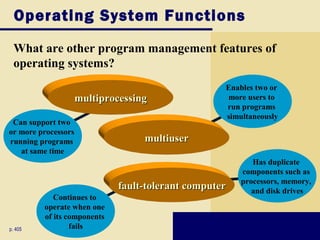
What are other program management features of 
operating systems? 
Enables two or 
more users to 
run programs 
simultaneously 
Has duplicate 
components such as 
processors, memory, 
and disk drives 
Can support two 
or more processors 
running programs 
at same time 
mmuullttiipprroocceessssiinngg 
Continues to 
operate when one 
of its components 
fails 
p. 405 
mmuullttiiuusseerr 
ffaauulltt--ttoolleerraanntt ccoommppuutteerr
Operating System Functions 
MEMORY MANAGEMENT: 
 Optimizing use of random access memory (RAM) 
p. 405 - 406 Fig. 8-8
Operating System Functions 
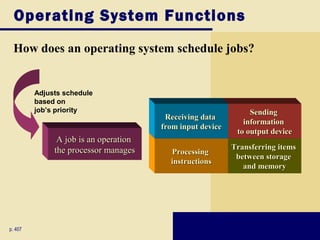
How does an operating system schedule jobs? 
p. 407 
SSeennddiinngg 
iinnffoorrmmaattiioonn 
ttoo oouuttppuutt ddeevviiccee 
TTrraannssffeerrrriinngg iitteemmss 
bbeettwweeeenn ssttoorraaggee 
aanndd mmeemmoorryy 
RReecceeiivviinngg ddaattaa 
ffrroomm iinnppuutt ddeevviiccee 
PPrroocceessssiinngg 
iinnssttrruuccttiioonnss 
Adjusts schedule 
based on 
job’s priority 
AA jjoobb iiss aann ooppeerraattiioonn 
tthhee pprroocceessssoorr mmaannaaggeess
Operating System Functions 
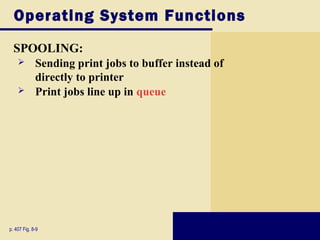
SPOOLING: 
 Sending print jobs to buffer instead of 
directly to printer 
 Print jobs line up in queue 
p. 407 Fig. 8-9
Operating System Functions 
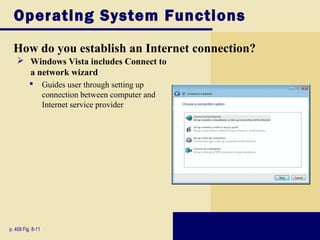
How do you establish an Internet connection? 
 Windows Vista includes Connect to 
a network wizard 
 Guides user through setting up 
p. 409 Fig. 8-11 
connection between computer and 
Internet service provider
Operating System Functions 
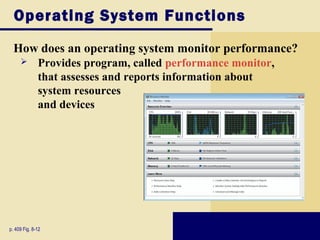
How does an operating system monitor performance? 
 Provides program, called performance monitor, 
that assesses and reports information about 
system resources 
and devices 
p. 409 Fig. 8-12
Operating System Functions 
SERVER OPERATING SYSTEM 
 An OS that organizes and coordinates how multiple users access and share resources on a network 
 Allows users to share resources on a network 
 Administers security 
by establishing user 
name and password for 
each user 
p. 410 Fig. 8-13
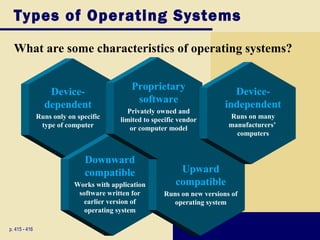
Types of Operating Systems 
What are some characteristics of operating systems? 
Device-dependent 
Runs only on specific 
type of computer 
p. 415 - 416 
Proprietary 
software 
Privately owned and 
limited to specific vendor 
or computer model 
Downward 
compatible 
Works with application 
software written for 
earlier version of 
operating system 
Upward 
compatible 
Runs on new versions of 
operating system 
Device-independent 
Runs on many 
manufacturers’ 
computers
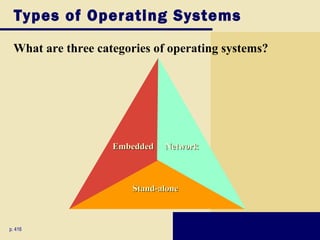
Types of Operating Systems 
What are three categories of operating systems? 
SSttaanndd--aalloonnee 
p. 416 
EEmmbbeeddddeedd NNeettwwoorrkk
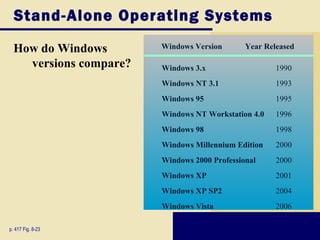
Stand-Alone Operating Systems 
How do Windows 
versions compare? 
p. 417 Fig. 8-23 
Windows Version Year Released 
Windows 3.x 1990 
Windows NT 3.1 1993 
Windows 95 1995 
Windows NT Workstation 4.0 1996 
Windows 98 1998 
Windows Millennium Edition 2000 
Windows 2000 Professional 2000 
Windows XP 2001 
Windows XP SP2 2004 
Windows Vista 2006
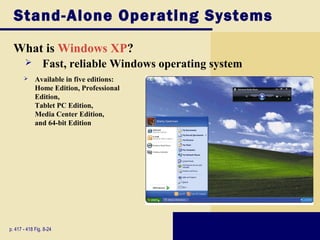
Stand-Alone Operating Systems 
What is Windows XP? 
 Fast, reliable Windows operating system 
 Available in five editions: 
Home Edition, Professional 
Edition, 
Tablet PC Edition, 
Media Center Edition, 
and 64-bit Edition 
p. 417 - 418 Fig. 8-24
Stand-Alone Operating Systems 
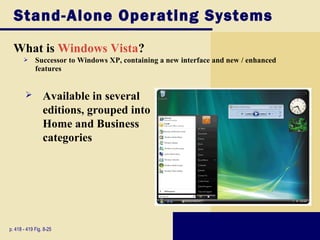
What is Windows Vista? 
 Successor to Windows XP, containing a new interface and new / enhanced 
features 
 Available in several 
editions, grouped into 
Home and Business 
categories 
p. 418 - 419 Fig. 8-25
Stand-Alone Operating Systems 
What are some features of Windows Vista? 
Windows Vista Features 
Reliability and Performance 
Security 
Information Management 
Appearance and Navigation 
Communications and the Internet 
p. 419
Stand-Alone Operating Systems 
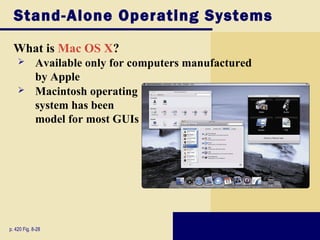
What is Mac OS X? 
 Available only for computers manufactured 
by Apple 
 Macintosh operating 
system has been 
model for most GUIs 
p. 420 Fig. 8-28
Stand-Alone Operating Systems 
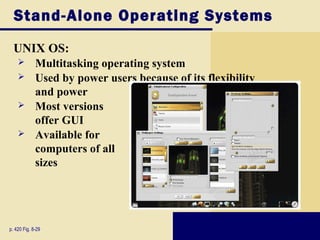
UNIX OS: 
 Multitasking operating system 
 Used by power users because of its flexibility 
and power 
 Most versions 
offer GUI 
 Available for 
computers of all 
sizes 
p. 420 Fig. 8-29
Stand-Alone Operating Systems 
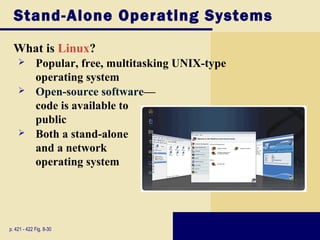
What is Linux? 
 Popular, free, multitasking UNIX-type 
operating system 
 Open-source software— 
code is available to 
public 
 Both a stand-alone 
and a network 
operating system 
p. 421 - 422 Fig. 8-30
Network Operating Systems 
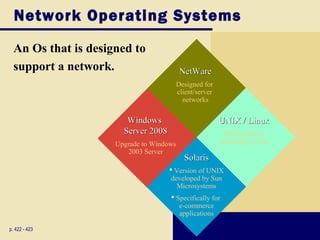
An Os that is designed to 
support a network. 
p. 422 - 423 
NetWare 
Designed for 
client/server 
networks 
Windows 
Server 2008 
Upgrade to Windows 
2003 Server 
UNIX / Linux 
Multi-purpose 
operating system 
Solaris 
 Version of UNIX 
developed by Sun 
Microsystems 
 Specifically for 
e-commerce 
applications
Embedded Operating Systems 
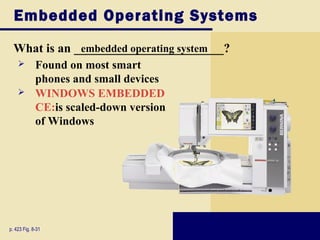
What is an ________________________? 
 Found on most smart 
phones and small devices 
 WINDOWS EMBEDDED 
CE:is scaled-down version 
of Windows 
p. 423 Fig. 8-31 
embedded operating system
Embedded Operating Systems 
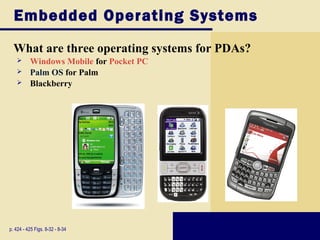
What are three operating systems for PDAs? 
 Windows Mobile for Pocket PC 
 Palm OS for Palm 
 Blackberry 
p. 424 - 425 Figs. 8-32 - 8-34
Embedded Operating Systems 
What is Embedded Linux? 
 Scaled-down Linux operating system 
p. 425 
designed for smart phones, PDAs, 
smart watches, set-top boxes, 
Internet telephones, and other 
devices 
 Offers many PIM functions
Embedded Operating Systems 
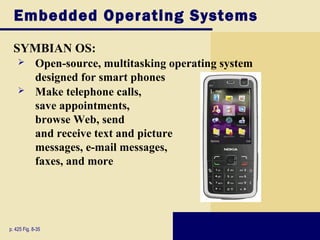
SYMBIAN OS: 
 Open-source, multitasking operating system 
designed for smart phones 
 Make telephone calls, 
save appointments, 
browse Web, send 
and receive text and picture 
messages, e-mail messages, 
faxes, and more 
p. 425 Fig. 8-35

Introduction To computer (discovery of computer)

  • 1.
    Athar Hussain Mutahari BS(Hons) Bioinformatics and Biotechnology Govt.College University Faisalabad
  • 2.
    Discovering Computers 2009 Chapter 8 Operating Systems and Utility Programs
  • 3.
    System Software Whatis system software? p. 398 - 399 PPrrooggrraammss tthhaatt ccoonnttrrooll oorr mmaaiinnttaaiinn ooppeerraattiioonn ooff ccoommppuutteerr OOppeerraattiinngg ssyysstteemm ((OOSS)) ((ssoommeettiimmeess ccaalllleedd tthhee ppllaattffoorrmm)) ccoooorrddiinnaatteess aallll aaccttiivviittiieess aammoonngg ccoommppuutteerr hhaarrddwwaarree rreessoouurrcceess TTwwoo ttyyppeess aarree ooppeerraattiinngg ssyysstteemmss aanndd uuttiilliittyy pprrooggrraammss
  • 4.
    Operating Systems Whatis an operating system: a set of programs including instructions that coordinate all the activities among hardware resources. p. 398 - 399 Fig. 8-1
  • 5.
    Operating System Functions Operating System functions. starting a computer, providing a user interface, managing programs, memory, coordinating tasks, configuring devices, establishing an internet connection, monitoring performance, providing file management utilities. p. 400 Fig. 8-2
  • 6.
    Operating System Functions What is booting?  Process of starting or restarting a computer  ___________ p. 400 Fig. 8-2 Turning on computer that has been powered off  ___________ Restarting computer that is powered on
  • 7.
    Operating System Functions BOOT DISK:  Contains system files that will start computer when p. 402 computer cannot boot  Also called recovery disk
  • 8.
    Operating System Functions What is a graphical user interface (GUI)?  User interacts with menus and visual images such as buttons and other graphical objects  Basic Interface  Windows Aero Interface p. 403 Fig. 8-5a and 8-5b
  • 9.
    Operating System Functions What is single user/ multitasking?  Working on two or more programs that reside in memory at same time  Foreground contains program you are using  Background contains programs that are running but are not in use p. 403 - 404 Fig. 8-6
  • 10.
    Operating System Functions What are other program management features of operating systems? Enables two or more users to run programs simultaneously Has duplicate components such as processors, memory, and disk drives Can support two or more processors running programs at same time mmuullttiipprroocceessssiinngg Continues to operate when one of its components fails p. 405 mmuullttiiuusseerr ffaauulltt--ttoolleerraanntt ccoommppuutteerr
  • 11.
    Operating System Functions MEMORY MANAGEMENT:  Optimizing use of random access memory (RAM) p. 405 - 406 Fig. 8-8
  • 12.
    Operating System Functions How does an operating system schedule jobs? p. 407 SSeennddiinngg iinnffoorrmmaattiioonn ttoo oouuttppuutt ddeevviiccee TTrraannssffeerrrriinngg iitteemmss bbeettwweeeenn ssttoorraaggee aanndd mmeemmoorryy RReecceeiivviinngg ddaattaa ffrroomm iinnppuutt ddeevviiccee PPrroocceessssiinngg iinnssttrruuccttiioonnss Adjusts schedule based on job’s priority AA jjoobb iiss aann ooppeerraattiioonn tthhee pprroocceessssoorr mmaannaaggeess
  • 13.
    Operating System Functions SPOOLING:  Sending print jobs to buffer instead of directly to printer  Print jobs line up in queue p. 407 Fig. 8-9
  • 14.
    Operating System Functions How do you establish an Internet connection?  Windows Vista includes Connect to a network wizard  Guides user through setting up p. 409 Fig. 8-11 connection between computer and Internet service provider
  • 15.
    Operating System Functions How does an operating system monitor performance?  Provides program, called performance monitor, that assesses and reports information about system resources and devices p. 409 Fig. 8-12
  • 16.
    Operating System Functions SERVER OPERATING SYSTEM  An OS that organizes and coordinates how multiple users access and share resources on a network  Allows users to share resources on a network  Administers security by establishing user name and password for each user p. 410 Fig. 8-13
  • 17.
    Types of OperatingSystems What are some characteristics of operating systems? Device-dependent Runs only on specific type of computer p. 415 - 416 Proprietary software Privately owned and limited to specific vendor or computer model Downward compatible Works with application software written for earlier version of operating system Upward compatible Runs on new versions of operating system Device-independent Runs on many manufacturers’ computers
  • 18.
    Types of OperatingSystems What are three categories of operating systems? SSttaanndd--aalloonnee p. 416 EEmmbbeeddddeedd NNeettwwoorrkk
  • 19.
    Stand-Alone Operating Systems How do Windows versions compare? p. 417 Fig. 8-23 Windows Version Year Released Windows 3.x 1990 Windows NT 3.1 1993 Windows 95 1995 Windows NT Workstation 4.0 1996 Windows 98 1998 Windows Millennium Edition 2000 Windows 2000 Professional 2000 Windows XP 2001 Windows XP SP2 2004 Windows Vista 2006
  • 20.
    Stand-Alone Operating Systems What is Windows XP?  Fast, reliable Windows operating system  Available in five editions: Home Edition, Professional Edition, Tablet PC Edition, Media Center Edition, and 64-bit Edition p. 417 - 418 Fig. 8-24
  • 21.
    Stand-Alone Operating Systems What is Windows Vista?  Successor to Windows XP, containing a new interface and new / enhanced features  Available in several editions, grouped into Home and Business categories p. 418 - 419 Fig. 8-25
  • 22.
    Stand-Alone Operating Systems What are some features of Windows Vista? Windows Vista Features Reliability and Performance Security Information Management Appearance and Navigation Communications and the Internet p. 419
  • 23.
    Stand-Alone Operating Systems What is Mac OS X?  Available only for computers manufactured by Apple  Macintosh operating system has been model for most GUIs p. 420 Fig. 8-28
  • 24.
    Stand-Alone Operating Systems UNIX OS:  Multitasking operating system  Used by power users because of its flexibility and power  Most versions offer GUI  Available for computers of all sizes p. 420 Fig. 8-29
  • 25.
    Stand-Alone Operating Systems What is Linux?  Popular, free, multitasking UNIX-type operating system  Open-source software— code is available to public  Both a stand-alone and a network operating system p. 421 - 422 Fig. 8-30
  • 26.
    Network Operating Systems An Os that is designed to support a network. p. 422 - 423 NetWare Designed for client/server networks Windows Server 2008 Upgrade to Windows 2003 Server UNIX / Linux Multi-purpose operating system Solaris  Version of UNIX developed by Sun Microsystems  Specifically for e-commerce applications
  • 27.
    Embedded Operating Systems What is an ________________________?  Found on most smart phones and small devices  WINDOWS EMBEDDED CE:is scaled-down version of Windows p. 423 Fig. 8-31 embedded operating system
  • 28.
    Embedded Operating Systems What are three operating systems for PDAs?  Windows Mobile for Pocket PC  Palm OS for Palm  Blackberry p. 424 - 425 Figs. 8-32 - 8-34
  • 29.
    Embedded Operating Systems What is Embedded Linux?  Scaled-down Linux operating system p. 425 designed for smart phones, PDAs, smart watches, set-top boxes, Internet telephones, and other devices  Offers many PIM functions
  • 30.
    Embedded Operating Systems SYMBIAN OS:  Open-source, multitasking operating system designed for smart phones  Make telephone calls, save appointments, browse Web, send and receive text and picture messages, e-mail messages, faxes, and more p. 425 Fig. 8-35