OPERATING SYSTEM-2
History Of OS
• Operating systems were first developed in the late 1950s to
manage tape storage
• The General Motors Research Lab implemented the first OS
in the early 1950s for their IBM 701
• In the mid-1960s, operating systems started to use disks
• In the late 1960s, the first version of the Unix OS was
developed
• The first OS built by Microsoft was DOS. It was built in 1981
by purchasing the 86-DOS software from a Seattle company
• The present-day popular OS Windows first came to
existence in 1985 when a GUI was created and paired with
MS-DOS.
2
Evolution of Operating Systems
• The evolution of operating systems is directly dependent on
the development of computer systems and how users use
them. Here is a quick tour of computing systems through
the past fifty years in the timeline.
• Early Evolution
– 1945: ENIAC, Moore School of Engineering, University of
Pennsylvania.
– 1949: EDSAC and EDVAC
– 1949: BINAC - a successor to the ENIAC
– 1951: UNIVAC by Remington
– 1952: IBM 701
– 1956: The interrupt
– 1954-1957: FORTRAN was developed
3
Evolution of Operating Systems…
• Operating Systems - Late 1950s
– By the late 1950s Operating systems were well improved
and started supporting following usages:
– It was able to perform Single stream batch processing.
– It could use Common, standardized, input/output routines
for device access.
– Program transition capabilities to reduce the overhead of
starting a new job was added.
– Error recovery to clean up after a job terminated
abnormally was added.
– Job control languages that allowed users to specify the job
definition and resource requirements were made possible.
4
Evolution of Operating Systems…
• Operating Systems - In 1960s
– 1961: The dawn of minicomputers
– 1962: Compatible Time-Sharing System (CTSS) from MIT
– 1963: Burroughs Master Control Program (MCP) for the B5000
system
– 1964: IBM System/360
– 1960s: Disks became mainstream
– 1966: Minicomputers got cheaper, more powerful, and really
useful.
– 1967-1968: Mouse was invented.
– 1964 and onward: Multics
– 1969: The UNIX Time-Sharing System from Bell Telephone
Laboratories.
5
Evolution of Operating Systems…
• Supported OS Features by 1970s
• Multi User and Multi tasking was introduced.
• Dynamic address translation hardware
and Virtual machines came into picture.
• Modular architectures came into existence.
• Personal, interactive systems came into
existence.
6
Evolution of Operating Systems…
• Accomplishments after 1970
– 1971: Intel announces the microprocessor
– 1972: IBM comes out with VM: the Virtual Machine
Operating System
– 1973: UNIX 4th Edition is published
– 1973: Ethernet
– 1974 The Personal Computer Age begins
– 1974: Gates and Allen wrote BASIC for the Altair
– 1976: Apple II
•
7
Evolution of Operating Systems…
– August 12, 1981: IBM introduces the IBM PC
– 1983 Microsoft begins work on MS-Windows
– 1984 Apple Macintosh comes out
– 1990 Microsoft Windows 3.0 comes out
– 1991 GNU/Linux
– 1992 The first Windows virus comes out
– 1993 Windows NT
– 2007: iOS
– 2008: Android OS
8
Features of Operating System
• Here is a list commonly found important features of an Operating
System:
• Protected and supervisor mode
• Allows disk access and file systems Device drivers Networking
Security
• Program Execution
• Memory management Virtual Memory Multitasking
• Handling I/O operations
• Manipulation of the file system
• Error Detection and handling
• Resource allocation
• Information and Resource Protection
9
Types of Operating System
• Batch Operating System.
• Multitasking/Time Sharing OS.
• Multiprocessing OS.
• Real Time OS.
• Distributed OS.
• Network OS.
• Mobile OS.
10
Batch Operating System
• Some computer processes are very lengthy
and time-consuming. To speed the same
process, a job with a similar type of needs are
batched together and run as a group.
• The user of a batch operating system never
directly interacts with the computer. In this
type of OS, every user prepares his or her job
on an offline device like a punch card and
submit it to the computer operator.
11
Batch Operating System…
• To speed up processing, jobs with similar needs
are batched together and run as a group. The
programmers leave their programs with the
operator and the operator then sorts the
programs with similar requirements into batches.
• The problems with Batch Systems are as follows −
• Lack of interaction between the user and the job.
• CPU is often idle, because the speed of the
mechanical I/O devices is slower than the CPU.
• Difficult to provide the desired priority.
12
Multi-Tasking/Time-sharing OS
• Time-sharing operating system enables people located at a different
terminal(shell) to use a single computer system at the same time.
The processor time (CPU) which is shared among multiple users is
termed as time sharing. Time-sharing is a technique which enables
many people, located at various terminals, to use a particular
computer system at the same time. Time-sharing or multitasking is
a logical extension of multiprogramming. Processor's time which is
shared among multiple users simultaneously is termed as time-
sharing.
• The main difference between Multiprogrammed Batch Systems and
Time-Sharing Systems is that in case of Multiprogrammed batch
systems, the objective is to maximize processor use, whereas in
Time-Sharing Systems, the objective is to minimize response time.
13
Multi-Tasking/Time-sharing OS…
• Multiple jobs are executed by the CPU by switching between them, but the
switches occur so frequently. Thus, the user can receive an immediate response.
For example, in a transaction processing, the processor executes each user
program in a short burst or quantum of computation. That is, if n users are
present, then each user can get a time quantum. When the user submits the
command, the response time is in few seconds at most.
• The operating system uses CPU scheduling and multiprogramming to provide each
user with a small portion of a time. Computer systems that were designed
primarily as batch systems have been modified to time-sharing systems.
• Advantages of Timesharing operating systems are as follows −
– Provides the advantage of quick response.
– Avoids duplication of software.
– Reduces CPU idle time.
• Disadvantages of Time-sharing operating systems are as follows −
– Problem of reliability.
– Question of security and integrity of user programs and data.
– Problem of data communication.
14
Real time OS
• A real time operating system time interval to
process and respond to inputs is very small
• A real-time system is defined as a data processing
system in which the time interval required to
process and respond to inputs is so small that it
controls the environment. The time taken by the
system to respond to an input and display of
required updated information is termed as
the response time. So in this method, the
response time is very less as compared to online
processing.
15
Real time OS…
• Real-time systems are used when there are rigid time
requirements on the operation of a processor or the
flow of data and real-time systems can be used as a
control device in a dedicated application.
• A real-time operating system must have well-defined,
fixed time constraints, otherwise the system will fail.
• For example : Military Software Systems, Space
Software Systems. Scientific experiments, medical
imaging systems, industrial control systems, weapon
systems, robots, air traffic control systems, etc.
16
Real time OS…
• There are two types of real-time operating systems.
• Hard real-time systems
Hard real-time systems guarantee that critical tasks
complete on time. In hard real-time systems, secondary
storage is limited or missing and the data is stored in ROM.
In these systems, virtual memory is almost never found.
• Soft real-time systems
Soft real-time systems are less restrictive. A critical
real-time task gets priority over other tasks and retains the
priority until it completes. Soft real-time systems have
limited utility than hard real-time systems. For example,
multimedia, virtual reality, Advanced Scientific Projects like
undersea exploration and planetary rovers, etc.
17
Distributed Operating System
• Distributed systems use many processors located in different
machines to provide very fast computation to its users.
• Distributed systems use multiple central processors to serve
multiple real-time applications and multiple users. Data processing
jobs are distributed among the processors accordingly.
• The processors communicate with one another through various
communication lines (such as high-speed buses or telephone lines).
These are referred as loosely coupled systems or distributed
systems. Processors in a distributed system may vary in size and
function. These processors are referred as sites, nodes, computers,
and so on.
18
Distributed Operating System…
• The advantages of distributed systems are as
follows −
– With resource sharing facility, a user at one site may
be able to use the resources available at another.
– Speedup the exchange of data with one another via
electronic mail.
– If one site fails in a distributed system, the remaining
sites can potentially continue operating.
– Better service to the customers.
– Reduction of the load on the host computer.
– Reduction of delays in data processing.
19
Network Operating System
• A Network Operating System runs on a server.
It provides the capability to serve, to manage
data, user, groups, security, application, and
other networking functions.
• The primary purpose of the network operating
system is to allow shared file and printer
access among multiple computers in a
network, typically a local area network (LAN),
a private network or to other networks.
20
Network Operating System…
• Examples of network operating systems include Microsoft Windows
Server 2003, Microsoft Windows Server 2008, UNIX, Linux, Mac OS
X, Novell NetWare, and BSD.
• The advantages of network operating systems are as follows −
– Centralized servers are highly stable.
– Security is server managed.
– Upgrades to new technologies and hardware can be easily integrated
into the system.
– Remote access to servers is possible from different locations and types
of systems.
• The disadvantages of network operating systems are as follows −
– High cost of buying and running a server.
– Dependency on a central location for most operations.
– Regular maintenance and updates are required.
21
Mobile OS
• Mobile operating systems are those OS which
is especially that are designed to power
smartphones, tablets, and wearables devices-
Smart watch , smart glasses.
• Some most famous mobile operating systems
are Android and iOS, but others include
BlackBerry, Web, and watchOS.
22
Difference between Firmware and
Operating System
Firmware Operating System
Firmware is one kind of
programming that is embedded
on a chip in the device which
controls that specific device.
OS provides functionality over
and above that which is
provided by the firmware.
Firmware programs that been
encoded by the manufacture of
the IC or something and cannot
be changed.
OS is a program that can be
installed by the user and can be
changed.
It is stored on non-volatile
memory.
OS is stored on the hard drive.
23
Important functions of an OS
• Memory Management
• Processor Management
• Device Management
• File Management
• Security
• Control over system performance
• Job accounting
• Error detecting aids
• Coordination between other software and users
24
Memory Management
• Memory management refers to management of Primary Memory
or Main Memory. Main memory is a large array of words or bytes
where each word or byte has its own address.
• Main memory provides a fast storage that can be accessed directly
by the CPU. For a program to be executed, it must in the main
memory.
• An Operating System does the following activities for memory
management:
– Keeps tracks of primary memory, i.e., what part of it are in use by
whom, what part are not in use.
– In multiprogramming, the OS decides which process will get memory
when and how much.
– Allocates the memory when a process requests it to do so.
– De-allocates the memory when a process no longer needs it or has
been terminated.
25
Processor Management
• In multiprogramming environment, the OS
decides which process gets the processor when
and for how much time. This function is called
process scheduling.
• An Operating System does the following activities
for processor management:
– Keeps tracks of processor and status of process. The
program responsible for this task is known as traffic
controller.
– Allocates the processor (CPU) to a process.
– De-allocates processor when a process is no longer
required.
26
Device Management
• An Operating System manages device
communication via their respective drivers. It
does the following activities for device
management:
• Keeps tracks of all devices. The program
responsible for this task is known as the I/O
controller.
• Decides which process gets the device when and
for how much time.
• Allocates the device in the most efficient way.
• De-allocates devices.
27
File Management
• A file system is normally organized into
directories for easy navigation and usage. These
directories may contain files and other directions.
• An Operating System does the following activities
for file management:
– Keeps track of information, location, uses, status etc.
The collective facilities are often known as file system.
– Decides who gets the resources.
– Allocates the resources.
– De-allocates the resources.
28
Other Important Activities
• Following are some of the important activities that an
Operating System performs:
• Security -- By means of password and similar other
techniques, it prevents unauthorized access to
programs and data.
• Control over system performance -- Recording delays
between request for a service and response from the
system.
• Job accounting -- Keeping track of time and resources
used by various jobs and users.
29
Other Important Activities…
• Error detecting aids -- Production of dumps,
traces, error messages, and other debugging
and error detecting aids.
• Coordination between other software and
users -- Coordination and assignment of
compilers, interpreters, assemblers and other
software to the various users of the computer
systems.
30
31
Operating Systems-3
Operating System – Different View Points
• Process View point
• Extended Machine View
• Hierarchical Machine View
Process View point
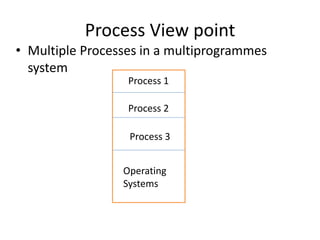
• Multiple Processes in a multiprogrammes
system
Process 3
Process 2
Process 1
Operating
Systems
Process View point…
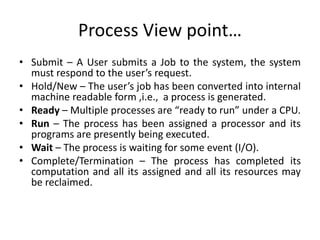
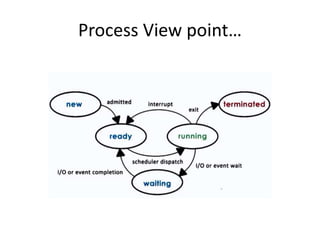
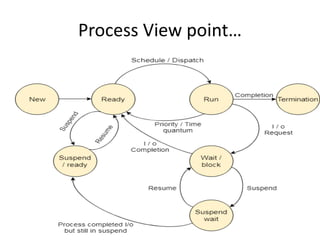
• Submit – A User submits a Job to the system, the system
must respond to the user’s request.
• Hold/New – The user’s job has been converted into internal
machine readable form ,i.e., a process is generated.
• Ready – Multiple processes are “ready to run” under a CPU.
• Run – The process has been assigned a processor and its
programs are presently being executed.
• Wait – The process is waiting for some event (I/O).
• Complete/Termination – The process has completed its
computation and all its assigned and all its resources may
be reclaimed.
Process View point…
Process View point…
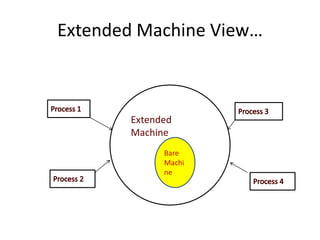
Extended Machine View
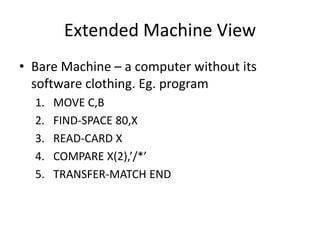
• Bare Machine – a computer without its
software clothing. Eg. program
1. MOVE C,B
2. FIND-SPACE 80,X
3. READ-CARD X
4. COMPARE X(2),’/*’
5. TRANSFER-MATCH END
Extended Machine View…
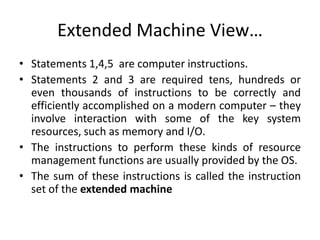
• Statements 1,4,5 are computer instructions.
• Statements 2 and 3 are required tens, hundreds or
even thousands of instructions to be correctly and
efficiently accomplished on a modern computer – they
involve interaction with some of the key system
resources, such as memory and I/O.
• The instructions to perform these kinds of resource
management functions are usually provided by the OS.
• The sum of these instructions is called the instruction
set of the extended machine
Extended Machine View…
Extended
Machine
Bare
Machi
ne
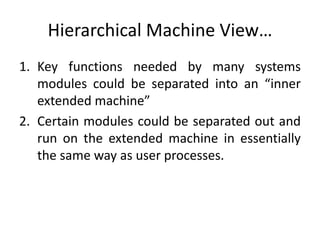
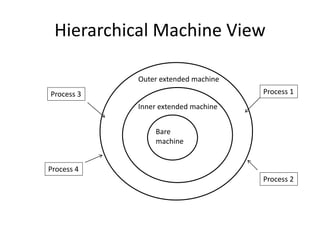
Hierarchical Machine View…
1. Key functions needed by many systems
modules could be separated into an “inner
extended machine”
2. Certain modules could be separated out and
run on the extended machine in essentially
the same way as user processes.
Hierarchical Machine View
BareMachine
n
Outer extended machine
Inner extended machine
Bare
machine
Process 4
Process 3
Process 2
Process 1
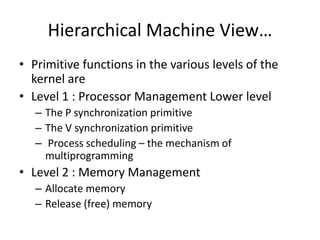
Hierarchical Machine View…
• Primitive functions in the various levels of the
kernel are
• Level 1 : Processor Management Lower level
– The P synchronization primitive
– The V synchronization primitive
– Process scheduling – the mechanism of
multiprogramming
• Level 2 : Memory Management
– Allocate memory
– Release (free) memory
Hierarchical Machine View…
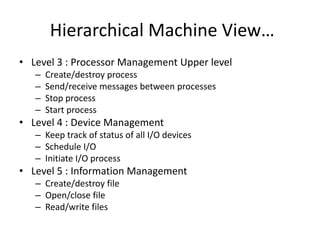
• Level 3 : Processor Management Upper level
– Create/destroy process
– Send/receive messages between processes
– Stop process
– Start process
• Level 4 : Device Management
– Keep track of status of all I/O devices
– Schedule I/O
– Initiate I/O process
• Level 5 : Information Management
– Create/destroy file
– Open/close file
– Read/write files
I/O Programming
• I/O programming
• Types of I/O channels
• I/O programming concepts
• I/O process structure
• Communication between the CPU and the
channel
• I/O Example using Single buffering
• I/O Example using Double buffering
• Multiple card buffering
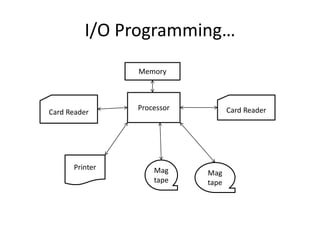
I/O Programming…
Card Reader
Processor Card Reader
Memory
Printer Mag
tape
Mag
tape
I/O Programming…
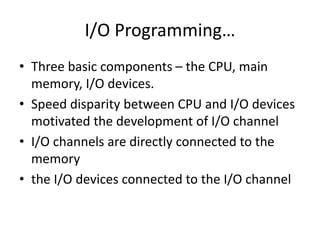
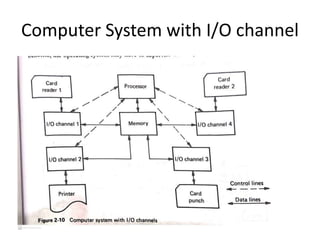
• Three basic components – the CPU, main
memory, I/O devices.
• Speed disparity between CPU and I/O devices
motivated the development of I/O channel
• I/O channels are directly connected to the
memory
• the I/O devices connected to the I/O channel
I/O channels
• I/O Channel definition: I/O channels or I/O
processors provide a path or channel for the
data to flow between I/O devices and main
memory.
• Specialized processing units intended to
operate the I/O devices.
• I/O operations are executed via the channel,
the CPU is free to perform its high speed
computations without wasting time for I/O.
Computer System with I/O channel
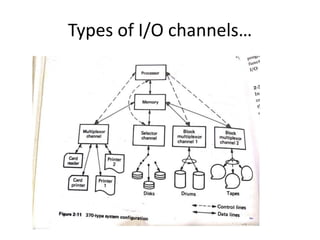
Types of I/O channels
• Selector Channel
• Multiplexor Channel
• Block Multiplexor Channel
• Selector Channel : can service only one device at a
time, i.e., one device is selected for service. These
channels used for very high speed devices. eg.
Magnetic tapes, disks and drums, each I/O request is
usually completed quickly and then another device
selected for I/O.
Types of I/O channels…
• Multiplexor Channel : simultaneously service
many devices (up to 256) for slow devices
such as card readers, card punches and
printers.
• Block Multiplexor Channel : allows multiple
channel programs for high speed devices to be
active on the same I/O channel.
Types of I/O channels…
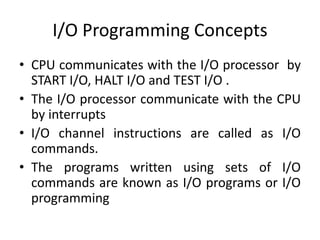
I/O Programming Concepts
• CPU communicates with the I/O processor by
START I/O, HALT I/O and TEST I/O .
• The I/O processor communicate with the CPU
by interrupts
• I/O channel instructions are called as I/O
commands.
• The programs written using sets of I/O
commands are known as I/O programs or I/O
programming
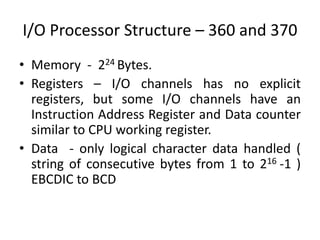
I/O Processor Structure – 360 and 370
• Memory - 224 Bytes.
• Registers – I/O channels has no explicit
registers, but some I/O channels have an
Instruction Address Register and Data counter
similar to CPU working register.
• Data - only logical character data handled (
string of consecutive bytes from 1 to 216 -1 )
EBCDIC to BCD
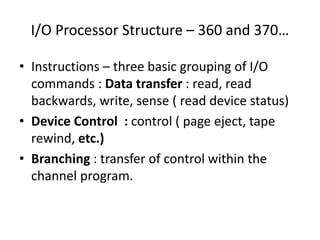
I/O Processor Structure – 360 and 370…
• Instructions – three basic grouping of I/O
commands : Data transfer : read, read
backwards, write, sense ( read device status)
• Device Control : control ( page eject, tape
rewind, etc.)
• Branching : transfer of control within the
channel program.
I/O Processor Structure – 360 and 370…
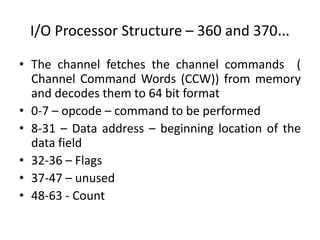
• The channel fetches the channel commands (
Channel Command Words (CCW)) from memory
and decodes them to 64 bit format
• 0-7 – opcode – command to be performed
• 8-31 – Data address – beginning location of the
data field
• 32-36 – Flags
• 37-47 – unused
• 48-63 - Count
I/O Processor Structure – 360 and 370…
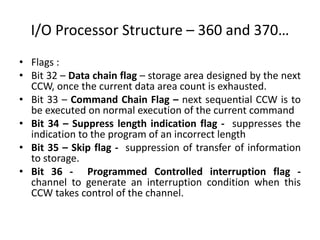
• Flags :
• Bit 32 – Data chain flag – storage area designed by the next
CCW, once the current data area count is exhausted.
• Bit 33 – Command Chain Flag – next sequential CCW is to
be executed on normal execution of the current command
• Bit 34 – Suppress length indication flag - suppresses the
indication to the program of an incorrect length
• Bit 35 – Skip flag - suppression of transfer of information
to storage.
• Bit 36 - Programmed Controlled interruption flag -
channel to generate an interruption condition when this
CCW takes control of the channel.
Special Features
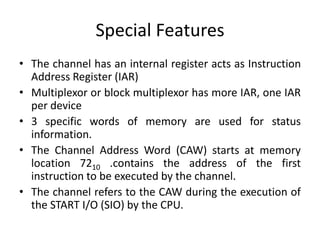
• The channel has an internal register acts as Instruction
Address Register (IAR)
• Multiplexor or block multiplexor has more IAR, one IAR
per device
• 3 specific words of memory are used for status
information.
• The Channel Address Word (CAW) starts at memory
location 7210 .contains the address of the first
instruction to be executed by the channel.
• The channel refers to the CAW during the execution of
the START I/O (SIO) by the CPU.
Special Features…
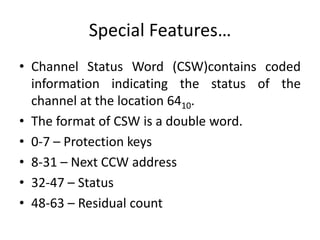
• Channel Status Word (CSW)contains coded
information indicating the status of the
channel at the location 6410.
• The format of CSW is a double word.
• 0-7 – Protection keys
• 8-31 – Next CCW address
• 32-47 – Status
• 48-63 – Residual count
Special Features…
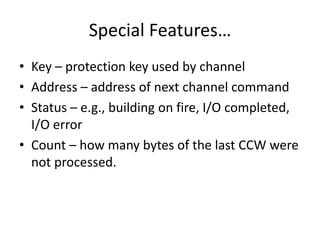
• Key – protection key used by channel
• Address – address of next channel command
• Status – e.g., building on fire, I/O completed,
I/O error
• Count – how many bytes of the last CCW were
not processed.
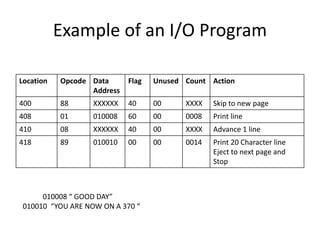
Example of an I/O Program
Location Opcode Data
Address
Flag Unused Count Action
400 88 XXXXXX 40 00 XXXX Skip to new page
408 01 010008 60 00 0008 Print line
410 08 XXXXXX 40 00 XXXX Advance 1 line
418 89 010010 00 00 0014 Print 20 Character line
Eject to next page and
Stop
010008 “ GOOD DAY”
010010 “YOU ARE NOW ON A 370 “
Communication between the CPU and the Channel
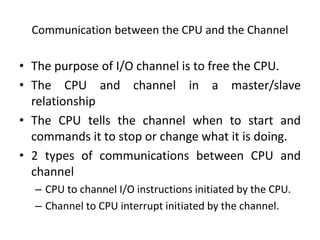
• The purpose of I/O channel is to free the CPU.
• The CPU and channel in a master/slave
relationship
• The CPU tells the channel when to start and
commands it to stop or change what it is doing.
• 2 types of communications between CPU and
channel
– CPU to channel I/O instructions initiated by the CPU.
– Channel to CPU interrupt initiated by the channel.
Communication between the CPU and the Channel…
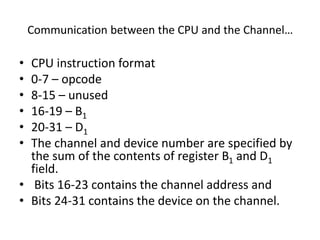
• CPU instruction format
• 0-7 – opcode
• 8-15 – unused
• 16-19 – B1
• 20-31 – D1
• The channel and device number are specified by
the sum of the contents of register B1 and D1
field.
• Bits 16-23 contains the channel address and
• Bits 24-31 contains the device on the channel.
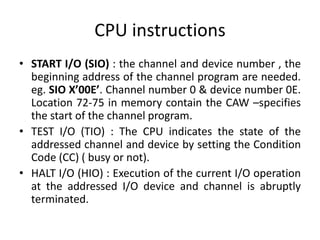
CPU instructions
• START I/O (SIO) : the channel and device number , the
beginning address of the channel program are needed.
eg. SIO X’00E’. Channel number 0 & device number 0E.
Location 72-75 in memory contain the CAW –specifies
the start of the channel program.
• TEST I/O (TIO) : The CPU indicates the state of the
addressed channel and device by setting the Condition
Code (CC) ( busy or not).
• HALT I/O (HIO) : Execution of the current I/O operation
at the addressed I/O device and channel is abruptly
terminated.
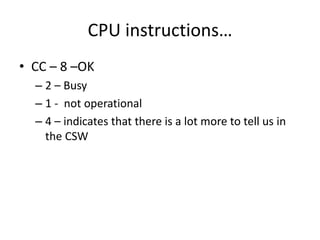
CPU instructions…
• CC – 8 –OK
– 2 – Busy
– 1 - not operational
– 4 – indicates that there is a lot more to tell us in
the CSW
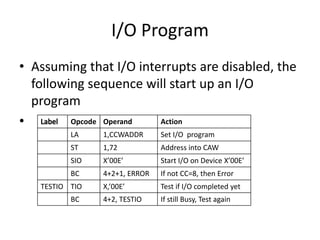
I/O Program
• Assuming that I/O interrupts are disabled, the
following sequence will start up an I/O
program
• Opcode Operand Action
LA 1,CCWADDR Set I/O program
ST 1,72 Address into CAW
SIO X’00E’ Start I/O on Device X’00E’
BC 4+2+1, ERROR If not CC=8, then Error
TESTIO TIO X,’00E’ Test if I/O completed yet
BC 4+2, TESTIO If still Busy, Test again
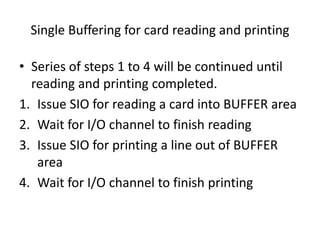
Single Buffering for card reading and printing
• Series of steps 1 to 4 will be continued until
reading and printing completed.
1. Issue SIO for reading a card into BUFFER area
2. Wait for I/O channel to finish reading
3. Issue SIO for printing a line out of BUFFER
area
4. Wait for I/O channel to finish printing
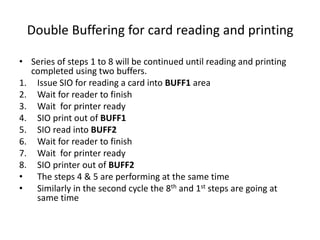
Double Buffering for card reading and printing
• Series of steps 1 to 8 will be continued until reading and printing
completed using two buffers.
1. Issue SIO for reading a card into BUFF1 area
2. Wait for reader to finish
3. Wait for printer ready
4. SIO print out of BUFF1
5. SIO read into BUFF2
6. Wait for reader to finish
7. Wait for printer ready
8. SIO printer out of BUFF2
• The steps 4 & 5 are performing at the same time
• Similarly in the second cycle the 8th and 1st steps are going at
same time
Interrupt Structure and Processing
• Interrupt
• Interrupt types
• Interrupt Mechanism
• Interrupt Handler Processing
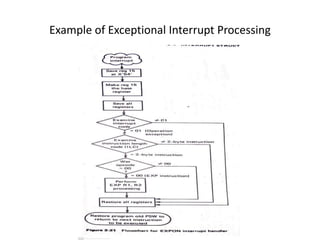
• Example of Exceptional Interrupt Processing
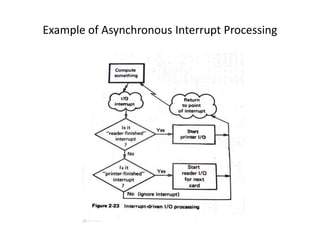
• Example of Asynchronous Interrupt
Processing
Interrupt
• An Interrupt is
(1) a response to an asynchronous or
exceptional event that
(2) automatically saves the current CPU
status to allow later restart and
(3) causes an automatic transfer to a
specified routine ( called an interrupt handler)
Figure : Locus of a process through an
interrupt
1
3
2
Program
Interrupt routine
Started here
Interrupt occurs
Program finishes
Interrupt process
starts
Interrupt processing
completed
Types of Interrupt
1. Input / Output Interrupt
2. Program Interrupt
3. Supervisor Call Interrupt (SVC Instruction)
4. External Interrupt
5. Machine-Check Interrupt ( Possible Hardware
failure was detected)
Types of Interrupt…
• Input/Output Interrupt
– Invalid I/O Command
– I/O channel end ( Channel finished)
– I/O device end ( Device finished)
• Program Interrupt
– Invalid CPU Instruction
– Fixed-point arithmetic overflow
– Storage protection violation
Types of Interrupt…
• External Interrupt
– Interval timer going off
– Operators interrupt button
– CPU-to-CPU communication interrupt
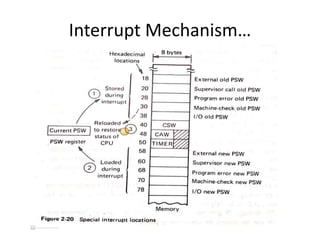
Interrupt Mechanism
• How CPU status can be saved and control
transferred to an interrupt handling routine.
• The ‘state’ or current condition of the CPU is
stored in a double word register called the
Program Status Word (PSW).
• PSW is used to control instruction sequencing
and to hold and indicate the current status of
the system in relation to the program
currently being executed.
Interrupt Mechanism…
• The active or controlling PSW is the ‘current’
PSW.
• By storing the PSW during an interruption, the
status of the CPU can be preserved for
inspection or reloading.
• By loading a new PSW or part of one, the state
of the CPU can be changed.
Interrupt Mechanism…
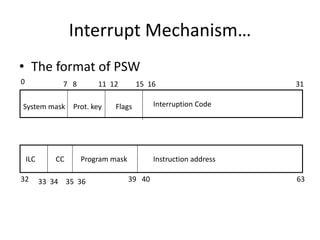
• The format of PSW
System mask Interruption Code
Instruction address
Program mask
Prot. key Flags
ILC CC
0 11 12
7 8 15 16 31
32 33 34 35 36 39 40 63
Interrupt Mechanism…
• PSW format
• System Mask – indicates whether the CPU wishes to accept
interrupts from a specific channel,
– Bit 0 turned on - 0th Channel
– Bit 1 turned on – 1st Channel
– Bit 2 turned on – 2nd Channel
– Bit 3 turned on – 3rd Channel
– Bit 4 turned on – 4th Channel
– Bit 5 turned on – 5th Channel
– Bit 6 turned on – 6th or above are allowed through 5 must be turned
on if channels 0 through 5 respectively are allowed to interrupt.
– Bit 7 turned on – The external interrupts are allowed.
If the I/O interrupts are masked and an interrupt occurs, then the
hardware automatically suspends that interrupt for later processing.
Interrupt Mechanism…
• PSW format…
• Protection Key – for protection purpose, main storage
is divided into blocks,
• Each block of memory is associated with a lock.
• Lock may be set and examined by appropriate
privileged instruction. Read/Write protect or only write
protect.
• Flags – (EMWP)- E – extended mode, M – Machine
check mode, W-wait state mode, P- problem state
mode. P is 0= supervisory or 1= user state, W indicates
the processor either is running (W=0) or is stopped
(W=1) waiting for an interrupt.
Interrupt Mechanism…
• PSW format…
• Interrupt code- contains coded information as to the type of
interrupt last received.
• ILC- Instruction Length Code contains the length of the last
instruction executed.- allows the programmer to trace back
one instruction.
• CC- Condition Code contains the current value of the
condition code. Automatically set by certain instructions, such
as arithmetic, comparison etc.
• Program mask - contain information to mask some other
types of interrupt. If such an interrupt is masked and occurs,
it is lost.
Interrupt Mechanism…
• PSW format…
• Instruction Address – contains address of the
next instruction to be executed.
• Status switching instructions – Load PSW
(LPSW), Set Program Mask (SPM), Set System
Mask (SSM), Supervisor Call (SVC) and Set
Storage Key (SSK) – most of these instructions
are executed only in supervisor mode.
• 5 classes of interrupts – I/O, program, supervisor call,
external and machine check – has associated with it
two doublewords called ‘old’ and ’new’ PSWs. Stored
in the main memory at predetermined storage
locations.
• When interrupt occurs, the interrupt hardware
mechanism (1) stores the current PSW in the old
position and (2) loads the current PSW from the new
position – the instruction sequence transfers to the
interrupt handler routine specified (3) there is usually
an LPSW instruction to make the old PSW as current
PSW again.
Interrupt Mechanism…
Interrupt Handler Processing
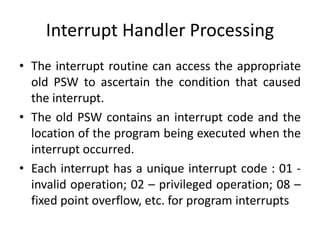
• The interrupt routine can access the appropriate
old PSW to ascertain the condition that caused
the interrupt.
• The old PSW contains an interrupt code and the
location of the program being executed when the
interrupt occurred.
• Each interrupt has a unique interrupt code : 01 -
invalid operation; 02 – privileged operation; 08 –
fixed point overflow, etc. for program interrupts
Interrupt Handler Processing…
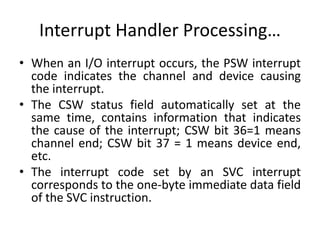
• When an I/O interrupt occurs, the PSW interrupt
code indicates the channel and device causing
the interrupt.
• The CSW status field automatically set at the
same time, contains information that indicates
the cause of the interrupt; CSW bit 36=1 means
channel end; CSW bit 37 = 1 means device end,
etc.
• The interrupt code set by an SVC interrupt
corresponds to the one-byte immediate data field
of the SVC instruction.
Interrupt Handler Processing…
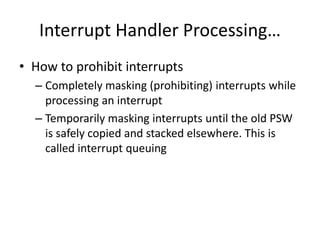
• How to prohibit interrupts
– Completely masking (prohibiting) interrupts while
processing an interrupt
– Temporarily masking interrupts until the old PSW
is safely copied and stacked elsewhere. This is
called interrupt queuing
Example of Exceptional Interrupt Processing
Example of Asynchronous Interrupt Processing
Unit I over
89

Operating system advance learning by Saurabh sahuji.pptx

  • 1.
  • 2.
    History Of OS •Operating systems were first developed in the late 1950s to manage tape storage • The General Motors Research Lab implemented the first OS in the early 1950s for their IBM 701 • In the mid-1960s, operating systems started to use disks • In the late 1960s, the first version of the Unix OS was developed • The first OS built by Microsoft was DOS. It was built in 1981 by purchasing the 86-DOS software from a Seattle company • The present-day popular OS Windows first came to existence in 1985 when a GUI was created and paired with MS-DOS. 2
  • 3.
    Evolution of OperatingSystems • The evolution of operating systems is directly dependent on the development of computer systems and how users use them. Here is a quick tour of computing systems through the past fifty years in the timeline. • Early Evolution – 1945: ENIAC, Moore School of Engineering, University of Pennsylvania. – 1949: EDSAC and EDVAC – 1949: BINAC - a successor to the ENIAC – 1951: UNIVAC by Remington – 1952: IBM 701 – 1956: The interrupt – 1954-1957: FORTRAN was developed 3
  • 4.
    Evolution of OperatingSystems… • Operating Systems - Late 1950s – By the late 1950s Operating systems were well improved and started supporting following usages: – It was able to perform Single stream batch processing. – It could use Common, standardized, input/output routines for device access. – Program transition capabilities to reduce the overhead of starting a new job was added. – Error recovery to clean up after a job terminated abnormally was added. – Job control languages that allowed users to specify the job definition and resource requirements were made possible. 4
  • 5.
    Evolution of OperatingSystems… • Operating Systems - In 1960s – 1961: The dawn of minicomputers – 1962: Compatible Time-Sharing System (CTSS) from MIT – 1963: Burroughs Master Control Program (MCP) for the B5000 system – 1964: IBM System/360 – 1960s: Disks became mainstream – 1966: Minicomputers got cheaper, more powerful, and really useful. – 1967-1968: Mouse was invented. – 1964 and onward: Multics – 1969: The UNIX Time-Sharing System from Bell Telephone Laboratories. 5
  • 6.
    Evolution of OperatingSystems… • Supported OS Features by 1970s • Multi User and Multi tasking was introduced. • Dynamic address translation hardware and Virtual machines came into picture. • Modular architectures came into existence. • Personal, interactive systems came into existence. 6
  • 7.
    Evolution of OperatingSystems… • Accomplishments after 1970 – 1971: Intel announces the microprocessor – 1972: IBM comes out with VM: the Virtual Machine Operating System – 1973: UNIX 4th Edition is published – 1973: Ethernet – 1974 The Personal Computer Age begins – 1974: Gates and Allen wrote BASIC for the Altair – 1976: Apple II • 7
  • 8.
    Evolution of OperatingSystems… – August 12, 1981: IBM introduces the IBM PC – 1983 Microsoft begins work on MS-Windows – 1984 Apple Macintosh comes out – 1990 Microsoft Windows 3.0 comes out – 1991 GNU/Linux – 1992 The first Windows virus comes out – 1993 Windows NT – 2007: iOS – 2008: Android OS 8
  • 9.
    Features of OperatingSystem • Here is a list commonly found important features of an Operating System: • Protected and supervisor mode • Allows disk access and file systems Device drivers Networking Security • Program Execution • Memory management Virtual Memory Multitasking • Handling I/O operations • Manipulation of the file system • Error Detection and handling • Resource allocation • Information and Resource Protection 9
  • 10.
    Types of OperatingSystem • Batch Operating System. • Multitasking/Time Sharing OS. • Multiprocessing OS. • Real Time OS. • Distributed OS. • Network OS. • Mobile OS. 10
  • 11.
    Batch Operating System •Some computer processes are very lengthy and time-consuming. To speed the same process, a job with a similar type of needs are batched together and run as a group. • The user of a batch operating system never directly interacts with the computer. In this type of OS, every user prepares his or her job on an offline device like a punch card and submit it to the computer operator. 11
  • 12.
    Batch Operating System… •To speed up processing, jobs with similar needs are batched together and run as a group. The programmers leave their programs with the operator and the operator then sorts the programs with similar requirements into batches. • The problems with Batch Systems are as follows − • Lack of interaction between the user and the job. • CPU is often idle, because the speed of the mechanical I/O devices is slower than the CPU. • Difficult to provide the desired priority. 12
  • 13.
    Multi-Tasking/Time-sharing OS • Time-sharingoperating system enables people located at a different terminal(shell) to use a single computer system at the same time. The processor time (CPU) which is shared among multiple users is termed as time sharing. Time-sharing is a technique which enables many people, located at various terminals, to use a particular computer system at the same time. Time-sharing or multitasking is a logical extension of multiprogramming. Processor's time which is shared among multiple users simultaneously is termed as time- sharing. • The main difference between Multiprogrammed Batch Systems and Time-Sharing Systems is that in case of Multiprogrammed batch systems, the objective is to maximize processor use, whereas in Time-Sharing Systems, the objective is to minimize response time. 13
  • 14.
    Multi-Tasking/Time-sharing OS… • Multiplejobs are executed by the CPU by switching between them, but the switches occur so frequently. Thus, the user can receive an immediate response. For example, in a transaction processing, the processor executes each user program in a short burst or quantum of computation. That is, if n users are present, then each user can get a time quantum. When the user submits the command, the response time is in few seconds at most. • The operating system uses CPU scheduling and multiprogramming to provide each user with a small portion of a time. Computer systems that were designed primarily as batch systems have been modified to time-sharing systems. • Advantages of Timesharing operating systems are as follows − – Provides the advantage of quick response. – Avoids duplication of software. – Reduces CPU idle time. • Disadvantages of Time-sharing operating systems are as follows − – Problem of reliability. – Question of security and integrity of user programs and data. – Problem of data communication. 14
  • 15.
    Real time OS •A real time operating system time interval to process and respond to inputs is very small • A real-time system is defined as a data processing system in which the time interval required to process and respond to inputs is so small that it controls the environment. The time taken by the system to respond to an input and display of required updated information is termed as the response time. So in this method, the response time is very less as compared to online processing. 15
  • 16.
    Real time OS… •Real-time systems are used when there are rigid time requirements on the operation of a processor or the flow of data and real-time systems can be used as a control device in a dedicated application. • A real-time operating system must have well-defined, fixed time constraints, otherwise the system will fail. • For example : Military Software Systems, Space Software Systems. Scientific experiments, medical imaging systems, industrial control systems, weapon systems, robots, air traffic control systems, etc. 16
  • 17.
    Real time OS… •There are two types of real-time operating systems. • Hard real-time systems Hard real-time systems guarantee that critical tasks complete on time. In hard real-time systems, secondary storage is limited or missing and the data is stored in ROM. In these systems, virtual memory is almost never found. • Soft real-time systems Soft real-time systems are less restrictive. A critical real-time task gets priority over other tasks and retains the priority until it completes. Soft real-time systems have limited utility than hard real-time systems. For example, multimedia, virtual reality, Advanced Scientific Projects like undersea exploration and planetary rovers, etc. 17
  • 18.
    Distributed Operating System •Distributed systems use many processors located in different machines to provide very fast computation to its users. • Distributed systems use multiple central processors to serve multiple real-time applications and multiple users. Data processing jobs are distributed among the processors accordingly. • The processors communicate with one another through various communication lines (such as high-speed buses or telephone lines). These are referred as loosely coupled systems or distributed systems. Processors in a distributed system may vary in size and function. These processors are referred as sites, nodes, computers, and so on. 18
  • 19.
    Distributed Operating System… •The advantages of distributed systems are as follows − – With resource sharing facility, a user at one site may be able to use the resources available at another. – Speedup the exchange of data with one another via electronic mail. – If one site fails in a distributed system, the remaining sites can potentially continue operating. – Better service to the customers. – Reduction of the load on the host computer. – Reduction of delays in data processing. 19
  • 20.
    Network Operating System •A Network Operating System runs on a server. It provides the capability to serve, to manage data, user, groups, security, application, and other networking functions. • The primary purpose of the network operating system is to allow shared file and printer access among multiple computers in a network, typically a local area network (LAN), a private network or to other networks. 20
  • 21.
    Network Operating System… •Examples of network operating systems include Microsoft Windows Server 2003, Microsoft Windows Server 2008, UNIX, Linux, Mac OS X, Novell NetWare, and BSD. • The advantages of network operating systems are as follows − – Centralized servers are highly stable. – Security is server managed. – Upgrades to new technologies and hardware can be easily integrated into the system. – Remote access to servers is possible from different locations and types of systems. • The disadvantages of network operating systems are as follows − – High cost of buying and running a server. – Dependency on a central location for most operations. – Regular maintenance and updates are required. 21
  • 22.
    Mobile OS • Mobileoperating systems are those OS which is especially that are designed to power smartphones, tablets, and wearables devices- Smart watch , smart glasses. • Some most famous mobile operating systems are Android and iOS, but others include BlackBerry, Web, and watchOS. 22
  • 23.
    Difference between Firmwareand Operating System Firmware Operating System Firmware is one kind of programming that is embedded on a chip in the device which controls that specific device. OS provides functionality over and above that which is provided by the firmware. Firmware programs that been encoded by the manufacture of the IC or something and cannot be changed. OS is a program that can be installed by the user and can be changed. It is stored on non-volatile memory. OS is stored on the hard drive. 23
  • 24.
    Important functions ofan OS • Memory Management • Processor Management • Device Management • File Management • Security • Control over system performance • Job accounting • Error detecting aids • Coordination between other software and users 24
  • 25.
    Memory Management • Memorymanagement refers to management of Primary Memory or Main Memory. Main memory is a large array of words or bytes where each word or byte has its own address. • Main memory provides a fast storage that can be accessed directly by the CPU. For a program to be executed, it must in the main memory. • An Operating System does the following activities for memory management: – Keeps tracks of primary memory, i.e., what part of it are in use by whom, what part are not in use. – In multiprogramming, the OS decides which process will get memory when and how much. – Allocates the memory when a process requests it to do so. – De-allocates the memory when a process no longer needs it or has been terminated. 25
  • 26.
    Processor Management • Inmultiprogramming environment, the OS decides which process gets the processor when and for how much time. This function is called process scheduling. • An Operating System does the following activities for processor management: – Keeps tracks of processor and status of process. The program responsible for this task is known as traffic controller. – Allocates the processor (CPU) to a process. – De-allocates processor when a process is no longer required. 26
  • 27.
    Device Management • AnOperating System manages device communication via their respective drivers. It does the following activities for device management: • Keeps tracks of all devices. The program responsible for this task is known as the I/O controller. • Decides which process gets the device when and for how much time. • Allocates the device in the most efficient way. • De-allocates devices. 27
  • 28.
    File Management • Afile system is normally organized into directories for easy navigation and usage. These directories may contain files and other directions. • An Operating System does the following activities for file management: – Keeps track of information, location, uses, status etc. The collective facilities are often known as file system. – Decides who gets the resources. – Allocates the resources. – De-allocates the resources. 28
  • 29.
    Other Important Activities •Following are some of the important activities that an Operating System performs: • Security -- By means of password and similar other techniques, it prevents unauthorized access to programs and data. • Control over system performance -- Recording delays between request for a service and response from the system. • Job accounting -- Keeping track of time and resources used by various jobs and users. 29
  • 30.
    Other Important Activities… •Error detecting aids -- Production of dumps, traces, error messages, and other debugging and error detecting aids. • Coordination between other software and users -- Coordination and assignment of compilers, interpreters, assemblers and other software to the various users of the computer systems. 30
  • 31.
  • 32.
  • 33.
    Operating System –Different View Points • Process View point • Extended Machine View • Hierarchical Machine View
  • 34.
    Process View point •Multiple Processes in a multiprogrammes system Process 3 Process 2 Process 1 Operating Systems
  • 35.
    Process View point… •Submit – A User submits a Job to the system, the system must respond to the user’s request. • Hold/New – The user’s job has been converted into internal machine readable form ,i.e., a process is generated. • Ready – Multiple processes are “ready to run” under a CPU. • Run – The process has been assigned a processor and its programs are presently being executed. • Wait – The process is waiting for some event (I/O). • Complete/Termination – The process has completed its computation and all its assigned and all its resources may be reclaimed.
  • 36.
  • 37.
  • 38.
    Extended Machine View •Bare Machine – a computer without its software clothing. Eg. program 1. MOVE C,B 2. FIND-SPACE 80,X 3. READ-CARD X 4. COMPARE X(2),’/*’ 5. TRANSFER-MATCH END
  • 39.
    Extended Machine View… •Statements 1,4,5 are computer instructions. • Statements 2 and 3 are required tens, hundreds or even thousands of instructions to be correctly and efficiently accomplished on a modern computer – they involve interaction with some of the key system resources, such as memory and I/O. • The instructions to perform these kinds of resource management functions are usually provided by the OS. • The sum of these instructions is called the instruction set of the extended machine
  • 40.
  • 41.
    Hierarchical Machine View… 1.Key functions needed by many systems modules could be separated into an “inner extended machine” 2. Certain modules could be separated out and run on the extended machine in essentially the same way as user processes.
  • 42.
    Hierarchical Machine View BareMachine n Outerextended machine Inner extended machine Bare machine Process 4 Process 3 Process 2 Process 1
  • 43.
    Hierarchical Machine View… •Primitive functions in the various levels of the kernel are • Level 1 : Processor Management Lower level – The P synchronization primitive – The V synchronization primitive – Process scheduling – the mechanism of multiprogramming • Level 2 : Memory Management – Allocate memory – Release (free) memory
  • 44.
    Hierarchical Machine View… •Level 3 : Processor Management Upper level – Create/destroy process – Send/receive messages between processes – Stop process – Start process • Level 4 : Device Management – Keep track of status of all I/O devices – Schedule I/O – Initiate I/O process • Level 5 : Information Management – Create/destroy file – Open/close file – Read/write files
  • 45.
    I/O Programming • I/Oprogramming • Types of I/O channels • I/O programming concepts • I/O process structure • Communication between the CPU and the channel • I/O Example using Single buffering • I/O Example using Double buffering • Multiple card buffering
  • 46.
    I/O Programming… Card Reader ProcessorCard Reader Memory Printer Mag tape Mag tape
  • 47.
    I/O Programming… • Threebasic components – the CPU, main memory, I/O devices. • Speed disparity between CPU and I/O devices motivated the development of I/O channel • I/O channels are directly connected to the memory • the I/O devices connected to the I/O channel
  • 48.
    I/O channels • I/OChannel definition: I/O channels or I/O processors provide a path or channel for the data to flow between I/O devices and main memory. • Specialized processing units intended to operate the I/O devices. • I/O operations are executed via the channel, the CPU is free to perform its high speed computations without wasting time for I/O.
  • 49.
  • 50.
    Types of I/Ochannels • Selector Channel • Multiplexor Channel • Block Multiplexor Channel • Selector Channel : can service only one device at a time, i.e., one device is selected for service. These channels used for very high speed devices. eg. Magnetic tapes, disks and drums, each I/O request is usually completed quickly and then another device selected for I/O.
  • 51.
    Types of I/Ochannels… • Multiplexor Channel : simultaneously service many devices (up to 256) for slow devices such as card readers, card punches and printers. • Block Multiplexor Channel : allows multiple channel programs for high speed devices to be active on the same I/O channel.
  • 52.
    Types of I/Ochannels…
  • 53.
    I/O Programming Concepts •CPU communicates with the I/O processor by START I/O, HALT I/O and TEST I/O . • The I/O processor communicate with the CPU by interrupts • I/O channel instructions are called as I/O commands. • The programs written using sets of I/O commands are known as I/O programs or I/O programming
  • 54.
    I/O Processor Structure– 360 and 370 • Memory - 224 Bytes. • Registers – I/O channels has no explicit registers, but some I/O channels have an Instruction Address Register and Data counter similar to CPU working register. • Data - only logical character data handled ( string of consecutive bytes from 1 to 216 -1 ) EBCDIC to BCD
  • 55.
    I/O Processor Structure– 360 and 370… • Instructions – three basic grouping of I/O commands : Data transfer : read, read backwards, write, sense ( read device status) • Device Control : control ( page eject, tape rewind, etc.) • Branching : transfer of control within the channel program.
  • 56.
    I/O Processor Structure– 360 and 370… • The channel fetches the channel commands ( Channel Command Words (CCW)) from memory and decodes them to 64 bit format • 0-7 – opcode – command to be performed • 8-31 – Data address – beginning location of the data field • 32-36 – Flags • 37-47 – unused • 48-63 - Count
  • 57.
    I/O Processor Structure– 360 and 370… • Flags : • Bit 32 – Data chain flag – storage area designed by the next CCW, once the current data area count is exhausted. • Bit 33 – Command Chain Flag – next sequential CCW is to be executed on normal execution of the current command • Bit 34 – Suppress length indication flag - suppresses the indication to the program of an incorrect length • Bit 35 – Skip flag - suppression of transfer of information to storage. • Bit 36 - Programmed Controlled interruption flag - channel to generate an interruption condition when this CCW takes control of the channel.
  • 58.
    Special Features • Thechannel has an internal register acts as Instruction Address Register (IAR) • Multiplexor or block multiplexor has more IAR, one IAR per device • 3 specific words of memory are used for status information. • The Channel Address Word (CAW) starts at memory location 7210 .contains the address of the first instruction to be executed by the channel. • The channel refers to the CAW during the execution of the START I/O (SIO) by the CPU.
  • 59.
    Special Features… • ChannelStatus Word (CSW)contains coded information indicating the status of the channel at the location 6410. • The format of CSW is a double word. • 0-7 – Protection keys • 8-31 – Next CCW address • 32-47 – Status • 48-63 – Residual count
  • 60.
    Special Features… • Key– protection key used by channel • Address – address of next channel command • Status – e.g., building on fire, I/O completed, I/O error • Count – how many bytes of the last CCW were not processed.
  • 61.
    Example of anI/O Program Location Opcode Data Address Flag Unused Count Action 400 88 XXXXXX 40 00 XXXX Skip to new page 408 01 010008 60 00 0008 Print line 410 08 XXXXXX 40 00 XXXX Advance 1 line 418 89 010010 00 00 0014 Print 20 Character line Eject to next page and Stop 010008 “ GOOD DAY” 010010 “YOU ARE NOW ON A 370 “
  • 62.
    Communication between theCPU and the Channel • The purpose of I/O channel is to free the CPU. • The CPU and channel in a master/slave relationship • The CPU tells the channel when to start and commands it to stop or change what it is doing. • 2 types of communications between CPU and channel – CPU to channel I/O instructions initiated by the CPU. – Channel to CPU interrupt initiated by the channel.
  • 63.
    Communication between theCPU and the Channel… • CPU instruction format • 0-7 – opcode • 8-15 – unused • 16-19 – B1 • 20-31 – D1 • The channel and device number are specified by the sum of the contents of register B1 and D1 field. • Bits 16-23 contains the channel address and • Bits 24-31 contains the device on the channel.
  • 64.
    CPU instructions • STARTI/O (SIO) : the channel and device number , the beginning address of the channel program are needed. eg. SIO X’00E’. Channel number 0 & device number 0E. Location 72-75 in memory contain the CAW –specifies the start of the channel program. • TEST I/O (TIO) : The CPU indicates the state of the addressed channel and device by setting the Condition Code (CC) ( busy or not). • HALT I/O (HIO) : Execution of the current I/O operation at the addressed I/O device and channel is abruptly terminated.
  • 65.
    CPU instructions… • CC– 8 –OK – 2 – Busy – 1 - not operational – 4 – indicates that there is a lot more to tell us in the CSW
  • 66.
    I/O Program • Assumingthat I/O interrupts are disabled, the following sequence will start up an I/O program • Opcode Operand Action LA 1,CCWADDR Set I/O program ST 1,72 Address into CAW SIO X’00E’ Start I/O on Device X’00E’ BC 4+2+1, ERROR If not CC=8, then Error TESTIO TIO X,’00E’ Test if I/O completed yet BC 4+2, TESTIO If still Busy, Test again
  • 67.
    Single Buffering forcard reading and printing • Series of steps 1 to 4 will be continued until reading and printing completed. 1. Issue SIO for reading a card into BUFFER area 2. Wait for I/O channel to finish reading 3. Issue SIO for printing a line out of BUFFER area 4. Wait for I/O channel to finish printing
  • 68.
    Double Buffering forcard reading and printing • Series of steps 1 to 8 will be continued until reading and printing completed using two buffers. 1. Issue SIO for reading a card into BUFF1 area 2. Wait for reader to finish 3. Wait for printer ready 4. SIO print out of BUFF1 5. SIO read into BUFF2 6. Wait for reader to finish 7. Wait for printer ready 8. SIO printer out of BUFF2 • The steps 4 & 5 are performing at the same time • Similarly in the second cycle the 8th and 1st steps are going at same time
  • 69.
    Interrupt Structure andProcessing • Interrupt • Interrupt types • Interrupt Mechanism • Interrupt Handler Processing • Example of Exceptional Interrupt Processing • Example of Asynchronous Interrupt Processing
  • 70.
    Interrupt • An Interruptis (1) a response to an asynchronous or exceptional event that (2) automatically saves the current CPU status to allow later restart and (3) causes an automatic transfer to a specified routine ( called an interrupt handler)
  • 71.
    Figure : Locusof a process through an interrupt 1 3 2 Program Interrupt routine Started here Interrupt occurs Program finishes Interrupt process starts Interrupt processing completed
  • 72.
    Types of Interrupt 1.Input / Output Interrupt 2. Program Interrupt 3. Supervisor Call Interrupt (SVC Instruction) 4. External Interrupt 5. Machine-Check Interrupt ( Possible Hardware failure was detected)
  • 73.
    Types of Interrupt… •Input/Output Interrupt – Invalid I/O Command – I/O channel end ( Channel finished) – I/O device end ( Device finished) • Program Interrupt – Invalid CPU Instruction – Fixed-point arithmetic overflow – Storage protection violation
  • 74.
    Types of Interrupt… •External Interrupt – Interval timer going off – Operators interrupt button – CPU-to-CPU communication interrupt
  • 75.
    Interrupt Mechanism • HowCPU status can be saved and control transferred to an interrupt handling routine. • The ‘state’ or current condition of the CPU is stored in a double word register called the Program Status Word (PSW). • PSW is used to control instruction sequencing and to hold and indicate the current status of the system in relation to the program currently being executed.
  • 76.
    Interrupt Mechanism… • Theactive or controlling PSW is the ‘current’ PSW. • By storing the PSW during an interruption, the status of the CPU can be preserved for inspection or reloading. • By loading a new PSW or part of one, the state of the CPU can be changed.
  • 77.
    Interrupt Mechanism… • Theformat of PSW System mask Interruption Code Instruction address Program mask Prot. key Flags ILC CC 0 11 12 7 8 15 16 31 32 33 34 35 36 39 40 63
  • 78.
    Interrupt Mechanism… • PSWformat • System Mask – indicates whether the CPU wishes to accept interrupts from a specific channel, – Bit 0 turned on - 0th Channel – Bit 1 turned on – 1st Channel – Bit 2 turned on – 2nd Channel – Bit 3 turned on – 3rd Channel – Bit 4 turned on – 4th Channel – Bit 5 turned on – 5th Channel – Bit 6 turned on – 6th or above are allowed through 5 must be turned on if channels 0 through 5 respectively are allowed to interrupt. – Bit 7 turned on – The external interrupts are allowed. If the I/O interrupts are masked and an interrupt occurs, then the hardware automatically suspends that interrupt for later processing.
  • 79.
    Interrupt Mechanism… • PSWformat… • Protection Key – for protection purpose, main storage is divided into blocks, • Each block of memory is associated with a lock. • Lock may be set and examined by appropriate privileged instruction. Read/Write protect or only write protect. • Flags – (EMWP)- E – extended mode, M – Machine check mode, W-wait state mode, P- problem state mode. P is 0= supervisory or 1= user state, W indicates the processor either is running (W=0) or is stopped (W=1) waiting for an interrupt.
  • 80.
    Interrupt Mechanism… • PSWformat… • Interrupt code- contains coded information as to the type of interrupt last received. • ILC- Instruction Length Code contains the length of the last instruction executed.- allows the programmer to trace back one instruction. • CC- Condition Code contains the current value of the condition code. Automatically set by certain instructions, such as arithmetic, comparison etc. • Program mask - contain information to mask some other types of interrupt. If such an interrupt is masked and occurs, it is lost.
  • 81.
    Interrupt Mechanism… • PSWformat… • Instruction Address – contains address of the next instruction to be executed. • Status switching instructions – Load PSW (LPSW), Set Program Mask (SPM), Set System Mask (SSM), Supervisor Call (SVC) and Set Storage Key (SSK) – most of these instructions are executed only in supervisor mode.
  • 82.
    • 5 classesof interrupts – I/O, program, supervisor call, external and machine check – has associated with it two doublewords called ‘old’ and ’new’ PSWs. Stored in the main memory at predetermined storage locations. • When interrupt occurs, the interrupt hardware mechanism (1) stores the current PSW in the old position and (2) loads the current PSW from the new position – the instruction sequence transfers to the interrupt handler routine specified (3) there is usually an LPSW instruction to make the old PSW as current PSW again. Interrupt Mechanism…
  • 83.
  • 84.
    Interrupt Handler Processing •The interrupt routine can access the appropriate old PSW to ascertain the condition that caused the interrupt. • The old PSW contains an interrupt code and the location of the program being executed when the interrupt occurred. • Each interrupt has a unique interrupt code : 01 - invalid operation; 02 – privileged operation; 08 – fixed point overflow, etc. for program interrupts
  • 85.
    Interrupt Handler Processing… •When an I/O interrupt occurs, the PSW interrupt code indicates the channel and device causing the interrupt. • The CSW status field automatically set at the same time, contains information that indicates the cause of the interrupt; CSW bit 36=1 means channel end; CSW bit 37 = 1 means device end, etc. • The interrupt code set by an SVC interrupt corresponds to the one-byte immediate data field of the SVC instruction.
  • 86.
    Interrupt Handler Processing… •How to prohibit interrupts – Completely masking (prohibiting) interrupts while processing an interrupt – Temporarily masking interrupts until the old PSW is safely copied and stacked elsewhere. This is called interrupt queuing
  • 87.
    Example of ExceptionalInterrupt Processing
  • 88.
    Example of AsynchronousInterrupt Processing
  • 89.