Sistem Operasi dan Program
Utilitas
Sistem Operasi
 adalah perangkat lunak sistem yang
  bertugas untuk melakukan kontrol
  dan manajemen perangkat keras
  serta operasi-operasi dasar sistem,
  termasuk menjalankan software
  aplikasi seperti program-program
  pengolah kata dan browser web
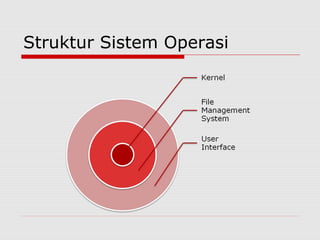
Struktur Sistem Operasi
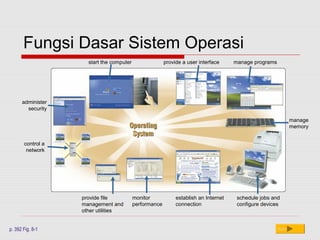
Fungsi Dasar Sistem Operasi
                     start the computer                 provide a user interface     manage programs


      administer
        security

                                                                                                              manage
                                                                                                              memory


       control a
        network


                   provide file           monitor            establish an Internet    schedule jobs and
                   management and         performance        connection               configure devices
                   other utilities


p. 392 Fig. 8-1                                                                                        Next
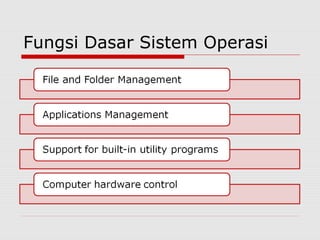
Fungsi Dasar Sistem Operasi
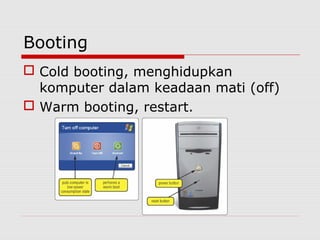
Booting
 Cold booting, menghidupkan
  komputer dalam keadaan mati (off)
 Warm booting, restart.
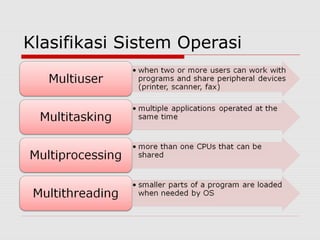
Klasifikasi Sistem Operasi
Pembagian Sistem Operasi
   Mainframes
   Embedded System
   Unix-like Operating System
   Mac OS
   Microsoft Windows
   Network OS
   WebOS
Mainframes
 Mainframes run multiple operating
  systems and operate not as a single
  computer but as a number of virtual
  machines.
 They are typically manufactured by
  large companies for large-scale
  computing purposes
Mainframes
 z/OS from IBM
  While IBM System z™ servers are
  supported by a number of different
  operating systems, their most
  advanced features are powered by
  z/OS
 http://www-03.ibm.com/systems/z/os/zos/
Embedded Systems
 Embedded systems are special-purpose
  systems in which the computer is
  completely encapsulated by the device it
  controls.
 Embedded systems perform pre-defined
  tasks that have very specific requirements.
 Real-time operating systems are embedded
  systems with certain time requirements
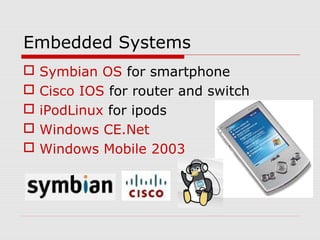
Embedded Systems
   Symbian OS for smartphone
   Cisco IOS for router and switch
   iPodLinux for ipods
   Windows CE.Net
   Windows Mobile 2003
Unix-like OS
 The operating system Unix was
  developed in 1960 by a group of AT&T
  employees.
 Free Unix-like operating systems can be
  used, studied, modified and
  redistributed by anyone with no
  restrictions.
Unix-like OS
 It's a diverse group of operating systems
  with several major sub-categories
  including BSD, and Linux.
 Unix like operating systems run on a
  variety of computers but more
  frequently on server systems and in
  academic and engineering environments
  due to high stability for any kind of
  processing
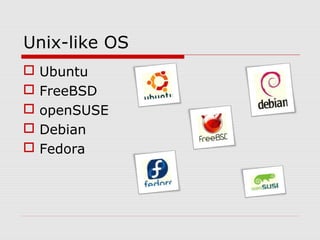
Unix-like OS
   Ubuntu
   FreeBSD
   openSUSE
   Debian
   Fedora
Mac OS
 Apple's Macintosh OS is an operating
  system with a very innovative and unique
  design.
 The history of the company behind it,
  Apple, that's been around since 1976 is
  fascinating and so is its cool operating
  system Mac OS.
 Leopard merupakan versi Mac OS terbaru
  (http://www.apple.com/macosx/)
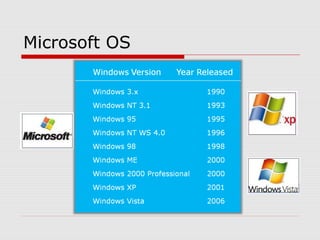
Microsoft OS
Network OS
 Sistem Operasi yang berbasis
  jaringan
 Contoh:
     Novell Netware
     Windows Server 2003
     Linux
     Solaris (Sun)
WebOS
 The WebOS (Web Operating System) represent
  a new form of virtual operating system that
  runs directly in your browser.
 The main advantages of a web operating
  system is that you can access it from anywhere
  but it's very arguable if it's really an operating
  system or not because it runs over a browser
  window and have no relation whatsoever with
  the hardware and its drivers.
 You will still need an operating system to run a
  WebOS.
WebOS
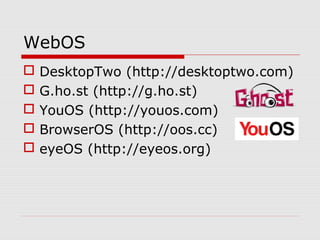
   DesktopTwo (http://desktoptwo.com)
   G.ho.st (http://g.ho.st)
   YouOS (http://youos.com)
   BrowserOS (http://oos.cc)
   eyeOS (http://eyeos.org)
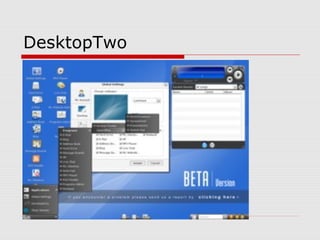
DesktopTwo
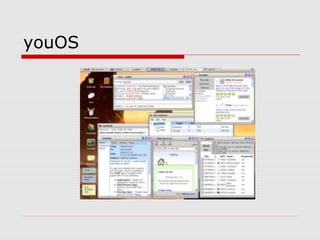
youOS
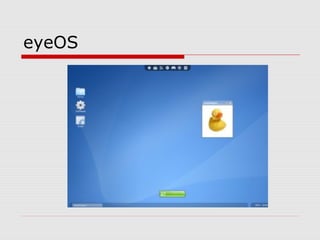
eyeOS
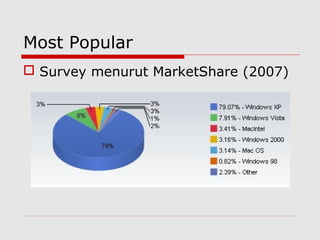
Most Popular
 Survey menurut MarketShare (2007)
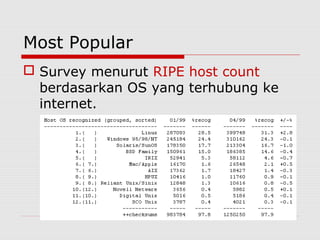
Most Popular
 Survey menurut RIPE host count
  berdasarkan OS yang terhubung ke
  internet.
Program Utilitas
   Antivirus
   Firewall
   Compression Software
   Media Player Software
   Burning Software
   dll
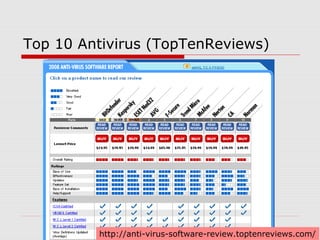
Top 10 Antivirus (TopTenReviews)


         http://anti-virus-software-review.toptenreviews.com/
DISKUSI KELOMPOK
1. Jelaskan tentang sistem operasi, lapisan dalam sistem
   operasi, dan proses booting
2. Sebutkan dan jelaskan berbagai jenis sistem operasi
3. Jelaskan tentang Sistem Operasi DOS serta contoh
   perintah DOS
4. Sebutkan dan jelaskan aksesoris yang terdapat pada
   windows
5. Sebutkan tentang elemen-elemen yang ada pada
   windows desktop
6. Sebutkan dan jelaskan ciri sistem operasi UNIX/Linux
7. Jelaskan apa yang dimaksud dengan shell dan kernel
   pada Linux

Operating system

  • 1.
    Sistem Operasi danProgram Utilitas
  • 2.
    Sistem Operasi  adalahperangkat lunak sistem yang bertugas untuk melakukan kontrol dan manajemen perangkat keras serta operasi-operasi dasar sistem, termasuk menjalankan software aplikasi seperti program-program pengolah kata dan browser web
  • 3.
  • 4.
    Fungsi Dasar SistemOperasi start the computer provide a user interface manage programs administer security manage memory control a network provide file monitor establish an Internet schedule jobs and management and performance connection configure devices other utilities p. 392 Fig. 8-1 Next
  • 5.
  • 6.
    Booting  Cold booting,menghidupkan komputer dalam keadaan mati (off)  Warm booting, restart.
  • 7.
  • 8.
    Pembagian Sistem Operasi  Mainframes  Embedded System  Unix-like Operating System  Mac OS  Microsoft Windows  Network OS  WebOS
  • 9.
    Mainframes  Mainframes runmultiple operating systems and operate not as a single computer but as a number of virtual machines.  They are typically manufactured by large companies for large-scale computing purposes
  • 10.
    Mainframes  z/OS fromIBM While IBM System z™ servers are supported by a number of different operating systems, their most advanced features are powered by z/OS  http://www-03.ibm.com/systems/z/os/zos/
  • 11.
    Embedded Systems  Embeddedsystems are special-purpose systems in which the computer is completely encapsulated by the device it controls.  Embedded systems perform pre-defined tasks that have very specific requirements.  Real-time operating systems are embedded systems with certain time requirements
  • 12.
    Embedded Systems  Symbian OS for smartphone  Cisco IOS for router and switch  iPodLinux for ipods  Windows CE.Net  Windows Mobile 2003
  • 13.
    Unix-like OS  Theoperating system Unix was developed in 1960 by a group of AT&T employees.  Free Unix-like operating systems can be used, studied, modified and redistributed by anyone with no restrictions.
  • 14.
    Unix-like OS  It'sa diverse group of operating systems with several major sub-categories including BSD, and Linux.  Unix like operating systems run on a variety of computers but more frequently on server systems and in academic and engineering environments due to high stability for any kind of processing
  • 15.
    Unix-like OS  Ubuntu  FreeBSD  openSUSE  Debian  Fedora
  • 16.
    Mac OS  Apple'sMacintosh OS is an operating system with a very innovative and unique design.  The history of the company behind it, Apple, that's been around since 1976 is fascinating and so is its cool operating system Mac OS.  Leopard merupakan versi Mac OS terbaru (http://www.apple.com/macosx/)
  • 17.
  • 18.
    Network OS  SistemOperasi yang berbasis jaringan  Contoh:  Novell Netware  Windows Server 2003  Linux  Solaris (Sun)
  • 19.
    WebOS  The WebOS(Web Operating System) represent a new form of virtual operating system that runs directly in your browser.  The main advantages of a web operating system is that you can access it from anywhere but it's very arguable if it's really an operating system or not because it runs over a browser window and have no relation whatsoever with the hardware and its drivers.  You will still need an operating system to run a WebOS.
  • 20.
    WebOS  DesktopTwo (http://desktoptwo.com)  G.ho.st (http://g.ho.st)  YouOS (http://youos.com)  BrowserOS (http://oos.cc)  eyeOS (http://eyeos.org)
  • 21.
  • 22.
  • 23.
  • 24.
    Most Popular  Surveymenurut MarketShare (2007)
  • 25.
    Most Popular  Surveymenurut RIPE host count berdasarkan OS yang terhubung ke internet.
  • 26.
    Program Utilitas  Antivirus  Firewall  Compression Software  Media Player Software  Burning Software  dll
  • 27.
    Top 10 Antivirus(TopTenReviews) http://anti-virus-software-review.toptenreviews.com/
  • 28.
    DISKUSI KELOMPOK 1. Jelaskantentang sistem operasi, lapisan dalam sistem operasi, dan proses booting 2. Sebutkan dan jelaskan berbagai jenis sistem operasi 3. Jelaskan tentang Sistem Operasi DOS serta contoh perintah DOS 4. Sebutkan dan jelaskan aksesoris yang terdapat pada windows 5. Sebutkan tentang elemen-elemen yang ada pada windows desktop 6. Sebutkan dan jelaskan ciri sistem operasi UNIX/Linux 7. Jelaskan apa yang dimaksud dengan shell dan kernel pada Linux