Introduction to
Information Technology
Course Administration &
Requirements
• Exams and Assessment
– Basically 2 exams method Mid & Final
– 10 % Quiz
– 10 % Assignments
– 10 % Final Project
– 30 % Mid
– 40 % Final
– (so you must start getting worried about it !!!)
Lecture Notes
• Available from Photostat shop before lectures or preferably one day
before the start of new week
• Usually the lecture material will cover the topics of one week
• Lecture Notes also now available online on the given website
address.
• Lecture Notes will not be in detail format rather these will contain
topics of discussion and important announcements regarding
assessments.
• Most Importantly Lecture Notes are just a supporting material and
students must not forget to read books for detail and complete
understanding (In case of Management as a subject you need to do
extensive reading on topics under discussion & look for majority of
web sites for practical know how
Course Administration &
Requirements
– Written assignments (Small Tasks) (details in coming
lectures)
• Idea is to initiate research oriented writing not “cut-copy-
paste”
– Attendance, Presentations, Quiz & Class Discussion &
Participation (as a regular activity)
– Volunteer presentations (you must not be that familiar
with this kind of stuff but you need to respond to it
quickly!)
How to get more marks?
• Requirements
– Overall Class Attitude
– Things to Avoid (Referencing, Cut-Copy-
Paste Culture, Carelessness, leg-pulling)
– Things to do (Innovation, Confidence,
Work Attitude)
– Sense of Maturity and continuous
learning
Text and References
• Introduction to Computers
By Peter Norton 7th Edition
Slides and handouts
SCOPE OF YOUR COURSE
To Learn Computer’s Basic Knowledge
To Learn Computer’s hardware knowledge
To Learn How Computer can be use in Office
Environment.
To Learn Internet basic know how.
ACS-1
A World of Computers
• Computers are everywhere
Discovering Computers 2012: Chapter 1 8Pages 4 - 5
Figure 1-1
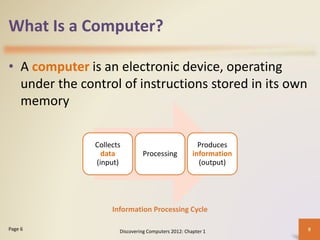
What Is a Computer?
• A computer is an electronic device, operating
under the control of instructions stored in its own
memory
Discovering Computers 2012: Chapter 1 9Page 6
Collects
data
(input)
Processing
Produces
information
(output)
Information Processing Cycle
What Is a Computer?
Discovering Computers 2012: Chapter 1 10Page 6
Figure 1-2
The Components of a Computer
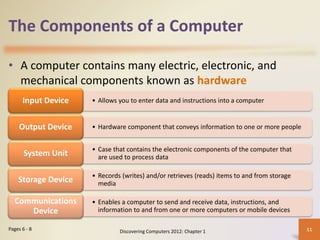
• A computer contains many electric, electronic, and
mechanical components known as hardware
Discovering Computers 2012: Chapter 1 11Pages 6 - 8
• Allows you to enter data and instructions into a computerInput Device
• Hardware component that conveys information to one or more peopleOutput Device
• Case that contains the electronic components of the computer that
are used to process dataSystem Unit
• Records (writes) and/or retrieves (reads) items to and from storage
mediaStorage Device
• Enables a computer to send and receive data, instructions, and
information to and from one or more computers or mobile devices
Communications
Device
The Components of a Computer
Discovering Computers 2012: Chapter 1 12Page 7
Figure 1-3
Advantages and Disadvantages
of Using Computers
Advantages of
Using Computers
Disadvantages of
Using Computers
Discovering Computers 2012: Chapter 1 13
Speed
Reliability
Consistency
Storage
Communications
Health Risks
Violation of Privacy
Public Safety
Impact on Labor Force
Impact on Environment
Pages 9 - 10
Advantages and Disadvantages
of Using Computers
• Green computing involves reducing the electricity
consumed and environmental waste generated when
using a computer
• Strategies include:
– Recycling
– Regulating manufacturing processes
– Extending the life of computers
– Immediately donating or properly disposing of replaced computers
Discovering Computers 2012: Chapter 1 14Page 10
Networks and the Internet
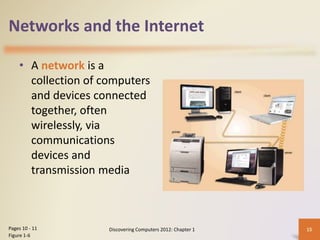
• A network is a
collection of computers
and devices connected
together, often
wirelessly, via
communications
devices and
transmission media
Discovering Computers 2012: Chapter 1 15Pages 10 - 11
Figure 1-6
Networks and the Internet
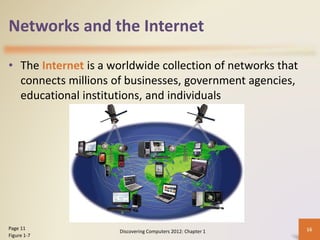
• The Internet is a worldwide collection of networks that
connects millions of businesses, government agencies,
educational institutions, and individuals
Discovering Computers 2012: Chapter 1 16Page 11
Figure 1-7
Networks and the Internet
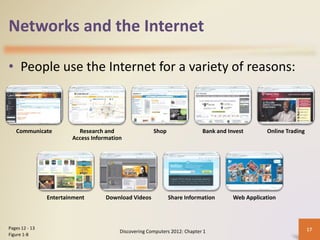
• People use the Internet for a variety of reasons:
Discovering Computers 2012: Chapter 1 17Pages 12 - 13
Figure 1-8
Communicate Research and
Access Information
Shop Bank and Invest Online Trading
Entertainment Download Videos Share Information Web Application
Networks and the Internet
• A social networking Web site encourages
members to share their interests, ideas, stories,
photos, music, and videos with other registered
users
Discovering Computers 2012: Chapter 1 18Page 14
Figure 1-9
Computer Software
• Software, also called a program, tells the
computer what tasks to perform and how to
perform them
Discovering Computers 2012: Chapter 1 19Pages 15 - 16
Figures 1-10 - 1-11
System Software
• Operating system
• Utility program
Application Software
Computer Software
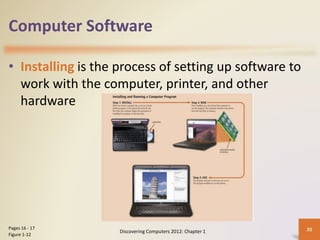
• Installing is the process of setting up software to
work with the computer, printer, and other
hardware
Discovering Computers 2012: Chapter 1 20Pages 16 - 17
Figure 1-12
Computer Software
• A programmer develops
software or writes the
instructions that direct
the computer to
process data into
information
Discovering Computers 2012: Chapter 1 21Page 18
Figure 1-13
Categories of Computers
Embedded computers
Supercomputers
Mainframes
Servers
Game consoles
Mobile computers and mobile devices
Personal computers
Discovering Computers 2012: Chapter 1 22Page 19
Personal Computers
• A personal computer can perform all of its input,
processing, output, and storage activities by itself
• Two popular architectures are the PC and the
Apple
– Desktop computer
Discovering Computers 2012: Chapter 1 23Pages 19 - 20
Figures 1-15 - 1-16
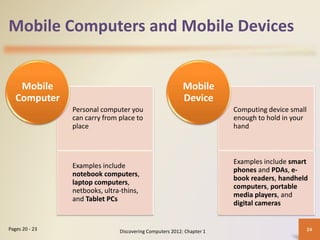
Mobile Computers and Mobile Devices
Personal computer you
can carry from place to
place
Examples include
notebook computers,
laptop computers,
netbooks, ultra-thins,
and Tablet PCs
Mobile
Computer
Computing device small
enough to hold in your
hand
Examples include smart
phones and PDAs, e-
book readers, handheld
computers, portable
media players, and
digital cameras
Mobile
Device
Discovering Computers 2012: Chapter 1 24Pages 20 - 23
Mobile Computers and Mobile Devices
Notebook computer
Tablet PC
Smart phones and PDAs
E-book reader
Discovering Computers 2012: Chapter 1 25Pages 20 - 22
Figures 1-17 – 1-20
Mobile Computers and Mobile Devices
Handheld computer
Portable media player
Digital camera
Discovering Computers 2012: Chapter 1 26Pages 22 - 23
Figures 1-21 – 1-23
Game Consoles
• A game console is a
mobile computing
device designed for
single-player or
multiplayer video
games
Discovering Computers 2012: Chapter 1 27Page 24
Figure 1-24
Servers
• A server controls access
to the hardware,
software, and other
resources on a network
– Provides a centralized
storage area for
programs, data, and
information
Discovering Computers 2012: Chapter 1 28Page 25
Figure 1-25
Mainframes
• A mainframe is a large,
expensive, powerful
computer that can
handle hundreds or
thousands of connected
users simultaneously
Discovering Computers 2012: Chapter 1 29Page 25
Figure 1-26
Supercomputers
• A supercomputer is the fastest, most powerful
computer
– Fastest supercomputers are capable of processing
more than one quadrillion instructions in a single
second
Discovering Computers 2012: Chapter 1 30Page 25
Figure 1-27
Embedded Computers
• An embedded computer is a special-purpose
computer that functions as a component in a
larger product
Discovering Computers 2012: Chapter 1 31Page 26
Consumer
Electronics
• Mobile and digital
telephones
• Digital televisions
• Cameras
• Video recorders
• DVD players and
recorders
• Answering
machines
Home Automation
Devices
• Thermostats
• Sprinkling systems
• Security
monitoring systems
• Appliances
• Lights
Automobiles
• Antilock brakes
• Engine control
modules
• Airbag controller
• Cruise control
Process Controllers
and Robotics
• Remote monitoring
systems
• Power monitors
• Machine
controllers
• Medical devices
Computer Devices
and Office Machines
• Keyboards
• Printers
• Faxes
• Copiers
Embedded Computers
Discovering Computers 2012: Chapter 1 32Page 26
Figure 1-28
Elements of an Information System
Hardware Software Data
People Procedures
Discovering Computers 2012: Chapter 1 33Page 27
Elements of an Information System
Discovering Computers 2012: Chapter 1 34Page 27
Figure 1-29
Examples of Computer Usage
Home User
•Personal financial
management
•Web access
•Communications
•Entertainment
Small Office/Home
Office User
•Look up information
•Send and receive e-mail
messages
•Make telephone calls
Mobile User
•Connect to other computers
on a network or the Internet
•Transfer information
•Play video games
•Listen to music
•Watch movies
Discovering Computers 2012: Chapter 1 35Pages 28 – 31
Figures 1-30 – 1-32
Examples of Computer Usage
Power User
• Work with multimedia
• Use industry-specific
software
Enterprise User
• Communicate among
employees
• Process high volumes
of transactions
• Blog
Discovering Computers 2012: Chapter 1 36Pages 31 – 32
Figures 1-33 – 1-34
Computer Applications in Society
Education
Finance
Government
Health Care
Discovering Computers 2012: Chapter 1 37Pages 34 - 36
Figures 1-36 – 1-39
Computer Applications in Society
Science
Publishing
Travel
Manufacturing
Discovering Computers 2012: Chapter 1 38Pages 36 - 38
Figures 1-40 – 1-43
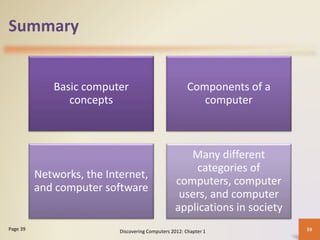
Summary
Basic computer
concepts
Components of a
computer
Networks, the Internet,
and computer software
Many different
categories of
computers, computer
users, and computer
applications in society
Discovering Computers 2012: Chapter 1 39Page 39
Your Interactive Guide
to the Digital World
Discovering
Computers 2012
Chapter 1 Complete

Chapter 1 introduction to computers

  • 1.
  • 2.
    Course Administration & Requirements •Exams and Assessment – Basically 2 exams method Mid & Final – 10 % Quiz – 10 % Assignments – 10 % Final Project – 30 % Mid – 40 % Final – (so you must start getting worried about it !!!)
  • 3.
    Lecture Notes • Availablefrom Photostat shop before lectures or preferably one day before the start of new week • Usually the lecture material will cover the topics of one week • Lecture Notes also now available online on the given website address. • Lecture Notes will not be in detail format rather these will contain topics of discussion and important announcements regarding assessments. • Most Importantly Lecture Notes are just a supporting material and students must not forget to read books for detail and complete understanding (In case of Management as a subject you need to do extensive reading on topics under discussion & look for majority of web sites for practical know how
  • 4.
    Course Administration & Requirements –Written assignments (Small Tasks) (details in coming lectures) • Idea is to initiate research oriented writing not “cut-copy- paste” – Attendance, Presentations, Quiz & Class Discussion & Participation (as a regular activity) – Volunteer presentations (you must not be that familiar with this kind of stuff but you need to respond to it quickly!)
  • 5.
    How to getmore marks? • Requirements – Overall Class Attitude – Things to Avoid (Referencing, Cut-Copy- Paste Culture, Carelessness, leg-pulling) – Things to do (Innovation, Confidence, Work Attitude) – Sense of Maturity and continuous learning
  • 6.
    Text and References •Introduction to Computers By Peter Norton 7th Edition Slides and handouts
  • 7.
    SCOPE OF YOURCOURSE To Learn Computer’s Basic Knowledge To Learn Computer’s hardware knowledge To Learn How Computer can be use in Office Environment. To Learn Internet basic know how. ACS-1
  • 8.
    A World ofComputers • Computers are everywhere Discovering Computers 2012: Chapter 1 8Pages 4 - 5 Figure 1-1
  • 9.
    What Is aComputer? • A computer is an electronic device, operating under the control of instructions stored in its own memory Discovering Computers 2012: Chapter 1 9Page 6 Collects data (input) Processing Produces information (output) Information Processing Cycle
  • 10.
    What Is aComputer? Discovering Computers 2012: Chapter 1 10Page 6 Figure 1-2
  • 11.
    The Components ofa Computer • A computer contains many electric, electronic, and mechanical components known as hardware Discovering Computers 2012: Chapter 1 11Pages 6 - 8 • Allows you to enter data and instructions into a computerInput Device • Hardware component that conveys information to one or more peopleOutput Device • Case that contains the electronic components of the computer that are used to process dataSystem Unit • Records (writes) and/or retrieves (reads) items to and from storage mediaStorage Device • Enables a computer to send and receive data, instructions, and information to and from one or more computers or mobile devices Communications Device
  • 12.
    The Components ofa Computer Discovering Computers 2012: Chapter 1 12Page 7 Figure 1-3
  • 13.
    Advantages and Disadvantages ofUsing Computers Advantages of Using Computers Disadvantages of Using Computers Discovering Computers 2012: Chapter 1 13 Speed Reliability Consistency Storage Communications Health Risks Violation of Privacy Public Safety Impact on Labor Force Impact on Environment Pages 9 - 10
  • 14.
    Advantages and Disadvantages ofUsing Computers • Green computing involves reducing the electricity consumed and environmental waste generated when using a computer • Strategies include: – Recycling – Regulating manufacturing processes – Extending the life of computers – Immediately donating or properly disposing of replaced computers Discovering Computers 2012: Chapter 1 14Page 10
  • 15.
    Networks and theInternet • A network is a collection of computers and devices connected together, often wirelessly, via communications devices and transmission media Discovering Computers 2012: Chapter 1 15Pages 10 - 11 Figure 1-6
  • 16.
    Networks and theInternet • The Internet is a worldwide collection of networks that connects millions of businesses, government agencies, educational institutions, and individuals Discovering Computers 2012: Chapter 1 16Page 11 Figure 1-7
  • 17.
    Networks and theInternet • People use the Internet for a variety of reasons: Discovering Computers 2012: Chapter 1 17Pages 12 - 13 Figure 1-8 Communicate Research and Access Information Shop Bank and Invest Online Trading Entertainment Download Videos Share Information Web Application
  • 18.
    Networks and theInternet • A social networking Web site encourages members to share their interests, ideas, stories, photos, music, and videos with other registered users Discovering Computers 2012: Chapter 1 18Page 14 Figure 1-9
  • 19.
    Computer Software • Software,also called a program, tells the computer what tasks to perform and how to perform them Discovering Computers 2012: Chapter 1 19Pages 15 - 16 Figures 1-10 - 1-11 System Software • Operating system • Utility program Application Software
  • 20.
    Computer Software • Installingis the process of setting up software to work with the computer, printer, and other hardware Discovering Computers 2012: Chapter 1 20Pages 16 - 17 Figure 1-12
  • 21.
    Computer Software • Aprogrammer develops software or writes the instructions that direct the computer to process data into information Discovering Computers 2012: Chapter 1 21Page 18 Figure 1-13
  • 22.
    Categories of Computers Embeddedcomputers Supercomputers Mainframes Servers Game consoles Mobile computers and mobile devices Personal computers Discovering Computers 2012: Chapter 1 22Page 19
  • 23.
    Personal Computers • Apersonal computer can perform all of its input, processing, output, and storage activities by itself • Two popular architectures are the PC and the Apple – Desktop computer Discovering Computers 2012: Chapter 1 23Pages 19 - 20 Figures 1-15 - 1-16
  • 24.
    Mobile Computers andMobile Devices Personal computer you can carry from place to place Examples include notebook computers, laptop computers, netbooks, ultra-thins, and Tablet PCs Mobile Computer Computing device small enough to hold in your hand Examples include smart phones and PDAs, e- book readers, handheld computers, portable media players, and digital cameras Mobile Device Discovering Computers 2012: Chapter 1 24Pages 20 - 23
  • 25.
    Mobile Computers andMobile Devices Notebook computer Tablet PC Smart phones and PDAs E-book reader Discovering Computers 2012: Chapter 1 25Pages 20 - 22 Figures 1-17 – 1-20
  • 26.
    Mobile Computers andMobile Devices Handheld computer Portable media player Digital camera Discovering Computers 2012: Chapter 1 26Pages 22 - 23 Figures 1-21 – 1-23
  • 27.
    Game Consoles • Agame console is a mobile computing device designed for single-player or multiplayer video games Discovering Computers 2012: Chapter 1 27Page 24 Figure 1-24
  • 28.
    Servers • A servercontrols access to the hardware, software, and other resources on a network – Provides a centralized storage area for programs, data, and information Discovering Computers 2012: Chapter 1 28Page 25 Figure 1-25
  • 29.
    Mainframes • A mainframeis a large, expensive, powerful computer that can handle hundreds or thousands of connected users simultaneously Discovering Computers 2012: Chapter 1 29Page 25 Figure 1-26
  • 30.
    Supercomputers • A supercomputeris the fastest, most powerful computer – Fastest supercomputers are capable of processing more than one quadrillion instructions in a single second Discovering Computers 2012: Chapter 1 30Page 25 Figure 1-27
  • 31.
    Embedded Computers • Anembedded computer is a special-purpose computer that functions as a component in a larger product Discovering Computers 2012: Chapter 1 31Page 26 Consumer Electronics • Mobile and digital telephones • Digital televisions • Cameras • Video recorders • DVD players and recorders • Answering machines Home Automation Devices • Thermostats • Sprinkling systems • Security monitoring systems • Appliances • Lights Automobiles • Antilock brakes • Engine control modules • Airbag controller • Cruise control Process Controllers and Robotics • Remote monitoring systems • Power monitors • Machine controllers • Medical devices Computer Devices and Office Machines • Keyboards • Printers • Faxes • Copiers
  • 32.
    Embedded Computers Discovering Computers2012: Chapter 1 32Page 26 Figure 1-28
  • 33.
    Elements of anInformation System Hardware Software Data People Procedures Discovering Computers 2012: Chapter 1 33Page 27
  • 34.
    Elements of anInformation System Discovering Computers 2012: Chapter 1 34Page 27 Figure 1-29
  • 35.
    Examples of ComputerUsage Home User •Personal financial management •Web access •Communications •Entertainment Small Office/Home Office User •Look up information •Send and receive e-mail messages •Make telephone calls Mobile User •Connect to other computers on a network or the Internet •Transfer information •Play video games •Listen to music •Watch movies Discovering Computers 2012: Chapter 1 35Pages 28 – 31 Figures 1-30 – 1-32
  • 36.
    Examples of ComputerUsage Power User • Work with multimedia • Use industry-specific software Enterprise User • Communicate among employees • Process high volumes of transactions • Blog Discovering Computers 2012: Chapter 1 36Pages 31 – 32 Figures 1-33 – 1-34
  • 37.
    Computer Applications inSociety Education Finance Government Health Care Discovering Computers 2012: Chapter 1 37Pages 34 - 36 Figures 1-36 – 1-39
  • 38.
    Computer Applications inSociety Science Publishing Travel Manufacturing Discovering Computers 2012: Chapter 1 38Pages 36 - 38 Figures 1-40 – 1-43
  • 39.
    Summary Basic computer concepts Components ofa computer Networks, the Internet, and computer software Many different categories of computers, computer users, and computer applications in society Discovering Computers 2012: Chapter 1 39Page 39
  • 40.
    Your Interactive Guide tothe Digital World Discovering Computers 2012 Chapter 1 Complete