 Operating System is a software, which makes a
computer to actually work.
 It is the software the enables all the programs we use.
 The OS organizes and controls the hardware.
 OS acts as an interface between the application
programs and the machine hardware.
 Examples: Windows, Linux, Unix and Mac OS, etc.,
An operating system performs basic tasks such
as,
 controlling and allocating memory,
 prioritizing system requests,
 controlling input and output devices,
 facilitating networking and
 managing file systems.
 Program development
 Editors and debuggers
 Program execution
 Access to I/O devices
 Controlled access to files
 System access
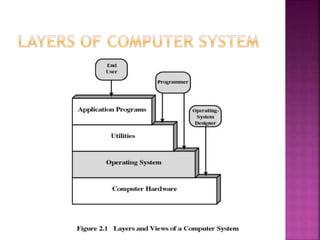
 The structure of OS consists of 4 layers:
1. Hardware
Hardware consists of CPU, Main
memory, I/O Devices, etc,
2. Software (Operating System)
Software includes process
management routines, memory
management routines, I/O control
routines, file management routines.
(Contd…)
3. System programs
This layer consists of compilers, Assemblers,
linker etc.
4. Application programs
This is dependent on users need. Ex. Railway
reservation system, Bank database
management etc.,
 The main functions of operating systems are:
1. Program creation
2. Program execution
3. Input/Output operations
4. Error detection
5. Resource allocation
6. Accounting
7. protection
 Provide a user interface
 Run programs
 Manage hardware devices
 Organized file storage
7A-9
 Many different applications supported
 System call
 Provides consistent access to OS features
 Share information between programs
 Copy and paste
 Object Linking and Embedding
 Programs need to access hardware
 Interrupts
 CPU is stopped
 Hardware device is accessed
 Device drivers control the hardware
 Organized storage
 Long file names
 Folders can be created and nested
 All storage devices work consistently
 Real-time operating system
 Very fast small OS
 Built into a device
 Respond quickly to user input
 MP3 players, Medical devices
 Single user/Single tasking OS
 One user works on the system
 Performs one task at a time
 MS-DOS and Palm OS
 Take up little space on disk
 Run on inexpensive computers
Operating System can also be classified as,-
 Single User Systems
 Multi User Systems
 Provides a platform for only one user at a
time.
 They are popularly associated with Desk Top
operating system which run on standalone
systems where no user accounts are
required.
 Example: DOS
 Provides regulated access for a number of users
by maintaining a database of known users.
 Refers to computer systems that support two or
more simultaneous users.
 Another term for multi-user is time sharing.
 Ex: All mainframes and are multi-user systems.
 Example: Unix
01 operating systems final

01 operating systems final

  • 2.
     Operating Systemis a software, which makes a computer to actually work.  It is the software the enables all the programs we use.  The OS organizes and controls the hardware.  OS acts as an interface between the application programs and the machine hardware.  Examples: Windows, Linux, Unix and Mac OS, etc.,
  • 3.
    An operating systemperforms basic tasks such as,  controlling and allocating memory,  prioritizing system requests,  controlling input and output devices,  facilitating networking and  managing file systems.
  • 5.
     Program development Editors and debuggers  Program execution  Access to I/O devices  Controlled access to files  System access
  • 6.
     The structureof OS consists of 4 layers: 1. Hardware Hardware consists of CPU, Main memory, I/O Devices, etc, 2. Software (Operating System) Software includes process management routines, memory management routines, I/O control routines, file management routines. (Contd…)
  • 7.
    3. System programs Thislayer consists of compilers, Assemblers, linker etc. 4. Application programs This is dependent on users need. Ex. Railway reservation system, Bank database management etc.,
  • 8.
     The mainfunctions of operating systems are: 1. Program creation 2. Program execution 3. Input/Output operations 4. Error detection 5. Resource allocation 6. Accounting 7. protection
  • 9.
     Provide auser interface  Run programs  Manage hardware devices  Organized file storage 7A-9
  • 10.
     Many differentapplications supported  System call  Provides consistent access to OS features  Share information between programs  Copy and paste  Object Linking and Embedding
  • 11.
     Programs needto access hardware  Interrupts  CPU is stopped  Hardware device is accessed  Device drivers control the hardware
  • 12.
     Organized storage Long file names  Folders can be created and nested  All storage devices work consistently
  • 13.
     Real-time operatingsystem  Very fast small OS  Built into a device  Respond quickly to user input  MP3 players, Medical devices
  • 14.
     Single user/Singletasking OS  One user works on the system  Performs one task at a time  MS-DOS and Palm OS  Take up little space on disk  Run on inexpensive computers
  • 15.
    Operating System canalso be classified as,-  Single User Systems  Multi User Systems
  • 16.
     Provides aplatform for only one user at a time.  They are popularly associated with Desk Top operating system which run on standalone systems where no user accounts are required.  Example: DOS
  • 17.
     Provides regulatedaccess for a number of users by maintaining a database of known users.  Refers to computer systems that support two or more simultaneous users.  Another term for multi-user is time sharing.  Ex: All mainframes and are multi-user systems.  Example: Unix