FTP & TFTP ServerFTP & TFTP Server
File Transfer Protocol (RFC 959)
• Why FTP?
• FTP’s connections
• FTP in action
• FTP commands/responses
Trivial File Transfer Protocol (RFC 1350)
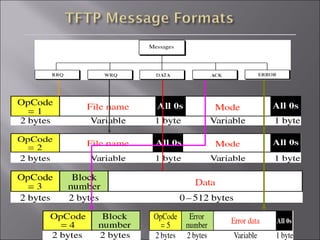
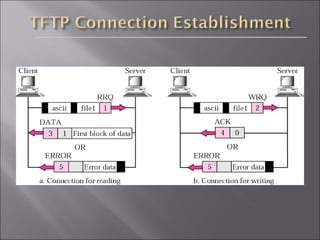
• TFTP and TFTP’s message formats
• FTP and TFTP compared
Purpose: To Transfer files between two computers
Goals of FTP Service
• Promote sharing of files (programs and/or data)
• Encourage indirect/implicit use of remote computers
• Shield users from variations in file storage among hosts
• Transfer data reliably and efficiently
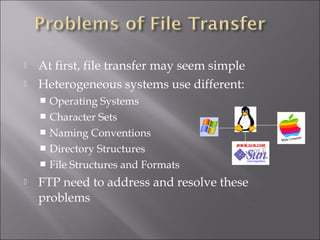
 At first, file transfer may seem simple
 Heterogeneous systems use different:
 Operating Systems
 Character Sets
 Naming Conventions
 Directory Structures
 File Structures and Formats
 FTP need to address and resolve these
problems
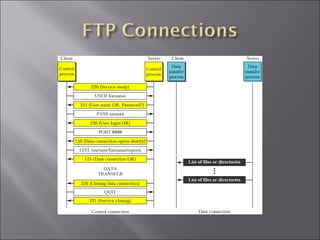
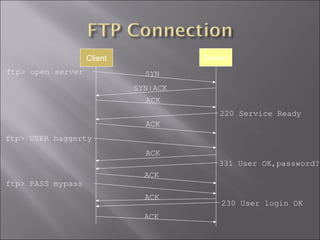
ftp> open server SYN
SYN|ACK
ACK
220 Service Ready
ftp> USER haggerty
ACK
ACK
331 User OK,password?
ACK
ftp> PASS mypass
ACK
230 User login OK
ACK
Client Server
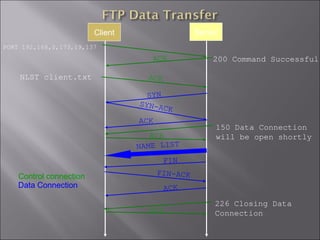
PORT 192,168,0,173,19,137
200 Command Successful
SYN
NLST client.txt
SYN-ACK
ACK
150 Data Connection
will be open shortly
NAME LIST
FIN
FIN-ACK
226 Closing Data
Connection
ACK
ACK
ACK
ACK
ACK
Control connection
Data Connection
Client Server
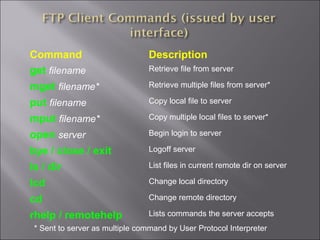
Command Description
get filename Retrieve file from server
mget filename* Retrieve multiple files from server*
put filename Copy local file to server
mput filename* Copy multiple local files to server*
open server Begin login to server
bye / close / exit Logoff server
ls / dir List files in current remote dir on server
lcd Change local directory
cd Change remote directory
rhelp / remotehelp Lists commands the server accepts
* Sent to server as multiple command by User Protocol Interpreter
Command Description
LIST [filelist ] List files or directories (ls / dir)
USER username Send username to server
PASS password Password on server
PORT h1,h2,h3,h4,p1,p2 Client IP and port number
RETR filename Retrieve (get) filename
STOR filename Store (put) filename
TYPE (ascii, image) Do nothing (check if server is alive)
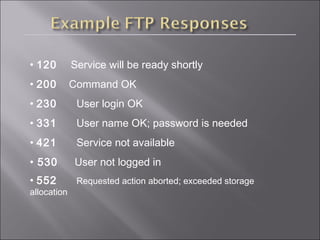
• 120 Service will be ready shortly
• 200 Command OK
• 230 User login OK
• 331 User name OK; password is needed
• 421 Service not available
• 530 User not logged in
• 552 Requested action aborted; exceeded storage
allocation
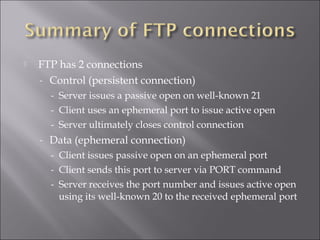
 FTP has 2 connections
- Control (persistent connection)
- Server issues a passive open on well-known 21
- Client uses an ephemeral port to issue active open
- Server ultimately closes control connection
- Data (ephemeral connection)
- Client issues passive open on an ephemeral port
- Client sends this port to server via PORT command
- Server receives the port number and issues active open
using its well-known 20 to the received ephemeral port
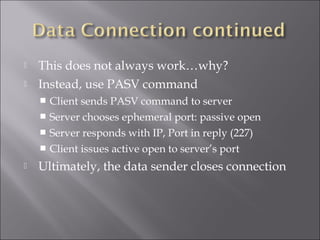
 This does not always work…why?
 Instead, use PASV command
 Client sends PASV command to server
 Server chooses ephemeral port: passive open
 Server responds with IP, Port in reply (227)
 Client issues active open to server’s port
 Ultimately, the data sender closes connection
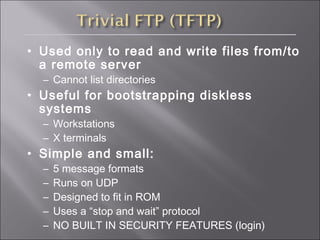
• Used only to read and write files from/to
a remote server
– Cannot list directories
• Useful for bootstrapping diskless
systems
– Workstations
– X terminals
• Simple and small:
– 5 message formats
– Runs on UDP
– Designed to fit in ROM
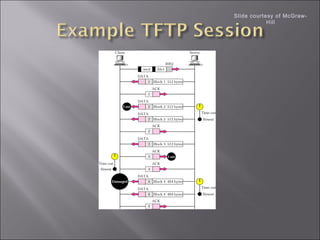
– Uses a “stop and wait” protocol
– NO BUILT IN SECURITY FEATURES (login)
Slide courtesy of McGraw-
Hill
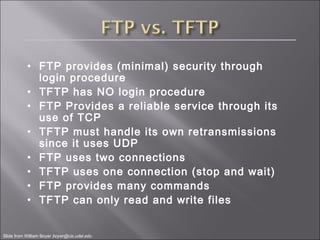
• FTP provides (minimal) security through
login procedure
• TFTP has NO login procedure
• FTP Provides a reliable service through its
use of TCP
• TFTP must handle its own retransmissions
since it uses UDP
• FTP uses two connections
• TFTP uses one connection (stop and wait)
• FTP provides many commands
• TFTP can only read and write files
Slide from William Boyer boyer@cis.udel.edu

Ftp tftp

  • 1.
    FTP & TFTPServerFTP & TFTP Server
  • 2.
    File Transfer Protocol(RFC 959) • Why FTP? • FTP’s connections • FTP in action • FTP commands/responses Trivial File Transfer Protocol (RFC 1350) • TFTP and TFTP’s message formats • FTP and TFTP compared
  • 3.
    Purpose: To Transferfiles between two computers Goals of FTP Service • Promote sharing of files (programs and/or data) • Encourage indirect/implicit use of remote computers • Shield users from variations in file storage among hosts • Transfer data reliably and efficiently
  • 4.
     At first,file transfer may seem simple  Heterogeneous systems use different:  Operating Systems  Character Sets  Naming Conventions  Directory Structures  File Structures and Formats  FTP need to address and resolve these problems
  • 6.
    ftp> open serverSYN SYN|ACK ACK 220 Service Ready ftp> USER haggerty ACK ACK 331 User OK,password? ACK ftp> PASS mypass ACK 230 User login OK ACK Client Server
  • 7.
    PORT 192,168,0,173,19,137 200 CommandSuccessful SYN NLST client.txt SYN-ACK ACK 150 Data Connection will be open shortly NAME LIST FIN FIN-ACK 226 Closing Data Connection ACK ACK ACK ACK ACK Control connection Data Connection Client Server
  • 8.
    Command Description get filenameRetrieve file from server mget filename* Retrieve multiple files from server* put filename Copy local file to server mput filename* Copy multiple local files to server* open server Begin login to server bye / close / exit Logoff server ls / dir List files in current remote dir on server lcd Change local directory cd Change remote directory rhelp / remotehelp Lists commands the server accepts * Sent to server as multiple command by User Protocol Interpreter
  • 9.
    Command Description LIST [filelist] List files or directories (ls / dir) USER username Send username to server PASS password Password on server PORT h1,h2,h3,h4,p1,p2 Client IP and port number RETR filename Retrieve (get) filename STOR filename Store (put) filename TYPE (ascii, image) Do nothing (check if server is alive)
  • 10.
    • 120 Servicewill be ready shortly • 200 Command OK • 230 User login OK • 331 User name OK; password is needed • 421 Service not available • 530 User not logged in • 552 Requested action aborted; exceeded storage allocation
  • 11.
     FTP has2 connections - Control (persistent connection) - Server issues a passive open on well-known 21 - Client uses an ephemeral port to issue active open - Server ultimately closes control connection - Data (ephemeral connection) - Client issues passive open on an ephemeral port - Client sends this port to server via PORT command - Server receives the port number and issues active open using its well-known 20 to the received ephemeral port
  • 12.
     This doesnot always work…why?  Instead, use PASV command  Client sends PASV command to server  Server chooses ephemeral port: passive open  Server responds with IP, Port in reply (227)  Client issues active open to server’s port  Ultimately, the data sender closes connection
  • 13.
    • Used onlyto read and write files from/to a remote server – Cannot list directories • Useful for bootstrapping diskless systems – Workstations – X terminals • Simple and small: – 5 message formats – Runs on UDP – Designed to fit in ROM – Uses a “stop and wait” protocol – NO BUILT IN SECURITY FEATURES (login)
  • 16.
    Slide courtesy ofMcGraw- Hill
  • 17.
    • FTP provides(minimal) security through login procedure • TFTP has NO login procedure • FTP Provides a reliable service through its use of TCP • TFTP must handle its own retransmissions since it uses UDP • FTP uses two connections • TFTP uses one connection (stop and wait) • FTP provides many commands • TFTP can only read and write files Slide from William Boyer boyer@cis.udel.edu

Editor's Notes

  • #14 TFTP uses the services of UDP on well known port 69.
  • #15 RRQ: client to establish a connection for reading data from the server. WRQ: write data from the client to the server DATA: All data bytes are exactly 512 bytes long except the last block which is between 0 and 511 bytes…EOF indicator – if data is in exact multiples of 512, sender must send one extra block of zero bytes. DATA can be in NVT ASCII or octet (binary format) ACK: Block number is a 2byte field containing the number of the block received