242-301 Adv. CoE Lab: JDBC 1
• Objective
– to give some background on JDBC to
help with the lab exercises
Introduction to Java
Database Connectivity
(JDBC)
242-301 Adv. CoE Lab: JDBC 2
Overview
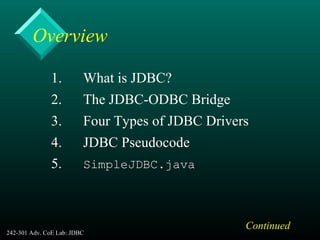
1. What is JDBC?
2. The JDBC-ODBC Bridge
3. Four Types of JDBC Drivers
4. JDBC Pseudocode
5. SimpleJDBC.java
Continued
242-301 Adv. CoE Lab: JDBC 3
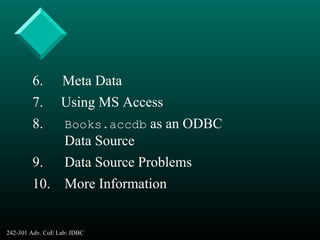
6. Meta Data
7. Using MS Access
8. Books.accdb as an ODBC
Data Source
9. Data Source Problems
10. More Information
242-301 Adv. CoE Lab: JDBC 4
1. What is JDBC?
• JDBC is an interface which allows Java
code to execute SQL statements inside relati
onal databases
– the databases must follow the ANSI SQL-2
standard
242-301 Adv. CoE Lab: JDBC 5
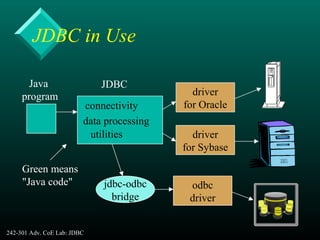
JDBC in Use
Java
program
connectivity
data processing
utilities
JDBC
driver
for Oracle
driver
for Sybase
jdbc-odbc
bridge
odbc
driver
Green means
"Java code"
242-301 Adv. CoE Lab: JDBC 6
2. The JDBC-ODBC Bridge
• ODBC (Open Database Connectivity) is a
Microsoft standard from the mid 1990’s.
• It is an API that allows C/C++ programs to
execute SQL inside databases
• ODBC is supported by many products.
Continued
242-301 Adv. CoE Lab: JDBC 7
• The JDBC-ODBC bridge allows Java code
to use the C/C++ interface of ODBC
– it means that JDBC can access many different
database products
• The layers of translation (Java --> C -->
SQL) can slow down execution.
Continued
242-301 Adv. CoE Lab: JDBC 8
• The JDBC-ODBC bridge comes free with
the JDK:
– called sun.jdbc.odbc.JdbcOdbcDriver
• The ODBC driver for Microsoft Access
comes with MS Office
– so it is easy to connect Java and Access
242-301 Adv. CoE Lab: JDBC 9
3. Four Types of JDBC Driver
• 1. JDBC-ODBC Bridge (type 1)
– translate Java to the ODBC API
– used by many Windows-based databases, e.g.
MS-Access
• 2. Database Protocol Driver (type 4)
– Independent from the OS/hardware because the
driver is in Java.
Continued
242-301 Adv. CoE Lab: JDBC 10
• 3. Native API Connection Driver (type 2)
– connected by a OS native module, dependent
on the OS or hardware
(e.g. DLLs on Windows)
• 4. Net Connection Driver (type 3)
– use Java to access the database via networking
middleware (usually TCP/IP)
– required for networked applications
242-301 Adv. CoE Lab: JDBC 11
JDBC Drivers
• A very long list of drivers (freeware,
shareware, and commercial) can be found at
:
http://www.oracle.com/technetwork/java/
index-136695.html
242-301 Adv. CoE Lab: JDBC 12
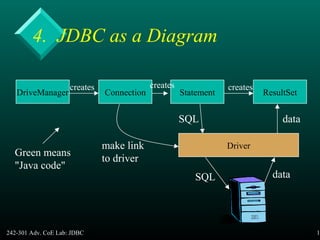
4. JDBC as a Diagram
DriveManager Connection Statement ResultSet
creates creates creates
Driver
SQL
SQL
data
data
make link
to driver
Green means
"Java code"
242-301 Adv. CoE Lab: JDBC 13
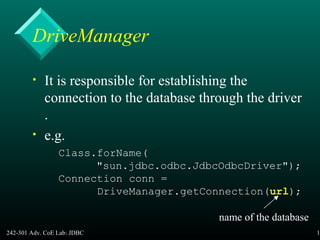
DriveManager
• It is responsible for establishing the
connection to the database through the driver
.
• e.g.
Class.forName(
"sun.jdbc.odbc.JdbcOdbcDriver");
Connection conn =
DriveManager.getConnection(url);
name of the database
242-301 Adv. CoE Lab: JDBC 14
Name the Database
• The name and location of the database is
given as a URL
– the details of the URL vary depending on the
type of database that is being used
242-301 Adv. CoE Lab: JDBC 15
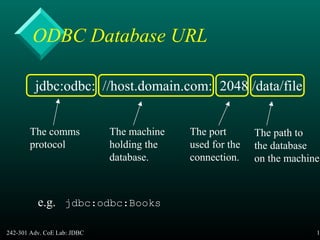
ODBC Database URL
jdbc:odbc: //host.domain.com: 2048 /data/file
The comms
protocol
The machine
holding the
database.
The port
used for the
connection.
The path to
the database
on the machine
e.g. jdbc:odbc:Books
242-301 Adv. CoE Lab: JDBC 16
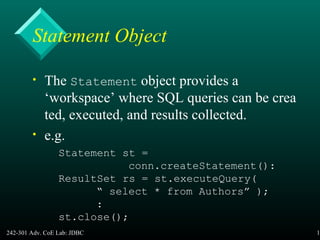
Statement Object
• The Statement object provides a
‘workspace’ where SQL queries can be crea
ted, executed, and results collected.
• e.g.
Statement st =
conn.createStatement():
ResultSet rs = st.executeQuery(
“ select * from Authors” );
:
st.close();
242-301 Adv. CoE Lab: JDBC 17
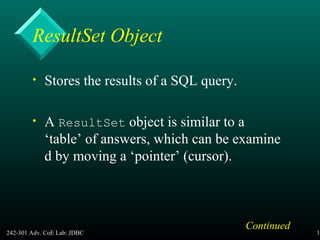
ResultSet Object
• Stores the results of a SQL query.
• A ResultSet object is similar to a
‘table’ of answers, which can be examine
d by moving a ‘pointer’ (cursor).
Continued
242-301 Adv. CoE Lab: JDBC 18
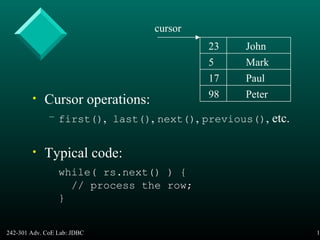
• Cursor operations:
– first(), last(), next(), previous(), etc.
• Typical code:
while( rs.next() ) {
// process the row;
}
23
5
17
98
John
Mark
Paul
Peter
cursor
242-301 Adv. CoE Lab: JDBC 19
5. SimpleJDBC.java
// SimpleJDBC.java
// Displays the firstnames and lastnames
// of the Authors table in the Books db.
import java.sql.*;
public class SimpleJDBC {
public static void main(String[] args)
{
// The URL for the Books database.
// ’Protected' by a login and password.
String url = "jdbc:odbc:Books";
String username = "anonymous";
String password = "guest";
:
242-301 Adv. CoE Lab: JDBC 20
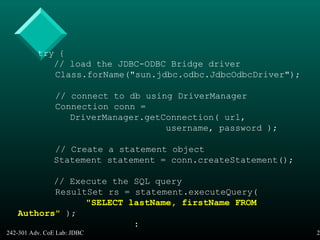
try {
// load the JDBC-ODBC Bridge driver
Class.forName("sun.jdbc.odbc.JdbcOdbcDriver");
// connect to db using DriverManager
Connection conn =
DriverManager.getConnection( url,
username, password );
// Create a statement object
Statement statement = conn.createStatement();
// Execute the SQL query
ResultSet rs = statement.executeQuery(
"SELECT lastName, firstName FROM
Authors" );
:
242-301 Adv. CoE Lab: JDBC 21
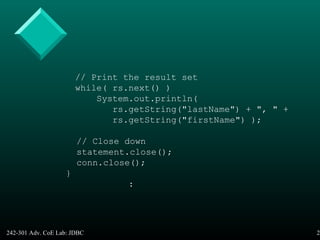
// Print the result set
while( rs.next() )
System.out.println(
rs.getString("lastName") + ", " +
rs.getString("firstName") );
// Close down
statement.close();
conn.close();
}
:
242-301 Adv. CoE Lab: JDBC 22
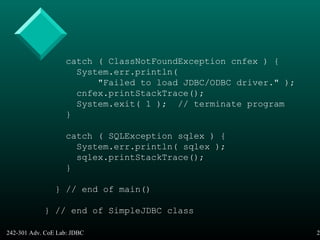
catch ( ClassNotFoundException cnfex ) {
System.err.println(
"Failed to load JDBC/ODBC driver." );
cnfex.printStackTrace();
System.exit( 1 ); // terminate program
}
catch ( SQLException sqlex ) {
System.err.println( sqlex );
sqlex.printStackTrace();
}
} // end of main()
} // end of SimpleJDBC class
242-301 Adv. CoE Lab: JDBC 23
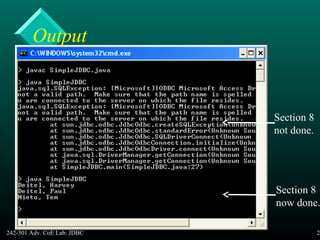
Section 8
not done.
Section 8
now done.
Output
242-301 Adv. CoE Lab: JDBC 24
• If you've done section 8, but still gettingIf you've done section 8, but still getting
error messages, then check out section 9.error messages, then check out section 9.
• If you're still having problems, please comeIf you're still having problems, please come
to see Aj. Andrew.to see Aj. Andrew.
242-301 Adv. CoE Lab: JDBC 25
5.1. Username & Password
• The database’s link to the outside (e.g. its
ODBC interface) must be configured to hav
e a login and password
– details for ODBC are given later
242-301 Adv. CoE Lab: JDBC 26
5.2. Accessing a ResultSet
• The ResultSet class contains many
methods for accessing the value of a
column of the current row
– can use the column name or position
– e.g. get the value in the lastName column:
rs.getString("lastName")
Continued
242-301 Adv. CoE Lab: JDBC 27
• The ‘tricky’ aspect is that the values are
SQL data, and so must be converted to Java
types/objects.
• There are many methods for accessing/
converting the data, e.g.
– getString(), getDate(), getInt(),
getFloat(), getObject()
242-301 Adv. CoE Lab: JDBC 28
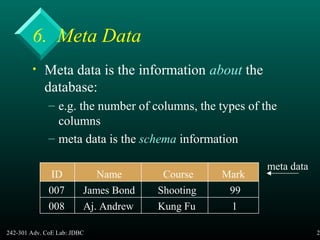
6. Meta Data
• Meta data is the information about the
database:
– e.g. the number of columns, the types of the
columns
– meta data is the schema information
ID Name Course Mark
007 James Bond Shooting 99
008 Aj. Andrew Kung Fu 1
meta data
242-301 Adv. CoE Lab: JDBC 29
• One important use for metadata is forOne important use for metadata is for
formatting result set dataformatting result set data
– e.g. instead of displaying the results as text,e.g. instead of displaying the results as text,
display them in a Java table with headers, rows,display them in a Java table with headers, rows,
columnscolumns
• see TableDisplay.java in the Exercisessee TableDisplay.java in the Exercises
242-301 Adv. CoE Lab: JDBC 30
6.1. Accessing Meta Data
• The getMetaData() method can be used
on a ResultSet object to create its meta da
ta object.
• e.g.
ResultSetMetaData md =
rs.getMetaData();
242-301 Adv. CoE Lab: JDBC 31
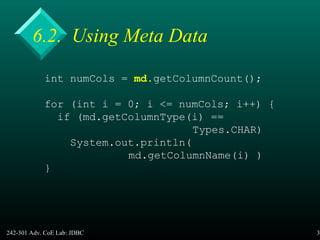
6.2. Using Meta Data
int numCols = md.getColumnCount();
for (int i = 0; i <= numCols; i++) {
if (md.getColumnType(i) ==
Types.CHAR)
System.out.println(
md.getColumnName(i) )
}
242-301 Adv. CoE Lab: JDBC 32
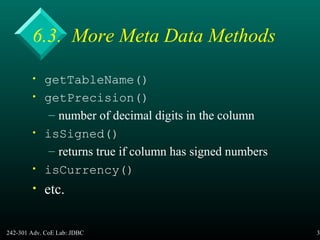
6.3. More Meta Data Methods
• getTableName()
• getPrecision()
– number of decimal digits in the column
• isSigned()
– returns true if column has signed numbers
• isCurrency()
• etc.
242-301 Adv. CoE Lab: JDBC 33
7. Using MS Access7. Using MS Access
• MS Access changed its file formats whenMS Access changed its file formats when
Access 2007 was released:Access 2007 was released:
– for Access 2003 (and earlier) you should usefor Access 2003 (and earlier) you should use
Books.Books.mdbmdb
– for Access 2007 or 2010, you should usefor Access 2007 or 2010, you should use
Books.Books.accdbaccdb
– both versions are in the lab's website.both versions are in the lab's website.
242-301 Adv. CoE Lab: JDBC 34
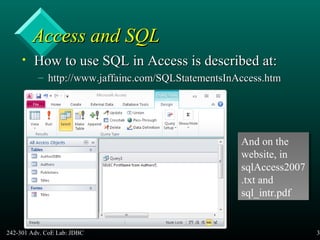
Access and SQLAccess and SQL
• How to use SQL in Access is described at:How to use SQL in Access is described at:
– http://www.jaffainc.com/SQLStatementsInAccess.htmhttp://www.jaffainc.com/SQLStatementsInAccess.htm
And on the
website, in
sqlAccess2007
.txt and
sql_intr.pdf
And on the
website, in
sqlAccess2007
.txt and
sql_intr.pdf
242-301 Adv. CoE Lab: JDBC 35
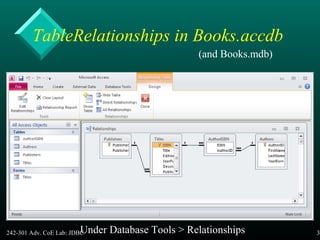
TableRelationships in Books.accdb
(and Books.mdb)
Under Database Tools > Relationships
242-301 Adv. CoE Lab: JDBC 36
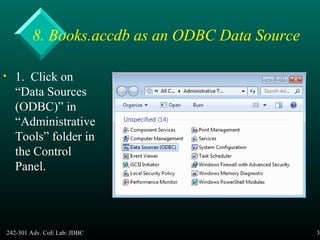
8. Books.accdb as an ODBC Data Source
• 1. Click on
“Data Sources
(ODBC)” in
“Administrative
Tools” folder in
the Control
Panel.
242-301 Adv. CoE Lab: JDBC 37
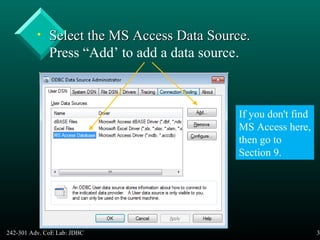
• Select the MS Access Data Source.Select the MS Access Data Source.
Press “Add’ to add a data source.
If you don't find
MS Access here,
then go to
Section 9.
242-301 Adv. CoE Lab: JDBC 38
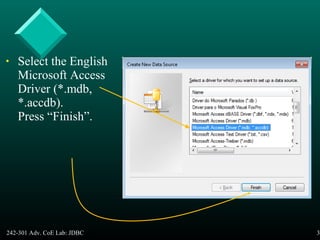
• Select the English
Microsoft Access
Driver (*.mdb,
*.accdb).
Press “Finish”.
242-301 Adv. CoE Lab: JDBC 39
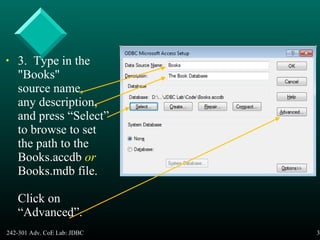
• 3. Type in the
"Books"
source name,
any description,
and press “Select”
to browse to set
the path to the
Books.accdb or
Books.mdb file.
Click on
“Advanced”.
242-301 Adv. CoE Lab: JDBC 40
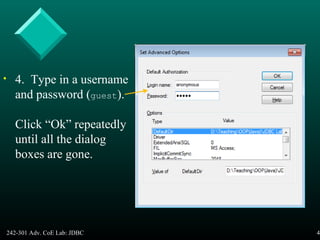
• 4. Type in a username
and password (guest).
Click “Ok” repeatedly
until all the dialog
boxes are gone.
242-301 Adv. CoE Lab: JDBC 41
9. Data Source Problems9. Data Source Problems
• Two problems may occur when using JDBCTwo problems may occur when using JDBC
with the data source set up in Section 8:with the data source set up in Section 8:
– "No suitable driver found for jdbc: odbc:"No suitable driver found for jdbc: odbc:
driver={Microsoft Access Driver (*.mdb)};...driver={Microsoft Access Driver (*.mdb)};...
– "The specified DSN contains an architecture mismatch"The specified DSN contains an architecture mismatch
between the Driver and Application"between the Driver and Application"
• These problems are usually due to youThese problems are usually due to you
using the 64-bit version of Windows 7.using the 64-bit version of Windows 7.
242-301 Adv. CoE Lab: JDBC 42
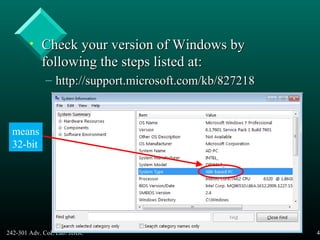
• Check your version of Windows byCheck your version of Windows by
following the steps listed at:following the steps listed at:
– http://support.microsoft.com/kb/827218http://support.microsoft.com/kb/827218
means
32-bit
242-301 Adv. CoE Lab: JDBC 43
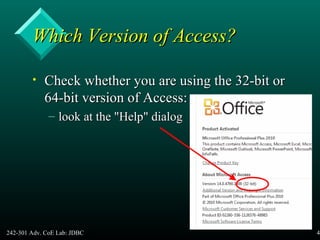
Which Version of Access?Which Version of Access?
• Check whether you are using the 32-bit orCheck whether you are using the 32-bit or
64-bit version of Access:64-bit version of Access:
– look at the "Help" dialoglook at the "Help" dialog
242-301 Adv. CoE Lab: JDBC 44
Win7 64-bit & Access 64-bitWin7 64-bit & Access 64-bit
• You may need to download the 64-bitYou may need to download the 64-bit
Access drivers from:Access drivers from:
– http://www.microsoft.com/http://www.microsoft.com/
en-us/download/details.aspx?id=13255en-us/download/details.aspx?id=13255
– executeexecute AccessDatabaseEngine_x64.exe
• You should also be using theYou should also be using the 64-bit64-bit versionversion
of Java for Windows. get it from:of Java for Windows. get it from:
– http://www.java.com/en/download/http://www.java.com/en/download/
242-301 Adv. CoE Lab: JDBC 45
Win 7 64-bit & AccessWin 7 64-bit & Access 32-bit32-bit
• Set up the data source using the 32-bitSet up the data source using the 32-bit
ODBC control panel at:ODBC control panel at:
– c:windowssysWOW64odbcad32.exec:windowssysWOW64odbcad32.exe
• You should also be using theYou should also be using the 32-bit32-bit versionversion
of Java for Windows. Get it from:of Java for Windows. Get it from:
– http://www.java.com/en/download/http://www.java.com/en/download/
242-301 Adv. CoE Lab: JDBC 46
10. More Information
• Ivor Horton’s Beginning Java 2, JDK 5
Edition, Wiley Publishing, 2005
Chapters 24 and 25 (starts on p.1306)
• Advanced Java 2 Platform: How to Program
Deitel & Deitel, Prentice-Hall, 2001
Chapter 8
http://java.coe.psu.ac.th/ForMember/
Continued
242-301 Adv. CoE Lab: JDBC 47
• JDBC Wikipaedia page:
• http://en.wikipedia.org/wiki/JDBC_driver
• The Java Documentation and tutorial
– http://docs.oracle.com/javase/tutorial/
– the JDBC Database Access ‘trail’ is very good
– http://docs.oracle.com/javase/tutorial/
jdbc/index.html

Jdbc drivers

  • 1.
    242-301 Adv. CoELab: JDBC 1 • Objective – to give some background on JDBC to help with the lab exercises Introduction to Java Database Connectivity (JDBC)
  • 2.
    242-301 Adv. CoELab: JDBC 2 Overview 1. What is JDBC? 2. The JDBC-ODBC Bridge 3. Four Types of JDBC Drivers 4. JDBC Pseudocode 5. SimpleJDBC.java Continued
  • 3.
    242-301 Adv. CoELab: JDBC 3 6. Meta Data 7. Using MS Access 8. Books.accdb as an ODBC Data Source 9. Data Source Problems 10. More Information
  • 4.
    242-301 Adv. CoELab: JDBC 4 1. What is JDBC? • JDBC is an interface which allows Java code to execute SQL statements inside relati onal databases – the databases must follow the ANSI SQL-2 standard
  • 5.
    242-301 Adv. CoELab: JDBC 5 JDBC in Use Java program connectivity data processing utilities JDBC driver for Oracle driver for Sybase jdbc-odbc bridge odbc driver Green means "Java code"
  • 6.
    242-301 Adv. CoELab: JDBC 6 2. The JDBC-ODBC Bridge • ODBC (Open Database Connectivity) is a Microsoft standard from the mid 1990’s. • It is an API that allows C/C++ programs to execute SQL inside databases • ODBC is supported by many products. Continued
  • 7.
    242-301 Adv. CoELab: JDBC 7 • The JDBC-ODBC bridge allows Java code to use the C/C++ interface of ODBC – it means that JDBC can access many different database products • The layers of translation (Java --> C --> SQL) can slow down execution. Continued
  • 8.
    242-301 Adv. CoELab: JDBC 8 • The JDBC-ODBC bridge comes free with the JDK: – called sun.jdbc.odbc.JdbcOdbcDriver • The ODBC driver for Microsoft Access comes with MS Office – so it is easy to connect Java and Access
  • 9.
    242-301 Adv. CoELab: JDBC 9 3. Four Types of JDBC Driver • 1. JDBC-ODBC Bridge (type 1) – translate Java to the ODBC API – used by many Windows-based databases, e.g. MS-Access • 2. Database Protocol Driver (type 4) – Independent from the OS/hardware because the driver is in Java. Continued
  • 10.
    242-301 Adv. CoELab: JDBC 10 • 3. Native API Connection Driver (type 2) – connected by a OS native module, dependent on the OS or hardware (e.g. DLLs on Windows) • 4. Net Connection Driver (type 3) – use Java to access the database via networking middleware (usually TCP/IP) – required for networked applications
  • 11.
    242-301 Adv. CoELab: JDBC 11 JDBC Drivers • A very long list of drivers (freeware, shareware, and commercial) can be found at : http://www.oracle.com/technetwork/java/ index-136695.html
  • 12.
    242-301 Adv. CoELab: JDBC 12 4. JDBC as a Diagram DriveManager Connection Statement ResultSet creates creates creates Driver SQL SQL data data make link to driver Green means "Java code"
  • 13.
    242-301 Adv. CoELab: JDBC 13 DriveManager • It is responsible for establishing the connection to the database through the driver . • e.g. Class.forName( "sun.jdbc.odbc.JdbcOdbcDriver"); Connection conn = DriveManager.getConnection(url); name of the database
  • 14.
    242-301 Adv. CoELab: JDBC 14 Name the Database • The name and location of the database is given as a URL – the details of the URL vary depending on the type of database that is being used
  • 15.
    242-301 Adv. CoELab: JDBC 15 ODBC Database URL jdbc:odbc: //host.domain.com: 2048 /data/file The comms protocol The machine holding the database. The port used for the connection. The path to the database on the machine e.g. jdbc:odbc:Books
  • 16.
    242-301 Adv. CoELab: JDBC 16 Statement Object • The Statement object provides a ‘workspace’ where SQL queries can be crea ted, executed, and results collected. • e.g. Statement st = conn.createStatement(): ResultSet rs = st.executeQuery( “ select * from Authors” ); : st.close();
  • 17.
    242-301 Adv. CoELab: JDBC 17 ResultSet Object • Stores the results of a SQL query. • A ResultSet object is similar to a ‘table’ of answers, which can be examine d by moving a ‘pointer’ (cursor). Continued
  • 18.
    242-301 Adv. CoELab: JDBC 18 • Cursor operations: – first(), last(), next(), previous(), etc. • Typical code: while( rs.next() ) { // process the row; } 23 5 17 98 John Mark Paul Peter cursor
  • 19.
    242-301 Adv. CoELab: JDBC 19 5. SimpleJDBC.java // SimpleJDBC.java // Displays the firstnames and lastnames // of the Authors table in the Books db. import java.sql.*; public class SimpleJDBC { public static void main(String[] args) { // The URL for the Books database. // ’Protected' by a login and password. String url = "jdbc:odbc:Books"; String username = "anonymous"; String password = "guest"; :
  • 20.
    242-301 Adv. CoELab: JDBC 20 try { // load the JDBC-ODBC Bridge driver Class.forName("sun.jdbc.odbc.JdbcOdbcDriver"); // connect to db using DriverManager Connection conn = DriverManager.getConnection( url, username, password ); // Create a statement object Statement statement = conn.createStatement(); // Execute the SQL query ResultSet rs = statement.executeQuery( "SELECT lastName, firstName FROM Authors" ); :
  • 21.
    242-301 Adv. CoELab: JDBC 21 // Print the result set while( rs.next() ) System.out.println( rs.getString("lastName") + ", " + rs.getString("firstName") ); // Close down statement.close(); conn.close(); } :
  • 22.
    242-301 Adv. CoELab: JDBC 22 catch ( ClassNotFoundException cnfex ) { System.err.println( "Failed to load JDBC/ODBC driver." ); cnfex.printStackTrace(); System.exit( 1 ); // terminate program } catch ( SQLException sqlex ) { System.err.println( sqlex ); sqlex.printStackTrace(); } } // end of main() } // end of SimpleJDBC class
  • 23.
    242-301 Adv. CoELab: JDBC 23 Section 8 not done. Section 8 now done. Output
  • 24.
    242-301 Adv. CoELab: JDBC 24 • If you've done section 8, but still gettingIf you've done section 8, but still getting error messages, then check out section 9.error messages, then check out section 9. • If you're still having problems, please comeIf you're still having problems, please come to see Aj. Andrew.to see Aj. Andrew.
  • 25.
    242-301 Adv. CoELab: JDBC 25 5.1. Username & Password • The database’s link to the outside (e.g. its ODBC interface) must be configured to hav e a login and password – details for ODBC are given later
  • 26.
    242-301 Adv. CoELab: JDBC 26 5.2. Accessing a ResultSet • The ResultSet class contains many methods for accessing the value of a column of the current row – can use the column name or position – e.g. get the value in the lastName column: rs.getString("lastName") Continued
  • 27.
    242-301 Adv. CoELab: JDBC 27 • The ‘tricky’ aspect is that the values are SQL data, and so must be converted to Java types/objects. • There are many methods for accessing/ converting the data, e.g. – getString(), getDate(), getInt(), getFloat(), getObject()
  • 28.
    242-301 Adv. CoELab: JDBC 28 6. Meta Data • Meta data is the information about the database: – e.g. the number of columns, the types of the columns – meta data is the schema information ID Name Course Mark 007 James Bond Shooting 99 008 Aj. Andrew Kung Fu 1 meta data
  • 29.
    242-301 Adv. CoELab: JDBC 29 • One important use for metadata is forOne important use for metadata is for formatting result set dataformatting result set data – e.g. instead of displaying the results as text,e.g. instead of displaying the results as text, display them in a Java table with headers, rows,display them in a Java table with headers, rows, columnscolumns • see TableDisplay.java in the Exercisessee TableDisplay.java in the Exercises
  • 30.
    242-301 Adv. CoELab: JDBC 30 6.1. Accessing Meta Data • The getMetaData() method can be used on a ResultSet object to create its meta da ta object. • e.g. ResultSetMetaData md = rs.getMetaData();
  • 31.
    242-301 Adv. CoELab: JDBC 31 6.2. Using Meta Data int numCols = md.getColumnCount(); for (int i = 0; i <= numCols; i++) { if (md.getColumnType(i) == Types.CHAR) System.out.println( md.getColumnName(i) ) }
  • 32.
    242-301 Adv. CoELab: JDBC 32 6.3. More Meta Data Methods • getTableName() • getPrecision() – number of decimal digits in the column • isSigned() – returns true if column has signed numbers • isCurrency() • etc.
  • 33.
    242-301 Adv. CoELab: JDBC 33 7. Using MS Access7. Using MS Access • MS Access changed its file formats whenMS Access changed its file formats when Access 2007 was released:Access 2007 was released: – for Access 2003 (and earlier) you should usefor Access 2003 (and earlier) you should use Books.Books.mdbmdb – for Access 2007 or 2010, you should usefor Access 2007 or 2010, you should use Books.Books.accdbaccdb – both versions are in the lab's website.both versions are in the lab's website.
  • 34.
    242-301 Adv. CoELab: JDBC 34 Access and SQLAccess and SQL • How to use SQL in Access is described at:How to use SQL in Access is described at: – http://www.jaffainc.com/SQLStatementsInAccess.htmhttp://www.jaffainc.com/SQLStatementsInAccess.htm And on the website, in sqlAccess2007 .txt and sql_intr.pdf And on the website, in sqlAccess2007 .txt and sql_intr.pdf
  • 35.
    242-301 Adv. CoELab: JDBC 35 TableRelationships in Books.accdb (and Books.mdb) Under Database Tools > Relationships
  • 36.
    242-301 Adv. CoELab: JDBC 36 8. Books.accdb as an ODBC Data Source • 1. Click on “Data Sources (ODBC)” in “Administrative Tools” folder in the Control Panel.
  • 37.
    242-301 Adv. CoELab: JDBC 37 • Select the MS Access Data Source.Select the MS Access Data Source. Press “Add’ to add a data source. If you don't find MS Access here, then go to Section 9.
  • 38.
    242-301 Adv. CoELab: JDBC 38 • Select the English Microsoft Access Driver (*.mdb, *.accdb). Press “Finish”.
  • 39.
    242-301 Adv. CoELab: JDBC 39 • 3. Type in the "Books" source name, any description, and press “Select” to browse to set the path to the Books.accdb or Books.mdb file. Click on “Advanced”.
  • 40.
    242-301 Adv. CoELab: JDBC 40 • 4. Type in a username and password (guest). Click “Ok” repeatedly until all the dialog boxes are gone.
  • 41.
    242-301 Adv. CoELab: JDBC 41 9. Data Source Problems9. Data Source Problems • Two problems may occur when using JDBCTwo problems may occur when using JDBC with the data source set up in Section 8:with the data source set up in Section 8: – "No suitable driver found for jdbc: odbc:"No suitable driver found for jdbc: odbc: driver={Microsoft Access Driver (*.mdb)};...driver={Microsoft Access Driver (*.mdb)};... – "The specified DSN contains an architecture mismatch"The specified DSN contains an architecture mismatch between the Driver and Application"between the Driver and Application" • These problems are usually due to youThese problems are usually due to you using the 64-bit version of Windows 7.using the 64-bit version of Windows 7.
  • 42.
    242-301 Adv. CoELab: JDBC 42 • Check your version of Windows byCheck your version of Windows by following the steps listed at:following the steps listed at: – http://support.microsoft.com/kb/827218http://support.microsoft.com/kb/827218 means 32-bit
  • 43.
    242-301 Adv. CoELab: JDBC 43 Which Version of Access?Which Version of Access? • Check whether you are using the 32-bit orCheck whether you are using the 32-bit or 64-bit version of Access:64-bit version of Access: – look at the "Help" dialoglook at the "Help" dialog
  • 44.
    242-301 Adv. CoELab: JDBC 44 Win7 64-bit & Access 64-bitWin7 64-bit & Access 64-bit • You may need to download the 64-bitYou may need to download the 64-bit Access drivers from:Access drivers from: – http://www.microsoft.com/http://www.microsoft.com/ en-us/download/details.aspx?id=13255en-us/download/details.aspx?id=13255 – executeexecute AccessDatabaseEngine_x64.exe • You should also be using theYou should also be using the 64-bit64-bit versionversion of Java for Windows. get it from:of Java for Windows. get it from: – http://www.java.com/en/download/http://www.java.com/en/download/
  • 45.
    242-301 Adv. CoELab: JDBC 45 Win 7 64-bit & AccessWin 7 64-bit & Access 32-bit32-bit • Set up the data source using the 32-bitSet up the data source using the 32-bit ODBC control panel at:ODBC control panel at: – c:windowssysWOW64odbcad32.exec:windowssysWOW64odbcad32.exe • You should also be using theYou should also be using the 32-bit32-bit versionversion of Java for Windows. Get it from:of Java for Windows. Get it from: – http://www.java.com/en/download/http://www.java.com/en/download/
  • 46.
    242-301 Adv. CoELab: JDBC 46 10. More Information • Ivor Horton’s Beginning Java 2, JDK 5 Edition, Wiley Publishing, 2005 Chapters 24 and 25 (starts on p.1306) • Advanced Java 2 Platform: How to Program Deitel & Deitel, Prentice-Hall, 2001 Chapter 8 http://java.coe.psu.ac.th/ForMember/ Continued
  • 47.
    242-301 Adv. CoELab: JDBC 47 • JDBC Wikipaedia page: • http://en.wikipedia.org/wiki/JDBC_driver • The Java Documentation and tutorial – http://docs.oracle.com/javase/tutorial/ – the JDBC Database Access ‘trail’ is very good – http://docs.oracle.com/javase/tutorial/ jdbc/index.html