
FFTTPP ((FFiillee TTrraannssffeerr PPrroottooccooll))
FFTTPP OOVVEERRVVIIEEWW 
Introduction to FTP 
FTP Working 
FTP connection 
FTP configuration 
Installation Win 2008 FTP setup 
Advantage and Disadvantage
FFTTPP 
This stands for File Transfer Protocol. This is a 
popular way to transfer files from one machine to 
another machine across a network.
FFTTPP ccoonnnneeccttiioonn 
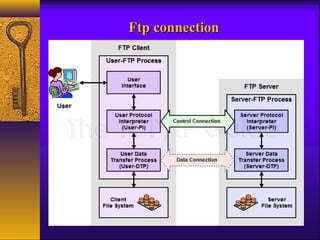
FTP connections consist of a two port system. 
There is the COMMAND Port and for sending and 
receiving all of the commands and there is a DATA port .
FFTTPP WWoorrkkiinngg 
– Client connects to the FTP server 
– User provides a login id and password to become 
authenticated 
– User can explore the directories 
– User can download files from and upload files to the 
server 
Ex: 
An FTP address looks a lot like an HTTP or web site 
address except it uses the prefix ftp:// instead of http://
FFttpp ccoonnnneeccttiioonn
We can configure FTP sseerrvveerrss oonnee ooff ttwwoo wwaayyss.. 
Private user-only site. 
Allows only system users to connect via FTP 
and access their files. 
Anonymous. 
Allows anyone on the network to connect to it 
and transfer files without having an account.
FTP Software's for WINDOWS 
Examples for FTP Software for Windows FTP Clients: 
WinSCP (free) 
Filezilla (free) 
smartFTP 
Examples for FTP Software for Windows FTP Server: 
IIS (Internet Information Services) different versions
Requirements for FTP 
Windows® 8/7/Vista/XP, Windows Server 2012/2008/2003 
(32-Bit and 64-Bit Support on All Platforms) 
Microsoft® Internet Explorer™ 6.0.0 or higher
Install FTP sseettuupp iinn WWiinnddoowwss22000088 sseerrvveerr
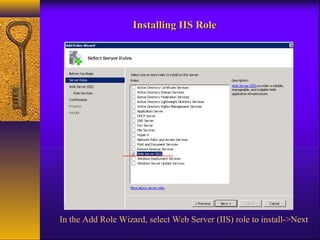
IInnssttaalllliinngg IIIISS RRoollee 
In the Add Role Wizard, select Web Server (IIS) role to install->Next
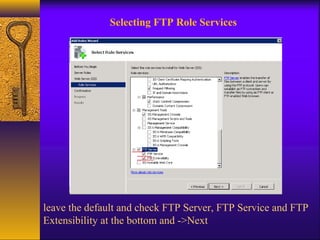
Selecting FTP Role Services 
leave the default and check FTP Server, FTP Service and FTP 
Extensibility at the bottom and ->Next
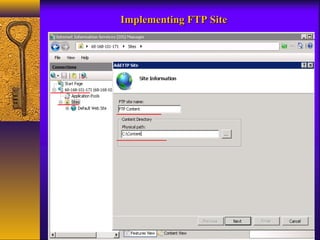
IImmpplleemmeennttiinngg FFTTPP SSiittee
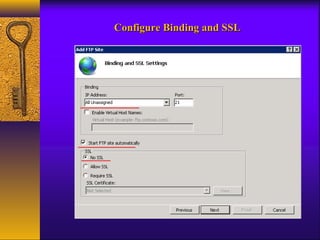
CCoonnffiigguurree BBiinnddiinngg aanndd SSSSLL
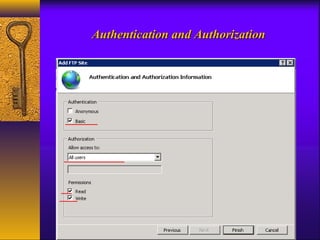
AAuutthheennttiiccaattiioonn aanndd AAuutthhoorriizzaattiioonn
Advantages 
 FTP is the fast and efficient way of transferring bulks of data 
across the internet. 
 It has an automatic backup .Whenever you edit your files in 
your local system you can update the same by copying it to the host 
system in your site. 
 You can work with the directories on the remote systems, delete 
or rename the remote files while transferring data between 2 hosts.
DDiissaaddvvaannttaaggeess 
 Ftp causes attacks during transferring of data. 
(example: Bounce attack, spoof attack, Brute force 
attacks etc.) 
 Filtering active FTP connections is difficult on 
your local machine
TTHHAANNKK YYOOUU

Ftp hari edu

  • 1.
  • 2.
    FFTTPP OOVVEERRVVIIEEWW Introductionto FTP FTP Working FTP connection FTP configuration Installation Win 2008 FTP setup Advantage and Disadvantage
  • 3.
    FFTTPP This standsfor File Transfer Protocol. This is a popular way to transfer files from one machine to another machine across a network.
  • 4.
    FFTTPP ccoonnnneeccttiioonn FTPconnections consist of a two port system. There is the COMMAND Port and for sending and receiving all of the commands and there is a DATA port .
  • 5.
    FFTTPP WWoorrkkiinngg –Client connects to the FTP server – User provides a login id and password to become authenticated – User can explore the directories – User can download files from and upload files to the server Ex: An FTP address looks a lot like an HTTP or web site address except it uses the prefix ftp:// instead of http://
  • 6.
  • 7.
    We can configureFTP sseerrvveerrss oonnee ooff ttwwoo wwaayyss.. Private user-only site. Allows only system users to connect via FTP and access their files. Anonymous. Allows anyone on the network to connect to it and transfer files without having an account.
  • 8.
    FTP Software's forWINDOWS Examples for FTP Software for Windows FTP Clients: WinSCP (free) Filezilla (free) smartFTP Examples for FTP Software for Windows FTP Server: IIS (Internet Information Services) different versions
  • 9.
    Requirements for FTP Windows® 8/7/Vista/XP, Windows Server 2012/2008/2003 (32-Bit and 64-Bit Support on All Platforms) Microsoft® Internet Explorer™ 6.0.0 or higher
  • 10.
    Install FTP sseettuuppiinn WWiinnddoowwss22000088 sseerrvveerr
  • 11.
    IInnssttaalllliinngg IIIISS RRoollee In the Add Role Wizard, select Web Server (IIS) role to install->Next
  • 12.
    Selecting FTP RoleServices leave the default and check FTP Server, FTP Service and FTP Extensibility at the bottom and ->Next
  • 13.
  • 14.
  • 15.
  • 16.
    Advantages  FTPis the fast and efficient way of transferring bulks of data across the internet.  It has an automatic backup .Whenever you edit your files in your local system you can update the same by copying it to the host system in your site.  You can work with the directories on the remote systems, delete or rename the remote files while transferring data between 2 hosts.
  • 17.
    DDiissaaddvvaannttaaggeess  Ftpcauses attacks during transferring of data. (example: Bounce attack, spoof attack, Brute force attacks etc.)  Filtering active FTP connections is difficult on your local machine
  • 18.