FTP SERVER
What is FTP?
● FTP stands for File Transfer Protocol.
● FTP is a standard Internet protocol for transmitting files between computers on the
Internet over TCP/IP connections.
● FTP is a client-server protocol.
● It relies on two communications channels between client and server:
1. A command channel for controlling the conversation
2. A data channel for transmitting file content.
Usage of FTP
● Uploading webpages to web servers or publishing on the Internet.
● Browsing and downloading files from public software sites.
● Transferring large files among two parties that are too large for email attachments.
● Distributing the latest revisions of programs by software developer.
What is FTP Server?
● An FTP server is a software program that is running on a server that uses
File Transfer Protocol (FTP) for exchanging files over the Internet.
Eg :- Vsftpd, Pure-FTPd, ProFTPD
- Vsftpd - fastest, most secure FTP server for Unix-like operatingsystem
- Pure-FTPd - simple, secure, highly-flexible FTP server
- ProFTPD - secure FTP server with a focus on configurability
What is FTP Client?
● A piece of software that you run on computer that will connect to an
FTP Server to download or upload files.
Eg :- FileZilla(Windows/Mac/Linux)
WinSCP(Windows)
FireFTP (Browser-based)
CyberDuck (Windows/Mac)
● To transfer a file with FTP we need an FTP accounts.
● Remote computers can connect anonymously to ftp, if allowed, or with a
username and password in order to download files
● There are two additional types of FTP accounts.
1. Anonymous FTP
2. Regular FTP
FTP Accounts
Working of FTP Server
● FTP uses one connection for commands and the other for sending and receiving data.
● A port is a "logical connection point" for communicating using the Internet Protocol (IP).
● Standard port number used by FTP servers :
- The port used exclusively for sending commands is referred to as a command port.
21 - is used only for sending commands.
(Port 21 (unsecured) or 990 (secured))
● The port used for data transfers between the client and server is referred to as a data port.
20 - is used as data port.(The number of the data port will vary depending on the
"mode" of the connection.)
Types of FTP
● Active Mode
● Passive Mode
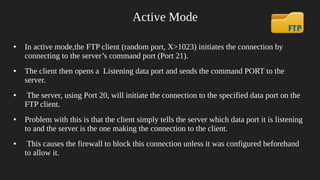
Active Mode
● In active mode,the FTP client (random port, X>1023) initiates the connection by
connecting to the server’s command port (Port 21).
● The client then opens a Listening data port and sends the command PORT to the
server.
● The server, using Port 20, will initiate the connection to the specified data port on the
FTP client.
● Problem with this is that the client simply tells the server which data port it is listening
to and the server is the one making the connection to the client.
● This causes the firewall to block this connection unless it was configured beforehand
to allow it.
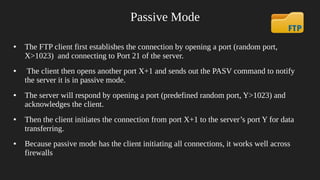
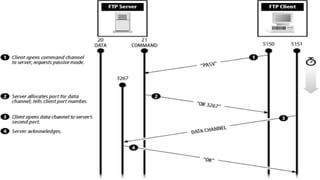
Passive Mode
● The FTP client first establishes the connection by opening a port (random port,
X>1023) and connecting to Port 21 of the server.
● The client then opens another port X+1 and sends out the PASV command to notify
the server it is in passive mode.
● The server will respond by opening a port (predefined random port, Y>1023) and
acknowledges the client.
● Then the client initiates the connection from port X+1 to the server’s port Y for data
transferring.
● Because passive mode has the client initiating all connections, it works well across
firewalls
Configure FTP Server
1. # yum install vsftpd ftp -y
- vsftpd stand for Very Secure FTP Daemon.
- vsftpd is secure, fast and stable version of FTP.
- vsftpd efficiently handle large numbers of connection securely.
- ftp is FTP client, used to connect to an FTP server.
Configure FTP Server
2. # chkconfig vsftpd on
3. # service vsftpd start
4. # netstat -nltp
● Configuartion file : /etc/vsftpd/vsftpd.conf
Configure FTP Server
● Edit configuration file
# vim /etc/vsftpd/vsftpd.conf
change lines to
● permit any one to access FTP server with authentication
anonymous_enable=YES to anonymous_enable=NO
Configure FTP Server
● Uncomment the following line
local_enable=YES
- allow users in /etc/passwd to login
write_enable=YES
- allow users to write files. NO will permit only to read.
● Change the line
chroot_local_user=NO to chroot_local_user=YES
- This will permit local user as FTP account. If we add an user, it will be treated
as a FTP account as well. The local user home directory will act as FTP directory.
Configure FTP Server
● # service vsftpd restart
●
Connecting with ftp server
- Command line
# ftp 192.168.0.12
# ftp domain.com
Configure FTP Server
● Downloading files using FTP
ftp> lcd /home/user/yourdirectoryname
ftp> get filename
● To download several files we can use wildcards
ftp> mget *.txt
● Uploading Files with FTP
ftp> lcd /home/user/yourdirectoryname
ftp> put filename
● The file which we want to upload is not in the local directory
ftp> put /path/file
● To upload several files
ftp> mput *.txt

Ftp

  • 1.
  • 2.
    What is FTP? ●FTP stands for File Transfer Protocol. ● FTP is a standard Internet protocol for transmitting files between computers on the Internet over TCP/IP connections. ● FTP is a client-server protocol. ● It relies on two communications channels between client and server: 1. A command channel for controlling the conversation 2. A data channel for transmitting file content.
  • 3.
    Usage of FTP ●Uploading webpages to web servers or publishing on the Internet. ● Browsing and downloading files from public software sites. ● Transferring large files among two parties that are too large for email attachments. ● Distributing the latest revisions of programs by software developer.
  • 4.
    What is FTPServer? ● An FTP server is a software program that is running on a server that uses File Transfer Protocol (FTP) for exchanging files over the Internet. Eg :- Vsftpd, Pure-FTPd, ProFTPD - Vsftpd - fastest, most secure FTP server for Unix-like operatingsystem - Pure-FTPd - simple, secure, highly-flexible FTP server - ProFTPD - secure FTP server with a focus on configurability
  • 5.
    What is FTPClient? ● A piece of software that you run on computer that will connect to an FTP Server to download or upload files. Eg :- FileZilla(Windows/Mac/Linux) WinSCP(Windows) FireFTP (Browser-based) CyberDuck (Windows/Mac)
  • 6.
    ● To transfera file with FTP we need an FTP accounts. ● Remote computers can connect anonymously to ftp, if allowed, or with a username and password in order to download files ● There are two additional types of FTP accounts. 1. Anonymous FTP 2. Regular FTP FTP Accounts
  • 7.
    Working of FTPServer ● FTP uses one connection for commands and the other for sending and receiving data. ● A port is a "logical connection point" for communicating using the Internet Protocol (IP). ● Standard port number used by FTP servers : - The port used exclusively for sending commands is referred to as a command port. 21 - is used only for sending commands. (Port 21 (unsecured) or 990 (secured)) ● The port used for data transfers between the client and server is referred to as a data port. 20 - is used as data port.(The number of the data port will vary depending on the "mode" of the connection.)
  • 8.
    Types of FTP ●Active Mode ● Passive Mode
  • 9.
    Active Mode ● Inactive mode,the FTP client (random port, X>1023) initiates the connection by connecting to the server’s command port (Port 21). ● The client then opens a Listening data port and sends the command PORT to the server. ● The server, using Port 20, will initiate the connection to the specified data port on the FTP client. ● Problem with this is that the client simply tells the server which data port it is listening to and the server is the one making the connection to the client. ● This causes the firewall to block this connection unless it was configured beforehand to allow it.
  • 11.
    Passive Mode ● TheFTP client first establishes the connection by opening a port (random port, X>1023) and connecting to Port 21 of the server. ● The client then opens another port X+1 and sends out the PASV command to notify the server it is in passive mode. ● The server will respond by opening a port (predefined random port, Y>1023) and acknowledges the client. ● Then the client initiates the connection from port X+1 to the server’s port Y for data transferring. ● Because passive mode has the client initiating all connections, it works well across firewalls
  • 13.
    Configure FTP Server 1.# yum install vsftpd ftp -y - vsftpd stand for Very Secure FTP Daemon. - vsftpd is secure, fast and stable version of FTP. - vsftpd efficiently handle large numbers of connection securely. - ftp is FTP client, used to connect to an FTP server.
  • 14.
    Configure FTP Server 2.# chkconfig vsftpd on 3. # service vsftpd start 4. # netstat -nltp ● Configuartion file : /etc/vsftpd/vsftpd.conf
  • 15.
    Configure FTP Server ●Edit configuration file # vim /etc/vsftpd/vsftpd.conf change lines to ● permit any one to access FTP server with authentication anonymous_enable=YES to anonymous_enable=NO
  • 16.
    Configure FTP Server ●Uncomment the following line local_enable=YES - allow users in /etc/passwd to login write_enable=YES - allow users to write files. NO will permit only to read. ● Change the line chroot_local_user=NO to chroot_local_user=YES - This will permit local user as FTP account. If we add an user, it will be treated as a FTP account as well. The local user home directory will act as FTP directory.
  • 17.
    Configure FTP Server ●# service vsftpd restart ● Connecting with ftp server - Command line # ftp 192.168.0.12 # ftp domain.com
  • 18.
    Configure FTP Server ●Downloading files using FTP ftp> lcd /home/user/yourdirectoryname ftp> get filename ● To download several files we can use wildcards ftp> mget *.txt ● Uploading Files with FTP ftp> lcd /home/user/yourdirectoryname ftp> put filename ● The file which we want to upload is not in the local directory ftp> put /path/file ● To upload several files ftp> mput *.txt