File Transfer Protocol(FTP)
Presentation By:
Asmita Wagle
Praful Nepal
Ajay Nemkul Shrestha
Contents
 Introduction
 OSI Module
 Protocol
 History Of FTP Server
 Usage Of FTP
 Merits Of FTP
 Demerits Of FTP
Introduction To FTP
File Transfer Protocol(FTP) is standard network
protocol used to transfer computer files between a
client and server on a computer network. It is built on a
client-server model architecture and uses separate
control and data connection between the client and the
server which operates under the application layer of
Open System Interconnection (OSI) model.
OSI Model
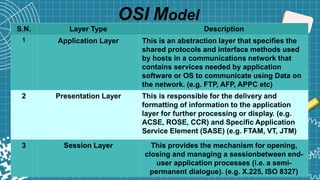
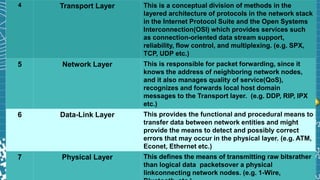
S.N. Layer Type Description
1 Application Layer This is an abstraction layer that specifies the
shared protocols and interface methods used
by hosts in a communications network that
contains services needed by application
software or OS to communicate using Data on
the network. (e.g. FTP, AFP, APPC etc)
2 Presentation Layer This is responsible for the delivery and
formatting of information to the application
layer for further processing or display. (e.g.
ACSE, ROSE, CCR) and Specific Application
Service Element (SASE) (e.g. FTAM, VT, JTM)
3 Session Layer This provides the mechanism for opening,
closing and managing a sessionbetween end-
user application processes (i.e. a semi-
permanent dialogue). (e.g. X.225, ISO 8327)
4 Transport Layer This is a conceptual division of methods in the
layered architecture of protocols in the network stack
in the Internet Protocol Suite and the Open Systems
Interconnection(OSI) which provides services such
as connection-oriented data stream support,
reliability, flow control, and multiplexing. (e.g. SPX,
TCP, UDP etc.)
5 Network Layer This is responsible for packet forwarding, since it
knows the address of neighboring network nodes,
and it also manages quality of service(QoS),
recognizes and forwards local host domain
messages to the Transport layer. (e.g. DDP, RIP, IPX
etc.)
6 Data-Link Layer This provides the functional and procedural means to
transfer data between network entities and might
provide the means to detect and possibly correct
errors that may occur in the physical layer. (e.g. ATM,
Econet, Ethernet etc.)
7 Physical Layer This defines the means of transmitting raw bitsrather
than logical data packetsover a physical
linkconnecting network nodes. (e.g. 1-Wire,
Protocol
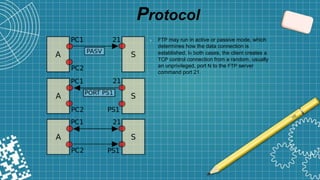
➲ FTP may run in active or passive mode, which
determines how the data connection is
established. In both cases, the client creates a
TCP control connection from a random, usually
an unprivileged, port N to the FTP server
command port 21.
Protocol (Contd)
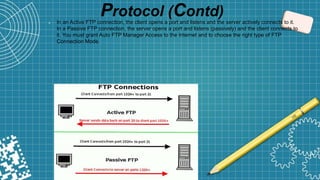
➲ In an Active FTP connection, the client opens a port and listens and the server actively connects to it.
In a Passive FTP connection, the server opens a port and listens (passively) and the client connects to
it. You must grant Auto FTP Manager Access to the Internet and to choose the right type of FTP
Connection Mode.
History
 The completion of FTP dates from 1971 when a file transfer system
(described in RFC141) between MIT machines (Massachusetts Institute of
Technology) was developed.
 Many RFC have since made improvements/changes to the basic protocol,
but the greatest innovation date from July 1973.
 The FTP protocol is currently defined by RFC 959 (File Transfer Protocol
(FTP) - Specifications).
Usage Of FTP
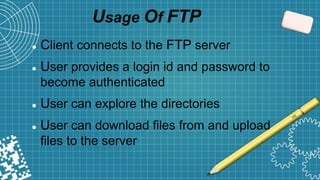
 Client connects to the FTP server
 User provides a login id and password to
become authenticated
 User can explore the directories
 User can download files from and upload
files to the server
Merits Of FTP
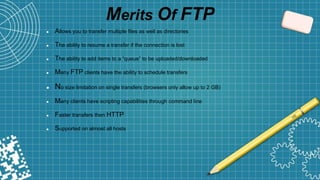
 Allows you to transfer multiple files as well as directories
 The ability to resume a transfer if the connection is lost
 The ability to add items to a “queue” to be uploaded/downloaded
 Many FTP clients have the ability to schedule transfers
 No size limitation on single transfers (browsers only allow up to 2 GB)
 Many clients have scripting capabilities through command line
 Faster transfers then HTTP
 Supported on almost all hosts
Demerits Of FTP
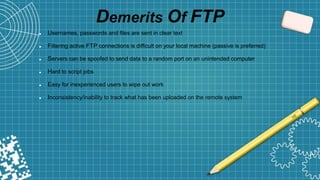
 Usernames, passwords and files are sent in clear text
 Filtering active FTP connections is difficult on your local machine (passive is preferred)
 Servers can be spoofed to send data to a random port on an unintended computer
 Hard to script jobs
 Easy for inexperienced users to wipe out work
 Inconsistency/inability to track what has been uploaded on the remote system
File Transfer Protocol (FTP)

File Transfer Protocol (FTP)

  • 1.
    File Transfer Protocol(FTP) PresentationBy: Asmita Wagle Praful Nepal Ajay Nemkul Shrestha
  • 2.
    Contents  Introduction  OSIModule  Protocol  History Of FTP Server  Usage Of FTP  Merits Of FTP  Demerits Of FTP
  • 3.
    Introduction To FTP FileTransfer Protocol(FTP) is standard network protocol used to transfer computer files between a client and server on a computer network. It is built on a client-server model architecture and uses separate control and data connection between the client and the server which operates under the application layer of Open System Interconnection (OSI) model.
  • 4.
    OSI Model S.N. LayerType Description 1 Application Layer This is an abstraction layer that specifies the shared protocols and interface methods used by hosts in a communications network that contains services needed by application software or OS to communicate using Data on the network. (e.g. FTP, AFP, APPC etc) 2 Presentation Layer This is responsible for the delivery and formatting of information to the application layer for further processing or display. (e.g. ACSE, ROSE, CCR) and Specific Application Service Element (SASE) (e.g. FTAM, VT, JTM) 3 Session Layer This provides the mechanism for opening, closing and managing a sessionbetween end- user application processes (i.e. a semi- permanent dialogue). (e.g. X.225, ISO 8327)
  • 5.
    4 Transport LayerThis is a conceptual division of methods in the layered architecture of protocols in the network stack in the Internet Protocol Suite and the Open Systems Interconnection(OSI) which provides services such as connection-oriented data stream support, reliability, flow control, and multiplexing. (e.g. SPX, TCP, UDP etc.) 5 Network Layer This is responsible for packet forwarding, since it knows the address of neighboring network nodes, and it also manages quality of service(QoS), recognizes and forwards local host domain messages to the Transport layer. (e.g. DDP, RIP, IPX etc.) 6 Data-Link Layer This provides the functional and procedural means to transfer data between network entities and might provide the means to detect and possibly correct errors that may occur in the physical layer. (e.g. ATM, Econet, Ethernet etc.) 7 Physical Layer This defines the means of transmitting raw bitsrather than logical data packetsover a physical linkconnecting network nodes. (e.g. 1-Wire,
  • 6.
    Protocol ➲ FTP mayrun in active or passive mode, which determines how the data connection is established. In both cases, the client creates a TCP control connection from a random, usually an unprivileged, port N to the FTP server command port 21.
  • 7.
    Protocol (Contd) ➲ Inan Active FTP connection, the client opens a port and listens and the server actively connects to it. In a Passive FTP connection, the server opens a port and listens (passively) and the client connects to it. You must grant Auto FTP Manager Access to the Internet and to choose the right type of FTP Connection Mode.
  • 8.
    History  The completionof FTP dates from 1971 when a file transfer system (described in RFC141) between MIT machines (Massachusetts Institute of Technology) was developed.  Many RFC have since made improvements/changes to the basic protocol, but the greatest innovation date from July 1973.  The FTP protocol is currently defined by RFC 959 (File Transfer Protocol (FTP) - Specifications).
  • 9.
    Usage Of FTP Client connects to the FTP server  User provides a login id and password to become authenticated  User can explore the directories  User can download files from and upload files to the server
  • 10.
    Merits Of FTP Allows you to transfer multiple files as well as directories  The ability to resume a transfer if the connection is lost  The ability to add items to a “queue” to be uploaded/downloaded  Many FTP clients have the ability to schedule transfers  No size limitation on single transfers (browsers only allow up to 2 GB)  Many clients have scripting capabilities through command line  Faster transfers then HTTP  Supported on almost all hosts
  • 11.
    Demerits Of FTP Usernames, passwords and files are sent in clear text  Filtering active FTP connections is difficult on your local machine (passive is preferred)  Servers can be spoofed to send data to a random port on an unintended computer  Hard to script jobs  Easy for inexperienced users to wipe out work  Inconsistency/inability to track what has been uploaded on the remote system