File Transfer Protocol
CS-328
Dick Steflik
FTP
• RFC 959
• uses two TCP Ports
– one for control
– one for data transfers
• command-response protocol
• control port uses telnet protocol to negotiate
session
– US-ASCII
– <crlf> is end-of-line character
Active Mode FTP
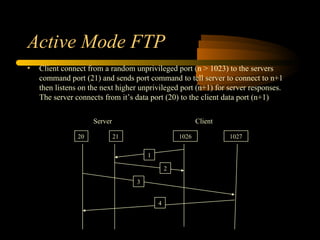
• Client connect from a random unprivileged port (n > 1023) to the servers
command port (21) and sends port command to tell server to connect to n+1
then listens on the next higher unprivileged port (n+1) for server responses.
The server connects from it’s data port (20) to the client data port (n+1)
ClientServer
20 21 1026 1027
1
2
3
4
Passive Mode FTP
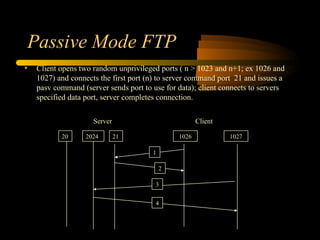
• Client opens two random unprivileged ports ( n > 1023 and n+1; ex 1026 and
1027) and connects the first port (n) to server command port 21 and issues a
pasv command (server sends port to use for data); client connects to servers
specified data port, server completes connection.
ClientServer
20 21 1026 1027
1
2
2024
3
4
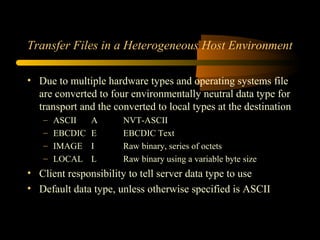
Transfer Files in a Heterogeneous Host Environment
• Due to multiple hardware types and operating systems file
are converted to four environmentally neutral data type for
transport and the converted to local types at the destination
– ASCII A NVT-ASCII
– EBCDIC E EBCDIC Text
– IMAGE I Raw binary, series of octets
– LOCAL L Raw binary using a variable byte size
• Client responsibility to tell server data type to use
• Default data type, unless otherwise specified is ASCII
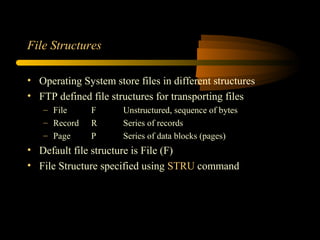
File Structures
• Operating System store files in different structures
• FTP defined file structures for transporting files
– File F Unstructured, sequence of bytes
– Record R Series of records
– Page P Series of data blocks (pages)
• Default file structure is File (F)
• File Structure specified using STRU command
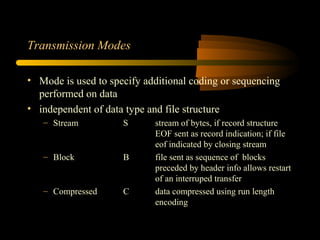
Transmission Modes
• Mode is used to specify additional coding or sequencing
performed on data
• independent of data type and file structure
– Stream S stream of bytes, if record structure
EOF sent as record indication; if file
eof indicated by closing stream
– Block B file sent as sequence of blocks
preceded by header info allows restart
of an interruped transfer
– Compressed C data compressed using run length
encoding
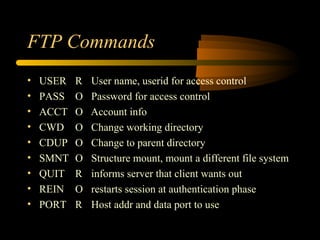
FTP Commands
• USER R User name, userid for access control
• PASS O Password for access control
• ACCT O Account info
• CWD O Change working directory
• CDUP O Change to parent directory
• SMNT O Structure mount, mount a different file system
• QUIT R informs server that client wants out
• REIN O restarts session at authentication phase
• PORT R Host addr and data port to use
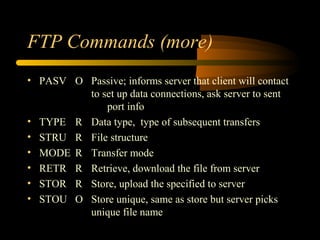
FTP Commands (more)
• PASV O Passive; informs server that client will contact
to set up data connections, ask server to sent
port info
• TYPE R Data type, type of subsequent transfers
• STRU R File structure
• MODE R Transfer mode
• RETR R Retrieve, download the file from server
• STOR R Store, upload the specified to server
• STOU O Store unique, same as store but server picks
unique file name
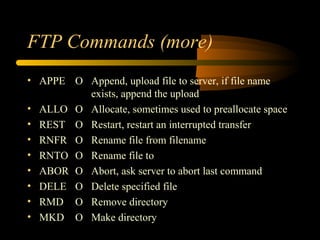
FTP Commands (more)
• APPE O Append, upload file to server, if file name
exists, append the upload
• ALLO O Allocate, sometimes used to preallocate space
• REST O Restart, restart an interrupted transfer
• RNFR O Rename file from filename
• RNTO O Rename file to
• ABOR O Abort, ask server to abort last command
• DELE O Delete specified file
• RMD O Remove directory
• MKD O Make directory
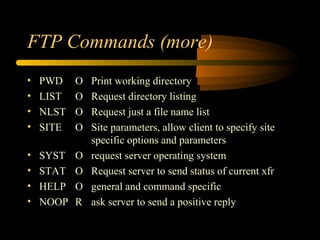
FTP Commands (more)
• PWD O Print working directory
• LIST O Request directory listing
• NLST O Request just a file name list
• SITE O Site parameters, allow client to specify site
specific options and parameters
• SYST O request server operating system
• STAT O Request server to send status of current xfr
• HELP O general and command specific
• NOOP R ask server to send a positive reply
FTP Responses
• Each command generates a server response
– 3 digit code, text, <crlf>
• use 3 digit code as driver for GUI Clients or programatic
implementations
• use text for Command line clients
Responses
• 1yz - Positive preliminary reply - command is being acted upon;
expect a final reply code before sending another command
• 2yz - Positive completion reply - command was successfully
executed; new command may be sent
• 3yz - Positive intermediate reply - command was accepted, but the
final result is being delayed because other information
needs to be supplied from the client; reply is used for
sequencing command groups
• 4yz - Transient negative completion reply - command failed, but the
condition is temporary
• 5yz - Permanent negative completion reply - command failed and
will always fail if given again; the command should not be
attempted again
Response
• x0z - Refers to command syntax
• x1z - Indicates information returned by commands
requesting information such as status or help
• x2z - Refers to the state of the control or data connections
• x3z - The reply is associated with the login process and
accounting procedures
• x4z - Reserved for future use
• x5z - Refers to the state of the requested file transfer or
other file system command
Trivial File Transfer Protocol
• RFC 1782
• UDP port 69
• Simple protocol, usually used to transfer
configuration files
• Usually used for transferring boot file for
diskless hosts (X-Stations) or updating
NVRAM
TFTP
• Typically used in short distance, low noise
environments
• Server is usually implement in firmware for
updating things like routers, bios...
TFTP
• Because of its compact size:
– no error recovery like TCP based FTP
– no command structure like FTP
– cannot list directories
– transfers to server are to a single configured
directory
Transfer Modes
• netascii (8-bit ASCII)
• raw binary
• mail (obsolete, not used)
TFTP Transfers
• client send a RRQ or WRQ to server
• server sends ACK 0
• client sends DAT1
• repeat until done
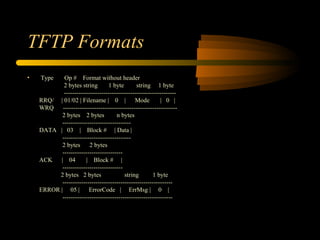
TFTP Formats
• Type Op # Format without header
2 bytes string 1 byte string 1 byte
------------------------------------------------------
RRQ/ | 01/02 | Filename | 0 | Mode | 0 |
WRQ -------------------------------------------------------
2 bytes 2 bytes n bytes
---------------------------------
DATA | 03 | Block # | Data |
---------------------------------
2 bytes 2 bytes
-----------------------------
ACK | 04 | Block # |
-----------------------------
2 bytes 2 bytes string 1 byte
-----------------------------------------------------
ERROR | 05 | ErrorCode | ErrMsg | 0 |
-----------------------------------------------------

patelchodu

  • 1.
  • 2.
    FTP • RFC 959 •uses two TCP Ports – one for control – one for data transfers • command-response protocol • control port uses telnet protocol to negotiate session – US-ASCII – <crlf> is end-of-line character
  • 3.
    Active Mode FTP •Client connect from a random unprivileged port (n > 1023) to the servers command port (21) and sends port command to tell server to connect to n+1 then listens on the next higher unprivileged port (n+1) for server responses. The server connects from it’s data port (20) to the client data port (n+1) ClientServer 20 21 1026 1027 1 2 3 4
  • 4.
    Passive Mode FTP •Client opens two random unprivileged ports ( n > 1023 and n+1; ex 1026 and 1027) and connects the first port (n) to server command port 21 and issues a pasv command (server sends port to use for data); client connects to servers specified data port, server completes connection. ClientServer 20 21 1026 1027 1 2 2024 3 4
  • 5.
    Transfer Files ina Heterogeneous Host Environment • Due to multiple hardware types and operating systems file are converted to four environmentally neutral data type for transport and the converted to local types at the destination – ASCII A NVT-ASCII – EBCDIC E EBCDIC Text – IMAGE I Raw binary, series of octets – LOCAL L Raw binary using a variable byte size • Client responsibility to tell server data type to use • Default data type, unless otherwise specified is ASCII
  • 6.
    File Structures • OperatingSystem store files in different structures • FTP defined file structures for transporting files – File F Unstructured, sequence of bytes – Record R Series of records – Page P Series of data blocks (pages) • Default file structure is File (F) • File Structure specified using STRU command
  • 7.
    Transmission Modes • Modeis used to specify additional coding or sequencing performed on data • independent of data type and file structure – Stream S stream of bytes, if record structure EOF sent as record indication; if file eof indicated by closing stream – Block B file sent as sequence of blocks preceded by header info allows restart of an interruped transfer – Compressed C data compressed using run length encoding
  • 8.
    FTP Commands • USERR User name, userid for access control • PASS O Password for access control • ACCT O Account info • CWD O Change working directory • CDUP O Change to parent directory • SMNT O Structure mount, mount a different file system • QUIT R informs server that client wants out • REIN O restarts session at authentication phase • PORT R Host addr and data port to use
  • 9.
    FTP Commands (more) •PASV O Passive; informs server that client will contact to set up data connections, ask server to sent port info • TYPE R Data type, type of subsequent transfers • STRU R File structure • MODE R Transfer mode • RETR R Retrieve, download the file from server • STOR R Store, upload the specified to server • STOU O Store unique, same as store but server picks unique file name
  • 10.
    FTP Commands (more) •APPE O Append, upload file to server, if file name exists, append the upload • ALLO O Allocate, sometimes used to preallocate space • REST O Restart, restart an interrupted transfer • RNFR O Rename file from filename • RNTO O Rename file to • ABOR O Abort, ask server to abort last command • DELE O Delete specified file • RMD O Remove directory • MKD O Make directory
  • 11.
    FTP Commands (more) •PWD O Print working directory • LIST O Request directory listing • NLST O Request just a file name list • SITE O Site parameters, allow client to specify site specific options and parameters • SYST O request server operating system • STAT O Request server to send status of current xfr • HELP O general and command specific • NOOP R ask server to send a positive reply
  • 12.
    FTP Responses • Eachcommand generates a server response – 3 digit code, text, <crlf> • use 3 digit code as driver for GUI Clients or programatic implementations • use text for Command line clients
  • 13.
    Responses • 1yz -Positive preliminary reply - command is being acted upon; expect a final reply code before sending another command • 2yz - Positive completion reply - command was successfully executed; new command may be sent • 3yz - Positive intermediate reply - command was accepted, but the final result is being delayed because other information needs to be supplied from the client; reply is used for sequencing command groups • 4yz - Transient negative completion reply - command failed, but the condition is temporary • 5yz - Permanent negative completion reply - command failed and will always fail if given again; the command should not be attempted again
  • 14.
    Response • x0z -Refers to command syntax • x1z - Indicates information returned by commands requesting information such as status or help • x2z - Refers to the state of the control or data connections • x3z - The reply is associated with the login process and accounting procedures • x4z - Reserved for future use • x5z - Refers to the state of the requested file transfer or other file system command
  • 15.
    Trivial File TransferProtocol • RFC 1782 • UDP port 69 • Simple protocol, usually used to transfer configuration files • Usually used for transferring boot file for diskless hosts (X-Stations) or updating NVRAM
  • 16.
    TFTP • Typically usedin short distance, low noise environments • Server is usually implement in firmware for updating things like routers, bios...
  • 17.
    TFTP • Because ofits compact size: – no error recovery like TCP based FTP – no command structure like FTP – cannot list directories – transfers to server are to a single configured directory
  • 18.
    Transfer Modes • netascii(8-bit ASCII) • raw binary • mail (obsolete, not used)
  • 19.
    TFTP Transfers • clientsend a RRQ or WRQ to server • server sends ACK 0 • client sends DAT1 • repeat until done
  • 20.
    TFTP Formats • TypeOp # Format without header 2 bytes string 1 byte string 1 byte ------------------------------------------------------ RRQ/ | 01/02 | Filename | 0 | Mode | 0 | WRQ ------------------------------------------------------- 2 bytes 2 bytes n bytes --------------------------------- DATA | 03 | Block # | Data | --------------------------------- 2 bytes 2 bytes ----------------------------- ACK | 04 | Block # | ----------------------------- 2 bytes 2 bytes string 1 byte ----------------------------------------------------- ERROR | 05 | ErrorCode | ErrMsg | 0 | -----------------------------------------------------