File Transfer Protocol (FTP) 
File Transfer Protocol (FTP) is the standard mechanism 
provided by TCP/IP for copying a file from one host to 
another. 
Although transferring files from one system to another 
seems simple and straightforward, some problems must be 
dealt with first. For example, 
•Two systems may use different file name conventions. 
•Two systems may have different ways to represent text and 
data. 
•Two systems may have different directory structures. 
All these problems have been solved by FTP in a very 
simple and elegant approach.
FTP differs from other client/server applications in that it 
establishes two connections between the hosts. 
One connection is used for data transfer, the other for 
controlinformation (commands and responses). 
Separation of commands and data transfer makes FTP 
more efficient. 
The control connection uses very simple rules of 
communication. 
We need to transfer only a line of command or a line of 
response at a time.
The data connection, on the other hand, needs more 
complex rules due to the variety of data types transferred. 
However, the difference in complexity is at the FTP level, 
not TCP. 
For TCP, both connections are treated the same. 
FTP uses two well-known TCP ports: 
Port 21 is used for the control connection, 
port 20 is used for the data connection.
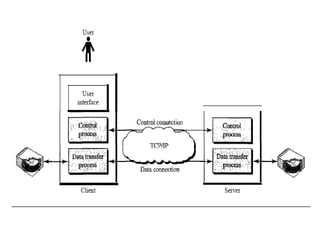
Figure shows the basic model of FTP. The client has 
three components: 
•User interface, 
•client control process, 
•client data transfer process. 
The server has two components: 
•the server control process 
•the server data transfer process. 
The control connection is made between the control 
processes. 
The data connection is made between the data transfer 
processes.
The control connection remains connected during the 
entire interactive FTP session. 
The data connection is opened and then closed for each 
file transferred. It opens each time commands that 
involve transferring files are used, and it closes when 
the file is transferred. 
In other words, when a user starts an FTP session, the 
control connection opens. While the control connection 
is open, the data connection can be opened and 
closed multiple times if several files are transferred.
Communication over Control Connection 
FTP uses the same approach as SMTP to communicate 
across the control connection. It uses the 7-bit ASCII 
character set (see Figure 26.22). Communication is 
achieved through commands and responses. This 
simple method is adequate for the control connection 
because we send one command (or response) at a time. 
Each command or response is only one short line, so 
we need not worry about file format or file structure. 
Each line is terminated with a end-of-line token.
Communication over Data Connection 
The purpose of the data connection is different from that of the 
control connection. We want to transfer files through the data 
connection. File transfer occurs over the data connection under 
the control of the commands sent over the control connection. 
However, file transfer in FTP means one of three things: 
•A file is to be copied from the server to the client. This is 
called retrieving a file. It is done under the supervision of 
the RETR command, 
• A file is to be copied from the client to the server. This is 
called storing a file. It is done under the supervision of the 
STOR command. 
•A list of directory or file names is to be sent from the 
server to the client. This is done under the supervision of 
the LIST command. FTP treats a list of directory or file names as a 
file. It is sent over the data connection.
Before sending the file through the data connection, we prepare for 
transmission through the control connection. The heterogeneity 
problem is resolved by defining three attributes of communication: 
file type, data structure, and transmission mode. 
File Type FTP can transfer one of the following file types across the 
data connection: an ASCII file, EBCDIC file, or image file. 
The ASCII file is the default format for transferring text files. Each 
character is encoded using 7-bit ASCII. The sender transforms the 
file from its own representation into ASCII characters, and the 
receiver transforms the ASCII characters to its own representation. If 
one or both ends of the connection use EBCDIC encoding, the file 
can be transferred using EBCDIC encoding. The image file is the 
default format for transferring binary files. The file is sent as 
continuous streams of bits without any interpretation or encoding. 
This is mostly used to transfer binary files such as compiled 
programs.
Data Structure : FTP can transfer a file across the 
data connection by using one of the following 
interpretations about the structure of the data: 
file structure, 
record structure, 
and page structure. 
In the file structure format, the file is a continuous 
stream of bytes. In the record structure, the file is 
divided into records. This can be used only with text 
files. In the page structure, the file is divided into 
pages, with each page having a page number and a 
page header. The pages can be stored and accessed 
randomly or sequentially.
Transmission Mode FTP can transfer a file across the data 
connection by using one of the following three 
transmission modes: stream mode, block mode, and 
compressed mode. 
The stream mode is the default mode. Data are delivered 
from FTP to TCP as a continuous stream of bytes. 
In block mode, data can be delivered from FTP to TCP in 
blocks. In this case, each block is preceded by a 3-byte 
header. The first byte is called the block descriptor; the 
next 2 bytes define the size of the block in bytes. 
In the compressed mode, if the file is big, the data can be 
compressed.
Anonymous FTP 
To use FTP, a user needs an account (user name) and a 
password on the remote server. 
Some sites have a set of files available for public access, 
to enable anonymous FTP. To access these files, a user 
does not need to have an account or password. Instead, 
the user can use anonymous as the user name and guest 
as the password. 
User access to the system is very limited. Some sites 
allow anonymous users only a subset of commands. For 
example, most sites allow the user to copy some files, but 
do not allow navigation through the directories.

Ftp

  • 1.
    File Transfer Protocol(FTP) File Transfer Protocol (FTP) is the standard mechanism provided by TCP/IP for copying a file from one host to another. Although transferring files from one system to another seems simple and straightforward, some problems must be dealt with first. For example, •Two systems may use different file name conventions. •Two systems may have different ways to represent text and data. •Two systems may have different directory structures. All these problems have been solved by FTP in a very simple and elegant approach.
  • 2.
    FTP differs fromother client/server applications in that it establishes two connections between the hosts. One connection is used for data transfer, the other for controlinformation (commands and responses). Separation of commands and data transfer makes FTP more efficient. The control connection uses very simple rules of communication. We need to transfer only a line of command or a line of response at a time.
  • 3.
    The data connection,on the other hand, needs more complex rules due to the variety of data types transferred. However, the difference in complexity is at the FTP level, not TCP. For TCP, both connections are treated the same. FTP uses two well-known TCP ports: Port 21 is used for the control connection, port 20 is used for the data connection.
  • 4.
    Figure shows thebasic model of FTP. The client has three components: •User interface, •client control process, •client data transfer process. The server has two components: •the server control process •the server data transfer process. The control connection is made between the control processes. The data connection is made between the data transfer processes.
  • 6.
    The control connectionremains connected during the entire interactive FTP session. The data connection is opened and then closed for each file transferred. It opens each time commands that involve transferring files are used, and it closes when the file is transferred. In other words, when a user starts an FTP session, the control connection opens. While the control connection is open, the data connection can be opened and closed multiple times if several files are transferred.
  • 7.
    Communication over ControlConnection FTP uses the same approach as SMTP to communicate across the control connection. It uses the 7-bit ASCII character set (see Figure 26.22). Communication is achieved through commands and responses. This simple method is adequate for the control connection because we send one command (or response) at a time. Each command or response is only one short line, so we need not worry about file format or file structure. Each line is terminated with a end-of-line token.
  • 8.
    Communication over DataConnection The purpose of the data connection is different from that of the control connection. We want to transfer files through the data connection. File transfer occurs over the data connection under the control of the commands sent over the control connection. However, file transfer in FTP means one of three things: •A file is to be copied from the server to the client. This is called retrieving a file. It is done under the supervision of the RETR command, • A file is to be copied from the client to the server. This is called storing a file. It is done under the supervision of the STOR command. •A list of directory or file names is to be sent from the server to the client. This is done under the supervision of the LIST command. FTP treats a list of directory or file names as a file. It is sent over the data connection.
  • 9.
    Before sending thefile through the data connection, we prepare for transmission through the control connection. The heterogeneity problem is resolved by defining three attributes of communication: file type, data structure, and transmission mode. File Type FTP can transfer one of the following file types across the data connection: an ASCII file, EBCDIC file, or image file. The ASCII file is the default format for transferring text files. Each character is encoded using 7-bit ASCII. The sender transforms the file from its own representation into ASCII characters, and the receiver transforms the ASCII characters to its own representation. If one or both ends of the connection use EBCDIC encoding, the file can be transferred using EBCDIC encoding. The image file is the default format for transferring binary files. The file is sent as continuous streams of bits without any interpretation or encoding. This is mostly used to transfer binary files such as compiled programs.
  • 10.
    Data Structure :FTP can transfer a file across the data connection by using one of the following interpretations about the structure of the data: file structure, record structure, and page structure. In the file structure format, the file is a continuous stream of bytes. In the record structure, the file is divided into records. This can be used only with text files. In the page structure, the file is divided into pages, with each page having a page number and a page header. The pages can be stored and accessed randomly or sequentially.
  • 11.
    Transmission Mode FTPcan transfer a file across the data connection by using one of the following three transmission modes: stream mode, block mode, and compressed mode. The stream mode is the default mode. Data are delivered from FTP to TCP as a continuous stream of bytes. In block mode, data can be delivered from FTP to TCP in blocks. In this case, each block is preceded by a 3-byte header. The first byte is called the block descriptor; the next 2 bytes define the size of the block in bytes. In the compressed mode, if the file is big, the data can be compressed.
  • 12.
    Anonymous FTP Touse FTP, a user needs an account (user name) and a password on the remote server. Some sites have a set of files available for public access, to enable anonymous FTP. To access these files, a user does not need to have an account or password. Instead, the user can use anonymous as the user name and guest as the password. User access to the system is very limited. Some sites allow anonymous users only a subset of commands. For example, most sites allow the user to copy some files, but do not allow navigation through the directories.