Application Layer
🠶 Layersbelow the application layer are there to provide reliable
transport, but they do not do real work for users.
🠶 The application layer is present at the top of the OSI model.
It is the layer through which users interact.
It provides services to the user
🠶 In the application layer there is also need for support protocols,
to allow the applications to function.
🠶 One of them is DNS which handles naming within the Internet.
🠶 FTP for file transfer
🠶 Three real applications:
1. Electronic Mail
2. The World Wide Web
3. Multimedia
3
4.
FTP- File Transfer
Protocol
🠶Transferring files from one computer to another is one
of the most common tasks expected from a
networking or internetworking environment.
🠶 As a matter of fact, the greatest volume of data
exchange in the Internet today is due to file transfer.
🠶 FTP is an application layer protocol which moves files
between local and remote file systems or copying a
file from one computer to another
.
🠶 It runs on the top of TCP, like HTTP.
4
5.
FTP- File Transfer
Protocol
🠶FTP differs from other client-server applications in that it
esta blishes two conne ctions between the hosts.
🠶 To transfer a file, 2 TCP connections are used by FTP in
parallel:
🠶 control conne ction and
🠶 data connection ( commands and responses).
🠶 Separation of commands and data transfer makes FTP
more efficient.
🠶 The well-known TCP port 21 is used for the control
connection and the well-known port 20 for the data conne
ction.
5
6.
FTP- File Transfer
Protocol
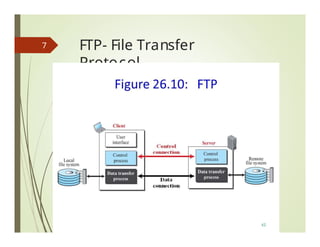
🠶The client has three components :
the user interfac e,
the client control process, and
the client data transfer process.
🠶 The server has two components:
the server control process and
the server data transfer process.
🠶 The control connection is made between the control processes .
🠶 The data connection is made between
the data transfer processes.
6
FTP- File Transfer
Protocol
differen
t
🠶Two Connections:
🠶 The two connections in
FTP have lifetimes.
🠶 The control connection remains connected during
the entire interactive FTP session.
🠶 The data connection is opened and then closed
for each file transfer activity.
🠶 It opens each time commands that involve
transferring files are used, and it closes when the file is
transferred.
8
9.
FTP- Control &Data
Connection
🠶 Control Connection: For sending control information like
🠶 user identification,
🠶 password,
🠶 commands to change the remote dire ctory,
🠶 commands to retrieve and store files, etc., FTP makes
use of control conne ction.
🠶 The control conne ction is initiated on port number 21.
🠶 Data Connection: For sending the actual file , FTP
makes use of data connection .
🠶 A data connection is initiated on port number 20.
9
FTP- Control Conne
ction
🠶For control communication, FTP uses the same
approach as TELNET.
🠶 It uses the NVT ASCII character set(7 bit)as used by
TELNET.
🠶 Communication is achieved through commands
and responses.
🠶 This simple method is adequate for the control
connection because we send one command (or
response) at a time.
🠶 Each command consists of four uppercase ASCII
characters, some with optional arguments.
🠶 Each line is terminated with a two-character
( carria ge return and line feed) end-of-line token.
11
FTP- Control Connection
Commands
Someof the FTP commands are
:
🠶 USER – This command sends the user identification
to the server.
🠶 PASS – This command sends the user
password to the server.
🠶 CWD – This command allows the user to
work with a different directory or dataset for file
storage or retrieval without altering his login or
accounting information.
🠶 RMD – This command causes the directory specified
in the path-name to be removed as a directory.
🠶 MKD – This command causes the directory
specified in the pathname to be created as a
directory.
🠶 PWD – This command causes the name of the
current working directory to be returned in the
reply.
🠶 RETR – Used to retrieve (that is, get) a file from the
current directory of the
remote host . This command causes
the remote host to initiate a data connection and
to send the requested file over the data
connection.
🠶 STOR – This command causes to store
a file into the current directory of the remote host .
🠶 LIST – Sends a request to display the list
of all the files present in the directory .
🠶 ABOR – This command tells the server to abort the
previous FTP service command and any
associated transfer of data.
🠶 QUIT – This command terminates a USER and if file
transfer is not in progress, the server closes the
control connection.
13
FTP- Control Connection
Responses
Someof the FTP replies are :
🠶 200 Command okay.
🠶 530 Not logged in.
🠶 331 User name okay, need a password.
🠶 225 Data connection open; no transfer in progress.
🠶 221 Service closing control connection.
🠶 551 Requested action aborted:
page type unknown.
🠶 502 Command not implemented.
🠶 503 Bad sequence of commands.
🠶 504 Command not implemented
for that parameter.
17
18.
FTP- Control Connection
Responses
18
🠶Every FTP commands generates at least one
response.
🠶 Response has two parts:
🠶 a Three digit no. followed by Text
🠶 Numeric part defines the code
🠶 Text part defines needed parameters or
further explanations
FTP- Data
Connection
🠶 Thedata conne ction uses the well-known port 20 at
the server site.
🠶 However, the creation of a data conne ction
is different from the control conne ction.
🠶 The following shows the steps:
🠶 1.The client, not the server, issues a passive open using
an ephemeral port.
🠶 2.Using the PORT command the client sends this port
number to the server.
🠶 3. The server receives the port number and issues an
active open using the well-known port 20 and the
received ephemeral port number.
21
FTP- Data
Connection
🠶 Totransfer files through the data
connection, The
client must define
the type of file to be transferred,
the structure of the data, and
the transmission mode.
23
24.
FTP : File
Type
filetypes across the
🠶 FTP can transfer one of the following
data connection:
an ASCII file
EBCDIC file or ima ge file
🠶 The ASCII file is the default format for transferring text
files.Each character is encoded using 7-bit ASCII.
🠶 If one or both ends of the connection use EBCDIC
encoding (the file format used by IBM), the file can be
transferred using EBCDIC encoding.
🠶 The image file is the default format for transferring binary
files.
24
25.
FTP : Data
Structures
FTPallows three types of data structures :
🠶 File Structure
In file-structure there is no internal structure and
the file is considered to be a continuous sequence or stre am of data bytes .
🠶 Record Structure
In record-structure the file is divided into records.
This can be used only with text files.
the file is made up of sequential records.
🠶 Page Structure
the file is divided into pages, with each page having a page number
and a page header
In page-structure the file is made up of independent indexed pages.
The pages can be stored and accessed randomly or sequentially.
25
26.
FTP : Transmission
modes
🠶FTP can transfer a file across the data
connection by using one of the following three
transmission modes :
stre am mode,
block mode,
and compressed mode.
26
27.
Stream mode
🠶 Itis the default mode.
🠶Data are delivered from FTP to
TCP as a continuous stre am of bytes.
🠶TCP is responsible for chopping data into segments
of appropriate size .
🠶If the data are simply a stream of bytes (file structure),
no end-of-file is needed.
🠶End-of-file in this case is the
closing of the data conne ction by
the sender.
27
28.
Block mode
🠶 Datacan be delivered from FTP to TCP in blocks.
🠶 In this case, each block is
preceded by a 3-byte
header.
The first byte is called the block descriptor;
the next 2 bytes define the size of the block in bytes.
28
29.
Compressed mode
🠶 Ifthe file is big, the data can be compressed.
🠶 The compression method normally used is run-length
encoding.
🠶 In this method, consecutive appearances of a data
unit are replaced by one occurrence and the number
of repetitions.
🠶 In a text file, this is usually spaces (blanks).
🠶 In a binary file, null characters are usually compressed.
29
Figure 21.8 Example21.1
220 (Service ready)
USER forouzan
LIST /usr/user/forouzan/reports
PASS xxxxxx
125 (Data connection OK)
331 (User name OK. Password?)
PORT 8888
150 (Data connection opens shortly)
230 (User login OK)
1
2
3
4
5
6
7
8
9
List of files or directories
List of files or directories
10
11
QUIT
226 (Closing data connection)
221 (Service closing)
12
13
14
DATA
TRANSFER
31
32.
Example 21.2
The 32followingshows an actual FTP session that
parallels Example 21.1. The colored lines show the
responses from the server control connection; the black
lines show the commands sent by the client. The lines in
white with black background show data transfer.
33.
Example 21.2
33
1. Afterthe control conne ction is created, the
FTP server send the 220 response.
2. The client sends its name.
3. The server responds with 331.
4. 4. The client sends the password (not shown).
5. The server responds with 230 (user log-in is OK).
6. The client sends the list command (ls reports) to find
the list of files on the directory name d report.
7. Now the server responds with 150 and opens
the data connection.
8. The server then sends the list of the files
or directories on the data connection.
9. The client sends a QUIT command.
10. The server responds with 221.
34.
1.After the controlconnection to port 21 is
created,
the FTP server sends the 220 (service
ready) response on the control
connection.
2.The client sends the USER command.
3.The server responds with 331 (user
n a m e i s O K , p a sswo r d i s r eq
u ire d ) .
4. The client sends the PASS command.
5.The server responds with 230 (user login
is OK)
E
X
A
M3
P4
LE :21.1Figure shows an example of using FTP for retrieving a list of
items in a directory.
35.
6.The client issuesa passive open on an ephemeral port for the
data connection and sends the PORT command (over the control
connection) to give this port number to the server.
Ephemeral port
A temporary communication hub used for Internet Protocol
(IP) communications.
It is created from a set range of port numbers by the IP
software and used as an end client's port assignment in direct
communication with a well-known port used by a server.
Different OS use different port ranges for ephemeral ports.
Many Linux versions use port range 32768-61000, while
Windows versions (until XP) use 1025-5000, by default.
Later Windows versions, including Vista, Windows 7
and Server 2008, use the Internet Assigned Number Authority
(IANA) suggested range of 49152-65535.
E3X5A
M
PLE
(CONTINUED)
36.
36
7. The serverdoes not open the connection at
this time,
but it prepares itself for issuing an
active open on the data connection
between port 20 (server side) and the
ephemeral port received from the client.
It sends response 150 (data connection will
open shortly).
8.The client sends the LIST message.
9.Now the server responds with 125 and
opens the data connection.
37.
connection)
responds with 226(closing data
over the control connection.
11. The client now has two choices.
It can use the QUIT command to request the
closing of the control connection
or it can send another command to start another
activity (and eventually open another data
connection). In our example, the client sends a
QUIT command.
12.After receiving the QUIT command, the server
Responds with 221 (service closing) and then
closes the control connection.
37
EXAMPLE (CONTINUED)
10. The server then sends the list of the files or
directories (as a file) on the data connection.
When the whole list (file) is sent, the server
DNS - TheDomain
Name System
🠶 Each internet host is assigned
a host name address
Host name are structured
character
and
IP
strings
eg.www.google.com.
IP addresses are 32- bit integers eg. 139.130.4.5.
🠶 DNS is the naming service of the internet that resolve
host names to IP addresses.
🠶 DNS allows users of internet application to refer to remote
hosts by name rather than by address.
40
41.
DNS - TheDomain
Name System
🠶 Addresses are hard for people to remember
🠶 If ISP or organization moves the mail server to a
different machine with a different IP address, e-mail
address has to change.
🠶 ASCII names were introduc ed to decouple machine
names from machine addresses
🠶 Network understands only numerical addresses, so
some mechanism is required to convert the ASCII
strings to network addresses.
🠶 Earlier, a file, hosts.txt, that listed all the hosts and their
IP addresses was used
🠶 Problem: size of the file became too large
🠶 To solve these problems, DNS was invented
41
42.
DNS - TheDomain
Name System
🠶 The invention of a hierarchical, domain-based naming scheme
and a distributed database system for implementing this naming
scheme.
🠶 Primarily used for mapping host names and e-mail destinations to
IP addresses.
🠶 The Domain Name System (DNS) translates Internet domain and
host names to IP addresses and vice versa.
🠶 Working:
🠶 To map a name onto an IP address, an application program calls a library
procedure called the resolver, passing it the name as a parameter
🠶 Resolver sends a UDP packet to a local DNS server, which then looks up the
name and returns the IP address to the resolver
, which then returns it to
the caller.
🠶 With the IP address, the program can then establish a TCP connection
with the destination or send it UDP packets
42
DNS Name Space
🠶Managing a large and constantly changing set of names
is a crucial problem-Unique names needed
🠶 The domain name space is hierarchical in design.
🠶 The names are defined in an inverted-tree
structure with the root at the top.
🠶 The tree can have only 128 levels: level 0 (root) to level
127.
🠶 Internet is divided into over 200 top-level domains, where
each domain covers many hosts.
🠶 Each domain is partitioned into sub domains, and these
are further partitioned, and so on.
🠶 All these domains can be represented by a tree, as
shown
44
DNS Name Space
46
🠶Top-level domains come in two flavors:
🠶 generic and countries
🠶 Original generic domains were
🠶 com ( commercial),
🠶 edu (educational institutions),
🠶 gov (the U.S. Federal Government),
🠶 int ( certain international organizations),
🠶 mil (the U.S. armed forces),
🠶 net (network providers), and
🠶 org (nonprofit organizations).
🠶 Country domains include one entry for every country
DNS Name Space
48
🠶Each node in the tree has a label.
🠶 Each domain is named by the path upward from it to the
(unnamed) root.
🠶 A full domain name is a sequence of labels separated by
dots.
Eg., challenger.atc.fhda.edu is a domain
name that defines a computer at De Anza College .
🠶 Each label in the domain may define an
entity in the organization;
🠶 the level of detail incre ases from right to left.
49.
DNS Name Space
49
🠶ICANN approved four new, general-purpose, top-level domains,
namely,
🠶 biz (businesses),
🠶 info (information),
🠶 name (people's names), and
🠶 pro (professions, such as doctors and lawyers).
🠶 In addition, three more specialized top-level domains were
introduced at the request of certain industries.
🠶 aero ( aerospace industry),
🠶 coop ( co-operatives), and
🠶 museum (museums).
🠶 Other top-level domains will be added in the future
🠶 For locating people, resourc es, services, or objects , another
directory service called LDAP (Lightweight Directory Access
Protocol) has been defined
Domains
51
🠶 Each domainis named by the path upward from it to the
(unnamed) root.
🠶 The components are separated by periods (pronounc ed
''dot'').
🠶 Thus, the engineering department at Sun Microsystems
might be
eng.sun.c om
🠶 Domain names can be either absolute or relative.
🠶 An absolute domain name always ends with a period (e.g.,
eng.sun.com.), whereas a relative one does not.
🠶 Domain names are case insensitive,
🠶 so edu, Edu, and EDU mean the same thing.
🠶 Component names can be up to 63 characters long,
and full path names must not exceed 255 characters.
🠶 The leaves of the tree represent domains that have no
subdomains (but do contain machines, of course).
🠶 A leaf domain may contain a single host, or it may represent a
company and contain thousands of hosts.
Resource Records
53
🠶 Everydomain, whether it is a single host or a top-level domain,
can have a set of resourc e records associated with it.
🠶 For a single host, the most common resourc e record is just its IP
address, but many other kinds of resourc e records also exist.
🠶 When a resolver gives a domain name to DNS,
what it gets back are the resourc e records associated with
that name.
🠶 Thus, the primary function of DNS is to map domain names
onto resourc e records.
🠶 A resourc e record is a five-tuple.
🠶 Resourc e records are presented as ASCII text, one line per
resourc e record.
🠶 The format we will use is as follows:
Domain_name Time_to_live Class Type Value
54.
Resource Records
54
🠶 Domain_name:tells the domain to which this record applies
🠶 Time_to_live field: gives an indication of how sta ble the record
is
🠶 Class field: For Internet information, it is always IN
🠶 Type field: tells what kind of record this is. Types listed below:
Fig: principal DNS resource records types.
🠶 Value field. This field can be a number, a domain name, or an
ASCII string. The semantics depend on the record type
55.
Name Servers
55
🠶 NameServers
🠶 In theory, a single name server could contain the entire DNS
database and respond to all queries about it.
🠶 In practice, this server would be so overloaded.
🠶 Furthermore, if it ever went down, the entire Internet would
be colla psed
🠶 To avoid the problems associated with having only a single
source of information, the DNS name space is divided into
nonoverla pping zones
🠶 One possible way to divide the name space into zones
🠶 Each zone contains some part of the tree and also contains
name servers holding the information about that zone.
It is very inefficient and also unreliable to have just one computer store
such a huge amount of information.
The solution to these problems is to distribute the information among
many computers called DNS servers.
Name Servers
🠶 Normally,a zone will have one primary name server, which
gets its information from a file on its disk, and
🠶 one or more secondary name servers, which
get their information from the primary name server
🠶 To improve relia bility, some servers for a zone can
be located outside the zone
57
Recursive Resolution
🠶 Recursivequery:
• When the name server of
a host cannot resolve a
query,
the server issues a
query to resolve the query
to the
“closest known”
authoritative name server.
• When the query is
finally
resolved, the response travels
back until it finally reaches
the requesting client. This is
called recursive resolution.
60
Iterative Resolution
🠶 Iterativequeries:
• When the name server of a
host cannot resolve a query,
the name server sends a
closest known” authoritative
name server referral to the
root server
• This involves more work for the
resolver.
• The client repeats the same
query to multiple servers.
62
Ele ctronic Mail(e-
mail)
🠶Snail mails (paper letters) are getting overruled by e-mails
🠶 The first e-mail systems simply consisted of file transfer protocols, with the
convention that the first line of each message (i.e., file) contained the
recipient's address.
🠶 Some of the complaints were as follows
🠶 Sending a message to a group of people was inconvenient
🠶 Messages had no internal structure, making computer processing
difficult
🠶 The originator (sender) never kn ew if a message arrived or not
🠶 Transferring mails to other person was not possible
🠶 user interfac e was poorly integrated with the transmission system (edit a file,
then leave the editor and invoke the file transfer program)
🠶 not possible to create and send messa ges containing a mixture of text,
drawings, facsimile, and voi ce
64
65.
Ele ctronic
mail
🠶 Architectureand Services
🠶 Overview of what e-mail systems can do and how they
are organized
🠶 Two subsystems:
🠶 the user agents
🠶 which allow people to read and send e-mail
🠶 They are local programs that provide a command-based,
menu-based, or graphical method for interacting with the e-mail
system
🠶 the message transfer agents
🠶 which move the messa ges from the sourc e to the destination.
🠶 They are typically system daemons, which are processes that
run in the background.
🠶 Their job is to move e-mail through the system
65
66.
Ele ctronic
mail
🠶 Architectureand Services :
🠶User Agent
🠶Message Transfer Agent: SMTP
🠶Message Access Agent: POP and IMAP
66
67.
Ele ctronic
mail
🠶 Whenthe sender and the receiver of an e-mail are on
different systems, we need two UAs and a pair of MTAs ( client
and server ).
67
68.
Ele ctronic
mail
🠶 Whenthe sender is connected to the mail server via a
LAN or a WAN, we need two UAs and two pairs of MTAs ( client
and server).
68
69.
Ele ctronic mail-Common scenario
🠶 When both sender and receiver are connected to
the mail server via a LAN or a WAN we need two a LAN or a
WAN, we need two UAs, two pairs of MTAs and a pair of MAAs
69
Ele ctronic
mail
🠶 e-mailsystems support five basic functions
🠶 Composition refers to the process of creating messages and
answers
🠶 Transfer refers to moving messages from the originator to the
recipient
🠶 Reporting has to do with telling the originator what happened to
the message
🠶 Displaying incoming messages is needed so people can read
their e-mail
🠶 Disposition is the final step and concerns what the recipient does
with the message after receiving it
🠶 throwing it away before reading, throwing it away after reading,
saving it, and so on
71
72.
Ele ctronic
mail
🠶 Mostsystems allow users to create mailboxes
to store incoming e-mail
🠶 Corporate managers often need to send a message
to each of their subordinates, customers, or suppliers
🠶 Achieved by maintaining a mailing list, which is a list of e-mail
addresses.
🠶 envelope encapsulates the messa ge
🠶 contains all the information needed for transporting the
messa ge, such as the destination address, priority, and security
level, all of which are distinct from the messa ge itself.
🠶 message transport agents use the envelope for routing
72
73.
Ele ctronic
mail
🠶 message inside the envelope consists of two parts: the
header and the body.
🠶 header contains control information for the user agents.
🠶 body is entirely for the human recipient
73
74.
Ele ctronic
mail
🠶 Useragent
🠶 normally a program (sometimes called a mail reader) that
accepts a variety of commands for composing, receiving, and
replying to messa ges, as well as for manipulating mailboxes
🠶 Write about
🠶 Sending E-mail
🠶 Reading E-mail
74
Ele ctronic mail-Message
Formats
🠶 RFC 822
🠶 Mail is sent between message transfer agents in a
standard format. The original format, RFC 822, has been
revised to the current RFC 5322 and extended with support
for multimedia content and international text. This scheme is
called MIME
🠶 Messa ges consist of a primitive envelope, some
number of header fields, a blank line, and then the
message body.
🠶 Each header field (logically) consists of a single line of ASCII text
containing the field name, a colon, and, for most fields, a value
76
Figure 7-10. RFC 5322 header fields related to message transport.
77.
Ele ctronic mail-Message
Formats
77
Figure 7-11. Some fields used in the RFC 5322 message header.
🠶 After the headers comes the messa ge body. Users can put
whatever they want here.
🠶 Some people terminate their messa ges with elaborate signatures,
including quotations from greater and lesser authorities, political
statements, and disclaimers of all kinds
78.
Ele ctronic mail-
MIME
🠶 MIME - The Multipurpose Internet Mail Extensions
🠶 In the early days of the ARPANET, e-mail consisted exclusively of
text messages written in English and expressed in ASCII.
🠶 For this environment, RFC 822 did the job completely:
🠶 it specified the headers but left the content entirely up to the
users.
🠶 Nowadays, on the worldwide Internet, this approach is no
longer adequate.
🠶 The problems include sending and receiving
🠶 1. Messages in languages with accents (e.g., French and
German).
🠶 2. Messa ges in non-Latin alphabets (e.g., Hebrew and
Russian).
🠶 3. Messages in languages without alphabets (e.g., Chinese and
J apanese).
🠶 4. Messa ges not containing text at all (e.g., audio or ima ges).
78
79.
Ele ctronic mail-
MIME
🠶 Basic idea of MIME
🠶 to continue to use the RFC 822 format,
🠶 but to add structure to the messa ge body and define encoding
rules for non-ASCII messages.
🠶 MIME messa ges can be sent using the existing mail programs
and protocols.
🠶 All that has to be changed are the sending and receiving programs,
which users can do for themselves
🠶 MIME defines five new messa ge headers
79
Ele ctronic mail-
MIME
🠶 Corre ct way to encode binary messa ges is to use
base64 encoding, sometimes called ASCII armor.
🠶 In this scheme, groups of 24 bits are broken up into four 6-bit units,
with each unit being sent as a legal ASCII character.
🠶 Coding is ''A'' for 0, ''B'' for 1, and so on, followed by the 26 lower-
case letters, the ten digits, and finally + and / for 62 and 63,
respectively
🠶 Carriage returns and line feeds are ig nored, so they can be inserted
at will to keep the lines short enough.
🠶 For messa ges that are almost entirely ASCII but with a few non-
ASCII characters, base64 encoding is somewhat inefficient.
🠶 Instead, an encoding known as quoted-printable encoding is
used.
🠶 This is just 7-bit ASCII, with all the characters above 127 encoded as an
equal sign followed by th e character's value as two
hexadecimal digits.
82
Ele ctronic mail-
MIME
🠶 MIME Content types and Subtypes in RFC
2045
85
86.
Ele ctronic mail-
MIME
🠶 MIME Content types and Subtypes in RFC 2045
86
87.
MTAs and MAAs
🠶The first and the second sta ges of mail delivery use
SMTP.
🠶 SMTP is a push protocol; it pushes the messa ge
from the client to the server.
🠶 The third sta ge needs a pull protocol;(POP3/IMAP)
🠶 Client must pull messa ges from the server.
87
88.
SMTP - TheSimple
Mail Transfer Protocol
🠶 Within the Internet, e-mail is delivered by having
the sourc e machine esta blish a TCP conne ction to
port 25 of the destination machine.
🠶 Listening to this port is an e-mail daemon that
speaks SMTP (Simple Mail Transfer Protocol).
🠶 This daemon accepts incoming connections and
copies messa ges from them into the appropriate
mailboxes.
🠶 If a message cannot be delivered, an error report
containing the first part of the undeliverable
message is returned to the sender
88
89.
Final Delivery
🠶 Whathappens when Alic e wants to send Bob e-mail
and Bob is not currently on-line ?
🠶 Alice cannot establish a TCP connection to
Bob and thus cannot run the SMTP protocol.
🠶 IMAP and POP being two other important protocols for
retrieving mail messa ges.
89
90.
Final Delivery
90
(a) Sendingand reading mail when the receiver has a permanent Internet connection
and the user agent runs on the same machine as the MTA (message transfer
agent.)
(b) Reading e-mail when the receiver has a dial-up connection to an ISP.
91.
Final Delivery
🠶 POP3(Post Office Protocol) is not convenient when
users frequently use different machines to read email
from servers, as emails have to be downloaded to
different computers more or less random
🠶 IMAP(Internet Message Access Protocol) can resolve
this issues as emails will be always on the servers
🠶 IMAP assumes that all the e-mail will remain on the
server indefinitely in multiple mailboxes.
🠶 But POP3 basically assumes that the user will clear out
the mailbox on every contact and work off-line after
that.
🠶 IMAP provides extensive mechanisms for reading
messa ge or even parts of messa ges.
91
WW
W
The idea ofthe Web was first proposed by Tim
Berners-Lee in 1989 at CERN, the European
Organization for Nuclear Research, to allow several
researchers at different locations throughout
Europe to access each others’ researches. The
commercial Web started in the early 1990s.
93
94.
WWW- World WideWeb
🠶 World Wide Web
🠶 Archite ctural framework for accessing linked documents
spread out over millions of machines all over the Internet
🠶 Architectural Overview
🠶 From the users' point of view, the Web consists of a vast,
worldwide colle ction of documents or Web pages, often
just called pages.
🠶 Each page may contain links to other pages anywhere in
the world.
🠶 Users can follow a link by clicking on it, which then takes
them to the page pointed to.
🠶 This process can be repeated indefinitely.
🠶 The idea of having one page point to another is called
hypertext
94
95.
WWW- World WideWeb
🠶 Pages are viewed with a program called a browser
🠶 Eg: Internet Explorer and Netsca pe Navigator
🠶 The browser fetches the page requested, interprets the
text and formatting commands on it, and displays the
page, properly formatted, on the screen
🠶 Strings of text that are links to other pages, called
hyperlinks,
🠶 Hyperlinks are often highlighted, by underlining, displaying
them in a special color, or both.
🠶 To follow a link, the user places the mouse cursor on the
highlighted area, which causes the cursor to change, and
clicks on it
95
WWW- World WideWeb
🠶 The Client Side
🠶 Browser is a program that can display a Web page and
catch mouse clicks to items on the displayed page.
🠶 When an item is selected, the browser follows the
hyperlink and fetches the page selected.
🠶 Therefore, the embedded hyperlink needs a way to name
any other page on the Web.
🠶 Pages are named using URLs (Uniform Resource Locators).
🠶 A typical URL is
🠶 http://www.abcd.com/products.html
🠶 Name of the protocol(http), DNS name of machine where page is
located and name of the file containing the page
98
http://www.someschool.edu/someDept/pic.gif
| ------- host name----||----path
name--------|
99.
WWW- World WideWeb
🠶 When a user clicks on a hyperlink, the browser carries out
a series of steps in order to fetch the page pointed to.
🠶 Suppose that a user is browsing the Web with URL,
http:// www.itu.org/ home/index.html .
🠶 Let us trace the steps that occur when this link is selected.
🠶 1. The browser determines the URL
🠶 2. The browser asks DNS for the IP address of www.itu.org.
🠶 3. DNS replies with 156.106.192.32.
🠶 4. The browser makes a TCP connection to port 80 on 156.106.192.32.
🠶 5. It then sends over a request asking for file / home/index.html .
🠶 6. The www.itu.org server sends the file / home/index.html.
🠶 7. The TCP connection is released.
🠶 8. The browser displays all the text in / home/index.html.
🠶 9. The browser fetches and displays all ima ges in this file.
99
100.
WWW- World WideWeb
🠶 To allow all browsers to understand all Web pages, Web pages
are written in a standardized language called HTML, which
describes Web pages
🠶 Although a browser is basically an HTML interpreter, most
browsers have numerous buttons and features to make it easier
to navigate the Web.
🠶 button for going back to the previous page,
🠶 button for going forward to the next page and
🠶 button for going straight to the user's own start page.
🠶 button or menu item to set a bookmark on a given page
🠶 button to display the list of bookmarks,
🠶 Pages can also be saved to disk or printed.
🠶 Numerous options are generally availa ble for controlling the
screen layout and setting various user preferences.
100
101.
WWW- World WideWeb
🠶 Since standard HTML pages may link to any of these, the browser
has a problem when it encounters a page it cannot interpret.
🠶 A page may also consist of
🠶 formatted document in PDF format,
🠶 icon in GIF format,
🠶 photograph in JPEG format,
🠶 song in MP3 format,
🠶 video in MPEG format, or
🠶 any one of hundreds of other file types
🠶 There are two possibilities : plug-ins and helper applications
101
102.
WWW- World WideWeb
🠶 The Server Side
🠶 Steps that the server performs in its main loop are:
🠶 1. Accept a TCP connection from a client ( a browser).
🠶 2. Get the name of the file requested.
🠶 3. Get the file (from disk).
🠶 4. Return the file to the client.
🠶 5. Release the TCP connection.
🠶 Web server cannot serve more requests per second
than it can make disk accesses
🠶 One obvious improvement (used by all Web servers) is to maintain a
cache in memory of the n most recently used files
🠶 Second improvement is to make the server multithreaded
102
103.
WWW- World WideWeb
103
Fig: A multithreaded Web server with a front end and processing
modules
104.
WWW- World WideWeb
🠶 In modern Web Servers processing of each request
handled by Processing Modules
🠶 Different Processing Modules can be
🠶 1. Resolve the name of the Web page requested.
🠶 2. Authenticate the client.
🠶 3. Perform access control on the client.
🠶 4. Perform access control on the Web page.
🠶 5. Check the cache.
🠶 6. Fetch the requested page from disk.
🠶 7. Determine the MIME type to include in the
response.
🠶 8. Take care of miscellaneous odds and ends.
🠶 9. Return the reply to the client.
🠶 10. Make an entry in the server log.
104
105.
WWW- World WideWeb
🠶 If too many requests come in each second, the CPU will
not be able to handle the processing load, no matter how
many disks are used in parallel.
🠶 The solution is to add more nodes ( computers), possibly with
replicated disks to avoid having the disks become the next
bottleneck.
🠶 This leads to the server farm model
105
106.
WWW- World WideWeb
🠶 A front end still accepts incoming requests but
sprays them over multiple CPUs rather than multiple thre
ads to reduce the load on each computer.
🠶 The individual machines may themselves be multithreaded
and pipelined
🠶 One problem with server farms is that there is no
longer a shared cache because each processing node
has its own memory
🠶 Solution: an expensive shared-memory multiprocessor can be
used.
🠶 Another problem with server farms is that the client's TCP
conne ction terminates at the front end, so the reply must
go through the front end
🠶 Solution: TCP handoff - TCP end point is passed to the
processing node so it can reply directly to the client
106
107.
WWW- World WideWeb
107
(a) Normal request-reply message sequence.
(b) Sequence when TCP handoff is used.
108.
UR
L
🠶 URLs –Uniform Resource Locaters
🠶 Web pages may contain pointers to other Web pages.
🠶 How these pointers are implemented.
🠶 When Web was first created, it was immediately
apparent that having one page point to another Web
page required mechanisms for naming and locating
pages.
🠶 In particular, three questions had to be answered
before a selected page could be displayed:
🠶 a)What is the page called ?
🠶 b)Where is the page located?
🠶 c)How can the page be accessed?
108
109.
UR
L
🠶 Each pageis assigned a URL (Uniform Resourc
e Locator) that effe ctively serves as the
page’s worldwide name.
🠶 URLs have three parts: the protocol ( also known as the
scheme), the DNS name of the machine on which the
page is located, and a local name uniquely indicating
the specific page (usually just a file name on the
machine where it resides).
109
110.
UR
L
110
Figure 7-19. Somecommon URL schemes.
🠶 The http protocol is the Web’s native language, the
one spoken by Web servers. HTTP stands for HyperText
Transfer Protocol
111.
Statelessness and Cookies
🠶Web is basically stateless. There is no
concept of a login session.
🠶 The browser sends a request to a server and gets back
a file.
🠶 When Web was just used for retrieving publicly
availa ble documents, this model was perfe ctly
adequate.
🠶 But as Web started to acquire other functions, it
caused problems.
111
112.
Statelessness and Cookies
🠶For example, some Web sites require clients to register (
and possibly pay money) to use them.
🠶 This raises the question of how servers can distinguish
between requests from registered users and everyone
else.
🠶 Other examples are e-commerce,
customized Web portals such as Yahoo.
🠶 Cookies are solve this problem
🠶 When a client requests a Web page, the server
can supply additional information along with the
requested page.
🠶 This information may include a cookie, which is a small
( at most 4 KB) file (or string).
112
113.
Statelessness and Cookies
🠶A cookie may contain up to five fields.
🠶 Domain- where the cookie came from.
🠶 Path- is a path in the server’s dire ctory structure that
identifies which parts of the server’s file tree may use the
cookie.
🠶 It is often /, which means the whole tree
113
114.
Statelessness and Cookies
🠶The Content field takes the form name = value. Both
name and value can be anything the server wants.
🠶 This field is where the cookie’s content is stored.
🠶 The Expires field specifies when the cookie expires.
🠶 If this field is absent, the browser discards the cookie when it
exits. Such a cookie is called a nonpersistent cookie.
🠶 If a time and date are supplied, the cookie is said to be a
persistent cookie and is kept until it expires.
🠶 The Secure field can be set to indicate that the browser
may only return the cookie to a server using a secure
transport, namely SSL/TLS .
🠶 This feature is used for e-commerce, banking, and other
secure applications.
114
115.
Other topics
🠶 StaticWeb Pages
🠶 HTML,XML
🠶 Forms
🠶 Dynamic Web pages
🠶 HTTP( HyperText Transfer
Protocol)
115
116.
SNMP- Simple
Network
Management Protocol
🠶Application layer protocol within the OSI model. It uses
UDP as transport
🠶 Internet-standard protocol for managing devices on IP
networks
🠶 Have the task of monitoring or managing a group of hosts or devices
on a computer network.
🠶 Devices that typically support SNMP include routers, switches, servers,
workstations, printers, modem racks and more
🠶 SNMP isused mostly in network management systems to monitor
network-attached devices for conditions that warrant administrative
attention.
🠶 It consists of a set of stand ards for network management, including an
application layer protocol, a database schema, and a set of data
objects.
🠶 So that it can monitor devices made by different manufa cturers and
installed on different physical networks.
116
117.
SNMP- Simple Network
ManagementProtocol
🠶 An SNMP-mana ged network consists of three key
components:
🠶 Managed device
🠶 network node that implements an SNMP interfac e that
allows unidire ctional (read-only) or bidire ctional (read and
write)
access to node-specific information
🠶 exchange node-spe cific information with the NMS
🠶 Egs: routers, access servers, switches, bridges, hubs, IP
telephones, IP video cameras, computer hosts, and printers.
🠶 Agent
🠶 software which runs on managed devices
🠶 has local knowledge of management information & translates
that information to or from an SNMP-spe cific form
117
118.
SNMP- Simple Network
ManagementProtocol
🠶 Network management station (NMS)
🠶 software which runs on the manager
🠶 executes applications that monitor
and control managed devices
🠶 provide the bulk of the processing and memory resources
required for network management
🠶 One or more NMSs may exist on any managed network
118
119.
SNMP- Simple Network
ManagementProtocol
🠶 Manager usually a host controls and monitors a set of
agents, usually routers.
🠶 A management station, called a manager,
🠶 is a host that runs the SNMP client program.
🠶 A managed station, called an agent,
🠶 is a router or host that runs the SNMP server program. The agent
keeps performanc e information in a database.
🠶The manager has access to the values in the database.
🠶Management is achieved through simple
interaction between a manager and an agent.
119
120.
SNMP- Simple Network
ManagementProtocol
🠶 Management with SNMP is based on three basic ideas
1.Amanager checks an agent by
requesting information that reflects the behavior of
the agent.
2. A manager forces an agent to perform a task by resetting
values in the agent database.
3. An agent contributes the management
process by warning the manager of an unusual
situation
120
121.
Management Components
🠶 SNMPrequires the use of two other protocols:
🠶 Structure of Management Information (SMI) and
🠶 Management Information Base (MIB).
🠶 Network management on the Internet is done
through the cooperation of SNMP, SMI, and MIB.
121
122.
Role of SNMP
🠶It defines the format of the packet to be sent from a
manager to an agent and vice versa.
🠶 It also interprets the result and creates statistics (often with
the help of other management software).
🠶 The packets exchanged contain the object (variable)
names and their status (values). SNMP is responsible
for reading and changing these values.
122
123.
SNMP defines theformat of packets
exchanged between a manager and an
agent. It reads and changes the status
(values) of objects (variables) in
SNMP packets.
Note:
12
3
124.
Role of SMI
🠶SMI defines rules for
🠶 Naming objects
🠶Objects in SNMP have heirarchical
structure
🠶 Defining types of objects
🠶Different types
🠶Their size ,range etc.
🠶 Encoding each of the type
124
125.
Nam
e
🠶 SMI requiresthat each managed
object (such as a router, a varia ble in a
router
, a value, etc.) have a unique
name.
🠶 To name objects globally, SMI uses an
object identifier, which is a hierarchical
identifier based on a tree structure
125
Managed Objects
object
• Eachmanaged object is assigned
an
identifier (OID)
an object
• The OID is specified in a MIB file .
• All objects managed by SNMP are given
identifier.
• The object identifier always starts with 1.3.6.1.2.1.
• An OID can be represented as a sequence of
integers separated by decimal points or by a text
string:
127
SMI defines thegeneral rules for naming
objects, defining object types (including
range and length), and showing how to
encode objects and values. SMI defines
neither the number of objects an entity
should manage, nor names the objects to
be managed nor defines the association
between the objects and their values.
Note:
12
9
130.
Role of MIB
🠶For each entity to be managed, this
protocol must define
🠶 the number of objects,
🠶 name them according to the rules defined by
SMI, and
🠶 associate a type to each named object.
130
131.
MIB creates acollection of named
objects, their types, and their
relationships to each other in an entity
to be managed.
Note:
13
1
PDU -protocol dataunits
Message Description
1. Get_Request Request the value for a variable
2. Get_Response
Returns the value of the variable
asked for
3.
Get_Next_Request
Request a variable next to the
previous one
4. Set_Request Set the value of an Object.
5. Trap Agent to manager Tra p report
6. Get_bulk_request
Request a set of variable of same
type
7. Inform_Request
Exchange of MIB
among Management stations Figure 21.19
SNMP PDUs
• SNMPv3 defines eight types of protocol data
units (PDU)
136
137.
SNMP messages:
🠶 SNMPdoes not send only a PDU, it embeds the PDU in a
message.
🠶 A messa ge in SNMPv3 is made of four elements:
version, header, security parameter and data.
🠶 The version, defines the current version (3)
🠶 The header contains values for message identification,
maximum message size, message flag and a message security
model.
🠶 The message security parameter is used to create a message
digest.
🠶 The data contain the PDU (which includes the encoded PDU).
137