File Transfer
Protocol
(FTP)
File transfer protocol (FTP)
• FTP stands for File transfer protocol.
• FTP is a standard internet protocol provided by
TCP/IP used for transmitting the files from one host
to another.
• It is mainly used for transferring the web page files
from their creator to the computer that acts as a
server for other computers on the internet.
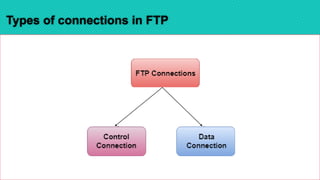
Types of connections in FTP
•Control connection : uses very simple rules for
communication. Through control connection, we
can transfer a line of command or line of response
at a time.
• Data Connection: The Data Connection uses very
complex rules as data types may vary.
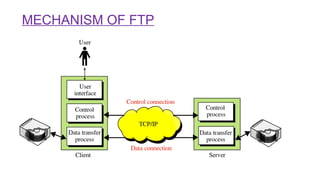
MECHANISM OF FTP
• The above figure shows the basic model of the
FTP. The FTP client has three components: the
user interface, control process, and data transfer
process.
• The server has two components: the server
control process and the server data transfer
process.
FTP uses two well known ports:
1. Port 21 is used for the control
connection
2. Port 20 is used for the data
connection.
Objectives of FTP
•It provides the sharing of files.
•It is used to encourage the use of remote
computers.
•It transfers the data more reliably and
efficiently.
Advantages of FTP
• Speed: One of the biggest advantages of FTP is speed. The FTP is
one of the fastest way to transfer the files from one computer to
another computer.
• Efficient: It is more efficient as we do not need to complete all
the operations to get the entire file.
• Security: To access the FTP server, we need to login with the
username and password. Therefore, we can say that FTP is more
secure.
• Back & forth movement: FTP allows us to transfer the files back
and forth. Suppose you are a manager of the company, you send
some information to all the employees, and they all send
information back on the same server.
Disadvantages of FTP
• We can’t send and receive large files on a network. However,
the size limit of the file is 2GB that can be sent.
• It is not compatible with every system.
File transfer protocol for computer science students

File transfer protocol for computer science students

  • 1.
  • 2.
    File transfer protocol(FTP) • FTP stands for File transfer protocol. • FTP is a standard internet protocol provided by TCP/IP used for transmitting the files from one host to another. • It is mainly used for transferring the web page files from their creator to the computer that acts as a server for other computers on the internet.
  • 3.
  • 4.
    •Control connection :uses very simple rules for communication. Through control connection, we can transfer a line of command or line of response at a time. • Data Connection: The Data Connection uses very complex rules as data types may vary.
  • 5.
  • 6.
    • The abovefigure shows the basic model of the FTP. The FTP client has three components: the user interface, control process, and data transfer process. • The server has two components: the server control process and the server data transfer process.
  • 7.
    FTP uses twowell known ports: 1. Port 21 is used for the control connection 2. Port 20 is used for the data connection.
  • 8.
    Objectives of FTP •Itprovides the sharing of files. •It is used to encourage the use of remote computers. •It transfers the data more reliably and efficiently.
  • 9.
    Advantages of FTP •Speed: One of the biggest advantages of FTP is speed. The FTP is one of the fastest way to transfer the files from one computer to another computer. • Efficient: It is more efficient as we do not need to complete all the operations to get the entire file. • Security: To access the FTP server, we need to login with the username and password. Therefore, we can say that FTP is more secure. • Back & forth movement: FTP allows us to transfer the files back and forth. Suppose you are a manager of the company, you send some information to all the employees, and they all send information back on the same server.
  • 10.
    Disadvantages of FTP •We can’t send and receive large files on a network. However, the size limit of the file is 2GB that can be sent. • It is not compatible with every system.