There are two types of Internet Protocol (IP) traffic. They are TCP or Transmission Control 
Protocol and UDP or User Datagram Protocol. TCP is connection oriented – once a connection is 
established, data can be sent bidirectional. UDP is a simpler, connectionless Internet protocol. 
Comparison chart 
TCP UDP 
Acronym for 
Transmission Control Protocol User Datagram Protocol or Universal 
Datagram Protocol 
Connection 
TCP is a connection-oriented 
protocol. 
UDP is a connectionless protocol. 
Function 
As a message makes its way across 
the internet from one computer to 
another. This is connection based. 
UDP is also a protocol used in 
message transport or transfer. This is 
not connection based which means 
that one program can send a load of 
packets to another and that would be 
the end of the relationship. 
Usage 
TCP is suited for applications that 
require high reliability, and 
transmission time is relatively less 
critical. 
UDP is suitable for applications that 
need fast, efficient transmission, such 
as games. UDP's stateless nature is 
also useful for servers that answer 
small queries from huge numbers of 
clients. 
Examples 
HTTP, HTTPs, FTP, SMTP, Telnet DNS, DHCP, TFTP, SNMP, RIP, 
VOIP. 
Ordering of data 
packets 
TCP rearranges data packets in the 
order specified. 
UDP has no inherent order as all 
packets are independent of each 
other. If ordering is required, it has to 
be managed by the application layer. 
Speed of transfer 
The speed for TCP is slower than 
UDP. 
UDP is faster because there is no 
error-checking for packets. 
Reliability 
There is absolute guarantee that the 
data transferred remains intact and 
arrives in the same order in which it 
was sent. 
There is no guarantee that the 
messages or packets sent would reach 
at all. 
Header Size TCP header size is 20 bytes UDP Header size is 8 bytes. 
Common Header 
Fields 
Source port, Destination port, Check 
Sum 
Source port, Destination port, Check 
Sum 
Streaming of data 
Data is read as a byte stream, no 
distinguishing indications are 
transmitted to signal message 
(segment) boundaries. 
Packets are sent individually and are 
checked for integrity only if they 
arrive. Packets have definite 
boundaries which are honored upon 
receipt, meaning a read operation at 
the receiver socket will yield an 
entire message as it was originally 
sent.
TCP UDP 
Weight 
TCP is heavy-weight. TCP requires 
three packets to set up a socket 
connection, before any user data can 
be sent. TCP handles reliability and 
congestion control. 
UDP is lightweight. There is no 
ordering of messages, no tracking 
connections, etc. It is a small 
transport layer designed on top of IP. 
Data Flow 
Control 
TCP does Flow Control. TCP 
requires three packets to set up a 
socket connection, before any user 
data can be sent. TCP handles 
reliability and congestion control. 
UDP does not have an option for 
flow control 
Error Checking 
TCP does error checking UDP does error checking, but no 
recovery options. 
Fields 
1. Sequence Number, 2. AcK 
number, 3. Data offset, 4. Reserved, 
5. Control bit, 6. Window, 7. Urgent 
Pointer 8. Options, 9. Padding, 10. 
Check Sum, 11. Source port, 12. 
Destination port 
1. Length, 2. Source port, 3. 
Destination port, 4. Check Sum 
Acknowledgement Acknowledgement segments No Acknowledgment 
Handshake 
SYN, SYN-ACK, ACK No handshake (connectionless 
protocol) 
Checksum checksum to detect errors

Udp vs-tcp

  • 1.
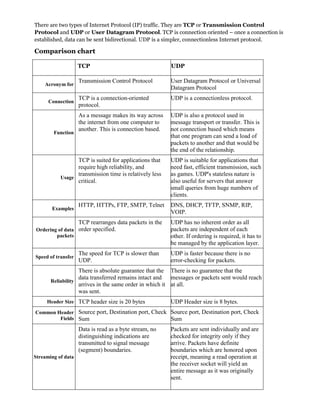
    There are twotypes of Internet Protocol (IP) traffic. They are TCP or Transmission Control Protocol and UDP or User Datagram Protocol. TCP is connection oriented – once a connection is established, data can be sent bidirectional. UDP is a simpler, connectionless Internet protocol. Comparison chart TCP UDP Acronym for Transmission Control Protocol User Datagram Protocol or Universal Datagram Protocol Connection TCP is a connection-oriented protocol. UDP is a connectionless protocol. Function As a message makes its way across the internet from one computer to another. This is connection based. UDP is also a protocol used in message transport or transfer. This is not connection based which means that one program can send a load of packets to another and that would be the end of the relationship. Usage TCP is suited for applications that require high reliability, and transmission time is relatively less critical. UDP is suitable for applications that need fast, efficient transmission, such as games. UDP's stateless nature is also useful for servers that answer small queries from huge numbers of clients. Examples HTTP, HTTPs, FTP, SMTP, Telnet DNS, DHCP, TFTP, SNMP, RIP, VOIP. Ordering of data packets TCP rearranges data packets in the order specified. UDP has no inherent order as all packets are independent of each other. If ordering is required, it has to be managed by the application layer. Speed of transfer The speed for TCP is slower than UDP. UDP is faster because there is no error-checking for packets. Reliability There is absolute guarantee that the data transferred remains intact and arrives in the same order in which it was sent. There is no guarantee that the messages or packets sent would reach at all. Header Size TCP header size is 20 bytes UDP Header size is 8 bytes. Common Header Fields Source port, Destination port, Check Sum Source port, Destination port, Check Sum Streaming of data Data is read as a byte stream, no distinguishing indications are transmitted to signal message (segment) boundaries. Packets are sent individually and are checked for integrity only if they arrive. Packets have definite boundaries which are honored upon receipt, meaning a read operation at the receiver socket will yield an entire message as it was originally sent.
  • 2.
    TCP UDP Weight TCP is heavy-weight. TCP requires three packets to set up a socket connection, before any user data can be sent. TCP handles reliability and congestion control. UDP is lightweight. There is no ordering of messages, no tracking connections, etc. It is a small transport layer designed on top of IP. Data Flow Control TCP does Flow Control. TCP requires three packets to set up a socket connection, before any user data can be sent. TCP handles reliability and congestion control. UDP does not have an option for flow control Error Checking TCP does error checking UDP does error checking, but no recovery options. Fields 1. Sequence Number, 2. AcK number, 3. Data offset, 4. Reserved, 5. Control bit, 6. Window, 7. Urgent Pointer 8. Options, 9. Padding, 10. Check Sum, 11. Source port, 12. Destination port 1. Length, 2. Source port, 3. Destination port, 4. Check Sum Acknowledgement Acknowledgement segments No Acknowledgment Handshake SYN, SYN-ACK, ACK No handshake (connectionless protocol) Checksum checksum to detect errors