
FTP
File Transfer Protocol
Gouasmia Zakaria
Gouasmia.zakaria1@gmail.com
INTRODUCTION
 What is FTP?
Network Protocol
Exchange files over any network that supports the TCP/IP
protocol
Client-Server Architecture
Separate Data and Control connections
User based password authentication or anonymous user
access
PROTOCOL OVERVIEW
PROTOCOL OVERVIEW
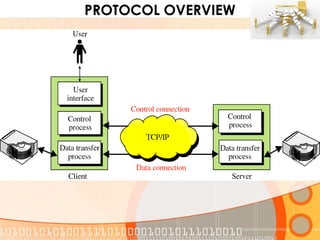
 Client to Server on TCP Port 21 – Control Connection
Commands
Identifications
Passwords
Interrupt Messages
 Client to Server or vice-versa on TCP Port 20 – Data Connection
Actual File Transfer
 Out-of-Bound Protocol
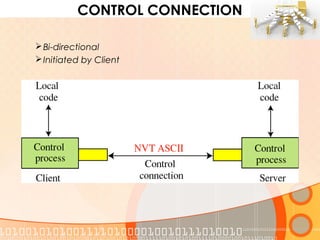
CONTROL CONNECTION
Bi-directional
Initiated by Client
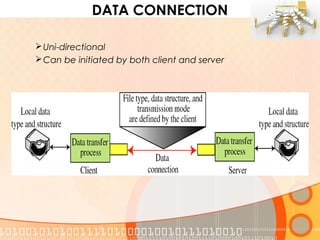
DATA CONNECTION
Uni-directional
Can be initiated by both client and server
PROTOCOL OVERVIEW
 FTP uses TCP as a Transport Protocol
 The FTP Server, running FTP Server software, listens on the network
 The Client computer, running FTP Client software, initiates connection
 FTP only opens a data connection when a client issues a command
requiring a data transfer
 Possible for an entire FTP session to open and close without a data
connection ever having been opened.
CONNECTION MODES
 Active Mode
Client sends Server the IP Address & Port Number
 Passive Mode
Client is behind firewall
Server sends client an IP Address and Port Number
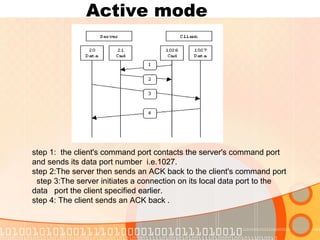
Active mode
step 1: the client's command port contacts the server's command port
and sends its data port number i.e.1027.
step 2:The server then sends an ACK back to the client's command port
step 3:The server initiates a connection on its local data port to the
data port the client specified earlier.
step 4: The client sends an ACK back .
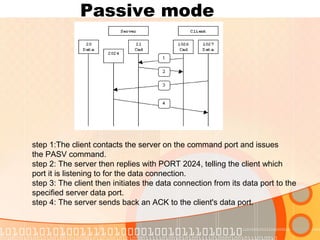
Passive mode
step 1:The client contacts the server on the command port and issues
the PASV command.
step 2: The server then replies with PORT 2024, telling the client which
port it is listening to for the data connection.
step 3: The client then initiates the data connection from its data port to the
specified server data port.
step 4: The server sends back an ACK to the client's data port.
FILE STRUCTURE
 OS stores files in different structures
 FTP defines file structures for different files
 File F Unstructured, sequence of bytes
 Record R Series of records
 Page P Series of data blocks (pages)
 Default File Structure is F
 Specified using STRU command
TRANSMISSION MODES
 Stream Mode
Data sent as a continuous stream
All processing left to TCP
End-of-File Indicator not required
 Blocked Mode
FTP breaks data into several blocks
 Compressed Mode
Data compressed using a single algorithm
Thank YOU !

(Ftp) file transfer protocol

  • 1.
    FTP File Transfer Protocol GouasmiaZakaria Gouasmia.zakaria1@gmail.com
  • 2.
    INTRODUCTION  What isFTP? Network Protocol Exchange files over any network that supports the TCP/IP protocol Client-Server Architecture Separate Data and Control connections User based password authentication or anonymous user access
  • 3.
  • 4.
    PROTOCOL OVERVIEW  Clientto Server on TCP Port 21 – Control Connection Commands Identifications Passwords Interrupt Messages  Client to Server or vice-versa on TCP Port 20 – Data Connection Actual File Transfer  Out-of-Bound Protocol
  • 5.
  • 6.
    DATA CONNECTION Uni-directional Can beinitiated by both client and server
  • 7.
    PROTOCOL OVERVIEW  FTPuses TCP as a Transport Protocol  The FTP Server, running FTP Server software, listens on the network  The Client computer, running FTP Client software, initiates connection  FTP only opens a data connection when a client issues a command requiring a data transfer  Possible for an entire FTP session to open and close without a data connection ever having been opened.
  • 8.
    CONNECTION MODES  ActiveMode Client sends Server the IP Address & Port Number  Passive Mode Client is behind firewall Server sends client an IP Address and Port Number
  • 9.
    Active mode step 1:the client's command port contacts the server's command port and sends its data port number i.e.1027. step 2:The server then sends an ACK back to the client's command port step 3:The server initiates a connection on its local data port to the data port the client specified earlier. step 4: The client sends an ACK back .
  • 10.
    Passive mode step 1:Theclient contacts the server on the command port and issues the PASV command. step 2: The server then replies with PORT 2024, telling the client which port it is listening to for the data connection. step 3: The client then initiates the data connection from its data port to the specified server data port. step 4: The server sends back an ACK to the client's data port.
  • 11.
    FILE STRUCTURE  OSstores files in different structures  FTP defines file structures for different files  File F Unstructured, sequence of bytes  Record R Series of records  Page P Series of data blocks (pages)  Default File Structure is F  Specified using STRU command
  • 12.
    TRANSMISSION MODES  StreamMode Data sent as a continuous stream All processing left to TCP End-of-File Indicator not required  Blocked Mode FTP breaks data into several blocks  Compressed Mode Data compressed using a single algorithm
  • 13.