




Files Management
Files management  -  ensures control at the file level Files management ensures that records relating to a specific activity or subject are securely maintained  together in one file.  This enables effective decision making and also ensures that the sequence of actions can be reconstructed, that is what happened, when, who did it, why.
Files management   Filing involves Arranging records according to a simple, logical system Placing records in a storage container in correct sequence Retrieving the records so that they can be used
good filing systems… contain complete and comprehensive files thereby enabling effective decision making  provide integrity and continuity regardless of changes in personnel  facilitate protection and preservation of records  provide low cost and efficient maintenance of records reduce the possibility of misfiling and reduce duplication  mean less time spent searching for files and documents
Files management Filing systems Filing Rules Files Equipment Computer  Applications
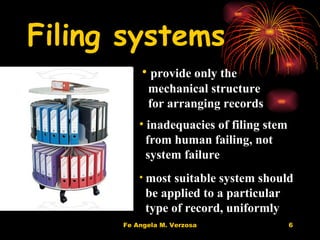
Filing systems provide only the  mechanical structure for arranging records inadequacies of filing stem  from human failing, not  system failure most suitable system should be applied to a particular type of record, uniformly
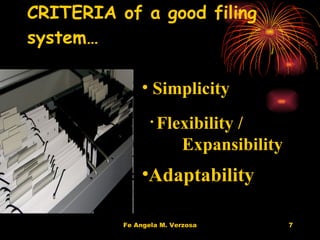
CRITERIA of a good filing system… Simplicity Flexibility /  Expansibility Adaptability
Filing methods numerical alphabetic functional  geographic form chronologic
Numerical System File units are placed in numerical sequence     Originated from the registry system, used particularly in accessioning correspondences.  Unsuited to handling name files. Ideally useful for case files (file units containing all documents pertaining to a particular transaction, usually developed in legal or business records.
Alphabetic System File units are placed in alphabetical sequence .  First used to arrange records relating to persons, then gradually to records relating to subjects.  The system may be modified to group records related by a  common subject by:  *standardizing subject headings  *subdividing the main subject headings  Other alphabetical filing systems are:  *Alpha-numeric -  uses letters to designate main subject  headings and numerals for subordinate headings  *Mnemonic -  uses alphabetical symbols to denote  subordinate headings.
Functional Filing System Records are the result of functions and are used in relation to them Records should then be grouped and maintained according to the functions to which they relate. The functional categories will reflect the organization’s purpose, mission, programs, projects and  activities.  Every office or department within an organization has a function and these functions are generally carried out through a series of major programs.  These major programs are often divided into subprograms until one gets to the individual project level.
Other Filing Systems Geographic Filing :  files records by location or place first, followed by the name or subject.  Forms  :  groups records according to their format or type (e.g. minutes, reports, invoices, receipts)   Subject Filing :  places records under subject classification.  Chronologic Filing : files records by year, month, and date
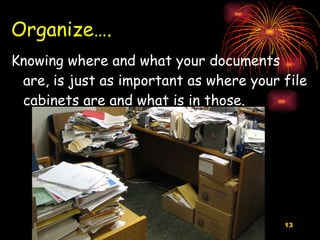
Organize…. Knowing where and what your documents are, is just as important as where your file cabinets are and what is in those.
Classification Grouping information together Cars, food, clothing Content and function Based on an organization’s business functions and activities
We do it all the time For example, we classify CARS: Chevrolet SUV Suburban 2004 White  and so on….
Another example Permits Building Permits 2008 Building Permits Specific Address/Site Grouping information together makes it easier to file, search and manage!
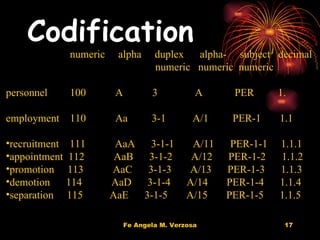
Codification  numeric  alpha  duplex  alpha-  subject  decimal   numeric  numeric  numeric  personnel 100   A  3  A  PER   1. employment 110  Aa  3-1  A/1  PER-1  1.1 recruitment  111  AaA  3-1-1  A/11  PER-1-1  1.1.1 appointment  112  AaB  3-1-2  A/12  PER-1-2  1.1.2 promotion  113  AaC  3-1-3  A/13  PER-1-3  1.1.3 demotion  114  AaD  3-1-4  A/14  PER-1-4  1.1.4 separation  115  AaE  3-1-5  A/15  PER-1-5  1.1.5
Attendance & Leave Records Attendance & Leave Records 2009
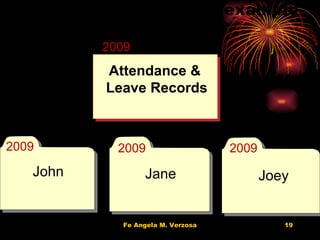
File structure example GS03030 2009 2009 2009 2009 John Jane Joey Attendance & Leave Records
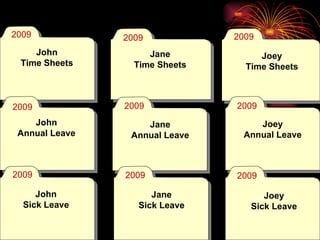
Next level Jane Time Sheets Joey Time Sheets John Annual Leave Jane Annual Leave Joey Annual Leave John Sick Leave Jane Sick Leave Joey Sick Leave John Time Sheets 2009 2009 2009 2009 2009 2009 2009 2009 2009
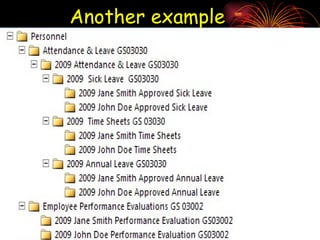
Another example
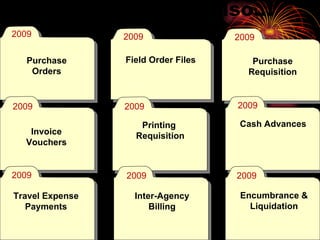
You can also… Purchase Orders Field Order Files Purchase Requisition Invoice Vouchers Printing  Requisition Cash Advances Travel Expense Payments Inter-Agency Billing Encumbrance & Liquidation 2009 2009 2009 2009 2009 2009 2009 2009 2009
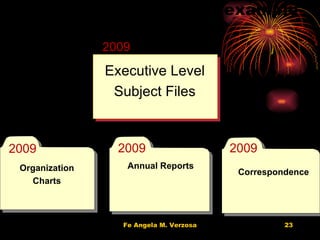
File structure example GS10003 2009 2009 2009 2009 Organization Charts Annual Reports Correspondence Executive Level Subject Files
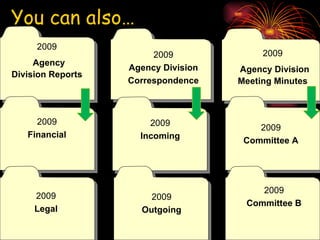
You can also… 2009 Agency Division Reports 2009 Agency Division Correspondence 2009 Agency Division   Meeting Minutes 2009 Financial 2009 Incoming 2009 Committee A 2009 Legal 2009 Outgoing 2009 Committee B
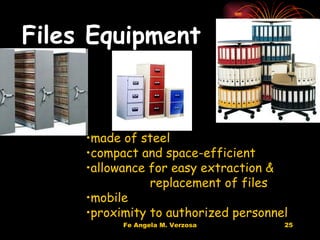
Files Equipment made of steel compact and space-efficient allowance for easy extraction &  replacement of files mobile proximity to authorized personnel
Training  Personnel receiving and opening mails placing mail/other papers in  correct files extracting and replacing files opening/creating new files indexing & cross-referencing keeping a record of file  movements retrieving lost/missing files destroying/disposing files retiring non-current files
Procedures in Filing indexing   by card or register coding  by writing symbols or captions, or highlighting indexed name or subject sorting  by tray, pigeon-hole, or multi-sorter filing
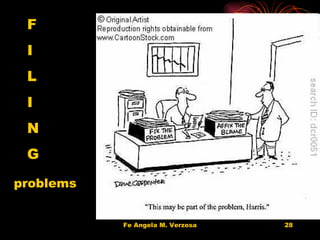
F I L I N G problems
Common filing problems too many filing places everybody a file clerk files disorderly; show no  particular plan or arrangement system does not fit the way material is called for some records seem to belong under more than one category filing decisions erratic or inconsistent bulging folders accumulation of unnecessary or personal records
Common filing problems related records are filed under different categories  the retrieval rate is poor (inability to locate the required document quickly)  missing and misplaced documents mean too much time spent looking for files  a high level of duplication exists  users are setting up personal records systems  incomplete files and backlogs of unfiled records exist  filing cabinets are jammed with files bulging with documents
When to create new files… a new function, subject, activity or project is commenced or  an existing subject, activity or project is further developed and needs to be split across several files an existing file becomes too large and a new part is required no existing file is appropriate for the document(s)
Improve your filing… Begin each calendar year with a new set of files Files should not exceed ½ thickness Dedicate time each week for filing to prevent backlog Avoid filing extraneous unnecessary duplicate copies Avoid tightly jammed files Safeguard access and confidentiality of records
Reminders… Explore your options, and adapt to best serve your office needs and use Keep it as simple as possible Take time to fully develop file structures using what is already familiar Have patience, and be sure to take time to train and educate file creators and users
Take a deep breath You can do it!!
Communicate!  Records management is a team effort Remember to consider future needs and address ongoing issues like maintenance, continuity, and consistency from the beginning – no excuses, and remember “human error happens” More Taming Tips
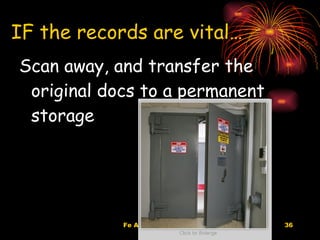
IF the records are vital… Scan away, and transfer the original docs to a permanent storage
You are done! Congratulations!
Contact fe.verzosa@dlsu.edu.ph Questions?

Files Management

  • 1.
  • 2.
    Files management - ensures control at the file level Files management ensures that records relating to a specific activity or subject are securely maintained together in one file. This enables effective decision making and also ensures that the sequence of actions can be reconstructed, that is what happened, when, who did it, why.
  • 3.
    Files management Filing involves Arranging records according to a simple, logical system Placing records in a storage container in correct sequence Retrieving the records so that they can be used
  • 4.
    good filing systems…contain complete and comprehensive files thereby enabling effective decision making provide integrity and continuity regardless of changes in personnel facilitate protection and preservation of records provide low cost and efficient maintenance of records reduce the possibility of misfiling and reduce duplication mean less time spent searching for files and documents
  • 5.
    Files management Filingsystems Filing Rules Files Equipment Computer Applications
  • 6.
    Filing systems provideonly the mechanical structure for arranging records inadequacies of filing stem from human failing, not system failure most suitable system should be applied to a particular type of record, uniformly
  • 7.
    CRITERIA of agood filing system… Simplicity Flexibility / Expansibility Adaptability
  • 8.
    Filing methods numericalalphabetic functional geographic form chronologic
  • 9.
    Numerical System Fileunits are placed in numerical sequence Originated from the registry system, used particularly in accessioning correspondences. Unsuited to handling name files. Ideally useful for case files (file units containing all documents pertaining to a particular transaction, usually developed in legal or business records.
  • 10.
    Alphabetic System Fileunits are placed in alphabetical sequence . First used to arrange records relating to persons, then gradually to records relating to subjects. The system may be modified to group records related by a common subject by: *standardizing subject headings *subdividing the main subject headings Other alphabetical filing systems are: *Alpha-numeric - uses letters to designate main subject headings and numerals for subordinate headings *Mnemonic - uses alphabetical symbols to denote subordinate headings.
  • 11.
    Functional Filing SystemRecords are the result of functions and are used in relation to them Records should then be grouped and maintained according to the functions to which they relate. The functional categories will reflect the organization’s purpose, mission, programs, projects and activities. Every office or department within an organization has a function and these functions are generally carried out through a series of major programs. These major programs are often divided into subprograms until one gets to the individual project level.
  • 12.
    Other Filing SystemsGeographic Filing : files records by location or place first, followed by the name or subject. Forms : groups records according to their format or type (e.g. minutes, reports, invoices, receipts) Subject Filing : places records under subject classification. Chronologic Filing : files records by year, month, and date
  • 13.
    Organize…. Knowing whereand what your documents are, is just as important as where your file cabinets are and what is in those.
  • 14.
    Classification Grouping informationtogether Cars, food, clothing Content and function Based on an organization’s business functions and activities
  • 15.
    We do itall the time For example, we classify CARS: Chevrolet SUV Suburban 2004 White and so on….
  • 16.
    Another example PermitsBuilding Permits 2008 Building Permits Specific Address/Site Grouping information together makes it easier to file, search and manage!
  • 17.
    Codification numeric alpha duplex alpha- subject decimal numeric numeric numeric personnel 100 A 3 A PER 1. employment 110 Aa 3-1 A/1 PER-1 1.1 recruitment 111 AaA 3-1-1 A/11 PER-1-1 1.1.1 appointment 112 AaB 3-1-2 A/12 PER-1-2 1.1.2 promotion 113 AaC 3-1-3 A/13 PER-1-3 1.1.3 demotion 114 AaD 3-1-4 A/14 PER-1-4 1.1.4 separation 115 AaE 3-1-5 A/15 PER-1-5 1.1.5
  • 18.
    Attendance & LeaveRecords Attendance & Leave Records 2009
  • 19.
    File structure exampleGS03030 2009 2009 2009 2009 John Jane Joey Attendance & Leave Records
  • 20.
    Next level JaneTime Sheets Joey Time Sheets John Annual Leave Jane Annual Leave Joey Annual Leave John Sick Leave Jane Sick Leave Joey Sick Leave John Time Sheets 2009 2009 2009 2009 2009 2009 2009 2009 2009
  • 21.
  • 22.
    You can also…Purchase Orders Field Order Files Purchase Requisition Invoice Vouchers Printing Requisition Cash Advances Travel Expense Payments Inter-Agency Billing Encumbrance & Liquidation 2009 2009 2009 2009 2009 2009 2009 2009 2009
  • 23.
    File structure exampleGS10003 2009 2009 2009 2009 Organization Charts Annual Reports Correspondence Executive Level Subject Files
  • 24.
    You can also…2009 Agency Division Reports 2009 Agency Division Correspondence 2009 Agency Division Meeting Minutes 2009 Financial 2009 Incoming 2009 Committee A 2009 Legal 2009 Outgoing 2009 Committee B
  • 25.
    Files Equipment madeof steel compact and space-efficient allowance for easy extraction & replacement of files mobile proximity to authorized personnel
  • 26.
    Training Personnelreceiving and opening mails placing mail/other papers in correct files extracting and replacing files opening/creating new files indexing & cross-referencing keeping a record of file movements retrieving lost/missing files destroying/disposing files retiring non-current files
  • 27.
    Procedures in Filingindexing by card or register coding by writing symbols or captions, or highlighting indexed name or subject sorting by tray, pigeon-hole, or multi-sorter filing
  • 28.
    F I LI N G problems
  • 29.
    Common filing problemstoo many filing places everybody a file clerk files disorderly; show no particular plan or arrangement system does not fit the way material is called for some records seem to belong under more than one category filing decisions erratic or inconsistent bulging folders accumulation of unnecessary or personal records
  • 30.
    Common filing problemsrelated records are filed under different categories the retrieval rate is poor (inability to locate the required document quickly) missing and misplaced documents mean too much time spent looking for files a high level of duplication exists users are setting up personal records systems incomplete files and backlogs of unfiled records exist filing cabinets are jammed with files bulging with documents
  • 31.
    When to createnew files… a new function, subject, activity or project is commenced or an existing subject, activity or project is further developed and needs to be split across several files an existing file becomes too large and a new part is required no existing file is appropriate for the document(s)
  • 32.
    Improve your filing…Begin each calendar year with a new set of files Files should not exceed ½ thickness Dedicate time each week for filing to prevent backlog Avoid filing extraneous unnecessary duplicate copies Avoid tightly jammed files Safeguard access and confidentiality of records
  • 33.
    Reminders… Explore youroptions, and adapt to best serve your office needs and use Keep it as simple as possible Take time to fully develop file structures using what is already familiar Have patience, and be sure to take time to train and educate file creators and users
  • 34.
    Take a deepbreath You can do it!!
  • 35.
    Communicate! Recordsmanagement is a team effort Remember to consider future needs and address ongoing issues like maintenance, continuity, and consistency from the beginning – no excuses, and remember “human error happens” More Taming Tips
  • 36.
    IF the recordsare vital… Scan away, and transfer the original docs to a permanent storage
  • 37.
    You are done!Congratulations!
  • 38.

Editor's Notes

  • #19 So first item of action is to create a file for “Attendance & Leave records, DAN number and a date or something that will trigger the appropriate cut-off or reminder, tag, flag or method you will use for disposition. ERM- Washington State Archives
  • #20 Then, build a structure appropriate for ease of use and bearing in mind retention and disposition efforts. You don’t need a single “bucket” for each little bit – larger buckets make for easier and more efficient management, but one huge bucket doesn’t work well either – you may end up keeping items that may be subject to disposal for longer than necessary, and if a litigation hold is in effect you have the keep the whole thing as opposed to the more pertinent information. ERM- Washington State Archives
  • #21 You can then set up different folders as needed for the different types of leave or attendance records. Leaping Lizards! E-mails & Electronic Records Management
  • #23 You can set up as many file folders as needed within the records series to meet your agency needs. Try to limit it though, and use “bigger buckets” if you can. Again, retention and disposition is simpler when you can manage larger “groups” of records together. Leaping Lizards! E-mails & Electronic Records Management
  • #24 Here’s another example. You can call these by any number of names suitable to your agency needs, just be sure the description fits and the appropriate DAN is utilized for retention and dispostion. ERM- Washington State Archives
  • #25 You can also set up and drill down into different subjects within a particular file folder as well. Leaping Lizards! E-mails & Electronic Records Management