Records Management
O Management
O Using resources to achieve specific goals
O Planning, organizing, leading, and controlling
O Records management
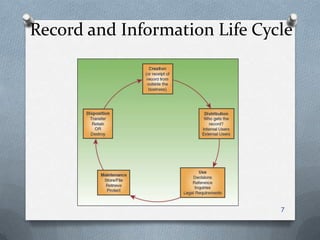
O Control of all records through the record life cycle
O Also known as records and information management
(RIM)
1
Records
O Definition of record
O Stored information, regardless of media or characteristics
O Made or received by
an organization
O Provides evidence
of operations and
has continuing value
2
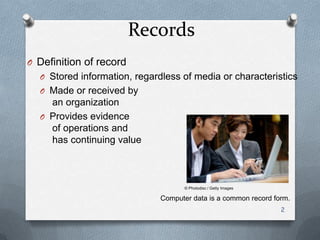
Computer data is a common record form.
© Photodisc / Getty Images
Records Classification
O By use
O Transaction documents
O Reference documents
O By place of use
O Internal records
O External records
O By value to the organization
3
– Vital records – Useful records
– Important records – Nonessential records
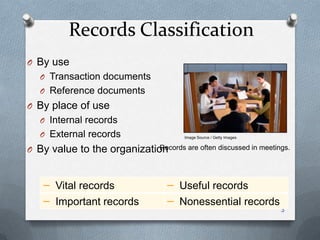
Records are often discussed in meetings.
Image Source / Getty Images
Why Records Are Used
O To serve as the memory of a business
O To document transactions
O To document compliance with laws and regulations
4
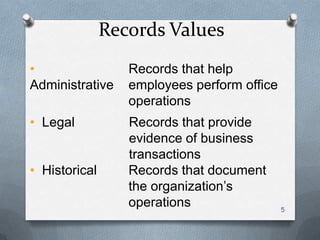
Records Values
•
Administrative
Records that help
employees perform office
operations
5
• Legal Records that provide
evidence of business
transactions
• Historical Records that document
the organization’s
operations
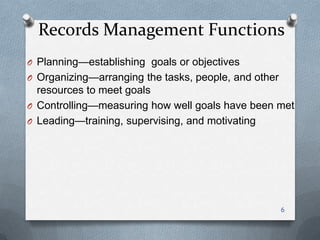
Records Management Functions
O Planning—establishing goals or objectives
O Organizing—arranging the tasks, people, and other
resources to meet goals
O Controlling—measuring how well goals have been met
O Leading—training, supervising, and motivating
6
Record and Information Life Cycle
7
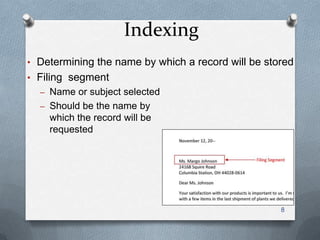
Indexing
• Determining the name by which a record will be stored
• Filing segment
– Name or subject selected
– Should be the name by
which the record will be
requested
8
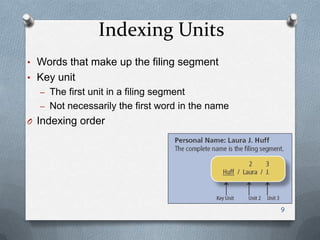
Indexing Units
• Words that make up the filing segment
• Key unit
– The first unit in a filing segment
– Not necessarily the first word in the name
O Indexing order
9
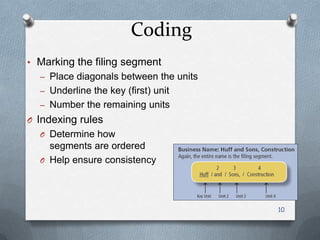
Coding
• Marking the filing segment
– Place diagonals between the units
– Underline the key (first) unit
– Number the remaining units
O Indexing rules
O Determine how
segments are ordered
O Help ensure consistency
10
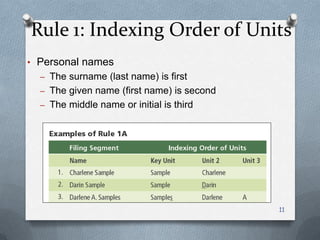
Rule 1: Indexing Order of Units
• Personal names
– The surname (last name) is first
– The given name (first name) is second
– The middle name or initial is third
11
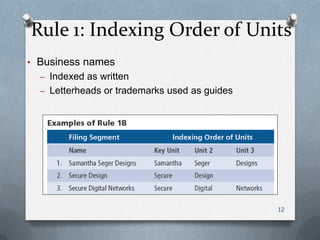
Rule 1: Indexing Order of Units
• Business names
– Indexed as written
– Letterheads or trademarks used as guides
12
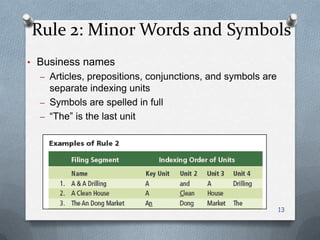
Rule 2: Minor Words and Symbols
• Business names
– Articles, prepositions, conjunctions, and symbols are
separate indexing units
– Symbols are spelled in full
– ―The‖ is the last unit
13
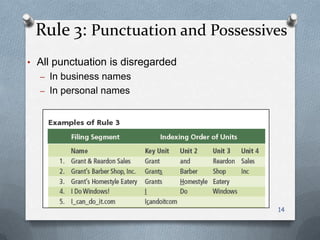
Rule 3: Punctuation and Possessives
• All punctuation is disregarded
– In business names
– In personal names
14
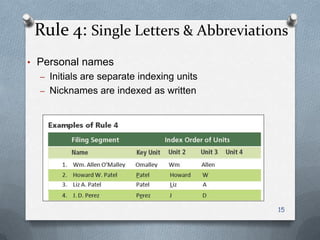
Rule 4: Single Letters & Abbreviations
• Personal names
– Initials are separate indexing units
– Nicknames are indexed as written
15
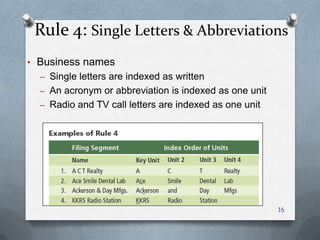
Rule 4: Single Letters & Abbreviations
• Business names
– Single letters are indexed as written
– An acronym or abbreviation is indexed as one unit
– Radio and TV call letters are indexed as one unit
16
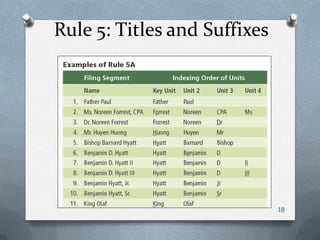
Rule 5: Titles and Suffixes
• Personal names
– A title, seniority suffix, or professional suffix is the last
unit
– Numeric suffixes are placed before alphabetic suffixes
– Single names with royal or religious titles are filed as
written
17
Rule 5: Titles and Suffixes
18
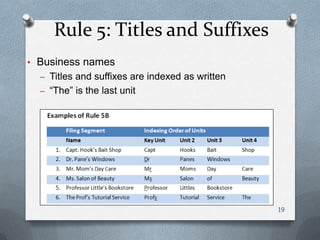
Rule 5: Titles and Suffixes
• Business names
– Titles and suffixes are indexed as written
– ―The‖ is the last unit
19
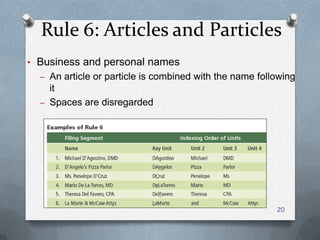
Rule 6: Articles and Particles
• Business and personal names
– An article or particle is combined with the name following
it
– Spaces are disregarded
20
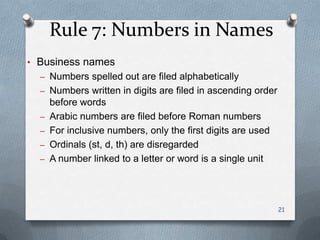
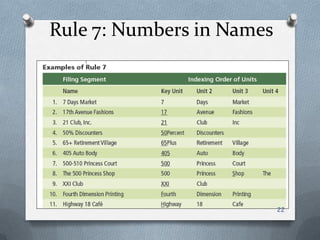
Rule 7: Numbers in Names
• Business names
– Numbers spelled out are filed alphabetically
– Numbers written in digits are filed in ascending order
before words
– Arabic numbers are filed before Roman numbers
– For inclusive numbers, only the first digits are used
– Ordinals (st, d, th) are disregarded
– A number linked to a letter or word is a single unit
21
Rule 7: Numbers in Names
22
Rule 8: Organizations & Institutions
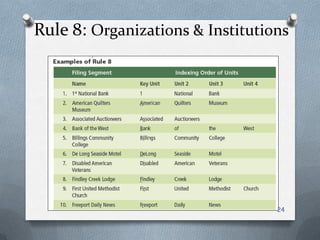
• Filed according to the name written on the letterhead
• Examples
– Banks and other financial institutions
– Schools, colleges, and universities
– Hospitals, hotels, and clubs
23
Rule 8: Organizations & Institutions
24
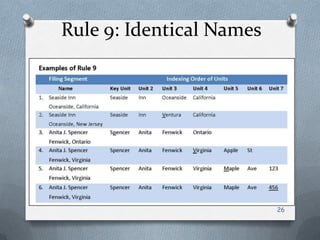
Rule 9: Identical Names
• For identical names, sort records by
– City names first
– State or province names second
– Street names third
– House or building numbers fourth
25
Rule 9: Identical Names
26
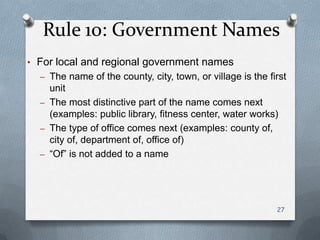
Rule 10: Government Names
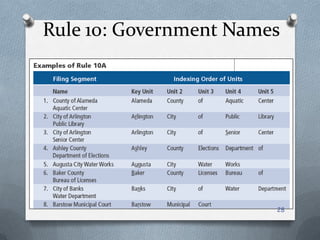
• For local and regional government names
– The name of the county, city, town, or village is the first
unit
– The most distinctive part of the name comes next
(examples: public library, fitness center, water works)
– The type of office comes next (examples: county of,
city of, department of, office of)
– ―Of‖ is not added to a name
27
Rule 10: Government Names
28
Rule 10: Government Names
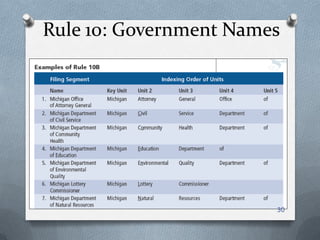
• For state government names
– The name of the state or province is the first unit
– The most distinctive part of the name comes next
(examples: attorney general, environmental quality)
– The type of office comes next (examples: office of,
department of)
– ―Of‖ is not added to a name
29
Rule 10: Government Names
30
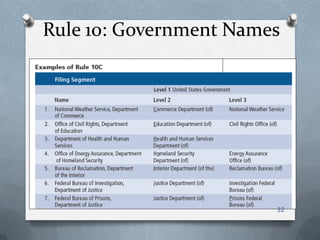
Rule 10: Government Names
• For federal government names
– Use three indexing levels rather than units
– United States Government is the first level
– The name of a department or top-level agency is the
second level
– A distinctive name is the third level (examples: national
weather service, civil rights office)
– ―Of‖ and ―the‖ are not considered but may be included for
clarity
31
Rule 10: Government Names
32
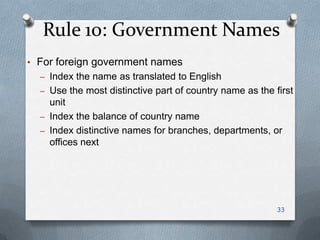
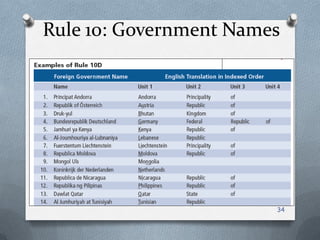
Rule 10: Government Names
• For foreign government names
– Index the name as translated to English
– Use the most distinctive part of country name as the first
unit
– Index the balance of country name
– Index distinctive names for branches, departments, or
offices next
33
Rule 10: Government Names
34
Cross-Referencing
• Copy of a record or a cross-reference sheet
– Shows the name in a form other than that used on the
original record
– Indicates the storage location of the original record
• Should be done with discretion
– Too many cross-references crowd the files
– Each one takes valuable time to prepare
35
Subject Titles
• Subject titles may be used in an alphabetic name file
O Applications
O Bids or project names
O Special promotions or celebrations
O The subject title is the key unit
O Subject subdivisions are indexed next
O The correspondent’s name is indexed next
36
Subject Records Management
• An alphabetic system of storing and retrieving records
by their subjects
• Examples of use
• Correspondence and reports
• Catalogs and inventory lists
• Research data
• Product development plans
37
Numeric Records Management
• A system for arranging records based on numbers
• Good for organizations that need to keep records
confidential
• Makes expanding files easy
38
Consecutive Numbering
• Numbered records are arranged in ascending number
order
• Numbers follow one after another without interruption
• An index must be referenced to locate a numbered
record
39
Nonconsecutive Number
Storage
O Terminal-digit storage
O Number are divided into groups
O The last group (two or three digits) is the
primary division under which a record is
filed
O Middle-digit storage
O Number are divided into groups
O The middle group (two or three digits) is
the primary division under which a record
is filed
O Chronologic storage 40
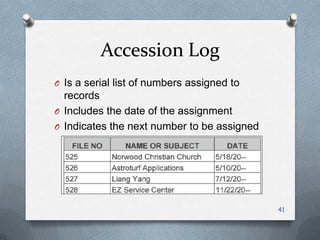
Accession Log
O Is a serial list of numbers assigned to
records
O Includes the date of the assignment
O Indicates the next number to be assigned
41
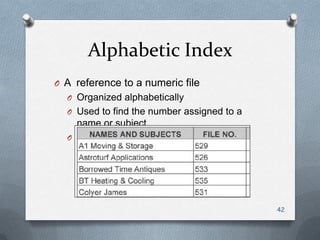
Alphabetic Index
O A reference to a numeric file
O Organized alphabetically
O Used to find the number assigned to a
name or subject
O Also called a relative index
42
Geographic Records Storage
• A system for storing and retrieving records by location
• Examples of use
• Organizations that operate in several locations
• Scientific studies or collections
• Property records
• Tracking construction or maintenance activities
43
Correspondence Records Storage
O Storage–placing records on a shelf or in a file drawer
according to a storage method
O Storage methods
O Alphabetic, subject, geographic
O Numeric or chronologic
O Alphabetic records management—storing records
according to letters of the alphabet
44
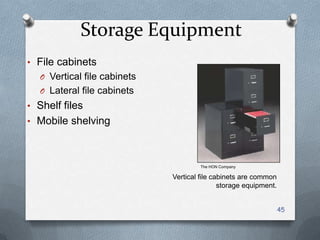
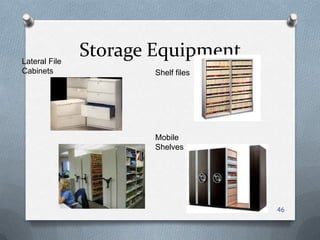
Storage Equipment
• File cabinets
O Vertical file cabinets
O Lateral file cabinets
• Shelf files
• Mobile shelving
45
The HON Company
Vertical file cabinets are common
storage equipment.
Storage Equipment
46
Lateral File
Cabinets Shelf files
Mobile
Shelves
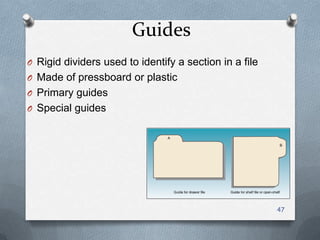
Guides
O Rigid dividers used to identify a section in a file
O Made of pressboard or plastic
O Primary guides
O Special guides
47
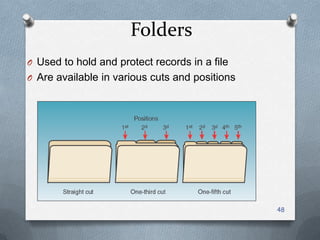
Folders
O Used to hold and protect records in a file
O Are available in various cuts and positions
48
Folders
O General folder—for records to and from
correspondents with a small volume of records
O Individual folder—for records of an individual
correspondent with several records
O Special folder—for records stored behind a special
guide
49
Types of Folders
O Suspension folder—has hooks on each side that hang
from metal rails on a file drawer
O Bellows folder—has a top flap and sides to enclose
records in a case
O Pocket folder—has partially enclosed sides and more
expansion at the bottom than an ordinary folder
50
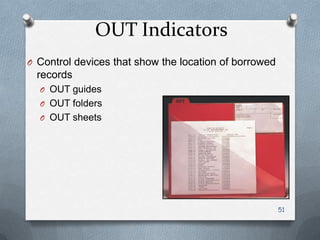
OUT Indicators
O Control devices that show the location of borrowed
records
O OUT guides
O OUT folders
O OUT sheets
51
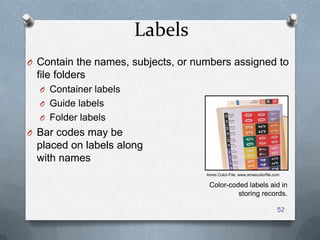
Labels
O Contain the names, subjects, or numbers assigned to
file folders
O Container labels
O Guide labels
O Folder labels
O Bar codes may be
placed on labels along
with names
52
Ames Color-File, www.amescolorfile.com
Color-coded labels aid in
storing records.
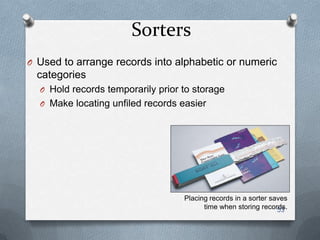
Sorters
O Used to arrange records into alphabetic or numeric
categories
O Hold records temporarily prior to storage
O Make locating unfiled records easier
53
Placing records in a sorter saves
time when storing records.
Records management

  • 1.
    Records Management O Management OUsing resources to achieve specific goals O Planning, organizing, leading, and controlling O Records management O Control of all records through the record life cycle O Also known as records and information management (RIM) 1
  • 2.
    Records O Definition ofrecord O Stored information, regardless of media or characteristics O Made or received by an organization O Provides evidence of operations and has continuing value 2 Computer data is a common record form. © Photodisc / Getty Images
  • 3.
    Records Classification O Byuse O Transaction documents O Reference documents O By place of use O Internal records O External records O By value to the organization 3 – Vital records – Useful records – Important records – Nonessential records Records are often discussed in meetings. Image Source / Getty Images
  • 4.
    Why Records AreUsed O To serve as the memory of a business O To document transactions O To document compliance with laws and regulations 4
  • 5.
    Records Values • Administrative Records thathelp employees perform office operations 5 • Legal Records that provide evidence of business transactions • Historical Records that document the organization’s operations
  • 6.
    Records Management Functions OPlanning—establishing goals or objectives O Organizing—arranging the tasks, people, and other resources to meet goals O Controlling—measuring how well goals have been met O Leading—training, supervising, and motivating 6
  • 7.
  • 8.
    Indexing • Determining thename by which a record will be stored • Filing segment – Name or subject selected – Should be the name by which the record will be requested 8
  • 9.
    Indexing Units • Wordsthat make up the filing segment • Key unit – The first unit in a filing segment – Not necessarily the first word in the name O Indexing order 9
  • 10.
    Coding • Marking thefiling segment – Place diagonals between the units – Underline the key (first) unit – Number the remaining units O Indexing rules O Determine how segments are ordered O Help ensure consistency 10
  • 11.
    Rule 1: IndexingOrder of Units • Personal names – The surname (last name) is first – The given name (first name) is second – The middle name or initial is third 11
  • 12.
    Rule 1: IndexingOrder of Units • Business names – Indexed as written – Letterheads or trademarks used as guides 12
  • 13.
    Rule 2: MinorWords and Symbols • Business names – Articles, prepositions, conjunctions, and symbols are separate indexing units – Symbols are spelled in full – ―The‖ is the last unit 13
  • 14.
    Rule 3: Punctuationand Possessives • All punctuation is disregarded – In business names – In personal names 14
  • 15.
    Rule 4: SingleLetters & Abbreviations • Personal names – Initials are separate indexing units – Nicknames are indexed as written 15
  • 16.
    Rule 4: SingleLetters & Abbreviations • Business names – Single letters are indexed as written – An acronym or abbreviation is indexed as one unit – Radio and TV call letters are indexed as one unit 16
  • 17.
    Rule 5: Titlesand Suffixes • Personal names – A title, seniority suffix, or professional suffix is the last unit – Numeric suffixes are placed before alphabetic suffixes – Single names with royal or religious titles are filed as written 17
  • 18.
    Rule 5: Titlesand Suffixes 18
  • 19.
    Rule 5: Titlesand Suffixes • Business names – Titles and suffixes are indexed as written – ―The‖ is the last unit 19
  • 20.
    Rule 6: Articlesand Particles • Business and personal names – An article or particle is combined with the name following it – Spaces are disregarded 20
  • 21.
    Rule 7: Numbersin Names • Business names – Numbers spelled out are filed alphabetically – Numbers written in digits are filed in ascending order before words – Arabic numbers are filed before Roman numbers – For inclusive numbers, only the first digits are used – Ordinals (st, d, th) are disregarded – A number linked to a letter or word is a single unit 21
  • 22.
    Rule 7: Numbersin Names 22
  • 23.
    Rule 8: Organizations& Institutions • Filed according to the name written on the letterhead • Examples – Banks and other financial institutions – Schools, colleges, and universities – Hospitals, hotels, and clubs 23
  • 24.
    Rule 8: Organizations& Institutions 24
  • 25.
    Rule 9: IdenticalNames • For identical names, sort records by – City names first – State or province names second – Street names third – House or building numbers fourth 25
  • 26.
  • 27.
    Rule 10: GovernmentNames • For local and regional government names – The name of the county, city, town, or village is the first unit – The most distinctive part of the name comes next (examples: public library, fitness center, water works) – The type of office comes next (examples: county of, city of, department of, office of) – ―Of‖ is not added to a name 27
  • 28.
  • 29.
    Rule 10: GovernmentNames • For state government names – The name of the state or province is the first unit – The most distinctive part of the name comes next (examples: attorney general, environmental quality) – The type of office comes next (examples: office of, department of) – ―Of‖ is not added to a name 29
  • 30.
  • 31.
    Rule 10: GovernmentNames • For federal government names – Use three indexing levels rather than units – United States Government is the first level – The name of a department or top-level agency is the second level – A distinctive name is the third level (examples: national weather service, civil rights office) – ―Of‖ and ―the‖ are not considered but may be included for clarity 31
  • 32.
  • 33.
    Rule 10: GovernmentNames • For foreign government names – Index the name as translated to English – Use the most distinctive part of country name as the first unit – Index the balance of country name – Index distinctive names for branches, departments, or offices next 33
  • 34.
  • 35.
    Cross-Referencing • Copy ofa record or a cross-reference sheet – Shows the name in a form other than that used on the original record – Indicates the storage location of the original record • Should be done with discretion – Too many cross-references crowd the files – Each one takes valuable time to prepare 35
  • 36.
    Subject Titles • Subjecttitles may be used in an alphabetic name file O Applications O Bids or project names O Special promotions or celebrations O The subject title is the key unit O Subject subdivisions are indexed next O The correspondent’s name is indexed next 36
  • 37.
    Subject Records Management •An alphabetic system of storing and retrieving records by their subjects • Examples of use • Correspondence and reports • Catalogs and inventory lists • Research data • Product development plans 37
  • 38.
    Numeric Records Management •A system for arranging records based on numbers • Good for organizations that need to keep records confidential • Makes expanding files easy 38
  • 39.
    Consecutive Numbering • Numberedrecords are arranged in ascending number order • Numbers follow one after another without interruption • An index must be referenced to locate a numbered record 39
  • 40.
    Nonconsecutive Number Storage O Terminal-digitstorage O Number are divided into groups O The last group (two or three digits) is the primary division under which a record is filed O Middle-digit storage O Number are divided into groups O The middle group (two or three digits) is the primary division under which a record is filed O Chronologic storage 40
  • 41.
    Accession Log O Isa serial list of numbers assigned to records O Includes the date of the assignment O Indicates the next number to be assigned 41
  • 42.
    Alphabetic Index O Areference to a numeric file O Organized alphabetically O Used to find the number assigned to a name or subject O Also called a relative index 42
  • 43.
    Geographic Records Storage •A system for storing and retrieving records by location • Examples of use • Organizations that operate in several locations • Scientific studies or collections • Property records • Tracking construction or maintenance activities 43
  • 44.
    Correspondence Records Storage OStorage–placing records on a shelf or in a file drawer according to a storage method O Storage methods O Alphabetic, subject, geographic O Numeric or chronologic O Alphabetic records management—storing records according to letters of the alphabet 44
  • 45.
    Storage Equipment • Filecabinets O Vertical file cabinets O Lateral file cabinets • Shelf files • Mobile shelving 45 The HON Company Vertical file cabinets are common storage equipment.
  • 46.
  • 47.
    Guides O Rigid dividersused to identify a section in a file O Made of pressboard or plastic O Primary guides O Special guides 47
  • 48.
    Folders O Used tohold and protect records in a file O Are available in various cuts and positions 48
  • 49.
    Folders O General folder—forrecords to and from correspondents with a small volume of records O Individual folder—for records of an individual correspondent with several records O Special folder—for records stored behind a special guide 49
  • 50.
    Types of Folders OSuspension folder—has hooks on each side that hang from metal rails on a file drawer O Bellows folder—has a top flap and sides to enclose records in a case O Pocket folder—has partially enclosed sides and more expansion at the bottom than an ordinary folder 50
  • 51.
    OUT Indicators O Controldevices that show the location of borrowed records O OUT guides O OUT folders O OUT sheets 51
  • 52.
    Labels O Contain thenames, subjects, or numbers assigned to file folders O Container labels O Guide labels O Folder labels O Bar codes may be placed on labels along with names 52 Ames Color-File, www.amescolorfile.com Color-coded labels aid in storing records.
  • 53.
    Sorters O Used toarrange records into alphabetic or numeric categories O Hold records temporarily prior to storage O Make locating unfiled records easier 53 Placing records in a sorter saves time when storing records.