Records Management
201: Beyond The Basics
Records Management Team
Brenda Burk
Krista Oldham
Michelle Voyles
Goals of RM 201: Beyond The Basics
 Welcome & Introductions
 Do you speak records?
 Best practices
 Structuring & organizing your files
 Naming conventions for your paper & electronic files
 Managing active & inactive records
 Managing copies
 Where do we go from here?
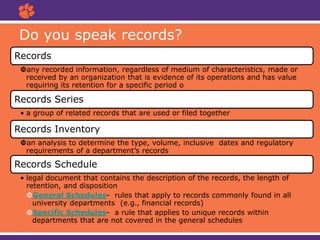
Do you speak records?
Records
any recorded information, regardless of medium of characteristics, made or
received by an organization that is evidence of its operations and has value
requiring its retention for a specific period o
Records Series
• a group of related records that are used or filed together
Records Inventory
an analysis to determine the type, volume, inclusive dates and regulatory
requirements of a department’s records
Records Schedule
• legal document that contains the description of the records, the length of
retention, and disposition
General Schedules- rules that apply to records commonly found in all
university departments (e.g., financial records)
Specific Schedules- a rule that applies to unique records within
departments that are not covered in the general schedules
Understanding your records
Records Appraisal
• Departmental
• Functional
Taking Inventory
• Points to consider
• ARM-1
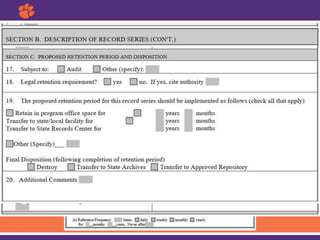
Understanding the Records Inventory Form
Digitization – factors to consider
• One location vs multiple locations
• Physical storage space
• Streamlining access
• Length of time needed
Understanding your records
Structuring & organizing your records
A well designed filing system:
• Must make filling less difficult, tedious, and unattractive
• Must offer quick and easy filing and retrieval information
• Must ensure integrity and continuity of record keeping
despite changes in office personnel
• Must have uniform practices
• Must allow for easy identification and purging of inactive
records according to RM policies
• Should provide clear and simple filing categories
• Should be expandable and flexible enough to meet
everyone’s needs
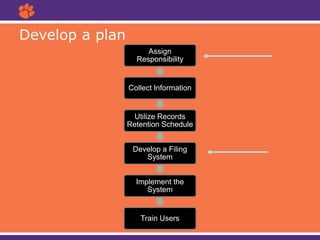
Develop a plan
Assign
Responsibility
Collect Information
Utilize Records
Retention Schedule
Develop a Filing
System
Implement the
System
Train Users
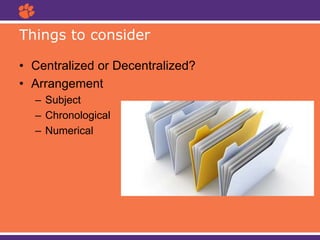
• Centralized or Decentralized?
• Arrangement
– Subject
– Chronological
– Numerical
Things to consider
• Records cover a range of topics where a topical
arrangement becomes logical.
– Arranged two different ways:
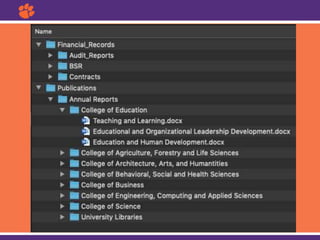
• Dictionary order—each subject is provided its own folder
• Encyclopedic order—subjects are grouped into major
headings. Individual folders are filed in alphabetical order
behind each heading.
• Structured function order—based on organizational structure,
functions, and processes.
Subject Filing
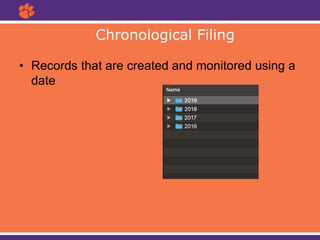
• Records that are created and monitored using a
date
Chronological Filing
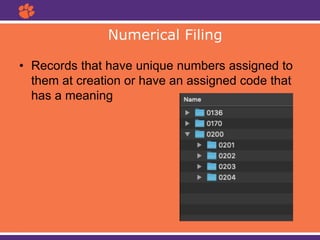
• Records that have unique numbers assigned to
them at creation or have an assigned code that
has a meaning
Numerical Filing
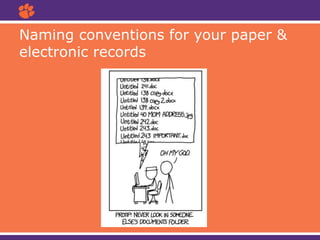
Naming conventions for your paper &
electronic records
Naming conventions for your paper &
electronic records
• A good format for date designations is YYYYMMDD or YYMMDD. This format makes
sure all of your files stay in chronological order, even over the span of many years.
• Try not to make file names too long, since long file names do not work well with all
types of software.
• Special characters such as ~ ! @ # $ % ^ & * ( ) ` ; < > ? , [ ] { } ' " and | should be
avoided.
• When using a sequential numbering system, using leading zeros for clarity and to
make sure files sort in sequential order. For example, use "001, 002, ...010, 011 ...
100, 101, etc." instead of "1, 2, ...10, 11 ... 100, 101, etc."
• Do not use spaces. Some software will not recognize file names with spaces, and file
names with spaces must be enclosed in quotes when using the command line. Other
options include:
– Underscores, e.g. file_name.xxx
– Dashes, e.g. file-name.xxx
– No separation, e.g. filename.xxx
– Camel case, where the first letter of each section of text is capitalized, e.g.
FileName.xxx
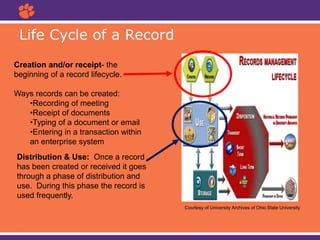
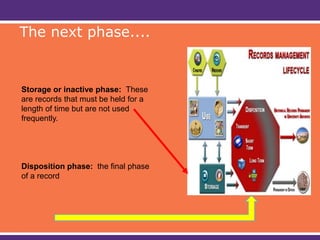
Life Cycle of a Record
Courtesy of University Archives of Ohio State University
Creation and/or receipt- the
beginning of a record lifecycle.
Ways records can be created:
•Recording of meeting
•Receipt of documents
•Typing of a document or email
•Entering in a transaction within
an enterprise system
Distribution & Use: Once a record
has been created or received it goes
through a phase of distribution and
use. During this phase the record is
used frequently.
Storage or inactive phase: These
are records that must be held for a
length of time but are not used
frequently.
Disposition phase: the final phase
of a record
The next phase....
Managing active & inactive records
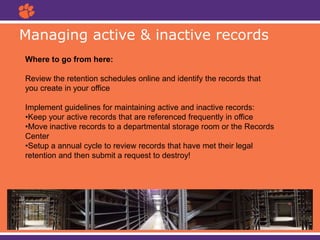
Where to go from here:
Review the retention schedules online and identify the records that
you create in your office
Implement guidelines for maintaining active and inactive records:
•Keep your active records that are referenced frequently in office
•Move inactive records to a departmental storage room or the Records
Center
•Setup a annual cycle to review records that have met their legal
retention and then submit a request to destroy!
Managing copies
 Sort out your "Office of Record"
records and focus on those records
first. This means any records for
which your office creates or
maintains the official record
copy. Those records are your top
priority. For other records, you may
need to keep a reference copy for a
short time.
 Reference and/or convenience
copies do not need to come through
Records Management for permission
to destroy.
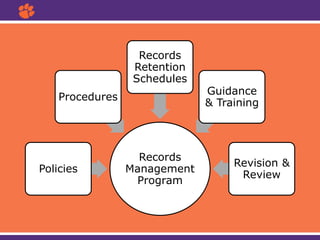
Records
Management
Program
Policies
Procedures
Records
Retention
Schedules
Guidance
& Training
Revision &
Review
Where do I go from here?
Next workshops:
• RM 301 Retention Schedules
• RM 401 Records & Data Management
• RM 501 Email & Digital Records Management
Brenda Burk Krista Oldham Michelle Voyles
bburk@clemson.edu kristao@clemson.edu mvoyles@clemson.edu
864-656-5176 864-656-4751 864-656-0680

RecordsManagement201.pptx

  • 1.
    Records Management 201: BeyondThe Basics Records Management Team Brenda Burk Krista Oldham Michelle Voyles
  • 2.
    Goals of RM201: Beyond The Basics  Welcome & Introductions  Do you speak records?  Best practices  Structuring & organizing your files  Naming conventions for your paper & electronic files  Managing active & inactive records  Managing copies  Where do we go from here?
  • 3.
    Do you speakrecords? Records any recorded information, regardless of medium of characteristics, made or received by an organization that is evidence of its operations and has value requiring its retention for a specific period o Records Series • a group of related records that are used or filed together Records Inventory an analysis to determine the type, volume, inclusive dates and regulatory requirements of a department’s records Records Schedule • legal document that contains the description of the records, the length of retention, and disposition General Schedules- rules that apply to records commonly found in all university departments (e.g., financial records) Specific Schedules- a rule that applies to unique records within departments that are not covered in the general schedules
  • 4.
    Understanding your records RecordsAppraisal • Departmental • Functional Taking Inventory • Points to consider • ARM-1
  • 5.
  • 6.
    Digitization – factorsto consider • One location vs multiple locations • Physical storage space • Streamlining access • Length of time needed Understanding your records
  • 7.
  • 8.
    A well designedfiling system: • Must make filling less difficult, tedious, and unattractive • Must offer quick and easy filing and retrieval information • Must ensure integrity and continuity of record keeping despite changes in office personnel • Must have uniform practices • Must allow for easy identification and purging of inactive records according to RM policies • Should provide clear and simple filing categories • Should be expandable and flexible enough to meet everyone’s needs
  • 9.
    Develop a plan Assign Responsibility CollectInformation Utilize Records Retention Schedule Develop a Filing System Implement the System Train Users
  • 11.
    • Centralized orDecentralized? • Arrangement – Subject – Chronological – Numerical Things to consider
  • 12.
    • Records covera range of topics where a topical arrangement becomes logical. – Arranged two different ways: • Dictionary order—each subject is provided its own folder • Encyclopedic order—subjects are grouped into major headings. Individual folders are filed in alphabetical order behind each heading. • Structured function order—based on organizational structure, functions, and processes. Subject Filing
  • 14.
    • Records thatare created and monitored using a date Chronological Filing
  • 15.
    • Records thathave unique numbers assigned to them at creation or have an assigned code that has a meaning Numerical Filing
  • 16.
    Naming conventions foryour paper & electronic records
  • 17.
    Naming conventions foryour paper & electronic records • A good format for date designations is YYYYMMDD or YYMMDD. This format makes sure all of your files stay in chronological order, even over the span of many years. • Try not to make file names too long, since long file names do not work well with all types of software. • Special characters such as ~ ! @ # $ % ^ & * ( ) ` ; < > ? , [ ] { } ' " and | should be avoided. • When using a sequential numbering system, using leading zeros for clarity and to make sure files sort in sequential order. For example, use "001, 002, ...010, 011 ... 100, 101, etc." instead of "1, 2, ...10, 11 ... 100, 101, etc." • Do not use spaces. Some software will not recognize file names with spaces, and file names with spaces must be enclosed in quotes when using the command line. Other options include: – Underscores, e.g. file_name.xxx – Dashes, e.g. file-name.xxx – No separation, e.g. filename.xxx – Camel case, where the first letter of each section of text is capitalized, e.g. FileName.xxx
  • 18.
    Life Cycle ofa Record Courtesy of University Archives of Ohio State University Creation and/or receipt- the beginning of a record lifecycle. Ways records can be created: •Recording of meeting •Receipt of documents •Typing of a document or email •Entering in a transaction within an enterprise system Distribution & Use: Once a record has been created or received it goes through a phase of distribution and use. During this phase the record is used frequently.
  • 19.
    Storage or inactivephase: These are records that must be held for a length of time but are not used frequently. Disposition phase: the final phase of a record The next phase....
  • 20.
    Managing active &inactive records Where to go from here: Review the retention schedules online and identify the records that you create in your office Implement guidelines for maintaining active and inactive records: •Keep your active records that are referenced frequently in office •Move inactive records to a departmental storage room or the Records Center •Setup a annual cycle to review records that have met their legal retention and then submit a request to destroy!
  • 21.
    Managing copies  Sortout your "Office of Record" records and focus on those records first. This means any records for which your office creates or maintains the official record copy. Those records are your top priority. For other records, you may need to keep a reference copy for a short time.  Reference and/or convenience copies do not need to come through Records Management for permission to destroy.
  • 22.
  • 24.
    Where do Igo from here? Next workshops: • RM 301 Retention Schedules • RM 401 Records & Data Management • RM 501 Email & Digital Records Management Brenda Burk Krista Oldham Michelle Voyles bburk@clemson.edu kristao@clemson.edu mvoyles@clemson.edu 864-656-5176 864-656-4751 864-656-0680

Editor's Notes

  • #3 Editorial Guidelines on Bullets: 1. Vertical lists are best introduced by a grammatically complete sentence followed by a colon. No periods are required at the end of entries unless at least one entry is a complete sentence, in which case a period is necessary at the end of each entry. Example: A university can be judged by three measures: · The quality of its students · The quality of it faculty · The quality of its infrastructure 2. If a list completes the sentence that introduces it, items begin with lowercase letters, commas or semicolons (if individual items contain commas) are used to separate each item, and the last item ends with a period. Note that the introductory clause does not end with a colon. Example: A university can be judged by · the quality of its students, · the quality of its faculty, · the quality of its infrastructure. 3. Avoid mixing sentence and nonsentence items in a bulleted list.
  • #4 Editorial Guidelines on Bullets: 1. Vertical lists are best introduced by a grammatically complete sentence followed by a colon. No periods are required at the end of entries unless at least one entry is a complete sentence, in which case a period is necessary at the end of each entry. Example: A university can be judged by three measures: · The quality of its students · The quality of it faculty · The quality of its infrastructure 2. If a list completes the sentence that introduces it, items begin with lowercase letters, commas or semicolons (if individual items contain commas) are used to separate each item, and the last item ends with a period. Note that the introductory clause does not end with a colon. Example: A university can be judged by · the quality of its students, · the quality of its faculty, · the quality of its infrastructure. 3. Avoid mixing sentence and nonsentence items in a bulleted list.
  • #8 Individual records are like puzzle pieces. When that puzzle is assembled, people can easily see the complete pictures, which is really important to our work- records tell us things and helps us do our job. Having standard filing systems and structures ensures that all records, regardless of their media, are properly and consistently house, identified, and maintained so that they can be efficiently and effectively retrieved. Just to stress records document the functions and service of an institution, and they support an employee’s performance of their assigned duties. It is all of our responsibilities to maintain records. As a unit, office, or department you will need to develop a filing system for maintaining records, and need to determine how the system will be used.
  • #10 A good filing system is developed through a basic file plan. Planning is important because it established direction and control, ensures that everyone involved has a common understanding of the purpose and goals and provides guidelines. Think of file plans as a roadmap to how your unit or department managed their records
  • #11 While managing your records is responsibility we all have, one or more people, depending on the size of your unit or department needs to figure out take the lead. It is essential to give some thought to how the records need to be organized and structured, rather than allowing it to develop in an ad-hoc and uncontrolled way.
  • #12 Centralized filing places all records series in one central location in an office. It is most useful when the majority of individuals within an office require access to a majority of the files. The electronic equivalent to centralized filing would be a shared directory like an  I drive. In a centralized file system: there is greater control over the files uniformity and consistency is easier to maintain all important information is located in a central location all information regarding a specific subject is located in a central location the need for duplicate files is eliminated storage of records requires less equipment and space Decentralized filing physically locates record series in different places within an office. It is most useful when only one individual requires access to a specific record series. The electronic equivalent would be an individual’s access to their PC. In this case, it works only if the creator of the files is the only user of the files. In a decentralized file system: there is less chance of folders being misfiled into the wrong record series limited access to a series leads to greater security and confidentiality Remember, filing systems should reflect the function and organization of an office
  • #17 How you organize and name your files will have a big impact on your ability to find those files later and to understand what they contain. You should be consistent and descriptive in naming and organizing files so that it is obvious where to find specific data and what the files contain.
  • #19 Editorial Guidelines on Bullets: 1. Vertical lists are best introduced by a grammatically complete sentence followed by a colon. No periods are required at the end of entries unless at least one entry is a complete sentence, in which case a period is necessary at the end of each entry. Example: A university can be judged by three measures: · The quality of its students · The quality of it faculty · The quality of its infrastructure 2. If a list completes the sentence that introduces it, items begin with lowercase letters, commas or semicolons (if individual items contain commas) are used to separate each item, and the last item ends with a period. Note that the introductory clause does not end with a colon. Example: A university can be judged by · the quality of its students, · the quality of its faculty, · the quality of its infrastructure. 3. Avoid mixing sentence and nonsentence items in a bulleted list.
  • #21 Editorial Guidelines on Bullets: 1. Vertical lists are best introduced by a grammatically complete sentence followed by a colon. No periods are required at the end of entries unless at least one entry is a complete sentence, in which case a period is necessary at the end of each entry. Example: A university can be judged by three measures: · The quality of its students · The quality of it faculty · The quality of its infrastructure 2. If a list completes the sentence that introduces it, items begin with lowercase letters, commas or semicolons (if individual items contain commas) are used to separate each item, and the last item ends with a period. Note that the introductory clause does not end with a colon. Example: A university can be judged by · the quality of its students, · the quality of its faculty, · the quality of its infrastructure. 3. Avoid mixing sentence and nonsentence items in a bulleted list.
  • #22 Editorial Guidelines on Bullets: 1. Vertical lists are best introduced by a grammatically complete sentence followed by a colon. No periods are required at the end of entries unless at least one entry is a complete sentence, in which case a period is necessary at the end of each entry. Example: A university can be judged by three measures: · The quality of its students · The quality of it faculty · The quality of its infrastructure 2. If a list completes the sentence that introduces it, items begin with lowercase letters, commas or semicolons (if individual items contain commas) are used to separate each item, and the last item ends with a period. Note that the introductory clause does not end with a colon. Example: A university can be judged by · the quality of its students, · the quality of its faculty, · the quality of its infrastructure. 3. Avoid mixing sentence and nonsentence items in a bulleted list.