Introduction to MIS Transactions and Enterprise Resource Planning Technology Toolbox: Creating EDI Transactions Technology Toolbox: Paying for Transactions Cases: Retail Sales
Outline How do you process the data from transactions and integrate the operations of the organization? How do you efficiently collect transaction data? What are the major elements and risks of a transaction? Why are transactions more difficult in an international environment? How do you track and compare the financial information of a firm? What are the transaction elements in the human resources management system? Can a company become more efficient and productive? How do businesses combine data from operations? How do you combine data across functional areas, including production, purchasing, marketing, and accounting? How do you make production more efficient? How do you keep track of all customer interactions? Who are your best customers? How can a manager handle all of the data in an ERP system? How does the CEO know that financial records are correct?
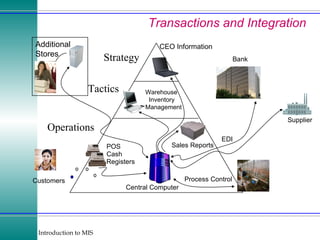
Transactions and Integration Central Computer Sales Reports POS Cash Registers Customers EDI Supplier Bank Process Control Additional Stores Strategy Tactics Operations Warehouse Inventory Management CEO Information
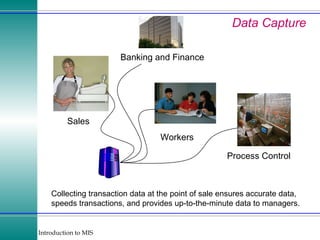
Data Capture Collecting transaction data at the point of sale ensures accurate data, speeds transactions, and provides up-to-the-minute data to managers.  Sales Process Control Banking and Finance Workers
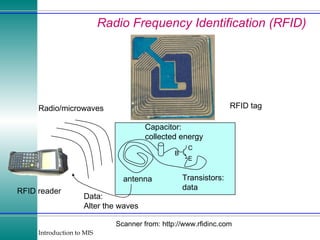
Radio Frequency Identification (RFID) Scanner from: http://www.rfidinc.com C antenna Capacitor: collected energy Transistors: data RFID tag RFID reader Radio/microwaves Data: Alter the waves B E
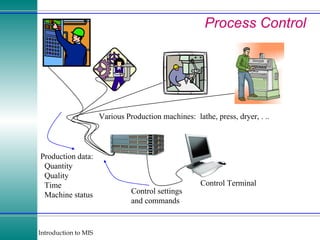
Process Control Various Production machines:  lathe, press, dryer, . .. Control Terminal Production data: Quantity Quality Time Machine status Control settings and commands
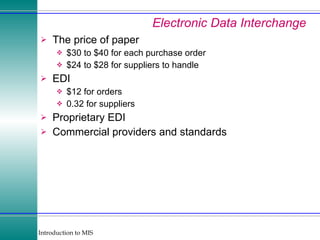
Electronic Data Interchange The price of paper $30 to $40 for each purchase order $24 to $28 for suppliers to handle EDI $12 for orders 0.32 for suppliers Proprietary EDI Commercial providers and standards
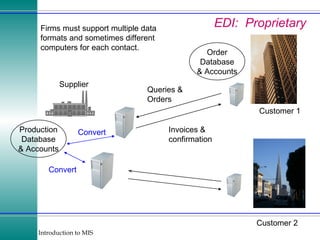
EDI:  Proprietary Supplier Customer 1 Queries & Orders Invoices & confirmation Order Database & Accounts Customer 2 Firms must support multiple data formats and sometimes different computers for each contact. Production Database & Accounts Convert Convert
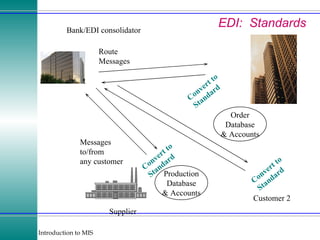
EDI:  Standards Supplier Customer 1 Production Database & Accounts Order Database & Accounts Customer 2 Bank/EDI consolidator Convert to Standard Route Messages Messages to/from any customer Convert to Standard Convert to Standard
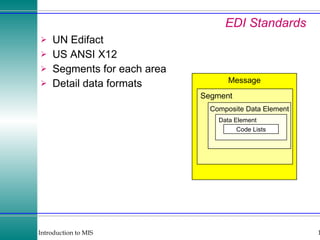
EDI Standards UN Edifact US ANSI X12 Segments for each area Detail data formats Message Segment Composite Data Element Data Element Code Lists
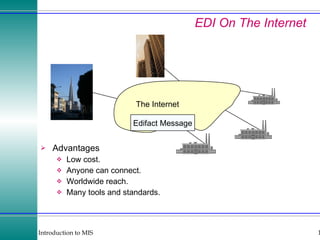
EDI On The Internet Advantages Low cost. Anyone can connect. Worldwide reach. Many tools and standards. The Internet Edifact Message
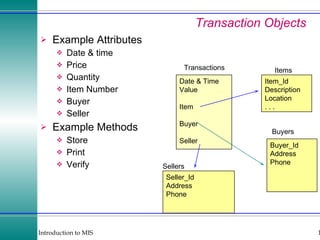
Transaction Objects Example Attributes Date & time Price Quantity Item Number Buyer Seller Example Methods Store Print Verify Date & Time Value Item Buyer Seller Item_Id Description Location . . . Transactions Items Buyer_Id Address Phone Seller_Id Address Phone Buyers Sellers
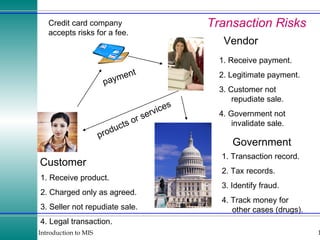
Transaction Risks payment products or services Vendor Customer Government 1. Receive payment. 2. Legitimate payment. 3. Customer not repudiate sale. 4. Government not invalidate sale. 1. Receive product. 2. Charged only as agreed. 3. Seller not repudiate sale. 4. Legal transaction. 1. Transaction record. 2. Tax records. 3. Identify fraud. 4. Track money for other cases (drugs). Credit card company accepts risks for a fee.
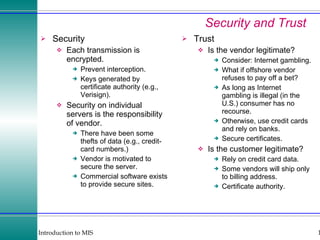
Security and Trust Security Each transmission is encrypted. Prevent interception. Keys generated by certificate authority (e.g., Verisign). Security on individual servers is the responsibility of vendor. There have been some thefts of data (e.g., credit-card numbers.) Vendor is motivated to secure the server. Commercial software exists to provide secure sites. Trust Is the vendor legitimate? Consider: Internet gambling. What if offshore vendor refuses to pay off a bet? As long as Internet gambling is illegal (in the U.S.) consumer has no recourse. Otherwise, use credit cards and rely on banks. Secure certificates. Is the customer legitimate? Rely on credit card data. Some vendors will ship only to billing address. Certificate authority.
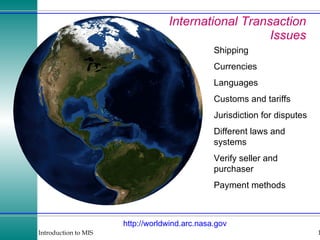
International Transaction Issues http:// worldwind.arc.nasa.gov Shipping Currencies Languages Customs and tariffs Jurisdiction for disputes Different laws and systems Verify seller and purchaser Payment methods
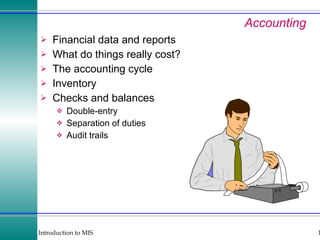
Accounting Financial data and reports What do things really cost? The accounting cycle Inventory Checks and balances Double-entry Separation of duties Audit trails
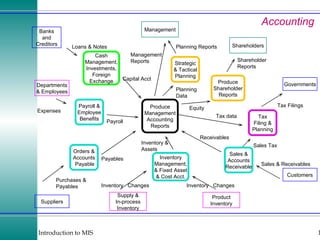
Accounting Suppliers Customers Management Shareholders Banks and Creditors Departments & Employees Sales & Accounts Receivable Produce Management Accounting Reports Produce Shareholder Reports Sales & Receivables Inventory  Changes Purchases & Payables Loans & Notes Expenses Equity Shareholder Reports Management Reports Product Inventory Orders & Accounts Payable Inventory Management, & Fixed Asset & Cost Acct. Payroll & Employee Benefits Cash Management, Investments, Foreign Exchange Supply & In-process Inventory Governments Tax Filing & Planning Strategic & Tactical Planning Inventory  Changes Payables Capital Acct Sales Tax Tax Filings Tax data Receivables Inventory & Assets Payroll Planning Reports Planning Data
Accounting Software General Ledger Sample chart of accounts Automatic posting Automatic entry of vendors Fiscal years Keep past data books open Post to prior years Allocate department expenses Accounts Receivable Automatic early discounts Interest on late payments Multiple shipping addresses Sales tax Automatic reminder notices Automatic monthly fees Keep monthly details Accounts payable Check reconciliation Automatic recurring entries Monitor payment discounts Select bills from screen Pay by item, not just total bill General Features Printer support Use of preprinted forms Custom reports Custom queries Security controls Technical support costs
The Role of Accounting Transaction Data Journal entries—double entry: money and categories General ledger—summary data by categories Information is defined by the chart of accounts Purchases, Sales, Loans, and Investments Inventory Control Process and Controls Double-Entry Systems Separation of Duties Audit Trails Exception reports
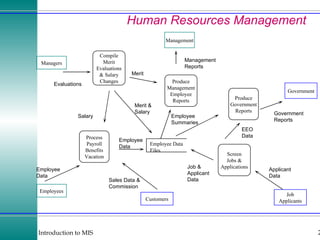
Human Resources Management Management Managers Employees Customers Government Process Payroll Benefits Vacation Compile Merit Evaluations & Salary Changes Job Applicants Produce Management Employee Reports Screen Jobs & Applications Produce Government Reports Employee Data Files Employee Data Evaluations Salary Merit & Salary Sales Data & Commission Employee Data Merit Applicant Data Employee Summaries Job & Applicant Data EEO Data Government Reports Management Reports
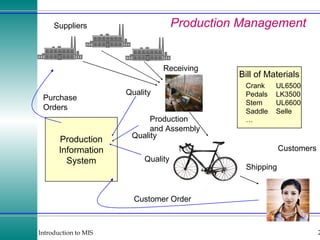
Production Management Production Information System Purchase Orders Customer Order Shipping Receiving Production and Assembly Quality Quality Quality Suppliers Customers Bill of Materials Crank UL6500 Pedals LK3500 Stem UL6600 Saddle Selle …
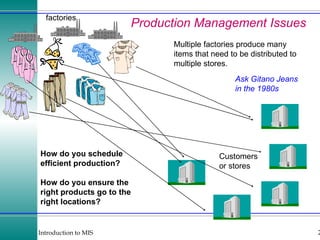
Production Management Issues factories Customers or stores Multiple factories produce many items that need to be distributed to multiple stores. How do you schedule efficient production? How do you ensure the right products go to the right locations? Ask Gitano Jeans in the 1980s
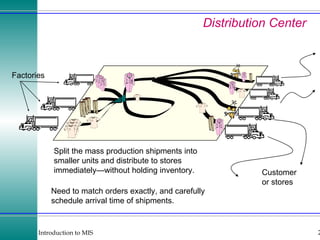
Distribution Center Factories Customer or stores Split the mass production shipments into smaller units and distribute to stores immediately—without holding inventory. Need to match orders exactly, and carefully schedule arrival time of shipments.
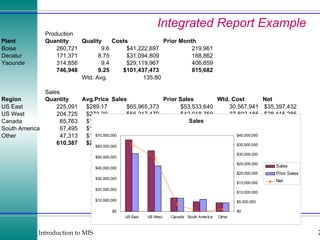
Integrated Report Example
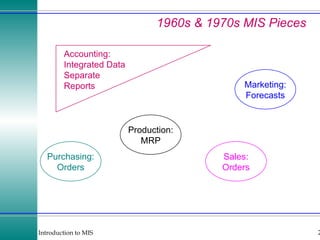
1960s & 1970s MIS Pieces Purchasing: Orders Sales: Orders Production: MRP Marketing: Forecasts Accounting: Integrated Data Separate Reports
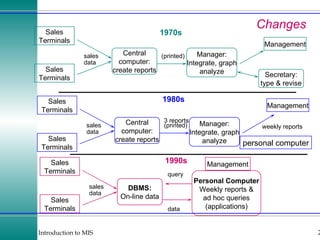
Changes weekly reports 1970s Sales Terminals Sales Terminals Central computer: create reports Manager: Integrate, graph analyze Secretary: type & revise Management weekly reports 1980s Sales Terminals Sales Terminals Central computer: create reports Manager: Integrate, graph analyze Management personal computer 1990s Sales Terminals Sales Terminals DBMS: On-line data Personal Computer Weekly reports & ad hoc queries (applications) Management query data sales data 3 reports (printed) sales data 3 reports (printed) sales data
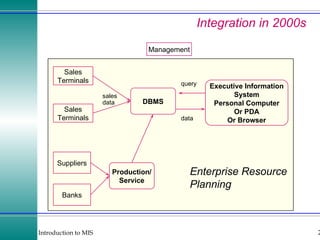
Integration in 2000s Sales Terminals Sales Terminals DBMS Executive Information System Personal Computer Or PDA Or Browser Management query data Suppliers Banks Production/ Service Enterprise Resource Planning sales data
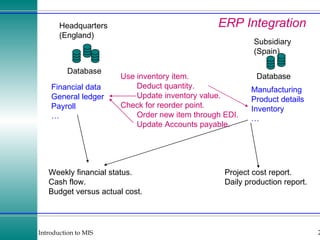
ERP Integration Database Headquarters (England) Database Subsidiary (Spain) Financial data General ledger Payroll …  Manufacturing Product details Inventory …  Use inventory item. Deduct quantity. Update inventory value. Check for reorder point. Order new item through EDI. Update Accounts payable. Project cost report. Daily production report. Weekly financial status. Cash flow. Budget versus actual cost.
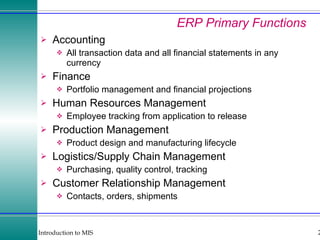
ERP Primary Functions Accounting All transaction data and all financial statements in any currency Finance Portfolio management and financial projections Human Resources Management Employee tracking from application to release Production Management Product design and manufacturing lifecycle Logistics/Supply Chain Management Purchasing, quality control, tracking Customer Relationship Management Contacts, orders, shipments
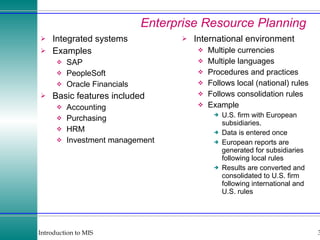
Enterprise Resource Planning Integrated systems Examples SAP PeopleSoft Oracle Financials Basic features included Accounting Purchasing HRM Investment management International environment Multiple currencies Multiple languages Procedures and practices Follows local (national) rules Follows consolidation rules Example U.S. firm with European subsidiaries. Data is entered once European reports are generated for subsidiaries following local rules Results are converted and consolidated to U.S. firm following international and U.S. rules
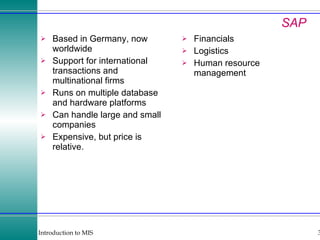
SAP Based in Germany, now worldwide Support for international transactions and multinational firms Runs on multiple database and hardware platforms Can handle large and small companies Expensive, but price is relative. Financials Logistics Human resource management
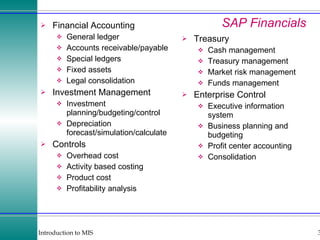
SAP Financials Treasury Cash management Treasury management Market risk management Funds management Enterprise Control Executive information system Business planning and budgeting Profit center accounting Consolidation Financial Accounting General ledger Accounts receivable/payable Special ledgers Fixed assets Legal consolidation Investment Management Investment planning/budgeting/control Depreciation forecast/simulation/calculate Controls Overhead cost Activity based costing Product cost Profitability analysis
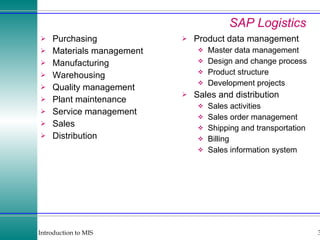
SAP Logistics Purchasing Materials management Manufacturing Warehousing Quality management Plant maintenance Service management Sales Distribution Product data management Master data management Design and change process Product structure Development projects Sales and distribution Sales activities Sales order management Shipping and transportation Billing Sales information system
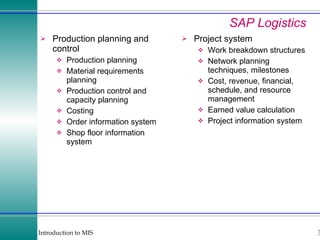
SAP Logistics Production planning and control Production planning Material requirements planning Production control and capacity planning Costing Order information system Shop floor information system Project system Work breakdown structures Network planning techniques, milestones Cost, revenue, financial, schedule, and resource management Earned value calculation Project information system
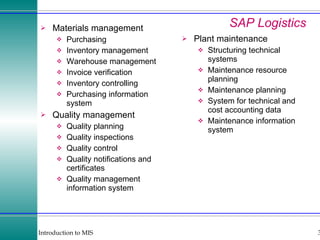
SAP Logistics Materials management Purchasing Inventory management Warehouse management Invoice verification Inventory controlling Purchasing information system Quality management Quality planning Quality inspections Quality control Quality notifications and certificates Quality management information system Plant maintenance Structuring technical systems Maintenance resource planning Maintenance planning System for technical and cost accounting data Maintenance information system
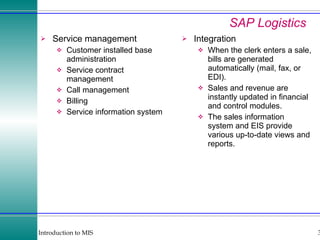
SAP Logistics Service management Customer installed base administration Service contract management Call management Billing Service information system Integration When the clerk enters a sale, bills are generated automatically (mail, fax, or EDI). Sales and revenue are instantly updated in financial and control modules. The sales information system and EIS provide various up-to-date views and reports.
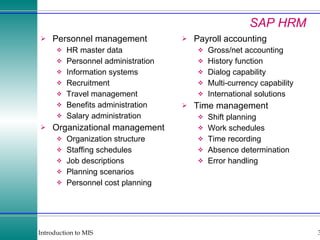
SAP HRM Personnel management HR master data Personnel administration Information systems Recruitment Travel management Benefits administration Salary administration Organizational management Organization structure Staffing schedules Job descriptions Planning scenarios Personnel cost planning Payroll accounting Gross/net accounting History function Dialog capability Multi-currency capability International solutions Time management Shift planning Work schedules Time recording Absence determination Error handling
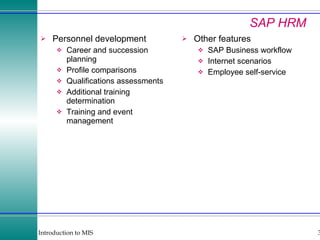
SAP HRM Personnel development Career and succession planning Profile comparisons Qualifications assessments Additional training determination Training and event management Other features SAP Business workflow Internet scenarios Employee self-service
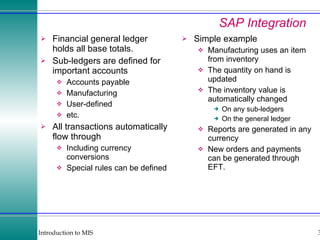
SAP Integration Financial general ledger holds all base totals. Sub-ledgers are defined for important accounts Accounts payable Manufacturing User-defined etc. All transactions automatically flow through Including currency conversions Special rules can be defined Simple example Manufacturing uses an item from inventory The quantity on hand is updated The inventory value is automatically changed On any sub-ledgers On the general ledger Reports are generated in any currency New orders and payments can be generated through EFT.
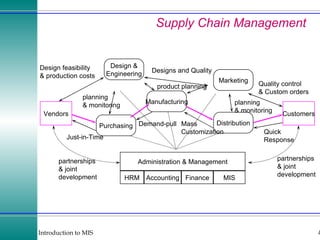
Supply Chain Management Vendors Customers Design & Engineering Marketing Distribution Manufacturing Purchasing Administration & Management HRM Accounting Finance MIS Just-in-Time Quality control  & Custom orders Quick Response Designs and Quality Mass Customization Demand-pull Design feasibility & production costs product planning partnerships & joint development partnerships & joint development planning & monitoring planning & monitoring
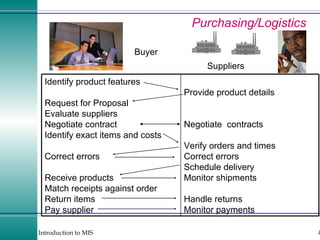
Purchasing/Logistics Buyer Suppliers Provide product details Negotiate  contracts Verify orders and times Correct errors Schedule delivery Monitor shipments Handle returns Monitor payments Identify product features Request for Proposal Evaluate suppliers Negotiate contract Identify exact items and costs Correct errors Receive products Match receipts against order Return items Pay supplier
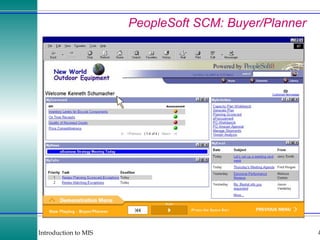
PeopleSoft SCM: Buyer/Planner
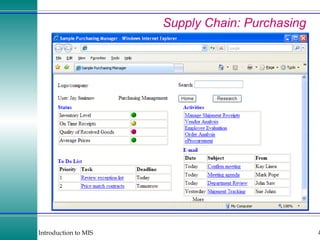
Supply Chain: Purchasing
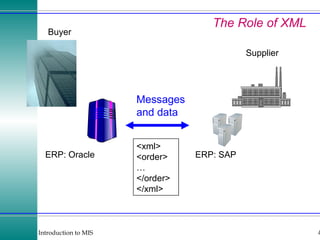
The Role of XML Buyer Supplier ERP: Oracle ERP: SAP Messages and data <xml> <order> … </order> </xml>
Customer Relationship Management Multiple Contact Points The goal is to provide a single, integrated view of all customer activity, available to all employees who interact with the customer. Feedback, Individual Needs, and Cross Selling Having better information enables workers to provide better service, meet the individual needs of each customer.
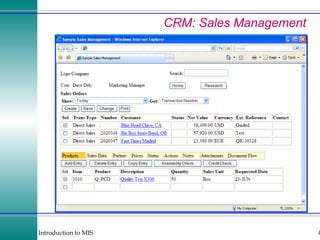
CRM: Sales Management
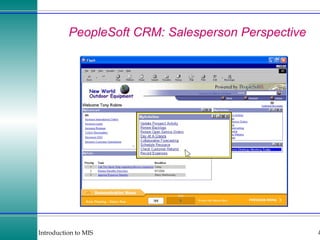
PeopleSoft CRM: Salesperson Perspective
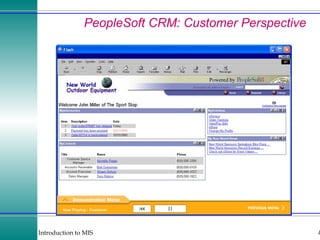
PeopleSoft CRM: Customer Perspective
ERP: Summarizing Data An ERP database can be gigantic. It would take time to evaluate every single transaction. Managers, particularly executives, need to begin with a summary of some basic conditions. The summary is usually graphical. Managers can then drill down and look at the detail.
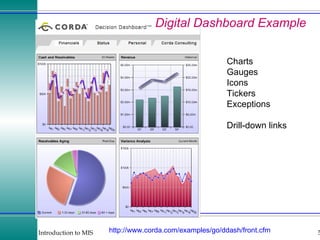
Digital Dashboard Example http:// www.corda.com/examples/go/ddash/front.cfm Charts Gauges Icons Tickers Exceptions Drill-down links
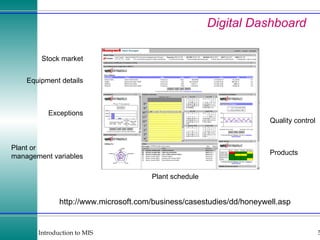
Digital Dashboard http://www.microsoft.com/business/casestudies/dd/honeywell.asp Stock market Exceptions Plant or  management variables Equipment details Products Quality control Plant schedule
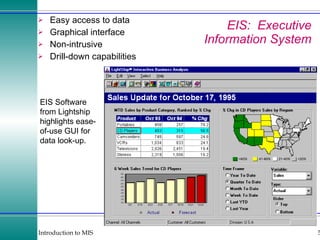
EIS:  Executive Information System Easy access to data Graphical interface Non-intrusive Drill-down capabilities EIS Software from Lightship highlights ease- of-use GUI for data look-up.
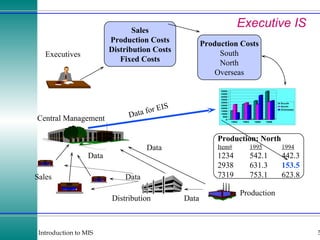
Executive IS Production Distribution Sales Central Management Executives Data Data Sales Production Costs Distribution Costs Fixed Costs Production Costs South North Overseas Production: North Item# 1995 1994 1234 542.1 442.3 2938 631.3 153.5 7319 753.1 623.8 Data for EIS Data Data
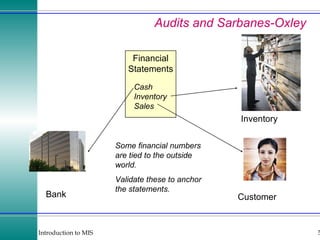
Audits and Sarbanes-Oxley Financial Statements Bank Cash Inventory Sales Customer Inventory Some financial numbers are tied to the outside world. Validate these to anchor the statements.
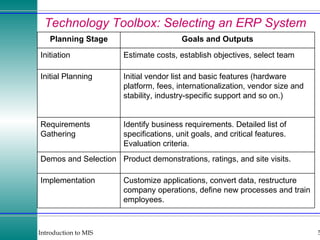
Technology Toolbox: Selecting an ERP System Customize applications, convert data, restructure company operations, define new processes and train employees. Implementation Product demonstrations, ratings, and site visits. Demos and Selection Identify business requirements. Detailed list of specifications, unit goals, and critical features. Evaluation criteria. Requirements Gathering Initial vendor list and basic features (hardware platform, fees, internationalization, vendor size and stability, industry-specific support and so on.) Initial Planning Estimate costs, establish objectives, select team Initiation Goals and Outputs Planning Stage
Quick Quiz: Selecting an ERP System 1. Assume you work for a mid-size construction firm that does about 30 percent of its work internationally. Find at least three ERP vendors and outline the features they provide. 2. Assume you work for a large retail clothing firm with stores in most U.S. states. Identify the specific accounting and financial features you would want in an ERP system. 3. Assume you work for a regional manufacturer that makes parts for cars. Explain how you would select and evaluate an ERP system. Find an example of a system that would work.

ERP and MIS

  • 1.
    Introduction to MISTransactions and Enterprise Resource Planning Technology Toolbox: Creating EDI Transactions Technology Toolbox: Paying for Transactions Cases: Retail Sales
  • 2.
    Outline How doyou process the data from transactions and integrate the operations of the organization? How do you efficiently collect transaction data? What are the major elements and risks of a transaction? Why are transactions more difficult in an international environment? How do you track and compare the financial information of a firm? What are the transaction elements in the human resources management system? Can a company become more efficient and productive? How do businesses combine data from operations? How do you combine data across functional areas, including production, purchasing, marketing, and accounting? How do you make production more efficient? How do you keep track of all customer interactions? Who are your best customers? How can a manager handle all of the data in an ERP system? How does the CEO know that financial records are correct?
  • 3.
    Transactions and IntegrationCentral Computer Sales Reports POS Cash Registers Customers EDI Supplier Bank Process Control Additional Stores Strategy Tactics Operations Warehouse Inventory Management CEO Information
  • 4.
    Data Capture Collectingtransaction data at the point of sale ensures accurate data, speeds transactions, and provides up-to-the-minute data to managers. Sales Process Control Banking and Finance Workers
  • 5.
    Radio Frequency Identification(RFID) Scanner from: http://www.rfidinc.com C antenna Capacitor: collected energy Transistors: data RFID tag RFID reader Radio/microwaves Data: Alter the waves B E
  • 6.
    Process Control VariousProduction machines: lathe, press, dryer, . .. Control Terminal Production data: Quantity Quality Time Machine status Control settings and commands
  • 7.
    Electronic Data InterchangeThe price of paper $30 to $40 for each purchase order $24 to $28 for suppliers to handle EDI $12 for orders 0.32 for suppliers Proprietary EDI Commercial providers and standards
  • 8.
    EDI: ProprietarySupplier Customer 1 Queries & Orders Invoices & confirmation Order Database & Accounts Customer 2 Firms must support multiple data formats and sometimes different computers for each contact. Production Database & Accounts Convert Convert
  • 9.
    EDI: StandardsSupplier Customer 1 Production Database & Accounts Order Database & Accounts Customer 2 Bank/EDI consolidator Convert to Standard Route Messages Messages to/from any customer Convert to Standard Convert to Standard
  • 10.
    EDI Standards UNEdifact US ANSI X12 Segments for each area Detail data formats Message Segment Composite Data Element Data Element Code Lists
  • 11.
    EDI On TheInternet Advantages Low cost. Anyone can connect. Worldwide reach. Many tools and standards. The Internet Edifact Message
  • 12.
    Transaction Objects ExampleAttributes Date & time Price Quantity Item Number Buyer Seller Example Methods Store Print Verify Date & Time Value Item Buyer Seller Item_Id Description Location . . . Transactions Items Buyer_Id Address Phone Seller_Id Address Phone Buyers Sellers
  • 13.
    Transaction Risks paymentproducts or services Vendor Customer Government 1. Receive payment. 2. Legitimate payment. 3. Customer not repudiate sale. 4. Government not invalidate sale. 1. Receive product. 2. Charged only as agreed. 3. Seller not repudiate sale. 4. Legal transaction. 1. Transaction record. 2. Tax records. 3. Identify fraud. 4. Track money for other cases (drugs). Credit card company accepts risks for a fee.
  • 14.
    Security and TrustSecurity Each transmission is encrypted. Prevent interception. Keys generated by certificate authority (e.g., Verisign). Security on individual servers is the responsibility of vendor. There have been some thefts of data (e.g., credit-card numbers.) Vendor is motivated to secure the server. Commercial software exists to provide secure sites. Trust Is the vendor legitimate? Consider: Internet gambling. What if offshore vendor refuses to pay off a bet? As long as Internet gambling is illegal (in the U.S.) consumer has no recourse. Otherwise, use credit cards and rely on banks. Secure certificates. Is the customer legitimate? Rely on credit card data. Some vendors will ship only to billing address. Certificate authority.
  • 15.
    International Transaction Issueshttp:// worldwind.arc.nasa.gov Shipping Currencies Languages Customs and tariffs Jurisdiction for disputes Different laws and systems Verify seller and purchaser Payment methods
  • 16.
    Accounting Financial dataand reports What do things really cost? The accounting cycle Inventory Checks and balances Double-entry Separation of duties Audit trails
  • 17.
    Accounting Suppliers CustomersManagement Shareholders Banks and Creditors Departments & Employees Sales & Accounts Receivable Produce Management Accounting Reports Produce Shareholder Reports Sales & Receivables Inventory Changes Purchases & Payables Loans & Notes Expenses Equity Shareholder Reports Management Reports Product Inventory Orders & Accounts Payable Inventory Management, & Fixed Asset & Cost Acct. Payroll & Employee Benefits Cash Management, Investments, Foreign Exchange Supply & In-process Inventory Governments Tax Filing & Planning Strategic & Tactical Planning Inventory Changes Payables Capital Acct Sales Tax Tax Filings Tax data Receivables Inventory & Assets Payroll Planning Reports Planning Data
  • 18.
    Accounting Software GeneralLedger Sample chart of accounts Automatic posting Automatic entry of vendors Fiscal years Keep past data books open Post to prior years Allocate department expenses Accounts Receivable Automatic early discounts Interest on late payments Multiple shipping addresses Sales tax Automatic reminder notices Automatic monthly fees Keep monthly details Accounts payable Check reconciliation Automatic recurring entries Monitor payment discounts Select bills from screen Pay by item, not just total bill General Features Printer support Use of preprinted forms Custom reports Custom queries Security controls Technical support costs
  • 19.
    The Role ofAccounting Transaction Data Journal entries—double entry: money and categories General ledger—summary data by categories Information is defined by the chart of accounts Purchases, Sales, Loans, and Investments Inventory Control Process and Controls Double-Entry Systems Separation of Duties Audit Trails Exception reports
  • 20.
    Human Resources ManagementManagement Managers Employees Customers Government Process Payroll Benefits Vacation Compile Merit Evaluations & Salary Changes Job Applicants Produce Management Employee Reports Screen Jobs & Applications Produce Government Reports Employee Data Files Employee Data Evaluations Salary Merit & Salary Sales Data & Commission Employee Data Merit Applicant Data Employee Summaries Job & Applicant Data EEO Data Government Reports Management Reports
  • 21.
    Production Management ProductionInformation System Purchase Orders Customer Order Shipping Receiving Production and Assembly Quality Quality Quality Suppliers Customers Bill of Materials Crank UL6500 Pedals LK3500 Stem UL6600 Saddle Selle …
  • 22.
    Production Management Issuesfactories Customers or stores Multiple factories produce many items that need to be distributed to multiple stores. How do you schedule efficient production? How do you ensure the right products go to the right locations? Ask Gitano Jeans in the 1980s
  • 23.
    Distribution Center FactoriesCustomer or stores Split the mass production shipments into smaller units and distribute to stores immediately—without holding inventory. Need to match orders exactly, and carefully schedule arrival time of shipments.
  • 24.
  • 25.
    1960s & 1970sMIS Pieces Purchasing: Orders Sales: Orders Production: MRP Marketing: Forecasts Accounting: Integrated Data Separate Reports
  • 26.
    Changes weekly reports1970s Sales Terminals Sales Terminals Central computer: create reports Manager: Integrate, graph analyze Secretary: type & revise Management weekly reports 1980s Sales Terminals Sales Terminals Central computer: create reports Manager: Integrate, graph analyze Management personal computer 1990s Sales Terminals Sales Terminals DBMS: On-line data Personal Computer Weekly reports & ad hoc queries (applications) Management query data sales data 3 reports (printed) sales data 3 reports (printed) sales data
  • 27.
    Integration in 2000sSales Terminals Sales Terminals DBMS Executive Information System Personal Computer Or PDA Or Browser Management query data Suppliers Banks Production/ Service Enterprise Resource Planning sales data
  • 28.
    ERP Integration DatabaseHeadquarters (England) Database Subsidiary (Spain) Financial data General ledger Payroll … Manufacturing Product details Inventory … Use inventory item. Deduct quantity. Update inventory value. Check for reorder point. Order new item through EDI. Update Accounts payable. Project cost report. Daily production report. Weekly financial status. Cash flow. Budget versus actual cost.
  • 29.
    ERP Primary FunctionsAccounting All transaction data and all financial statements in any currency Finance Portfolio management and financial projections Human Resources Management Employee tracking from application to release Production Management Product design and manufacturing lifecycle Logistics/Supply Chain Management Purchasing, quality control, tracking Customer Relationship Management Contacts, orders, shipments
  • 30.
    Enterprise Resource PlanningIntegrated systems Examples SAP PeopleSoft Oracle Financials Basic features included Accounting Purchasing HRM Investment management International environment Multiple currencies Multiple languages Procedures and practices Follows local (national) rules Follows consolidation rules Example U.S. firm with European subsidiaries. Data is entered once European reports are generated for subsidiaries following local rules Results are converted and consolidated to U.S. firm following international and U.S. rules
  • 31.
    SAP Based inGermany, now worldwide Support for international transactions and multinational firms Runs on multiple database and hardware platforms Can handle large and small companies Expensive, but price is relative. Financials Logistics Human resource management
  • 32.
    SAP Financials TreasuryCash management Treasury management Market risk management Funds management Enterprise Control Executive information system Business planning and budgeting Profit center accounting Consolidation Financial Accounting General ledger Accounts receivable/payable Special ledgers Fixed assets Legal consolidation Investment Management Investment planning/budgeting/control Depreciation forecast/simulation/calculate Controls Overhead cost Activity based costing Product cost Profitability analysis
  • 33.
    SAP Logistics PurchasingMaterials management Manufacturing Warehousing Quality management Plant maintenance Service management Sales Distribution Product data management Master data management Design and change process Product structure Development projects Sales and distribution Sales activities Sales order management Shipping and transportation Billing Sales information system
  • 34.
    SAP Logistics Productionplanning and control Production planning Material requirements planning Production control and capacity planning Costing Order information system Shop floor information system Project system Work breakdown structures Network planning techniques, milestones Cost, revenue, financial, schedule, and resource management Earned value calculation Project information system
  • 35.
    SAP Logistics Materialsmanagement Purchasing Inventory management Warehouse management Invoice verification Inventory controlling Purchasing information system Quality management Quality planning Quality inspections Quality control Quality notifications and certificates Quality management information system Plant maintenance Structuring technical systems Maintenance resource planning Maintenance planning System for technical and cost accounting data Maintenance information system
  • 36.
    SAP Logistics Servicemanagement Customer installed base administration Service contract management Call management Billing Service information system Integration When the clerk enters a sale, bills are generated automatically (mail, fax, or EDI). Sales and revenue are instantly updated in financial and control modules. The sales information system and EIS provide various up-to-date views and reports.
  • 37.
    SAP HRM Personnelmanagement HR master data Personnel administration Information systems Recruitment Travel management Benefits administration Salary administration Organizational management Organization structure Staffing schedules Job descriptions Planning scenarios Personnel cost planning Payroll accounting Gross/net accounting History function Dialog capability Multi-currency capability International solutions Time management Shift planning Work schedules Time recording Absence determination Error handling
  • 38.
    SAP HRM Personneldevelopment Career and succession planning Profile comparisons Qualifications assessments Additional training determination Training and event management Other features SAP Business workflow Internet scenarios Employee self-service
  • 39.
    SAP Integration Financialgeneral ledger holds all base totals. Sub-ledgers are defined for important accounts Accounts payable Manufacturing User-defined etc. All transactions automatically flow through Including currency conversions Special rules can be defined Simple example Manufacturing uses an item from inventory The quantity on hand is updated The inventory value is automatically changed On any sub-ledgers On the general ledger Reports are generated in any currency New orders and payments can be generated through EFT.
  • 40.
    Supply Chain ManagementVendors Customers Design & Engineering Marketing Distribution Manufacturing Purchasing Administration & Management HRM Accounting Finance MIS Just-in-Time Quality control & Custom orders Quick Response Designs and Quality Mass Customization Demand-pull Design feasibility & production costs product planning partnerships & joint development partnerships & joint development planning & monitoring planning & monitoring
  • 41.
    Purchasing/Logistics Buyer SuppliersProvide product details Negotiate contracts Verify orders and times Correct errors Schedule delivery Monitor shipments Handle returns Monitor payments Identify product features Request for Proposal Evaluate suppliers Negotiate contract Identify exact items and costs Correct errors Receive products Match receipts against order Return items Pay supplier
  • 42.
  • 43.
  • 44.
    The Role ofXML Buyer Supplier ERP: Oracle ERP: SAP Messages and data <xml> <order> … </order> </xml>
  • 45.
    Customer Relationship ManagementMultiple Contact Points The goal is to provide a single, integrated view of all customer activity, available to all employees who interact with the customer. Feedback, Individual Needs, and Cross Selling Having better information enables workers to provide better service, meet the individual needs of each customer.
  • 46.
  • 47.
  • 48.
  • 49.
    ERP: Summarizing DataAn ERP database can be gigantic. It would take time to evaluate every single transaction. Managers, particularly executives, need to begin with a summary of some basic conditions. The summary is usually graphical. Managers can then drill down and look at the detail.
  • 50.
    Digital Dashboard Examplehttp:// www.corda.com/examples/go/ddash/front.cfm Charts Gauges Icons Tickers Exceptions Drill-down links
  • 51.
    Digital Dashboard http://www.microsoft.com/business/casestudies/dd/honeywell.aspStock market Exceptions Plant or management variables Equipment details Products Quality control Plant schedule
  • 52.
    EIS: ExecutiveInformation System Easy access to data Graphical interface Non-intrusive Drill-down capabilities EIS Software from Lightship highlights ease- of-use GUI for data look-up.
  • 53.
    Executive IS ProductionDistribution Sales Central Management Executives Data Data Sales Production Costs Distribution Costs Fixed Costs Production Costs South North Overseas Production: North Item# 1995 1994 1234 542.1 442.3 2938 631.3 153.5 7319 753.1 623.8 Data for EIS Data Data
  • 54.
    Audits and Sarbanes-OxleyFinancial Statements Bank Cash Inventory Sales Customer Inventory Some financial numbers are tied to the outside world. Validate these to anchor the statements.
  • 55.
    Technology Toolbox: Selectingan ERP System Customize applications, convert data, restructure company operations, define new processes and train employees. Implementation Product demonstrations, ratings, and site visits. Demos and Selection Identify business requirements. Detailed list of specifications, unit goals, and critical features. Evaluation criteria. Requirements Gathering Initial vendor list and basic features (hardware platform, fees, internationalization, vendor size and stability, industry-specific support and so on.) Initial Planning Estimate costs, establish objectives, select team Initiation Goals and Outputs Planning Stage
  • 56.
    Quick Quiz: Selectingan ERP System 1. Assume you work for a mid-size construction firm that does about 30 percent of its work internationally. Find at least three ERP vendors and outline the features they provide. 2. Assume you work for a large retail clothing firm with stores in most U.S. states. Identify the specific accounting and financial features you would want in an ERP system. 3. Assume you work for a regional manufacturer that makes parts for cars. Explain how you would select and evaluate an ERP system. Find an example of a system that would work.