ERP- Enterprise Resource Planning
         ( An Introduction)


                         By: Gaurav Kumar
                              (www.apagen.com)
Definition Of ERP


Software solution that addresses all the needs of an
  enterprise with the process view of an
  organization to meet the organizational goals and
  integrate all the functions of the enterprise
What is ERP ?


• Facilitates Company-wide integrated Information
  Systems Covering all functional Areas.
• Performs core Corporate activities and increases
  customer service augmenting Corporate Image.
• Organizes & Optimizes the data input
  methodologies systematically.
Evolution of Business Applications
• MIS      - Management Information Systems
           Decision Support - No

• IIS      - Integrated Information Systems
           No Decision Support - No

• EIS - Executive Information Systems
           Decision Support - Yes

• CIS - Corporate Information Systems
           Decision Support - Yes

• EWS      - Enterprise Wide Systems
           Decision Support - No
           Logistics are considered as a part of system
Evolution of Planning Systems

• Materials Requirement Planning (MRP)
• Manufacturing Resource Planning ( MRP II)
• Enterprise Resource Planning ( ERP)

Other terminologies are :
• Money Resource Planning (MRP III)
• Supply Chain Management
• Value Chain Management
Is It Only a Jargon ?

  • No. MRP and MRP II were there for a long
    time.

  • ERP is an enhancement over these.

  • It is true that Year 2000 problem accelerated
    the sales and acceptance of ERP.

  • Introduction of ERP provides you a chance to
    have a new look at your working.
Is It Going to be there long?
Yes and No.

ERP will be there for a long time, if you are willing to
upgrade to new versions with new features as and
when the are released in the market

Your ERP may still work after a long time without
enhancements, if your company is not growing!

Moral : Upgrading the systems are a must!
Can We wait ?
Wait if you have :
      Good systems running.
      No immediate threat of Y2K, Euro and
             other known/unknown problems.
      No management commitment.
      Financial problems.

Do not wait if you have :
     Tough competition in the market.
     Multiple location operations.
     Plans to grow Globally.
     Management Commitment for change.
Why ERP ?
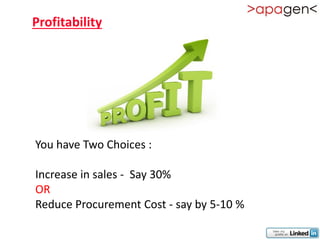
Profitability


You have Two Choices :

Increase in sales - Say 30%
OR
Reduce Procurement Cost - say by 5-10 %
What IT Dept. shall look into?

 Automatic Identification System
 Hardware & Networking

 Software DBMS/RDBMS

 Communication

 ERP

 Supply Chain Management
 EDI
 Intranet

 Internet
For Healthy Operations

   Integration of Systems across the Functional
    Departments in a Company as well as across the
    Enterprise as a Whole.
   Better Customer Service.
   Introduction of Latest Technologies as and when the
    are ready for the Industry acceptance
   Expertise database
   Avoids data redundancy
Competition In the Market!
Manufacturing Challenges.
  Manufacturing Globally.
  Distribution network spread.
  New Product introduction.
  Lower manufacturing lead time.
Focus on industry markets.
   Satisfying the needs of customers.
   Develop specific business methods and processes.
   Integration with third party products.
Demands on the Industry

   Better products at lower costs
   Tough competition
   Need to analyze costs / revenues on a product or
    customer basis
   Flexibility to respond to changing business
    requirements
   More informed management decision making
What are your Problems ?

   Unable to get accurate, timely information
   Applications not complete for existing business
    practices
   Modifications are time consuming or not feasible
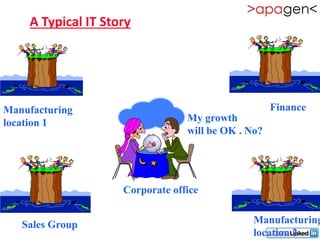
A Typical IT Story


Manufacturing                                       Finance
location 1                       My growth
                                 will be OK . No?


                    Corporate office


   Sales Group                                 Manufacturing
                                               location 2
ERP - The Enabler
What is that ERP enables ?


Systematic Look into your Systems & procedures

Optimizing the processes

Enables you to adapt yourself to new technologies

Discipline across the functions
What does ERP integrate ?

•   Database
•   Applications
•   Interfaces
•   Tools
What drives ERP ?
• Business
       • Customer Satisfaction
       • Business Development - new areas, products,
         services
       • Ability to face competition
       • Efficient processes required to push the company to
          top gear
• IT
       • Present Software does not meet business needs
       • Legacy systems difficult to maintain, Y2K Problem ,
          Euro currency
       • Obsolete hardware/software difficult to maintain
Problems Taken Care of
• Availability check at the time of Accepting
  Sales order
• On-line Material Status & Shortages
• Productivity Enhancements
• Material Planning
• Customer Service
• Cash Management
• Inventory
• Quality
Subsystems of ERP
•   Logistics
•   Bill Of Materials
•   Sales & Marketing
•   Master Scheduling
•   Materials Requirement Planning
•   Capacity Requirements Planning
•   Purchasing
•   Shop Floor Control
•   Accounts Payable/Receivable
•   HR
Understanding ERP
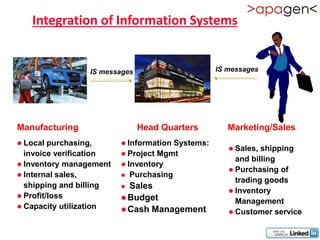
Integration of Information Systems


                 IS messages                     IS messages


Manufacturing                  Head Quarters        Marketing/Sales
 Local  purchasing,      InformationSystems:
                                                     Sales, shipping
  invoice verification    Project Mgmt
                                                      and billing
 Inventory management    Inventory
                                                     Purchasing of
 Internal sales,         Purchasing
                                                      trading goods
  shipping and billing    Sales
                                                     Inventory
 Profit/loss             Budget                     Management
 Capacity utilization
                          Cash Management           Customer service
Definition of Business Intelligence


Any tools enabling people to make better decisions
and thus improve their business processes

Examples:    •   Decision support systems (DSS)
             •   Executive information systems (EIS)
             •   Reporting
             •   Data mining
             •   Early warning systems (robots)
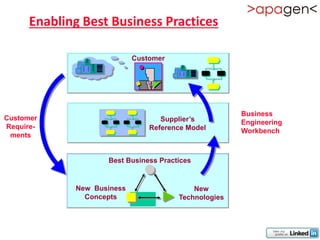
Enabling Best Business Practices

                            Customer


                                                      Business
Customer                           Supplier’s         Engineering
Require-                        Reference Model       Workbench
 ments


                    Best Business Practices


             New Business                  New
               Concepts                Technologies
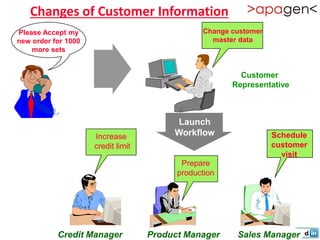
Changes of Customer Information
Please Accept my                                Change customer
new order for 1000                                master data
    more sets


                                                         Customer
                                                       Representative


                                         Launch
                     Increase            Workflow                 Schedule
                     credit limit                                 customer
                                                                    visit
                                           Prepare
                                          production


           Credit Manager           Product Manager     Sales Manager
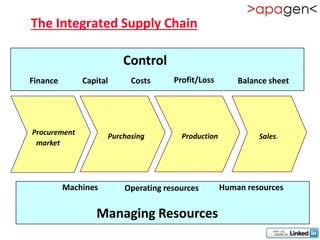
The Integrated Supply Chain

                         Control
Finance       Capital      Costs     Profit/Loss        Balance sheet


Procurement          Purchasing        Production            Sales.
 market


          Machines       Operating resources        Human resources


                 Managing Resources
Process Automation and Lead Time
                            Standard functions

           Pricing
                                        Allocation               Transport

ATP                  Credit limit
                                                     Picking


EDI          Sales order            Delivery           Billing       EDI
                entry


 EDI                                   EDI           Scan           Loading
entry           Blocked                note           log             list


                          Workflow for
      exception handling, Trigger for mail, transactions, EDI
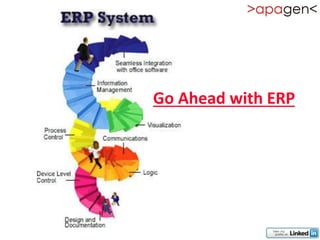
Go Ahead with ERP
Business Process Re-Engineering ( BPR)

• In-depth study of existing systems/processes is
  required before ERP is considered.
• This study brings out deficiencies of the
  existing system/process.
• This study is called BPR
• BPR attempts to re-structure and re-organize
  the human resources, functional areas, Man-
  Machine interfaces in the organization.
• Hence BPR attempts to maximize productivity
Re-engineering
• Study the current system & Processes
• Design and develop new systems
• Define Process, organization structure,
  procedures
• Develop/Customize the software
• Train people
• Implement new system
ERP without Re-engineering
• Advantages
  –   No visible changes in Functionality
  –   Users find it more acceptable
  –   Can be completed within time frame.
  –   Cost can be with in your control
  –   Impact on Organization will be moderate
• Disadvantages
  –   Best Business practices would have been ignored
  –   Stability of the system is known only in long run
  –   May not achieve Corporate wide systems integration
  –   New technologies have to be studied your self
  –   Some functionality may be lost
Re-Engineering -a part Life with ERP!
•   Re-engineer process before going for ERP
•   Re-engineer during implementation of ERP
•   Re-engineer after implementing ERP
•   Continuous re-engineering through ERP
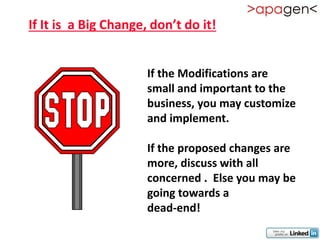
If It is a Big Change, don’t do it!


                      If the Modifications are
                      small and important to the
                      business, you may customize
                      and implement.

                      If the proposed changes are
                      more, discuss with all
                      concerned . Else you may be
                      going towards a
                      dead-end!
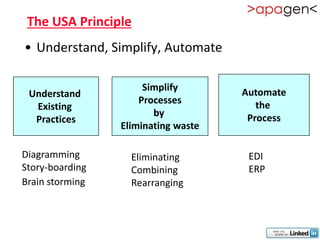
The USA Principle
• Understand, Simplify, Automate

                      Simplify       Automate
 Understand
                     Processes          the
  Existing
                        by            Process
  Practices
                 Eliminating waste

Diagramming        Eliminating        EDI
Story-boarding     Combining          ERP
Brain storming     Rearranging
ERP Selection
• Check whether all functional aspects of your
  Business are covered
• Check whether all the business functions and
  processes are integrated
• Check whether all latest IT trends are covered
• Check whether the vendor has customizing &
  implementing capabilities
• Check the Service options available
• Check your purse & calculate ROI
Prepare Base for ERP
• Do not start without Management commitment
• Allocate sufficient funds
• Identify Core Project Team
• Select specialists from all functional areas
• Evaluate and select ERP package
• Evaluate Implementation Partner
• Make an Implementation Plan
• Present plan to Management Committee for sanctions
• Present plan to Employee groups for
  feedback/acceptability
• Plan for User Training
• Plan for Future upgrades
Define Requirements
• Determine the hardware required
• Analyze the existing Processes
• Fine tune the processes to be in line with those of
  ERP defined
• Analyze effect of system changes.
• Prototype and present
• Refine the prototype & freeze the specifications
ERP Implementation
• Commitment from Management
• Form a task force with personnel from all
  functional Areas
• Take care of Hardware requirements
• Step-by-step rather than big-bang introduction
• Be patient. ERP implementation takes Time.
ERP Involves
• Project Planning
• Business & Operational Analysis, including Gap Analysis
• Business Process Re-engineering (BPR)
• Installation & Configuration
• Project Team Training
• Business Requirements Mapping to Software
• Module Configuration
• System Modification and Interfaces
• Data Conversion
• Custom Documentation
• End User Training
• Conference Room Pilot
• Acceptance Testing
• Production
• Post-Implementation Audit/Support
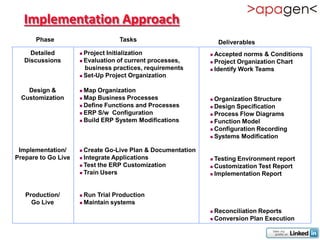
Implementation Approach
      Phase                       Tasks                          Deliverables
     Detailed         Project Initialization                 Accepted norms & Conditions
   Discussions        Evaluation of current processes,       Project Organization Chart
                       business practices, requirements       Identify Work Teams
                      Set-Up Project Organization


    Design &          Map Organization
  Customization       Map Business Processes                 Organization Structure
                      Define Functions and Processes         Design Specification
                      ERP S/w Configuration                  Process Flow Diagrams
                      Build ERP System Modifications         Function Model

                                                              Configuration Recording

                                                              Systems Modification


 Implementation/      Create Go-Live Plan & Documentation
Prepare to Go Live    Integrate Applications                 Testing Environment report
                      Test the ERP Customization             Customization Test Report
                      Train Users                            Implementation Report


   Production/        Run Trial Production
     Go Live          Maintain systems

                                                              Reconciliation Reports
                                                              Conversion Plan Execution
Advantages Of ERP
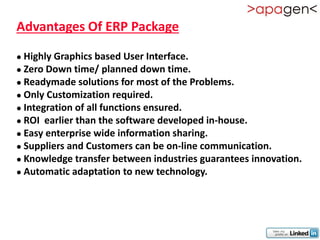
Advantages Of ERP Package

 Highly Graphics based User Interface.
 Zero Down time/ planned down time.

 Readymade solutions for most of the Problems.
 Only Customization required.

 Integration of all functions ensured.

 ROI earlier than the software developed in-house.

 Easy enterprise wide information sharing.

 Suppliers and Customers can be on-line communication.
 Knowledge transfer between industries guarantees innovation.

 Automatic adaptation to new technology.
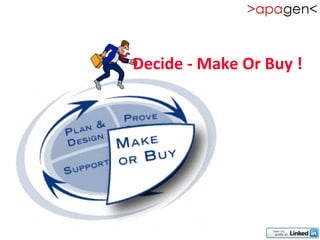
Decide - Make Or Buy !
In-house Development       ERP package

Project Development takes time .    Ready made Projects.
Reinventing the wheel.              Needs only customization

Process specific to your industry   Best Business practices followed
are implemented

Documentation may not be present    Documentation is part of system

EDI implementation modifications    EDI Compatible. Universally accepted
to be taken care of

Enterprise implementation is        The package itself is designed as
difficult as each unit follows      Enterprise Package.
different S/W option

Latest Developments to be studied   Constant Updates on Technology
as and when they are introduced.    and Processes assured
Embrace - New Technologies
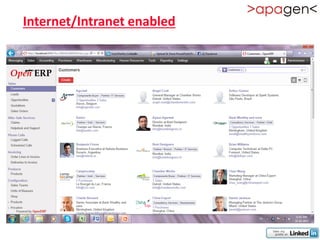
Internet/Intranet enabled
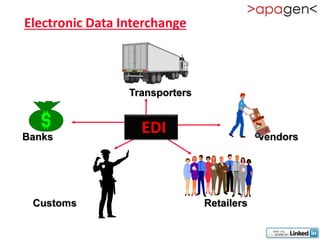
Electronic Data Interchange


                 Transporters


Banks
                   EDI                      Vendors


 Customs                        Retailers
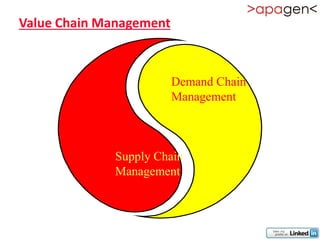
Value Chain Management


                   Demand Chain
                   Management


          Supply Chain
          Management
Summary
•   Optimum utilization of resources
•   Customer satisfaction
•   Seamless integration between Functions
•   Reduced overheads & inventory
•   Timely responsiveness
•   Market share & image enhancement
•   Faster design to manufacturability
•   Keep up with technology changes
•   Only way for integrated systems for a client
    with multiple locations
Feel Free to contact us for any ERP related query


Corporate Office:                                Registered Office:

                                                 297- A 4-6, Menara Bangsar ,
Plot No. 124,
                                                 Kualalumpur, Malaysia
Functional Industrial Estate,
Patparganj, Delhi, India                         Pin - 529100
Pin - 110092

Tel: +91 11 2487892 | Mob.: +91- 9971800665      Tel: +601-968-69167

Erp study (Understand and select ERP)

  • 1.
    ERP- Enterprise ResourcePlanning ( An Introduction) By: Gaurav Kumar (www.apagen.com)
  • 2.
    Definition Of ERP Softwaresolution that addresses all the needs of an enterprise with the process view of an organization to meet the organizational goals and integrate all the functions of the enterprise
  • 3.
    What is ERP? • Facilitates Company-wide integrated Information Systems Covering all functional Areas. • Performs core Corporate activities and increases customer service augmenting Corporate Image. • Organizes & Optimizes the data input methodologies systematically.
  • 4.
    Evolution of BusinessApplications • MIS - Management Information Systems Decision Support - No • IIS - Integrated Information Systems No Decision Support - No • EIS - Executive Information Systems Decision Support - Yes • CIS - Corporate Information Systems Decision Support - Yes • EWS - Enterprise Wide Systems Decision Support - No Logistics are considered as a part of system
  • 5.
    Evolution of PlanningSystems • Materials Requirement Planning (MRP) • Manufacturing Resource Planning ( MRP II) • Enterprise Resource Planning ( ERP) Other terminologies are : • Money Resource Planning (MRP III) • Supply Chain Management • Value Chain Management
  • 6.
    Is It Onlya Jargon ? • No. MRP and MRP II were there for a long time. • ERP is an enhancement over these. • It is true that Year 2000 problem accelerated the sales and acceptance of ERP. • Introduction of ERP provides you a chance to have a new look at your working.
  • 7.
    Is It Goingto be there long? Yes and No. ERP will be there for a long time, if you are willing to upgrade to new versions with new features as and when the are released in the market Your ERP may still work after a long time without enhancements, if your company is not growing! Moral : Upgrading the systems are a must!
  • 8.
    Can We wait? Wait if you have : Good systems running. No immediate threat of Y2K, Euro and other known/unknown problems. No management commitment. Financial problems. Do not wait if you have : Tough competition in the market. Multiple location operations. Plans to grow Globally. Management Commitment for change.
  • 9.
  • 10.
    Profitability You have TwoChoices : Increase in sales - Say 30% OR Reduce Procurement Cost - say by 5-10 %
  • 11.
    What IT Dept.shall look into?  Automatic Identification System  Hardware & Networking  Software DBMS/RDBMS  Communication  ERP  Supply Chain Management  EDI  Intranet  Internet
  • 12.
    For Healthy Operations  Integration of Systems across the Functional Departments in a Company as well as across the Enterprise as a Whole.  Better Customer Service.  Introduction of Latest Technologies as and when the are ready for the Industry acceptance  Expertise database  Avoids data redundancy
  • 13.
    Competition In theMarket! Manufacturing Challenges. Manufacturing Globally. Distribution network spread. New Product introduction. Lower manufacturing lead time. Focus on industry markets. Satisfying the needs of customers. Develop specific business methods and processes. Integration with third party products.
  • 14.
    Demands on theIndustry  Better products at lower costs  Tough competition  Need to analyze costs / revenues on a product or customer basis  Flexibility to respond to changing business requirements  More informed management decision making
  • 15.
    What are yourProblems ?  Unable to get accurate, timely information  Applications not complete for existing business practices  Modifications are time consuming or not feasible
  • 16.
    A Typical ITStory Manufacturing Finance location 1 My growth will be OK . No? Corporate office Sales Group Manufacturing location 2
  • 17.
    ERP - TheEnabler
  • 18.
    What is thatERP enables ? Systematic Look into your Systems & procedures Optimizing the processes Enables you to adapt yourself to new technologies Discipline across the functions
  • 19.
    What does ERPintegrate ? • Database • Applications • Interfaces • Tools
  • 20.
    What drives ERP? • Business • Customer Satisfaction • Business Development - new areas, products, services • Ability to face competition • Efficient processes required to push the company to top gear • IT • Present Software does not meet business needs • Legacy systems difficult to maintain, Y2K Problem , Euro currency • Obsolete hardware/software difficult to maintain
  • 21.
    Problems Taken Careof • Availability check at the time of Accepting Sales order • On-line Material Status & Shortages • Productivity Enhancements • Material Planning • Customer Service • Cash Management • Inventory • Quality
  • 22.
    Subsystems of ERP • Logistics • Bill Of Materials • Sales & Marketing • Master Scheduling • Materials Requirement Planning • Capacity Requirements Planning • Purchasing • Shop Floor Control • Accounts Payable/Receivable • HR
  • 23.
  • 24.
    Integration of InformationSystems IS messages IS messages Manufacturing Head Quarters Marketing/Sales  Local purchasing,  InformationSystems:  Sales, shipping invoice verification  Project Mgmt and billing  Inventory management  Inventory  Purchasing of  Internal sales,  Purchasing trading goods shipping and billing  Sales  Inventory  Profit/loss  Budget Management  Capacity utilization  Cash Management  Customer service
  • 25.
    Definition of BusinessIntelligence Any tools enabling people to make better decisions and thus improve their business processes Examples: • Decision support systems (DSS) • Executive information systems (EIS) • Reporting • Data mining • Early warning systems (robots)
  • 26.
    Enabling Best BusinessPractices Customer Business Customer Supplier’s Engineering Require- Reference Model Workbench ments Best Business Practices New Business New Concepts Technologies
  • 27.
    Changes of CustomerInformation Please Accept my Change customer new order for 1000 master data more sets Customer Representative Launch Increase Workflow Schedule credit limit customer visit Prepare production Credit Manager Product Manager Sales Manager
  • 28.
    The Integrated SupplyChain Control Finance Capital Costs Profit/Loss Balance sheet Procurement Purchasing Production Sales. market Machines Operating resources Human resources Managing Resources
  • 29.
    Process Automation andLead Time Standard functions Pricing Allocation Transport ATP Credit limit Picking EDI Sales order Delivery Billing EDI entry EDI EDI Scan Loading entry Blocked note log list Workflow for exception handling, Trigger for mail, transactions, EDI
  • 30.
  • 31.
    Business Process Re-Engineering( BPR) • In-depth study of existing systems/processes is required before ERP is considered. • This study brings out deficiencies of the existing system/process. • This study is called BPR • BPR attempts to re-structure and re-organize the human resources, functional areas, Man- Machine interfaces in the organization. • Hence BPR attempts to maximize productivity
  • 32.
    Re-engineering • Study thecurrent system & Processes • Design and develop new systems • Define Process, organization structure, procedures • Develop/Customize the software • Train people • Implement new system
  • 33.
    ERP without Re-engineering •Advantages – No visible changes in Functionality – Users find it more acceptable – Can be completed within time frame. – Cost can be with in your control – Impact on Organization will be moderate • Disadvantages – Best Business practices would have been ignored – Stability of the system is known only in long run – May not achieve Corporate wide systems integration – New technologies have to be studied your self – Some functionality may be lost
  • 34.
    Re-Engineering -a partLife with ERP! • Re-engineer process before going for ERP • Re-engineer during implementation of ERP • Re-engineer after implementing ERP • Continuous re-engineering through ERP
  • 35.
    If It isa Big Change, don’t do it! If the Modifications are small and important to the business, you may customize and implement. If the proposed changes are more, discuss with all concerned . Else you may be going towards a dead-end!
  • 36.
    The USA Principle •Understand, Simplify, Automate Simplify Automate Understand Processes the Existing by Process Practices Eliminating waste Diagramming Eliminating EDI Story-boarding Combining ERP Brain storming Rearranging
  • 37.
    ERP Selection • Checkwhether all functional aspects of your Business are covered • Check whether all the business functions and processes are integrated • Check whether all latest IT trends are covered • Check whether the vendor has customizing & implementing capabilities • Check the Service options available • Check your purse & calculate ROI
  • 38.
    Prepare Base forERP • Do not start without Management commitment • Allocate sufficient funds • Identify Core Project Team • Select specialists from all functional areas • Evaluate and select ERP package • Evaluate Implementation Partner • Make an Implementation Plan • Present plan to Management Committee for sanctions • Present plan to Employee groups for feedback/acceptability • Plan for User Training • Plan for Future upgrades
  • 39.
    Define Requirements • Determinethe hardware required • Analyze the existing Processes • Fine tune the processes to be in line with those of ERP defined • Analyze effect of system changes. • Prototype and present • Refine the prototype & freeze the specifications
  • 40.
    ERP Implementation • Commitmentfrom Management • Form a task force with personnel from all functional Areas • Take care of Hardware requirements • Step-by-step rather than big-bang introduction • Be patient. ERP implementation takes Time.
  • 41.
    ERP Involves • ProjectPlanning • Business & Operational Analysis, including Gap Analysis • Business Process Re-engineering (BPR) • Installation & Configuration • Project Team Training • Business Requirements Mapping to Software • Module Configuration • System Modification and Interfaces • Data Conversion • Custom Documentation • End User Training • Conference Room Pilot • Acceptance Testing • Production • Post-Implementation Audit/Support
  • 42.
    Implementation Approach Phase Tasks Deliverables Detailed  Project Initialization  Accepted norms & Conditions Discussions  Evaluation of current processes,  Project Organization Chart business practices, requirements  Identify Work Teams  Set-Up Project Organization Design &  Map Organization Customization  Map Business Processes  Organization Structure  Define Functions and Processes  Design Specification  ERP S/w Configuration  Process Flow Diagrams  Build ERP System Modifications  Function Model  Configuration Recording  Systems Modification Implementation/  Create Go-Live Plan & Documentation Prepare to Go Live  Integrate Applications  Testing Environment report  Test the ERP Customization  Customization Test Report  Train Users  Implementation Report Production/  Run Trial Production Go Live  Maintain systems  Reconciliation Reports  Conversion Plan Execution
  • 43.
  • 44.
    Advantages Of ERPPackage  Highly Graphics based User Interface.  Zero Down time/ planned down time.  Readymade solutions for most of the Problems.  Only Customization required.  Integration of all functions ensured.  ROI earlier than the software developed in-house.  Easy enterprise wide information sharing.  Suppliers and Customers can be on-line communication.  Knowledge transfer between industries guarantees innovation.  Automatic adaptation to new technology.
  • 45.
    Decide - MakeOr Buy !
  • 46.
    In-house Development ERP package Project Development takes time . Ready made Projects. Reinventing the wheel. Needs only customization Process specific to your industry Best Business practices followed are implemented Documentation may not be present Documentation is part of system EDI implementation modifications EDI Compatible. Universally accepted to be taken care of Enterprise implementation is The package itself is designed as difficult as each unit follows Enterprise Package. different S/W option Latest Developments to be studied Constant Updates on Technology as and when they are introduced. and Processes assured
  • 47.
    Embrace - NewTechnologies
  • 48.
  • 49.
    Electronic Data Interchange Transporters Banks EDI Vendors Customs Retailers
  • 50.
    Value Chain Management Demand Chain Management Supply Chain Management
  • 51.
    Summary • Optimum utilization of resources • Customer satisfaction • Seamless integration between Functions • Reduced overheads & inventory • Timely responsiveness • Market share & image enhancement • Faster design to manufacturability • Keep up with technology changes • Only way for integrated systems for a client with multiple locations
  • 52.
    Feel Free tocontact us for any ERP related query Corporate Office: Registered Office: 297- A 4-6, Menara Bangsar , Plot No. 124, Kualalumpur, Malaysia Functional Industrial Estate, Patparganj, Delhi, India Pin - 529100 Pin - 110092 Tel: +91 11 2487892 | Mob.: +91- 9971800665 Tel: +601-968-69167