
CAS 103 – ACCOUNTING INFORMATION
SYSTEM
IT 302 - COMPUTERIZED ACCOUNTING
(Week 1)
OLYMPIA BUSINESS SCHOOL
DIPLOMA IN INFORMATION TECHNOLOGY
Prepared by Sharifah Zarith Rahmah Syed Ahmad
Course Introduction
 Understand the primary information flows within the business
environment.
 Understand the difference between accounting information
systems and management information systems.
 Know the principal features of the general model for
information systems.
 Be familiar with the functional areas of a business and their
principal activities.
 Understand the stages in the evolution of information systems.
 Understand the relationship between external auditing, internal
auditing, and information technology auditing.
Learning Objective
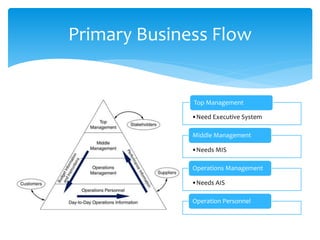
Primary Business Flow
•Need Executive System
Top Management
•Needs MIS
Middle Management
•Needs AIS
Operations Management
Operation Personnel
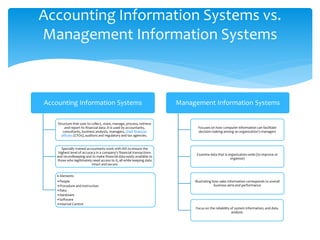
Accounting Information Systems
Structure that uses to collect, store, manage, process, retrieve
and report its financial data .It is used by accountants,
consultants, business analysts, managers, chief financial
officers (CFOs), auditors and regulatory and tax agencies.
Specially trained accountants work with AIS to ensure the
highest level of accuracy in a company's financial transactions
and recordkeeping and to make financial data easily available to
those who legitimately need access to it, all while keeping data
intact and secure
6 Elements
•People
•Procedure and instruction
•Data
•Hardware
•Software
•Internal Control
Management Information Systems
Focuses on how computer information can facilitate
decision making among an organization’s managers
Examine data that is organization-wide (to improve or
organize)
Illustrating how sales information corresponds to overall
business aims and performance
Focus on the reliability of system information, and data
analysis
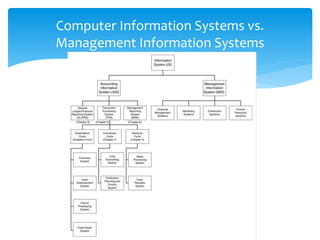
Accounting Information Systems vs.
Management Information Systems
Computer Information Systems vs.
Management Information Systems
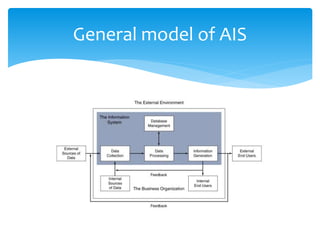
General model of AIS
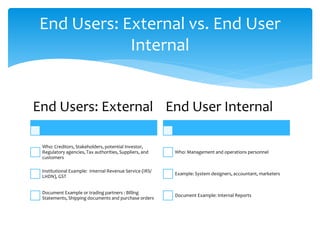
End Users: External
Who: Creditors, Stakeholders, potential Investor,
Regulatory agencies, Tax authorities, Suppliers, and
customers
Institutional Example: Internal Revenue Service (IRS/
LHDN), GST
Document Example or trading partners : Billing
Statements, Shipping documents and purchase orders
End User Internal
Who: Management and operations personnel
Example: System designers, accountant, marketers
Document Example: Internal Reports
End Users: External vs. End User
Internal
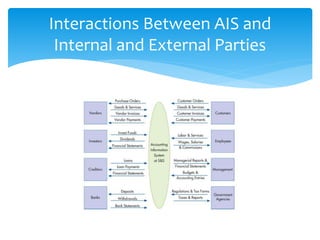
Interactions Between AIS and
Internal and External Parties
 Business organizations conduct business transactions
between internal and external stakeholders.
 Internal stakeholders are employees in the
organization (e.g., employees and managers).
 External stakeholders are trading partners such as
customers and vendors as well as other external
organizations such as Banks and Government.
 The AIS captures the flow of information between
these users for the various business transactions.
Transactional Information Between
Internal and External Parties in an AIS
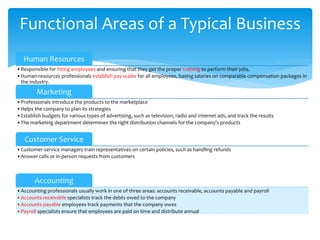
Human Resources
•Responsible for hiring employees and ensuring that they get the proper training to perform their jobs.
•Human-resources professionals establish pay scales for all employees, basing salaries on comparable compensation packages in
the industry.
Marketing
•Professionals introduce the products to the marketplace
•Helps the company to plan its strategies
•Establish budgets for various types of advertising, such as television, radio and Internet ads, and track the results
•The marketing department determines the right distribution channels for the company's products
Customer Service
•Customer-service managers train representatives on certain policies, such as handling refunds
•Answer calls or in-person requests from customers
Accounting
•Accounting professionals usually work in one of three areas: accounts receivable, accounts payable and payroll
•Accounts-receivable specialists track the debts owed to the company
•Accounts-payable employees track payments that the company owes
•Payroll specialists ensure that employees are paid on time and distribute annual
Functional Areas of a Typical Business
Transactions between the business organization and
external parties fundamentally involve a “give–get”
exchange. These basic business processes are:
 Revenue: give goods / give service—get cash
 Expenditure: get goods / get service—give cash
 Production: give labor and give raw materials—get
finished goods
 Payroll: give cash—get labor
 Financing: give cash—get cash
Basic Business Process
 Manual accounting - requires that all journal entries,
invoices and other financial documents be created by
hand
 Computerized accounting - allows paperless process
to input information into accounting software
programs.
Manual vs. Computerize Accounting
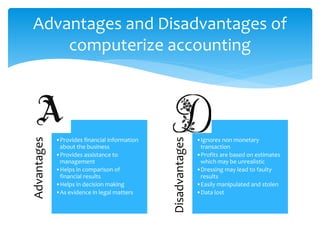
Advantages
•Provides financial information
about the business
•Provides assistance to
management
•Helps in comparison of
financial results
•Helps in decision making
•As evidence in legal matters
Disadvantages
•Ignores non monetary
transaction
•Profits are based on estimates
which may be unrealistic
•Dressing may lead to faulty
results
•Easily manipulated and stolen
•Data lost
Advantages and Disadvantages of
computerize accounting
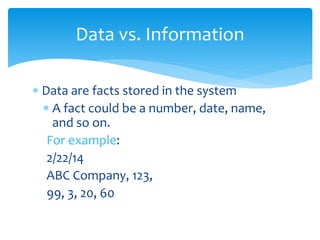
 Data are facts stored in the system
 A fact could be a number, date, name,
and so on.
For example:
2/22/14
ABC Company, 123,
99, 3, 20, 60
Data vs. Information
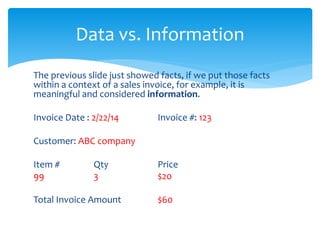
The previous slide just showed facts, if we put those facts
within a context of a sales invoice, for example, it is
meaningful and considered information.
Invoice Date : 2/22/14 Invoice #: 123
Customer: ABC company
Item # Qty Price
99 3 $20
Total Invoice Amount $60
Data vs. Information
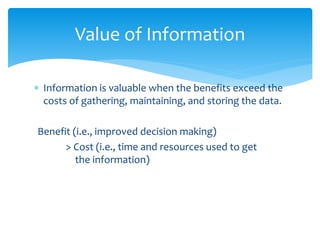
 Information is valuable when the benefits exceed the
costs of gathering, maintaining, and storing the data.
Benefit (i.e., improved decision making)
> Cost (i.e., time and resources used to get
the information)
Value of Information
There are seven general characteristics that make information
useful:
1. Relevant: information needed to make a decision (e.g., the
decision to extend customer credit would need relevant
information on customer balance from an A/R aging report)
2. Reliable: information free from bias
3. Complete: does not omit important aspects of events or
activities
4. Timely: information needs to be provided in time to make
the decision
5. Understandable: information must be presented in a
meaningful manner
6. Verifiable: two independent people can produce the same
conclusion
7. Accessible: available when needed
What Makes Information Useful?
Accounting Information System
Introduction
 It can be manual or computerized
 Consists of
 People who use the system
 Processes
 Technology (data, software, and information
technology)
 Controls to safeguard information
 Thus, transactional data is collected and stored into
meaningful information from which business
decisions are made and provides adequate controls to
protect and secure the organizational data assets.
What Is an Accounting Information
System?
 A well thought out AIS can add value through
effective and efficient decisions.
 Having effective decisions means quality decisions
 Having efficient decisions means reducing costs of
decision making
How Does an AIS Add Value?
 An AIS is influenced by an organization’s strategy.
 A strategy is the overall goal the organization hopes
to achieve (e.g., increase profitability).
 Once an overall goal is determined, an organization
can determine actions needed to reach their goal and
identify the informational requirements necessary to
measure how well they are doing in obtaining that
goal.
AIS and Strategy
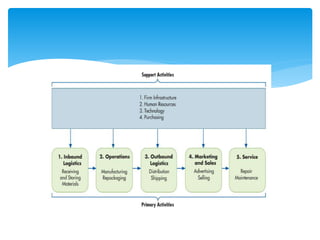
 The value chain shows how the different activities
within an organization provide value to the customer.
 These activities are primary and support activities.
 Primary activities provide direct value to the customer.
 Support activities enable primary activities to be
efficient and effective.
AIS in the Value Chain
Overview of Transaction
Processing and Enterprise
Resource Planning Systems
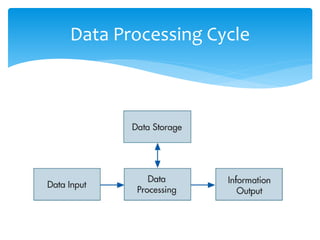
Data Processing Cycle
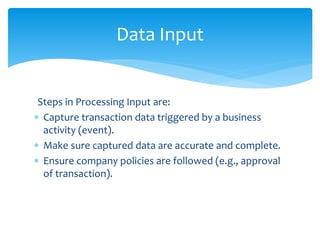
Steps in Processing Input are:
 Capture transaction data triggered by a business
activity (event).
 Make sure captured data are accurate and complete.
 Ensure company policies are followed (e.g., approval
of transaction).
Data Input
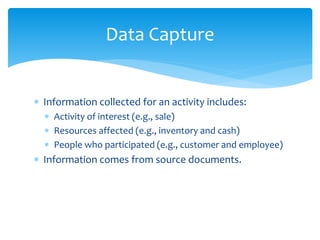
 Information collected for an activity includes:
 Activity of interest (e.g., sale)
 Resources affected (e.g., inventory and cash)
 People who participated (e.g., customer and employee)
 Information comes from source documents.
Data Capture
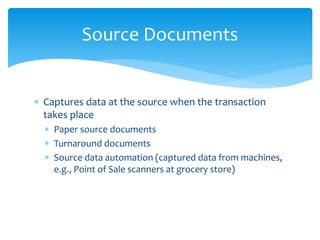
 Captures data at the source when the transaction
takes place
 Paper source documents
 Turnaround documents
 Source data automation (captured data from machines,
e.g., Point of Sale scanners at grocery store)
Source Documents
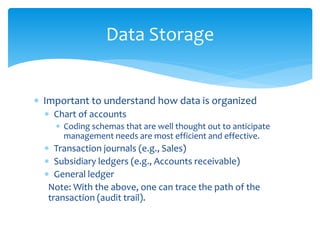
 Important to understand how data is organized
 Chart of accounts
 Coding schemas that are well thought out to anticipate
management needs are most efficient and effective.
 Transaction journals (e.g., Sales)
 Subsidiary ledgers (e.g., Accounts receivable)
 General ledger
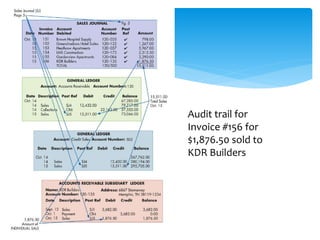
Note: With the above, one can trace the path of the
transaction (audit trail).
Data Storage
Audit trail for
Invoice #156 for
$1,876.50 sold to
KDR Builders
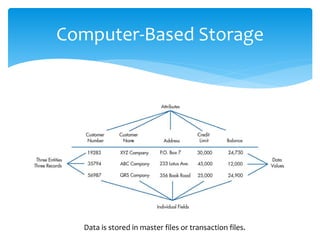
Computer-Based Storage
Data is stored in master files or transaction files.
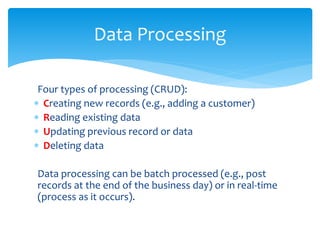
Four types of processing (CRUD):
 Creating new records (e.g., adding a customer)
 Reading existing data
 Updating previous record or data
 Deleting data
Data processing can be batch processed (e.g., post
records at the end of the business day) or in real-time
(process as it occurs).
Data Processing
The data stored in the database files can be viewed
 Online (soft copy)
 Printed out (hard copy)
 Document (e.g., sales invoice)
 Report (e.g., monthly sales report)
 Query (question for specific information in a database,
e.g., What division had the most sales for the month?)
Information Output
 Integrates activities from the entire organization
 Production
 Payroll
 Sales
 Purchasing
 Financial Reporting
Enterprise Resource Planning (ERP)
Systems
 Integrated enterprise-wide allowing for better flow of
the information as it’s stored in a centralized
database and can be accessed by various
departments which also improves customer service.
 Data captured once (i.e., no longer need sales to
enter data about a customer and then accounting to
enter same customer data for invoicing)
 Improve access of control of the data through
security settings
 Standardization of procedures and reports
Advantages of ERP System
 Costly
 Significant amount of time to implement
 Complex
 User resistance (learning new things is sometimes
hard for employees)
Disadvantages of ERP System
http://gst.customs.gov.my/en/ib/Pages/ib_ppp_senarai.
aspx
Latest Accounting Software
Disclaimer: Some of the content in this slide belongs to
© Pearson Education 2015

It 302 computerized accounting (week 1) - sharifah

  • 1.
    CAS 103 –ACCOUNTING INFORMATION SYSTEM IT 302 - COMPUTERIZED ACCOUNTING (Week 1) OLYMPIA BUSINESS SCHOOL DIPLOMA IN INFORMATION TECHNOLOGY Prepared by Sharifah Zarith Rahmah Syed Ahmad
  • 2.
  • 3.
     Understand theprimary information flows within the business environment.  Understand the difference between accounting information systems and management information systems.  Know the principal features of the general model for information systems.  Be familiar with the functional areas of a business and their principal activities.  Understand the stages in the evolution of information systems.  Understand the relationship between external auditing, internal auditing, and information technology auditing. Learning Objective
  • 4.
    Primary Business Flow •NeedExecutive System Top Management •Needs MIS Middle Management •Needs AIS Operations Management Operation Personnel
  • 5.
    Accounting Information Systems Structurethat uses to collect, store, manage, process, retrieve and report its financial data .It is used by accountants, consultants, business analysts, managers, chief financial officers (CFOs), auditors and regulatory and tax agencies. Specially trained accountants work with AIS to ensure the highest level of accuracy in a company's financial transactions and recordkeeping and to make financial data easily available to those who legitimately need access to it, all while keeping data intact and secure 6 Elements •People •Procedure and instruction •Data •Hardware •Software •Internal Control Management Information Systems Focuses on how computer information can facilitate decision making among an organization’s managers Examine data that is organization-wide (to improve or organize) Illustrating how sales information corresponds to overall business aims and performance Focus on the reliability of system information, and data analysis Accounting Information Systems vs. Management Information Systems
  • 6.
    Computer Information Systemsvs. Management Information Systems
  • 7.
  • 8.
    End Users: External Who:Creditors, Stakeholders, potential Investor, Regulatory agencies, Tax authorities, Suppliers, and customers Institutional Example: Internal Revenue Service (IRS/ LHDN), GST Document Example or trading partners : Billing Statements, Shipping documents and purchase orders End User Internal Who: Management and operations personnel Example: System designers, accountant, marketers Document Example: Internal Reports End Users: External vs. End User Internal
  • 9.
    Interactions Between AISand Internal and External Parties
  • 10.
     Business organizationsconduct business transactions between internal and external stakeholders.  Internal stakeholders are employees in the organization (e.g., employees and managers).  External stakeholders are trading partners such as customers and vendors as well as other external organizations such as Banks and Government.  The AIS captures the flow of information between these users for the various business transactions. Transactional Information Between Internal and External Parties in an AIS
  • 11.
    Human Resources •Responsible forhiring employees and ensuring that they get the proper training to perform their jobs. •Human-resources professionals establish pay scales for all employees, basing salaries on comparable compensation packages in the industry. Marketing •Professionals introduce the products to the marketplace •Helps the company to plan its strategies •Establish budgets for various types of advertising, such as television, radio and Internet ads, and track the results •The marketing department determines the right distribution channels for the company's products Customer Service •Customer-service managers train representatives on certain policies, such as handling refunds •Answer calls or in-person requests from customers Accounting •Accounting professionals usually work in one of three areas: accounts receivable, accounts payable and payroll •Accounts-receivable specialists track the debts owed to the company •Accounts-payable employees track payments that the company owes •Payroll specialists ensure that employees are paid on time and distribute annual Functional Areas of a Typical Business
  • 12.
    Transactions between thebusiness organization and external parties fundamentally involve a “give–get” exchange. These basic business processes are:  Revenue: give goods / give service—get cash  Expenditure: get goods / get service—give cash  Production: give labor and give raw materials—get finished goods  Payroll: give cash—get labor  Financing: give cash—get cash Basic Business Process
  • 13.
     Manual accounting- requires that all journal entries, invoices and other financial documents be created by hand  Computerized accounting - allows paperless process to input information into accounting software programs. Manual vs. Computerize Accounting
  • 14.
    Advantages •Provides financial information aboutthe business •Provides assistance to management •Helps in comparison of financial results •Helps in decision making •As evidence in legal matters Disadvantages •Ignores non monetary transaction •Profits are based on estimates which may be unrealistic •Dressing may lead to faulty results •Easily manipulated and stolen •Data lost Advantages and Disadvantages of computerize accounting
  • 15.
     Data arefacts stored in the system  A fact could be a number, date, name, and so on. For example: 2/22/14 ABC Company, 123, 99, 3, 20, 60 Data vs. Information
  • 16.
    The previous slidejust showed facts, if we put those facts within a context of a sales invoice, for example, it is meaningful and considered information. Invoice Date : 2/22/14 Invoice #: 123 Customer: ABC company Item # Qty Price 99 3 $20 Total Invoice Amount $60 Data vs. Information
  • 17.
     Information isvaluable when the benefits exceed the costs of gathering, maintaining, and storing the data. Benefit (i.e., improved decision making) > Cost (i.e., time and resources used to get the information) Value of Information
  • 18.
    There are sevengeneral characteristics that make information useful: 1. Relevant: information needed to make a decision (e.g., the decision to extend customer credit would need relevant information on customer balance from an A/R aging report) 2. Reliable: information free from bias 3. Complete: does not omit important aspects of events or activities 4. Timely: information needs to be provided in time to make the decision 5. Understandable: information must be presented in a meaningful manner 6. Verifiable: two independent people can produce the same conclusion 7. Accessible: available when needed What Makes Information Useful?
  • 19.
  • 20.
     It canbe manual or computerized  Consists of  People who use the system  Processes  Technology (data, software, and information technology)  Controls to safeguard information  Thus, transactional data is collected and stored into meaningful information from which business decisions are made and provides adequate controls to protect and secure the organizational data assets. What Is an Accounting Information System?
  • 21.
     A wellthought out AIS can add value through effective and efficient decisions.  Having effective decisions means quality decisions  Having efficient decisions means reducing costs of decision making How Does an AIS Add Value?
  • 22.
     An AISis influenced by an organization’s strategy.  A strategy is the overall goal the organization hopes to achieve (e.g., increase profitability).  Once an overall goal is determined, an organization can determine actions needed to reach their goal and identify the informational requirements necessary to measure how well they are doing in obtaining that goal. AIS and Strategy
  • 23.
     The valuechain shows how the different activities within an organization provide value to the customer.  These activities are primary and support activities.  Primary activities provide direct value to the customer.  Support activities enable primary activities to be efficient and effective. AIS in the Value Chain
  • 25.
    Overview of Transaction Processingand Enterprise Resource Planning Systems
  • 26.
  • 27.
    Steps in ProcessingInput are:  Capture transaction data triggered by a business activity (event).  Make sure captured data are accurate and complete.  Ensure company policies are followed (e.g., approval of transaction). Data Input
  • 28.
     Information collectedfor an activity includes:  Activity of interest (e.g., sale)  Resources affected (e.g., inventory and cash)  People who participated (e.g., customer and employee)  Information comes from source documents. Data Capture
  • 29.
     Captures dataat the source when the transaction takes place  Paper source documents  Turnaround documents  Source data automation (captured data from machines, e.g., Point of Sale scanners at grocery store) Source Documents
  • 30.
     Important tounderstand how data is organized  Chart of accounts  Coding schemas that are well thought out to anticipate management needs are most efficient and effective.  Transaction journals (e.g., Sales)  Subsidiary ledgers (e.g., Accounts receivable)  General ledger Note: With the above, one can trace the path of the transaction (audit trail). Data Storage
  • 31.
    Audit trail for Invoice#156 for $1,876.50 sold to KDR Builders
  • 32.
    Computer-Based Storage Data isstored in master files or transaction files.
  • 33.
    Four types ofprocessing (CRUD):  Creating new records (e.g., adding a customer)  Reading existing data  Updating previous record or data  Deleting data Data processing can be batch processed (e.g., post records at the end of the business day) or in real-time (process as it occurs). Data Processing
  • 34.
    The data storedin the database files can be viewed  Online (soft copy)  Printed out (hard copy)  Document (e.g., sales invoice)  Report (e.g., monthly sales report)  Query (question for specific information in a database, e.g., What division had the most sales for the month?) Information Output
  • 35.
     Integrates activitiesfrom the entire organization  Production  Payroll  Sales  Purchasing  Financial Reporting Enterprise Resource Planning (ERP) Systems
  • 36.
     Integrated enterprise-wideallowing for better flow of the information as it’s stored in a centralized database and can be accessed by various departments which also improves customer service.  Data captured once (i.e., no longer need sales to enter data about a customer and then accounting to enter same customer data for invoicing)  Improve access of control of the data through security settings  Standardization of procedures and reports Advantages of ERP System
  • 37.
     Costly  Significantamount of time to implement  Complex  User resistance (learning new things is sometimes hard for employees) Disadvantages of ERP System
  • 38.
    http://gst.customs.gov.my/en/ib/Pages/ib_ppp_senarai. aspx Latest Accounting Software Disclaimer:Some of the content in this slide belongs to © Pearson Education 2015