1
Digital Logic Design
2
Digital Logic Design
° Digital
- Concerned with the interconnection among digital
components and modules
» Best Digital System example is General Purpose
Computer
° Logic Design
- Deals with the basic concepts and tools used to design
digital hardware consisting of logic circuits
» Circuits to perform arithmetic operations (+, -, x, ÷)
3
DigiDigi
taltal
SigSig
nalsnals
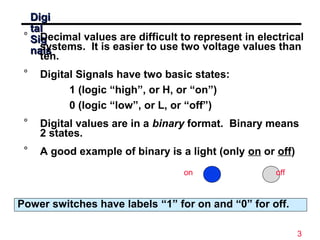
° Decimal values are difficult to represent in electrical
systems. It is easier to use two voltage values than
ten.
° Digital Signals have two basic states:
1 (logic “high”, or H, or “on”)
0 (logic “low”, or L, or “off”)
° Digital values are in a binary format. Binary means
2 states.
° A good example of binary is a light (only on or off)
on off
Power switches have labels “1” for on and “0” for off.
4
Digital Logic Design
° Bits and Pieces of DLD History
° George Boole
- Mathematical Analysis of Logic (1847)
- An Investigation of Laws of Thoughts; Mathematical
Theories of Logic and Probabilities (1854)
° Claude Shannon
- Rediscovered the Boole
- “ A Symbolic Analysis of Relay and Switching Circuits “
- Boolean Logic and Boolean Algebra were Applied to Digital
Circuitry
---------- Beginning of the Digital Age and/or Computer Age
World War II
Computers as Calculating Machines
Arlington (State Machines) “ Control “
5
Motivation
° Microprocessors/Microelectronics have
revolutionized our world
• Cell phones, internet, rapid advances in medicine, etc.
° The semiconductor industry has grown tremendously
6
Objectives
° Number System, Their Uses, Conversions
° Basic Building Blocks of Digital System
° Minimization
° Combinational And Sequential Logic
° Digital System/Circuit Analysis and Design
° State Minimizations
° Integrated Circuits
° Simulations
7
Text Book
° Primary Text:
“Digital Design” By M. Morris Mano and Michael D.
Ciletti
° Complementary Material
“Logic and Computer Design Fundamentals” By M.
Morris Mano & Charles R Kime.
8
Digital Logic Design
Lecture 1
Number Systems
9
Number Systems
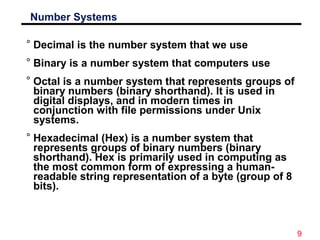
° Decimal is the number system that we use
° Binary is a number system that computers use
° Octal is a number system that represents groups of
binary numbers (binary shorthand). It is used in
digital displays, and in modern times in
conjunction with file permissions under Unix
systems.
° Hexadecimal (Hex) is a number system that
represents groups of binary numbers (binary
shorthand). Hex is primarily used in computing as
the most common form of expressing a human-
readable string representation of a byte (group of 8
bits).
10
Overvie
w
° The design of computers
• It all starts with numbers
• Building circuits
• Building computing machines
° Digital systems
° Understanding decimal numbers
° Binary and octal numbers
• The basis of computers!
° Conversion between different number systems
11
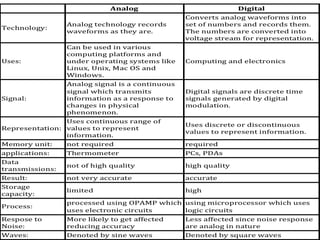
Analog vs. Digital
Consider a faucet
Digital
Water can be flowing or NOT flowing
from the faucet
Two States
• On
• Off
Analog
How much water is flowing from the
faucet?
Advantages of Digital
Replication
• Analog
Try replicating the exact flow
from a faucet
• Digital
12
Advantages of Digital
o Error Correction/Detection
• Small errors don’t propagate
o Miniaturization of Circuits
o Programmability
• Digital computers are programmable
°Two discrete values are used in digital systems.
°How are discrete elements represented?
• Signals are the physical quantities used to represent discrete
elements of information in a digital system.
°Electric signals used:
• Voltage
• Current
13
Advantages of Digital/Representation of Binary Values
Volts
- 1 .0
0 .0
1 .0
2 .0
3 .0
4 .0
5 .0
6 .0
H ig h
L o w
°Why are there voltage ranges instead
of exact voltages?
• Variations in circuit behavior & noise
oTwo possible values
• 1, 0
• On, Off
• True, False
• High, Low
• Heads, Tails
• Black, White
14
15
Digital Computer Systems
° Digital systems consider discrete amounts of data.
° Examples
• 26 letters in the alphabet
• 10 decimal digits
° Larger quantities can be built from discrete values:
• Words made of letters
• Numbers made of decimal digits (e.g. 239875.32)
° Computers operate on binary values (0 and 1)
° Easy to represent binary values electrically
• Voltages and currents.
• Can be implemented using circuits
• Create the building blocks of modern computers
16
Understanding Decimal Numbers
° Decimal numbers are made of decimal digits:
(0,1,2,3,4,5,6,7,8,9)
° But how many items does a decimal number
represent?
• 8653 = 8x10³
+ 6x10² +
5x101 +
3x100
° What about fractions?
• 97654.35 = 9x10⁴
+ 7x10³ +
6x10² +
5x101 +
4x100
+ 3x10⁻¹ +
5x10⁻²
• In formal notation -> (97654.35)10
° Why do we use 10 digits, anyway?
17
Understanding Octal
Numbers
° Octal numbers are made of octal digits:
(0,1,2,3,4,5,6,7)
° How many items does an octal number represent?
• (4536)8 = 4x83
+ 5x82 +
3x81 +
6x80
= (1362)10
° What about fractions?
• (465.27)8 = 4x82 +
6x81 +
5x80
+ 2x8-1 +
7x8-2
° Octal numbers don’t use digits 8 or 9
° Who would use octal number, anyway?
18
Understanding Binary Numbers
° Binary numbers are made of binary digits (bits):
• 0 and 1
° How many items does an binary number represent?
• (1011)2 = 1x23
+ 0x22 +
1x21 +
1x20
= (11)10
° What about fractions?
• (110.10)2 = 1x22 +
1x21 +
0x20
+ 1x2-1 +
0x2-2
° Groups of eight bits are called a byte
• (11001001) 2
° Groups of four bits are called a nibble.
• (1101) 2
19
Why Use Binary Numbers?
° Easy to represent 0 and 1 using
electrical values.
° Possible to tolerate noise.
° Easy to transmit data
° Easy to build binary circuits.
AND Gate
1
0
0
20
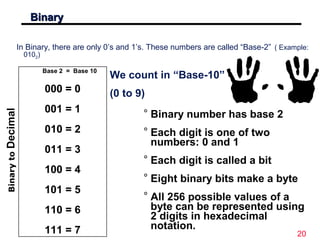
BinaryBinary
Base 2 = Base 10
000 = 0
001 = 1
010 = 2
011 = 3
100 = 4
101 = 5
110 = 6
111 = 7
In Binary, there are only 0’s and 1’s. These numbers are called “Base-2” ( Example:
0102)
BinarytoDecimal
We count in “Base-10”
(0 to 9)
° Binary number has base 2
° Each digit is one of two
numbers: 0 and 1
° Each digit is called a bit
° Eight binary bits make a byte
° All 256 possible values of a
byte can be represented using
2 digits in hexadecimal
notation.
21
Binary as a VoltageBinary as a Voltage
° Voltages are used to represent logic values:
° A voltage present (called Vcc or Vdd) = 1
° Zero Volts or ground (called gnd or Vss) = 0
A simple switch can provide a logic high or a logic low.
22
A Simple SwitchA Simple Switch
° Here is a simple switch used to provide a logic value:
Vcc
Gnd, or 0
Vcc
Vcc, or 1
There are other ways to connect a switch.
23
Binary digits
Bit: single binary digit
Byte: 8 binary digits
100101112
Bit
Byte
Radix
24
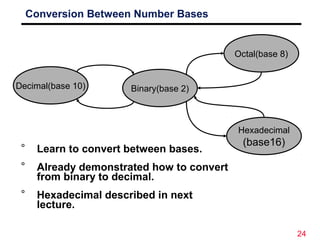
Conversion Between Number Bases
Decimal(base 10)
Octal(base 8)
Binary(base 2)
Hexadecimal
(base16)
° Learn to convert between bases.
° Already demonstrated how to convert
from binary to decimal.
° Hexadecimal described in next
lecture.
25
Number Systems
System Base Symbols
Used by
humans?
Used in
computers?
Decimal 10 0, 1, … 9 Yes No
Binary 2 0, 1 No Yes
Octal 8 0, 1, … 7 No No
Hexa-
decimal
16 0, 1, … 9,
A, B, … F
No No
26
Con
ver
sio
n
Am
ong
Bas
es
The possibilities:
Hexadecimal
Decimal Octal
Binary
27
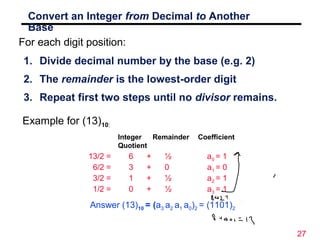
Convert an Integer from Decimal to Another
Base
1. Divide decimal number by the base (e.g. 2)
2. The remainder is the lowest-order digit
3. Repeat first two steps until no divisor remains.
For each digit position:
Example for (13)10:
Integer
Quotient
13/2 = 6 + ½ a0 = 1
6/2 = 3 + 0 a1 = 0
3/2 = 1 + ½ a2 = 1
1/2 = 0 + ½ a3 = 1
Remainder Coefficient
Answer (13)10 = (a3 a2 a1 a0)2 = (1101)2
28
Convert an Fraction from Decimal to Another
Base
1. Multiply decimal number by the base (e.g. 2)
2. The integer is the highest-order digit
3. Repeat first two steps until fraction becomes
zero.
For each digit position:
Example for (0.625)10:
Integer
0.625 x 2 = 1 + 0.25 a-1 = 1
0.250 x 2 = 0 + 0.50 a-2 = 0
0.500 x 2 = 1 + 0 a-3 = 1
Fraction Coefficient
Answer (0.625)10 = (0.a-1 a-2 a-3 )2 = (0.101)2
29
The Growth of Binary
Numbersn 2n
0 20
=1
1 21
=2
2 22
=4
3 23
=8
4 24
=16
5 25
=32
6 26
=64
7 27
=128
n 2n
8 28
=256
9 29
=512
10 210
=1024
11 211
=2048
12 212
=4096
20 220
=1M
30 230
=1G
40 240
=1T
Mega
Giga
Tera
30
Binary
Addition
° Binary addition is very simple.
° This is best shown in an example of adding two
binary numbers…
1 1 1 1 0 1
+ 1 0 1 1 1
---------------------
0
1
0
1
1
1111
1 1 00
carries
31
Binary Subtraction
° We can also perform subtraction (with borrows in place of
carries).
° Let’s subtract (10111)2 from (1001101)2…
1 10
0 10 10 0 0 10
1 0 0 1 1 0 1
- 1 0 1 1 1
------------------------
1 1 0 1 1 0
borrows
32
Binary
Multiplication
° Binary multiplication is much the same as decimal
multiplication, except that the multiplication
operations are much simpler…
1 0 1 1 1
X 1 0 1 0
-----------------------
0 0 0 0 0
1 0 1 1 1
0 0 0 0 0
1 0 1 1 1
-----------------------
1 1 1 0 0 1 1 0
33
Convert an Integer from Decimal to
Octal
1. Divide decimal number by the base (8)
2. The remainder is the lowest-order digit
3. Repeat first two steps until no divisor remains.
For each digit position:
Example for (175)10:
Integer
Quotient
175/8 = 21 + 7/8 a0 = 7
21/8 = 2 + 5/8 a1 = 5
2/8 = 0 + 2/8 a2 = 2
Remainder Coefficient
Answer (175)10 = (a2 a1 a0)2 = (257)8
34
Convert an Fraction from Decimal to
Octal
1. Multiply decimal number by the base (e.g. 8)
2. The integer is the highest-order digit
3. Repeat first two steps until fraction becomes
zero.
For each digit position:
Example for (0.3125)10:
Integer
0.3125 x 8 = 2 + 5 a-1 = 2
0.5000 x 8 = 4 + 0 a-2 = 4
Fraction Coefficient
Answer (0.3125)10 = (0.24)8
35
Summary
° Binary numbers are made of binary digits (bits)
° Binary and octal number systems
° Conversion between number systems
° Addition, subtraction, and multiplication in binary

digital logic design number system

  • 1.
  • 2.
    2 Digital Logic Design °Digital - Concerned with the interconnection among digital components and modules » Best Digital System example is General Purpose Computer ° Logic Design - Deals with the basic concepts and tools used to design digital hardware consisting of logic circuits » Circuits to perform arithmetic operations (+, -, x, ÷)
  • 3.
    3 DigiDigi taltal SigSig nalsnals ° Decimal valuesare difficult to represent in electrical systems. It is easier to use two voltage values than ten. ° Digital Signals have two basic states: 1 (logic “high”, or H, or “on”) 0 (logic “low”, or L, or “off”) ° Digital values are in a binary format. Binary means 2 states. ° A good example of binary is a light (only on or off) on off Power switches have labels “1” for on and “0” for off.
  • 4.
    4 Digital Logic Design °Bits and Pieces of DLD History ° George Boole - Mathematical Analysis of Logic (1847) - An Investigation of Laws of Thoughts; Mathematical Theories of Logic and Probabilities (1854) ° Claude Shannon - Rediscovered the Boole - “ A Symbolic Analysis of Relay and Switching Circuits “ - Boolean Logic and Boolean Algebra were Applied to Digital Circuitry ---------- Beginning of the Digital Age and/or Computer Age World War II Computers as Calculating Machines Arlington (State Machines) “ Control “
  • 5.
    5 Motivation ° Microprocessors/Microelectronics have revolutionizedour world • Cell phones, internet, rapid advances in medicine, etc. ° The semiconductor industry has grown tremendously
  • 6.
    6 Objectives ° Number System,Their Uses, Conversions ° Basic Building Blocks of Digital System ° Minimization ° Combinational And Sequential Logic ° Digital System/Circuit Analysis and Design ° State Minimizations ° Integrated Circuits ° Simulations
  • 7.
    7 Text Book ° PrimaryText: “Digital Design” By M. Morris Mano and Michael D. Ciletti ° Complementary Material “Logic and Computer Design Fundamentals” By M. Morris Mano & Charles R Kime.
  • 8.
  • 9.
    9 Number Systems ° Decimalis the number system that we use ° Binary is a number system that computers use ° Octal is a number system that represents groups of binary numbers (binary shorthand). It is used in digital displays, and in modern times in conjunction with file permissions under Unix systems. ° Hexadecimal (Hex) is a number system that represents groups of binary numbers (binary shorthand). Hex is primarily used in computing as the most common form of expressing a human- readable string representation of a byte (group of 8 bits).
  • 10.
    10 Overvie w ° The designof computers • It all starts with numbers • Building circuits • Building computing machines ° Digital systems ° Understanding decimal numbers ° Binary and octal numbers • The basis of computers! ° Conversion between different number systems
  • 11.
    11 Analog vs. Digital Considera faucet Digital Water can be flowing or NOT flowing from the faucet Two States • On • Off Analog How much water is flowing from the faucet? Advantages of Digital Replication • Analog Try replicating the exact flow from a faucet • Digital
  • 12.
    12 Advantages of Digital oError Correction/Detection • Small errors don’t propagate o Miniaturization of Circuits o Programmability • Digital computers are programmable °Two discrete values are used in digital systems. °How are discrete elements represented? • Signals are the physical quantities used to represent discrete elements of information in a digital system. °Electric signals used: • Voltage • Current
  • 13.
    13 Advantages of Digital/Representationof Binary Values Volts - 1 .0 0 .0 1 .0 2 .0 3 .0 4 .0 5 .0 6 .0 H ig h L o w °Why are there voltage ranges instead of exact voltages? • Variations in circuit behavior & noise oTwo possible values • 1, 0 • On, Off • True, False • High, Low • Heads, Tails • Black, White
  • 14.
  • 15.
    15 Digital Computer Systems °Digital systems consider discrete amounts of data. ° Examples • 26 letters in the alphabet • 10 decimal digits ° Larger quantities can be built from discrete values: • Words made of letters • Numbers made of decimal digits (e.g. 239875.32) ° Computers operate on binary values (0 and 1) ° Easy to represent binary values electrically • Voltages and currents. • Can be implemented using circuits • Create the building blocks of modern computers
  • 16.
    16 Understanding Decimal Numbers °Decimal numbers are made of decimal digits: (0,1,2,3,4,5,6,7,8,9) ° But how many items does a decimal number represent? • 8653 = 8x10³ + 6x10² + 5x101 + 3x100 ° What about fractions? • 97654.35 = 9x10⁴ + 7x10³ + 6x10² + 5x101 + 4x100 + 3x10⁻¹ + 5x10⁻² • In formal notation -> (97654.35)10 ° Why do we use 10 digits, anyway?
  • 17.
    17 Understanding Octal Numbers ° Octalnumbers are made of octal digits: (0,1,2,3,4,5,6,7) ° How many items does an octal number represent? • (4536)8 = 4x83 + 5x82 + 3x81 + 6x80 = (1362)10 ° What about fractions? • (465.27)8 = 4x82 + 6x81 + 5x80 + 2x8-1 + 7x8-2 ° Octal numbers don’t use digits 8 or 9 ° Who would use octal number, anyway?
  • 18.
    18 Understanding Binary Numbers °Binary numbers are made of binary digits (bits): • 0 and 1 ° How many items does an binary number represent? • (1011)2 = 1x23 + 0x22 + 1x21 + 1x20 = (11)10 ° What about fractions? • (110.10)2 = 1x22 + 1x21 + 0x20 + 1x2-1 + 0x2-2 ° Groups of eight bits are called a byte • (11001001) 2 ° Groups of four bits are called a nibble. • (1101) 2
  • 19.
    19 Why Use BinaryNumbers? ° Easy to represent 0 and 1 using electrical values. ° Possible to tolerate noise. ° Easy to transmit data ° Easy to build binary circuits. AND Gate 1 0 0
  • 20.
    20 BinaryBinary Base 2 =Base 10 000 = 0 001 = 1 010 = 2 011 = 3 100 = 4 101 = 5 110 = 6 111 = 7 In Binary, there are only 0’s and 1’s. These numbers are called “Base-2” ( Example: 0102) BinarytoDecimal We count in “Base-10” (0 to 9) ° Binary number has base 2 ° Each digit is one of two numbers: 0 and 1 ° Each digit is called a bit ° Eight binary bits make a byte ° All 256 possible values of a byte can be represented using 2 digits in hexadecimal notation.
  • 21.
    21 Binary as aVoltageBinary as a Voltage ° Voltages are used to represent logic values: ° A voltage present (called Vcc or Vdd) = 1 ° Zero Volts or ground (called gnd or Vss) = 0 A simple switch can provide a logic high or a logic low.
  • 22.
    22 A Simple SwitchASimple Switch ° Here is a simple switch used to provide a logic value: Vcc Gnd, or 0 Vcc Vcc, or 1 There are other ways to connect a switch.
  • 23.
    23 Binary digits Bit: singlebinary digit Byte: 8 binary digits 100101112 Bit Byte Radix
  • 24.
    24 Conversion Between NumberBases Decimal(base 10) Octal(base 8) Binary(base 2) Hexadecimal (base16) ° Learn to convert between bases. ° Already demonstrated how to convert from binary to decimal. ° Hexadecimal described in next lecture.
  • 25.
    25 Number Systems System BaseSymbols Used by humans? Used in computers? Decimal 10 0, 1, … 9 Yes No Binary 2 0, 1 No Yes Octal 8 0, 1, … 7 No No Hexa- decimal 16 0, 1, … 9, A, B, … F No No
  • 26.
  • 27.
    27 Convert an Integerfrom Decimal to Another Base 1. Divide decimal number by the base (e.g. 2) 2. The remainder is the lowest-order digit 3. Repeat first two steps until no divisor remains. For each digit position: Example for (13)10: Integer Quotient 13/2 = 6 + ½ a0 = 1 6/2 = 3 + 0 a1 = 0 3/2 = 1 + ½ a2 = 1 1/2 = 0 + ½ a3 = 1 Remainder Coefficient Answer (13)10 = (a3 a2 a1 a0)2 = (1101)2
  • 28.
    28 Convert an Fractionfrom Decimal to Another Base 1. Multiply decimal number by the base (e.g. 2) 2. The integer is the highest-order digit 3. Repeat first two steps until fraction becomes zero. For each digit position: Example for (0.625)10: Integer 0.625 x 2 = 1 + 0.25 a-1 = 1 0.250 x 2 = 0 + 0.50 a-2 = 0 0.500 x 2 = 1 + 0 a-3 = 1 Fraction Coefficient Answer (0.625)10 = (0.a-1 a-2 a-3 )2 = (0.101)2
  • 29.
    29 The Growth ofBinary Numbersn 2n 0 20 =1 1 21 =2 2 22 =4 3 23 =8 4 24 =16 5 25 =32 6 26 =64 7 27 =128 n 2n 8 28 =256 9 29 =512 10 210 =1024 11 211 =2048 12 212 =4096 20 220 =1M 30 230 =1G 40 240 =1T Mega Giga Tera
  • 30.
    30 Binary Addition ° Binary additionis very simple. ° This is best shown in an example of adding two binary numbers… 1 1 1 1 0 1 + 1 0 1 1 1 --------------------- 0 1 0 1 1 1111 1 1 00 carries
  • 31.
    31 Binary Subtraction ° Wecan also perform subtraction (with borrows in place of carries). ° Let’s subtract (10111)2 from (1001101)2… 1 10 0 10 10 0 0 10 1 0 0 1 1 0 1 - 1 0 1 1 1 ------------------------ 1 1 0 1 1 0 borrows
  • 32.
    32 Binary Multiplication ° Binary multiplicationis much the same as decimal multiplication, except that the multiplication operations are much simpler… 1 0 1 1 1 X 1 0 1 0 ----------------------- 0 0 0 0 0 1 0 1 1 1 0 0 0 0 0 1 0 1 1 1 ----------------------- 1 1 1 0 0 1 1 0
  • 33.
    33 Convert an Integerfrom Decimal to Octal 1. Divide decimal number by the base (8) 2. The remainder is the lowest-order digit 3. Repeat first two steps until no divisor remains. For each digit position: Example for (175)10: Integer Quotient 175/8 = 21 + 7/8 a0 = 7 21/8 = 2 + 5/8 a1 = 5 2/8 = 0 + 2/8 a2 = 2 Remainder Coefficient Answer (175)10 = (a2 a1 a0)2 = (257)8
  • 34.
    34 Convert an Fractionfrom Decimal to Octal 1. Multiply decimal number by the base (e.g. 8) 2. The integer is the highest-order digit 3. Repeat first two steps until fraction becomes zero. For each digit position: Example for (0.3125)10: Integer 0.3125 x 8 = 2 + 5 a-1 = 2 0.5000 x 8 = 4 + 0 a-2 = 4 Fraction Coefficient Answer (0.3125)10 = (0.24)8
  • 35.
    35 Summary ° Binary numbersare made of binary digits (bits) ° Binary and octal number systems ° Conversion between number systems ° Addition, subtraction, and multiplication in binary

Editor's Notes

  • #2 Give qualifications of instructors: DAP teaching computer architecture at Berkeley since 1977 Co-athor of textbook used in class Best known for being one of pioneers of RISC currently author of article on future of microprocessors in SciAm Sept 1995 RY took 152 as student, TAed 152,instructor in 152 undergrad and grad work at Berkeley joined NextGen to design fact 80x86 microprocessors one of architects of UltraSPARC fastest SPARC mper shipping this Fall
  • #9 Give qualifications of instructors: DAP teaching computer architecture at Berkeley since 1977 Co-athor of textbook used in class Best known for being one of pioneers of RISC currently author of article on future of microprocessors in SciAm Sept 1995 RY took 152 as student, TAed 152,instructor in 152 undergrad and grad work at Berkeley joined NextGen to design fact 80x86 microprocessors one of architects of UltraSPARC fastest SPARC mper shipping this Fall
  • #11 credential: bring a computer die photo wafer : This can be an hidden slide. I just want to use this to do my own planning. I have rearranged Culler’s lecture slides slightly and add more slides. This covers everything he covers in his first lecture (and more) but may We will save the fun part, “ Levels of Organization,” at the end (so student can stay awake): I will show the internal stricture of the SS10/20. Notes to Patterson: You may want to edit the slides in your section or add extra slides to taylor your needs.
  • #16 credential: bring a computer die photo wafer : This can be an hidden slide. I just want to use this to do my own planning. I have rearranged Culler’s lecture slides slightly and add more slides. This covers everything he covers in his first lecture (and more) but may We will save the fun part, “ Levels of Organization,” at the end (so student can stay awake): I will show the internal stricture of the SS10/20. Notes to Patterson: You may want to edit the slides in your section or add extra slides to taylor your needs.
  • #17 credential: bring a computer die photo wafer : This can be an hidden slide. I just want to use this to do my own planning. I have rearranged Culler’s lecture slides slightly and add more slides. This covers everything he covers in his first lecture (and more) but may We will save the fun part, “ Levels of Organization,” at the end (so student can stay awake): I will show the internal stricture of the SS10/20. Notes to Patterson: You may want to edit the slides in your section or add extra slides to taylor your needs.
  • #18 credential: bring a computer die photo wafer : This can be an hidden slide. I just want to use this to do my own planning. I have rearranged Culler’s lecture slides slightly and add more slides. This covers everything he covers in his first lecture (and more) but may We will save the fun part, “ Levels of Organization,” at the end (so student can stay awake): I will show the internal stricture of the SS10/20. Notes to Patterson: You may want to edit the slides in your section or add extra slides to taylor your needs.
  • #19 credential: bring a computer die photo wafer : This can be an hidden slide. I just want to use this to do my own planning. I have rearranged Culler’s lecture slides slightly and add more slides. This covers everything he covers in his first lecture (and more) but may We will save the fun part, “ Levels of Organization,” at the end (so student can stay awake): I will show the internal stricture of the SS10/20. Notes to Patterson: You may want to edit the slides in your section or add extra slides to taylor your needs.
  • #31 Design state of art organization in 1990
  • #32 Design state of art organization in 1990
  • #33 Design state of art organization in 1990
  • #36 credential: bring a computer die photo wafer : This can be an hidden slide. I just want to use this to do my own planning. I have rearranged Culler’s lecture slides slightly and add more slides. This covers everything he covers in his first lecture (and more) but may We will save the fun part, “ Levels of Organization,” at the end (so student can stay awake): I will show the internal stricture of the SS10/20. Notes to Patterson: You may want to edit the slides in your section or add extra slides to taylor your needs.