Dr. Krishnanaik VankdothDr. Krishnanaik Vankdoth
B.E(ECE), M.Tech (ECE), Ph.D (ECE)B.E(ECE), M.Tech (ECE), Ph.D (ECE)
Professor in ECE Dept
Vaagdevi college of Engineering
Warangal – 506001
DLD - DIGITAL LOGIC DESIGNDLD - DIGITAL LOGIC DESIGN
1krishnanaik.ece@gmail.com
BooksBooks
1.1. ““ Digital Design”Digital Design” By M. Morris Mano and Michael D.Ciletti
2.2. Logical Design and ApplicationLogical Design and Application By Dr. KrishnanaikBy Dr. Krishnanaik
Vankdoth LAP LAMBERT Academic PublishingVankdoth LAP LAMBERT Academic Publishing
Dnfscland/Germany – 2014Dnfscland/Germany – 2014
3. Complementary Material “ Logic and Computer Design
Fundamentals ” By M. Morris Mano & Charles R Kime.
2
Digital Systems and Binary Numbers
DLD - DIGITAL LOGIC DESIGNDLD - DIGITAL LOGIC DESIGN
3Dr. V. Krishnanaik Ph.D
• Digital
• Concerned with the interconnection among digital components and modules
» Best Digital System example is General Purpose
Computer
• Logic Design
• Deals with the basic concepts and tools used to design digital hardware
consisting of logic circuits
» Circuits to perform arithmetic operations (+, -, x, ÷)
4
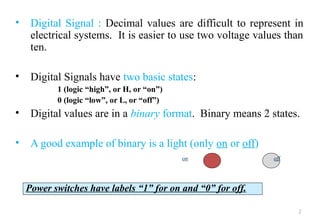
• Digital Signal : Decimal values are difficult to represent in
electrical systems. It is easier to use two voltage values than
ten.
• Digital Signals have two basic states:
1 (logic “high”, or H, or “on”)
0 (logic “low”, or L, or “off”)
• Digital values are in a binary format. Binary means 2 states.
• A good example of binary is a light (only on or off)
on off
Power switches have labels “1” for on and “0” for off.
5
• Bits and Pieces of DLD History
• George Boole
• Mathematical Analysis of Logic (1847)
• An Investigation of Laws of Thoughts; Mathematical Theories of Logic and
Probabilities (1854)
• Claude Shannon
• Rediscovered the Boole
• “ A Symbolic Analysis of Relay and Switching Circuits “
• Boolean Logic and Boolean Algebra were Applied to Digital Circuitry
---------- Beginning of the Digital Age and/or Computer Age
World War II
Computers as Calculating Machines
Arlington (State Machines) “ Control “
6
Motivation
• Microprocessors/Microelectronics have revolutionized our
world
– Cell phones, internet, rapid advances in medicine, etc.
• The semiconductor industry has grown tremendously
7
Digital Systems and Binary Numbers
 Digital age and information age
 Digital computers
– General purposes
– Many scientific, industrial and commercial applications
• Digital systems
– Telephone switching exchanges
– Digital camera
– Electronic calculators, PDA's
– Digital TV
• Discrete information-processing systems
– Manipulate discrete elements of information
– For example, {1, 2, 3, …} and {A, B, C, …}…
8
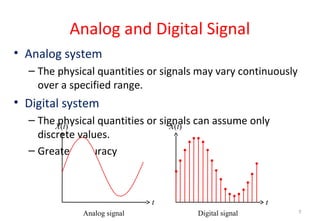
Analog and Digital Signal
• Analog system
– The physical quantities or signals may vary continuously
over a specified range.
• Digital system
– The physical quantities or signals can assume only
discrete values.
– Greater accuracy
t
X(t)
t
X(t)
Analog signal Digital signal 9
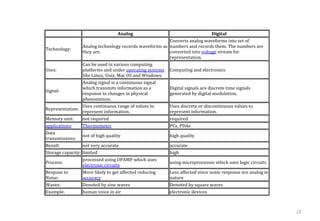
10
Analog Digital
Technology:
Analog technology records waveforms as
they are.
Converts analog waveforms into set of
numbers and records them. The numbers are
converted into voltage stream for
representation.
Uses:
Can be used in various computing
platforms and under operating systems
like Linux, Unix, Mac OS and Windows.
Computing and electronics
Signal:
Analog signal is a continuous signal
which transmits information as a
response to changes in physical
phenomenon.
Digital signals are discrete time signals
generated by digital modulation.
Representation:
Uses continuous range of values to
represent information.
Uses discrete or discontinuous values to
represent information.
Memory unit: not required required
applications: Thermometer PCs, PDAs
Data
transmissions:
not of high quality high quality
Result: not very accurate accurate
Storage capacity: limited high
Process:
processed using OPAMP which uses
electronic circuits
using microprocessor which uses logic circuits
Respose to
Noise:
More likely to get affected reducing
accuracy
Less affected since noise response are analog in
nature
Waves: Denoted by sine waves Denoted by square waves
Example: human voice in air electronic devices
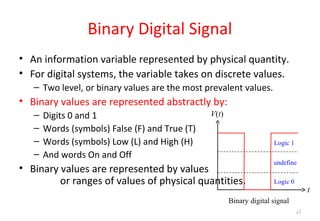
Binary Digital Signal
• An information variable represented by physical quantity.
• For digital systems, the variable takes on discrete values.
– Two level, or binary values are the most prevalent values.
• Binary values are represented abstractly by:
– Digits 0 and 1
– Words (symbols) False (F) and True (T)
– Words (symbols) Low (L) and High (H)
– And words On and Off
• Binary values are represented by values
or ranges of values of physical quantities.
t
V(t)
Binary digital signal
Logic 1
Logic 0
undefine
11
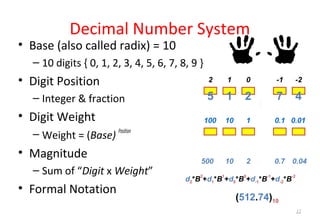
Decimal Number System
• Base (also called radix) = 10
– 10 digits { 0, 1, 2, 3, 4, 5, 6, 7, 8, 9 }
• Digit Position
– Integer & fraction
• Digit Weight
– Weight = (Base)
Position
• Magnitude
– Sum of “Digit x Weight”
• Formal Notation
1 0 -12 -2
5 1 2 7 4
10 1 0.1100 0.01
500 10 2 0.7 0.04
d2*B
2
+d1*B
1
+d0*B
0
+d-1*B
-1
+d-2*B
-2
(512.74)10
12
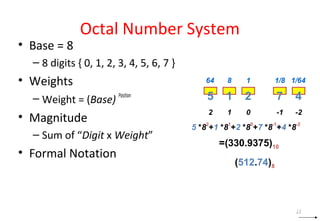
Octal Number System
• Base = 8
– 8 digits { 0, 1, 2, 3, 4, 5, 6, 7 }
• Weights
– Weight = (Base)
Position
• Magnitude
– Sum of “Digit x Weight”
• Formal Notation
1 0 -12 -2
8 1 1/864 1/64
5 1 2 7 4
5 *8
2
+1 *8
1
+2 *8
0
+7 *8
-1
+4 *8
-2
=(330.9375)10
(512.74)8
13
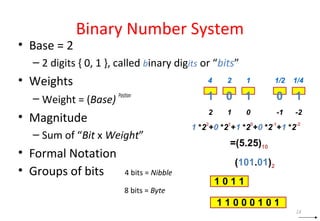
Binary Number System
• Base = 2
– 2 digits { 0, 1 }, called binary digits or “bits”
• Weights
– Weight = (Base)
Position
• Magnitude
– Sum of “Bit x Weight”
• Formal Notation
• Groups of bits 4 bits = Nibble
8 bits = Byte
1 0 -12 -2
2 1 1/24 1/4
1 0 1 0 1
1 *2
2
+0 *2
1
+1 *2
0
+0 *2
-1
+1 *2
-2
=(5.25)10
(101.01)2
1 0 1 1
1 1 0 0 0 1 0 1
14
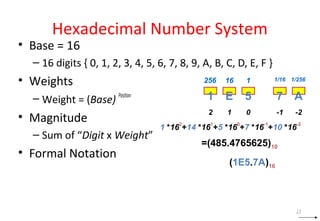
Hexadecimal Number System
• Base = 16
– 16 digits { 0, 1, 2, 3, 4, 5, 6, 7, 8, 9, A, B, C, D, E, F }
• Weights
– Weight = (Base)
Position
• Magnitude
– Sum of “Digit x Weight”
• Formal Notation
1 0 -12 -2
16 1 1/16256 1/256
1 E 5 7 A
1 *16
2
+14 *16
1
+5 *16
0
+7 *16
-1
+10 *16
-2
=(485.4765625)10
(1E5.7A)16
15
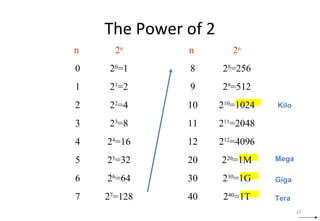
The Power of 2
n 2n
0 20
=1
1 21
=2
2 22
=4
3 23
=8
4 24
=16
5 25
=32
6 26
=64
7 27
=128
n 2n
8 28
=256
9 29
=512
10 210
=1024
11 211
=2048
12 212
=4096
20 220
=1M
30 230
=1G
40 240
=1T
Mega
Giga
Tera
Kilo
16
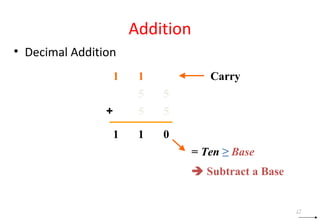
Addition
• Decimal Addition
5 5
55+
011
= Ten ≥ Base
 Subtract a Base
11 Carry
17
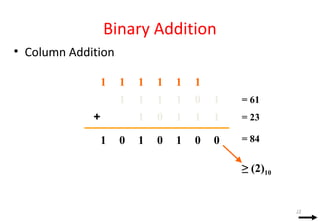
Binary Addition
• Column Addition
1 0 1111
1111 0+
0000 1 11
≥ (2)10
111111
= 61
= 23
= 84
18
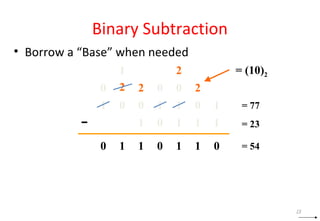
Binary Subtraction
• Borrow a “Base” when needed
0 0 1110
1111 0−
0101 1 10
= (10)2
2
2
2 2
1
000
1
= 77
= 23
= 54
19
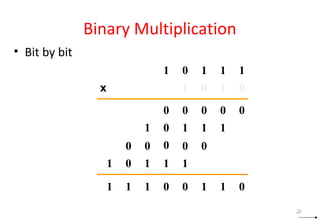
Binary Multiplication
• Bit by bit
01 1 1 1
01 1 0
00 0 0 0
01 1 1 1
01 1 1 1
0 0 000
0110111 0
x
20
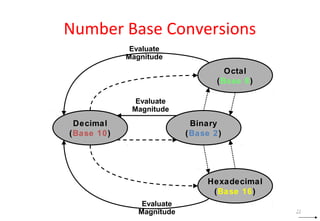
Number Base Conversions
Decimal
(Base 10)
Octal
(Base 8)
Binary
(Base 2)
Hexadecimal
(Base 16)
Evaluate
Magnitude
Evaluate
Magnitude
Evaluate
Magnitude 21
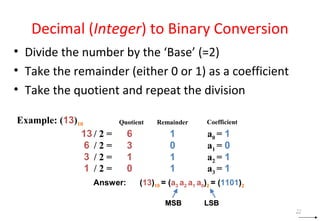
Decimal (Integer) to Binary Conversion
• Divide the number by the ‘Base’ (=2)
• Take the remainder (either 0 or 1) as a coefficient
• Take the quotient and repeat the division
Example: (13)10 Quotient Remainder Coefficient
Answer: (13)10 = (a3 a2 a1 a0)2 = (1101)2
MSB LSBMSB LSB
13 / 2 = 6 1 a0 = 1
6 / 2 = 3 0 a1 = 0
3 / 2 = 1 1 a2 = 1
1 / 2 = 0 1 a3 = 1
22
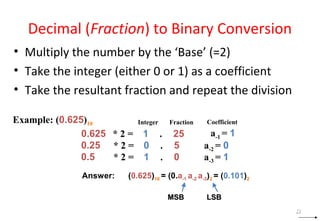
Decimal (Fraction) to Binary Conversion
• Multiply the number by the ‘Base’ (=2)
• Take the integer (either 0 or 1) as a coefficient
• Take the resultant fraction and repeat the division
Example: (0.625)10 Integer Fraction Coefficient
Answer: (0.625)10 = (0.a-1 a-2 a-3)2 = (0.101)2
MSB LSBMSB LSB
0.625 * 2 = 1 . 25
0.25 * 2 = 0 . 5 a-2 = 0
0.5 * 2 = 1 . 0 a-3 = 1
a-1 = 1
23
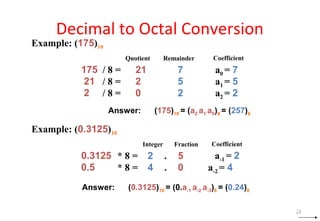
Decimal to Octal Conversion
Example: (175)10
Quotient Remainder Coefficient
Answer: (175)10 = (a2 a1 a0)8 = (257)8
175 / 8 = 21 7 a0 = 7
21 / 8 = 2 5 a1 = 5
2 / 8 = 0 2 a2 = 2
Example: (0.3125)10
Integer Fraction Coefficient
Answer: (0.3125)10 = (0.a-1 a-2 a-3)8 = (0.24)8
0.3125 * 8 = 2 . 5
0.5 * 8 = 4 . 0 a-2 = 4
a-1 = 2
24
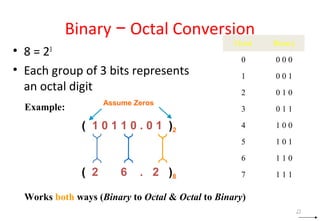
Binary − Octal Conversion
• 8 = 23
• Each group of 3 bits represents
an octal digit
Octal Binary
0 0 0 0
1 0 0 1
2 0 1 0
3 0 1 1
4 1 0 0
5 1 0 1
6 1 1 0
7 1 1 1
Example:
( 1 0 1 1 0 . 0 1 )2
( 2 6 . 2 )8
Assume Zeros
Works both ways (Binary to Octal & Octal to Binary)
25
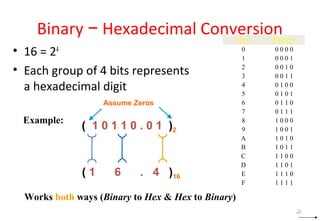
Binary − Hexadecimal Conversion
• 16 = 24
• Each group of 4 bits represents
a hexadecimal digit
Hex Binary
0 0 0 0 0
1 0 0 0 1
2 0 0 1 0
3 0 0 1 1
4 0 1 0 0
5 0 1 0 1
6 0 1 1 0
7 0 1 1 1
8 1 0 0 0
9 1 0 0 1
A 1 0 1 0
B 1 0 1 1
C 1 1 0 0
D 1 1 0 1
E 1 1 1 0
F 1 1 1 1
Example:
( 1 0 1 1 0 . 0 1 )2
( 1 6 . 4 )16
Assume Zeros
Works both ways (Binary to Hex & Hex to Binary)
26
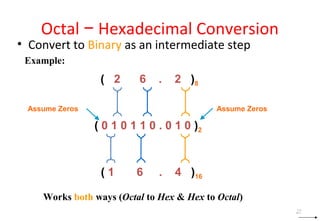
Octal − Hexadecimal Conversion
• Convert to Binary as an intermediate step
Example:
( 0 1 0 1 1 0 . 0 1 0 )2
( 1 6 . 4 )16
Assume Zeros
Works both ways (Octal to Hex & Hex to Octal)
( 2 6 . 2 )8
Assume Zeros
27
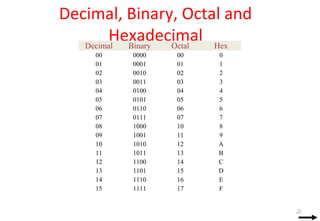
Decimal, Binary, Octal and
HexadecimalDecimal Binary Octal Hex
00 0000 00 0
01 0001 01 1
02 0010 02 2
03 0011 03 3
04 0100 04 4
05 0101 05 5
06 0110 06 6
07 0111 07 7
08 1000 10 8
09 1001 11 9
10 1010 12 A
11 1011 13 B
12 1100 14 C
13 1101 15 D
14 1110 16 E
15 1111 17 F
28
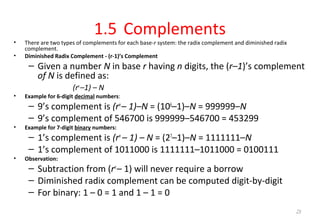
1.5 Complements
• There are two types of complements for each base-r system: the radix complement and diminished radix
complement.
• Diminished Radix Complement - (r-1)’s Complement
– Given a number N in base r having n digits, the (r–1)’s complement
of N is defined as:
(rn
–1) – N
• Example for 6-digit decimal numbers:
– 9’s complement is (rn
– 1)–N = (106
–1)–N = 999999–N
– 9’s complement of 546700 is 999999–546700 = 453299
• Example for 7-digit binary numbers:
– 1’s complement is (rn
– 1) – N = (27
–1)–N = 1111111–N
– 1’s complement of 1011000 is 1111111–1011000 = 0100111
• Observation:
– Subtraction from (rn
– 1) will never require a borrow
– Diminished radix complement can be computed digit-by-digit
– For binary: 1 – 0 = 1 and 1 – 1 = 0
29
Complements
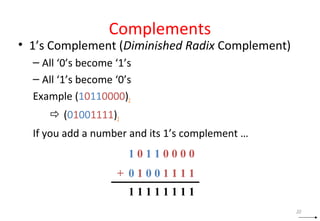
• 1’s Complement (Diminished Radix Complement)
– All ‘0’s become ‘1’s
– All ‘1’s become ‘0’s
Example (10110000)2
 (01001111)2
If you add a number and its 1’s complement …
1 0 1 1 0 0 0 0
+ 0 1 0 0 1 1 1 1
1 1 1 1 1 1 1 1
30
Complements
• Radix Complement
• Example: Base-10
• Example: Base-2
The r's complement of an n-digit number N in base r is defined as
rn
– N for N ≠ 0 and as 0 for N = 0. Comparing with the (r − 1) 's
complement, we note that the r's complement is obtained by adding 1 to the
(r − 1) 's complement, since rn
– N = [(rn
− 1) – N] + 1.
The 10's complement of 012398 is 987602
The 10's complement of 246700 is 753300
The 2's complement of 1101100 is 0010100
The 2's complement of 0110111 is 1001001
31
Complements
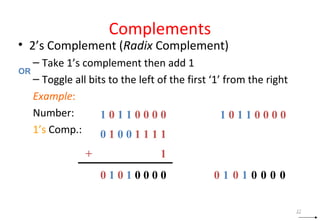
• 2’s Complement (Radix Complement)
– Take 1’s complement then add 1
– Toggle all bits to the left of the first ‘1’ from the right
Example:
Number:
1’s Comp.:
0 1 0 1 0 0 0 0
1 0 1 1 0 0 0 0
0 1 0 0 1 1 1 1
+ 1
OR
1 0 1 1 0 0 0 0
00001010
32
Complements
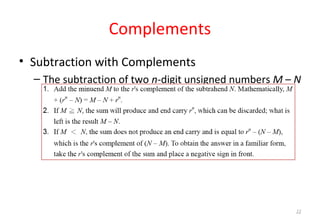
• Subtraction with Complements
– The subtraction of two n-digit unsigned numbers M – N
in base r can be done as follows:
33
Complements
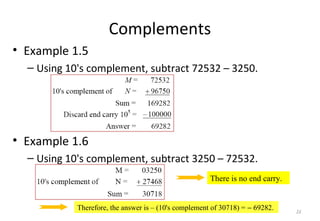
• Example 1.5
– Using 10's complement, subtract 72532 – 3250.
• Example 1.6
– Using 10's complement, subtract 3250 – 72532.
There is no end carry.
Therefore, the answer is – (10's complement of 30718) = − 69282. 34
Complements
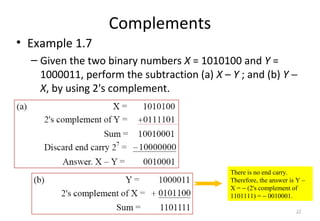
• Example 1.7
– Given the two binary numbers X = 1010100 and Y =
1000011, perform the subtraction (a) X – Y ; and (b) Y −
X, by using 2's complement.
There is no end carry.
Therefore, the answer is Y –
X = − (2's complement of
1101111) = − 0010001.
35
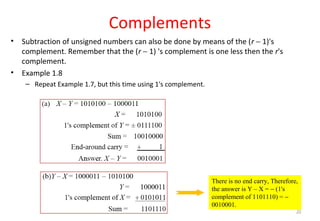
Complements
• Subtraction of unsigned numbers can also be done by means of the (r − 1)'s
complement. Remember that the (r − 1) 's complement is one less then the r's
complement.
• Example 1.8
– Repeat Example 1.7, but this time using 1's complement.
There is no end carry, Therefore,
the answer is Y – X = − (1's
complement of 1101110) = −
0010001.
36
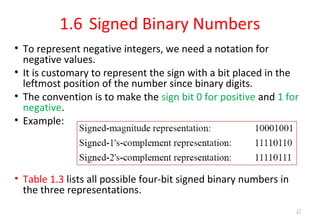
1.6 Signed Binary Numbers
• To represent negative integers, we need a notation for
negative values.
• It is customary to represent the sign with a bit placed in the
leftmost position of the number since binary digits.
• The convention is to make the sign bit 0 for positive and 1 for
negative.
• Example:
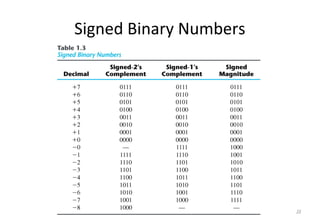
• Table 1.3 lists all possible four-bit signed binary numbers in
the three representations.
37
Signed Binary Numbers
38
Signed Binary Numbers
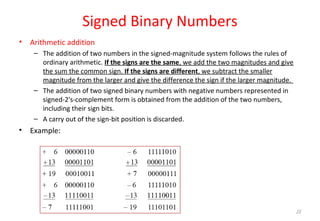
• Arithmetic addition
– The addition of two numbers in the signed-magnitude system follows the rules of
ordinary arithmetic. If the signs are the same, we add the two magnitudes and give
the sum the common sign. If the signs are different, we subtract the smaller
magnitude from the larger and give the difference the sign if the larger magnitude.
– The addition of two signed binary numbers with negative numbers represented in
signed-2's-complement form is obtained from the addition of the two numbers,
including their sign bits.
– A carry out of the sign-bit position is discarded.
• Example:
39
Signed Binary Numbers
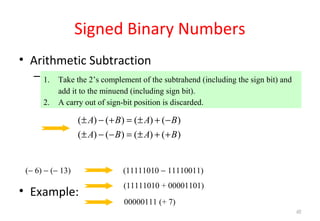
• Arithmetic Subtraction
– In 2’s-complement form:
• Example:
1. Take the 2’s complement of the subtrahend (including the sign bit) and
add it to the minuend (including sign bit).
2. A carry out of sign-bit position is discarded.
( ) ( ) ( ) ( )
( ) ( ) ( ) ( )
A B A B
A B A B
± − + = ± + −
± − − = ± + +
(− 6) − (− 13) (11111010 − 11110011)
(11111010 + 00001101)
00000111 (+ 7)
40
1.7 Binary Codes
41
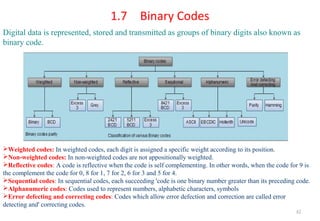
Digital data is represented, stored and transmitted as groups of binary digits also known as
binary code.
Weighted codes: In weighted codes, each digit is assigned a specific weight according to its position.
Non-weighted codes: In non-weighted codes are not appositionally weighted.
Reflective codes: A code is reflective when the code is self complementing. In other words, when the code for 9 is
the complement the code for 0, 8 for 1, 7 for 2, 6 for 3 and 5 for 4.
Sequential codes: In sequential codes, each succeeding 'code is one binary number greater than its preceding code.
Alphanumeric codes: Codes used to represent numbers, alphabetic characters, symbols
Error defecting and correcting codes: Codes which allow error defection and correction are called error
detecting and' correcting codes.
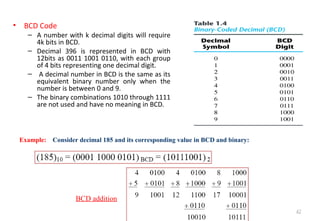
• BCD Code
– A number with k decimal digits will require
4k bits in BCD.
– Decimal 396 is represented in BCD with
12bits as 0011 1001 0110, with each group
of 4 bits representing one decimal digit.
– A decimal number in BCD is the same as its
equivalent binary number only when the
number is between 0 and 9.
– The binary combinations 1010 through 1111
are not used and have no meaning in BCD.
42
Example: Consider decimal 185 and its corresponding value in BCD and binary:
BCD addition
Binary Codes
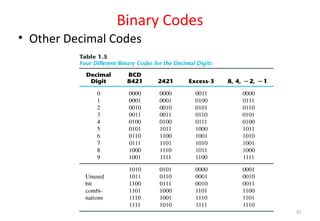
• Other Decimal Codes
43
Binary Codes
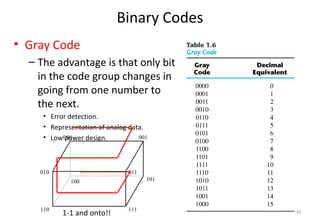
• Gray Code
– The advantage is that only bit
in the code group changes in
going from one number to
the next.
• Error detection.
• Representation of analog data.
• Low power design.000 001
010
100
110 111
101
011
1-1 and onto!! 44
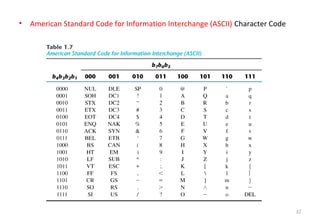
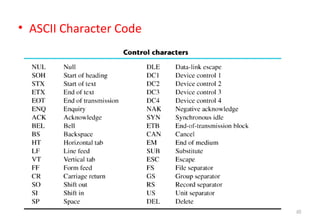
• American Standard Code for Information Interchange (ASCII) Character Code
45
• ASCII Character Code
46
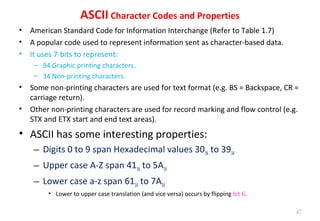
ASCII Character Codes and Properties
• American Standard Code for Information Interchange (Refer to Table 1.7)
• A popular code used to represent information sent as character-based data.
• It uses 7-bits to represent:
– 94 Graphic printing characters.
– 34 Non-printing characters.
• Some non-printing characters are used for text format (e.g. BS = Backspace, CR =
carriage return).
• Other non-printing characters are used for record marking and flow control (e.g.
STX and ETX start and end text areas).
• ASCII has some interesting properties:
– Digits 0 to 9 span Hexadecimal values 3016 to 3916
– Upper case A-Z span 4116 to 5A16
– Lower case a-z span 6116 to 7A16
• Lower to upper case translation (and vice versa) occurs by flipping bit 6.
47
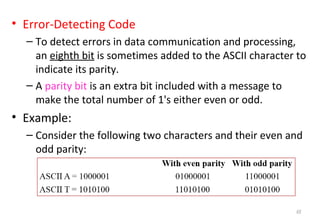
• Error-Detecting Code
– To detect errors in data communication and processing,
an eighth bit is sometimes added to the ASCII character to
indicate its parity.
– A parity bit is an extra bit included with a message to
make the total number of 1's either even or odd.
• Example:
– Consider the following two characters and their even and
odd parity:
48
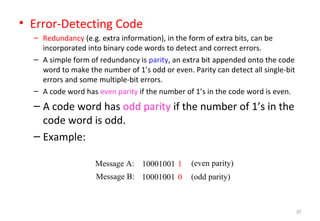
• Error-Detecting Code
– Redundancy (e.g. extra information), in the form of extra bits, can be
incorporated into binary code words to detect and correct errors.
– A simple form of redundancy is parity, an extra bit appended onto the code
word to make the number of 1’s odd or even. Parity can detect all single-bit
errors and some multiple-bit errors.
– A code word has even parity if the number of 1’s in the code word is even.
– A code word has odd parity if the number of 1’s in the
code word is odd.
– Example:
10001001
10001001
1
0 (odd parity)Message B:
Message A: (even parity)
49
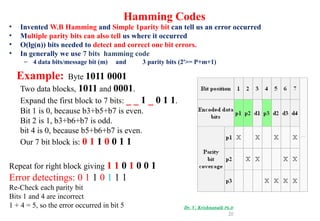
Hamming Codes
• Invented W.B Hamming and Simple 1parity bit can tell us an error occurred
• Multiple parity bits can also tell us where it occurred
• O(lg(n)) bits needed to detect and correct one bit errors.
• In generally we use 7 bits hamming code
– 4 data bits/message bit (m) and 3 parity bits (2P
>= P+m+1)
Example: Byte 1011 0001
Two data blocks, 1011 and 0001.
Expand the first block to 7 bits: _ _ 1 _ 0 1 1.
Bit 1 is 0, because b3+b5+b7 is even.
Bit 2 is 1, b3+b6+b7 is odd.
bit 4 is 0, because b5+b6+b7 is even.
Our 7 bit block is: 0 1 1 0 0 1 1
Repeat for right block giving 1 1 0 1 0 0 1
Error detectings: 0 1 1 0 1 1 1
Re-Check each parity bit
Bits 1 and 4 are incorrect
1 + 4 = 5, so the error occurred in bit 5 Dr. V. Krishnanaik Ph.D
50
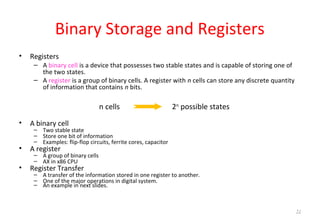
Binary Storage and Registers
• Registers
– A binary cell is a device that possesses two stable states and is capable of storing one of
the two states.
– A register is a group of binary cells. A register with n cells can store any discrete quantity
of information that contains n bits.
• A binary cell
– Two stable state
– Store one bit of information
– Examples: flip-flop circuits, ferrite cores, capacitor
• A register
– A group of binary cells
– AX in x86 CPU
• Register Transfer
– A transfer of the information stored in one register to another.
– One of the major operations in digital system.
– An example in next slides.
n cells 2n
possible states
51
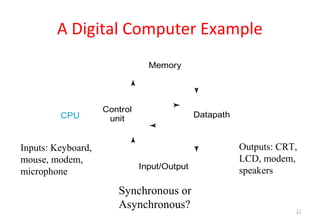
A Digital Computer Example
Synchronous or
Asynchronous?
Inputs: Keyboard,
mouse, modem,
microphone
Outputs: CRT,
LCD, modem,
speakers
Memory
Control
unit Datapath
Input/Output
CPU
52
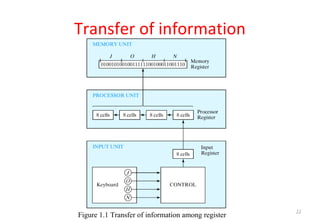
Transfer of information
Figure 1.1 Transfer of information among register
53
Transfer of information
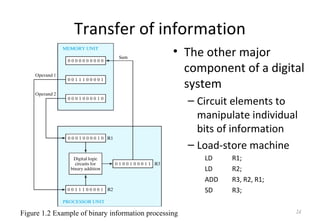
• The other major
component of a digital
system
– Circuit elements to
manipulate individual
bits of information
– Load-store machine
LD R1;
LD R2;
ADD R3, R2, R1;
SD R3;
Figure 1.2 Example of binary information processing 54
Binary Logic
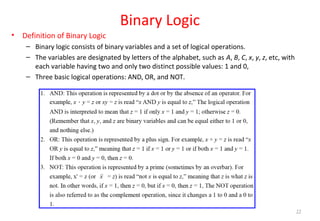
• Definition of Binary Logic
– Binary logic consists of binary variables and a set of logical operations.
– The variables are designated by letters of the alphabet, such as A, B, C, x, y, z, etc, with
each variable having two and only two distinct possible values: 1 and 0,
– Three basic logical operations: AND, OR, and NOT.
55
Binary Logic gates
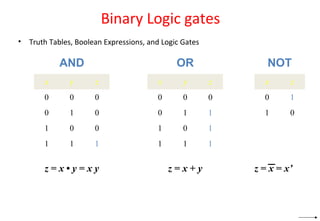
• Truth Tables, Boolean Expressions, and Logic Gates
x y z
0 0 0
0 1 0
1 0 0
1 1 1
x y z
0 0 0
0 1 1
1 0 1
1 1 1
x z
0 1
1 0
AND OR NOT
z = x • y = x y z = x + y z = x = x’
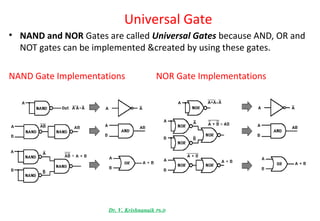
Universal Gate
• NAND and NOR Gates are called Universal Gates because AND, OR and
NOT gates can be implemented &created by using these gates.
NAND Gate Implementations NOR Gate Implementations
Dr. V. Krishnanaik Ph.D
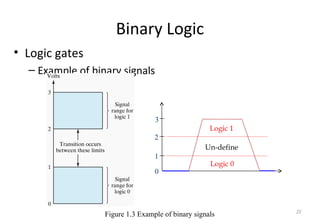
Binary Logic
• Logic gates
– Example of binary signals
0
1
2
3
Logic 1
Logic 0
Un-define
Figure 1.3 Example of binary signals 59
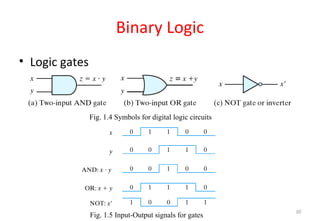
Binary Logic
• Logic gates
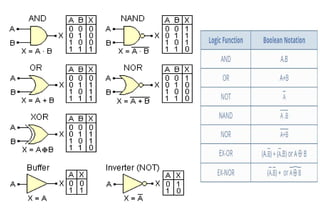
– Graphic Symbols and Input-Output Signals for Logic
gates:
Fig. 1.4 Symbols for digital logic circuits
Fig. 1.5 Input-Output signals for gates
60
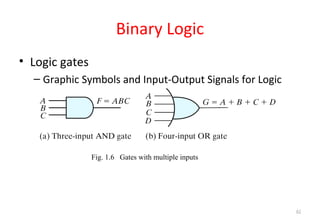
Binary Logic
• Logic gates
– Graphic Symbols and Input-Output Signals for Logic
gates:
Fig. 1.6 Gates with multiple inputs
61
62
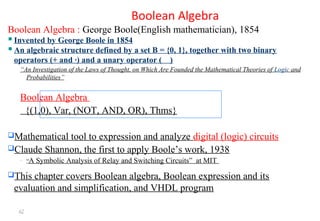
Boolean Algebra
Boolean Algebra : George Boole(English mathematician), 1854
Invented by George Boole in 1854
An algebraic structure defined by a set B = {0, 1}, together with two binary
operators (+ and ·) and a unary operator ( )
“An Investigation of the Laws of Thought, on Which Are Founded the Mathematical Theories of Logic and
Probabilities”
Boolean Algebra
{(1,0), Var, (NOT, AND, OR), Thms}
Mathematical tool to expression and analyze digital (logic) circuits
Claude Shannon, the first to apply Boole’s work, 1938
– “A Symbolic Analysis of Relay and Switching Circuits” at MIT
This chapter covers Boolean algebra, Boolean expression and its
evaluation and simplification, and VHDL program
63
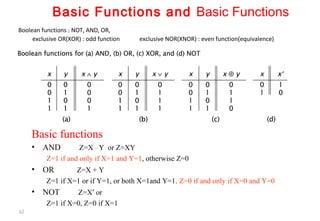
Boolean functions : NOT, AND, OR,
exclusive OR(XOR) : odd function exclusive NOR(XNOR) : even function(equivalence)
Basic Functions and Basic Functions
Basic functions
• AND Z=X ⋅ Y or Z=XY
Z=1 if and only if X=1 and Y=1, otherwise Z=0
• OR Z=X + Y
Z=1 if X=1 or if Y=1, or both X=1and Y=1. Z=0 if and only if X=0 and Y=0
• NOT Z=X′ or
Z=1 if X=0, Z=0 if X=1
64
65
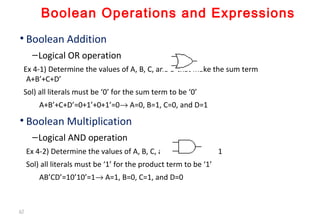
Boolean Operations and Expressions
• Boolean Addition
–Logical OR operation
Ex 4-1) Determine the values of A, B, C, and D that make the sum term
A+B’+C+D’
Sol) all literals must be ‘0’ for the sum term to be ‘0’
A+B’+C+D’=0+1’+0+1’=0→ A=0, B=1, C=0, and D=1
• Boolean Multiplication
–Logical AND operation
Ex 4-2) Determine the values of A, B, C, and D for AB’CD’=1
Sol) all literals must be ‘1’ for the product term to be ‘1’
AB’CD’=10’10’=1→ A=1, B=0, C=1, and D=0
66
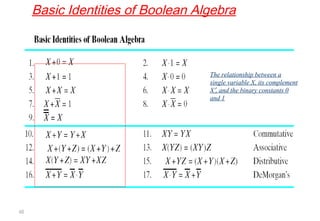
Basic Identities of Boolean Algebra
The relationship between a
single variable X, its complement
X′, and the binary constants 0
and 1
67
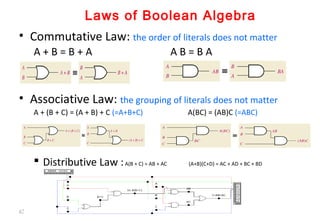
Laws of Boolean Algebra
• Commutative Law: the order of literals does not matter
A + B = B + A A B = B A
• Associative Law: the grouping of literals does not matter
A + (B + C) = (A + B) + C (=A+B+C) A(BC) = (AB)C (=ABC)
 Distributive Law :A(B + C) = AB + AC (A+B)(C+D) = AC + AD + BC + BD
68
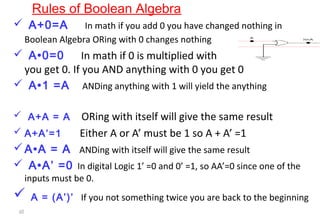
 A+0=A In math if you add 0 you have changed nothing in
Boolean Algebra ORing with 0 changes nothing
 A•0=0 In math if 0 is multiplied with anything
you get 0. If you AND anything with 0 you get 0
 A•1 =A ANDing anything with 1 will yield the anything
 A+A = A ORing with itself will give the same result
 A+A’=1 Either A or A’ must be 1 so A + A’ =1
A•A = A ANDing with itself will give the same result
 A•A’ =0 In digital Logic 1’ =0 and 0’ =1, so AA’=0 since one of the
inputs must be 0.
 A = (A’)’ If you not something twice you are back to the beginning
Rules of Boolean Algebra
69
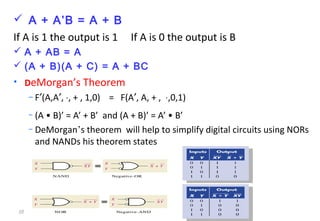
 A + A’B = A + B
If A is 1 the output is 1 If A is 0 the output is B
 A + AB = A
 (A + B)(A + C) = A + BC
• DeMorgan’s Theorem
– F′(A,A′, ⋅, + , 1,0) = F(A′, A, + , ⋅,0,1)
– (A • B)’ = A’ + B’ and (A + B)’ = A’ • B’
– DeMorgan’s theorem will help to simplify digital circuits using NORs
and NANDs his theorem states
70
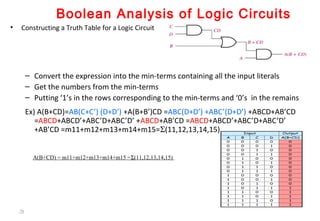
Boolean Analysis of Logic Circuits
• Constructing a Truth Table for a Logic Circuit
– Convert the expression into the min-terms containing all the input literals
– Get the numbers from the min-terms
– Putting ‘1’s in the rows corresponding to the min-terms and ‘0’s in the remains
Ex) A(B+CD)=AB(C+C’) (D+D’) +A(B+B’)CD =ABC(D+D’) +ABC’(D+D’) +ABCD+AB’CD
=ABCD+ABCD’+ABC’D+ABC’D’ +ABCD+AB’CD =ABCD+ABCD’+ABC’D+ABC’D’
+AB’CD =m11+m12+m13+m14+m15=Σ(11,12,13,14,15)
A(B+CD) = m11+m12+m13+m14+m15 =Σ(11,12,13,14,15)
71
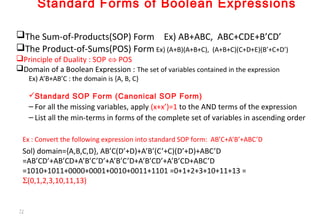
Standard Forms of Boolean Expressions
The Sum-of-Products(SOP) Form Ex) AB+ABC, ABC+CDE+B’CD’
The Product-of-Sums(POS) Form Ex) (A+B)(A+B+C), (A+B+C)(C+D+E)(B’+C+D’)
Principle of Duality : SOP ⇔ POS
Domain of a Boolean Expression : The set of variables contained in the expression
Ex) A’B+AB’C : the domain is {A, B, C}
Standard SOP Form (Canonical SOP Form)
– For all the missing variables, apply (x+x’)=1 to the AND terms of the expression
– List all the min-terms in forms of the complete set of variables in ascending order
Ex : Convert the following expression into standard SOP form: AB’C+A’B’+ABC’D
Sol) domain={A,B,C,D}, AB’C(D’+D)+A’B’(C’+C)(D’+D)+ABC’D
=AB’CD’+AB’CD+A’B’C’D’+A’B’C’D+A’B’CD’+A’B’CD+ABC’D
=1010+1011+0000+0001+0010+0011+1101 =0+1+2+3+10+11+13 =
Σ(0,1,2,3,10,11,13)
72
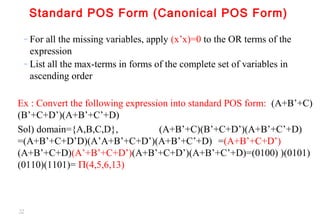
Standard POS Form (Canonical POS Form)
– For all the missing variables, apply (x’x)=0 to the OR terms of the
expression
– List all the max-terms in forms of the complete set of variables in
ascending order
Ex : Convert the following expression into standard POS form: (A+B’+C)
(B’+C+D’)(A+B’+C’+D)
Sol) domain={A,B,C,D}, (A+B’+C)(B’+C+D’)(A+B’+C’+D)
=(A+B’+C+D’D)(A’A+B’+C+D’)(A+B’+C’+D) =(A+B’+C+D’)
(A+B’+C+D)(A’+B’+C+D’)(A+B’+C+D’)(A+B’+C’+D)=(0100) )(0101)
(0110)(1101)= Π(4,5,6,13)
73
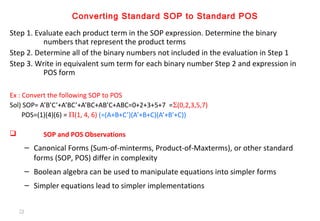
Converting Standard SOP to Standard POS
Step 1. Evaluate each product term in the SOP expression. Determine the binary
numbers that represent the product terms
Step 2. Determine all of the binary numbers not included in the evaluation in Step 1
Step 3. Write in equivalent sum term for each binary number Step 2 and expression in
POS form
Ex : Convert the following SOP to POS
Sol) SOP= A’B’C’+A’BC’+A’BC+AB’C+ABC=0+2+3+5+7 =Σ(0,2,3,5,7)
POS=(1)(4)(6) = Π(1, 4, 6) (=(A+B+C’)(A’+B+C)(A’+B’+C))
 SOP and POS Observations
– Canonical Forms (Sum-of-minterms, Product-of-Maxterms), or other standard
forms (SOP, POS) differ in complexity
– Boolean algebra can be used to manipulate equations into simpler forms
– Simpler equations lead to simpler implementations
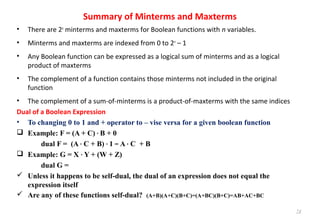
Summary of Minterms and Maxterms
• There are 2n
minterms and maxterms for Boolean functions with n variables.
• Minterms and maxterms are indexed from 0 to 2n
– 1
• Any Boolean function can be expressed as a logical sum of minterms and as a logical
product of maxterms
• The complement of a function contains those minterms not included in the original
function
• The complement of a sum-of-minterms is a product-of-maxterms with the same indices
Dual of a Boolean Expression
• To changing 0 to 1 and + operator to – vise versa for a given boolean function
 Example: F = (A + C) · B + 0
dual F = (A · C + B) · 1 = A · C + B
 Example: G = X · Y + (W + Z)
dual G =
 Unless it happens to be self-dual, the dual of an expression does not equal the
expression itself
 Are any of these functions self-dual? (A+B)(A+C)(B+C)=(A+BC)(B+C)=AB+AC+BC
74
75
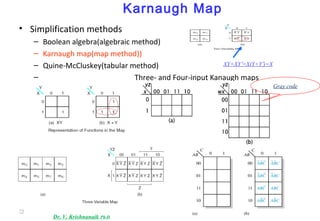
Karnaugh Map
• Simplification methods
– Boolean algebra(algebraic method)
– Karnaugh map(map method))
– Quine-McCluskey(tabular method)
– Three- and Four-input Kanaugh maps
XY+XY′=X(Y+Y′)=X
Gray code
Dr. V. Krishnanaik Ph.D
76
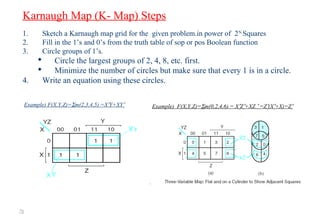
Example) F(X,Y,Z)=Σm(2,3,4,5) =X′Y+XY′ Example) F(X,Y,Z)=Σm(0,2,4,6) = X′Z′+XZ ′ =Z′(X′+X)=Z′
Karnaugh Map (K- Map) Steps
1. Sketch a Karnaugh map grid for the given problem.in power of 2N
Squares
2. Fill in the 1’s and 0’s from the truth table of sop or pos Boolean function
3. Circle groups of 1’s.
 Circle the largest groups of 2, 4, 8, etc. first.
 Minimize the number of circles but make sure that every 1 is in a circle.
4. Write an equation using these circles.
77
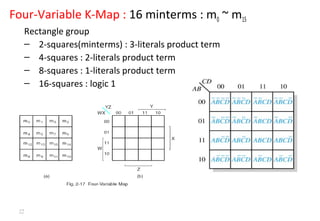
Four-Variable K-Map : 16 minterms : m0 ~ m15
Rectangle group
– 2-squares(minterms) : 3-literals product term
– 4-squares : 2-literals product term
– 8-squares : 1-literals product term
– 16-squares : logic 1
78
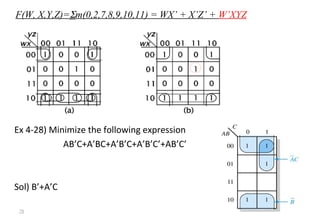
F(W, X,Y,Z)=Σm(0,2,7,8,9,10,11) = WX’ + X’Z’ + W’XYZ
Ex 4-28) Minimize the following expression
AB’C+A’BC+A’B’C+A’B’C’+AB’C’
Sol) B’+A’C
79
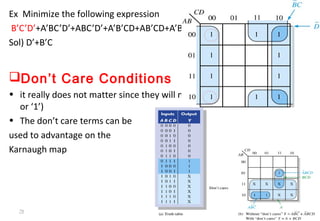
Ex Minimize the following expression
B’C’D’+A’BC’D’+ABC’D’+A’B’CD+AB’CD+A’B’CD’+A’BCD’ +ABCD’+AB’CD’
Sol) D’+B’C
Don’t Care Conditions
• it really does not matter since they will never occur(its output is either ‘0’
or ‘1’)
• The don’t care terms can be
used to advantage on the
Karnaugh map
80
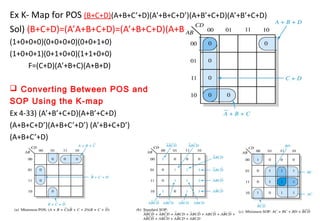
Ex K- Map for POS (B+C+D)(A+B+C’+D)(A’+B+C+D’)(A+B’+C+D)(A’+B’+C+D)
Sol) (B+C+D)=(A’A+B+C+D)=(A’+B+C+D)(A+B+C+D)
(1+0+0+0)(0+0+0+0)(0+0+1+0)
(1+0+0+1)(0+1+0+0)(1+1+0+0)
F=(C+D)(A’+B+C)(A+B+D)
 Converting Between POS and
SOP Using the K-map
Ex 4-33) (A’+B’+C+D)(A+B’+C+D)
(A+B+C+D’)(A+B+C’+D’) (A’+B+C+D’)
(A+B+C’+D)
81
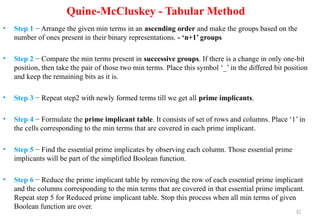
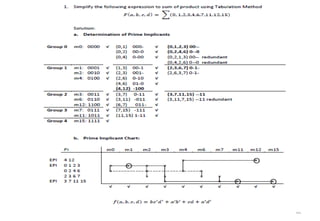
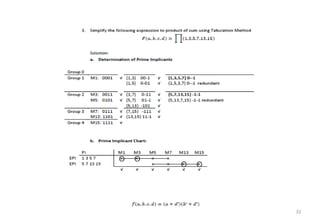
Quine-McCluskey - Tabular Method
• Step 1 − Arrange the given min terms in an ascending order and make the groups based on the
number of ones present in their binary representations. - ‘n+1’ groups
• Step 2 − Compare the min terms present in successive groups. If there is a change in only one-bit
position, then take the pair of those two min terms. Place this symbol ‘_’ in the differed bit position
and keep the remaining bits as it is.
• Step 3 − Repeat step2 with newly formed terms till we get all prime implicants.
• Step 4 − Formulate the prime implicant table. It consists of set of rows and columns. Place ‘1’ in
the cells corresponding to the min terms that are covered in each prime implicant.
• Step 5 − Find the essential prime implicates by observing each column. Those essential prime
implicants will be part of the simplified Boolean function.
• Step 6 − Reduce the prime implicant table by removing the row of each essential prime implicant
and the columns corresponding to the min terms that are covered in that essential prime implicant.
Repeat step 5 for Reduced prime implicant table. Stop this process when all min terms of given
Boolean function are over.
82
83
84
Dr. Krishnanaik VankdothDr. Krishnanaik Vankdoth
B.EB.E(ECE),(ECE), M.TechM.Tech (ECE),(ECE), Ph.DPh.D (ECE)(ECE)
Professor
Vaagdevi College of Engineering
Electronics and Communications Engineering
Warangal – 506001
krishnanaik.ece@gmail.com
krishnanaik_ece@yahoo.com
Phone : +919441629162
85

Digital logic design part1

  • 1.
    Dr. Krishnanaik VankdothDr.Krishnanaik Vankdoth B.E(ECE), M.Tech (ECE), Ph.D (ECE)B.E(ECE), M.Tech (ECE), Ph.D (ECE) Professor in ECE Dept Vaagdevi college of Engineering Warangal – 506001 DLD - DIGITAL LOGIC DESIGNDLD - DIGITAL LOGIC DESIGN 1krishnanaik.ece@gmail.com
  • 2.
    BooksBooks 1.1. ““ DigitalDesign”Digital Design” By M. Morris Mano and Michael D.Ciletti 2.2. Logical Design and ApplicationLogical Design and Application By Dr. KrishnanaikBy Dr. Krishnanaik Vankdoth LAP LAMBERT Academic PublishingVankdoth LAP LAMBERT Academic Publishing Dnfscland/Germany – 2014Dnfscland/Germany – 2014 3. Complementary Material “ Logic and Computer Design Fundamentals ” By M. Morris Mano & Charles R Kime. 2
  • 3.
    Digital Systems andBinary Numbers DLD - DIGITAL LOGIC DESIGNDLD - DIGITAL LOGIC DESIGN 3Dr. V. Krishnanaik Ph.D
  • 4.
    • Digital • Concernedwith the interconnection among digital components and modules » Best Digital System example is General Purpose Computer • Logic Design • Deals with the basic concepts and tools used to design digital hardware consisting of logic circuits » Circuits to perform arithmetic operations (+, -, x, ÷) 4
  • 5.
    • Digital Signal: Decimal values are difficult to represent in electrical systems. It is easier to use two voltage values than ten. • Digital Signals have two basic states: 1 (logic “high”, or H, or “on”) 0 (logic “low”, or L, or “off”) • Digital values are in a binary format. Binary means 2 states. • A good example of binary is a light (only on or off) on off Power switches have labels “1” for on and “0” for off. 5
  • 6.
    • Bits andPieces of DLD History • George Boole • Mathematical Analysis of Logic (1847) • An Investigation of Laws of Thoughts; Mathematical Theories of Logic and Probabilities (1854) • Claude Shannon • Rediscovered the Boole • “ A Symbolic Analysis of Relay and Switching Circuits “ • Boolean Logic and Boolean Algebra were Applied to Digital Circuitry ---------- Beginning of the Digital Age and/or Computer Age World War II Computers as Calculating Machines Arlington (State Machines) “ Control “ 6
  • 7.
    Motivation • Microprocessors/Microelectronics haverevolutionized our world – Cell phones, internet, rapid advances in medicine, etc. • The semiconductor industry has grown tremendously 7
  • 8.
    Digital Systems andBinary Numbers  Digital age and information age  Digital computers – General purposes – Many scientific, industrial and commercial applications • Digital systems – Telephone switching exchanges – Digital camera – Electronic calculators, PDA's – Digital TV • Discrete information-processing systems – Manipulate discrete elements of information – For example, {1, 2, 3, …} and {A, B, C, …}… 8
  • 9.
    Analog and DigitalSignal • Analog system – The physical quantities or signals may vary continuously over a specified range. • Digital system – The physical quantities or signals can assume only discrete values. – Greater accuracy t X(t) t X(t) Analog signal Digital signal 9
  • 10.
    10 Analog Digital Technology: Analog technologyrecords waveforms as they are. Converts analog waveforms into set of numbers and records them. The numbers are converted into voltage stream for representation. Uses: Can be used in various computing platforms and under operating systems like Linux, Unix, Mac OS and Windows. Computing and electronics Signal: Analog signal is a continuous signal which transmits information as a response to changes in physical phenomenon. Digital signals are discrete time signals generated by digital modulation. Representation: Uses continuous range of values to represent information. Uses discrete or discontinuous values to represent information. Memory unit: not required required applications: Thermometer PCs, PDAs Data transmissions: not of high quality high quality Result: not very accurate accurate Storage capacity: limited high Process: processed using OPAMP which uses electronic circuits using microprocessor which uses logic circuits Respose to Noise: More likely to get affected reducing accuracy Less affected since noise response are analog in nature Waves: Denoted by sine waves Denoted by square waves Example: human voice in air electronic devices
  • 11.
    Binary Digital Signal •An information variable represented by physical quantity. • For digital systems, the variable takes on discrete values. – Two level, or binary values are the most prevalent values. • Binary values are represented abstractly by: – Digits 0 and 1 – Words (symbols) False (F) and True (T) – Words (symbols) Low (L) and High (H) – And words On and Off • Binary values are represented by values or ranges of values of physical quantities. t V(t) Binary digital signal Logic 1 Logic 0 undefine 11
  • 12.
    Decimal Number System •Base (also called radix) = 10 – 10 digits { 0, 1, 2, 3, 4, 5, 6, 7, 8, 9 } • Digit Position – Integer & fraction • Digit Weight – Weight = (Base) Position • Magnitude – Sum of “Digit x Weight” • Formal Notation 1 0 -12 -2 5 1 2 7 4 10 1 0.1100 0.01 500 10 2 0.7 0.04 d2*B 2 +d1*B 1 +d0*B 0 +d-1*B -1 +d-2*B -2 (512.74)10 12
  • 13.
    Octal Number System •Base = 8 – 8 digits { 0, 1, 2, 3, 4, 5, 6, 7 } • Weights – Weight = (Base) Position • Magnitude – Sum of “Digit x Weight” • Formal Notation 1 0 -12 -2 8 1 1/864 1/64 5 1 2 7 4 5 *8 2 +1 *8 1 +2 *8 0 +7 *8 -1 +4 *8 -2 =(330.9375)10 (512.74)8 13
  • 14.
    Binary Number System •Base = 2 – 2 digits { 0, 1 }, called binary digits or “bits” • Weights – Weight = (Base) Position • Magnitude – Sum of “Bit x Weight” • Formal Notation • Groups of bits 4 bits = Nibble 8 bits = Byte 1 0 -12 -2 2 1 1/24 1/4 1 0 1 0 1 1 *2 2 +0 *2 1 +1 *2 0 +0 *2 -1 +1 *2 -2 =(5.25)10 (101.01)2 1 0 1 1 1 1 0 0 0 1 0 1 14
  • 15.
    Hexadecimal Number System •Base = 16 – 16 digits { 0, 1, 2, 3, 4, 5, 6, 7, 8, 9, A, B, C, D, E, F } • Weights – Weight = (Base) Position • Magnitude – Sum of “Digit x Weight” • Formal Notation 1 0 -12 -2 16 1 1/16256 1/256 1 E 5 7 A 1 *16 2 +14 *16 1 +5 *16 0 +7 *16 -1 +10 *16 -2 =(485.4765625)10 (1E5.7A)16 15
  • 16.
    The Power of2 n 2n 0 20 =1 1 21 =2 2 22 =4 3 23 =8 4 24 =16 5 25 =32 6 26 =64 7 27 =128 n 2n 8 28 =256 9 29 =512 10 210 =1024 11 211 =2048 12 212 =4096 20 220 =1M 30 230 =1G 40 240 =1T Mega Giga Tera Kilo 16
  • 17.
    Addition • Decimal Addition 55 55+ 011 = Ten ≥ Base  Subtract a Base 11 Carry 17
  • 18.
    Binary Addition • ColumnAddition 1 0 1111 1111 0+ 0000 1 11 ≥ (2)10 111111 = 61 = 23 = 84 18
  • 19.
    Binary Subtraction • Borrowa “Base” when needed 0 0 1110 1111 0− 0101 1 10 = (10)2 2 2 2 2 1 000 1 = 77 = 23 = 54 19
  • 20.
    Binary Multiplication • Bitby bit 01 1 1 1 01 1 0 00 0 0 0 01 1 1 1 01 1 1 1 0 0 000 0110111 0 x 20
  • 21.
    Number Base Conversions Decimal (Base10) Octal (Base 8) Binary (Base 2) Hexadecimal (Base 16) Evaluate Magnitude Evaluate Magnitude Evaluate Magnitude 21
  • 22.
    Decimal (Integer) toBinary Conversion • Divide the number by the ‘Base’ (=2) • Take the remainder (either 0 or 1) as a coefficient • Take the quotient and repeat the division Example: (13)10 Quotient Remainder Coefficient Answer: (13)10 = (a3 a2 a1 a0)2 = (1101)2 MSB LSBMSB LSB 13 / 2 = 6 1 a0 = 1 6 / 2 = 3 0 a1 = 0 3 / 2 = 1 1 a2 = 1 1 / 2 = 0 1 a3 = 1 22
  • 23.
    Decimal (Fraction) toBinary Conversion • Multiply the number by the ‘Base’ (=2) • Take the integer (either 0 or 1) as a coefficient • Take the resultant fraction and repeat the division Example: (0.625)10 Integer Fraction Coefficient Answer: (0.625)10 = (0.a-1 a-2 a-3)2 = (0.101)2 MSB LSBMSB LSB 0.625 * 2 = 1 . 25 0.25 * 2 = 0 . 5 a-2 = 0 0.5 * 2 = 1 . 0 a-3 = 1 a-1 = 1 23
  • 24.
    Decimal to OctalConversion Example: (175)10 Quotient Remainder Coefficient Answer: (175)10 = (a2 a1 a0)8 = (257)8 175 / 8 = 21 7 a0 = 7 21 / 8 = 2 5 a1 = 5 2 / 8 = 0 2 a2 = 2 Example: (0.3125)10 Integer Fraction Coefficient Answer: (0.3125)10 = (0.a-1 a-2 a-3)8 = (0.24)8 0.3125 * 8 = 2 . 5 0.5 * 8 = 4 . 0 a-2 = 4 a-1 = 2 24
  • 25.
    Binary − OctalConversion • 8 = 23 • Each group of 3 bits represents an octal digit Octal Binary 0 0 0 0 1 0 0 1 2 0 1 0 3 0 1 1 4 1 0 0 5 1 0 1 6 1 1 0 7 1 1 1 Example: ( 1 0 1 1 0 . 0 1 )2 ( 2 6 . 2 )8 Assume Zeros Works both ways (Binary to Octal & Octal to Binary) 25
  • 26.
    Binary − HexadecimalConversion • 16 = 24 • Each group of 4 bits represents a hexadecimal digit Hex Binary 0 0 0 0 0 1 0 0 0 1 2 0 0 1 0 3 0 0 1 1 4 0 1 0 0 5 0 1 0 1 6 0 1 1 0 7 0 1 1 1 8 1 0 0 0 9 1 0 0 1 A 1 0 1 0 B 1 0 1 1 C 1 1 0 0 D 1 1 0 1 E 1 1 1 0 F 1 1 1 1 Example: ( 1 0 1 1 0 . 0 1 )2 ( 1 6 . 4 )16 Assume Zeros Works both ways (Binary to Hex & Hex to Binary) 26
  • 27.
    Octal − HexadecimalConversion • Convert to Binary as an intermediate step Example: ( 0 1 0 1 1 0 . 0 1 0 )2 ( 1 6 . 4 )16 Assume Zeros Works both ways (Octal to Hex & Hex to Octal) ( 2 6 . 2 )8 Assume Zeros 27
  • 28.
    Decimal, Binary, Octaland HexadecimalDecimal Binary Octal Hex 00 0000 00 0 01 0001 01 1 02 0010 02 2 03 0011 03 3 04 0100 04 4 05 0101 05 5 06 0110 06 6 07 0111 07 7 08 1000 10 8 09 1001 11 9 10 1010 12 A 11 1011 13 B 12 1100 14 C 13 1101 15 D 14 1110 16 E 15 1111 17 F 28
  • 29.
    1.5 Complements • Thereare two types of complements for each base-r system: the radix complement and diminished radix complement. • Diminished Radix Complement - (r-1)’s Complement – Given a number N in base r having n digits, the (r–1)’s complement of N is defined as: (rn –1) – N • Example for 6-digit decimal numbers: – 9’s complement is (rn – 1)–N = (106 –1)–N = 999999–N – 9’s complement of 546700 is 999999–546700 = 453299 • Example for 7-digit binary numbers: – 1’s complement is (rn – 1) – N = (27 –1)–N = 1111111–N – 1’s complement of 1011000 is 1111111–1011000 = 0100111 • Observation: – Subtraction from (rn – 1) will never require a borrow – Diminished radix complement can be computed digit-by-digit – For binary: 1 – 0 = 1 and 1 – 1 = 0 29
  • 30.
    Complements • 1’s Complement(Diminished Radix Complement) – All ‘0’s become ‘1’s – All ‘1’s become ‘0’s Example (10110000)2  (01001111)2 If you add a number and its 1’s complement … 1 0 1 1 0 0 0 0 + 0 1 0 0 1 1 1 1 1 1 1 1 1 1 1 1 30
  • 31.
    Complements • Radix Complement •Example: Base-10 • Example: Base-2 The r's complement of an n-digit number N in base r is defined as rn – N for N ≠ 0 and as 0 for N = 0. Comparing with the (r − 1) 's complement, we note that the r's complement is obtained by adding 1 to the (r − 1) 's complement, since rn – N = [(rn − 1) – N] + 1. The 10's complement of 012398 is 987602 The 10's complement of 246700 is 753300 The 2's complement of 1101100 is 0010100 The 2's complement of 0110111 is 1001001 31
  • 32.
    Complements • 2’s Complement(Radix Complement) – Take 1’s complement then add 1 – Toggle all bits to the left of the first ‘1’ from the right Example: Number: 1’s Comp.: 0 1 0 1 0 0 0 0 1 0 1 1 0 0 0 0 0 1 0 0 1 1 1 1 + 1 OR 1 0 1 1 0 0 0 0 00001010 32
  • 33.
    Complements • Subtraction withComplements – The subtraction of two n-digit unsigned numbers M – N in base r can be done as follows: 33
  • 34.
    Complements • Example 1.5 –Using 10's complement, subtract 72532 – 3250. • Example 1.6 – Using 10's complement, subtract 3250 – 72532. There is no end carry. Therefore, the answer is – (10's complement of 30718) = − 69282. 34
  • 35.
    Complements • Example 1.7 –Given the two binary numbers X = 1010100 and Y = 1000011, perform the subtraction (a) X – Y ; and (b) Y − X, by using 2's complement. There is no end carry. Therefore, the answer is Y – X = − (2's complement of 1101111) = − 0010001. 35
  • 36.
    Complements • Subtraction ofunsigned numbers can also be done by means of the (r − 1)'s complement. Remember that the (r − 1) 's complement is one less then the r's complement. • Example 1.8 – Repeat Example 1.7, but this time using 1's complement. There is no end carry, Therefore, the answer is Y – X = − (1's complement of 1101110) = − 0010001. 36
  • 37.
    1.6 Signed BinaryNumbers • To represent negative integers, we need a notation for negative values. • It is customary to represent the sign with a bit placed in the leftmost position of the number since binary digits. • The convention is to make the sign bit 0 for positive and 1 for negative. • Example: • Table 1.3 lists all possible four-bit signed binary numbers in the three representations. 37
  • 38.
  • 39.
    Signed Binary Numbers •Arithmetic addition – The addition of two numbers in the signed-magnitude system follows the rules of ordinary arithmetic. If the signs are the same, we add the two magnitudes and give the sum the common sign. If the signs are different, we subtract the smaller magnitude from the larger and give the difference the sign if the larger magnitude. – The addition of two signed binary numbers with negative numbers represented in signed-2's-complement form is obtained from the addition of the two numbers, including their sign bits. – A carry out of the sign-bit position is discarded. • Example: 39
  • 40.
    Signed Binary Numbers •Arithmetic Subtraction – In 2’s-complement form: • Example: 1. Take the 2’s complement of the subtrahend (including the sign bit) and add it to the minuend (including sign bit). 2. A carry out of sign-bit position is discarded. ( ) ( ) ( ) ( ) ( ) ( ) ( ) ( ) A B A B A B A B ± − + = ± + − ± − − = ± + + (− 6) − (− 13) (11111010 − 11110011) (11111010 + 00001101) 00000111 (+ 7) 40
  • 41.
    1.7 Binary Codes 41 Digitaldata is represented, stored and transmitted as groups of binary digits also known as binary code. Weighted codes: In weighted codes, each digit is assigned a specific weight according to its position. Non-weighted codes: In non-weighted codes are not appositionally weighted. Reflective codes: A code is reflective when the code is self complementing. In other words, when the code for 9 is the complement the code for 0, 8 for 1, 7 for 2, 6 for 3 and 5 for 4. Sequential codes: In sequential codes, each succeeding 'code is one binary number greater than its preceding code. Alphanumeric codes: Codes used to represent numbers, alphabetic characters, symbols Error defecting and correcting codes: Codes which allow error defection and correction are called error detecting and' correcting codes.
  • 42.
    • BCD Code –A number with k decimal digits will require 4k bits in BCD. – Decimal 396 is represented in BCD with 12bits as 0011 1001 0110, with each group of 4 bits representing one decimal digit. – A decimal number in BCD is the same as its equivalent binary number only when the number is between 0 and 9. – The binary combinations 1010 through 1111 are not used and have no meaning in BCD. 42 Example: Consider decimal 185 and its corresponding value in BCD and binary: BCD addition
  • 43.
    Binary Codes • OtherDecimal Codes 43
  • 44.
    Binary Codes • GrayCode – The advantage is that only bit in the code group changes in going from one number to the next. • Error detection. • Representation of analog data. • Low power design.000 001 010 100 110 111 101 011 1-1 and onto!! 44
  • 45.
    • American StandardCode for Information Interchange (ASCII) Character Code 45
  • 46.
  • 47.
    ASCII Character Codesand Properties • American Standard Code for Information Interchange (Refer to Table 1.7) • A popular code used to represent information sent as character-based data. • It uses 7-bits to represent: – 94 Graphic printing characters. – 34 Non-printing characters. • Some non-printing characters are used for text format (e.g. BS = Backspace, CR = carriage return). • Other non-printing characters are used for record marking and flow control (e.g. STX and ETX start and end text areas). • ASCII has some interesting properties: – Digits 0 to 9 span Hexadecimal values 3016 to 3916 – Upper case A-Z span 4116 to 5A16 – Lower case a-z span 6116 to 7A16 • Lower to upper case translation (and vice versa) occurs by flipping bit 6. 47
  • 48.
    • Error-Detecting Code –To detect errors in data communication and processing, an eighth bit is sometimes added to the ASCII character to indicate its parity. – A parity bit is an extra bit included with a message to make the total number of 1's either even or odd. • Example: – Consider the following two characters and their even and odd parity: 48
  • 49.
    • Error-Detecting Code –Redundancy (e.g. extra information), in the form of extra bits, can be incorporated into binary code words to detect and correct errors. – A simple form of redundancy is parity, an extra bit appended onto the code word to make the number of 1’s odd or even. Parity can detect all single-bit errors and some multiple-bit errors. – A code word has even parity if the number of 1’s in the code word is even. – A code word has odd parity if the number of 1’s in the code word is odd. – Example: 10001001 10001001 1 0 (odd parity)Message B: Message A: (even parity) 49
  • 50.
    Hamming Codes • InventedW.B Hamming and Simple 1parity bit can tell us an error occurred • Multiple parity bits can also tell us where it occurred • O(lg(n)) bits needed to detect and correct one bit errors. • In generally we use 7 bits hamming code – 4 data bits/message bit (m) and 3 parity bits (2P >= P+m+1) Example: Byte 1011 0001 Two data blocks, 1011 and 0001. Expand the first block to 7 bits: _ _ 1 _ 0 1 1. Bit 1 is 0, because b3+b5+b7 is even. Bit 2 is 1, b3+b6+b7 is odd. bit 4 is 0, because b5+b6+b7 is even. Our 7 bit block is: 0 1 1 0 0 1 1 Repeat for right block giving 1 1 0 1 0 0 1 Error detectings: 0 1 1 0 1 1 1 Re-Check each parity bit Bits 1 and 4 are incorrect 1 + 4 = 5, so the error occurred in bit 5 Dr. V. Krishnanaik Ph.D 50
  • 51.
    Binary Storage andRegisters • Registers – A binary cell is a device that possesses two stable states and is capable of storing one of the two states. – A register is a group of binary cells. A register with n cells can store any discrete quantity of information that contains n bits. • A binary cell – Two stable state – Store one bit of information – Examples: flip-flop circuits, ferrite cores, capacitor • A register – A group of binary cells – AX in x86 CPU • Register Transfer – A transfer of the information stored in one register to another. – One of the major operations in digital system. – An example in next slides. n cells 2n possible states 51
  • 52.
    A Digital ComputerExample Synchronous or Asynchronous? Inputs: Keyboard, mouse, modem, microphone Outputs: CRT, LCD, modem, speakers Memory Control unit Datapath Input/Output CPU 52
  • 53.
    Transfer of information Figure1.1 Transfer of information among register 53
  • 54.
    Transfer of information •The other major component of a digital system – Circuit elements to manipulate individual bits of information – Load-store machine LD R1; LD R2; ADD R3, R2, R1; SD R3; Figure 1.2 Example of binary information processing 54
  • 55.
    Binary Logic • Definitionof Binary Logic – Binary logic consists of binary variables and a set of logical operations. – The variables are designated by letters of the alphabet, such as A, B, C, x, y, z, etc, with each variable having two and only two distinct possible values: 1 and 0, – Three basic logical operations: AND, OR, and NOT. 55
  • 56.
    Binary Logic gates •Truth Tables, Boolean Expressions, and Logic Gates x y z 0 0 0 0 1 0 1 0 0 1 1 1 x y z 0 0 0 0 1 1 1 0 1 1 1 1 x z 0 1 1 0 AND OR NOT z = x • y = x y z = x + y z = x = x’
  • 58.
    Universal Gate • NANDand NOR Gates are called Universal Gates because AND, OR and NOT gates can be implemented &created by using these gates. NAND Gate Implementations NOR Gate Implementations Dr. V. Krishnanaik Ph.D
  • 59.
    Binary Logic • Logicgates – Example of binary signals 0 1 2 3 Logic 1 Logic 0 Un-define Figure 1.3 Example of binary signals 59
  • 60.
    Binary Logic • Logicgates – Graphic Symbols and Input-Output Signals for Logic gates: Fig. 1.4 Symbols for digital logic circuits Fig. 1.5 Input-Output signals for gates 60
  • 61.
    Binary Logic • Logicgates – Graphic Symbols and Input-Output Signals for Logic gates: Fig. 1.6 Gates with multiple inputs 61
  • 62.
    62 Boolean Algebra Boolean Algebra: George Boole(English mathematician), 1854 Invented by George Boole in 1854 An algebraic structure defined by a set B = {0, 1}, together with two binary operators (+ and ·) and a unary operator ( ) “An Investigation of the Laws of Thought, on Which Are Founded the Mathematical Theories of Logic and Probabilities” Boolean Algebra {(1,0), Var, (NOT, AND, OR), Thms} Mathematical tool to expression and analyze digital (logic) circuits Claude Shannon, the first to apply Boole’s work, 1938 – “A Symbolic Analysis of Relay and Switching Circuits” at MIT This chapter covers Boolean algebra, Boolean expression and its evaluation and simplification, and VHDL program
  • 63.
    63 Boolean functions :NOT, AND, OR, exclusive OR(XOR) : odd function exclusive NOR(XNOR) : even function(equivalence) Basic Functions and Basic Functions Basic functions • AND Z=X ⋅ Y or Z=XY Z=1 if and only if X=1 and Y=1, otherwise Z=0 • OR Z=X + Y Z=1 if X=1 or if Y=1, or both X=1and Y=1. Z=0 if and only if X=0 and Y=0 • NOT Z=X′ or Z=1 if X=0, Z=0 if X=1
  • 64.
  • 65.
    65 Boolean Operations andExpressions • Boolean Addition –Logical OR operation Ex 4-1) Determine the values of A, B, C, and D that make the sum term A+B’+C+D’ Sol) all literals must be ‘0’ for the sum term to be ‘0’ A+B’+C+D’=0+1’+0+1’=0→ A=0, B=1, C=0, and D=1 • Boolean Multiplication –Logical AND operation Ex 4-2) Determine the values of A, B, C, and D for AB’CD’=1 Sol) all literals must be ‘1’ for the product term to be ‘1’ AB’CD’=10’10’=1→ A=1, B=0, C=1, and D=0
  • 66.
    66 Basic Identities ofBoolean Algebra The relationship between a single variable X, its complement X′, and the binary constants 0 and 1
  • 67.
    67 Laws of BooleanAlgebra • Commutative Law: the order of literals does not matter A + B = B + A A B = B A • Associative Law: the grouping of literals does not matter A + (B + C) = (A + B) + C (=A+B+C) A(BC) = (AB)C (=ABC)  Distributive Law :A(B + C) = AB + AC (A+B)(C+D) = AC + AD + BC + BD
  • 68.
    68  A+0=A Inmath if you add 0 you have changed nothing in Boolean Algebra ORing with 0 changes nothing  A•0=0 In math if 0 is multiplied with anything you get 0. If you AND anything with 0 you get 0  A•1 =A ANDing anything with 1 will yield the anything  A+A = A ORing with itself will give the same result  A+A’=1 Either A or A’ must be 1 so A + A’ =1 A•A = A ANDing with itself will give the same result  A•A’ =0 In digital Logic 1’ =0 and 0’ =1, so AA’=0 since one of the inputs must be 0.  A = (A’)’ If you not something twice you are back to the beginning Rules of Boolean Algebra
  • 69.
    69  A +A’B = A + B If A is 1 the output is 1 If A is 0 the output is B  A + AB = A  (A + B)(A + C) = A + BC • DeMorgan’s Theorem – F′(A,A′, ⋅, + , 1,0) = F(A′, A, + , ⋅,0,1) – (A • B)’ = A’ + B’ and (A + B)’ = A’ • B’ – DeMorgan’s theorem will help to simplify digital circuits using NORs and NANDs his theorem states
  • 70.
    70 Boolean Analysis ofLogic Circuits • Constructing a Truth Table for a Logic Circuit – Convert the expression into the min-terms containing all the input literals – Get the numbers from the min-terms – Putting ‘1’s in the rows corresponding to the min-terms and ‘0’s in the remains Ex) A(B+CD)=AB(C+C’) (D+D’) +A(B+B’)CD =ABC(D+D’) +ABC’(D+D’) +ABCD+AB’CD =ABCD+ABCD’+ABC’D+ABC’D’ +ABCD+AB’CD =ABCD+ABCD’+ABC’D+ABC’D’ +AB’CD =m11+m12+m13+m14+m15=Σ(11,12,13,14,15) A(B+CD) = m11+m12+m13+m14+m15 =Σ(11,12,13,14,15)
  • 71.
    71 Standard Forms ofBoolean Expressions The Sum-of-Products(SOP) Form Ex) AB+ABC, ABC+CDE+B’CD’ The Product-of-Sums(POS) Form Ex) (A+B)(A+B+C), (A+B+C)(C+D+E)(B’+C+D’) Principle of Duality : SOP ⇔ POS Domain of a Boolean Expression : The set of variables contained in the expression Ex) A’B+AB’C : the domain is {A, B, C} Standard SOP Form (Canonical SOP Form) – For all the missing variables, apply (x+x’)=1 to the AND terms of the expression – List all the min-terms in forms of the complete set of variables in ascending order Ex : Convert the following expression into standard SOP form: AB’C+A’B’+ABC’D Sol) domain={A,B,C,D}, AB’C(D’+D)+A’B’(C’+C)(D’+D)+ABC’D =AB’CD’+AB’CD+A’B’C’D’+A’B’C’D+A’B’CD’+A’B’CD+ABC’D =1010+1011+0000+0001+0010+0011+1101 =0+1+2+3+10+11+13 = Σ(0,1,2,3,10,11,13)
  • 72.
    72 Standard POS Form(Canonical POS Form) – For all the missing variables, apply (x’x)=0 to the OR terms of the expression – List all the max-terms in forms of the complete set of variables in ascending order Ex : Convert the following expression into standard POS form: (A+B’+C) (B’+C+D’)(A+B’+C’+D) Sol) domain={A,B,C,D}, (A+B’+C)(B’+C+D’)(A+B’+C’+D) =(A+B’+C+D’D)(A’A+B’+C+D’)(A+B’+C’+D) =(A+B’+C+D’) (A+B’+C+D)(A’+B’+C+D’)(A+B’+C+D’)(A+B’+C’+D)=(0100) )(0101) (0110)(1101)= Π(4,5,6,13)
  • 73.
    73 Converting Standard SOPto Standard POS Step 1. Evaluate each product term in the SOP expression. Determine the binary numbers that represent the product terms Step 2. Determine all of the binary numbers not included in the evaluation in Step 1 Step 3. Write in equivalent sum term for each binary number Step 2 and expression in POS form Ex : Convert the following SOP to POS Sol) SOP= A’B’C’+A’BC’+A’BC+AB’C+ABC=0+2+3+5+7 =Σ(0,2,3,5,7) POS=(1)(4)(6) = Π(1, 4, 6) (=(A+B+C’)(A’+B+C)(A’+B’+C))  SOP and POS Observations – Canonical Forms (Sum-of-minterms, Product-of-Maxterms), or other standard forms (SOP, POS) differ in complexity – Boolean algebra can be used to manipulate equations into simpler forms – Simpler equations lead to simpler implementations
  • 74.
    Summary of Mintermsand Maxterms • There are 2n minterms and maxterms for Boolean functions with n variables. • Minterms and maxterms are indexed from 0 to 2n – 1 • Any Boolean function can be expressed as a logical sum of minterms and as a logical product of maxterms • The complement of a function contains those minterms not included in the original function • The complement of a sum-of-minterms is a product-of-maxterms with the same indices Dual of a Boolean Expression • To changing 0 to 1 and + operator to – vise versa for a given boolean function  Example: F = (A + C) · B + 0 dual F = (A · C + B) · 1 = A · C + B  Example: G = X · Y + (W + Z) dual G =  Unless it happens to be self-dual, the dual of an expression does not equal the expression itself  Are any of these functions self-dual? (A+B)(A+C)(B+C)=(A+BC)(B+C)=AB+AC+BC 74
  • 75.
    75 Karnaugh Map • Simplificationmethods – Boolean algebra(algebraic method) – Karnaugh map(map method)) – Quine-McCluskey(tabular method) – Three- and Four-input Kanaugh maps XY+XY′=X(Y+Y′)=X Gray code Dr. V. Krishnanaik Ph.D
  • 76.
    76 Example) F(X,Y,Z)=Σm(2,3,4,5) =X′Y+XY′Example) F(X,Y,Z)=Σm(0,2,4,6) = X′Z′+XZ ′ =Z′(X′+X)=Z′ Karnaugh Map (K- Map) Steps 1. Sketch a Karnaugh map grid for the given problem.in power of 2N Squares 2. Fill in the 1’s and 0’s from the truth table of sop or pos Boolean function 3. Circle groups of 1’s.  Circle the largest groups of 2, 4, 8, etc. first.  Minimize the number of circles but make sure that every 1 is in a circle. 4. Write an equation using these circles.
  • 77.
    77 Four-Variable K-Map :16 minterms : m0 ~ m15 Rectangle group – 2-squares(minterms) : 3-literals product term – 4-squares : 2-literals product term – 8-squares : 1-literals product term – 16-squares : logic 1
  • 78.
    78 F(W, X,Y,Z)=Σm(0,2,7,8,9,10,11) =WX’ + X’Z’ + W’XYZ Ex 4-28) Minimize the following expression AB’C+A’BC+A’B’C+A’B’C’+AB’C’ Sol) B’+A’C
  • 79.
    79 Ex Minimize thefollowing expression B’C’D’+A’BC’D’+ABC’D’+A’B’CD+AB’CD+A’B’CD’+A’BCD’ +ABCD’+AB’CD’ Sol) D’+B’C Don’t Care Conditions • it really does not matter since they will never occur(its output is either ‘0’ or ‘1’) • The don’t care terms can be used to advantage on the Karnaugh map
  • 80.
    80 Ex K- Mapfor POS (B+C+D)(A+B+C’+D)(A’+B+C+D’)(A+B’+C+D)(A’+B’+C+D) Sol) (B+C+D)=(A’A+B+C+D)=(A’+B+C+D)(A+B+C+D) (1+0+0+0)(0+0+0+0)(0+0+1+0) (1+0+0+1)(0+1+0+0)(1+1+0+0) F=(C+D)(A’+B+C)(A+B+D)  Converting Between POS and SOP Using the K-map Ex 4-33) (A’+B’+C+D)(A+B’+C+D) (A+B+C+D’)(A+B+C’+D’) (A’+B+C+D’) (A+B+C’+D)
  • 81.
  • 82.
    Quine-McCluskey - TabularMethod • Step 1 − Arrange the given min terms in an ascending order and make the groups based on the number of ones present in their binary representations. - ‘n+1’ groups • Step 2 − Compare the min terms present in successive groups. If there is a change in only one-bit position, then take the pair of those two min terms. Place this symbol ‘_’ in the differed bit position and keep the remaining bits as it is. • Step 3 − Repeat step2 with newly formed terms till we get all prime implicants. • Step 4 − Formulate the prime implicant table. It consists of set of rows and columns. Place ‘1’ in the cells corresponding to the min terms that are covered in each prime implicant. • Step 5 − Find the essential prime implicates by observing each column. Those essential prime implicants will be part of the simplified Boolean function. • Step 6 − Reduce the prime implicant table by removing the row of each essential prime implicant and the columns corresponding to the min terms that are covered in that essential prime implicant. Repeat step 5 for Reduced prime implicant table. Stop this process when all min terms of given Boolean function are over. 82
  • 83.
  • 84.
  • 85.
    Dr. Krishnanaik VankdothDr.Krishnanaik Vankdoth B.EB.E(ECE),(ECE), M.TechM.Tech (ECE),(ECE), Ph.DPh.D (ECE)(ECE) Professor Vaagdevi College of Engineering Electronics and Communications Engineering Warangal – 506001 krishnanaik.ece@gmail.com krishnanaik_ece@yahoo.com Phone : +919441629162 85